
Fax.Plus
>
Salesforce
Coming Soon

Salesforce Fax Integration

The Fax.Plus app for Salesforce lets Enterprise teams send and receive faxes directly from any record, with fax content kept secure in Fax.Plus, not stored in Salesforce.

Join the waitlist

Be the first to know about new features and updates.

Thank you!

You are on the waitlist. We will be in touch soon.

Contact sales
salesforce fax integration
send fax from salesforce

Prototype

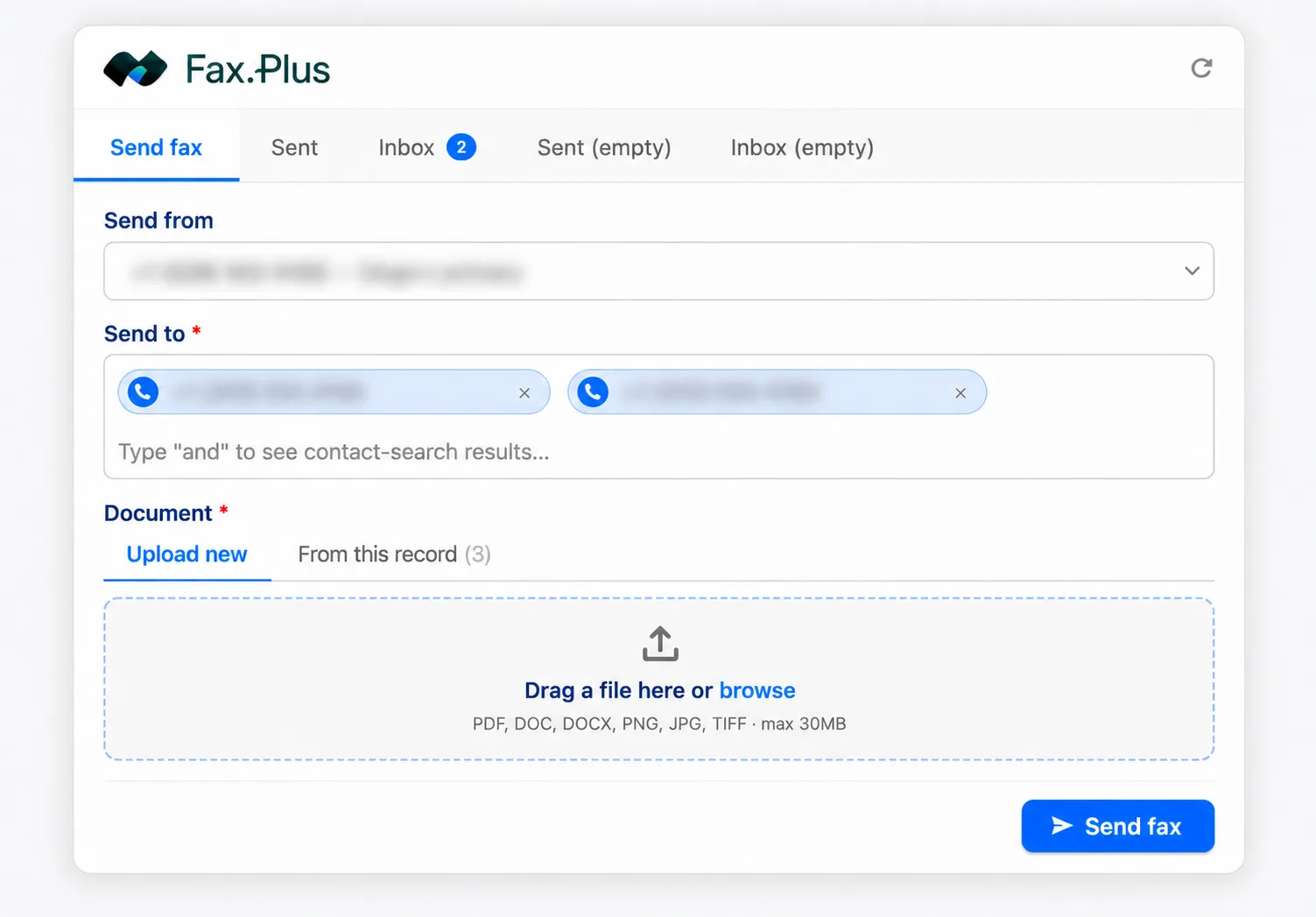
Fax a contract from any record

  • Recipient number auto-filled from the record
  • Upload a file or pick from the record's documents
  • Watch live delivery status without leaving Salesforce
  • Works from Lead, Contact, Account, Opportunity, or custom objects

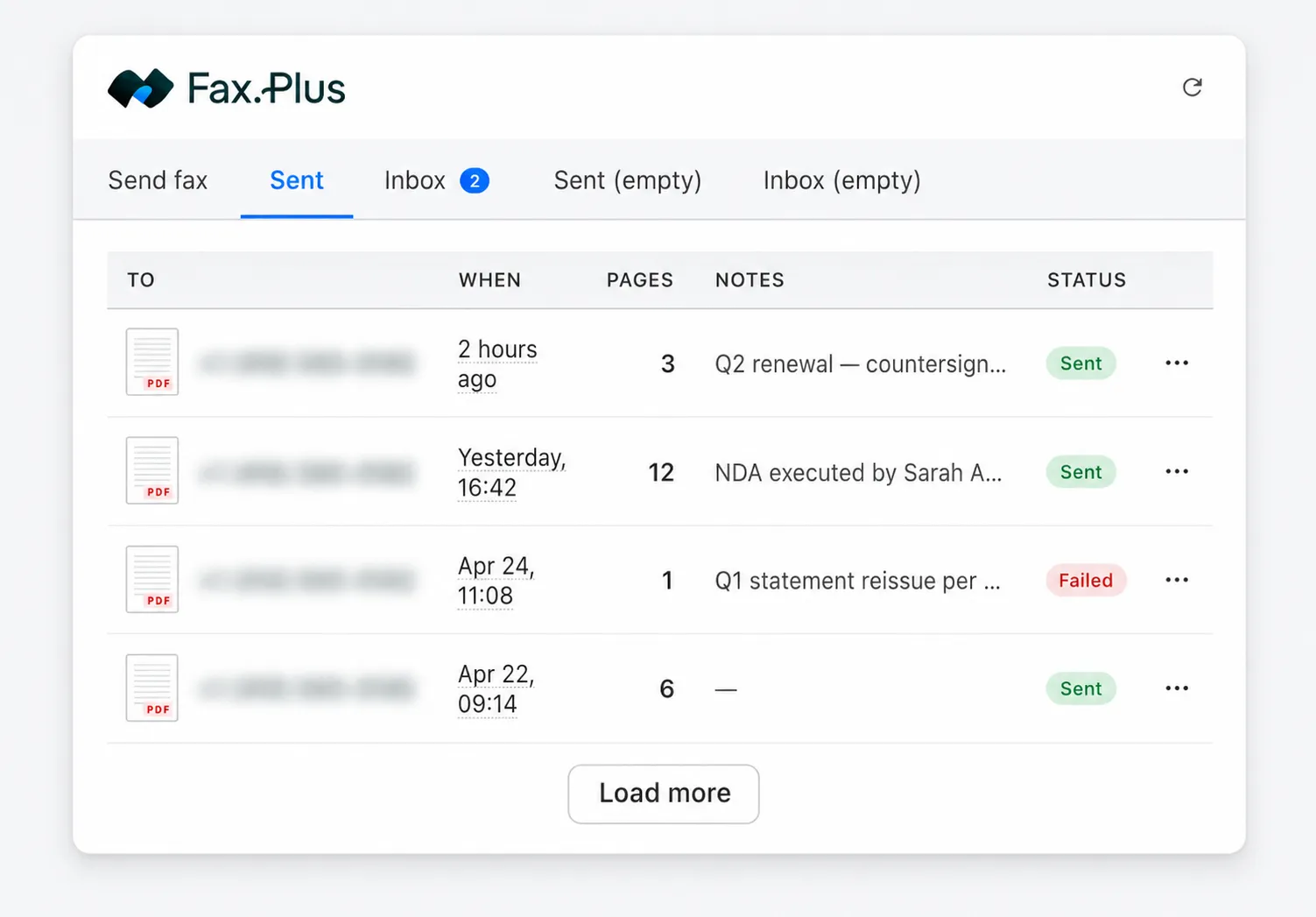
Every fax on the record

  • Sent and received faxes surface in tabs on the record
  • To / When / Pages / Notes at a glance
  • Live status pills: Sending, Sent, Failed
  • The fax trail sits next to the deal, not in a separate system
fax received in salesforce

Prototype

Secure by default, HIPAA-ready on Enterprise

Protect icon

Compliant by default

SOC 2, ISO 27001, and GDPR compliance is built into every Fax.Plus plan, from day one.
a blue icon of two servers on a white background

Kept out of Salesforce

Fax content goes straight to Fax.Plus, shown on the record, never stored in Salesforce.
Keep Your Current Fax Numbers

HIPAA-ready on Enterprise

A signed BAA on Enterprise covers your healthcare and PHI faxing workflows end to end.

Set up Fax.Plus in Salesforce in 4 steps

1
Install Fax.Plus from the Salesforce AppExchange (admin).
2
Connect your Fax.Plus account.
3
If you're on an eligible Fax.Plus tier, you'll be able to add the Fax.Plus component to your record page layouts.
4
Send a test fax from a record to confirm it works.

FAQ

Can you send a fax from Salesforce?

arrow navbar

Yes. With the Fax.Plus app from the Salesforce AppExchange, you can send and receive faxes from any Lead, Contact, Account, Opportunity, or custom object, without leaving Salesforce.

How do I send a fax from a Salesforce record?

arrow navbar

Open the Fax.Plus component on the record. The recipient number is pre-filled from the record. Upload a document or pick one from the record, then send and watch the live delivery status.

Which Fax.Plus plan includes the Salesforce integration?

arrow navbar

The Salesforce integration is included with Fax.Plus Enterprise, at no separate integration fee.

Is the Salesforce fax integration HIPAA compliant?

arrow navbar

HIPAA compliance with a signed Business Associate Agreement (BAA) is available on Fax.Plus Enterprise. Enterprise is the path for healthcare and PHI workflows.

Does the integration work on Salesforce Mobile?

arrow navbar

The first version supports Salesforce Lightning and Classic on desktop. Salesforce Mobile is not supported in v1.

Are faxes stored in Salesforce?

arrow navbar

No. Fax content goes directly to Fax.Plus and is displayed on the record through the component. It is not stored inside Salesforce.

Can I see received faxes on a record?

arrow navbar

Yes. Sent and received faxes appear in tabs on the record, with live status (Sending, Sent, Failed) and details like recipient, time, and page count.

How is Fax.Plus different from Concord Cloud Fax or eFax for Salesforce?

arrow navbar

Fax.Plus is included from the Enterprise plan with no per-page metering and no second vendor account, and it runs on standard Sales Cloud without a Health Cloud license. Concord meters per page on a separate account; eFax Connector requires Health Cloud and per-user tiers.

Does it support multiple Salesforce orgs?

arrow navbar

The first version connects one Fax.Plus organization to one Salesforce org.

Explore more ways to fax

Fax from the tools your team already uses, connect fax to your systems, and keep every document secure and compliant.

Start faxing now.

Create an account to save time and money by sending free faxes from a computer or mobile to anywhere in the world.

Partner with us!

Join our affiliate program and deliver exceptional online faxing solutions to your audience.
Become a Partner
