


Nextiva vFAX Review 2026: Features, Pricing, and Real-World Performance
We reviewed Nextiva vFAX: real pricing, the combined page pool, a bundle-gated HIPAA tier, a six-month retention limit, and the broader Nextiva complaint pattern around renewals and billing.


- Nextiva vFAX is a low-cost email-to-fax service from Nextiva, a company that has otherwise moved on to a unified customer-experience platform; the fax product is maintained but lightly developed.
- Pricing is genuinely strong on paper: a combined send-and-receive page pool, $0.03 per overage page (the lowest in this series), and failed faxes that do not count against your allowance.
- The "HIPAA Compliant vFAX" tier on the fax page is not a standalone product. Nextiva does not sign a BAA for regular vFAX, and the HIPAA configuration disables the email-to-fax workflow that makes vFAX worth buying in the first place.
- The marketing promises you will "never lose a fax," but Nextiva's own user guide says faxes are purged from its servers after six months and cannot be restored.
- Best fit is light email-to-fax use within the US and Canada by a price-sensitive buyer who reads the renewal terms; anyone needing a mobile app, a straightforward HIPAA and BAA path, a public API, or international sending should compare alternatives first.
Is Nextiva vFAX Worth It in 2026?
If your faxing is occasional and lives in your inbox, Nextiva vFAX is one of the cheapest credible ways to do it. Plans start at $7.95 per month billed annually ($9.95 month-to-month) for 500 pages, and sending works by emailing a document to {number}@nextivafax.com. The page allowance is a single pool shared across sending and receiving, overage is only $0.03 per page, and failed faxes do not draw down your allowance at all. Those are real strengths, and they are the opposite of how some legacy competitors count pages.
The picture gets more complicated once you read past the pricing table. The fax page advertises a "HIPAA Compliant vFAX" tier, but Nextiva states plainly that standard vFAX is not HIPAA compliant and that it will not sign a Business Associate Agreement (BAA) for the standalone fax service. A BAA is generally required when a vendor handles protected health information on behalf of a covered healthcare organization. HIPAA faxing exists only as part of a Nextiva business phone package, and in that configuration the email-to-fax workflow is switched off. There is no dedicated mobile app, no publicly documented vFAX API, no international faxing, and a retention limit the marketing does not surface: Nextiva's own quick-start guide says faxes are purged after six months. A recurring theme in Nextiva's broader public complaint record is auto-renewing contracts and post-cancellation billing, although much of that feedback covers the wider Nextiva platform rather than standalone vFAX.
About Nextiva vFAX
Nextiva is a Scottsdale, Arizona communications company that started in business VoIP (voice over internet protocol, or phone service delivered over the internet) and has spent the last few years repositioning itself as a unified customer-experience platform. Its current marketing is built around the NEXT platform, an AI assistant called XBert, and a contact-center suite; the January 2024 acquisition of Thrio pushed that pivot further. Online fax sits well outside that story now. Nextiva vFAX is a maintained legacy product running on the company's NextOS infrastructure, still sold and supported, but its limited place in Nextiva's current marketing suggests it is no longer a major product-development focus.
The seams of that history are easy to spot. The fax portal lives at fax.nextiva.com, while the main nextiva.com login and a separate portal.nextivafax.com only get you to billing, a split that has confused reviewers for years and is the same kind of leftover plumbing we flagged at MyFax (the still-live MyFaxCentral portal) and Dropbox Fax (lingering HelloFax branding). The separate nextivafax.com domain also reflects the product's older, standalone infrastructure.
The product surface is intentionally narrow: a web portal, email-to-fax, and an optional hardware Fax Bridge (a small adapter, similar to the analog telephone adapter used in VoIP, that lets a traditional fax machine ride Nextiva's service). Fax numbers are available as local numbers, with toll-free available when you port an existing one in. There is no desktop app, no mobile app, no published developer API, and no international faxing. For programmable faxing or healthcare automation, Nextiva steers you toward its phone platform, not vFAX.
How We Reviewed Nextiva vFAX
We reviewed Nextiva vFAX using three evidence layers:
- Hands-on product testing. We created a Nextiva vFAX account, tested the fax.nextiva.com portal directly, and worked through its core sending workflows. We sent a fax through the web portal and also tested email-to-fax, alongside sign-up, sign-in, navigation, and the dashboard. Screenshots from the account were used to evaluate the interface and workflow.
- Billing and account-control review. We read Nextiva's published vFAX terms, support documentation, and Acceptable Use Policy, and mapped the cancellation and renewal path against the public complaint record.
- Business-readiness review. We checked Nextiva's public materials for security and compliance claims, data residency and retention information, API and developer resources, healthcare-readiness details, and enterprise automation support.
We then scored Nextiva vFAX across five areas: pricing, security and compliance, usability, customer service and account control, and data residency and retention. We cover enterprise, API, and healthcare integration narratively rather than as a scored category, since that programmable layer is outside what vFAX is built to do.
1. Pricing | Score 4/5
Nextiva vFAX has the most genuinely buyer-friendly page-counting in this series, and it is worth being clear about why before the catches.
The Plan Lineup
- Essential: $7.95 per month billed annually, or $9.95 month-to-month, for 500 pages.
- Professional: $13.95 per month billed annually for 1,000 pages.
- HIPAA Compliant vFAX: custom pricing behind a sales contact (see Section 2 for what this actually is).
Annual billing carries the headline prices above and runs on a 12-month commitment. For Essential, choosing month-to-month billing costs roughly 25 percent more. Overage, the per-page rate once your monthly pool runs out, is $0.03 per page on every plan, the lowest in this series.
How Pages Are Counted
This is where Nextiva does better than most of the field, and it deserves credit.
A Combined Send-and-Receive Pool
Your monthly page count is a single pool used for both outbound and inbound faxing, rather than a send allowance with a separate, smaller receive allowance bolted on. There is no separate inbound cap to track. That is a cleaner model than the one we documented at MyFax, where received pages, including spam, draw down a separate inbound allowance.
Failed Faxes Do Not Count
Nextiva attempts a fax up to three times before it declares a failure, and a failed transmission does not count against your pool. This is the opposite of the duration-based, bill-on-interruption counting we flagged at MyFax and eFax, where a slow or even an incomplete send can be billed as multiple pages. With Nextiva, you pay for pages that go through.
Is There a Free Option?
No. The vFAX pricing page lists paid plans only, each going straight to a Buy Now, and the signup flow is a direct checkout that asks for payment rather than a trial enrollment. Some Nextiva page metadata still references a free trial, but it is generic boilerplate that does not appear in the actual vFAX pricing or checkout, so treat vFAX as a paid-from-day-one subscription with a card required at signup. The plan auto-renews; see Section 4 before you enter a card.
How Nextiva vFAX Pricing Compares
| Service | Entry Price | Pages/month | Free Option | Receiving at Entry |
|---|---|---|---|---|
| Nextiva vFAX Essential | $7.95/mo annual ($9.95 monthly) | 500 (combined pool) | No (paid only) | Yes (shared pool) |
| Fax.Plus Basic | $6.99/mo | 200 | Yes (10 free pages, one-time) | Yes |
| eFax Personal | $18.99/mo | 200 (US & Canada) | No | Yes |
| iFax Basic | $12.49/mo | 200 | No (trial only) | No (send-only) |
| Dropbox Fax Professional | $15/mo | 50 | Yes (5 pages, one-time), $0.99 pay-as-you-go | Yes |
| MyFax Home Office | $12/mo ($8.25 annual) | 100 | Trial, card required | Yes (separate allowance) |
On raw value, Nextiva vFAX is one of the better deals here: 500 combined pages for $7.95 on annual billing works out to roughly $0.016 per page before overage, and the $0.03 overage and no-charge-for-failures policy keep surprises down. Fax.Plus Basic still undercuts it on entry price with 10 free pages to test the service and no annual lock-in, and Nextiva's monthly premium and 12-month commitment are the soft spots. What keeps the pricing score at 4/5 rather than higher is the annual commitment, the monthly markup, and the opaque, sales-gated HIPAA tier sitting where a normal plan would be. The page-counting itself is the strongest in the series.
2. Security and Compliance | Score 3.5/5
Nextiva markets vFAX as secure, and the underlying platform carries real credentials. The gaps are in what is published for the fax product specifically, and in a HIPAA story that the fax page tells more simply than the truth.
Is Nextiva vFAX HIPAA Compliant?
Short answer: the standard product is not, and the "HIPAA Compliant vFAX" tier on the fax page is not what most buyers will assume. Two terms first, because they decide everything here. HIPAA is the US law on patient health information, and a Business Associate Agreement (BAA) is generally required when a vendor handles protected health information on behalf of a covered healthcare organization.
What the "HIPAA Compliant vFAX" Tier Really Is
Here is what the fax page does not spell out. Nextiva does not sign a BAA for standalone vFAX, and it states directly that standard vFAX is not HIPAA compliant. HIPAA-capable faxing exists only when vFAX is bought as part of a Nextiva HIPAA business phone package, where Nextiva executes a BAA covering the bundled services. That appears to be the offering behind the "Contact us" button.
What HIPAA Mode Disables
The catch is what HIPAA mode costs you in function. Nextiva's documentation says standard vFAX can deliver incoming faxes as PDF email attachments and forward them by email. In the HIPAA-enabled configuration, that email delivery and forwarding workflow is disabled, along with sending faxes from email. In other words, the email-to-fax workflow that is the main reason to choose vFAX is switched off in the only configuration Nextiva positions for HIPAA-covered fax workflows. A buyer who reads "HIPAA Compliant vFAX" on the fax page and assumes it is the same product with a compliance badge is going to be surprised on both the packaging and the workflow.
What Healthcare Buyers Should Compare Instead
A healthcare practice should not treat standard vFAX as a HIPAA-ready workflow, because Nextiva does not provide a BAA for the standalone service. Healthcare buyers who want a clearly defined HIPAA and BAA path should compare services built for it: Fax.Plus Enterprise pairs HIPAA and a signed BAA with unlimited users, Documo includes a BAA on every plan, and eFax Business offers one at a higher per-user cost.
There is a pointed contrast on the exact workflow Nextiva sacrifices. Where vFAX has to switch email-to-fax off to handle PHI, Fax.Plus keeps it: HIPAA and PHIPA Enterprise accounts with a signed BAA (or, for PHIPA, a service provider agreement) can send email-to-fax over a dedicated, TLS-enforced address ({number}@tls.fax.plus), and a compliant account that emails the standard address is auto-redirected to the secure pipeline rather than blocked. The inbox workflow vFAX disables in compliance mode stays available.
The Evidence Gap
Beyond HIPAA, Nextiva's product-specific security disclosure for vFAX is partial. The company describes 256-bit SSL encryption, with web communication over HTTPS/TLS (the standard that encrypts data moving between your browser and the service). At the corporate level, Nextiva references SOC 2, ISO 27001, and data centers carrying SSAE 16 and PCI DSS, and a sitewide footer carries SOC 2 and HIPAA badges with a 99.999 percent uptime claim. One limitation is that the SOC 2 report is not publicly available and can be reviewed only under a non-disclosure agreement. Nextiva states that vFAX sits outside PCI DSS scope because the fax service does not process payment-card data.
What These Certifications Mean in Plain Language
These acronyms come up across compliance pages, so here is what each one actually tells you.
- SOC 2: an outside auditor checks, over a period of months, that a company really follows the security controls it claims, rather than just asserting them. A "Type II" report covers a window of time, not a single day.
- ISO 27001: an international standard for running an information-security program. When it is certified at the organization level, an external body has signed off on the company's whole security management system, not just one data center.
- PCI DSS: the payment-card industry's security rules for handling credit-card data. Nextiva states vFAX is outside this scope.
- SSAE 16: an older US auditing standard (now SSAE 18) focused on a service provider's controls, often cited for data centers. It is a financial-controls heritage standard, not a fax-security certification on its own.
The takeaway is the same one we applied to MyFax and Dropbox Fax: platform-level credentials that are not stated, or not openly auditable, for the product you are actually buying cannot complete a compliance evaluation on their own.
By contrast, Fax.Plus publishes its compliance stack directly: ISO 27001 at the organization level and SOC 2 Type II, both certified by EY CertifyPoint, AES-256 encryption at rest and TLS in transit, paired with a clearly defined HIPAA and BAA path on the Enterprise plan. The 3.5/5 reflects a legitimate service on competent infrastructure with named certifications, held back by limited vFAX-specific disclosure and a HIPAA path that is bundle-gated and feature-limited rather than the simple tier the fax page implies. That still places Nextiva a half-step above MyFax, which has no HIPAA path at all.
3. Usability | Score 3.5/5
Nextiva vFAX is a clean, modern fax client when you stay in the web portal, with the friction sitting around the edges: a split-login setup, a missing mobile app, and a five-step send flow.
Email-to-Fax: The Core Workflow
vFAX's strongest design decision is making email a primary interface. In our test, we sent a document by attaching it to an email addressed to {number}@nextivafax.com, with a leading 1 before the ten-digit fax number (so 800-555-1212 becomes 18005551212@nextivafax.com). For users who live in Outlook or Gmail, this takes the portal out of daily use. Two constraints to know: the sending email address must match the primary email on the vFAX account, and attachments are capped at 5 MB, which is on the small side for image-heavy documents. It is a solid implementation of email-to-fax, the workflow most of this category was built on.
The Web Portal
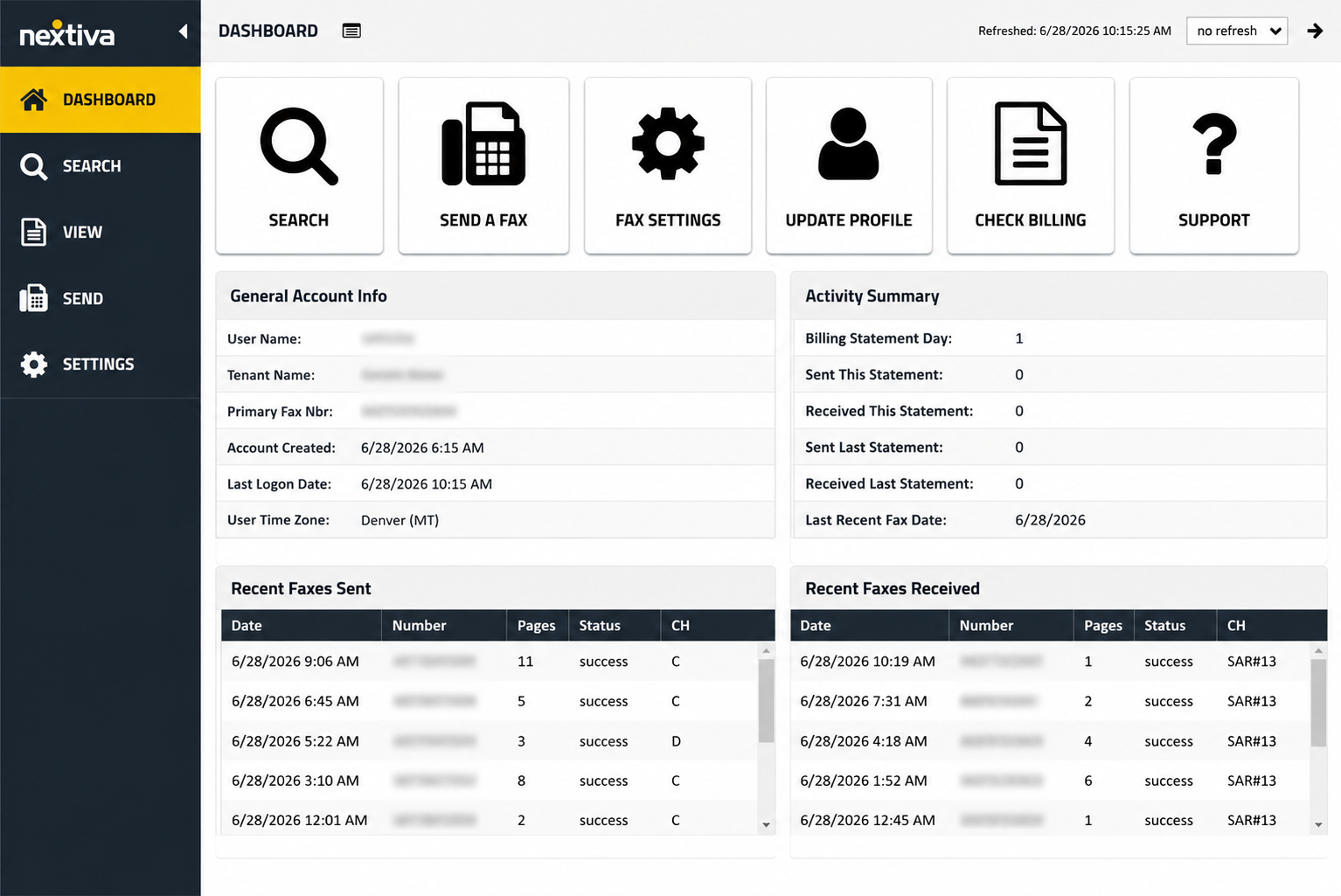
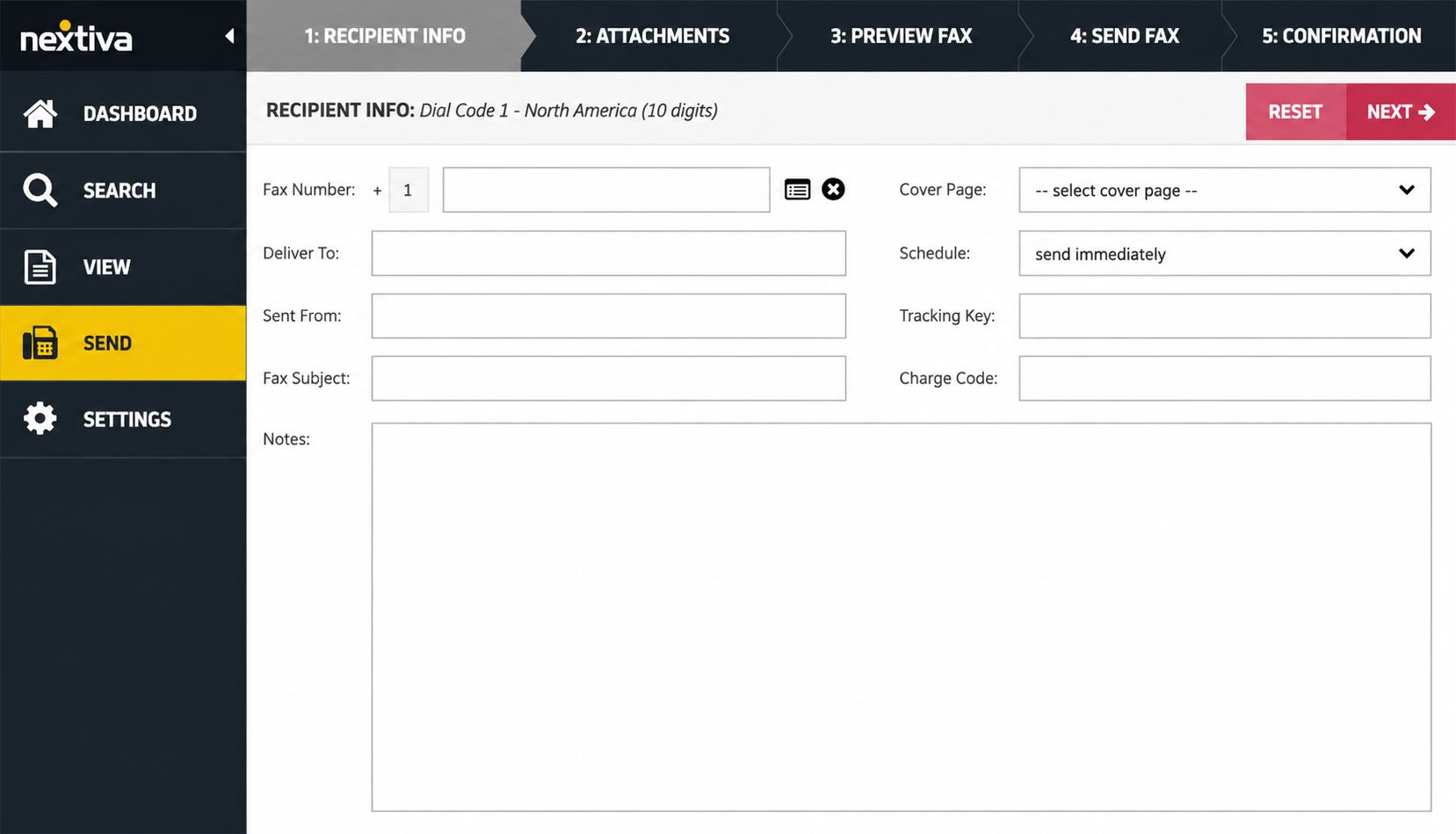
The portal lives at fax.nextiva.com. In our test, the post-login portal felt clean and reasonably well organized compared with many older fax interfaces. The login screen is the exception: a portal screenshot taken for this review shows a plain, dated page still on a 2023-era build (build 6131.0.2023.0201.01), so any modern feel starts only after sign-in. The standout friction is the send flow: in our test, composing a fax took five steps and split entering the recipient and adding the attachment across separate screens, which breaks the otherwise email-like feel. The other quirk is the split login. The fax portal is at fax.nextiva.com, while logging in through the main nextiva.com site or the separate billing portal only gets you to account and billing management, not your faxes. It is a small thing the first time and a recurring one after that.
Mobile
There is no dedicated Nextiva vFAX app for iOS or Android. The Nextiva mobile app you will find in the app stores is the company's phone and collaboration app, not the fax product. Mobile faxing with vFAX means using the web portal in a mobile browser or sending by email. Some third-party software directories list a vFAX mobile app, but that listing conflates it with the general Nextiva app. For a category where iFax and Fax.Plus also has iOS and Android apps, the absence of any fax app is a real gap for a mobile-first buyer.
Limits Worth Knowing
Two product limits shape who vFAX suits. It supports US and Canada faxing only, with no international sending at any tier, and a new fax line comes as a local number only, with toll-free available when you port an existing number in. Neither is a defect, but both narrow the fit.
How Nextiva vFAX Usability Compares
The picture is a convenient email-to-fax flow attached to a web portal that felt clean and organized once inside but that opens on a dated login page, with the friction in the structure rather than the styling: the split login, the five-step send, the 5 MB attachment cap, and the lack of any mobile app. The market context is the one we applied across this series: Dropbox Fax ships no mobile app yet still scores well on desk-based simplicity, Documo has no Android app, eFax draws a lower mark on its slower portal and mixed apps, iFax has iOS and Android apps, ComFax has good mobile apps but lacks admin depth, and MyFax rides a rebranded modern interface with friction around its login and a post-update iOS bug. Fax.Plus is the mobile-app standard in this series, with native apps on iOS and Android, desktop apps, web, and email-to-fax. Nextiva lands at 3.5/5: a good core experience on the web, level with eFax once you weigh the missing app and the clunky send flow against the otherwise clean portal, and a step behind the mobile-app leaders. The score reflects a portal that is clean inside but dated at the login, undercut by structural friction and no app at all.
4. Customer Service, Cancellation and Account Control | Score 3.5/5
This is the section to read before giving Nextiva a card number. The strongest recurring complaint pattern around Nextiva concerns contract renewal, cancellation, and post-cancellation billing, although much of that public feedback covers the wider Nextiva platform rather than standalone vFAX.
Support Channels
Nextiva publishes a phone support line (800-285-7995), a sales line (800-799-0600), a help center, and live chat. Nextiva advertises 24/7 support at the company level, although its public materials do not clearly confirm whether the same coverage applies specifically to standalone vFAX accounts. The vFAX documentation routes most fax-specific problems back through the portal and the support team, and for failed faxes Nextiva asks you to send at least two examples to support within 24 hours of the issue with the sending and receiving numbers and timestamps.
Contracts and Renewals: What to Check Before You Buy
The part worth your own due diligence before signing up is the contract and renewal terms. A vFAX annual plan is a 12-month commitment, so the practical questions are when it renews, how much notice a cancellation needs, and whether any early-termination terms apply. Before signing up, review Nextiva's current renewal and cancellation terms and check recent complaint records for recurring billing or contract issues. Whatever you find, the safe habits are the same: know your renewal date, get the cancellation terms in writing, and do not assume month-to-month flexibility on an annual plan.
How to Cancel Nextiva vFAX
Check the notice period in your current agreement and request written confirmation of the cancellation. Save your own proof of cancellation, because the absence of written confirmation can make a later billing dispute harder to resolve. Before you cancel, export your faxes: stored faxes are deleted when the account closes, and as covered in Section 5 they are purged on Nextiva's side after six months regardless.
One Account-Control Risk Specific to Faxing
Nextiva's Acceptable Use Policy (AUP) treats high-volume sending as a violation. Sending the same message to six or more recipients in sequence from one account counts as "fax broadcasting" or "blasting," and Nextiva asks users to keep to roughly one fax per minute or batches of five with confirmation between. A first offense gets the account disabled until you speak with support; repeat offenses can get the account canceled. It is not a billing trap, but it is a way an ordinary-seeming task (a small broadcast to a handful of recipients) can lock you out, so it belongs on the account-control ledger.
What Users Report
If you research Nextiva before buying, the split is the familiar one. The business-software directories, which collect solicited feedback from active users, skew warmer and praise call quality and the overall platform, and as of June 2026, Nextiva's company-wide Trustpilot score was around 4.6 out of 5 across thousands of reviews. Complaint-focused sources such as the BBB skew more heavily toward customers reporting contract, cancellation, and post-cancellation billing problems. What matters is not any single rating but the consistency, and on the way out the contract terms are the recurring story.
How Nextiva vFAX Account Control Compares
A clean post-login portal, real phone support, and a generally well-regarded support reputation keep this from being a bottom-tier score. The concerns sit around the contract: the 12-month annual commitment, a recurring auto-renewal pattern in the complaint record, the AUP rule that can disable an account for a modest broadcast, and the deletion of stored faxes on close. For contrast, Documo earned a 5/5 here with multi-channel support and a clean billing-menu cancellation, and Fax.Plus matches that no-maze posture while supporting number porting both in and out. The 3.5/5 reflects competent support paired with a contract structure associated with a long-running pattern of public complaints.
5. Data Residency and Retention | Score 3/5
Security is not only about encryption and certificates. For many organizations the bigger questions are where fax data is stored and how long it is kept, and on both, Nextiva publishes less than regulated and international buyers usually need, with one detail that contradicts the marketing.
Retention
Here is the finding that does not match the sales pitch. The fax page promises you will "never lose a fax" and that everything is managed in one place. Nextiva's own vFAX quick-start guide says the opposite about the long term: the portal search shows faxes from the past six months, and after six months all fax data is purged from Nextiva's servers and cannot be restored. So vFAX is not long-term archival storage. If you need a durable record, you have to export and store faxes yourself, and you should assume stored faxes also disappear when an account closes.
Data Residency
Data residency means where, geographically, your documents physically live, which decides whose laws protect them and whether you can meet localization rules. Nextiva runs its NextOS platform on North American data centers, and no region selection, EU residency option, or product-specific residency control is published for vFAX. For a US or Canada buyer that may be fine; for anyone with EU or other localization requirements, there is no option to choose.
How Nextiva vFAX Data Residency Compares
The transparent end of the market looks like user-selectable data residency across many regions. Fax.Plus lets account admins select from more than 20 regions, including several US locations alongside the EU, Canada, Australia, Japan, and Switzerland (data stays in the US by default for US customers), with live data and backups storable in separate regions. Even Dropbox Fax names AWS and documents its data-transfer mechanisms, and Documo publishes its subprocessor list and footprint. The 3/5 reflects a stable North American platform and a clear retention rule, balanced against the six-month purge that the marketing does not surface, no region selection, and no product-specific residency disclosure.
API, Automation, and Healthcare Integration
Nextiva vFAX is built around web and email-to-fax rather than software integration or workflow automation. We found no publicly documented vFAX API, webhook support, MCP server, AI document-processing tools, or healthcare-system integrations. The optional Fax Bridge connects an analog fax machine to the service, but it does not connect faxing to other software.
These capabilities will not matter to every buyer, especially someone who only needs occasional email-to-fax. They do, however, show what a more modern fax service can add beyond sending and receiving documents. Fax.Plus offers a public fax API and webhooks for connecting faxing to other systems, MCP support for AI-assisted workflows, AI transcription and data extraction, and healthcare-focused automation and integrations.
For a light user who only wants an inexpensive inbox-based fax service, Nextiva's narrower approach may be enough. Teams that need faxing to connect with applications, AI tools, or operational workflows will need to look beyond vFAX. The HIPAA compliance question itself is covered in Section 2.
Alternatives to Nextiva vFAX
Fax.Plus: Best overall Nextiva vFAX alternative
Fax.Plus is a modern cloud fax service starting at $6.99 per month, with 10 free pages to test the service and no annual commitment required. It offers an organization-level compliance stack with a named auditor (ISO 27001 and SOC 2 certified by EY CertifyPoint), HIPAA and a signed BAA on the Enterprise plan with unlimited users, data residency across 20-plus regions (US data stays in the US by default for US customers), number porting in and out, native apps on iOS, Android, macOS, and Windows, a public API, MCP support for AI-assisted workflows, and AI-powered document transcription and data extraction. It covers the main areas vFAX leaves open: native mobile apps, international faxing, a clearly defined Enterprise BAA path, developer access, and AI-powered document handling.
Best for: Users who want modern apps, broad compliance, international reach, and a fax record that does not vanish after six months.
SRFax: Lower-cost path to a self-serve healthcare BAA
A dedicated fax service with healthcare-oriented plans and a self-serve BAA at small-practice prices, offered on month-to-month terms without a long-term commitment. Where Nextiva's headline pricing requires a 12-month commitment and its HIPAA option is bundled into a feature-limited business-phone package, SRFax offers a BAA directly on month-to-month terms. The trade-off: no mobile app, an interface that shows its age, and it does not publish the same independently audited certification stack as Fax.Plus.
Best for: Small practices that want a direct, self-serve BAA on month-to-month terms and can accept the lack of native mobile apps and a comparable published certification stack.
FaxZero: Best for true one-off faxing
Free, no-account faxing: up to five three-page faxes per day with a branded cover page, or a flat fee for larger sends. No inbound number, no storage, no subscription to manage, and therefore no contract to renew or cancel.
Best for: The genuinely occasional faxer who does not need an account, a number, or a subscription.
FAQs
Where do I log in to Nextiva vFAX?

The fax portal is at fax.nextiva.com. The main Nextiva login and portal.nextivafax.com are used primarily for account and billing management rather than viewing or sending faxes.
How much does Nextiva vFAX cost?
Essential is $7.95 per month on annual billing ($9.95 month-to-month) for 500 pages, Professional is $13.95 per month annually for 1,000 pages, with a custom HIPAA tier behind a sales contact. The page count is a combined pool for sending and receiving, overage is $0.03 per page, and failed faxes do not count. Annual plans carry a 12-month commitment. For a lower-cost path with no lock-in, Fax.Plus starts at $6.99 per month for 200 pages with 10 free pages to test the service.
Is Nextiva vFAX HIPAA compliant?
Standard Nextiva vFAX is not HIPAA compliant, and Nextiva does not sign a BAA for the standalone fax service. A HIPAA-capable vFAX exists only when it is bought as part of a Nextiva HIPAA business phone package, and Nextiva's documentation indicates that in that mode you cannot send faxes from email, receive them as email attachments, or forward them by email. By contrast, Fax.Plus keeps HIPAA and PHIPA email-to-fax available on its Enterprise plan, sent over a dedicated TLS-enforced address. Healthcare teams that want a clearly defined BAA path should evaluate Fax.Plus Enterprise, Documo, which includes a BAA on every plan, or eFax Business.
Is Nextiva vFAX legit and safe?
Nextiva is a legitimate, established US communications company with more than 100,000 business customers, so the business itself is real. Safe is the more careful question: vFAX uses SSL and HTTPS/TLS encryption and runs on a platform with SOC 2 and ISO 27001 credentials, but its SOC 2 report is available only under NDA, product-specific security disclosure is limited, and standard vFAX does not include a BAA. It should therefore not be treated as a HIPAA-ready service for protected health information. For general, non-regulated faxing within the US and Canada, it is a functioning, low-cost service. For regulated or healthcare workflows, choose a provider that publishes a product-specific security stack and offers a BAA, such as Fax.Plus.
Does Nextiva vFAX have a mobile app?
No. There is no dedicated vFAX app for iOS or Android. Mobile faxing is done through the web portal in a mobile browser or by email-to-fax. The Nextiva app in the app stores is the company's phone and collaboration app, not the fax product.
Can Nextiva vFAX send international faxes?
No. Nextiva vFAX supports faxing within the US and Canada only, with no international sending at any tier.
How long does Nextiva vFAX keep my faxes?
The portal lets you search faxes from the past six months. After six months, Nextiva purges fax data from its servers and it cannot be restored, so vFAX is not long-term storage. Export anything you need to keep, and assume stored faxes are also lost when an account closes.
How do you cancel Nextiva vFAX?
Check the notice period in your current agreement and keep written proof of the cancellation, since billing that continues after a cancellation request is a recurring theme in Nextiva's broader public complaint record. Annual plans are a 12-month commitment, so confirm your renewal date before you assume you can stop at any time. Export your faxes first, because stored faxes are deleted when the account closes.
Does Nextiva vFAX have an API?
We found no publicly documented vFAX API, developer documentation, webhook support, or MCP server. The only hardware integration we found is the optional Fax Bridge for analog machines. Teams that need programmatic faxing or AI-assisted workflows should compare providers with a published fax API and MCP server.
Is Nextiva vFAX worth it in 2026?
For light email-to-fax use within the US and Canada by a price-sensitive buyer who reads the renewal terms, the combined page pool, low overage, and no-charge-for-failures policy make vFAX one of the better-value options in the category. For anyone needing a mobile app, a straightforward HIPAA and BAA path, international sending, developer access, or long-term storage, the gaps point elsewhere. Overall, Nextiva vFAX lands at 3.5/5: strong on pricing, solid on the web, and held back by the bundled-and-limited HIPAA path, the six-month retention purge, the missing app and lack of a published API, and a contract pattern worth approaching with eyes open. Choose Nextiva vFAX if you want inexpensive email-to-fax within the US and Canada and are comfortable with its contract and retention limits. For most other buyers, especially those needing mobile apps, compliance, international coverage, or automation, we would choose Fax.Plus.


Featured Articles
See All






Confédération Suisse
Confederazione Svizzera
Confederaziun Svizra
Swiss Confederation
Innosuisse - Swiss Innovation Agency


