ComFax Review 2026: Features, Pricing, and Real-World Performance
We tested ComFax: mobile fax quality, subscription-only pricing, HIPAA and BAA gaps, cancellation terms, and enterprise limitations. Scored across seven categories.


- Its biggest strength is usability: the mobile workflow is fast, clean, and easy for occasional faxing.
- The app includes a built-in scanner, in-app signing, cloud imports, unlimited pages, and a free local fax number.
- Fax quality is good for everyday documents, but ComFax uses one fixed quality setting with no HD or Fine mode.
- Pricing is subscription-only, with no pay-per-fax option for one-time users.
- Refund flexibility is limited: once you send a fax, ComFax generally treats the service as rendered and does not grant refunds.
- HIPAA is marketed across plans, but healthcare buyers still need to request and verify a signed BAA before sending PHI.
- ComFax has no public API, webhooks, SDKs, MCP server, or healthcare automation workflow.
- It is best for occasional mobile faxing, but harder to recommend for teams, developers, regulated workflows.
Is ComFax Worth It in 2026?
ComFax is genuinely worth it for one buyer: the person who needs to fax from a phone, occasionally, and wants the whole job done in a clean mobile app. The built-in scanner, cloud imports, and signature tool make a one-off fax fast, and the iOS app's reputation reflects that. Reviewers consistently describe sending a document in under five minutes from a couch or an airport gate.
It is much weaker for businesses, teams, and developers. There is no Windows app, no public API, data lives on US servers with no residency choice, and the subscription-only pricing turns a single fax into a recurring weekly or monthly charge. App-store-gated cancellation also makes leaving harder than joining.
About ComFax
The app is operated by Municorn Limited, a Cyprus-based company. Municorn publishes a range of consumer subscription apps on the same developer account, including a scanner, a calorie counter, a step counter, and two eSIM and second-phone-number products, so you may encounter Municorn, ComFax, FAX App, or Everyfax in different app-store, billing, or web contexts. Before subscribing, confirm which product and storefront you are using.
The mobile app launched in 2020, by Municorn's own account, and built a large user base on App Store visibility: a 4.78/5 lifetime average across 367,000+ ratings at the time of writing. Municorn also markets "18M+ downloads in the United States." Treat the download figure as a company claim rather than an audited number.
A note on Municorn's own reviews. comfax.com doubles as Municorn's own content site, running a network of "best fax service" roundups and competitor reviews on its own domain. Those pages rank Municorn's own app at or near the top and are authored by Municorn staff writers, so treat them as brand-owned content rather than independent editorial reviews, and research the brand beyond its own domain.
Is ComFax the Same as Municorn Fax and FAX App?
Yes. ComFax, "Municorn Fax," "FAX from iPhone: Send Doc App" on iOS, and "FAX App" on Google Play all refer to the same Municorn Limited product family. Municorn also operates Everyfax as a separate browser-based web and email-to-fax service, with its own different pricing. Throughout this review we use "ComFax" for the mobile-first fax app sold through comfax.com and the app stores.
How We Reviewed ComFax
We reviewed ComFax using four evidence layers:
- Hands-on fax testing. We sent two fixed, real-world-style test documents through ComFax rather than blank PDFs or simple sample pages, transmitting each one several times across separate sessions to average send time, judge quality consistently, and surface any intermittent delivery failures rather than relying on a single send. We compared the output against Fax.Plus Normal and HD reference transmissions on the same source files. The first document is a government and legal document based on IRS Form 2553, with handwritten signatures, official stamps, tabular data, and mixed font sizes. The second is a healthcare lab results form with a metabolic panel, flagged values, a handwritten physician note, and a PHI stamp. No real personal, patient, tax, or company data was used in the fax-quality tests.
- Product and pricing review. We checked ComFax's current app-store listings, website, pricing, support, refund, terms, and privacy materials, and verified the plan and billing details directly.
- User feedback review. We reviewed recent public app-store and review-platform feedback for recurring patterns around usability, pricing, cancellation, delivery confidence, and support.
- Business-readiness review. We checked public materials for API access, developer documentation, BAA availability, data residency, retention controls, and organization-level security certifications.
We then scored ComFax across seven areas: fax quality, pricing, security and compliance, usability, customer service and account control, data residency and retention, and enterprise, API, and healthcare automation.
1. Fax Quality | Score 4/5
ComFax sends a clean fax for everyday documents, and its mobile scanner is the part users praise most. One reliability pattern to know before trusting it with court or medical deadlines: a recurring recent App Store complaint describes faxes marked delivered that recipients never received, and enough similar reports exist across the January-May 2026 versions to rule out isolated incidents.
Government and Legal Document Fax Test
The first test used a simulated IRS Form 2553, a US government tax election form. Documents like this are common in legal, financial, and real estate workflows: signed agreements, tax filings, and multi-party authorization forms where every detail needs to arrive intact.
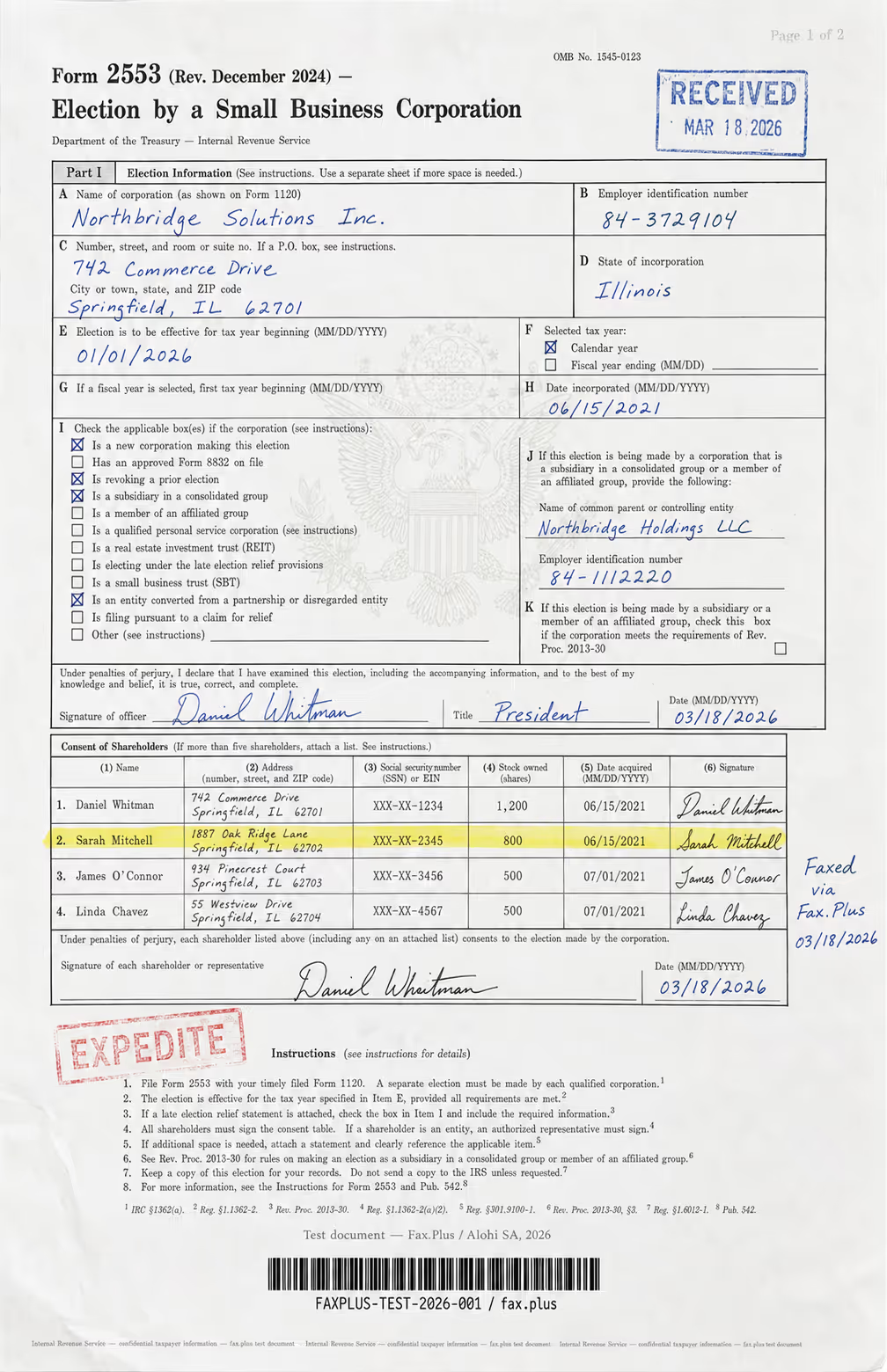
What the test document included:
- Handwritten signatures and a cursive-style officer name
- An official-style RECEIVED stamp with date
- An EXPEDITE rubber stamp with faded ink edges
- A US government eagle seal watermark in the center
- A highlighted shareholder table row
- Mixed font sizes across headers, body text, and fine print
- Dense tabular data across multiple columns
- A microprint line at the bottom for anti-fraud authentication
ComFax (default quality)
ComFax does not expose a user-selectable HD or Fine resolution toggle in the app, so this test reflects its standard output, and standard is the only output it offers.
On a document this dense, the details that decide a fax are the signature contours, the shareholder table grid lines, the eagle watermark behind the form, and the microprint at the foot of the page. ComFax renders the printed text and handwritten signatures cleanly, and on everyday text its output is consistent with other mid-range mobile fax services. Where it gives ground is on the finest detail. The Treasury eagle watermark behind boxes I and J does not survive the transmission, the anti-fraud microprint line along the bottom edge blurs into an unreadable smear, and the Code-128 barcode comes through with thickened bars and partly filled-in gaps, the kind of degradation that makes a barcode harder for a scanner to read back.
Reference Baseline: Fax.Plus Normal and HD
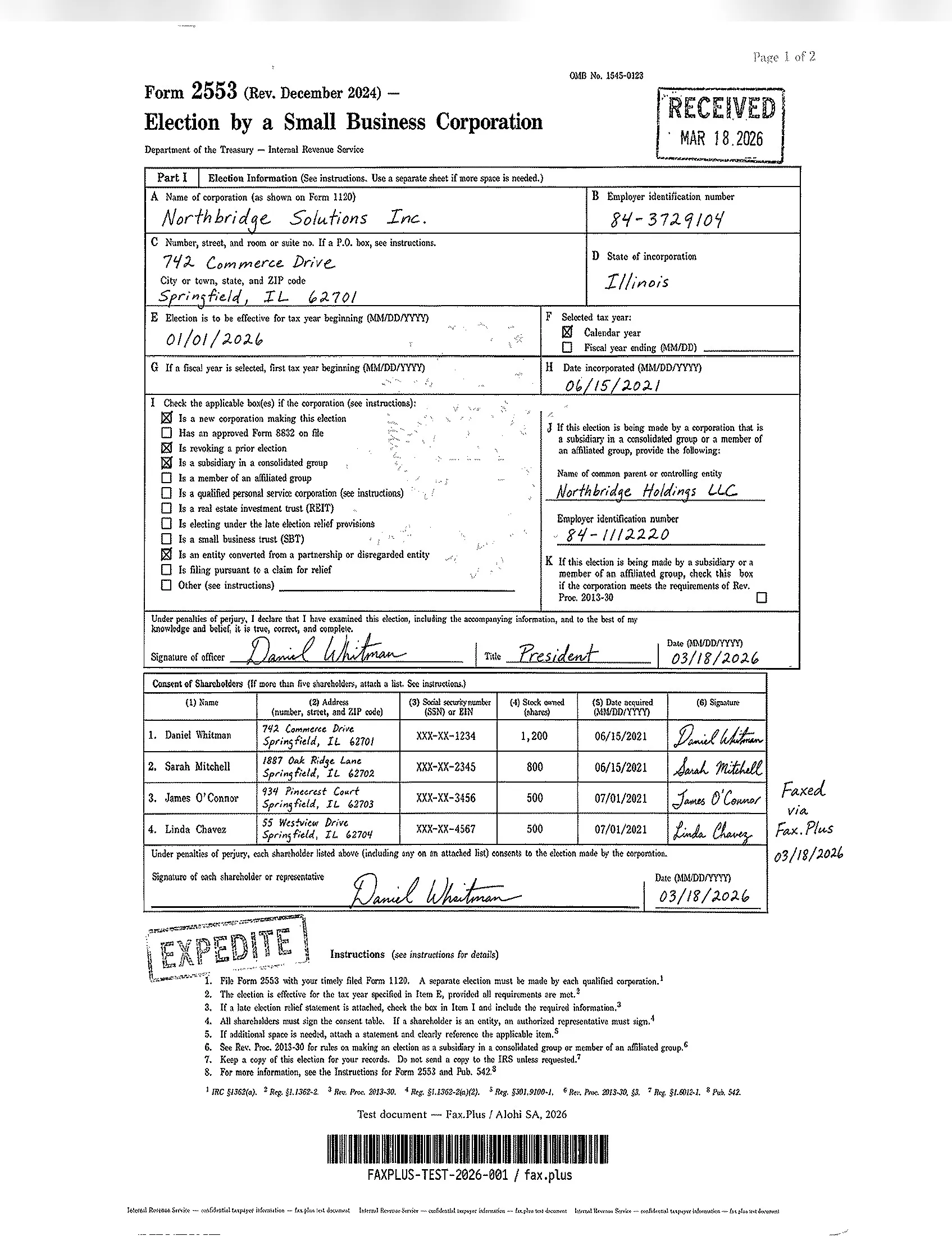
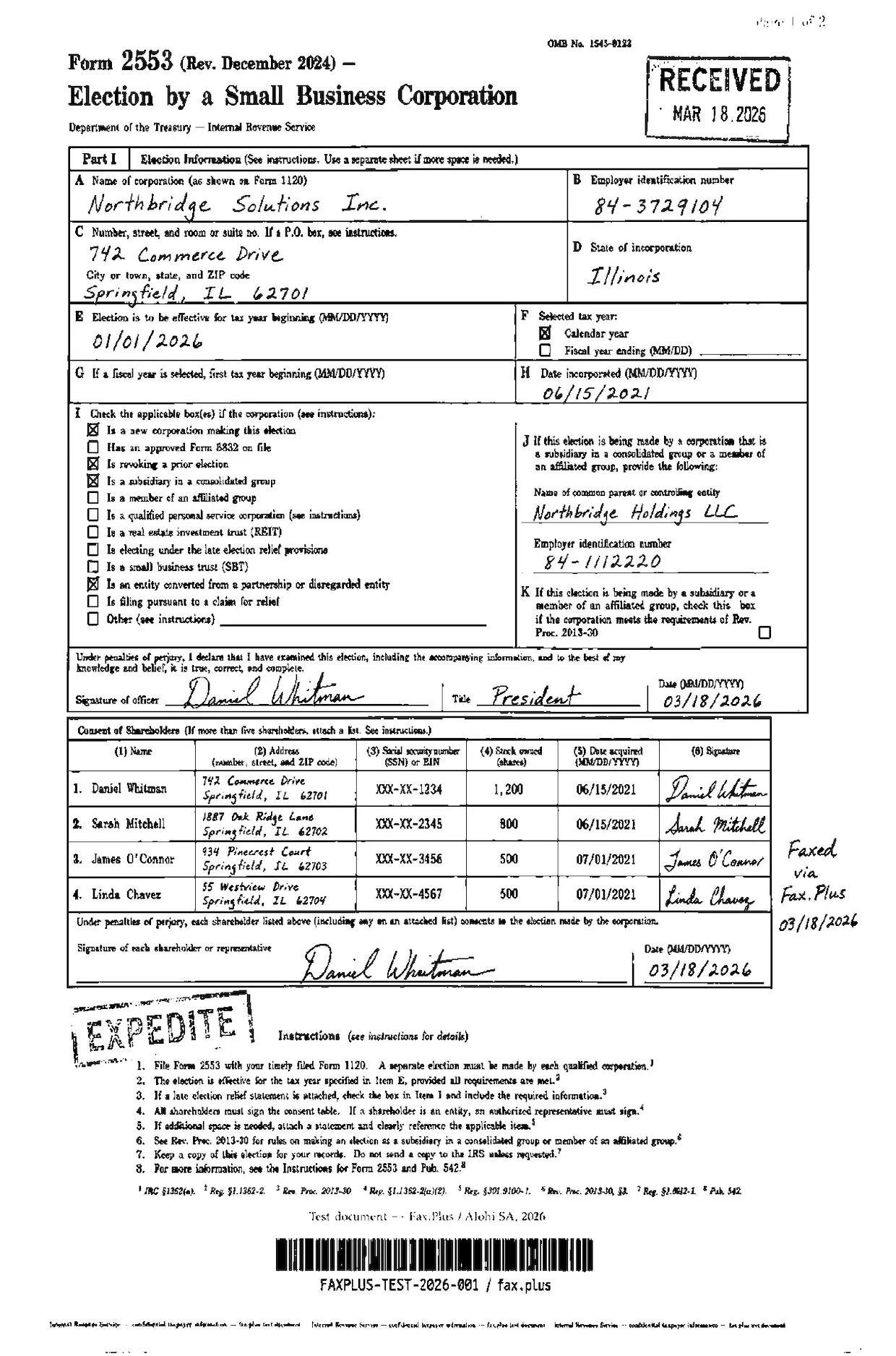
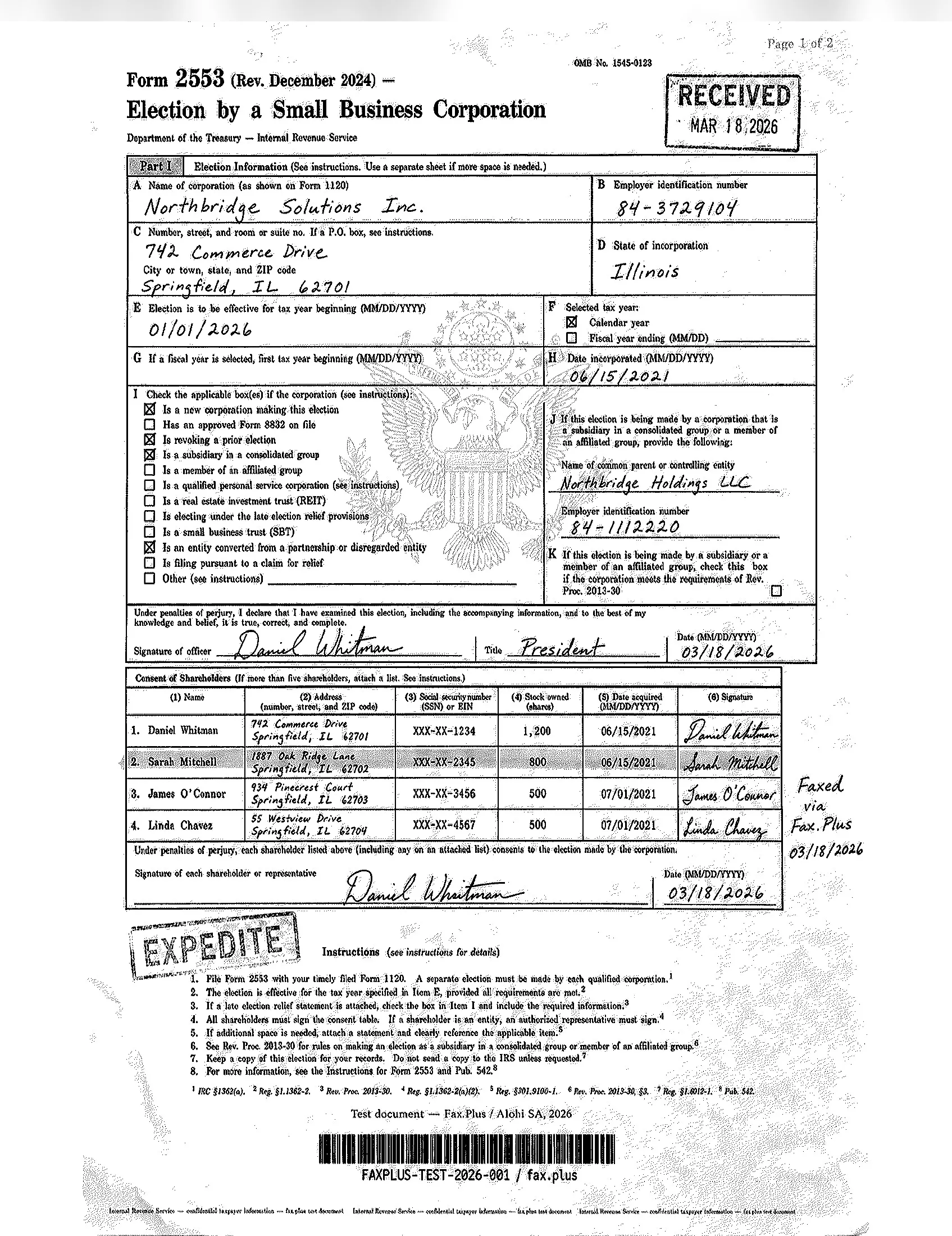
The screenshots below show the same IRS Form 2553 transmitted via Fax.Plus at Normal and HD quality, included as a reference baseline so the quality difference on identical source material is visible rather than described. Fax.Plus is not under review in this section.
 Standard
 Standard
The contrast is clearest on the eagle watermark and the bottom microprint. Fax.Plus Normal keeps the barcode crisp with clean separation between bars, and the footer microprint stays legible, though the faint eagle watermark thins out much as it does on ComFax. Fax.Plus HD goes further: the full Treasury eagle, its feathers, the stars, and the shield stripes all come through, and the microprint line remains readable. That HD headroom is exactly what ComFax has no setting to match, because it transmits at one fixed quality.
 HD
Standard
HD
Standard
Healthcare Document Test
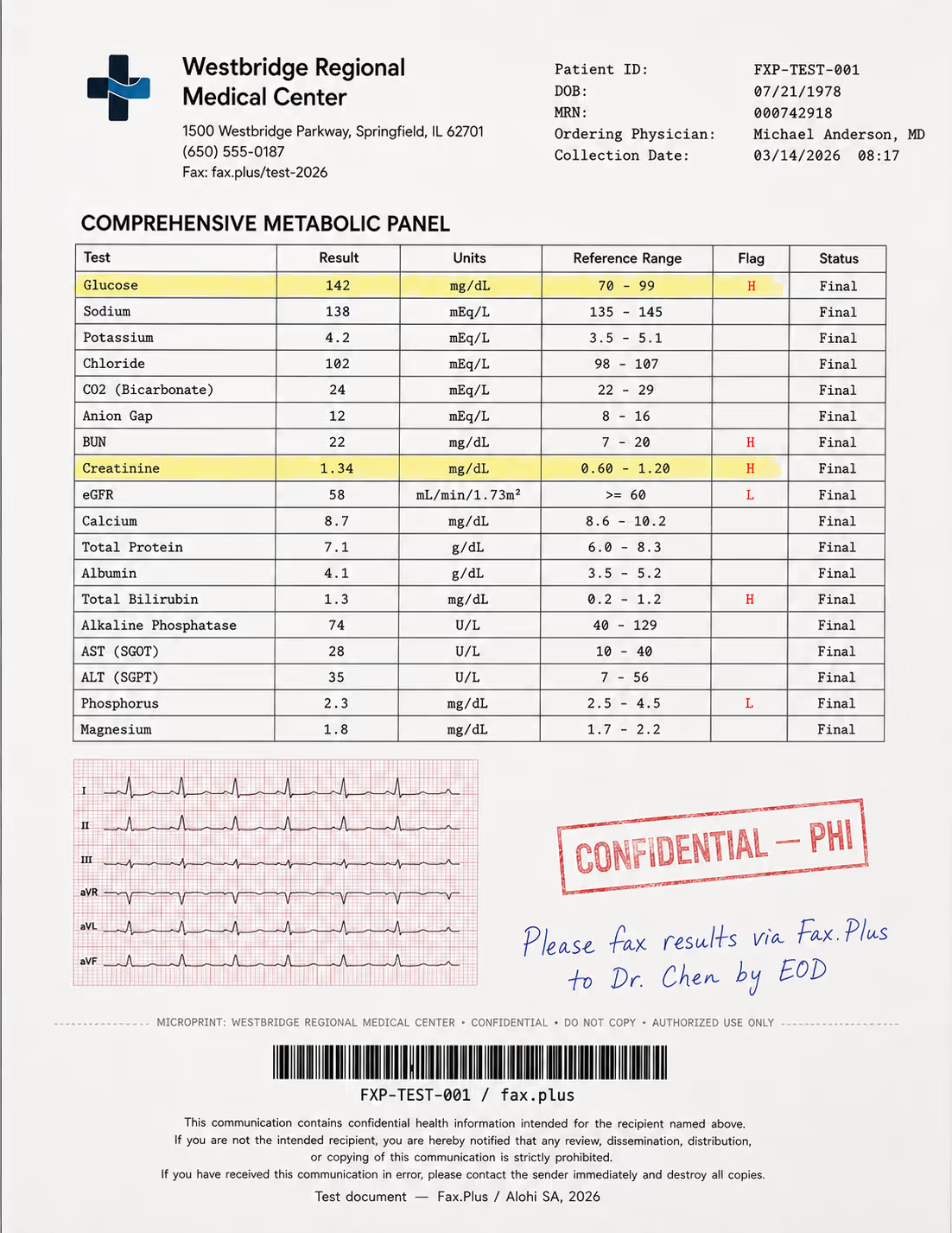
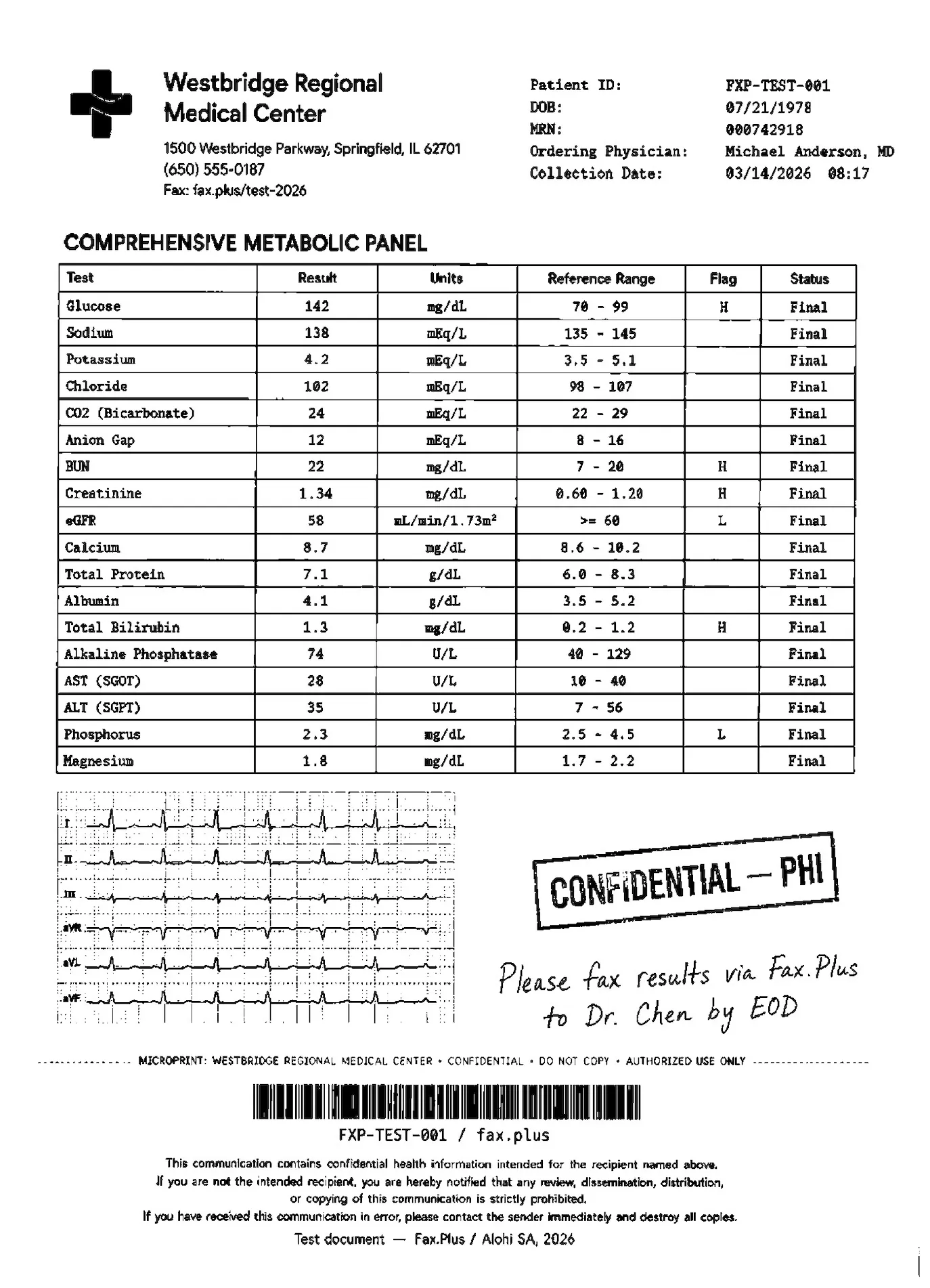
The second test used a simulated lab results form from a fictional medical center. No real patient data was used. The embedded EKG strip on red grid paper was included deliberately to push rendering limits; the lab data, flag values, handwritten note, and PHI stamp reflect what appears in real healthcare fax workflows.
What the test document included:
- A comprehensive metabolic panel with highlighted flag values (H/L indicators)
- An EKG strip on red grid paper included as a quality stress test
- A handwritten physician instruction in blue ink
- A CONFIDENTIAL PHI rubber stamp with faded edges
- Patient header data and a Code-128 barcode
- A HIPAA disclaimer footer in small print
- A microprint line for anti-fraud authentication
ComFax (default quality)
The healthcare form is the harder test. The metabolic panel values, the H and L flag markers, and the blue handwritten note all come through readable, which is what matters most for a lab result. The EKG strip on its fine grid is where the single-quality transmission shows its limit: the gridlines coarsen and the trace loses some of its finer deflections, and the small-print HIPAA disclaimer along the footer softens. For a clinician reading flag values, this is adequate; for a document where the waveform itself carries meaning, the lack of a higher-resolution option is a real ceiling.
 Standard
 Standard
Reference Baseline: Fax.Plus Normal and HD
On the same EKG strip, Fax.Plus HD holds the grid and the waveform deflections that the single-quality transmission coarsens, and the footer disclaimer stays sharp. It is the same pattern as the government form: the finer the detail, the more an HD setting earns its place, and that setting is the one ComFax does not have.
 HD
Standard
HD
Standard
Send Speed
Fax.Plus Normal completed in approximately 1 minute. Fax.Plus HD completed in approximately 3 minutes. Comfax standard transmission completed within 1 minutes across our test runs.
How ComFax Fax Quality Compares
| Category | ComFax Standard | Fax.Plus Normal | Fax.Plus HD |
|---|---|---|---|
| Resolution options | Single fixed quality, no HD or Fine mode | Standard transmission option | Higher-resolution option for fine-detail documents |
| Printed text | Readable on everyday documents | Readable and clean | Sharp and clean |
| Handwriting | Clear | Clear | Sharp |
| Tables and form fields | Readable, with fine detail softened | Clean and readable | Sharp, with better fine-detail retention |
| Stamps | Visible and usable | Visible and clean | Clean, with stronger detail retention |
| Watermark / seal | Mostly lost on dense IRS test document | Partially retained, still faint | Full detail retained more clearly |
| Microprint line | Blurred into an unreadable smear | Legible | Readable and clearer |
| Barcode | Thickened bars with partly filled gaps | Crisp, with clean bar separation | Sharp and easier to scan back |
| EKG grid and waveform | Grid coarsened; fine waveform deflections softened | Partially retained | Grid and waveform detail retained more clearly |
| Small footer text | Softened on healthcare test document | Readable | Sharp |
| Send speed | Within 1 minute across test runs | Approximately 1 minute | Approximately 3 minutes |
| Best fit | Everyday mobile faxing where fine detail is not critical | General business faxing with clean standard output | Dense legal, government, healthcare, or fine-detail documents |
ComFax is built for clean everyday documents, and our test confirms it holds up there: printed text, signatures, lab values, and flag markers all came through readable. The gap is on high-detail material, and it traces back to one design choice, that ComFax transmits at a single fixed quality with no user-selectable HD or Fine mode. On our two test documents that showed up as a lost eagle watermark, a smeared anti-fraud microprint line, thickened barcode bars, and a coarsened EKG grid. The printed content survived; the security and fine-detail layers did not.
That is the everyday-sender tier, and ComFax sits in it behind the services that preserve fine detail. In our hands-on test, transmitting the same documents through ComFax and comparing against Fax.Plus reference sends, Fax.Plus produced the cleaner output: its HD mode held the watermark, microprint, and EKG detail that ComFax's single fixed quality dropped. In our earlier hands-on testing of Dropbox Fax, its clarity also came out ahead of single-quality mobile apps, consistent with PCMag's 2026 results. The difference that decides a stress document is the HD option: Fax.Plus exposes an HD fax quality setting on paid plans that preserved the detail the single-quality path lost, and ComFax has no equivalent toggle to reach for.
We score Fax Quality 4/5: a dependable everyday sender that renders text and signatures cleanly, held out of a higher score by the absence of any high-resolution mode for the dense, fine-detail documents where it matters most. The side-by-side images above are the evidence.
2. Pricing | Score 4/5
ComFax's one genuine value point is unlimited pages. Everything else about the pricing requires careful reading.
The plans are subscription-only, sold through the App Store and Google Play, with no one-time or pay-per-fax option.
ComFax Plans
- Pro 1 Week: $9.99/week
- Pro 1 Month: $29.99/month
- Pro 1 Year: $249.99/year
All three include the same features: unlimited send and receive pages, a free local fax number, international faxing to 90+ countries, the built-in scanner, and cloud imports. On mobile there is no cheaper "lite" tier and no enterprise tier. The monthly plan only starts to make sense if you expect to fax repeatedly; for one fax or a few pages, the subscription model creates unnecessary friction.
What "unlimited" actually means
ComFax markets unlimited pages, but its Terms of Use qualify that claim. A fair-use policy lets Municorn cap the number of pages or documents "even if not explicitly stated in your plan," and suspend accounts whose usage significantly exceeds the average, with these technical limits applied automatically regardless of subscription tier. For everyday faxing this never bites. For the high-volume sender the unlimited claim is aimed at, it is a real asterisk worth knowing before you rely on it.
Where the paywall and the real price sit
The App Store listing says you can prepare documents at no charge and send one demo fax, after which "ongoing fax services require an Active subscription." In practice, the subscription wall appears when you press Send.
The real price depends on the storefront and checkout flow. Municorn's own homepage pitches the Fax App as "less costly to try out for a week at just $0.99," while the main website pricing lists $9.99/week for the Pro plan. On Android, however, the weekly price only became visible in Google Play checkout, where we saw $14.99/week. Always check the renewal price shown by Apple or Google before subscribing, because that is what you will actually be charged once any intro period ends.
Everyfax is a different price list
Municorn's web brand Everyfax sells a separate lineup: Personal at $20.99/month capped at 200 pages to send, Team at $29.99/month with a 14-day trial, and Business at $49.99/month with a 30-day trial and HIPAA. Everyfax is not the same checkout path as the ComFax mobile app, and the web channel gets page caps and free trials the mobile app never mentions.
The No-Refund Rule
The billing mechanic that catches people is the refund policy. ComFax's refund policy says that if a user has sent one or more faxes, the service is considered fully or partially rendered and no refund will be granted, and that renewals and subsequent charges are non-refundable.
There are narrow statutory exceptions, a 14-day withdrawal right in the EU, UK, and Switzerland and a 3-day cooling-off window in some US states, but both fall away once you have actually sent a fax, so in practice the no-refund rule is what applies. The one buried exception worth trying: the same policy invites you to contact support to discuss your case if your fax was not delivered.
With no pay-as-you-go path, the practical takeaway is simple. If you need to send one fax this year, you commit to a recurring subscription and must remember to cancel before it renews.
How ComFax Pricing Compares
| Service | Entry Price | Pages/month | Free Option | Pay-as-you-go |
|---|---|---|---|---|
| ComFax Pro Monthly | $29.99/mo | Unlimited | No (demo fax only) | No |
| Fax.Plus Basic | $6.99/mo | 200 | Yes (10 pages, one-time) | No |
| Dropbox Fax Home Office | $12.99/mo | 100 | Yes (5 pages, one-time) | Yes ($0.99/fax up to 10 pages) |
| SRFax Healthcare Lite | $12.60/mo | 200 | No | No |
| FaxZero | Free | 5 faxes/day, 3 pages each | Yes | Yes ($2.09+/fax) |
For high-volume senders, unlimited pages at $29.99/month is defensible. For everyone else, the math is hard to justify against the market, because the category gives occasional senders cheaper ways in that ComFax does not match. Dropbox Fax is the one service with true subscription-free pay-as-you-go, at $0.99 for a fax up to 10 pages, so a single fax costs under a dollar with no plan to manage. FaxZero takes a different route: it is free for a rare one-off, with per-fax paid upgrades from $2.09 for longer or higher-priority sends, though only within tight limits: five faxes a day at three pages each on the free tier, send-only with no fax number, a branded cover page, US and Canada destinations only, and an ad-heavy interface wrapped in third-party banners and video ads. Among page-bundle subscriptions, Fax.Plus starts at $6.99/month for 200 pages, well below ComFax's $29.99, and SRFax is the lowest-priced HIPAA-included entry at $12.60/month. The page-bundle model is worth understanding before you commit; the Fax.Plus pricing page lays out where a recurring plan makes sense and where it does not.
3. Security and Compliance | Score 3.5/5
ComFax encrypts what it sends and markets HIPAA on every tier. Reading the binding privacy policy alongside the marketing pages shows where a regulated buyer needs to look closer.
The Security Stack
ComFax's marketing pages emphasize encryption and HIPAA-oriented faxing, stating that "faxes sent using the FAX App are encrypted using industry-standard 256-bit AES and TLS protocols." The company also displays a Compliancy Group HIPAA seal.
It is worth understanding what that seal is. There is no government HIPAA certification anywhere. The Compliancy Group seal is a vendor-issued badge, awarded after an organization completes a coach-guided, self-audit program that documents a "good-faith effort" toward HIPAA. It is a real credit, but it is a self-attested process completion, not an independent third-party audit like SOC 2 Type II or organization-level ISO 27001.
The privacy policy uses more cautious language than the marketing. It describes safeguards "aligned with" HIPAA rather than certified compliance, "reasonable and appropriate" measures rather than a guaranteed encryption standard, and says a BAA may be available on request.
What the privacy policy shares with third parties
The policy is candid about data-sharing, and the list is broad for a service that markets HIPAA. It splits into two groups.
Infrastructure and processing providers that run the service:
- Microsoft Azure (US servers), Phaxio and Documo mFax (fax transmission), and ConvertAPI (document conversion)
- OpenAI, which receives certain anonymized text data from scanned documents as a data processor under a GDPR-compliant agreement, to improve app functionality
Analytics and advertising partners, which are the ones a regulated buyer will not expect:
- Amplitude, AppsFlyer, Firebase, and Appfigures for analytics
- Facebook Pixel and Google Ads for advertising, alongside interest-based advertising and collection of advertising identifiers (IDFA or Android Advertising ID) with consent
In fairness, ComFax states plainly that it does not use document image data for advertising, so these trackers operate on usage and device data rather than fax contents. Even so, advertising SDKs and an AI processor are more third-party exposure than a regulated buyer typically expects, and the clause is worth reviewing before sending sensitive documents.
What we could not find
During this review we found no public SOC 2 Type II report, ISO 27001 certificate, HITRUST listing, or security whitepaper for ComFax. If those exist privately, business buyers should request them before using ComFax for regulated workflows. For a consumer app, their absence is normal; for a business handling regulated data, it is a gap.
HIPAA Compliant Encryption vs Signed BAA
HIPAA note: Encryption helps protect transmission. A BAA governs the business-associate relationship. Healthcare buyers usually need both.
Here is the distinction that matters for healthcare buyers. HIPAA-aligned encryption is not the same as a signed Business Associate Agreement, and a covered entity needs the BAA.
ComFax's own documents are clear on this. The privacy policy says the Fax App is not intended for transmitting PHI without a valid BAA. The Terms of Use go further, stating that ComFax is not a Business Associate and the service is not HIPAA-compliant by default unless advanced security controls are enabled and a BAA is signed. The BAA comes on request, with no self-serve signing flow we could find.
Beyond the BAA, the deeper question is whether the assurance is independently audited or self-attested. A vendor HIPAA badge documents a good-faith effort; a hospital's procurement team also wants an independent audit of the company behind the service.
Before approving ComFax for any PHI workflow, a regulated buyer should confirm:
- A signed BAA is in place, and clarify how long it takes to obtain
- Whether advanced security controls are enabled on the account, which ComFax's own Terms make a precondition for HIPAA use
- Independent audit evidence (SOC 2 Type II, ISO 27001, or HITRUST), which we could not find publicly
- That the advertising and analytics SDKs are acceptable for the data being handled, or can be disabled
If procurement requires all of that, it is worth comparing ComFax with a business fax provider before using it for PHI. A HIPAA-compliant fax that signs the BAA up front and sits on independently audited ISO 27001, SOC 2 Type II, CSA STAR, and AES-256 at rest gives an auditor more to verify than a marketing claim and a self-attested badge.
[Screenshot: ComFax HIPAA and security page showing encryption and Compliancy Group seal] Alt: ComFax security page showing 256-bit AES, TLS, and Compliancy Group HIPAA seal File name: comfax-hipaa-security-page.jpg
How ComFax Security Compares
On encryption, ComFax matches the field. On HIPAA specifically, the services built for healthcare make the signed BAA easy to get: SRFax is the lowest-priced HIPAA-compliant option at $12.60/month and will sign a BAA on request as part of its healthcare plans, while RingCentral includes HIPAA and a BAA through its UCaaS plans rather than a cheap fax-only tier. ComFax markets HIPAA on every tier but gates the actual BAA behind a request, and as noted above its own Terms place the compliance burden on the user. Teams that need a signed agreement on day one, backed by audit logs and access controls, will want a provider whose HIPAA-compliant fax names the tier and signs the agreement up front.
4. Usability | Score 4.5/5
Usability is ComFax's strongest category, and the score reflects that. This is a product built mobile-first by a team that understands the phone faxing job.
The Mobile Apps
The iOS app is the centerpiece. ComFax is one of the most-rated fax apps on the App Store: a 4.78/5 lifetime average across 367,000+ ratings in live store data at the time of writing, with 4.5/5 across roughly 67,000 reviews and 1M+ installs on Android. Worth knowing: the most recent iOS reviews average closer to 3.9, and the complaints concentrate on billing rather than the app itself. The recurring praise is consistent: faxing is fast and the app guides you through it, often in under five minutes from a phone.

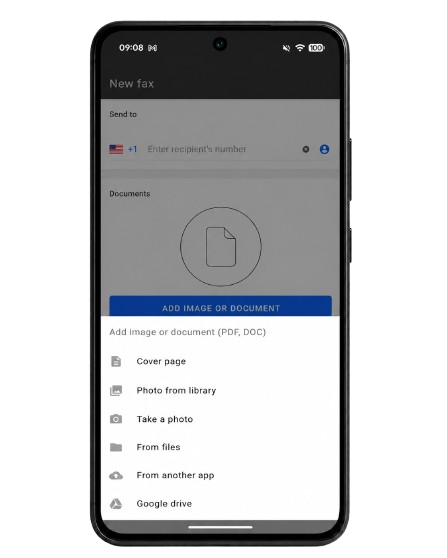
The workflow earns that praise, and it matched our own hands-on experience: the send flow is genuinely fast and simple, a scan-to-fax took well under five minutes, and the app guides you through each step without friction. A built-in scanner turns a paper page into a fax, you can add a signature to the scanned document, cloud imports pull files from Google Drive, Dropbox, and iCloud, and delivery tracking tells you when the fax lands. Supported formats include PDF, DOC, HTML, and images. The one caveat is that ease of use is not the same as output quality: as our fax-quality tests showed, the experience of sending is excellent, but the single transmission quality leaves fine detail behind in a way a busier document will expose. One functional wart Municorn's own support site admits: after a reinstall or a phone change, the app may not recognize an active subscription, so paying users can be re-prompted to purchase.
The Desktop and Web Experience
The gap shows the moment you leave the phone, and this is where ComFax gets genuinely confusing. There is a Mac path: the same App Store app runs on Apple Silicon Macs, and Municorn markets cross-platform compatibility across Android, iPhone, iPad, and Mac. There is no Windows app.

PC users are pointed to the web, where Municorn maintains two separate interfaces: the Everyfax brand with its own page-capped subscriptions, and a "web-based Fax App interface" with different pricing again. Three storefronts and three price lists for one product family. For a buyer who lives in a browser, that split is real friction, and it makes comparing what you would actually pay harder than it should be.
How ComFax Usability Compares
Few fax apps match ComFax on raw mobile polish and review volume. Where it falls short is platform breadth. ComFax has no Windows app, and its desktop and web story splits across two separate interfaces with different pricing. Fax.Plus, by contrast, runs dedicated iOS and Android apps alongside macOS and Windows desktop apps, a web app, and email-to-fax, so the same account works the same way on a phone, a laptop, and the browser. Dropbox Fax, SRFax, and FaxZero run through the mobile web rather than dedicated apps, so ComFax's native-app experience genuinely beats them on the phone. The contrast that matters is consistency across devices: if you need the same experience everywhere rather than a polished phone app and a fragmented desktop story, compare ComFax against a provider with native apps across every platform before committing.
5. Customer Service, Cancellation and Account Control | Score 4/5
ComFax markets 24/7 live support, and that is a real point in its favor. The score is held down by what happens when you try to leave.
Support Channels
ComFax advertises 24/7 live support, with contact routed to in-app chat and support@comfax.com. The positive mobile reviews suggest day-to-day help is responsive for in-app questions. The counter-pattern shows up around money: complaint threads describe refund emails going unanswered for months, and when Municorn replies publicly, the responses tend to defend the weekly pricing and route refund requests back to Apple or Google.
The Fine Print That Matters
Municorn's Terms of Use are governed by the laws of Cyprus and require individual arbitration: disputes "will not be brought as a class arbitration, class action or any other type of representative proceeding." Total liability is capped at "one hundred United States dollars ($100.00)," and any claim must be filed within one year or it "is permanently barred."
Price increases handle themselves too: "by continuing to use the subscription after the price change takes effect, you will have accepted the new price." None of this is unusual for consumer apps, but the combination matters. As a Cyprus company, Municorn has no BBB profile or US dispute venue, so your practical remedies are Apple or Google refund requests and card disputes.
How to Cancel ComFax
Because ComFax subscriptions are billed through the App Store and Google Play, cancellation must happen in your device's subscription settings, not inside the ComFax app. Two facts trip people up:
⚠ Important: Deleting the ComFax app does NOT cancel your subscription. You must cancel through Apple or Google at least 24 hours before the renewal date, or you will be charged for the next period.
Refunds
There is no proration and no refund once you have sent a fax, and renewals are explicitly non-refundable. Plan your cancellation around the renewal date, because there is no money back after the fact. The one exception worth trying: the refund policy invites you to contact support if your fax was not delivered.
What Users Report
The billing complaints show up on both app stores. On iOS, of 133 recent one- and two-star reviews analyzed during our research, 82 concerned billing or the paywall, with reviewers describing continued charges after they thought they had stopped the subscription. The same pattern is visible on the 4.5-star Google Play listing: among its most-helpful negative reviews is a one-star account, marked helpful by more than 300 users, describing how the switch from prepaid credits to subscriptions wiped existing credit balances, with a refund request refused on the grounds that subscribing meant accepting the terms, even though the user says they never subscribed. That credit-migration complaint is not a one-off; it recurs across both stores. ComFax's Trustpilot page sits at 4.1/5, but across only 23 reviews, and its two negative reviews actually concern Municorn's eSIM sibling app on the same billing entity, not the fax product.
How ComFax Account Control Compares
App-store-gated billing is common for mobile-first services, but it pushes cancellation and refunds outside the vendor's control, which is exactly where users get stuck. ComFax is not alone in making the exit harder than the entry: RingCentral has no self-service cancellation at all, requiring a phone call to an account manager to close a fax account. The better pattern is in-app self-service cancellation on every tier, which Fax.Plus offers, keeping the exit as simple as the signup and leaving billing inside the vendor's own dashboard rather than Apple's or Google's. For a regular faxing relationship, that control matters as much as the monthly price.
6. Data Residency and Retention | Score 3.5/5
Score rationale: ComFax does disclose its infrastructure (Azure servers in the USA) and a seven-year payment-data retention window, which is more transparency than some consumer apps offer. The 3.5/5 reflects the lack of control: US-only storage with no EU option and no user-selectable region, an open-ended retention period for uploaded documents, and OpenAI listed as a processor for scanned-document text.
Data residency is where the data lives; retention is how long it is kept. ComFax does disclose the basics, and what it discloses points one way: the United States.
Retention and Residency
ComFax's privacy policy names the infrastructure: "We use Azure servers located in the USA for Fax App operation." For a Cyprus-based company with European customers, that is worth pausing on. Your faxes are stored in the US, with no EU option and no user-controlled region selection.
Retention is one-sided. Payment data is kept for seven years for financial compliance, while uploaded documents are retained "for as long as needed to provide requested services," with no fixed deletion window you can set. The same policy lists OpenAI as a data processor for scanned-document text, and names the US fax carriers Phaxio and Documo mFax among the service providers that handle delivery, so your documents ride third-party networks. It also reserves the right to disclose personal data as part of a merger, acquisition, or sale of assets.
How ComFax Data Residency Compares
The market has moved toward explicit control, and ComFax offers none. The contrast runs along a spectrum. SRFax is location-locked, keeping Canadian clients' data in Canada and US clients' data in the US with no cross-border storage, which is residency by jurisdiction but still without a region picker. Dropbox Fax provides inbound numbers only in the US, UK, and Canada. At the other end, Fax.Plus documents selectable data residency regions on its Enterprise tier, letting a customer choose where live data and backups sit. ComFax sits at the no-choice end: US-only, with retention you cannot configure, which keeps this category at 3.5/5.
7. Enterprise, API and Healthcare Automation | Score 2/5
Score rationale: ComFax does one thing reliably at consumer scale: send and receive faxes from a phone. That is the single point that works. The 2/5 reflects the hard ceiling on everything an enterprise or developer needs: no public API, no webhooks, no OAuth, no published SDKs, no MCP server, and no EHR/EMR integration or healthcare automation product as of May 2026.
ComFax is a consumer app, and this category is where that identity sets a hard ceiling.
API Access
We found no public developer API, no webhooks, no OAuth, and no published SDKs for ComFax as of May 2026. There is no sandbox and no developer documentation. A team that wants to send faxes programmatically, route inbound faxes into an EHR, or trigger downstream workflows cannot build on ComFax today.
The 2026 bar for enterprise fax is higher still: an MCP server that lets AI agents send faxes and read fax content as part of automated workflows. ComFax has no MCP positioning.
Healthcare Automation
ComFax markets HIPAA-ready faxing, but it offers no healthcare automation product, no data extraction, and no EHR/EMR integration. It is a way to send and receive faxes, not a platform to build healthcare document workflows on.
How ComFax API Compares
On developer access, ComFax sits at the bottom of the market because there is nothing to access, and that is unusual even among its competitors. SRFax exposes a full REST API with ready-made PHP, C#, and Ruby classes suited to EHR integration, and Dropbox Fax publishes an API and SDKs for developers, so an API-less fax service is the exception in 2026, not the norm. RingCentral offers programmatic access through its broader platform. The 2026 differentiator on top of a plain API is an MCP server for AI agent workflows: Fax.Plus publishes both a fax API and an MCP server, which is where automated faxing is heading. For any workflow that needs programmatic faxing, OAuth, SDKs, or MCP-driven AI agents, ComFax is not a candidate, and that is what earns the 2/5.
Alternatives to ComFax
Fax.Plus: Best overall ComFax alternative
The strongest alternative to ComFax overall. Modern, high-quality cloud fax for individuals, teams, and enterprises, with output quality that stood out in our testing above (a selectable HD mode ComFax has no setting to match). HIPAA compliant with a signed BAA, organization-level ISO 27001 and SOC 2 Type II, an advanced fax API with OAuth 2.0 and MCP server support, and a clean experience across web, desktop, and mobile. Plans range from a free tier with 10 pages to enterprise, from $6.99/month with no credit card required to start. Best for: Users who want reliable fax quality, modern UX, broad compliance, and developer-ready integrations, from solo users to large teams.
iFax: Best for a BAA on a lower-cost plan
A subscription fax service with a signed BAA on its paid Pro plan, which suits smaller healthcare practices that need HIPAA coverage. Default fax output quality fell below the market standard in our testing, which is worth noting for clinical document workflows. The Plus tier carries HIPAA marketing but no BAA. Its SOC 2 and ISO 27001 also sit at Pro tier only, with no published auditor or certificate. Like ComFax it is subscription-based, and users report higher charges on mobile sign-up than on the website, so check the renewal terms before you subscribe. Best for: Healthcare practices that want a BAA on a lower-cost plan than enterprise, and will verify the compliance paperwork themselves.
Dropbox Fax, formerly HelloFax: Best for occasional senders
A clean web interface with a genuine pay-as-you-go option at $0.99 per fax, a better fit than ComFax for people who fax rarely and do not want a recurring subscription. Its fax clarity rated well in PCMag's 2026 testing, ahead of where a single-quality app like ComFax sits, though our own tests put Fax.Plus first on fine detail. No dedicated mobile app, and no Dropbox Fax plan includes a BAA, so healthcare teams that need HIPAA should look elsewhere. Best for: Occasional senders who already use Dropbox and only need basic faxing.
If you are switching from ComFax, Fax.Plus is the most complete upgrade: standout fax quality with a selectable HD mode, a full compliance stack with a signed BAA, an API with MCP support, and pricing that scales from a free tier to enterprise.
FAQs
Does ComFax have an API?

No. We found no public developer API, webhooks, SDKs, or MCP server for ComFax as of May 2026. It is a consumer app, not a developer platform. Competitors like SRFax and Dropbox Fax do publish APIs.
How much does ComFax cost?
ComFax is subscription-only: marketed at $9.99/week, $29.99/month, or $249.99/year with unlimited pages, though in-app weekly pricing can step up after an intro week and varies by region. There is no pay-per-fax option. On the web, Municorn's Everyfax brand sells separate plans from $20.99/month with a 200-page sending cap.
Is ComFax HIPAA compliant?
ComFax markets HIPAA on every tier and is Compliancy Group certified, but its binding privacy policy only claims safeguards "aligned with" HIPAA and states the app "is not intended for transmitting PHI without a valid BAA." The BAA is available on request rather than instant. Services built for healthcare, such as SRFax, sign a BAA from their entry plan, and Fax.Plus signs one on its Enterprise plan.
Is ComFax worth it in 2026?
For occasional, on-the-go phone faxing, yes. ComFax is a polished mobile app with a built-in scanner and HIPAA-aligned encryption. For businesses, teams, or developers, the subscription-only pricing, missing API, and thin enterprise controls make alternatives a better fit.
What is the best ComFax alternative?
It depends on use. For a rare one-off where send-only and a branded cover page are acceptable, FaxZero; for pay-as-you-go, Dropbox Fax; for a full-featured platform with an API, data residency, and an MCP server, Fax.Plus.
Is ComFax the same as Municorn Fax and FAX App?
Yes. ComFax, Municorn Fax, "FAX from iPhone: Send Doc App" (iOS), and "FAX App" (Google Play) are one product from Municorn Limited, a Cyprus company. Everyfax is Municorn's separate web faxing brand with different pricing.


Featured Articles
See All



Confédération Suisse
Confederazione Svizzera
Confederaziun Svizra
Swiss Confederation
Innosuisse - Swiss Innovation Agency