MyFax Review 2026: Features, Pricing, and Real-World Performance
We reviewed MyFax: real pricing, the number-porting paradox, missing HIPAA coverage, and a documented cancellation pattern. Overall score: 3.5/5, based on seven category scores.


- MyFax is a legacy email-to-fax service from the eFax family, sold on a simple email-to-fax workflow and a free trial that requires a credit card.
- No MyFax plan offers HIPAA compliance or a BAA, and the parent company points healthcare buyers to eFax instead.
- Pricing looks simple, but overages, spam faxes counting toward limits, and time-based page counting reward a close read of the terms.
- The customer agreement restricts taking your fax number with you when you leave, while the marketing site promises the opposite.
- Best fit is light email-to-fax use by someone already comfortable in the eFax ecosystem; anyone who values their fax number or an easy exit should compare alternatives first.
Is MyFax Worth It in 2026?
If your faxing lives inside your inbox, MyFax keeps things simple. Plans start at $12 per month ($8.25 billed annually) for 100 pages, sending works by emailing documents to a recipient's number @send.myfax.com, and there is a free trial to test first, though its length is stated inconsistently across the site. The service supports nearly 200 file formats, includes unlimited fax storage, and lets up to five email addresses share one account.
The picture changes once you read past the homepage. No MyFax plan includes HIPAA compliance or a Business Associate Agreement, the contract that actually permits a healthcare organization to send patient information through a vendor. That rules MyFax out for healthcare workflows entirely, and the parent company's own compliance positioning routes medical buyers to its sister product eFax. The customer agreement designates MyFax, not you, as the official owner of your fax number, restricts moving that number to another provider, and sets a $500 penalty for transfers that break those rules. And the most consistent thread in public user feedback, across more than half a decade, concerns billing that continues after cancellation.
About MyFax
MyFax is owned by Consensus Cloud Solutions (NASDAQ: CCSI), the J2 Global spinoff whose fax portfolio also includes eFax, MetroFax, jFax, TrustFax, RapidFax, Send2Fax, and Fax.com. MyFax itself started life at Protus IP Solutions, an Ottawa-based company, and came into the J2 family through the December 2010 acquisition of Protus. If you are comparing MyFax against eFax or MetroFax, you are comparing brands of the same company running on shared infrastructure: the differences are packaging and price, not platform.
That heritage is still visible in the product's seams. The Android app ships under the package name com.j2.myfax, the J2 corporate identity that was retired when Consensus spun off in 2021, and the web portal, MyFaxCentral, carries an interface design that predates most of its competitors' last two redesigns. As with Dropbox Fax's lingering HelloFax branding, the incomplete housekeeping is a useful tell: this is a maintained legacy product, not an actively developed one.
The product surface is intentionally narrow: web portal, email-to-fax, and mobile apps for iOS and Android. Fax numbers are available as local, toll-free, and international. There is no desktop app, no published developer API, and no enterprise interoperability stack. For those, Consensus sells you eFax.
How We Reviewed MyFax
We reviewed MyFax using four evidence layers:
- Hands-on product testing. We reviewed signup, activation, cancellation, the modern web portal, the legacy MyFaxCentral portal, email-to-fax, and the iOS and Android apps.
- Fax-quality testing. We tested MyFax using two fixed, synthetic, real-world-style source documents: one government and legal document and one healthcare lab results form. The same source files were used across testing so we could evaluate output quality consistently. Across the tests, we assessed the practical details that matter in real document workflows, including readability, layout preservation, handwriting, fine print, stamps, signatures, barcodes, dense tables, and mixed font sizes. No real personal, medical, tax, company, or patient data was used in the fax-quality tests.
- Billing and account-control review. We monitored signup through trial, read the full customer agreement, and mapped the cancellation path against the public complaint record.
- Business-readiness review. We checked MyFax's public materials for security and compliance claims, data residency and retention information, API and developer resources, healthcare-readiness details, and enterprise automation support.
We then scored MyFax across seven areas: fax quality, pricing, security and compliance, usability, customer service and account control, data residency and retention, and enterprise, API, and healthcare automation.
1. Fax Quality | Score 4/5
MyFax sends decent faxes, and the hands-on testing corrected the first assumption from our desk research before the first page even went through: MyFax does expose a resolution setting, Standard and Fine, the same pair eFax offers. That is the first of several places where the testing confirmed what the branding hints at, that MyFax and eFax are one Consensus platform with a different coat of paint, and it is why MyFax lands right where eFax does on quality.
Test Methodology
We tested two document types in both sending directions (Fax.Plus to MyFax and MyFax to Fax.Plus) and ran multiple passes. Because MyFax gives you two quality options, we ran both Standard and Fine and compared them against the Fax.Plus reference originals and the Fax.Plus Normal and HD output on the same source files. The two test documents were a simulated IRS Form 2553 and a simulated healthcare lab results form, the fixed synthetic files used across this series. No real personal, medical, tax, company, or patient data was used.
Government and Legal Document Fax Test
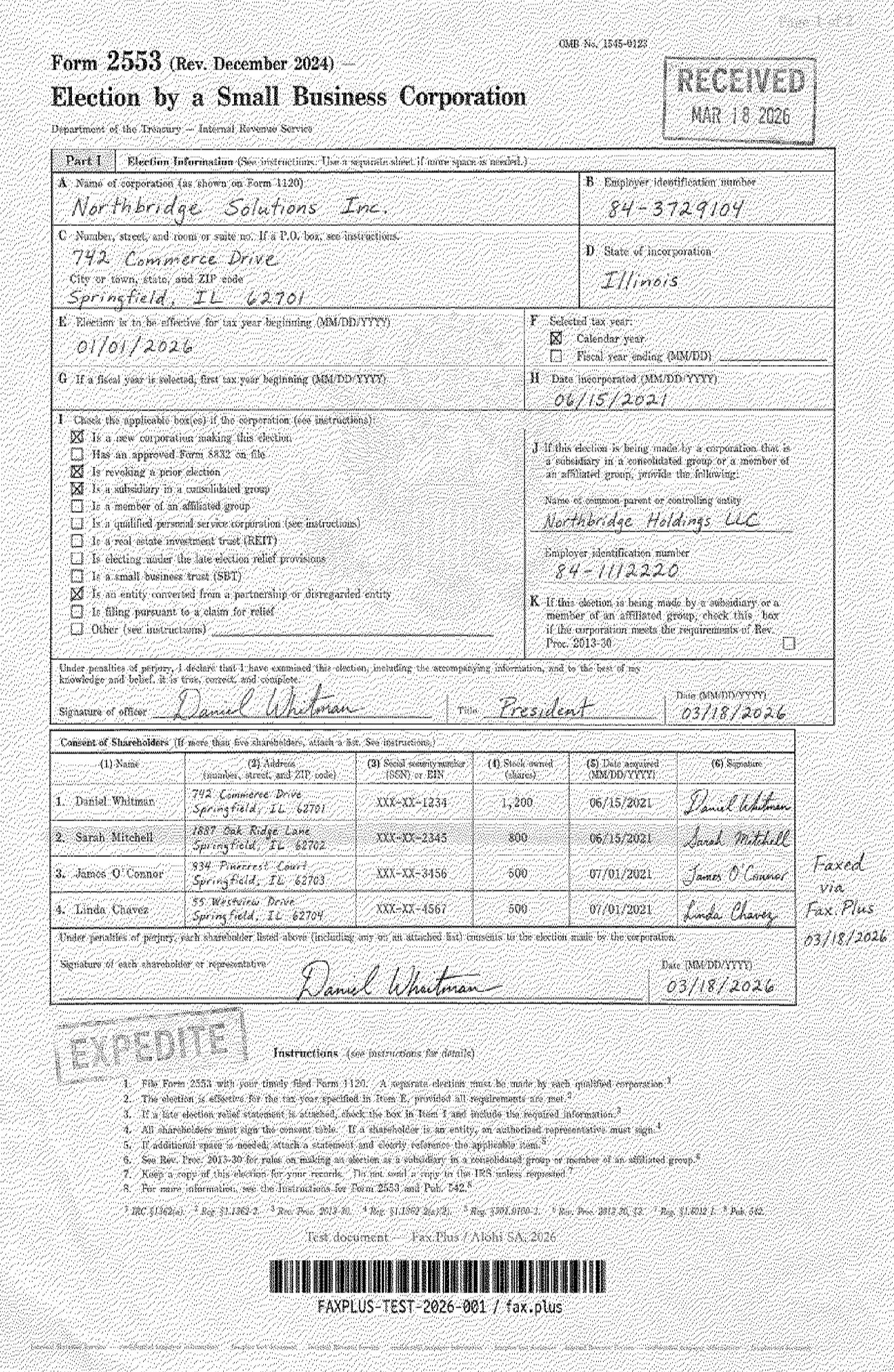
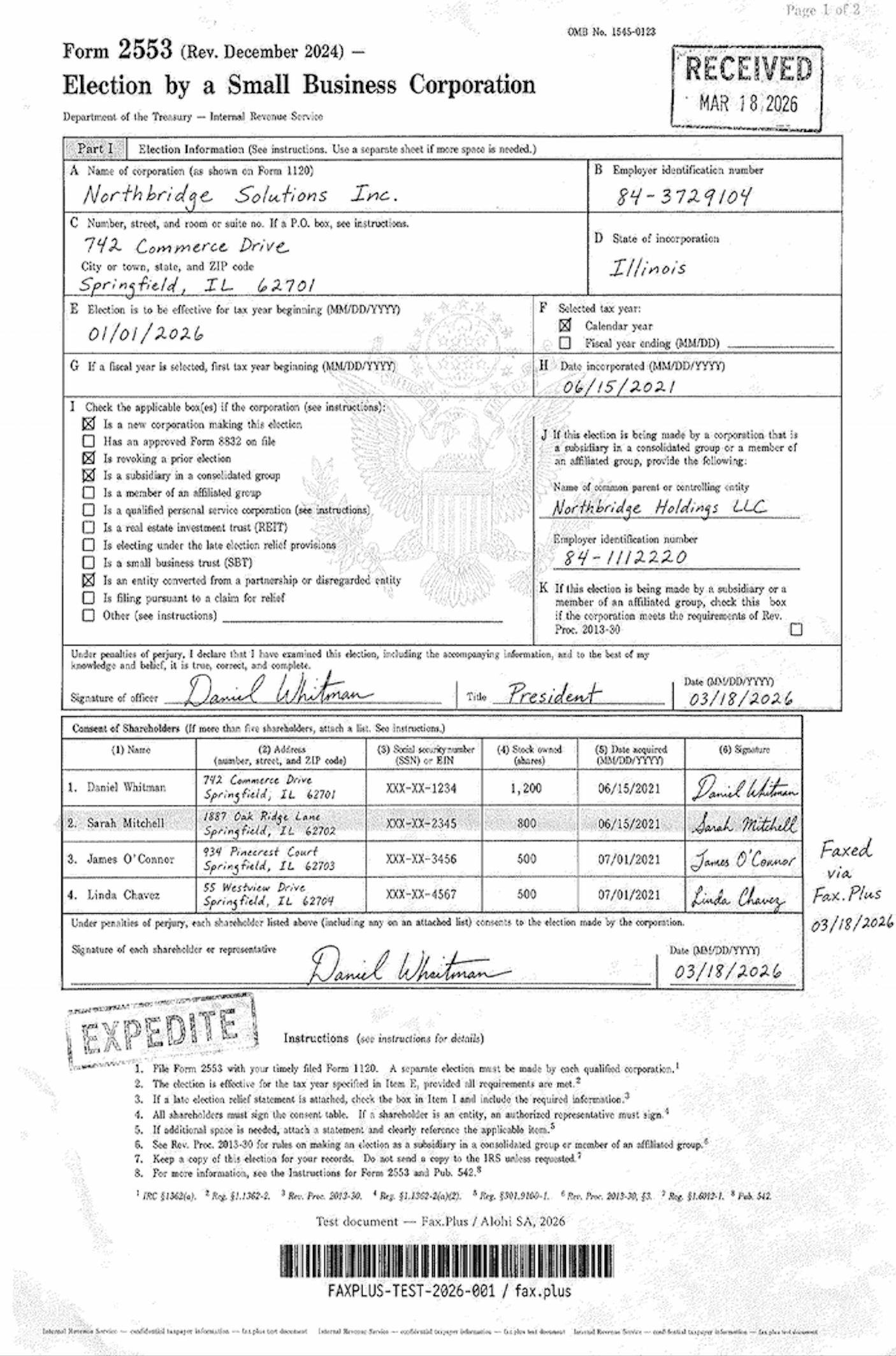
The first test used a simulated IRS Form 2553, a US government tax election form. Documents like this are common in legal, financial, and real estate workflows: signed agreements, tax filings, and multi-party authorization forms where every detail needs to arrive intact.
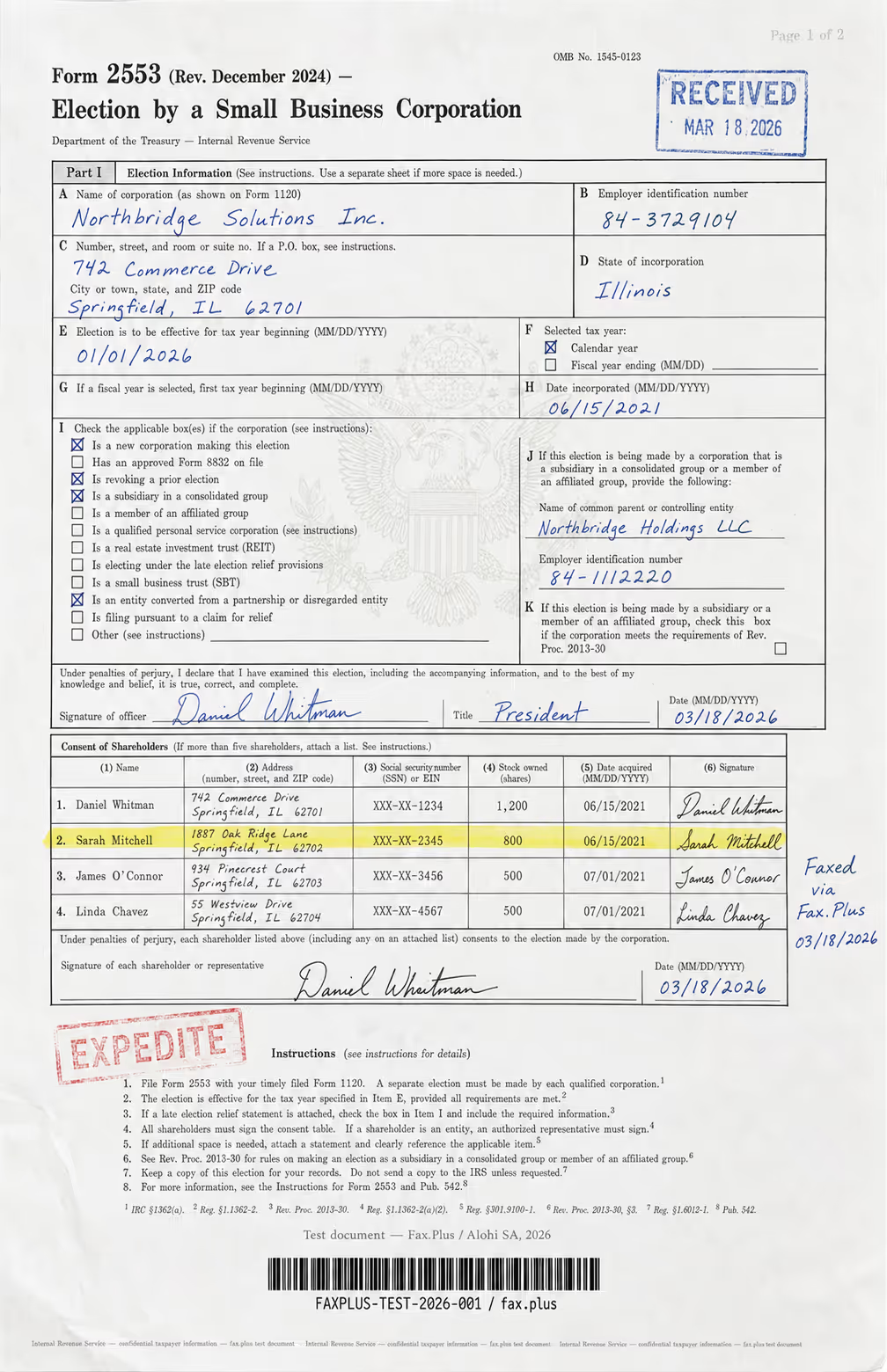
What the test document included:
- Handwritten signatures and a cursive-style officer name
- An official-style RECEIVED stamp with date
- An EXPEDITE rubber stamp with faded ink edges
- A US government eagle seal watermark in the center
- A highlighted shareholder table row
- Mixed font sizes across headers, body text, and fine print
- Dense tabular data across multiple columns
- A microprint line at the bottom for anti-fraud authentication
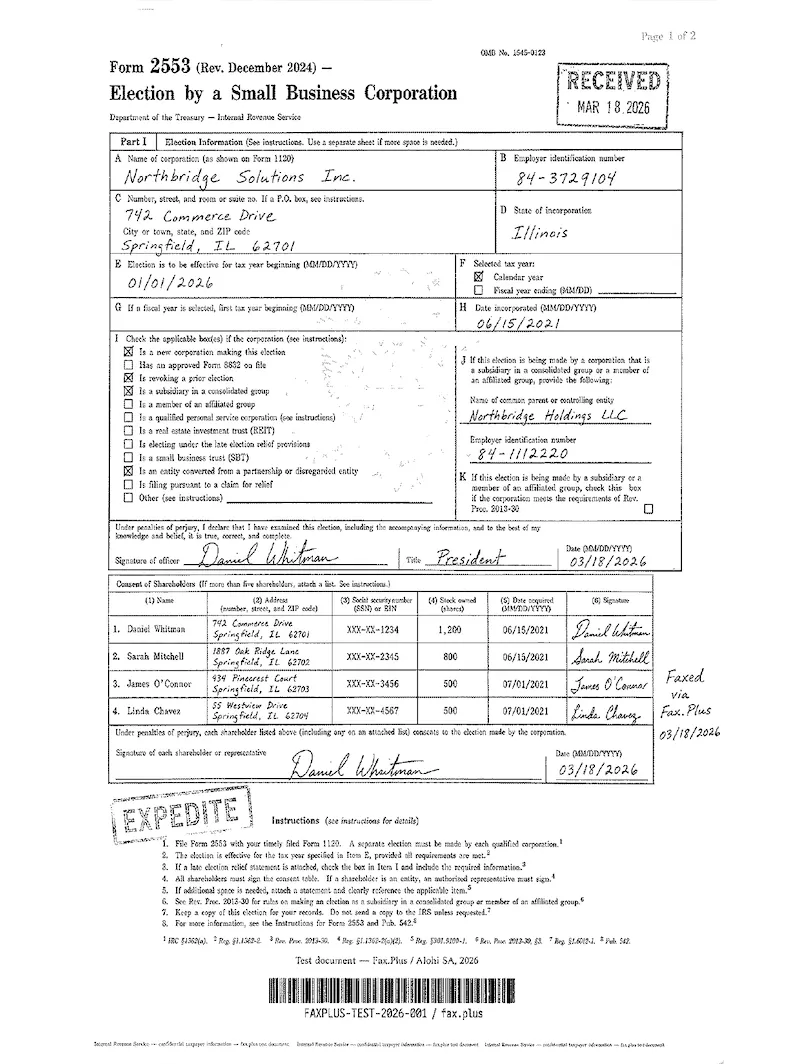
On Standard, the form arrived legible end to end. The handwritten signatures and the cursive officer name stayed readable, the RECEIVED and EXPEDITE stamps survived, and the dense shareholder table held its columns. The microprint line at the bottom dissolved into a grey smear, expected at fax resolution. The catch is the background: MyFax Standard lays a heavy grey dithered texture across the whole page, the same noise pattern eFax produces, and it is the clearest proof that the two brands render on one pipeline. The Treasury eagle watermark behind boxes I and J does not survive that rendering.
Fine is a real step up. The grey cast thins out, text and fine print sharpen, and the form reads close to a clean photocopy. It does not go fully white, some grey texture remains, but Fine is the setting to use for anything that needs to look professional. The eagle seal is faint at best even here.
Standard vs Fax.Plus Standard
 Standard
 Standard
This is the like-for-like everyday comparison, the default tier each service ships. Fax.Plus Standard renders on clean white paper, the text, stamps, and shareholder table all legible, with a faint trace of the Treasury eagle still visible. MyFax Standard reads the same content but under its heavy grey dithered background, and the eagle watermark is gone with it. Same document, same tier: the difference is the grey wash and the seal it takes away. The Fax.Plus reference original is included as the source check; Fax.Plus is not under review here.
Fine vs Fax.Plus HD
 HD
HD
 Fine
Fine
This is the higher-tier head-to-head, MyFax's best setting against Fax.Plus HD on the same form. Both are readable, but they part company on the faint detail. Fax.Plus HD renders on clean white paper and holds the Treasury eagle watermark in full, the feathers, the stars, and the shield. MyFax Fine keeps a light grey cast and the eagle is faint at best. The ink survives on both; the clean paper and the watermark headroom are what Fax.Plus HD has and MyFax Fine has no setting to reach.
Healthcare Document Test
The second test used a simulated lab results form from a fictional medical center. No real patient data was used. What is typical is the combination of lab data, flag values, handwritten physician notes, and stamps marking protected health information (PHI), all of which appear regularly in real healthcare fax workflows. One framing note for this test: MyFax has no HIPAA path at all, so the healthcare test demonstrates output quality only, not workflow fitness.
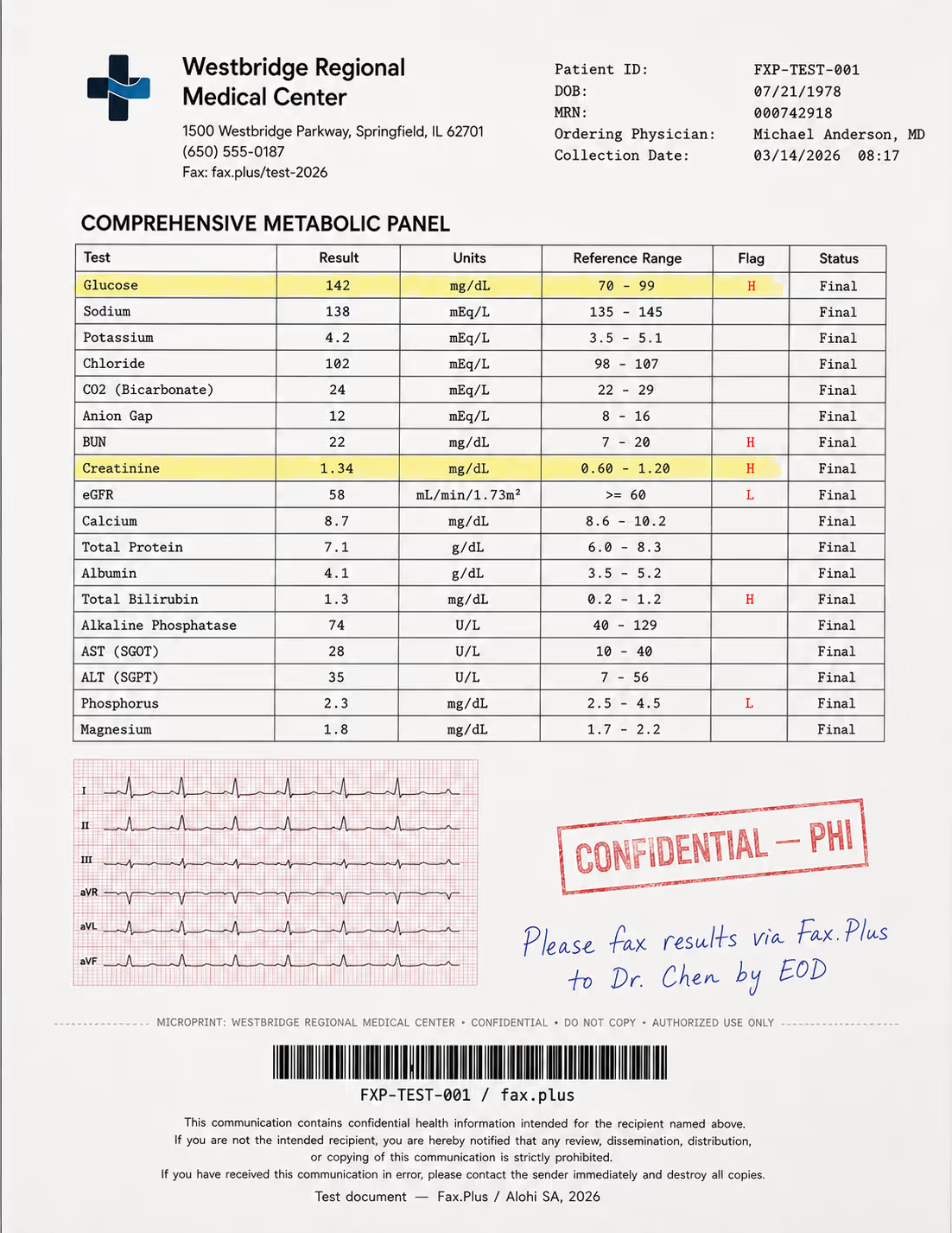
What the test document included:
- A comprehensive metabolic panel with highlighted flag values (H/L indicators)
- A 6-lead EKG strip on red grid paper included as a quality stress test
- A handwritten physician instruction in blue ink
- A CONFIDENTIAL/PHI rubber stamp with faded edges
- Patient header data and a Code-128 barcode
- A HIPAA disclaimer footer in small print
- A microprint line for anti-fraud authentication
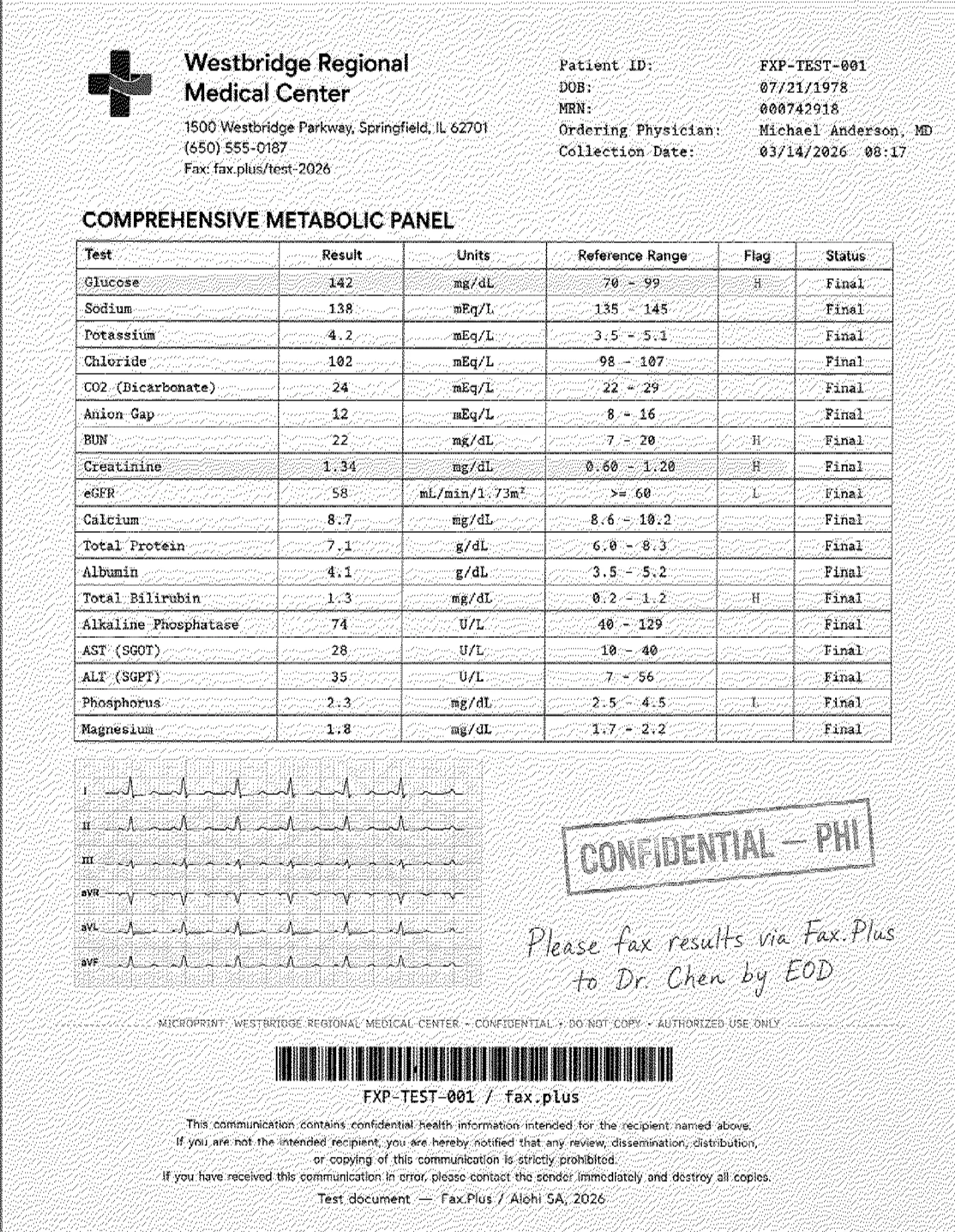
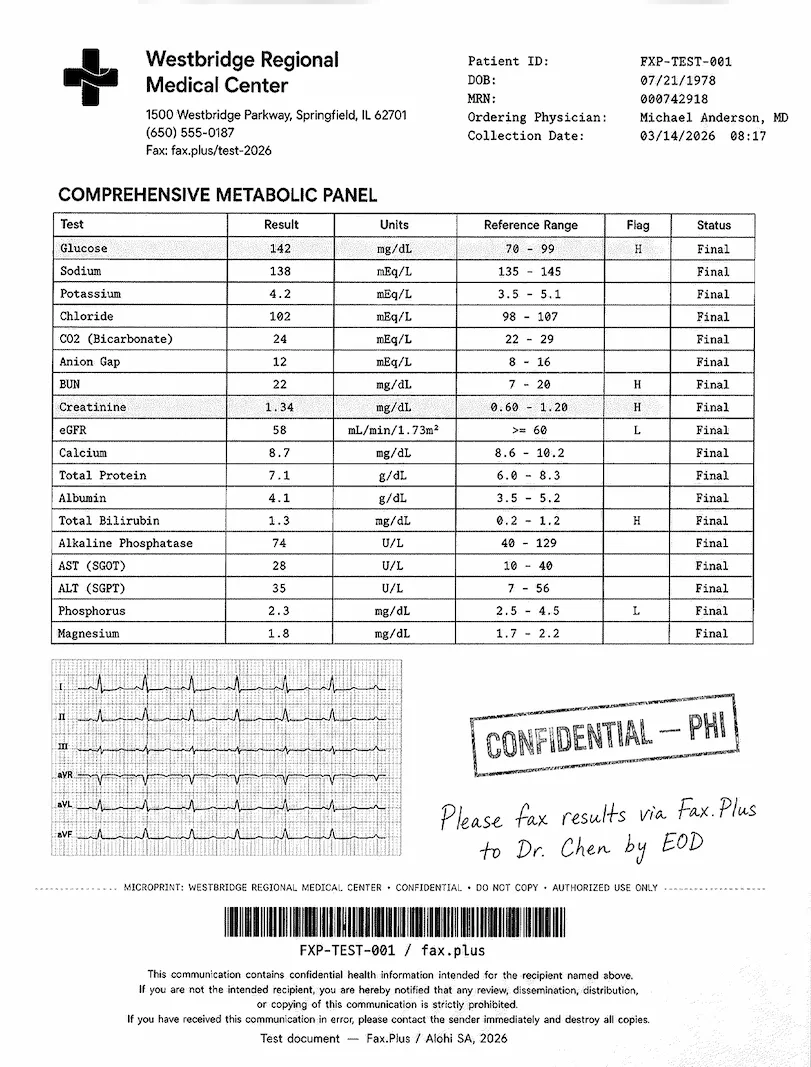
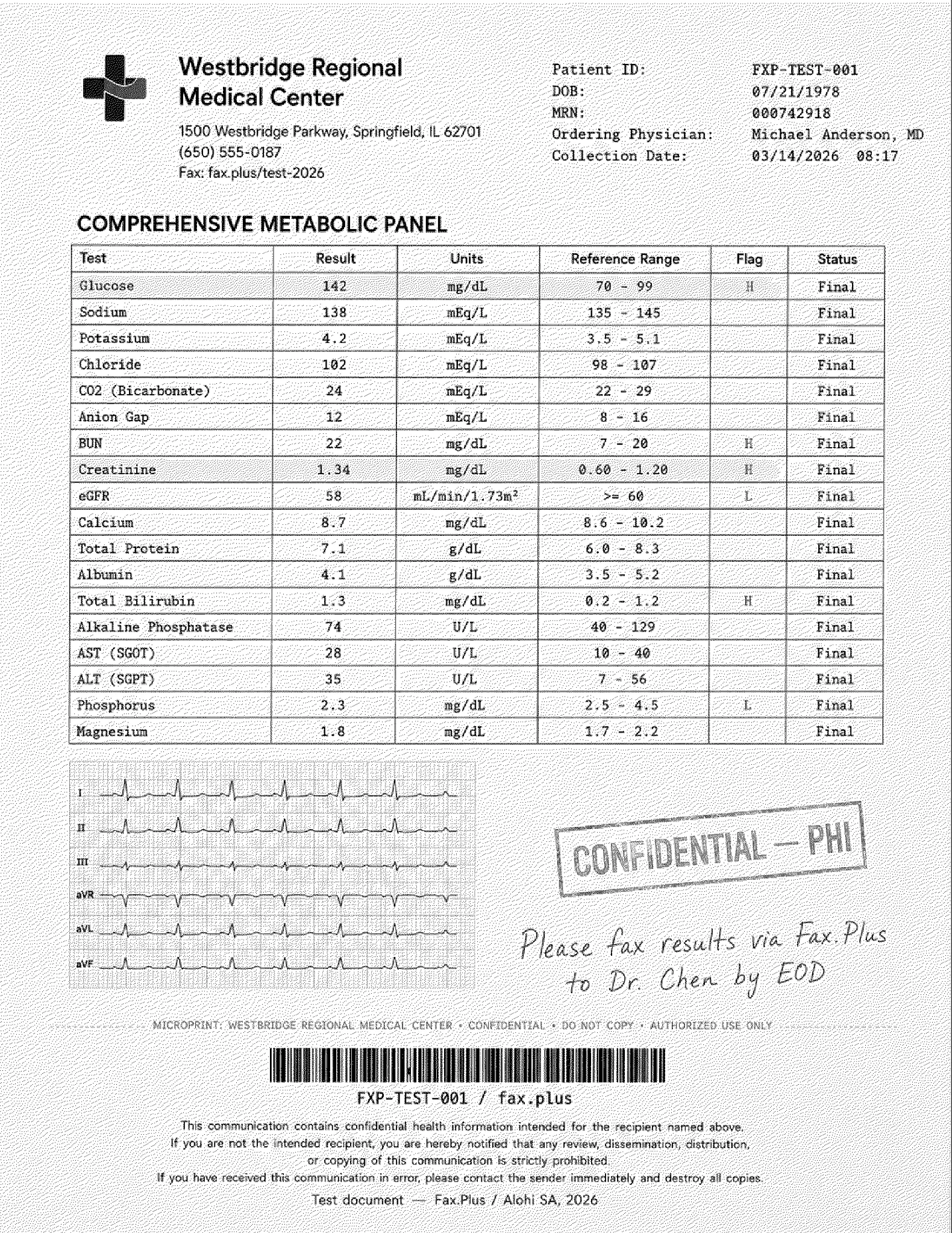
The pattern matched the government test, which is what one rendering engine handling both documents looks like. On Standard, the metabolic panel values, the H and L flag markers, the handwritten physician note, the PHI stamp, and the small-print HIPAA footer all came through readable, which is what matters most for a lab result. The ECG strip is where the grey background showed its cost: the trace stayed traceable but picked up grain, and the fine grid behind it mostly washed out. Fine cleaned this up noticeably, a sharper table, a clearer trace, less background noise, though the grid still came through soft.
Standard vs Fax.Plus Standard
 Standard
 Standard
This is the like-for-like everyday comparison, the default tier each service ships, on the same lab form. Fax.Plus Standard renders on clean white paper with the table, flag markers, and the ECG grid and trace all holding. MyFax Standard reads the same values but carries the grey dithered background throughout, and the fine ECG grid behind the trace mostly washes out under it. For a clinician reading flag values, both are usable. For a document where the waveform carries meaning, the grey wash is the difference, and it is the tier most users never change. The Fax.Plus reference original is included as the source check; Fax.Plus is not under review here.
Fine vs Fax.Plus HD
 HD
HD
 Fine
Fine
On the higher tier the gap narrows but holds. Fax.Plus HD keeps the ECG grid and the finer waveform deflections on clean white paper, with the footer disclaimer staying sharp. MyFax Fine lightens the grey cast and sharpens the table and trace, but the grid behind the waveform still comes through soft and the background never goes fully white. For a lab value, both are fine; for the waveform detail, HD on clean paper is the one that holds it.
Send Speed
MyFax send times matched what we measured on eFax, which is consistent with a shared platform. Standard completed in about 2 minutes and Fine in about 4 minutes, against the Fax.Plus baselines of 1 minute on Standard and 3 minutes on HD. Fine costs roughly double the transmission time of Standard, so the quality gain comes with a real speed trade-off on slow or graphics-heavy sends, and under MyFax's 60-second increment billing that extra time can translate directly to extra pages billed.
Send time is only one side of speed. On inbound, Fax.Plus also offers real-time fax streaming, which delivers each page of an incoming fax the moment it is decoded instead of holding the whole document until the final page lands, useful when a multi-page record is time-critical. Most cloud fax services deliver the document only after every page has arrived.
How MyFax Fax Quality Compares
The table pairs like tiers: MyFax Standard against Fax.Plus Standard, and MyFax Fine against Fax.Plus HD.
MyFax Fine is the best output we have seen from a Consensus brand, a touch ahead of eFax, because Fine strips out a little more of the dithering than eFax's equivalent setting. That puts MyFax at 4/5 on fax quality: readable on both tiers, stronger on Fine, and still limited by the grey background that survives even on its best setting. The ink survives; the clean paper underneath it does not.
2. Pricing | Score 4/5
MyFax pricing looks like the simplest in the category: three plans, every feature on all of them, the only variable being pages. The catches live in how pages are counted.
The Plan Lineup
- Home Office: $12 per month for 100 pages, or roughly $8.25 per month billed annually.
- Small Business: $25 per month for 300 pages, or roughly $20.83 annually.
- Power User: $45 per month for 600 pages, or roughly $37.50 annually.
Annual billing saves about 17 percent across the board. Every plan includes a local or toll-free number, all features, and a discounted first month. A custom Corporate tier exists behind a sales contact. Overage, the per-page rate once your monthly pages run out, is $0.10 per page for US faxing.
The Free Trial
MyFax does run a free trial, and a credit card is required at signup. Beyond the unsettled trial length above, the conversion mechanics are where the risk sits: if you go looking, you will find a recurring pattern of charges landing during or immediately after the trial window, including overage charges billed against trial usage. The takeaway is not any single account's story but the consistency of it: treat the trial as a paid subscription you have to actively stop, and watch the dashboard during the window rather than assuming free means no charges.
The inconsistency worth noting lives in the trial, not the page counts. MyFax's main pricing page and its signup funnel page agree on the allowances of 100, 300, and 600 pages, but the trial length does not hold still across the site. The main pricing page promotes a 14-day trial, the signup funnel page advertises a 3-day trial on the Home Office plan, and a developer response on the Android store refers to a 30-day trial promotion. Three different trial lengths on the company's own surfaces is a reason to confirm the exact term at checkout before you rely on it.
How Pages Are Counted
Two mechanics deserve attention before the per-page math.
Incoming Faxes Count, Including Spam
A detail the pricing page does not spell out: the plan numbers describe pages you send. The customer agreement separately includes an inbound allowance (200 received pages per 30 days on the base terms), and received pages beyond it are charged at $0.10 per page. Junk faxes are not excluded, so spam draws down that inbound allowance like any legitimate fax, and users on long-held numbers report meaningful allowance loss to spam once the included pages are gone.
Time-Based Page Counting
Like its sister product eFax, MyFax counts pages by transmission duration, not just by document length. The customer agreement states the billed page count for each transmission is the greater of the actual number of pages or the number of full and partial 60-second increments of transmission or connection time. In plain terms: if a page is slow to transmit, you pay for it as if it were several pages. The terms supply their own example: a one-page fax that takes one minute and six seconds is recognized as two pages. The same clause goes one step further: the increments count whether or not the transmission occurs or is completed, and the terms name answered calls and interrupted transmissions as examples, so a failed send can still bill pages. A graphics-heavy or slow transmission can therefore bill well above its real page count, which is the kind of surprise that turns up if you look through user feedback on billing.
At $0.12 per page on the entry plan ($0.0825 on annual billing), MyFax sits mid-pack on raw per-page cost, cheaper than eFax and Dropbox Fax, pricier than Fax.Plus. Fax.Plus Basic delivers double the pages at roughly half the entry price, with a free tier to test before paying anything. MyFax's genuine pricing strengths are the existence of a trial and the flat feature set across tiers. What keeps the pricing score at 4/5, rather than higher, is the small entry allowance, spam drawing it down, and duration-based counting that can quietly multiply usage.
3. Security and Compliance | Score 3/5
MyFax markets itself as secure. What it does not do is publish the evidence, and on the question that matters most for regulated buyers, the answer is an explicit no.
Is MyFax HIPAA Compliant?
Short answer: no. Two terms first, because they decide everything here. HIPAA is the US law on patient health information, and a Business Associate Agreement (BAA) is the contract HIPAA requires between a healthcare organization and any vendor that touches that information. Without a signed BAA, using a fax service for patient documents puts the practice itself out of compliance. This single document decides whether a fax service is usable in healthcare at all.
MyFax does not sign BAAs with healthcare clients, and no plan is sold as HIPAA compliant. This is not a disclosure gap but a settled position, and it holds up from two directions. Third-party compliance assessor Compliancy Group states directly that MyFax is not HIPAA compliant and does not sign BAAs, pointing to eFax, the parent company's HIPAA-capable brand, where a signed BAA is available on the Business tier and above. MyFax's own site says the same thing by omission: there is no HIPAA page, no healthcare page, and no BAA reference anywhere on the marketing site, the corporate plan page, or the privacy policy, the last of which was updated in February 2026.
One caution if you are searching this yourself. Recent results claiming "mFax signs a BAA" refer to Documo, formerly branded mFax, which is a different company from MyFax and does offer a BAA on request. The similar names collide in search, so confirm you are reading about MyFax (a Consensus brand) and not Documo before you rely on a HIPAA answer. We cover that distinction in the Documo review.
A healthcare practice faxing patient information through MyFax is doing so without authorization, full stop. Healthcare buyers need a service with a published BAA path: Fax.Plus Enterprise pairs HIPAA and a signed BAA with unlimited users, eFax Business offers one at a higher per-user cost, and Documo includes a BAA on every plan, signed on request.
The Evidence Gap
Beyond HIPAA, MyFax's public security documentation is thin. The marketing pages describe transmissions over secure lines and storage on a secure website, but no encryption standard (the AES bit length or TLS version that tells you how data is actually protected), no SOC 2 report, no ISO 27001 certification, and no audit reference is published for the MyFax product. These certifications matter because a company can claim anything about its own security; a certification means an outside auditor came in, checked, and signed off.
Consensus Cloud Solutions holds enterprise-grade credentials at the corporate level for its eFax Corporate line, including HITRUST. But as with Dropbox Fax inheriting Dropbox Sign's badges, platform-level credentials that are not stated for the product you are buying cannot complete a compliance evaluation.
By contrast, Fax.Plus publishes its compliance stack directly: ISO 27001 at the organization level and SOC 2 Type II, both certified by EY CertifyPoint, AES-256 encryption at rest, and TLS in transit, paired with a named BAA tier. That is the disclosure standard a regulated buyer needs to see before contacting sales.
The 3/5 reflects a legitimate, long-established service that likely runs on competent corporate infrastructure, but publishes limited product-specific security evidence and has no HIPAA path.
4. Usability | Score 4/5
The hands-on testing reset our read here, with one wrinkle. MyFax has two web faces, and they could not be further apart. The default modern interface is the same one eFax shipped in its most recent redesign, with the MyFax logo and brand colors swapped in: clean, current, and quick. Behind it, the older MyFaxCentral portal is still live, and it is exactly the relic the older reviews describe, the same dated layout as eFax's old portal. The modern interface is what most users will spend their time in, and it was the surprise of this review in the right direction: where the eFax build showed some lag for us, MyFax did not, and faxes loaded and sent without the stalling we noted in that review.
Email-to-Fax: The Core Workflow
MyFax's strongest design decision is making email the primary interface: address a message to {number}@send.myfax.com, attach one of nearly 200 supported file formats, and send. For users who live in Outlook or Gmail, this takes the portal out of daily use entirely. Share With 5 extends sending rights to five email addresses on one account, and Fax to 50 handles broadcast sends. It is a solid implementation of email-to-fax, the workflow most of this category was built on.
The Web Portal
The Modern Interface
The default interface is the one to judge MyFax on, and it holds up: the rebranded eFax web app, clean and responsive, with composing, sending, and browsing the fax list all behaving normally in our testing and none of the stalling we hit on eFax. TechRadar was less impressed on overall value and price, and that verdict stands on cost, but on the modern interface itself our hands-on experience was positive.
The Legacy MyFaxCentral Portal
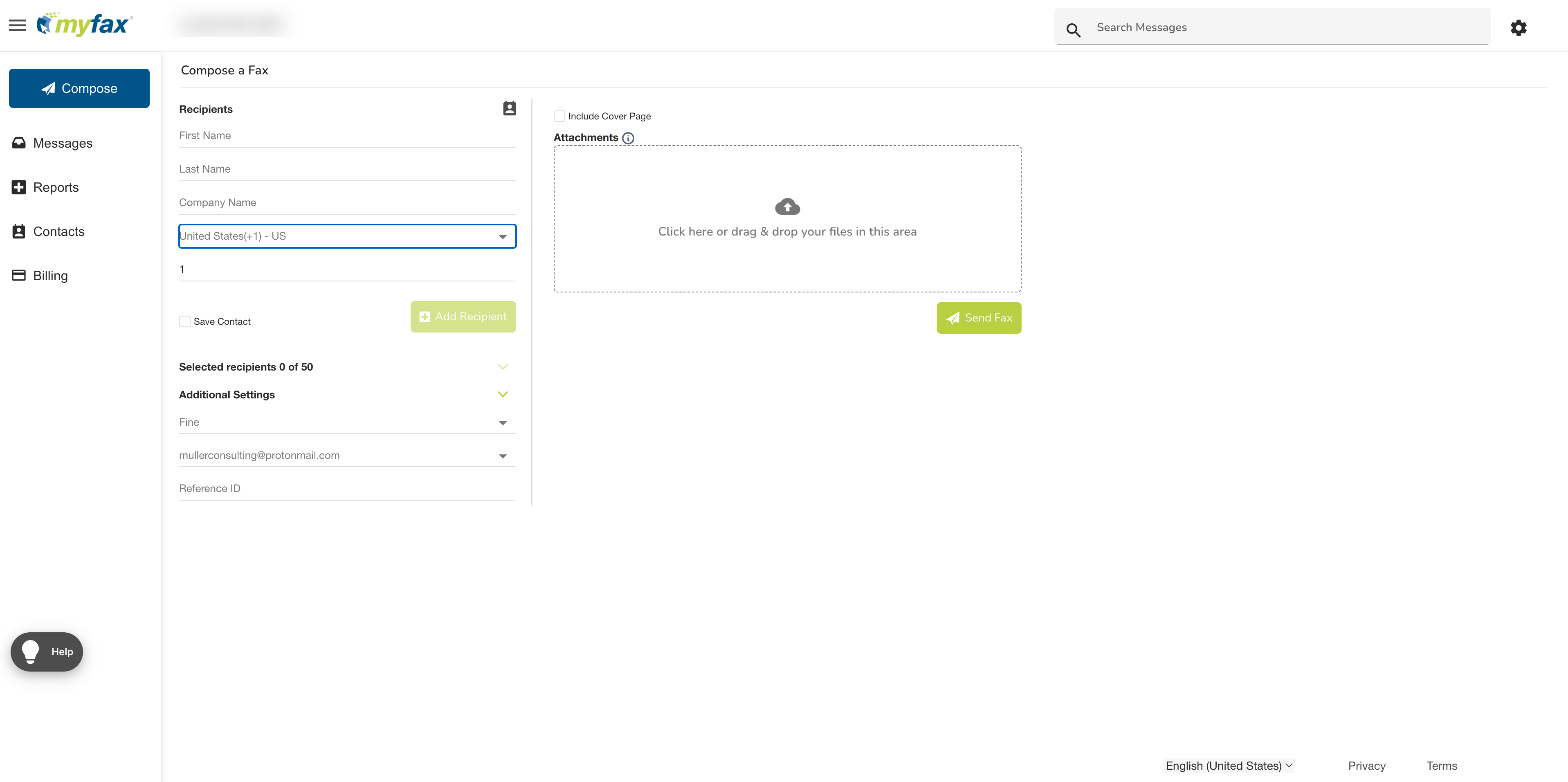
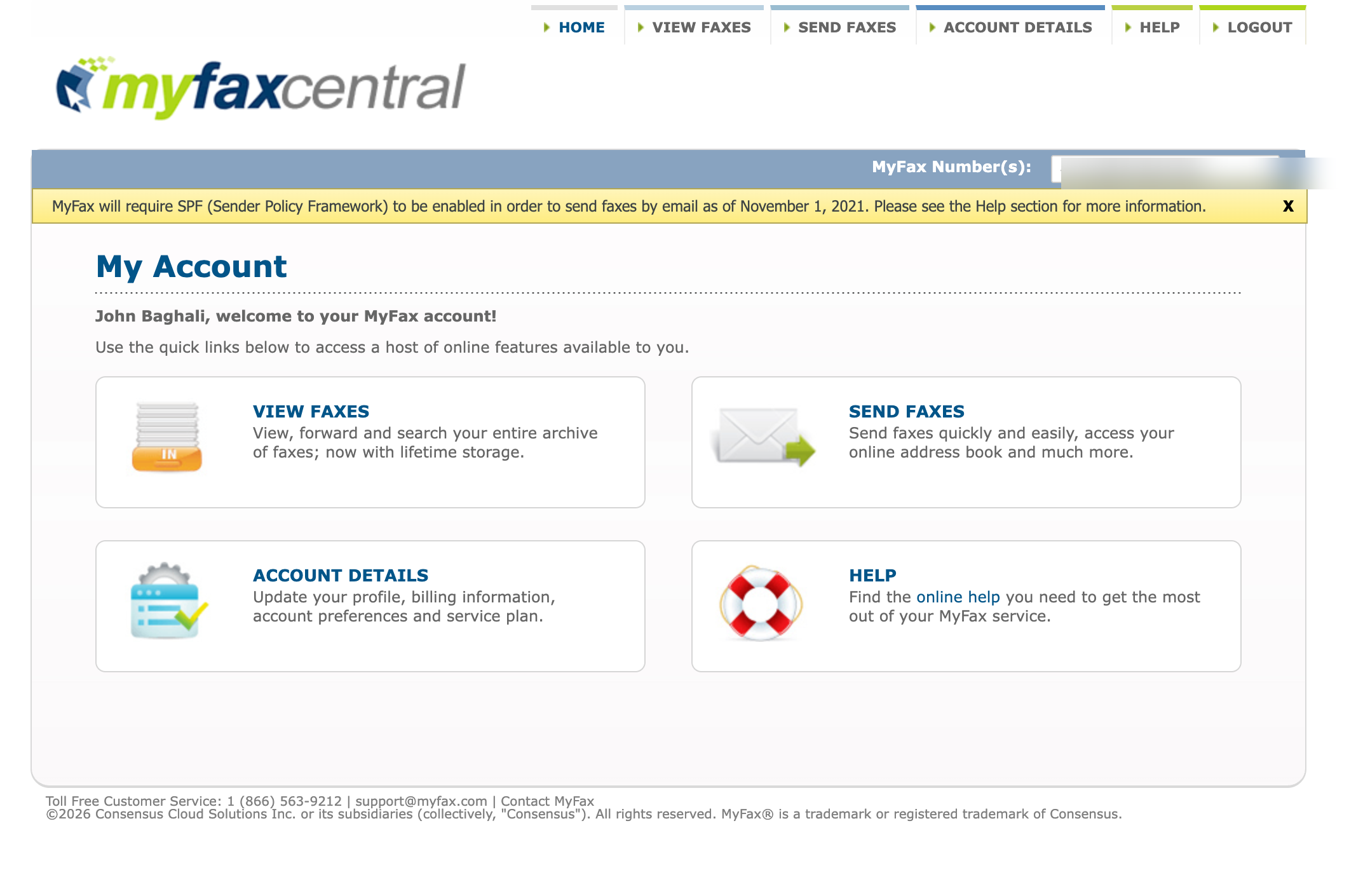
The catch is that the old MyFaxCentral portal is still reachable, and it has not aged well. The layout, the icon set, the lifebuoy "online help" graphic, all of it is the same dated design as eFax's old portal, and it still surfaces a notice telling users that MyFax will require SPF (Sender Policy Framework) to send faxes by email as of November 1, 2021. A stale banner from four-plus years ago, still displayed on a live 2026 account, is the same incomplete housekeeping we flagged in the Overview (the retired com.j2.myfax package name, the leftover J2 identity): a maintained legacy product, not an actively developed one. It does not break anything, but it tells you which platform tier you are on.
Mobile
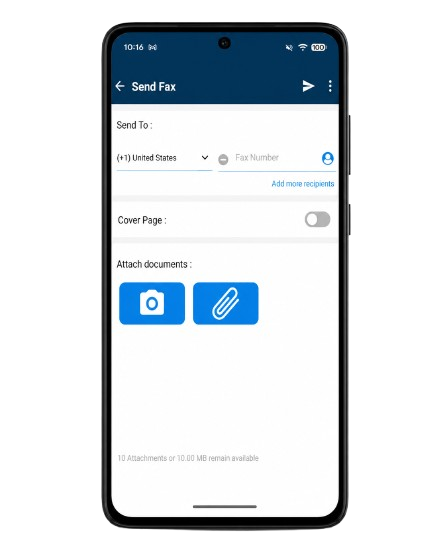
iOS and Android are effectively the same app: identical layout, identical behavior, no difference worth flagging between the two platforms.
Two Login Interstitials
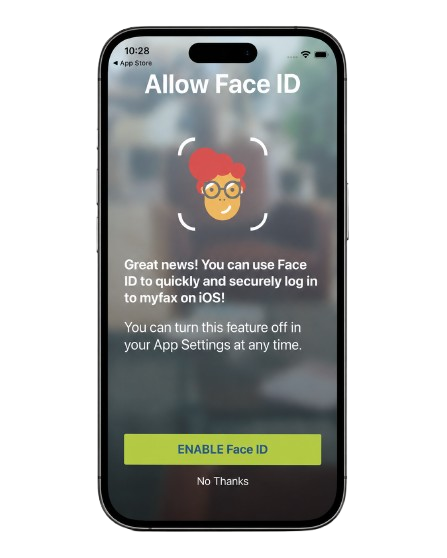
The one genuine irritation sits at the front door. Logging in fires two back-to-back full-screen prompts before you reach your faxes, one of them a Face ID enrollment screen pitched like a marketing splash ("Great news! You can use Face ID..."). The sequence feels like the interstitial ads you get in a free app, not something a paid service should push. It is a small thing, but it is the kind you notice every single time you open the app.
A Post-Update Bug
The iOS app also reproduced the post-update defect its own users have been flagging. Reviews running from February through May 2026, all on the current build, describe the same failure set after an update: faxes failing to open or loading only after long delays, blank or missing fax images, archived faxes nearly inaccessible, and slow navigation. We hit it once during sustained testing, the rendering failure surfacing exactly as described, and MyFax's own developer responses acknowledge the bug directly, telling users a fix is planned and that faxing through the website or email is unaffected in the meantime. There is history here too: a 2021 review describes an earlier update breaking the app the same two ways, image rendering and navigation speed. An app that has now shipped the same regression twice, and whose maker steers users back to the website until the next patch, is a real signal for any mobile-first buyer.
How MyFax Usability Compares
The picture is a convenient email-to-fax flow attached to a genuinely modern, responsive primary interface that happens to be eFax's, with consistent apps across iOS and Android. The friction sits around the edges: the still-live legacy MyFaxCentral portal with its stale 2021 banner, the double login interstitial on mobile, the post-update iOS rendering bug we reproduced once, and the onboarding failure we hit before we could even use the product (the activation email never arrived, covered in Section 5). The market context is the one we applied across this series: Dropbox Fax ships no mobile app at all yet still scores well on its desk-based simplicity, Documo has no Android app, eFax draws a lower usability mark on its slower portal and mixed apps, iFax ships strong apps on both platforms, and ComFax leads on mobile polish but lacks admin depth. Fax.Plus covers every surface at once, with native apps on iOS and Android rated 4.8/5 and 4.7/5, desktop apps, web, and email-to-fax, a consistency TechRadar has cited as a differentiator. MyFax lands as a competent, modern client when you stay on the new interface: the 4/5 puts it level with Documo, ahead of eFax's 3/5, and a half-step behind iFax and Dropbox Fax at 4.5/5, with the core experience good and the friction at the edges, not the center.
5. Customer Service, Cancellation and Account Control | Score 3.5/5
This is the section to read before giving MyFax a card number, because it is where the public record is loudest and most consistent.
What Happened When We Signed Up and Cancelled
We can report this part first-hand, because the account-control problems started before we had an account to control.
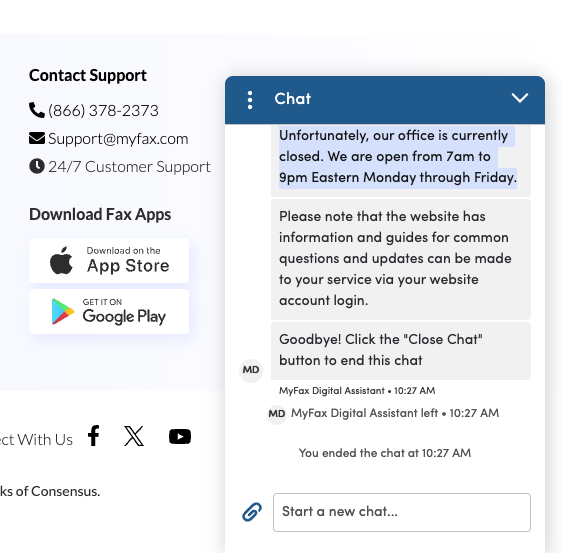
Signup takes a credit card and then sends an activation email to confirm the address. Ours never arrived. We ran the forgotten-password flow to force a resend, and that email did not arrive either. So we did what the site tells you to do and contacted support, which the marketing footer advertises as 24/7. The reply in the live chat was that the office was currently closed and open only from 7am to 9pm Eastern, Monday through Friday. A 24/7 badge sitting on the same screen as a closed-office message is the kind of contradiction you do not have to go looking for.
We reached an agent once the stated hours reopened, and to their credit the agent was helpful and did everything within reach. They confirmed that on MyFax's side the activation email had been sent, and backed it with a log entry showing the send. That left us at the impasse familiar to any email-delivery failure, where the sender's logs say "sent," the recipient never receives, and neither side can push the message through. With no way to activate the account, the only move left was to cancel before the trial converted to a charge.
Two things about the exit are worth recording. First, once we had agreed to cancel, the agent asked whether we would stay if MyFax halved the monthly fee and halved the included fax allowance. That offer lands strangely when the reason for leaving is that the account could not be activated at all: a discount does not help if you cannot log in. Second, the next morning a follow-up email arrived saying the company was sorry to see us go and inviting us to reactivate with a special discount. The retention machinery worked end to end. The activation email, the one message we actually needed, was the one that never came.
The point is not that a single signup failed, which can happen to any service. It is the shape of it. The support hours did not match the 24/7 promise, the only resolution offered was a discount we could not use, and the system built to win us back was more reliable than the system meant to let us in. For a section about account control, that is the whole thesis in one signup.
Support Channels
MyFax's own contact details do not line up across its own pages. Depending on where you look, you get a different phone number, and on the cancellation page, no phone option at all.
Three phone numbers, four email addresses, and a cancellation page that quietly drops the phone option the support page promotes: that is the picture before you ever open a ticket. Email turnaround, where users describe it, tends to run from several hours to a day for anything that needs an agent.
Before You Cancel: Your Fax Number
MyFax's customer agreement contains the same number-control architecture we documented at eFax, and it deserves explaining precisely, because the legal terms are doing a lot of quiet work here.
What the Customer Agreement Actually Says
Customer of record means the entity the phone carrier officially recognizes as the number's owner. MyFax's terms establish that the company, not you, is the customer of record for all numbers provided with the service. What you get is revocable permission to use the number. Porting, moving a number from one provider to another, is the mechanism that would normally let you take it with you, and the agreement permits porting out only if you give written notice no later than 30 days after termination and meet the agreement's other conditions, including a $40 administrative fee per number. Liquidated damages is a pre-agreed penalty amount written into a contract, and here the agreement authorizes charging your card $500 of them for a transfer that breaks those rules. Even where the requirements are met, the terms disclaim responsibility for technical or procedural difficulties that may prevent the port, with no refund of the administrative fee.
The Marketing Page Promises the Opposite
Here is the part that earns this review's signature finding. MyFax's marketing site runs a dedicated page on fax number porting that opens with a no-long-term-contracts, cancel-anytime promise and assures prospects that they can keep their number even after switching. That page is about porting numbers in to MyFax. The customer agreement governs what happens when you try to take a number out, and it points the opposite direction, ending with the provision that upon termination for any reason, your number may be immediately reassigned to another customer. A small business that ported a decade-old number into MyFax on the strength of the marketing page has, per the agreement, handed the customer-of-record status for that number to Consensus. This is not a hypothetical edge case: difficulty porting a number back out is a theme you will run into if you look through user accounts, which is exactly what you would expect from the terms.
Important. Per the customer agreement, your MyFax number may be reassigned to another customer immediately upon termination, and porting out is restricted. If your fax number matters to your business, resolve the port before you cancel, not after, and consider whether a provider that supports porting your number both in and out is the safer place for a number you cannot afford to lose.
How to Cancel MyFax
The official path is self-serve: log in to MyFaxCentral, open Account Details, go to the Billing tab, and click Cancel My Account. Save your own proof of cancellation, because the absence of a confirmation record is the pivot point of most billing disputes, and three patterns recur often enough to plan around.
Suspended Accounts Cannot Self-Cancel
BBB complaints against Consensus document the mechanic directly: an account suspended by the company's usage safeguards (in one verified case, for faxing a large volume of medical files) loses access to the self-serve cancellation path, leaving the customer instructed to cancel through an account they can no longer use. The cases on record were resolved only after BBB escalation, with the company closing the account and issuing a courtesy refund.
The Loop
A recurring structure if you read through cancellation accounts: the website points you to the phone, the phone points you back to the website, and billing continues through the round trip. It shows up often enough to be a pattern rather than a one-off, and resolving it sometimes comes down to the customer's own bank.
Email Cancellation Is Inconsistent
Whether you can cancel by email is not a settled answer, and MyFax's own channels disagree. Accounts surface where an emailed cancellation was refused on the grounds that email cancellation is not permitted, while a MyFax developer response on the App Store tells users they can email to cancel from the mobile app. Either way, do not assume an email cancellation has registered without written confirmation back.
Refunds
The customer agreement is explicit that the money side favors the vendor: activation fees and monthly service fees are non-refundable, and any unused service credits expire at the end of the 30-day period in which they are issued and are not refunded when an account is terminated. If you look through user accounts, the lived experience tracks that contract language: refunds are discretionary at best, and the ones that do get issued tend to follow an escalation rather than the standard support path.
What Users Report
If you research MyFax before buying, the pattern is hard to miss and it has been consistent for years. The split is the familiar one: the business-software directories, which collect solicited feedback from active users, skew warmer and praise the email workflow, while the consumer-complaint sites, which collect the unsolicited feedback of people trying to leave, skew sharply negative and cluster on the same three themes: difficulty cancelling, billing that continues afterward, and support that is hard to pin down. The independent professional take sits in between; TechRadar, for one, sums the service up as mediocre on efficiency and security at an inflated price.
What matters is not any single rating or review, which can be cherry-picked either way, but the consistency. For a cancellation-risk assessment, the people trying to leave are the relevant sample, and they have been describing the same experience since at least 2019.
How MyFax Account Control Compares
A self-serve cancel link exists, which beats a pure call-to-cancel maze, and the agent we reached was helpful. That keeps this from being a bottom-tier support score. The concerns sit around account control: the suspension mechanic that can disable the cancel link, the web-to-phone loop, the inconsistent answer on email cancellation, the discretionary refund posture, and a number-ownership regime that contradicts the company's own porting marketing. For contrast, Documo earned a 5/5 here with multi-channel support and a clean billing-menu cancellation, and Fax.Plus matches that no-maze posture while supporting number porting both in and out. The 3.5/5 reflects a usable cancellation route with meaningful account-control risk around it.
6. Data Residency and Retention | Score 3/5
Security is not only about encryption and certificates. For many organizations, the bigger questions are where fax data is stored and how long it is retained, and on both, MyFax publishes less detail than regulated and international buyers usually need.
Retention
Every plan includes unlimited online storage of sent and received faxes, with lifetime retention while the account is active. No per-plan retention caps, no user-configurable auto-delete, and no published post-termination deletion timeline specific to MyFax surfaced in this review. Given the eFax precedent of immediate loss of access to stored faxes upon closure with no grace period, assume the same and export everything before cancelling.
Data Residency
Data residency means where, geographically, your documents physically live, which decides which country's laws protect them and whether you can satisfy localization rules. No hosting region, infrastructure provider, or data-residency option is published for MyFax. The privacy framework is the Consensus corporate policy, with US-based infrastructure the operative assumption. There is no EU residency option and no regional selection of any kind.
How MyFax Data Residency Compares
The transparent end of the market looks like user-selectable data residency across many regions. Fax.Plus lets account admins select from more than 20 regions, including several US locations alongside the EU, Canada, Australia, Japan, and Switzerland, with live data and backups storable in separate regions and self-serve migration later. Even Dropbox Fax names AWS and documents its GDPR transfer mechanisms, and Documo publishes its subprocessor list and US-and-Canada footprint. MyFax publishes none of the above. The 3/5 reflects useful unlimited in-account storage and a stable corporate privacy framework, balanced against the lack of published region selection, infrastructure disclosure, or product-specific deletion timelines.
7. Enterprise, API and Healthcare Automation | Score 3/5
This section is short because the product surface is.
API Access
MyFax has no public API. No developer documentation, no endpoint reference, no webhook support (automatic notifications to your other systems when a fax arrives or completes), and no OAuth materials (the standard way one application securely grants another access) exist for the MyFax brand. Consensus's programmable faxing lives under the eFax Developer and Corporate umbrella, itself sales-gated, as we covered in our eFax review. A developer evaluating MyFax has nothing to evaluate; the brand is a consumer endpoint of someone else's platform.
MCP and AI Workflows
A newer expectation in enterprise fax is an MCP server, the interface that lets developers wire faxing directly into AI agent workflows and tools like Claude or the OpenAI Agents SDK. As of June 2026, MyFax has neither an MCP path nor any published route for AI-agent workflows. Teams building agent-based document automation can compare what a published MCP server for fax workflows looks like alongside a self-serve fax API; MyFax offers neither layer.
Healthcare Automation
None, by design. No BAA, no healthcare product line, no EHR integrations (EHR being the electronic health record systems clinics run their patient workflows in). Consensus's healthcare interoperability stack (eFax Unite, Clarity, Conductor) is an eFax Corporate conversation, not a MyFax one.
The 3/5 credits a functioning Corporate custom tier and the stability of the underlying Consensus platform, while still holding back points for the absence of public API documentation, MCP support, and a clear healthcare automation path under the MyFax brand.
Alternatives to MyFax
Fax.Plus - Best overall MyFax alternative
Modern cloud fax from $6.99 per month, with a free tier to test and no annual lock-in. An organization-level compliance stack with a named auditor (ISO 27001 and SOC 2 certified by EY CertifyPoint), HIPAA and a signed BAA on the Enterprise plan with unlimited users, data residency across 20+ regions, number porting in and out, native apps on iOS, Android, macOS, and Windows, and an API with MCP support. The entry plan delivers double MyFax's page allowance at roughly half the price.
Best for: Users who want reliable fax quality, modern apps, broad compliance, and an exit path that does not put their fax number at risk.
eFax - Best for staying inside the Consensus ecosystem
MyFax's bigger sibling on the same infrastructure. Costs more, but adds the things MyFax lacks: a signed BAA on the Business plan, a native Windows desktop app, phone support, and an enterprise healthcare stack. The same number-ownership terms and cancellation friction apply, so the account-control caveats in this review carry over.
Best for: Buyers who specifically need a Consensus product with a HIPAA path and accept the trade-offs documented in our eFax review.
Documo - Best for compliance-first healthcare teams
The opposite end of the spectrum from MyFax: HIPAA included on every plan with a BAA available on all of them, HITRUST certification, and the most praised support in this series. The trade-off is price, with a $25 per month Solo plan sold on annual billing only, and no Android app.
Best for: US healthcare teams that want a compliance-focused vendor and will pay above market rate for it.
FaxZero - Best for true one-off faxing
Free, no-account faxing: up to five free faxes a day of three pages each with a branded cover page, or a flat fee for larger sends. No inbound number, no storage, no subscription to manage, and therefore no cancellation to fight.
Best for: The genuinely occasional faxer who does not need an account, a number, or a subscription to manage.
FAQs
Is MyFax the same as eFax?

Same company, same infrastructure, different packaging. Both are Consensus Cloud Solutions brands (along with MetroFax, jFax, TrustFax, RapidFax, Send2Fax, and Fax.com); MyFax came into the family via the 2010 acquisition of Protus IP Solutions. MyFax is the cheaper consumer-oriented brand without the BAA, desktop app, or API access that eFax sells at higher tiers.
Does MyFax have an API?
No. There is no public MyFax API, developer documentation, or MCP support. Programmable faxing in the Consensus portfolio runs through eFax's sales-gated developer program. Teams that need self-serve programmatic faxing or AI-agent integration should compare a published fax API and MCP server.
Is MyFax worth it in 2026?
For light email-to-fax use by someone who reads the terms, watches the trial, and does not care about fax number portability, the trial and email workflow have genuine appeal. For anyone needing HIPAA coverage, a dependable exit, modern apps, developer access, or published security evidence, the documented record points elsewhere. Overall, MyFax lands at 3.5/5: useful for light email-to-fax workflows, with stronger marks for pricing and usability, but still held back by compliance gaps, account-control risk, thin data-residency disclosure, and no public API.
How do you cancel MyFax?
Log in to MyFaxCentral, open Account Details, go to the Billing tab, and click Cancel My Account. Screenshot every step and keep your own written confirmation: billing that continues after cancellation is a recurring theme in user accounts, and a documented BBB case shows an account suspension can disable the self-serve cancel link entirely, forcing you to contact support to finish.
Is MyFax legit and safe?
MyFax is a legitimate service operated by Consensus Cloud Solutions (NASDAQ: CCSI), a public company whose fax portfolio also includes eFax and MetroFax, so the business itself is real and long-established. Safe is the more careful question: MyFax markets secure transmission and storage but publishes no encryption standard, SOC 2 report, or ISO 27001 certification for the product, and signs no BAA, so it is not authorized for patient health information. For general non-regulated faxing it is a functioning service; for anything sensitive or healthcare-related, choose a provider that publishes its security stack and offers a BAA, such as Fax.Plus.
Is MyFax HIPAA compliant?
No. MyFax does not sign Business Associate Agreements and no plan is sold as HIPAA compliant. Consensus, MyFax's parent company, offers HIPAA coverage through eFax instead, with a BAA on eFax's Business tier. Healthcare teams should evaluate services with a published BAA path, such as Fax.Plus Enterprise, eFax Business, or Documo, which includes a BAA on every plan.
How much does MyFax cost?
Home Office is $12/month for 100 pages, Small Business is $25/month for 300 pages, and Power User is $45/month for 600 pages, with annual billing reducing those to roughly $8.25, $20.83, and $37.50 per month. Overage is $0.10 per page in the US, incoming faxes (including spam) count toward the allowance, and pages that transmit slowly can be billed as multiple pages. A custom Corporate tier is sales-led. For a lower-cost path, Fax.Plus starts at $6.99 per month for 200 pages with a free plan to test first.
Does MyFax have a free trial?
Yes, but a credit card is required at signup and the subscription converts automatically unless cancelled. Note that MyFax states the trial length three different ways across its own pages (14 days on the main pricing page, 3 days on the signup funnel, and a 30-day promotion referenced in an app store response), so confirm the exact term at checkout. Charges landing during the trial window are a recurring theme in user feedback, so monitor the account dashboard during the trial rather than assuming free means no charges.
How long does MyFax take to send a fax?
MyFax Standard completed in about 2 minutes in our tests, while Fine took about 4 minutes. Transmission time is not only a speed question with MyFax: because billing counts every full and partial 60-second increment as a page, a slow or graphics-heavy send costs more, not just takes longer.


Featured Articles
See All





Confédération Suisse
Confederazione Svizzera
Confederaziun Svizra
Swiss Confederation
Innosuisse - Swiss Innovation Agency