Documo (mFax) Review 2026: Features, Pricing, and Real-World Performance
We tested Documo (formerly mFax): real pricing, HIPAA and BAA coverage, security certifications, usability, data residency, and support. Scored across seven categories.


- Documo is the new name for mFax, repositioned around cloud fax plus document automation.
- HIPAA compliance is included on every plan, and a signed BAA is available on all of them, requested through sales rather than auto-executed at signup. HITRUST is the standout cert, though it is a voluntary framework, not a legal requirement.
- Pricing is the highest entry point we have reviewed: the $25 per month Solo plan is sold on annual billing only, with no free tier and no pay-as-you-go path.
- There is no Android app, and Google's AI-generated answers currently point Android users to an unrelated lookalike app that also uses the mFax name.
- Customer support is the most consistently praised part of the product; best fit is US healthcare and high-volume teams, while light or budget-conscious buyers will find better value elsewhere.
Is Documo Worth It in 2026?
Documo is built for a specific buyer: US healthcare teams that want a compliance-focused fax vendor, a BAA reachable on the entry plan, and US-based support, and are willing to pay above market rate for that combination. For that profile, it fits. The irony is who pays for it: HITRUST certification is expensive to maintain and the cost is baked into every plan, yet the buyers who actually get asked for HITRUST proof are large health systems, not the solo practitioners the entry plan is literally named after.
Outside that profile, the value is harder to defend. The cheapest way into Documo is a $300 annual commitment, and the rest of the market lets you start far smaller: Fax.Plus from $6.99 per month, with HIPAA and a BAA on its $79.99 Enterprise plan at unlimited users, iFax from $12.49 monthly, Dropbox Fax from under a dollar per fax, and eFax from $18.99 with no annual lock-in. None of them is perfect, each review covers the trade-offs, but none asks for $300 up front either. The full cost breakdown is in the pricing section below.
About Documo
Documo launched in 2014 as mFax, a cloud fax platform for healthcare and regulated industries, based in Wilmington, Delaware. The rebrand to Documo reflects a wider focus on document workflows and intelligent document processing rather than faxing alone. mFax and Documo are the same service under a new brand; the active product and pricing live at documo.com.
Do Not Confuse Documo With mfax.to
A separate, unrelated service at mfax.to also uses the "mFax" name. It is a consumer mobile fax app run by Octagon Lab, a Dubai-based app developer, with no corporate or technical relationship to Documo.
The collision is not theoretical. At the time of writing, Google's AI Overview answers "how to use Documo on Android" by recommending the mfax.to app from Google Play, and even instructs users to log in with their Documo credentials. That login will not work, and following the advice means handing your Documo details to an unrelated company. Documo has no Android app; its mobile app is iOS-only. Any plan names, prices, or compliance claims you read at mfax.to belong to a different company.
What Documo Offers
The core product is standard cloud fax: a web portal, email-to-fax and fax-to-email, a Windows print driver, and an API, plus fax bridges for VoIP providers (the hardware link that lets internet-phone companies connect old fax lines to the cloud) and connections to storage tools like Google Drive, Dropbox, and Box. The document automation positioning rests on the top tiers, where OCR (turning scanned pages into searchable text), document classification, and data extraction are added, features most customers on the standard plans never touch.
How We Reviewed Documo
We reviewed Documo using four evidence layers:
- Hands-on product testing. We created an account and tested Documo through the web portal, the email-to-fax workflow, the Windows print driver, and the iOS mobile app. Documo offers no Android app, so on Android we tested through the mobile browser. We sent live faxes from each surface to evaluate the full user experience across browser, email, and mobile workflows.
- Fax-quality testing. We tested Documo using two fixed, synthetic, real-world-style source documents: one government and legal document and one healthcare lab results form. The same source files were used across testing so we could evaluate output quality consistently. Across the tests, we assessed the practical details that matter in real document workflows, including readability, layout preservation, handwriting, fine print, stamps, signatures, barcodes, dense tables, and mixed font sizes. No real personal, medical, tax, company, or patient data was used in the fax-quality tests.
- Billing and account-control review. We monitored the billing flow from signup through the free trial period and mapped the cancellation path directly, including the steps required to manage or cancel the account after registration.
- Business-readiness review. We checked Documo's public materials for security and compliance claims, including its trust center, subscription agreement, and subprocessor list, plus data residency and retention information, API and developer resources, healthcare-readiness details, and enterprise automation support.
We then scored Documo across seven areas: fax quality, pricing, security and compliance, usability, customer service and account control, data residency and retention, and enterprise, API, and healthcare automation.
1. Fax Quality | Score: 4/5
Test Methodology
We tested two document types in both sending directions (Fax.Plus to Documo and Documo to Fax.Plus) and ran multiple passes. Documo does not document a resolution or HD setting anywhere in its product materials, so its output represents the only quality tier available. For each document, the slider moves across Documo Standard and the Fax.Plus Normal and HD reference baselines.
Government and Legal Document Fax Test
The first test used a simulated IRS Form 2553, a US government tax election form. Documents like this are common in legal, financial, and real estate workflows: signed agreements, tax filings, and multi-party authorization forms where every detail needs to arrive intact.
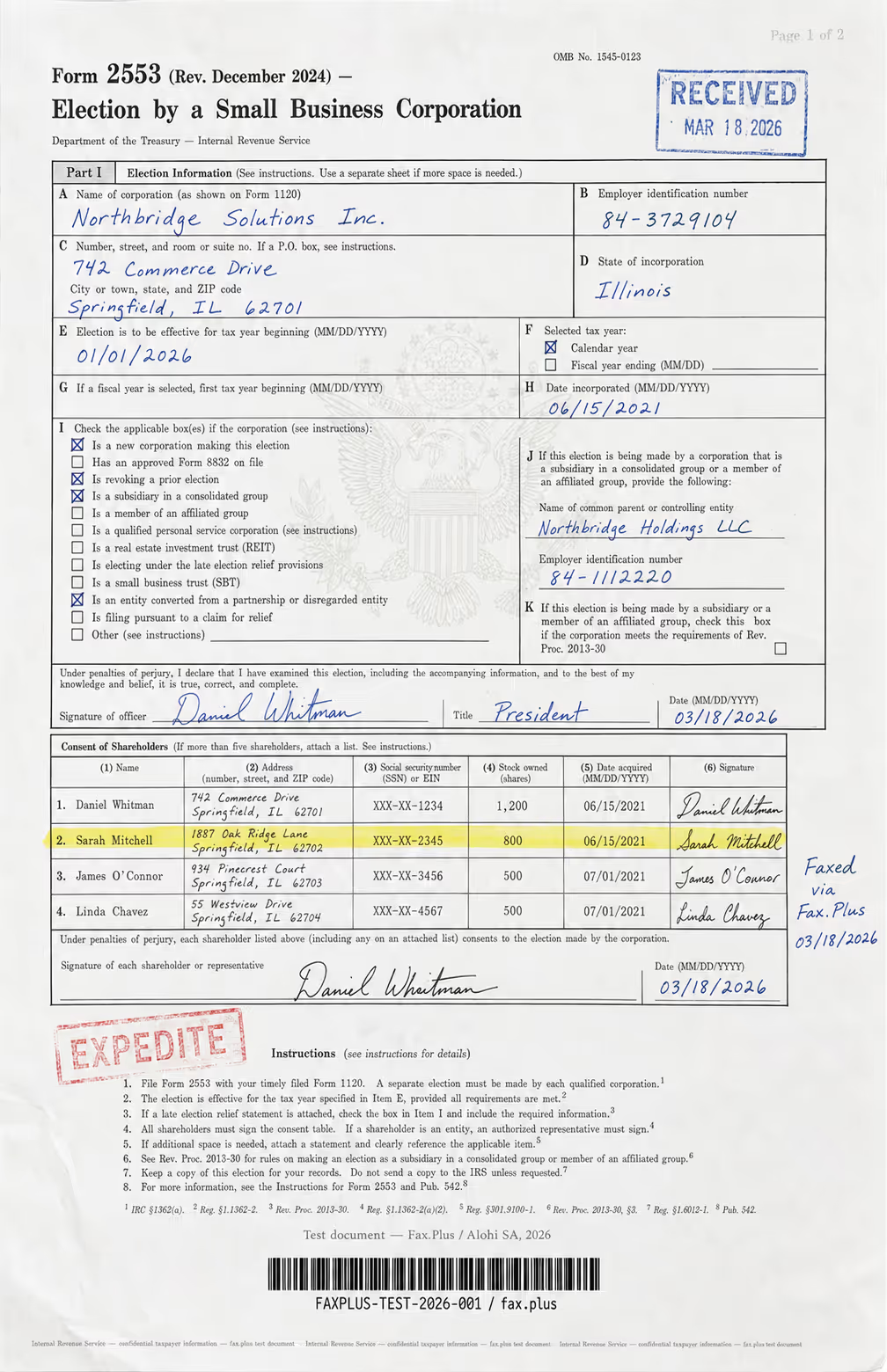
What the test document included:
- Handwritten signatures and a cursive-style officer name
- An official-style RECEIVED stamp with date
- An EXPEDITE rubber stamp with faded ink edges
- A US government eagle seal watermark in the center
- A highlighted shareholder table row
- Mixed font sizes across headers, body text, and fine print
- Dense tabular data across multiple columns
- A microprint line at the bottom for anti-fraud authentication
Documo fax quality reference, compared with Fax.Plus Standard
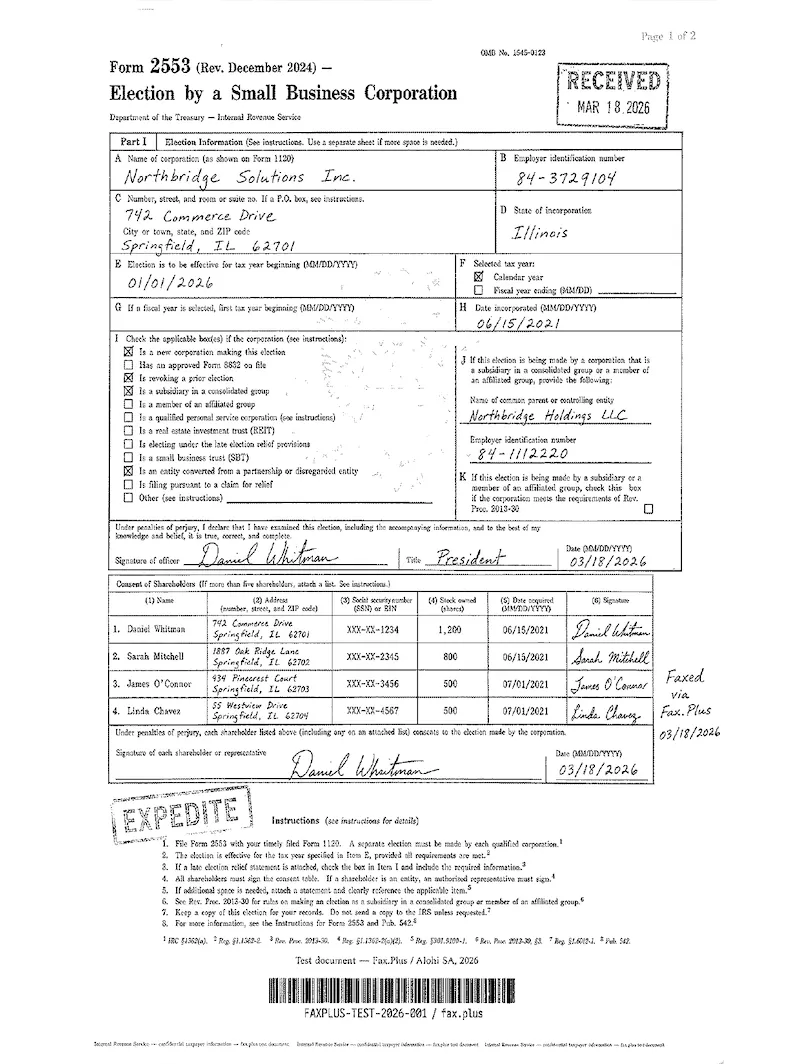
Documo does not expose a user-selectable HD or Fine resolution toggle, so this test reflects its standard output, and standard is the only output it offers.
 Standard
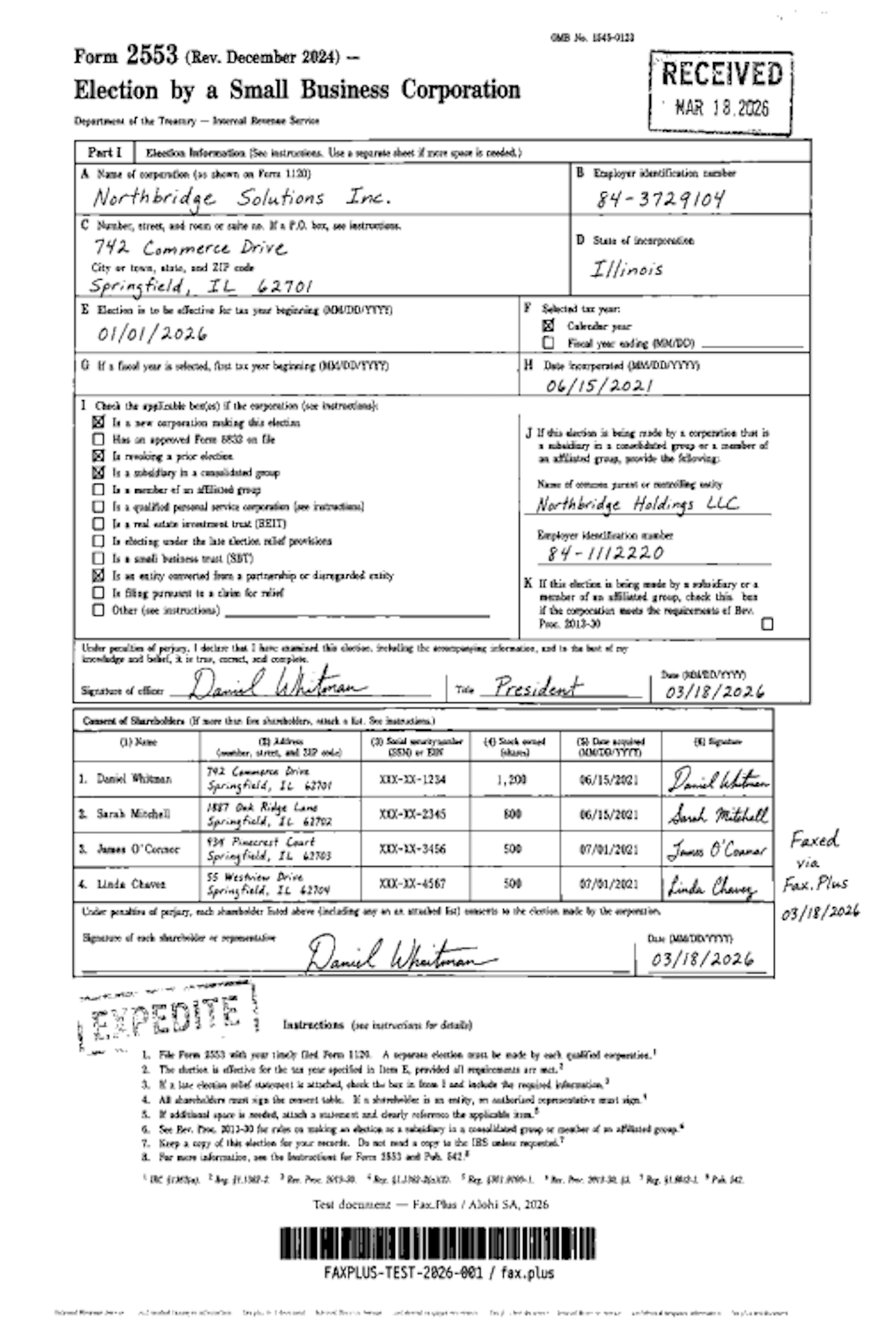

Documo does better on the black-on-white parts than on anything subtle. The printed text is legible, the ruled boxes and the shareholder table grid hold their lines, the signatures and the RECEIVED and EXPEDITE stamps read clearly enough, and the barcode comes through usable. Where it gives ground is on the faint, gray detail. The Treasury eagle watermark behind boxes I and J does not survive Documo's high-contrast rendering, which keeps the page background clean but thresholds the seal away with it. The output reads like an everyday photocopy: fine on the ink, blind to the watermark underneath it.
Documo fax quality reference, compared with Fax.Plus HD
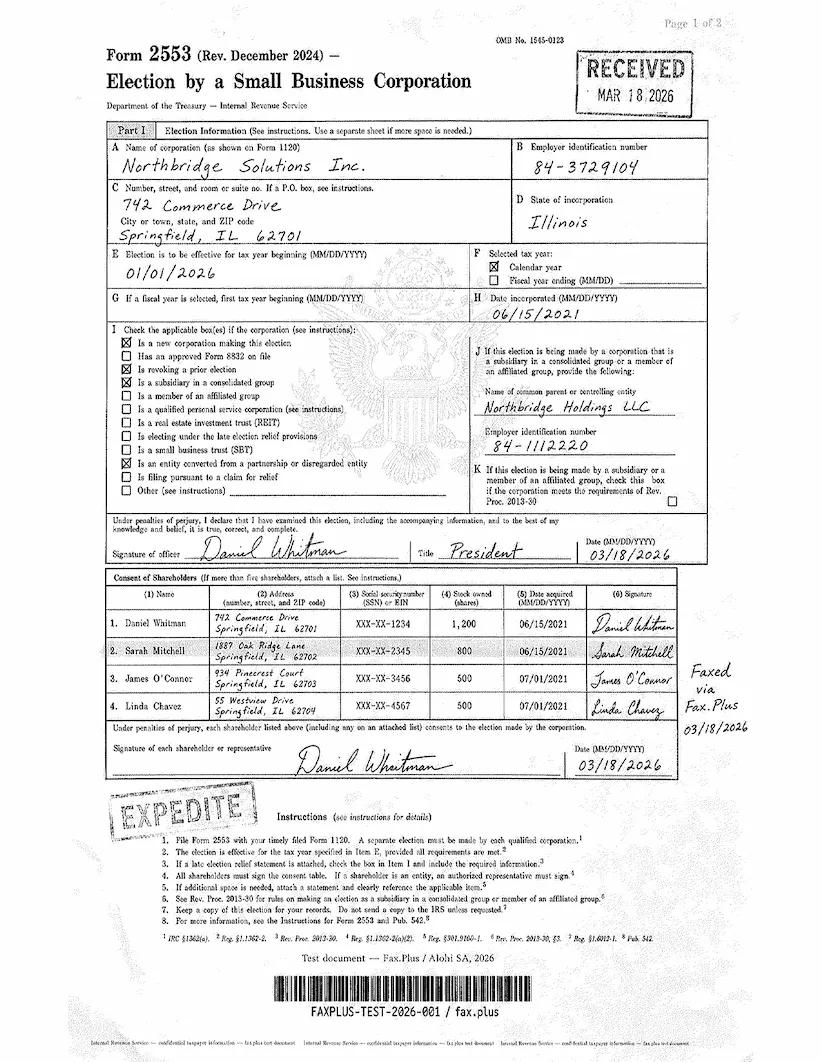
The images below show the same IRS Form 2553 transmitted via Fax.Plus at HD quality, included as a reference baseline so the difference on identical source material is visible rather than described. Fax.Plus is not under review in this section.
On the IRS form all three read the solid ink, text, signatures, stamps, and the barcode, though Fax.Plus is the cleaner of the two and Documo comes through a little softer. The separation shows on the watermark. Fax.Plus Normal keeps a faint trace of the eagle, and Fax.Plus HD holds it fully, the feathers, the stars, and the shield, along with the page's background security pattern. Documo drops it. That headroom for fine, gray detail is what Documo has no setting to match, because it transmits at one fixed quality.
 HD
HD
Healthcare Document Test
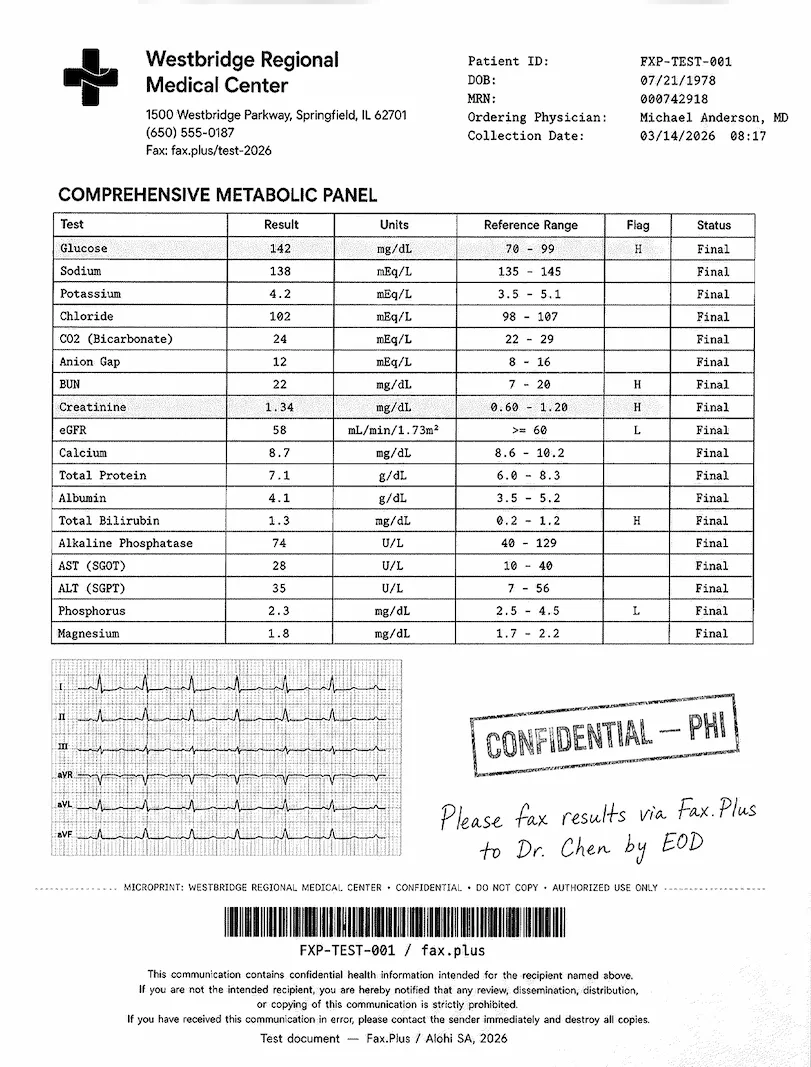
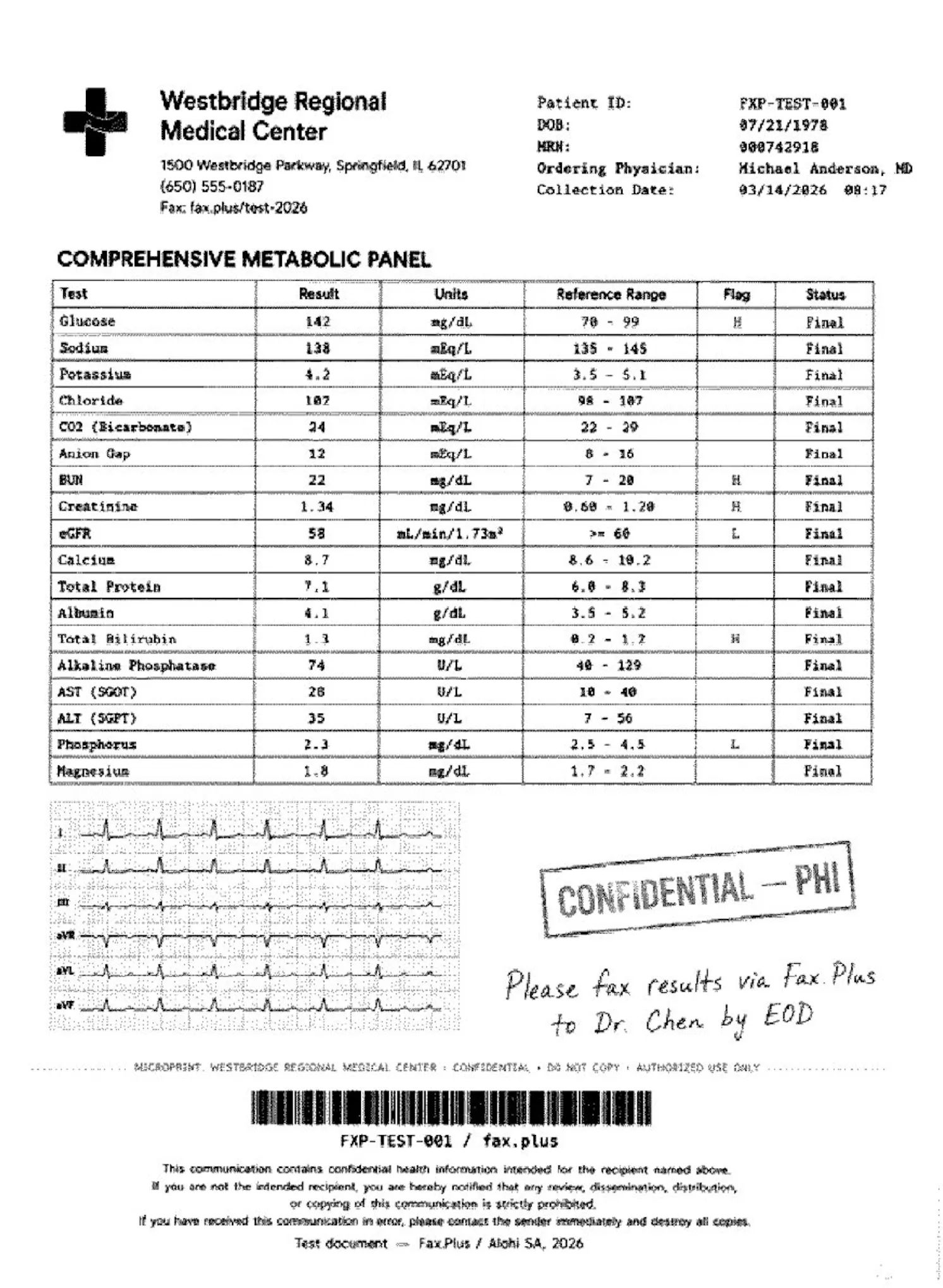
The second test used a simulated lab results form from a fictional medical center. No real patient data was used. The document was designed as a stress test rather than a literal workflow scenario: the embedded EKG strip on red grid paper was included deliberately to push the limits of what each service can render. What is typical is the combination of lab data, flag values, handwritten physician notes, and PHI stamps, all of which appear regularly in real healthcare fax workflows.
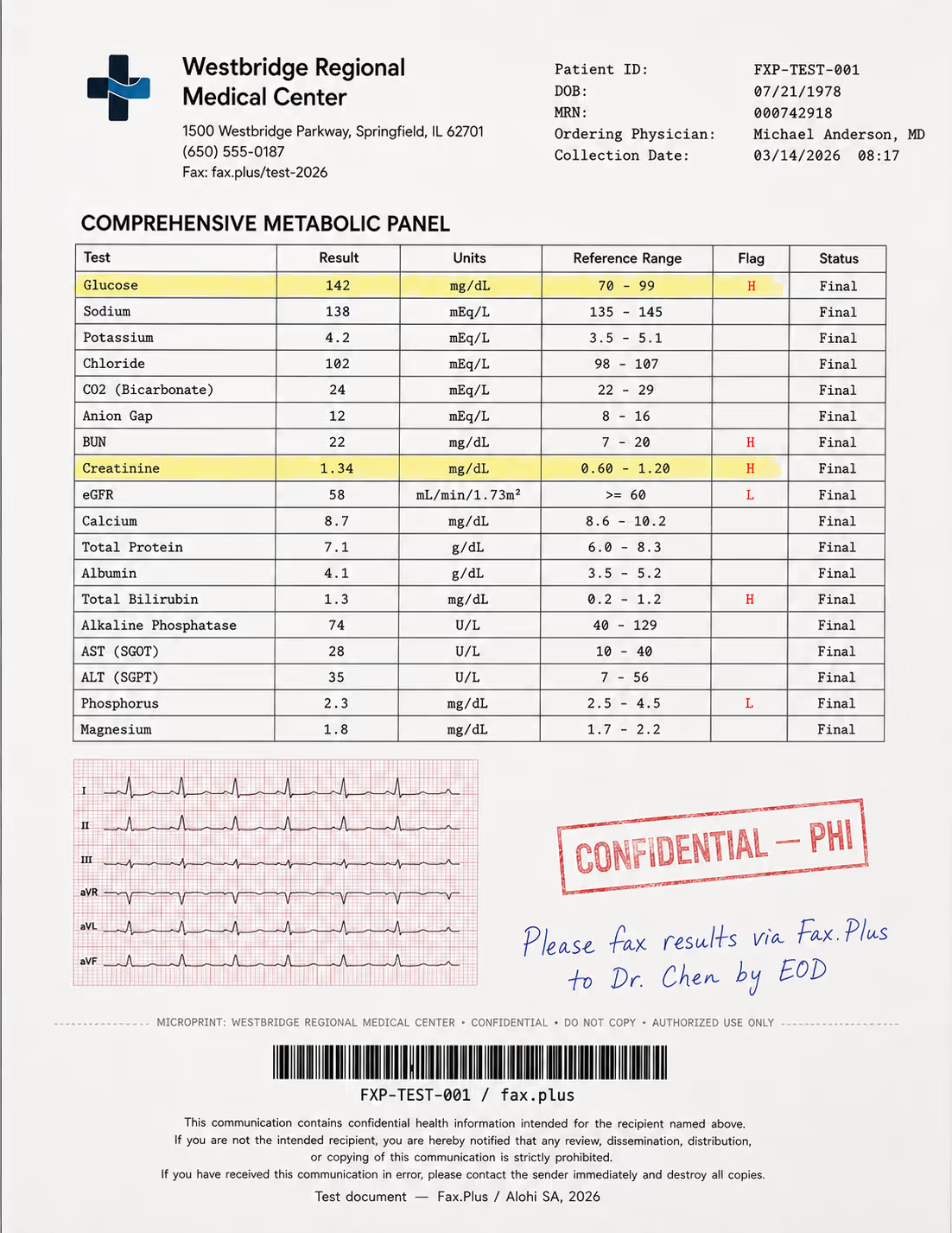
What the test document included:
- A comprehensive metabolic panel with highlighted flag values (H/L indicators)
- A 6-lead EKG strip on red grid paper included as a quality stress test
- A handwritten physician instruction in blue ink
- A CONFIDENTIAL/PHI rubber stamp with faded edges
- Patient header data and a Code-128 barcode
- A HIPAA disclaimer footer in small print
- A microprint line for anti-fraud authentication
Documo fax quality reference, compared with Fax.Plus Standard
The healthcare form is the harder test, and it splits cleanly into what Documo does well and where its single tier reaches a ceiling. The metabolic panel values, the H and L flag markers, the blue handwritten note, the PHI stamp, and the small-print HIPAA footer all come through readable, which is what matters most for a lab result. The EKG strip is where the single quality shows its limit. The fine grid behind the trace mostly drops out, and the waveform itself comes through thin and faint, losing some of its finer deflections. For a clinician reading flag values, this is fine. For a document where the waveform carries the meaning, the lack of a higher-resolution option is a real ceiling.
 Standard
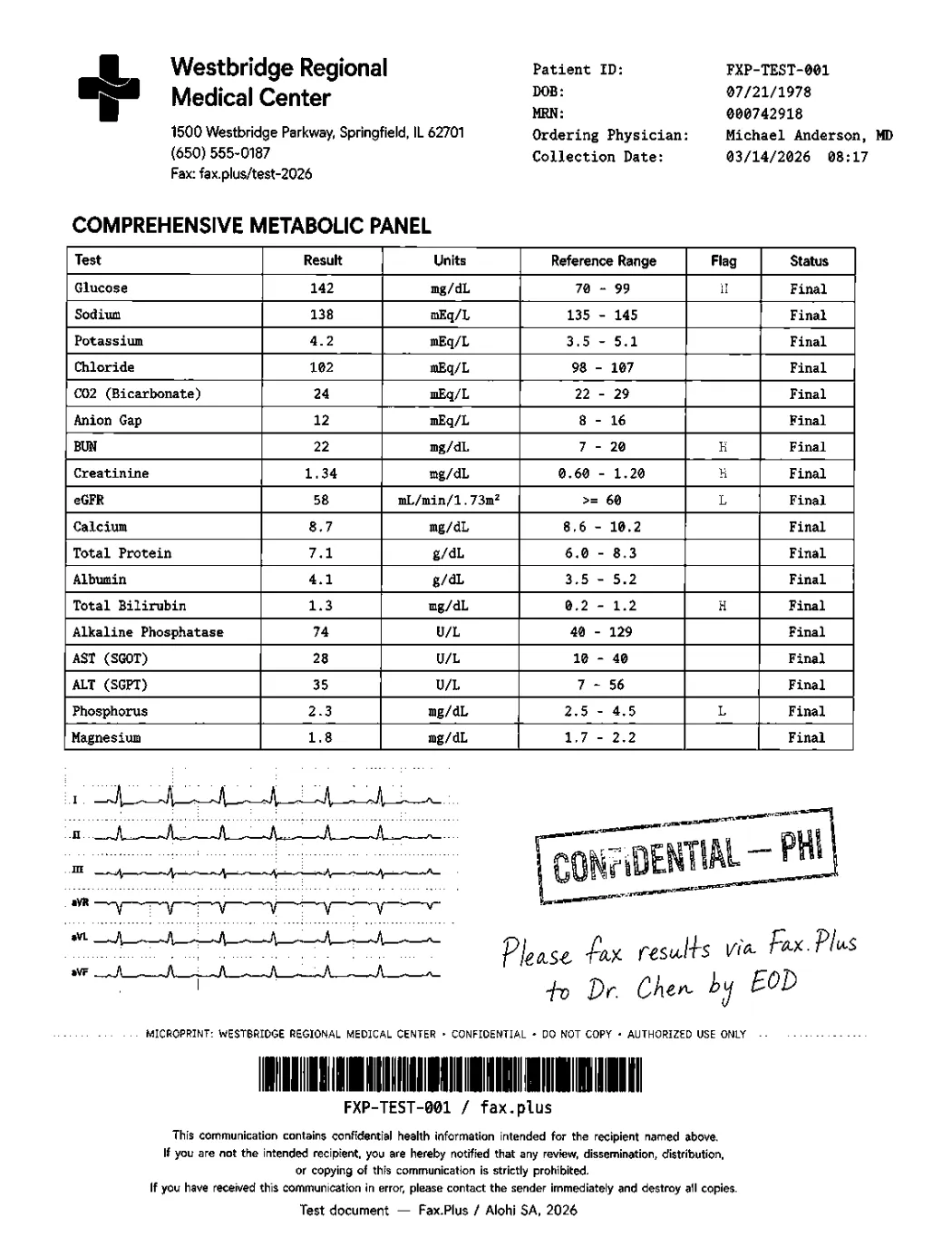
Documo fax quality reference, compared with Fax.Plus HD
For a healthcare provider, this is where fax quality stops being cosmetic. Lab values, flag markers, a physician's note, and especially fine detail like an EKG trace are part of the record, and they need to arrive intact. This is exactly where Fax.Plus performs better than Documo, holding the small details that can carry clinical meaning. On the same EKG strip, Fax.Plus Normal keeps the grid and the trace, and Fax.Plus HD goes further and holds the finer waveform deflections that Documo's single quality thins out, with the footer disclaimer staying sharp. It is the same pattern as the government form: the finer the detail, the more an HD setting earns its place, and that setting is the one Documo does not have.
 HD
HD
Send Speed
Fax.Plus Normal completed in about 1 minute, and Fax.Plus HD took 2 to 3 minutes, the cost of the higher-resolution pass. Documo's single-quality transmission landed in between, at roughly 1.5 to 2 minutes across our test runs, slower than Fax.Plus Normal and quicker than HD.
Send time is only one side of speed. On inbound, Fax.Plus also offers real-time fax streaming, which delivers each page of an incoming fax the moment it is decoded instead of holding the whole document until the final page lands, useful when a multi-page record is time-critical. Most cloud fax services deliver the document only after every page has arrived.
| Category | Documo Standard | Fax.Plus Normal | Fax.Plus HD |
|---|---|---|---|
| Resolution options | Single fixed quality, no HD or Fine mode | Standard transmission option | Higher-resolution option for fine-detail documents |
| Printed text | Legible | Readable and clean | Sharp and clean |
| Handwriting | Legible | Clear | Sharp |
| Tables and form fields | Legible, grid lines hold | Clean and readable | Sharp, with better fine-detail retention |
| Stamps | Usable | Visible and clean | Clean, with stronger detail retention |
| Watermark / seal | Dropped on the dense IRS test document | Partially retained, still faint | Full detail retained more clearly |
| Microprint line | Softer, mostly legible | Legible | Readable and clearer |
| Barcode | Usable | Crisp, with clean bar separation | Sharp and easier to scan back |
| EKG grid and waveform | Grid mostly dropped; trace thin and faint | Grid and trace retained | Grid and finer waveform deflections retained |
| Small footer text | Legible | Readable | Sharp |
| Send speed | About 1.5 to 2 minutes | About 1 minute | 2 to 3 minutes |
| Best fit | Everyday text, forms, and lab values where fine gray detail is not critical | General business faxing with clean standard output | Dense legal, government, healthcare, or fine-detail documents |
Documo is built for everyday documents, and our test confirms it holds up there: printed text, ruled tables, signatures, lab values, and flag markers all came through legible. The gap is on faint, gray, fine-detail material, and it traces back to one design choice, that Documo transmits at a single fixed quality with no user-selectable HD or Fine mode. On our two test documents that showed up as a dropped eagle watermark and a thinned EKG grid and trace. The ink survived; the gray detail behind it did not.
That is the everyday-sender tier, and on quality Documo sits in it behind the services that hold fine detail. In our hands-on testing, transmitting the same documents through Documo and comparing against Fax.Plus reference sends, Fax.Plus produced the more complete output: its HD mode held the watermark and the EKG detail that Documo's single fixed quality dropped. If we rank on fax quality alone, the order is Fax.Plus first, Dropbox Fax next, and Documo behind them, since Documo's single fixed quality is fine for everyday text but gives up the fine detail the other two keep. The difference that decides a stress document is the HD option, the setting Fax.Plus exposes on paid plans and Documo has no equivalent toggle to reach for.
We score Fax Quality 4/5: a dependable everyday sender that renders text, tables, and signatures legibly, held out of a higher score by the absence of any high-resolution mode for the dense, fine-detail documents where it matters most. The side-by-side images above are the evidence.
2. Pricing | Score 3/5
Documo is not a budget service, and its pricing makes that clear from the first plan.
The plans run on a tiered model based on pages, users, and fax numbers, billed monthly or annually. HIPAA compliance is included on every plan at no extra cost, which matters for the comparison below.
The Plans
- Solo: $25 per month, sold on annual billing only, so the real entry cost is $300 up front. 300 pages, 1 user, 1 fax number. Overages (the per-page rate once you use up your monthly pages) at $0.15 per page. Email-to-fax, fax-to-email, tags, and custom fields. There is no monthly-billed version of this plan.
- Professional: $75 per month, or $62.50 per month billed annually. 800 pages, 3 users, 1 fax number. Overages at $0.09 per page. Adds team management and electronic signatures.
- Business: $150 per month, or $125 per month billed annually. 2,500 pages, 10 users, 5 fax numbers. Overages at $0.08 per page. Adds API access and reseller tools.
- Enterprise: $300 per month, or $250 per month billed annually. 6,000 pages, 50 users, 10 fax numbers. Overages at $0.07 per page. Adds SSO (single sign-on, so staff log in through the company's existing identity system).
- Custom: Negotiated pricing for high volume, with AI-enabled workspaces, OCR, document classification, and data extraction.
There is a 14-day free trial, but no permanent free tier and no pay-as-you-go option for one-off sends. If you only need to send a fax once in a while, the closest thing to a free path is a separate online free fax service. On reliability, Documo markets a 99.9% uptime and a 99.8% delivery rate on its pricing page.
The Real Cost of Entry
The number to anchor on is the entry price, and it is steeper than it looks. The $25 per month Solo plan only exists on annual billing. In practice, that means the cheapest way into Documo is a $300 up-front commitment. If you want to pay month to month instead, the cheapest option is Professional at $75. The trial softens this a little, but once those 14 days end, there is no middle ground: you either walk away or commit to a year.
It is worth asking what that premium actually pays for. A meaningful part of it is Documo's compliance program, and HITRUST certification in particular, which costs a vendor six figures to obtain and maintain. For a large health system whose procurement team demands HITRUST proof, that investment is real value. A solo practitioner or a small clinic is almost never asked for it. They pay the same baked-in premium anyway, and that is the structural problem with a plan literally named "Solo" carrying the highest entry price in the category.
The Fine Print
One more thing before committing: read the subscription agreement. Documo reserves the right to change its prices, and the obligation to keep an eye on pricing falls on the customer. The service is provided "as is," and there is no stated refund policy, so charges are due whether or not service is restored after a disruption. None of this is unusual for SaaS. It just sits awkwardly next to the price point.
| Service | Entry Price | Pages/month | Free Option | HIPAA + BAA | Documo Solo | $25/mo (annual billing only) | 300 | No | BAA on all plans, on request |
|---|---|---|---|---|
| Fax.Plus Basic | $6.99/mo | 200 | Yes (10 pages, one-time) | From Enterprise |
| eFax Personal | $18.99/mo | 200 | No | BAA on Business+ |
| iFax Basic | $12.49/mo | 200 | No | HIPAA from Plus |
| Dropbox Fax | $15/mo | 50 | Yes (5 pages, one-time) | No BAA |
Where Documo earns back some of that premium is consistency. HIPAA is included on every plan, and a BAA is available on every plan. A healthcare buyer never has to upgrade just to stay compliant.
Most rivals cannot say that. eFax keeps its signed BAA on the Business tier. iFax starts talking about HIPAA on its Plus plan. Dropbox Fax offers no fax BAA at all. So if you are a single practitioner, this is the strongest argument for Documo's price, and it is a fair one.
The moment a team is involved, though, the math flips. Fax.Plus Enterprise includes HIPAA and a signed BAA at $79.99 per month. That comes with unlimited users, SSO, and data residency you can set yourself across 20+ regions. Getting a team onto Documo costs $150 per month for 10 users, or $300 for 50. The data stays in the US and Canada at every tier, and every extra seat is something to plan around.
Put plainly: a clinic with a dozen staff pays about half at Fax.Plus. A larger organization pays about a quarter. Neither ever hits a user cap. The 3/5 reflects a transparent price list with a genuinely buyer-friendly BAA policy, held back by the highest entry price in the category and team pricing that the competition simply beats.
3. Security and Compliance | Score 5/5
Security is where Documo invests, and the paperwork backs it up. The question for most buyers is not whether the certifications are real. It is how much of this stack they actually need.
The Stack
Security certifications are easiest to read as independent inspections. A company can claim anything about its own security; a certification means an outside auditor came in, checked, and signed off. Documo has collected several of these, all listed as certified on its own trust center.
What each one tells you, in everyday terms:
- ISO 27001 says the company runs security properly as an organization: who has access to what, how risks are tracked, what happens when something goes wrong.
- SOC 2 Type II says an auditor did not just take a snapshot but watched the controls work over a period of months.
- PCI DSS says card payments are handled safely.
- HIPAA is the US law on patient health information; Documo states compliance on every plan. HITRUST, the standout item, gets its own explanation below.
On the technical side, the protections are what you would want: documents are encrypted both while stored and while traveling between you and the recipient, the platform runs on Google Cloud, logins can require a second confirmation step, sessions time out automatically, and there is an audit trail of who did what.
It is a solid set. Worth knowing, though, that most of it is simply what the top of this category looks like in 2026: ISO 27001, SOC 2, PCI DSS, and HIPAA also appear in the Fax.Plus stack, among others. The one item that stands out is HITRUST. Audit reports and certificates are available on request rather than as public downloads, which is standard practice.
What HITRUST Is, and What It Is Not
HITRUST CSF is a private, voluntary framework. It maps HIPAA, ISO 27001, PCI DSS, and NIST controls (NIST being the US government's security standards body) into a single standard that an independent assessor can certify against. That matters because HIPAA itself has no certification body, so any vendor can simply claim HIPAA compliance.
This makes HITRUST a credible third-party signal, and a real procurement requirement at more than 90 large payers and health systems that demand it of their vendors. What it is not is a legal requirement. No law mandates HITRUST, it does not replace HIPAA, and a vendor can hold HITRUST and still fall short of HIPAA. A small practice does not need its fax provider to be HITRUST certified to stay compliant itself.
HIPAA and the BAA
First, what the BAA actually is: a Business Associate Agreement is the contract HIPAA requires between a healthcare organization and any vendor that touches patient health information. Without a signed BAA, using a fax service for patient documents puts the practice itself out of compliance, which is why this single document decides whether a fax service is usable in healthcare at all.
On that front, Documo does well. HIPAA compliance is included on every paid plan at no extra cost, and a signed BAA is available on every plan, also at no extra cost. One operational detail: the BAA is not auto-executed at signup. Documo signs it on request through its sales team.
That is a small step rather than a barrier, and it still beats most of the competition on access. eFax keeps its signed BAA on the Business tier, iFax ties HIPAA to its Plus tier and up, and Dropbox Fax lists no fax BAA at all. Documo makes the BAA reachable on the cheapest plan.
How Documo Security Compares
This is a close race, and the two stacks lead in different places. Documo and Fax.Plus both hold ISO 27001, SOC 2 Type II, PCI DSS, and HIPAA. Documo adds HITRUST. Fax.Plus names its auditor publicly, with ISO 27001 and SOC 2 Type 2 both certified by EY CertifyPoint, and adds CSA STAR certification, GDPR and CCPA compliance, and Swiss FADP jurisdiction. Account admins can also choose where data lives across 20+ regions, so US customer data stays in US data centers just as it would with Documo, while teams that need Zurich, Frankfurt, Montreal, Tokyo, or Sydney can pick those instead, and encrypted documents can be moved between data centers later.
So the deciding question is the buyer. If your procurement process requires a HITRUST-certified vendor, Documo has the edge. For everyone else, the two are closely matched on controls, and the decision comes down to three practical things.
First, cost. Documo's compliance-included plans start at a $300 annual commitment, while Fax.Plus pairs HIPAA and a BAA with unlimited users at $79.99 per month. The full breakdown is in the pricing comparison above.
Second, jurisdiction. Documo answers to US law, which protects data in patches, sector by sector. Fax.Plus operates under Switzerland's FADP, a single national law that covers all personal data by default. The data residency section below explains the difference in full.
Third, location. With Documo, data lives in the US and Canada, full stop. With Fax.Plus, a US customer's data also stays in US data centers; on top of that, admins can choose from 20+ regions worldwide and change their mind later, also covered below.
The 5/5 reflects certification breadth at the top of the category; the trade-offs sit in price and data residency, not in the security controls themselves.
4. Usability | Score 4/5
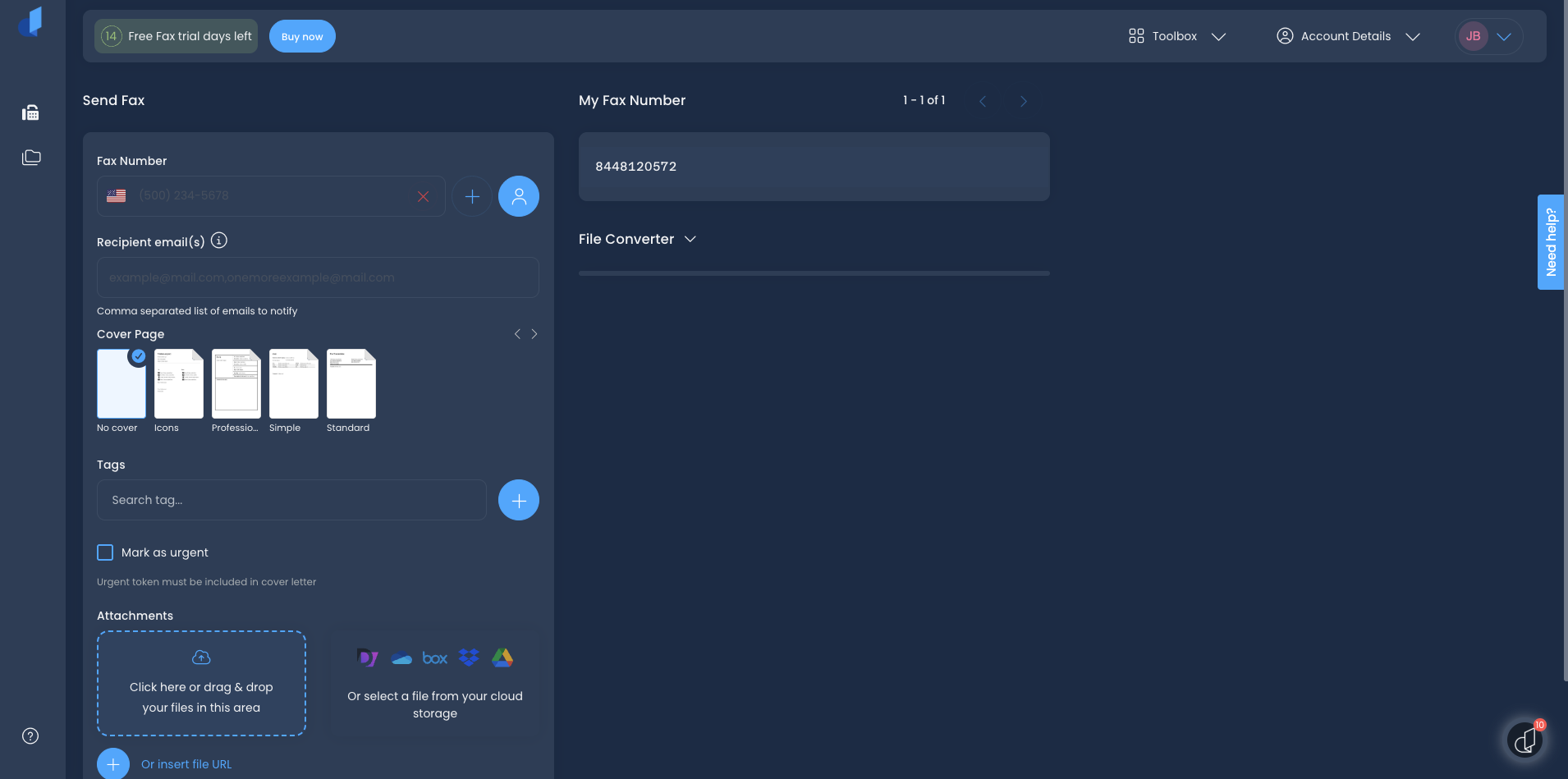
The first thing we noticed after logging in was how quickly the core workflow clicked into place. Submitting a fax from the web portal takes under a minute: attach a file, enter the number, add a cover page if needed, send. The dashboard is uncluttered, the fax history loads fast, and for a clinic front desk sending a dozen referrals a day, this is a surface they could hand to a new hire without much training. G2 users back this up with a 9.4 out of 10 ease-of-use score, and Capterra reviewers consistently describe the interface as the part that surprised them in a good way.
One trait runs through the whole portal: it takes getting used to. Even as people who test these platforms all the time, we caught ourselves hunting for where a feature lived, and a few actions sit a click further than they should. None of this makes it a bad platform, and once it is familiar it works well, but expect a short learning curve before it feels natural.
The Web Portal
What Works
The admin layer is where the web portal gets impressive. Sub-accounts, user permissions, a "log in as" function for troubleshooting, and reseller controls for partners managing faxing on behalf of clients: it is a proper management console, not a bolted-on afterthought. Email-to-fax worked exactly as expected in our testing, and the routing and tagging tools gave us no trouble.
Where We Hit Friction
Two friction points appeared in our own workflow, and both turned out to match what other users have been reporting for some time.
The first is the Windows print driver. When we tried to print multiple separate documents to the fax driver in a single job, it would not combine them. Each document had to be submitted as its own fax. This is a known limitation that shows up across Capterra and Software Advice, where one reviewer described losing the ability to send multiple documents through the print driver as, in their words, "a feature we had in our old system." For a high-volume practice printing from its EHR (electronic health record system) and from Word in the same workflow, this adds up to real friction every day.
The second is the save behavior in the send form. After you hit save, the window does not close, which creates confusion about whether the action registered. At least one reviewer called this out, and we hit the same pause ourselves the first time. It is a small thing, but small things slow down high-frequency workflows.
Mobile
Mobile is the weakest part of the experience, and we want to flag something we ran into ourselves before we even reached the app.
No Android App, and Brand Confusion to Watch For
There is no Documo Android app. Android users are limited to the mobile browser. When we went looking for one the way any user would, Google's AI Overview pointed us to an "mFax" app on Google Play and told us to sign in with our Documo credentials. Here is the part that is easy to get wrong: mFax is not an unrelated app, it is Documo's own earlier brand. The product is marketed as "mFax by Documo," and Documo's own materials state that "mFax is now Documo." The real issue is the brand split itself. Documo still trails an older mFax footprint across the web and the app stores, so an Android user, or an AI assistant acting on their behalf, can land on the legacy product with a login that may not match their current account. Be skeptical of third-party software directories here too, since some list Documo as having both iOS and Android apps, which is wrong on the Android half.
The iOS App
Documo has an iOS app, but it does not update or promote it. The app is absent from the main documo.com site, the old mobile-app page returns a 404, and the only download link sits in the help center. It covers the basics, sending with attachments, camera scanning, contacts, and history, but it has not been updated since April 2025 and sits at 3.7 stars from 9 ratings on the US App Store.
It works, but the recurring complaint, on the App Store and elsewhere online, is the app crashing on send. We hit that crash once across a long test session, so it is not constant, but it is documented. Mobile is a category-wide weak spot anyway: Dropbox Fax has no app at all, and eFax and iFax draw mixed reviews. An unmaintained iOS app is a clear sign of where Documo does not put its attention.
Sub-Account Complexity
For larger deployments, the sub-account hierarchy is powerful but takes time to learn, which reviewers on G2 and Capterra echo. The one documented snag is enterprise provisioning: SCIM does not map cleanly onto sub-accounts, and admins have reported reassigning users through the API to work around it. We did not hit it in a standard test account, but multi-location teams should expect it.
How Documo Usability Compares
For office and clinic teams working primarily from a browser and email, Documo's web portal is a real strength, and the setup experience is faster than most. The picture changes once you put it next to the rest of the field, because each rival leads on a different surface.
Dropbox Fax is the simplest desk-based option, but it offers no mobile app at all, so Documo's iOS app, dated as it is, still clears that bar. eFax covers web and mobile, and its newer portal has shed the old legacy look, though it runs slow and is not fully polished yet, and its apps draw mixed reviews. iFax comes from mobile-first roots and ships capable apps on both platforms, the thing Documo is missing, though its credit system takes getting used to. ComFax sits at the consumer end: a mobile-first app with fixed output quality and none of the admin depth a clinic team needs. And Fax.Plus is the one that covers every surface at once: native apps on iOS and Android, desktop apps for macOS and Windows, web, and email-to-fax, with camera capture built in, a consistency TechRadar has pointed to as a strength.
So the usability question depends on where your team works. Browser and email only: Documo holds its own. Anything involving phones, especially Android phones, and the field passes it. The 4/5 reflects a clean portal, a capable admin layer, and a user experience that earns its G2 ease-of-use score, marked down by the missing Android app, the one gap that affects a real share of users every day.
5. Customer Service, Cancellation and Account Control | Score 5/5
This is the area where Documo most clearly outperforms its competitors, and it earns full marks.
Support Channels
Documo runs a US-based support team reachable by live chat, phone, and email, with fast response times that show up repeatedly in user feedback. Across G2 and Capterra, the support team is the single most praised aspect of the service, with users calling out quick responses and helpful onboarding by name. In a category where support reputations are often mixed, that consistency stands out. It is the clearest contrast with the legacy end of the market, where eFax in particular draws long-standing complaints about retention tactics and a call-to-cancel flow, and where Dropbox Fax offers form-only support with no phone or chat line.
Account Control
Account control is mostly simple, with one asterisk. From the Professional plan up, Documo bills month to month with no long-term contract required, and cancellation runs through the billing menu in the customer portal, with no notorious cancellation maze of the kind that plagues some legacy providers. The asterisk is the Solo plan, which is sold on annual billing only, so the lightest users are the ones locked into the longest commitment. A 14-day free trial that requires no payment details lets new buyers test before committing, and porting an existing number in is supported for a one-time $15 fee, typically completing in 7 to 10 business days.
What Users Report
Two smaller frictions surface in user feedback. Managing fax numbers is not fully self-serve: users report that removing a number and later adding it back usually means contacting support rather than handling it in the portal. And the sub-account hierarchy, while powerful for resellers and multi-location teams, takes time to learn. Neither undermines the core experience, and both are minor next to the support quality.
How Documo Account Control Compares
Documo sets the bar for this category. The combination of responsive, multi-channel support and a clean, no-contract cancellation path is better than most rivals we have reviewed, several of which run form-only support or call-to-cancel flows. Fax.Plus matches the no-maze posture, runs multi-channel support, and supports porting your number both in and out, so the two are close at the top. The 5/5 reflects a genuine, consistently reported strength that competitors in this series do not match.
6. Data Residency and Retention | Score 3/5
Security is not only about encryption and certificates. For many organizations, the bigger questions are where fax data is stored and how long it is retained, and this is where Documo's otherwise strong compliance story narrows.
Documo's infrastructure is US-based by default, with documented support for Canadian data regulations for organizations that need to keep data in Canada. Its published subprocessors (the third-party companies a vendor relies on to run its service), Google Cloud, Mailgun, Salesforce, Stripe, and PandaDoc, are all US-based, which reinforces the US-centric footprint. That covers the two markets most of its customers operate in.
What it does not offer is broad, user-selectable multi-region residency. For a US or Canadian healthcare organization, that is rarely a problem. For an international team, or an organization in a jurisdiction with strict data localization rules, the lack of region choice is a real constraint. The US-centric posture extends to sending, too: per Documo's own help center, international outbound faxing is disabled by default on all standard accounts, covers only certain countries, carries a per-page surcharge, and has to be enabled by contacting the support team. The subscription agreement is also worth a read on retention: it allows Documo to delete all stored content and data on termination without liability, so an exiting customer should export anything they need to keep before closing the account.
How Documo Data Residency Compares
The transparent end of the market looks like user-selectable data residency across many regions. Fax.Plus, for example, lets account admins select from more than 20 regions, including several US locations alongside the EU, Canada, Australia, Japan, and Switzerland, and sends to 180+ countries out of the box with no activation step.
Why Does Swiss Jurisdiction Matter?
The distinction worth understanding is that storage location and legal jurisdiction are two different things. A US clinic on Fax.Plus can keep its data in US data centers, exactly as it would with Documo, while the provider itself operates under Swiss law. And the difference between US and Swiss law is bigger than it sounds.
The US has no single federal privacy law. Protection comes in patches: HIPAA covers health information, other sectors have their own rules, and beyond that it varies state by state. Switzerland's FADP works the other way around. It is one national law that covers all personal data by default, was revised in 2023 to match the GDPR's standards, and the EU officially recognizes Switzerland as an adequate jurisdiction, meaning European data can flow there freely. In practice: a provider under FADP is held to a comprehensive privacy law for everything it touches, not just the slice a sector law happens to cover.
The control goes a level deeper than picking one region: admins choose separate storage locations for live data and for backups, directly from the account settings, so a team can keep working data in a US region while its backups sit in, say, Switzerland or Canada. And the choice is not permanent: migration between regions runs from the same settings panel, so if the organization later picks up EU clients or runs into a localization requirement, the data can follow without switching vendors or filing a support ticket. With Documo, US-and-Canada is not a choice but the ceiling.
For a domestic healthcare buyer, Documo's footprint is enough. For organizations with EU clients, international recipients, or sector localization rules, it stops short. The 3/5 reflects clear US and Canadian coverage, all-US subprocessors, opt-in international sending, and no broader region choice.
7. Enterprise, API and Healthcare Automation | Score 5/5
This is the part of the product Documo builds its pitch around. Much of it holds up, though most of the depth sits behind the higher tiers, and a few of the claims deserve a closer look.
API Access
Documo publishes a REST API with OAuth 2.0 (the standard way applications grant each other secure access) and API key authentication, webhook support (automatic notifications to your other systems when a fax arrives or completes), and documentation that gets good marks from developers; one Gartner Peer Insights reviewer called it among the best they had worked with, though that is a single voice rather than a pattern. The bigger practical question is access: the API begins on the Business plan at $150 per month, so a small team that just wants to automate faxing has to commit to a business-grade tier first. iFax, by contrast, exposes a self-serve API on a lower-cost plan, so a developer who only needs basic programmatic sending can start cheaper there, though without Documo's compliance depth.
Document Automation
Beyond faxing, Documo's higher tiers add intelligent document processing: OCR, document classification, and data extraction inside AI-enabled workspaces. For a healthcare or operations team handling heavy inbound fax volume, that automation is the actual selling point, not the faxing itself. Worth knowing before you budget for it: these features live on the top tiers, so the teams most likely to want them are also signing up for the most expensive plans. And one transparency note for buyers evaluating where their data flows: Documo markets AI document processing but does not name a dedicated AI or LLM subprocessor on its public subprocessor list, so the processing appears to run within its Google Cloud environment rather than through a named third-party model provider. Teams with strict vendor-disclosure requirements may want to confirm this directly.
One thing Documo's pipeline does not change is when a document becomes visible. Processing starts after the full transmission completes, so a 40-page referral packet is invisible until the last page lands. For emergency departments and intake teams, that wait matters. This is where Fax Streaming takes a different approach: Fax.Plus delivers each page in real time as it is decoded, so staff can start working a referral the moment page one arrives, and the feature is included in Enterprise accounts rather than sold as an automation add-on.
Healthcare Integrations
Healthcare reviewers mention the practice-management and EHR integrations, and VoIP resellers cite the fax bridges and SIP trunk support. The usual caveat applies: much of this feedback comes from vendor-invited reviews, so treat it as directional. There is also a documented rough edge for larger deployments: user provisioning through SCIM (the standard for syncing staff accounts automatically from a company's identity system) does not map cleanly onto sub-accounts, and at least one administrator reported having to use the API to reassign users manually.
MCP and AI Workflows
The bar for enterprise fax in 2026 is rising. A newer expectation is an MCP server, which lets developers wire faxing directly into AI agent workflows and tools like Claude or the OpenAI Agents SDK. Documo's AI is document processing (OCR and extraction), not an agent-callable interface, and it does not publish an MCP server. Fax.Plus already ships one, so for teams building agent-driven document workflows, that is the gap most likely to matter. None of the other services in this series, eFax, iFax, or Dropbox Fax, publishes one either.
How Documo API Compares
A maintained REST API, strong documentation, and an intelligent document processing layer put Documo ahead of consumer-only fax services like Dropbox Fax, and the EHR integrations are a real asset for healthcare automation. The trade-offs are the gates: the API at $150 a month, the automation on the top tiers, and no MCP path for agent-driven workflows. Teams comparing programmatic options will weigh those against iFax's cheaper self-serve API on one side and Fax.Plus's API-plus-MCP path on the other. The 5/5 reflects the depth of the developer and healthcare offering; just know that most of that depth is priced accordingly.
Alternatives to Documo
Fax.Plus - Best overall Documo alternative
Modern cloud fax from $6.99 per month, with a free tier to test and no annual lock-in. It matches Documo's core certifications (ISO 27001 and SOC 2 certified by EY CertifyPoint, plus PCI DSS and CSA STAR), adds data residency across 20+ regions under Swiss FADP jurisdiction, and ships native apps on iOS, Android, macOS, and Windows plus an API with MCP support. For healthcare teams, the Enterprise plan pairs HIPAA and a signed BAA with unlimited users at $79.99 per month, about half of Documo's 10-user Business plan, and includes Fax Streaming for real-time, page-by-page delivery.
Best for: Teams that want a comparable compliance stack without the entry price, from solo users to large enterprises.
iFax - Best for low-cost HIPAA on a lighter plan
A lower-cost option for healthcare teams that want HIPAA without a business-grade commitment, with HIPAA marketed from its Plus tier and a self-serve API. Watch the send-only Basic plan, the credit multipliers, and a security page that puts SOC 2 and ISO 27001 on its Pro tier with no named auditor.
Best for: Small healthcare practices and developers that want HIPAA marketing and an API at a lower monthly rate.
eFax - Best-known legacy brand
The most recognized name in the category, with broad features, but a higher $18.99 entry, a BAA gated to its Business tier, fixed-quality output, and a long-standing reputation for retention tactics and a difficult cancellation flow.
Best for: Buyers who specifically want the incumbent brand and do not mind paying for it.
FAQs
What is Documo?

Documo is a cloud fax and document automation platform built for healthcare and regulated business, formerly known as mFax. It handles online faxing across a web portal, email-to-fax, and an API, with HIPAA compliance included on every paid plan and a BAA available on request. On higher tiers it adds document automation such as OCR, classification, and data extraction.
Does Documo have an API?
Yes. Documo offers a REST API with OAuth 2.0 and API key authentication and webhook support, and its documentation is well regarded by developers. API access is available on the Business plan and above, starting at $150 per month. It does not publish an MCP server for AI-agent workflows.
Does Documo have an Android app and can I fax from my phone?
No. Documo's mobile app is iOS-only, and there is no Documo Android app; Android users work through the mobile browser. Be careful with app store searches and AI-generated answers here: the "mFAX" app on Google Play belongs to mfax.to, an unrelated company, and Documo credentials will not work in it. The iOS app covers sending, camera scanning, and history, but it carries a 3.7-star rating and has not been updated in over a year. For a stronger mobile experience, the Fax.Plus app on iOS and Android supports camera capture and scan-to-fax. If you only need a quick send, an online free fax service can also cover one-off faxes.
What is the difference between mFax and Documo?
mFax is a product of Documo Inc. The two names refer to the same company. Documo markets the broader platform including mFax for faxing, mSign for e-signatures, and mDrive for cloud storage. The mfax.io domain remains active as a consumer entry point.
Is Documo HIPAA compliant?
Yes. HIPAA compliance is included on every paid Documo plan at no extra cost, and a signed Business Associate Agreement is available on every plan, signed on request through Documo's sales team. Documo also holds HITRUST, ISO 27001, SOC 2 Type II, and PCI DSS certifications per its trust center. Buyers who want a HIPAA-compliant fax service at a lower entry price can compare alternatives that include a BAA on cheaper tiers.
Is mFax the same as Documo?
Yes. mFax rebranded to Documo. The active product and pricing now live at documo.com, though the original mfax.io domain still exists. Note that a separate, unrelated mobile fax app at mfax.to also uses the "mFax" name and is operated by a different company, Octagon Lab.
How much does Documo (mFax) cost?
Documo starts at $25 per month for the Solo plan (300 pages, 1 user, 1 fax number), but the Solo plan is sold on annual billing only, so the real entry cost is $300 up front. Higher plans are Professional at $75, Business at $150, and Enterprise at $300 per month, with annual discounts on those tiers and custom pricing above that. There is a 14-day free trial but no permanent free tier. For a lower-cost path, Fax.Plus starts at $6.99 per month with a free fax plan and no credit card required.
What is the best Documo alternative?
For healthcare teams, the Fax.Plus Enterprise plan offers HIPAA and a signed BAA with unlimited users at $79.99 per month, roughly half the price of Documo's 10-user Business plan, plus multi-region data residency and a dedicated MCP server. For lighter use, the Basic plan starts at $6.99 with a free tier to test. iFax is a lower-cost option with HIPAA marketed from its Plus tier, and Dropbox Fax is the cheapest path for occasional senders who do not need HIPAA.


Featured Articles
See All





Confédération Suisse
Confederazione Svizzera
Confederaziun Svizra
Swiss Confederation
Innosuisse - Swiss Innovation Agency