iFax Review 2026: Features, Pricing, and Real-World Performance
iFax is a mobile-first online fax service from Amplify Ventures, in the market since 2008 and serving more than 5 million users. It sends faxes fast and markets HIPAA support with a signed BAA on its paid HIPAA tier, but the pricing mechanics and billing reputation need careful reading before you commit.


- Fax is a mobile-first fax service with broad app, HIPAA, and API support.
- Test output was fast, but Standard quality showed grey background, dithering, and fine-detail loss.
- The iOS app works well, but Android and web feel less consistent.
- Pricing needs careful review due to send-only Basic, auto top-up, credit multipliers, and cancellation issues.
- Best fit for HIPAA-aware practices and iOS-first users; others should compare alternatives first.
White background throughout, mostly clean rendering across the form. Table grid lines and handwriting are clear. The eagle seal watermark is present with minor compression on the finest detail. The microprint line is readable. Both stamps are clean with minor softening on the finest ink edges. The overall quality is visibly cleaner than iFax Standard and broadly comparable to iFax HD+.
Is iFax Worth It in 2026?
iFax works best for small healthcare practices that need a HIPAA path at a lower monthly rate than enterprise-tier providers, developers who want a self-serve REST API with no sales call, and iOS-first users who prioritize mobile fax quality.
It is less compelling for buyers who want predictable billing, need EU data residency, or require AI-agent integration. The consumer and B2B review records diverge significantly, which is the key context for reading the sections below.
About iFax
iFax is operated by Amplify Ventures Limited, doing business as iFax, according to its current Terms of Use. The company also states on its pricing page that it is used by “5 million people across 20,000 companies.”
The product surface is broad. iFax runs on the web, native iOS and Android apps, native macOS and Windows desktop apps, a Google Workspace add-on, and a public REST API. It positions itself around healthcare and developer use cases, layering AI document features (OCR, data extraction, generative-AI chat) on top of standard fax.
Hosting sits across two of iFax's own pages. The security page states "iFax is built on Amazon Web Services (AWS) and has its primary data center in Oregon.” Other facilities are spun up across other domestic and international regions upon demand.
How We Reviewed iFax
We reviewed iFax using four evidence layers:
- Hands-on product testing. We created an account, installed the iFax desktop apps on macOS and Windows, tested the mobile apps on iPhone and Android, and worked through the web portal. We sent live faxes from each surface to evaluate the full user experience across desktop, mobile, and browser-based workflows.
- Fax-quality testing. We tested iFax using two fixed, synthetic, real-world-style source documents: one government and legal document and one healthcare lab results form. The same source files were used across testing so we could evaluate output quality consistently. Across the tests, we assessed the practical details that matter in real document workflows, including readability, layout preservation, handwriting, fine print, stamps, signatures, barcodes, dense tables, and mixed font sizes. No real personal, medical, tax, company, or patient data was used in the fax-quality tests.
- Billing and account-control review. We monitored the billing flow from signup through the free trial period and mapped the cancellation path directly, including the steps required to manage the account after registration.
- Business-readiness review. We checked iFax’s public materials for security and compliance claims, data residency and retention information, API and developer resources, healthcare-readiness details, and enterprise automation support.
We then scored iFax across seven areas: fax quality, pricing, security and compliance, usability, customer service and account control, data residency and retention, and enterprise, API, and healthcare automation.
1. Fax Quality | Score 3/5
iFax fax quality falls below eFax in our testing. iFax Standard carries heavier grey background artifacts and more pronounced fine-detail loss than eFax Standard, and iFax HD+, the highest quality tier at 3 credits per page, does not fully match Fax.Plus Normal output on clinical documents. The 2/5 score reflects the quality gap at the default Standard tier and the limited headroom even at the highest tier.
iFax offers four quality tiers: Low (0.9 credits/page, plain text), Standard (1 credit/page, everyday documents), HD (2 credits/page, detailed text and forms), and HD+ (3 credits/page, images and fine detail). We tested Standard and HD+ to cover the full quality range from default to maximum.
Government and Legal Document Fax Test
The first test used a simulated IRS Form 2553, a US government tax election form. Documents like this are common in legal, financial, and real estate workflows: signed agreements, tax filings, and multi-party authorization forms where every detail needs to arrive intact.
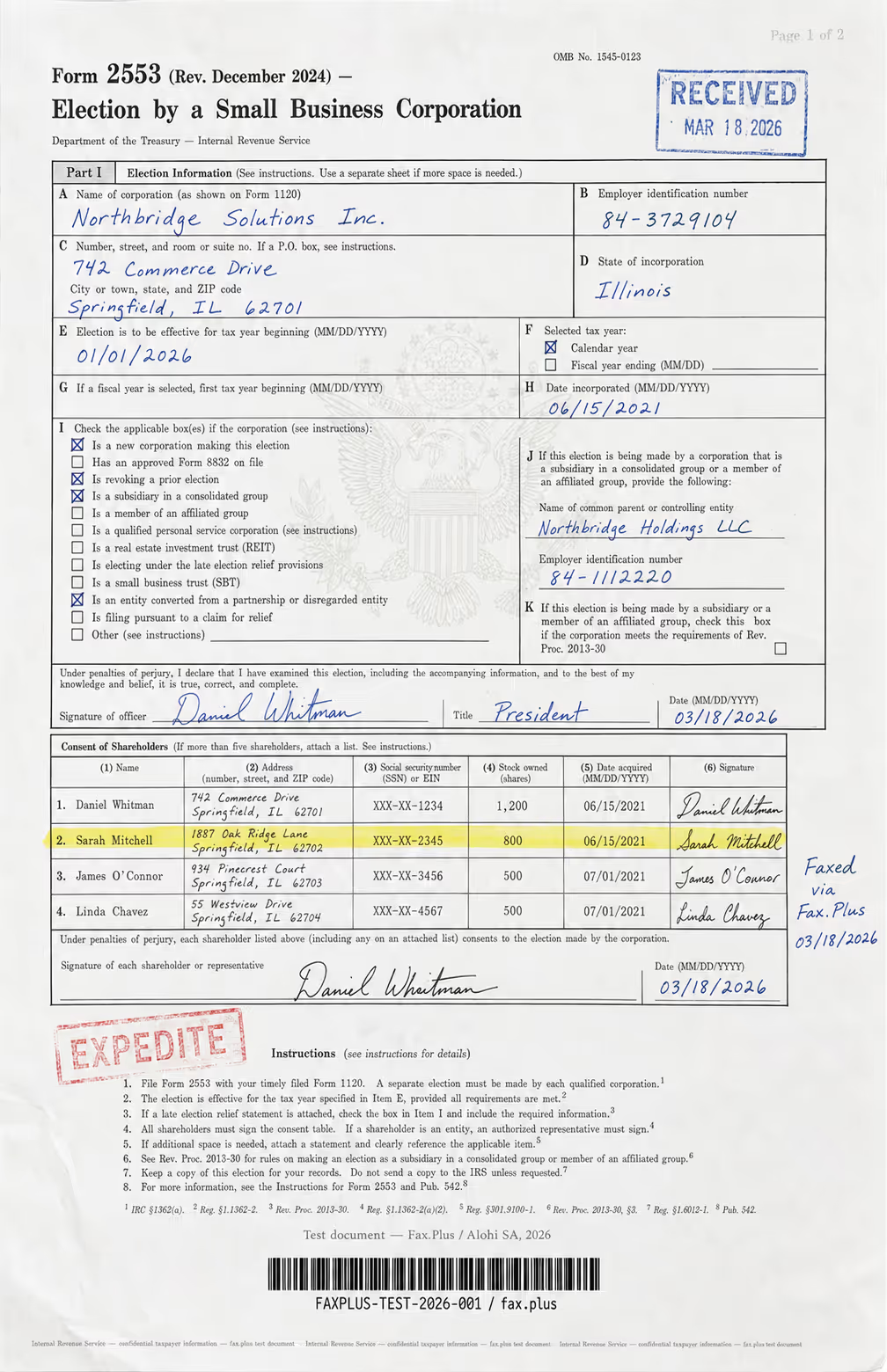
What the test document included:
- Handwritten signatures and a cursive-style officer name
- An official-style RECEIVED stamp with date
- An EXPEDITE rubber stamp with faded ink edges
- A US government eagle seal watermark in the center
- A highlighted shareholder table row
- Mixed font sizes across headers, body text, and fine print
- Dense tabular data across multiple columns
- A microprint line at the bottom for anti-fraud authentication
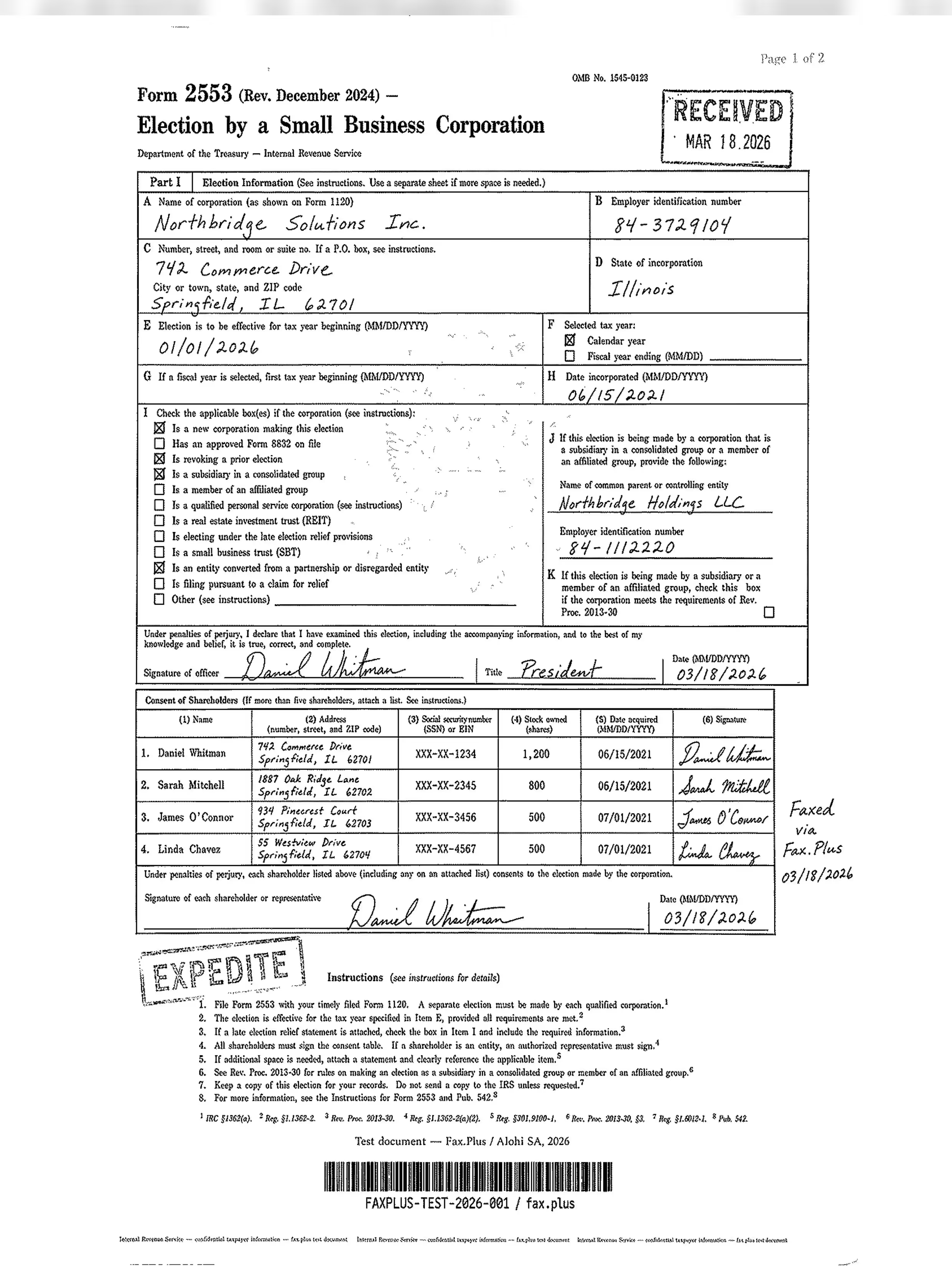
iFax Standard
Standard iFax output shows a uniform grey background cast across the entire page, with wave-like dithering and noise artifacts throughout. The main form content (field entries, checkbox states, the signature, and the shareholder table) remains legible, but fine detail is substantially degraded. The eagle seal watermark is largely lost to the grey background, the microprint line dissolves into noise, and the EXPEDITE stamp's faded ink edges are indistinguishable from the surrounding grey wash. The RECEIVED stamp reads but loses edge definition.
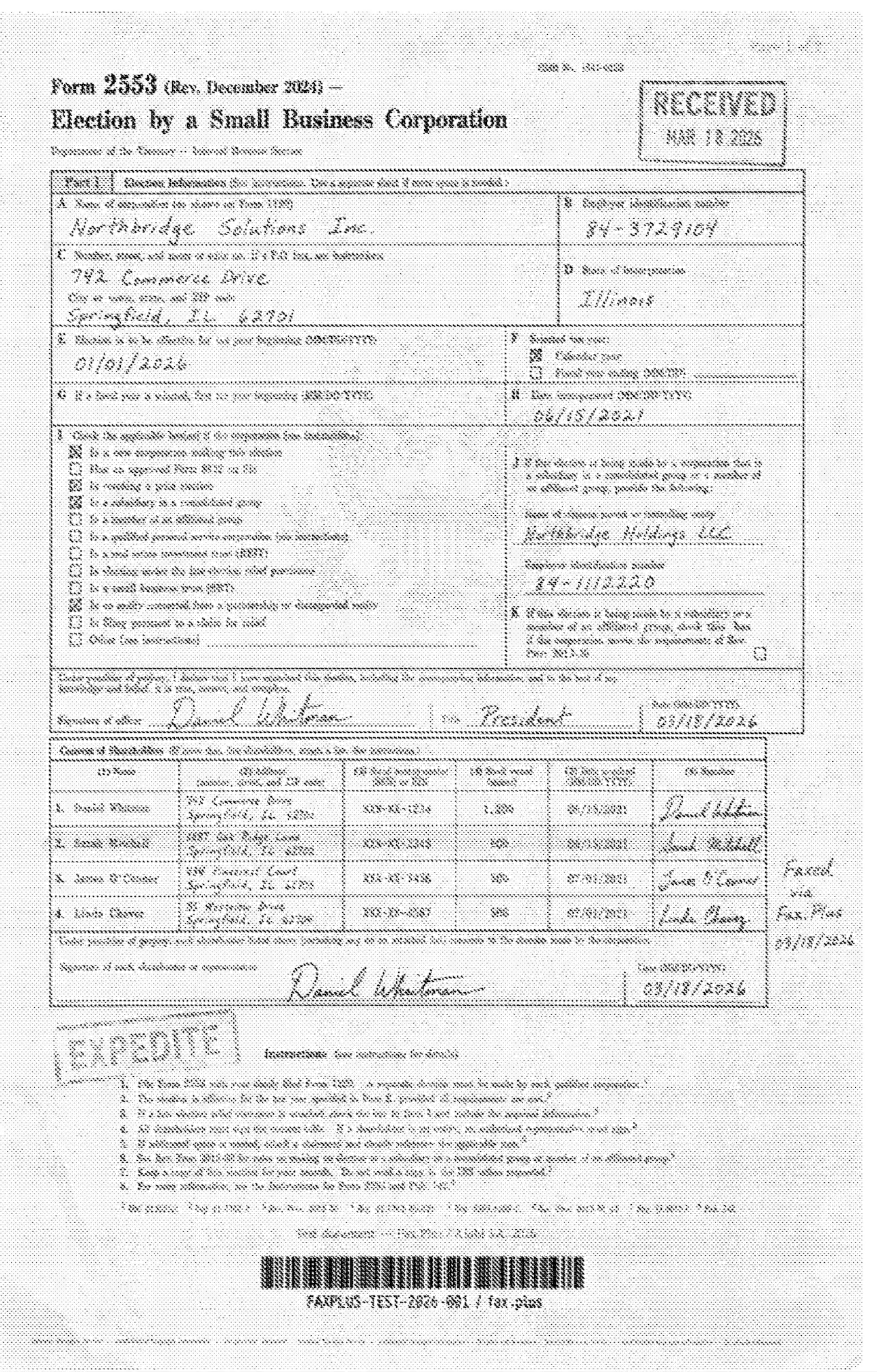
Fax.Plus Standard (reference)
White background throughout, mostly clean rendering across the form. Table grid lines and handwriting are clear. The eagle seal watermark is present with minor compression on the finest detail. The microprint line is readable. Both stamps are clean with minor softening on the finest ink edges. The overall quality is visibly cleaner than iFax Standard and broadly comparable to iFax HD+.
 Standard
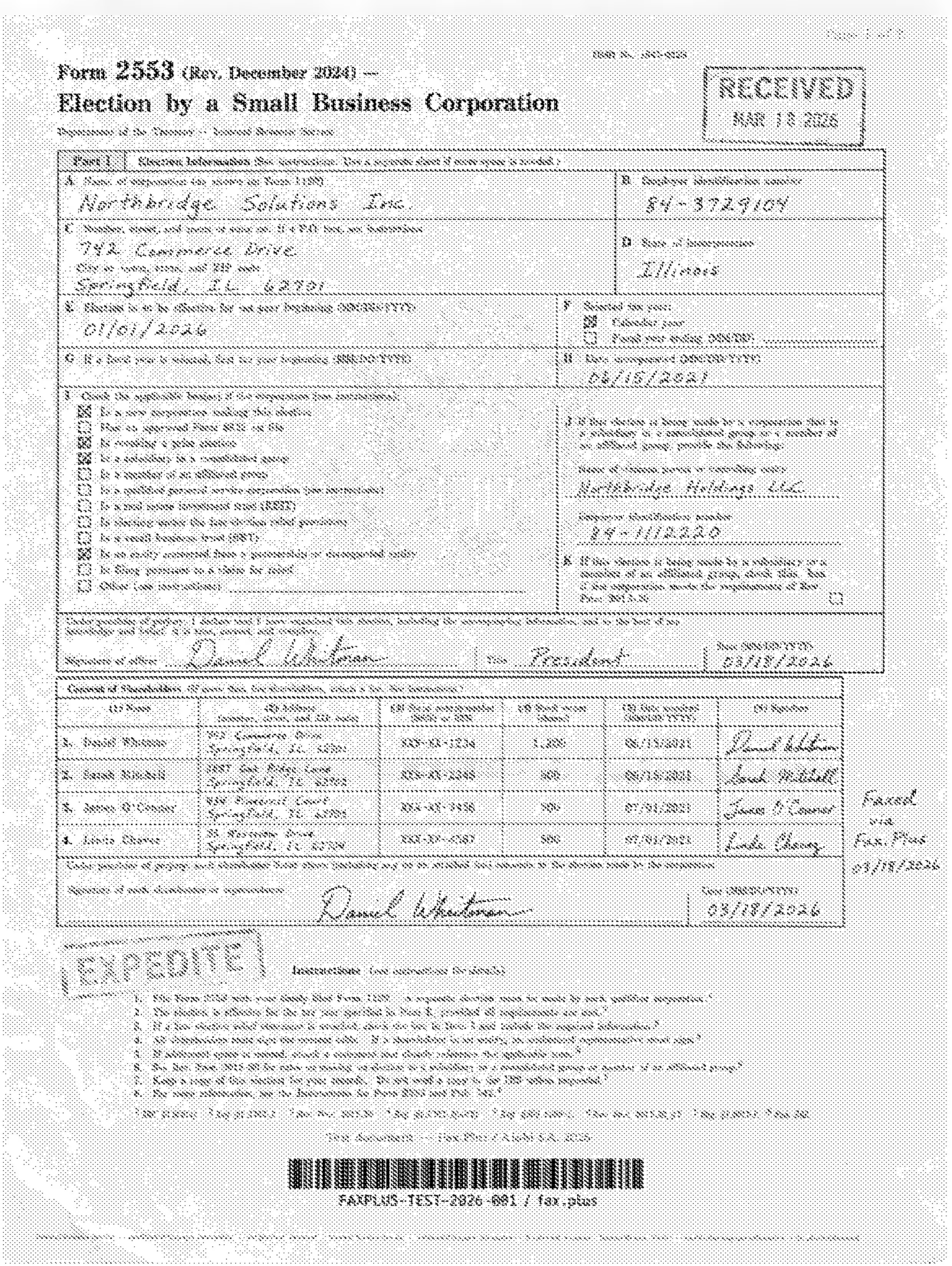
 Standard
iFax HD+
The quality improvement from Standard to HD+ is substantial and immediately visible. The background is mostly white with greatly reduced noise, table grid lines are sharp, checkbox states are clean, and the handwritten signature retains natural variation. The RECEIVED and EXPEDITE stamps are clean with faded ink edges better preserved. The eagle seal watermark appears faint but recognizable. The microprint line is faint but traceable. For text-heavy legal and government documents, iFax HD+ produces genuinely clear, usable output.
Fax.Plus HD (reference)
Excellent rendering across all elements. Clean white background, sharp table lines and checkbox states, handwriting with full natural variation preserved. Both stamps are clean with faded-edge ink detail intact. The eagle seal watermark is fully visible. The microprint line is readable. The barcode is sharp. This is the cleanest output in our test set on this document type, and the baseline the iFax tiers are measured against.
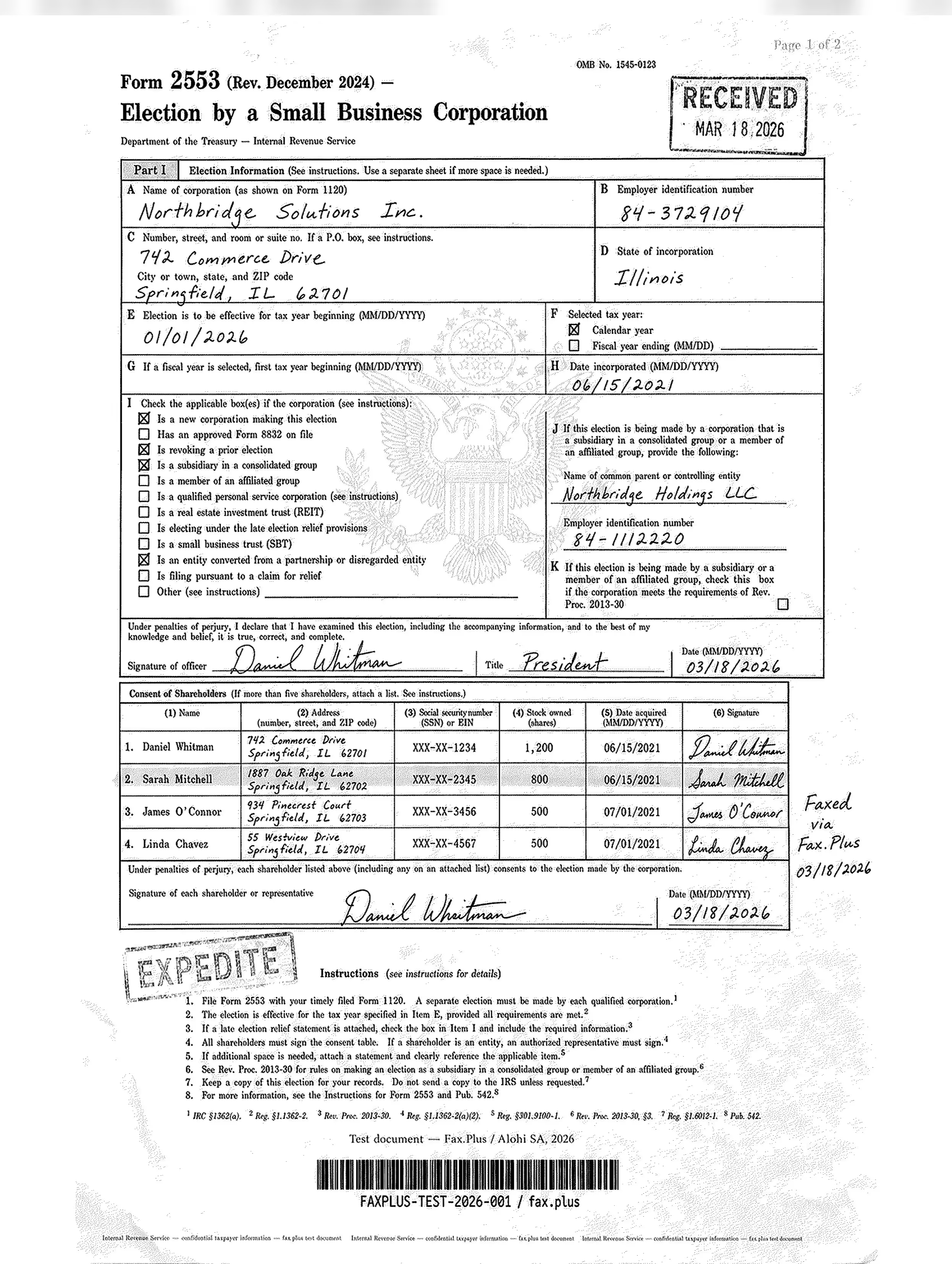 HD
HD
 HD+
HD+
Send Speed
iFax Standard completed in approximately 1 minute. iFax HD+ completed in approximately 2 minutes. Both match Fax.Plus at equivalent quality tiers. iFax also offers Priority delivery at 2 credits per page, which estimates roughly one minute faster than Regular; in our testing, Regular delivery was already fast enough that the difference was marginal.
Healthcare Document Test
The second test used a simulated lab results form from a fictional medical center. No real patient data was used. The document was designed as a stress test rather than a literal workflow scenario: in clinical practice, fax workflows rarely include diagnostic imaging, but the embedded EKG strip on red grid paper was included deliberately to push the limits of what each service can render. What is typical is the combination of lab data, flag values, handwritten physician notes, and PHI stamps, all of which appear regularly in real healthcare fax workflows.
The image below shows the master document used in this test, transmitted without modification to every service tested. All names, patient identifiers, and clinical data are fictional. No real patient information was used.
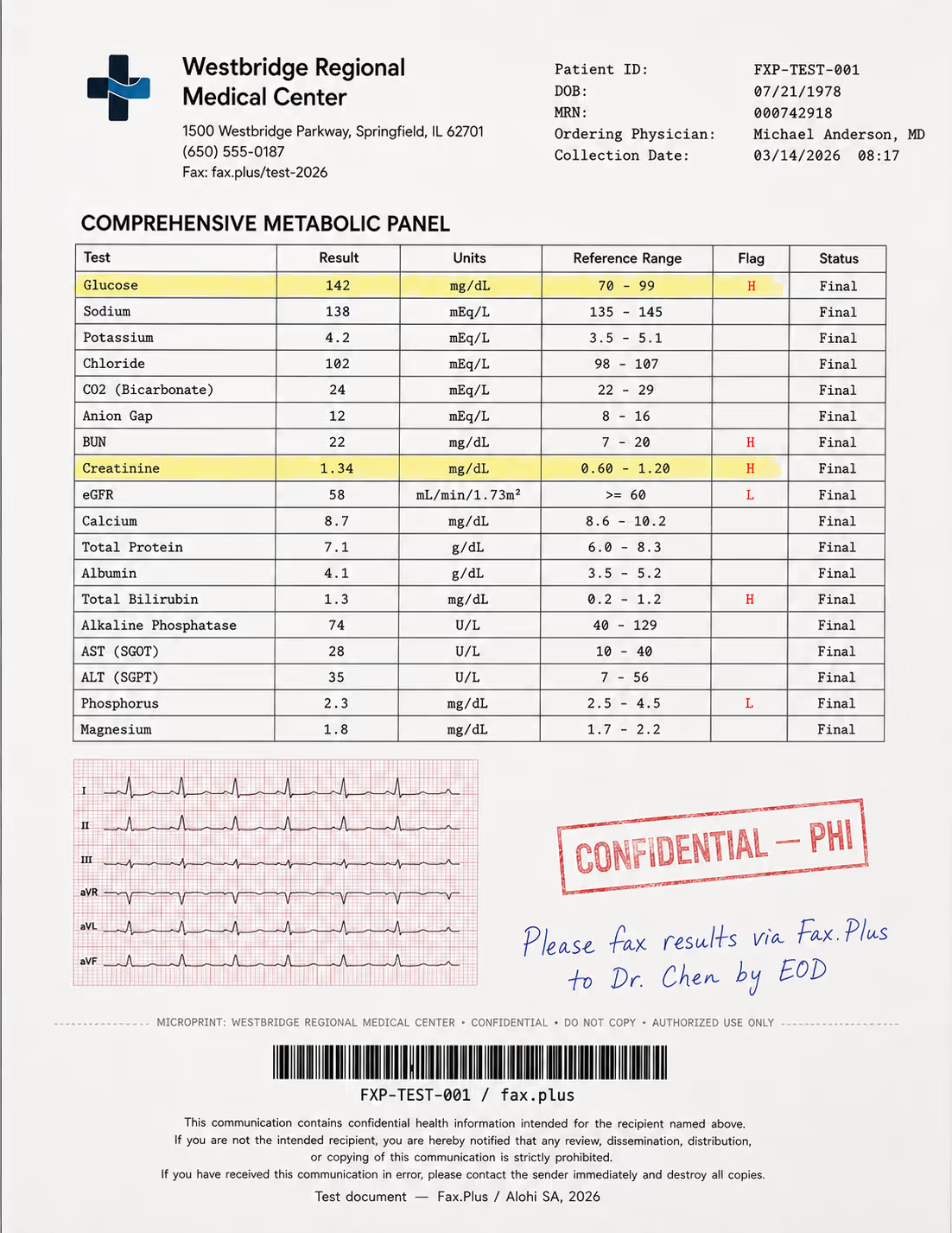
What the test document included:
- A comprehensive metabolic panel with highlighted flag values (H/L indicators)
- A 6-lead EKG strip on red grid paper included as a quality stress test
- A handwritten physician instruction in blue ink
- A CONFIDENTIAL/PHI rubber stamp with faded edges
- Patient header data and a Code-128 barcode
- A HIPAA disclaimer footer in small print
- A microprint line for anti-fraud authentication
In a real workflow, a flag value that arrives illegible or a handwritten instruction that cannot be read is not just a quality issue, it is a clinical risk.
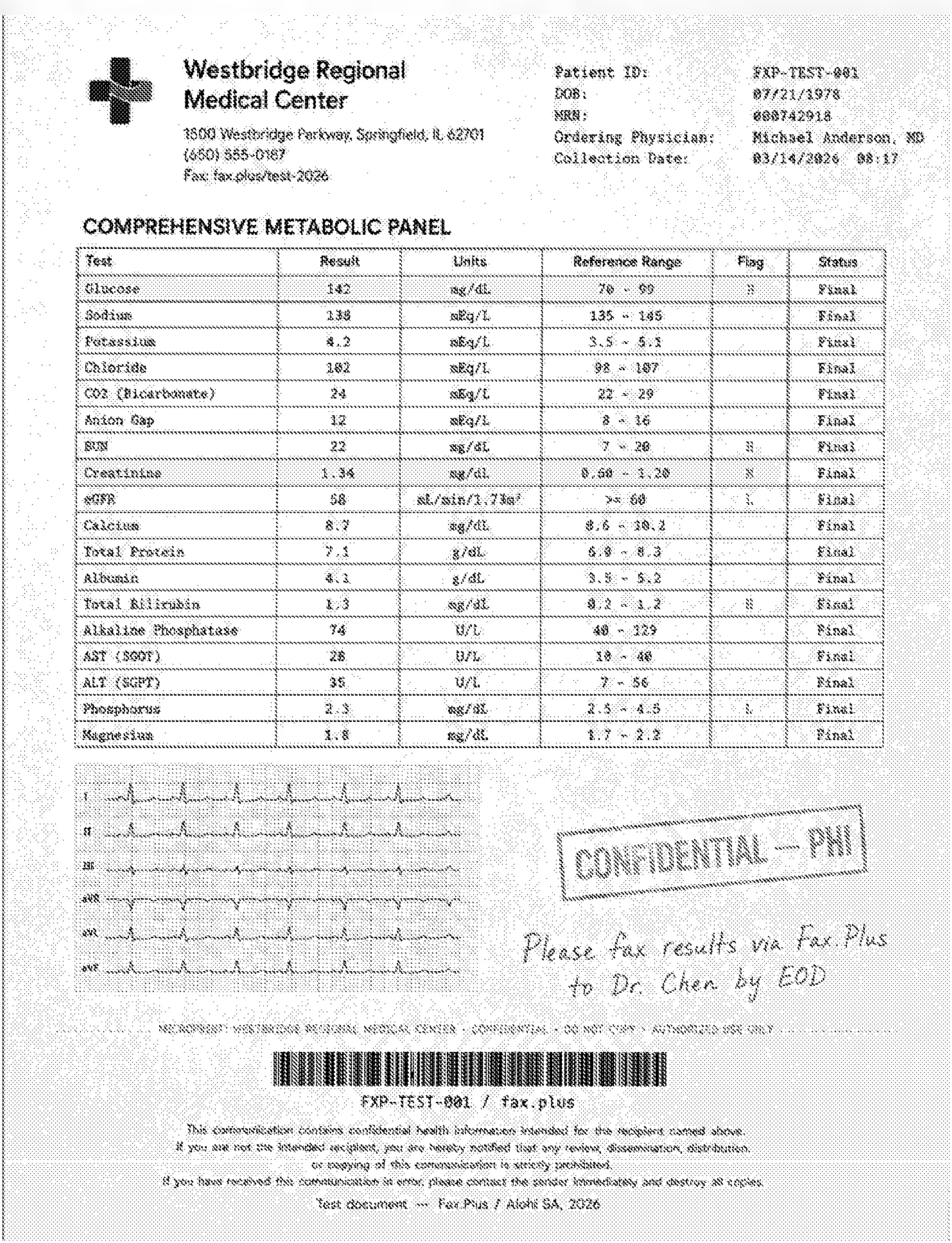
iFax Standard
Standard iFax output shows the same grey background wash and dithering as on the government document. The lab table values are readable and flag entries (H, L) distinguishable, but against a noisy grey field rather than a clean white page. The EKG strip is where the limitation is most clinically significant: the waveform shapes are vaguely present but the red grid lines that give them context have collapsed entirely into grey noise, making the leads uninterpretable. The CONFIDENTIAL/PHI stamp renders as a grey block rather than a clean imprint. The handwritten note is legible but soft. The microprint line is lost.
Fax.Plus Standard (reference)
White background, clean table with sharp values and flag entries. The EKG waveforms are visible and the grid structure partially preserved, with the finest grid lines showing minor compression. The handwritten note is clear. The PHI stamp is clean. The microprint line is present.
 Standard
 Standard
iFax HD+
A meaningful improvement over Standard, but the grey background persists, distinguishing this output clearly from the clean white of the Fax.Plus reference. The lab table values and flag entries are sharp. The EKG waveforms are more defined than in Standard, but the red grid background remains grey and the fine lead markings are partially rather than fully retained. The PHI stamp is cleaner with better edge definition. The handwritten note is clear. The microprint remains faint. For healthcare documents with embedded waveform data, iFax HD+ meaningfully raises the floor but does not fully close the gap to the Fax.Plus white-background baseline.
Fax.Plus HD (reference)
Excellent quality across all elements. Clean white background, sharp table with all values and flag entries fully legible, the EKG grid with waveform detail clearly defined across all six leads, the PHI stamp clean with ink edge definition, the handwritten note clearly legible, microprint line present.
 HD
HD
 HD+
HD+
Send Speed
iFax Standard completed in approximately 1 minute. iFax HD+ completed in approximately 2 minutes. Both match Fax.Plus at equivalent quality tiers on this document type. Priority delivery (2 credits/page) was available but produced no meaningful time improvement over Regular in our testing.
How iFax Fax Quality Compares
| Category | iFax Standard | iFax HD+ | Fax.Plus Normal | Fax.Plus HD |
|---|---|---|---|---|
| Background | Grey, heavy dithering | Mostly white, light noise | White, clean | White, clean |
| Table rendering | Readable, degraded lines | Sharp | Sharp | Sharp, clean |
| Handwriting | Legible, soft | Clear | Clear | Sharp, natural variation |
| Stamps and seals | Grey, edges lost | Clean, faded ink preserved | Clean | Clean, detail retained |
| EKG grid | Lost to grey | Partially visible, grey cast | Partially retained | Clearly retained |
| Watermark/seal | Lost to grey | Faint, recognizable | Mostly present | Full detail |
| Microprint line | Lost | Faint | Readable | Readable |
| Barcode | Degraded | Sharp | Sharp | Sharp, scannable |
| Gov. send speed | ~1 min | ~2 min | ~1 min | ~2 min |
| Healthcare send speed | ~1 min | ~2 min | ~1 min | ~2 min |
iFax quality depends heavily on which tier you send from, and the default tier is where it falls down. iFax Standard, the setting most users never change, produced heavy background artifacts on both test documents. iFax HD+ recovers most of that but still does not reach Fax.Plus Normal, and at 3 credits per page it carries a cost the default tier does not. That split, a weak default and a top tier that only catches up partway, is what holds iFax at 3 out of 5 on quality.
The clearest gap between tiers is visible without side-by-side comparison. iFax Standard lands with a heavy grey background and wave-like dithering on both document types. iFax HD+ at 3 credits per page clears almost all of it: white background, sharp table lines, readable detail. Across the full tier ladder, iFax Standard output is worse than eFax Standard, with heavier artifacts and more pronounced fine-detail loss. iFax HD+, their top quality tier, does not reach eFax Fine, and both fall short of Fax.Plus Normal. eFax scored 3.5/5 on quality in our eFax review; iFax scores below that.
Send speed results were a genuine bright spot. iFax matched Fax.Plus at equivalent quality levels on both document types, roughly one minute per page at Standard and roughly two minutes at HD+. Received faxes can also be downloaded as JPEG files in addition to PDF, though they arrive zipped rather than as individual files.
Healthcare Positioning
iFax targets healthcare prominently: HIPAA from Plus, EHR integrations on Pro, medical centers in the client logo bar. The quality test does not support that positioning at the Standard tier. In clinical workflows, fax quality is not a secondary detail. A PHI document with heavy dithering is a legibility risk. iFax Standard, the default tier, fails on both document types we ran. iFax HD+ recovers substantially but does not reach the clean white output Fax.Plus delivers at its normal quality tier. Healthcare buyers should test their actual document types before committing.
2. Pricing | Score 3.5/5
iFax has a genuinely useful tier in Plus, but the surrounding pricing mechanics demand close reading and undercut the value.
The plan ladder runs Free (5 pages, send-only), Basic, Plus, Professional, and a sales-led Enterprise tier. The catch hits buyers early: the entry paid plan does not do what most people assume a fax service does.
Basic Plan
Basic costs $12.49/month for 200 pages, with a 20% annual discount advertised on the pricing page. It is send-only. You cannot receive faxes on Basic, and it includes no HIPAA coverage and no BAA. New users routinely sign up expecting full service and discover the receiving limitation after the fact, a complaint that recurs on Capterra and independent review sites.
Plus Plan
Plus is the real entry point at $24.99/month for 500 pages with one fax number, per the current pricing page. It is the first tier that can both send and receive, and is marketed as "HIPAA compliant" on the pricing page. iFax shows a "BAA Included" headline on its HIPAA page, but the public pricing and HIPAA pages do not explicitly spell out which tier includes the signed BAA, so HIPAA-aware buyers should confirm tier-level BAA inclusion directly with sales.
Pro Plan
Pro is listed at $33.33/month for 1,000 pages (paid annually) on the live pricing page, and is marketed as including HIPAA, SOC 2 and ISO 27001, the certifications lower tiers do not carry. It is the tier required for API access. No public audit certificate, scope document, or auditor reference for SOC 2 or ISO 27001 surfaced during this review, so buyers who need the underlying evidence should request it directly from sales.
Auto Top-Up and the Credits Contradiction
Auto top-up is enabled by default. iFax's Terms of Use state that when usage reaches 95% of your plan limit, additional credits are automatically billed to your payment method. You can disable this in settings, but it is on unless you turn it off, which sits uneasily next to the service's "no overage fees" marketing.
The credit multiplier is not prominently disclosed. iFax offers four quality tiers: Low (0.9 credits/page), Standard (1 credit/page), HD (2 credits/page), and HD+ (3 credits/page). Speed also has a multiplier: Regular delivery costs 1 credit per page, Priority costs 2 credits per page for roughly one minute faster, an incremental gain at best in our testing. A two-page fax at HD+ on Priority consumes 10 credits against your monthly allowance, not 2. The multiplier compounds with the auto top-up mechanic and is not visible on the pricing page headline.
The credits policy contradicts itself. Both documents were live during our testing in June 2026:
iFax Terms of Use: credits are valid only during the current billing period and do not roll over.
iFax Knowledge Base ("Will my credits expire?"): "Credits will never expire from your account."
That is a direct discrepancy between two of iFax's own documents. Confirm the current policy in writing before relying on either claim.
How iFax Pricing Compares
| Service | Entry Price | Pages/month | Free Option | Send + Receive at Entry |
|---|---|---|---|---|
| iFax Basic | $12.49/mo | 200 | Yes (5 pages, send-only) | No (send-only) |
| Fax.Plus | $6.99/mo | 200 | Yes (10 pages, one-time) | Yes |
| eFax Personal | $18.99/mo | 200 (US & Canada) | No | Yes |
| Dropbox Fax | $9.99/mo | 300 | Yes (5 pages, one-time) | Yes |
| SRFax | $12.60/mo | 200 | No | Yes |
The Enterprise tier is custom and sales-led, with commitment-based discounts and a dedicated account manager. That adds evaluation friction for teams that want to price the service before talking to anyone.
3. Security and Compliance | Score 4.5/5
This is iFax's strongest area, and the included BAA is the headline.
The Security Stack
Encryption and Infrastructure
iFax uses 256-bit AES encryption at rest and TLS 1.2 in transit, with a Zero-Trust model, MFA and SSO, DDoS protection, a web application firewall, and penetration testing "at least once a year and after any significant changes" per the security page. Infrastructure runs on AWS with primary data center in Oregon. iFax markets a 99.98% availability rate, though no public SLA document or uptime report surfaced in this review.
The company maps to HIPAA, GLBA, SOX, GDPR, and FERPA. PCI-DSS is not explicitly named in its security documentation.
SOC 2 and ISO 27001
SOC 2 Type 2 and ISO 27001 are marketed on the Pro plan and above. The pricing page lists them and iFax has dedicated marketing pages for each. No certificate number, auditing firm, or scope document surfaced in this review. Buyers who need to verify the underlying evidence should request it directly from sales.
HIPAA Compliant Encryption vs Signed BAA
Here is the distinction that matters for healthcare buyers. HIPAA-compliant faxing is marketed from the Plus plan ($24.99/mo) up. The pricing page labels Plus "HIPAA compliant" and Pro adds "HIPAA, SOC 2 & ISO 27001." iFax's dedicated HIPAA page shows a "BAA Included" headline and a HIPAA Seal of Compliance from the Compliancy Group. What the public pages do not spell out is precisely which tier(s) the signed BAA applies to, or what the signing workflow looks like. HIPAA-aware buyers should confirm tier-level BAA inclusion directly with sales before relying on it. Basic does not cover HIPAA.
How iFax Security Compares
A signed BAA marketed from the $24.99/month Plus plan is potentially a real differentiator, if checkout confirms the tier-level inclusion that iFax's public pages leave vague. Where iFax clearly trails is the evidence trail. Its SOC 2 Type 2 and ISO 27001 are marketed only on Pro and above, and no auditor name, certificate number, or scope document appears on its public pages. The others handle this more transparently: Dropbox Fax publishes its full audited stack (SOC 2 Type 2, ISO 27001 with Statement of Applicability, ISO 27018, HIPAA, PCI DSS) openly on its trust center, and Fax.Plus provides its ISO 27001 (organization-level, EY CertifyPoint) and SOC 2 Type II documents on request. eFax gates a signed BAA to its Business tier and above and reserves HITRUST for top-tier Corporate.
4. Usability (Hands-On Experience) | Score 4.5/5
iFax is functional and polished in places, but the experience is uneven across platforms. One product bug is worth a direct warning. The most-reported issue across app-store reviews is a fax that iFax marks as delivered, confirmation email and all, that the recipient never receives. We hit it ourselves during testing: random, not reproducible on demand, and dangerous precisely because it fails silently while telling you the fax went through. For anything time-sensitive, confirm receipt out of band rather than trusting the delivered status alone.
The Desktop Apps
iFax ships native apps for both macOS and Windows, available through their respective app stores, and they access files directly without a browser. The Mac app holds a 4.2/5 rating. For desk-based workflows this is a clean path.
The iOS App
The iOS app is the strongest mobile surface, rated 4.5/5 across roughly 35,000 App Store ratings. Sending from iPhone was the smoothest part of our testing: we attached a PDF, typed the number, and the fax cleared in about a minute with a confirmation email landing right after.
The delivery-confirmation email was one of the clearest usability wins in our own testing, and G2 reviewers echo the same point. Users repeatedly mention the reassurance of knowing when a fax has been sent successfully, which matched our experience during live sends. The number lookup feature, which can pull up a facility or doctor by name instead of forcing users to dig through fax history, also stood out as a practical time-saver. For iOS-first users, these details help explain why iFax remains one of the better-rated fax apps for iPhone.
The Android App
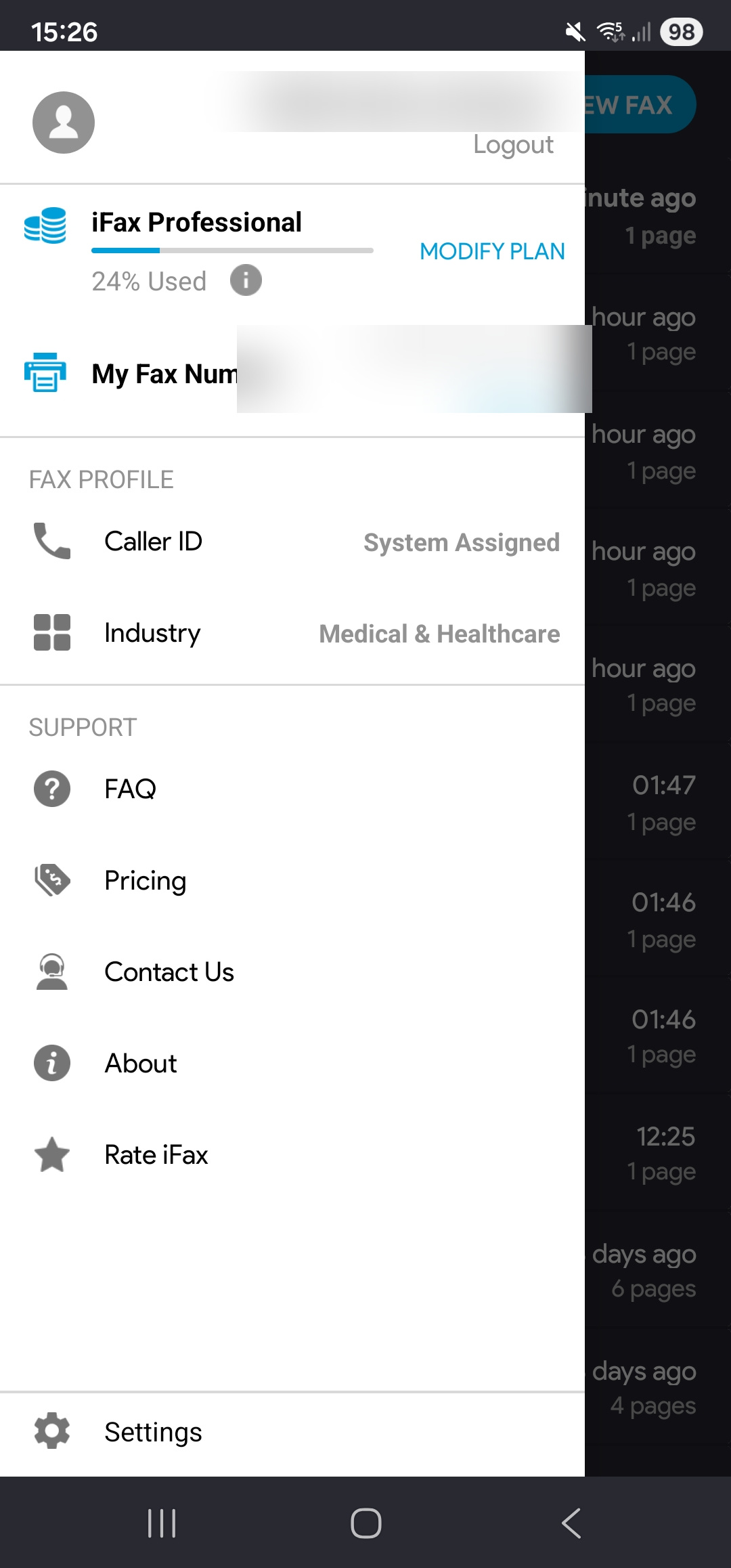
Android trails. The Play Store rating is 3.4/5 across roughly 6,400 reviews. During testing the Android app felt less polished than iOS: more taps to reach the compose screen, occasional UI glitches that did not appear on iOS, and a narrower feature set on the scanning and editing side. Recent negative reviews skew toward billing and stability issues, consistent with the Trustpilot and BBB pattern.
Returning Users (iOS and Android)
Both apps have the same onboarding friction for existing account holders. Installing on a new device pushes through multiple promotional screens before the login option appears, with no obvious way to skip directly to sign-in. We ran into this on both platforms during setup. New users registering for the first time will not encounter it.
The Web Portal
The web dashboard at ifaxapp.com is the most capable surface, with the fullest scanning and editing tools and broad file-format support across PDF, DOCX, TIFF, JPG, and PNG. The mobile apps carry fewer features.
Two friction points caught us out during testing. Basic is send-only: we tried to receive a test fax on it and could not, and the limitation is not obvious until you hit it. On the Plus plan we had to toggle HIPAA on for each individual fax, and we forgot to do it more than once, exactly the kind of step a busy clinical user should not have to remember.
Interface
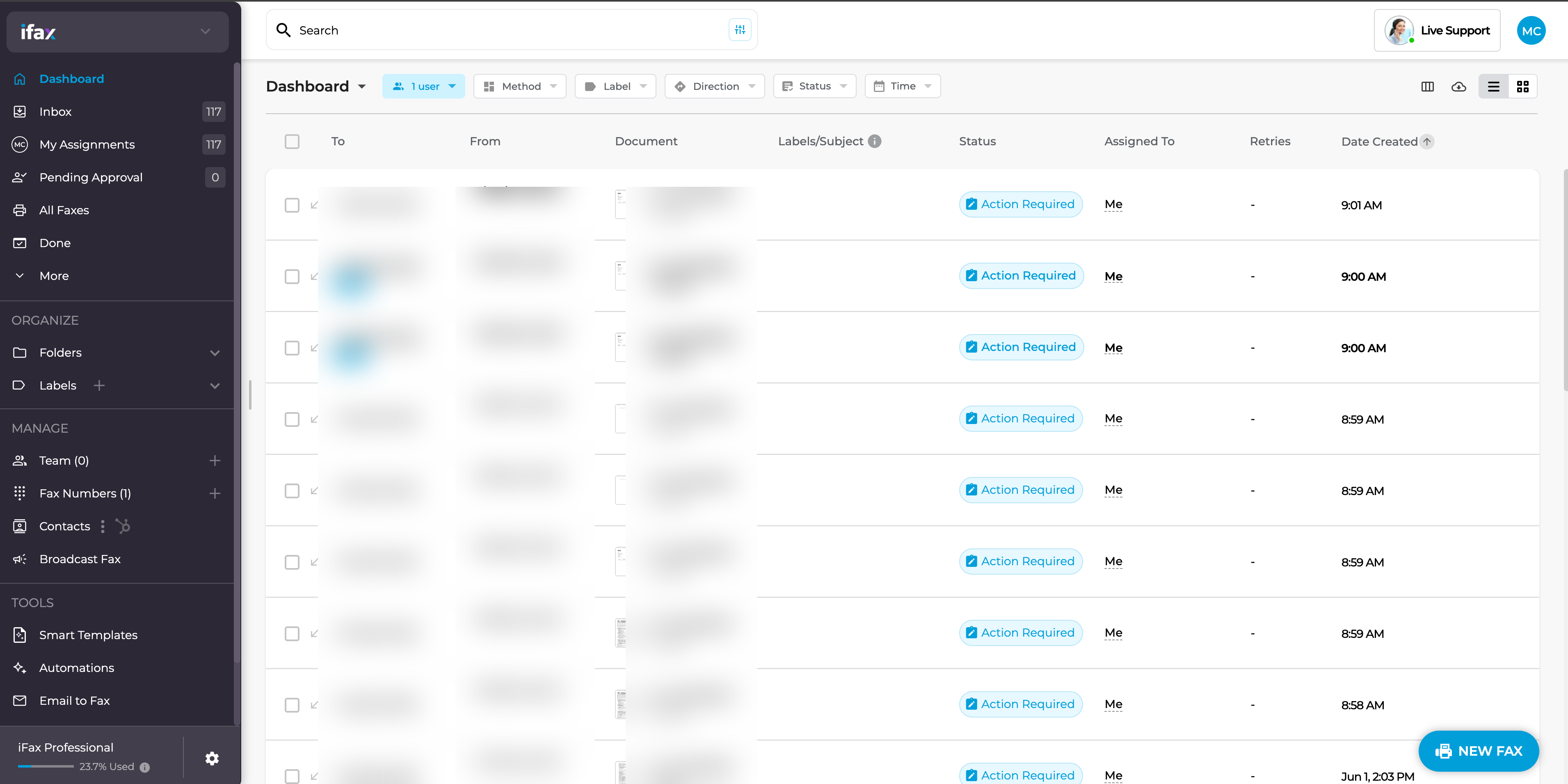
The interface is dense. The sidebar packs 15+ items across navigation, folders, team management, and tool shortcuts into a single scrollable panel. The fax list runs seven columns, with phone numbers truncated mid-number so the core recipient data requires a hover. Four inbox views (Dashboard, Inbox, My Assignments, All Faxes) show overlapping content with filter differences that are never explained.
Navigation is responsive and no crashes occurred during our testing, though the portal showed occasional slowdown under normal use, noticeably behind the consistency of Fax.Plus and Dropbox Fax.
Pre-filled Compose Window
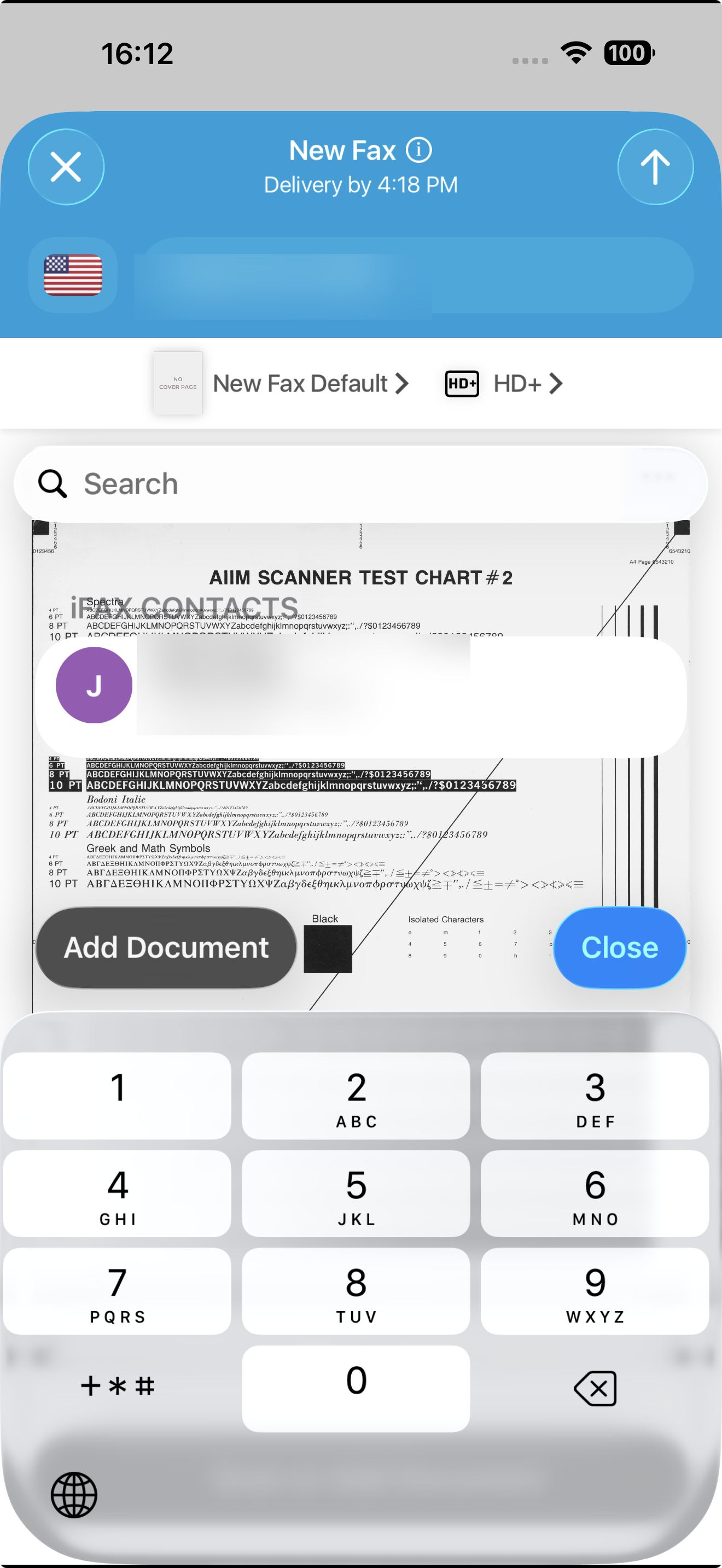
The most significant usability problem we found is in the New Fax compose dialog. When clicking "NEW FAX" to start a fresh fax, the dialog opened with data from a previous session already populated: the recipient number from a prior send and the previously attached file still loaded. A user who does not notice this before hitting Send would transmit a confidential document to the wrong recipient.
In regulated industries this is not an edge-case risk. We could not reproduce it on every session, but we observed it consistently enough to document it, and the description matches reports in iFax's own user feedback threads.
How iFax Usability Compares
iFax's web portal is functional and feature-rich, but it sits on the denser end of the spectrum. Dropbox Fax sets the web benchmark here: a minimal compose flow, clean inbox, and no sidebar overload. Even eFax's updated web interface, still mid-redesign and not fully finished, presents a less cluttered starting screen than iFax. The iOS app at 4.5/5 across 35,000+ ratings is a genuine strength. The broader gap is cross-platform consistency. Fax.Plus, for one, has been recognized by TechRadar as one of the best online fax services for a consistent experience across web and mobile, while iFax's split between 4.5/5 on iOS and 3.4/5 on Android is the widest we recorded this cycle. The web portal's density is the other place the friction shows.
5. Customer Service, Cancellation and Account Control | Score 3.5/5
iFax offers 24/7 chat and responsive email at its best, but its account-control reputation is the weakest part of the product.
Support Channels
Email and live chat are on all plans, with chat marketed as 24/7. Phone support starts at Pro, and a dedicated account manager only at Enterprise. We tested both channels: a plan question came back fast and clear, a billing question was slower and needed a follow-up.
Before You Cancel: Your Fax Number
Read the number terms before you depend on a number long-term. iFax's Terms of Use state that iFax owns all telephone numbers and that users "cannot harvest, collect, steal or otherwise keep a record of the phone numbers." The terms further state iFax "may at any time, at our sole discretion, revoke, replace or reassign any telephone number provided to the User." Per the FAQ, "we can port most Toll-Free, wireless, landline, and fax numbers in the United States and Canada," and "porting will take 7–10 business days." iFax also notes that it does not cancel your previous carrier service on your behalf, so plan that step separately.
It is also worth knowing that iFax reserves the right to update its Terms "periodically without notifying the Users," and can suspend or terminate an account "without prior notice or need to deliberate on reasons."
⚠ Important: Once your account closes, your data is deleted within 30 days and your fax number can be reassigned at iFax's discretion. Save everything you need and complete any number port before starting cancellation.
How to Cancel iFax
Per the current knowledge base, the website-activated path is: log in, then navigate to Settings > Plan&Account > Plan > Edit Plan > Change Plan and click the "Delete Account" button to cancel. There is no button labeled "Cancel Subscription" or "Cancel Plan." Save a screenshot of the page after completing each step, because no cancellation confirmation email is sent automatically.
Exceptions where users hit problems:
- App store subscribers: If you subscribed through Apple, Google, or Microsoft, you must cancel through that platform's subscription settings. iFax support cannot cancel these for you.
- Free trial timing: You must cancel at least 24 hours before the trial ends or the full subscription charge applies, and the terms state withdrawal rights are waived once service begins.
- Multi-year prepaid plans: Early termination forfeits the pricing benefit with no proration.
- Auto-renewal: Subscriptions renew unless canceled at least 24 hours before the period ends.
Refunds
There is no proration. iFax's Terms state all payments are final and non-refundable, with refunds issued only at the company's sole discretion and sometimes as service credit rather than cash. App store purchases are refunded by Apple, Google, or Microsoft, not iFax.
What Users Report
The recurring consumer-review pattern is billing surprises: charges of $299 to $431 early in a 7-day trial, especially via mobile sign-up, and billing that continues for months after cancellation, with disputes requiring a chargeback. It shows up consistently enough across platforms to be a pattern, not isolated incidents.
B2B reviews on G2 and Capterra are warmer. Praise centers on ease of use, fast delivery, and the confirmation email, with several healthcare and finance users saying iFax saved them a trip to the office. The cons that surface even in positive reviews echo the consumer complaints at lower volume: pricing flagged as high for light users, trial and billing terms called opaque, and support described as slow on account issues.
What Happens to Your Data When You Close
Per iFax's privacy policy, identifiable information may remain in backup for up to 30 days after you delete your account before it is purged. Removal requests are honored within 30 days. Sent and received fax messages are stored while the account is active per the Terms, and per-fax auto-delete is user-configurable (1/7/30/90 days or Never). Export anything you need before you cancel.
How iFax Account Control Compares
Account control is where iFax's split reputation hurts most. For an individual buyer evaluating cancellation friction, the consumer review pattern is what counts, and it sits well below the market norm. The no-proration refund posture combined with iFax's claim of ownership over your fax number, which its Terms allow it to revoke or reassign at its discretion, is stricter than most rivals. Fax.Plus, by contrast, supports porting your number out to another provider, so you keep continuity if you decide to leave.
6. Data Residency and Retention | Score 3.5/5
iFax discloses its data handling clearly, but it offers no regional choice.
Retention Settings
Account information is stored while your account is active, per both the privacy policy and the Terms. But section 8.3 of the Privacy Policy states fax documents auto-delete after one year, while the Terms imply storage for the life of the account. That is a discrepancy worth confirming with support if long-term retention matters to your workflow.
Per-fax auto-delete is user-configurable to 1, 7, 30, 90 days, or Never, more granular than most rivals offer. On account deletion, identifiable data may remain in backup for up to 30 days before being purged, and removal requests are honored within 30 days.
Data Residency
iFax's security page puts the primary data center in Oregon and keeps US customer data in US jurisdiction, but adds that other facilities are "spun up across other domestic and international regions upon demand." The privacy policy separately describes servers as "hosted globally."
The specific international regions are never disclosed in iFax's public documentation. For buyers under GDPR or data-sovereignty rules, that is a real gap: you cannot verify compliance if you cannot confirm where your data is processed. There is no EU residency option and no user-controlled region selection on the standard plans.
How iFax Data Residency Compares
For a US-only buyer, Oregon-primary AWS is fine. For organizations under GDPR or with multi-region requirements, the absence of any residency choice is a real limitation. Providers that let customers pick from 20+ regions and configure data residency at the account level offer control iFax does not. The user-configurable auto-delete is, however, a quiet strength compared with rivals that lock retention by plan tier.
7. Enterprise, API and Healthcare Automation | Score 4.5/5
iFax's developer offering is solid and self-serve, with one notable gap.
API Access
Overview
The API is public and self-serve: you can get a key without a sales call, which is more than some legacy fax providers offer. It is a REST API at `api.ifaxapp.com/v1` (developer docs at `ifaxapp.com/docs/api/v1`), covering send, inbound, AI data extraction, and number purchasing, authenticated by an `accessToken` parameter. iFax describes "automatic retry on busy signals with configurable retry logic" on the API page, though specific retry counts are not disclosed. The main endpoint categories are documented on the marketing page (send, receive, status, number provisioning, AI extraction) with full details in the developer docs at `ifaxapp.com/docs/api/v1`. SDK samples ship for cURL, Ruby, Node.js, Java, PHP, and Python.
Pricing
API access is tied to the Pro App plan at $33.33/month billed annually, per the pricing page. Separately, iFax also markets a standalone API product on its `/fax-api/` page at $34.99/month monthly or $29.17/month billed annually. The overlap is real: both routes give you API access, at different listed prices, across two official iFax pages. A 7-day free trial is advertised on the standalone API page.
Gaps for 2026
Neither OAuth 2.0 nor an MCP server appeared in iFax's API pages or public registries during our verification. Both gaps are meaningful for developers.
OAuth 2.0 matters for multi-tenant applications. If you are building a product where your end users authorize your app to send or receive faxes on their behalf, OAuth is the standard mechanism. Without it, the API is limited to single-tenant, server-side integrations using a static access token.
MCP (Model Context Protocol) support is also absent. An MCP server lets developers plug fax functionality directly into AI agent tools like Claude or the OpenAI Agents SDK. Fax.Plus is currently the only enterprise fax provider with a published MCP server.
Healthcare Automation
iFax markets healthcare automation with a HIPAA-compliant API and BAA, EHR/EMR integration via API and Zapier, timestamped audit trails, and AI-based data extraction that parses inbound faxes into structured fields. The AI layer (OCR, NLP extraction, generative-AI chat) consumes separate AI credits beyond your page allowance.
One practical note for developers: in our clinical document test, iFax Standard output fell below what healthcare workflows require. See the Fax Quality (#) section for the full results before setting quality tiers in API calls.
Alternatives to iFax
Fax.Plus - Best overall iFax alternative
The strongest alternative to iFax overall. Modern, high-quality cloud fax for individuals, teams, and enterprises. HIPAA compliant, ISO 27001, SOC 2 Type II, with an advanced fax API including OAuth 2.0 and MCP server support, plus a clean experience across web, desktop, and mobile. Plans range from a free tier to enterprise.
Best for: Users who want reliable fax quality, modern UX, broad compliance, and developer-ready integrations, from solo users to large teams.
eFax - Best for teams that prefer an established fax brand
An established name in online fax, familiar in regulated industries, but less modern than current platforms, with a less streamlined experience and pricing that may not suit every team.
Best for: Teams that prioritize a long-standing fax brand and a familiar workflow over a more modern, integrated experience.
Dropbox Fax, formerly HelloFax - Best for occasional senders
Simple online faxing for users already working in the Dropbox ecosystem. No dedicated mobile app. It can work for occasional sending, but it is less compelling as a dedicated fax solution for teams that need stronger fax workflows, admin controls, compliance visibility, or advanced integrations.
Best for: Occasional senders who already use Dropbox and only need basic faxing.
If you are switching from iFax, Fax.Plus is the most complete upgrade: better default fax quality, a full compliance stack, and integrations that scale from a single user to an enterprise team.
FAQs
Is iFax worth it in 2026?

For HIPAA-aware practices and developers, yes, with caveats. The HIPAA marketing, included BAA on paid tiers, self-serve API, and strong B2B reception on G2 and Capterra are genuine strengths. Buyers who want predictable billing, or who sign up as individuals, should weigh the F BBB rating, 2.3/5 Trustpilot score, and documented surprise-trial-charge reports first.
How much does iFax cost?
Basic is $12.49/month (200 pages, send-only), Plus is $24.99/month (500 pages, 1 number, send and receive, HIPAA), and Pro is $33.33/month billed annually ($49.99/month billed monthly) for 1,000 pages plus API access. Enterprise is volume-priced. The standalone API page lists $34.99/month monthly or $29.17/month annually. Two things shrink your effective allowance: auto top-up bills extra credits at 95% usage unless disabled, and the quality multiplier means HD costs 2 credits per page and HD+ costs 3.
Is iFax HIPAA compliant?
iFax markets HIPAA-compliant faxing from the Plus plan ($24.99/mo) up and shows a HIPAA Seal of Compliance from the Compliancy Group. The public pages do not spell out precisely which tier includes the signed BAA, so confirm tier-level inclusion with sales before relying on it. Basic does not cover HIPAA.
How do you cancel iFax?
On the web: log in, then Settings > Plan&Account > Plan > Edit Plan > Change Plan, and click "Delete Account." There is no dedicated "Cancel Plan" button, and no confirmation email is sent, so screenshot each step. App store subscriptions must be canceled through Apple, Google, or Microsoft. Cancel at least 24 hours before renewal. Payments are non-refundable for the active period; refunds are at iFax's sole discretion.
Can you access stored faxes after canceling iFax?
No. Customer data is deleted within 30 days of account closure, with no extended grace period. Export everything you need before you cancel.
Can I keep my fax number if I leave iFax?
You can port out most Toll-Free, wireless, landline, and fax numbers in the US and Canada, and porting takes 7 to 10 business days. iFax does not cancel your previous carrier service for you. The Terms state iFax owns all numbers and may revoke or reassign them at its discretion, so you do not own the number while using it.
Does iFax have AI features?
Yes: OCR, NLP-based data extraction, and generative-AI fax chat. These consume separate AI credits beyond your page allowance.


Featured Articles
See All



Confédération Suisse
Confederazione Svizzera
Confederaziun Svizra
Swiss Confederation
Innosuisse - Swiss Innovation Agency