eFax Review 2026: Features, Pricing, and Real-World Performance
We went hands-on with eFax across desktop, mobile, and web. Here is what we found on pricing, HIPAA compliance, usability, and the cancellation process.


- eFax is a mature online fax service with broad platform support and strong compliance options.
- Test output was readable, but Standard and Fine quality both showed grey background, dithering, and weaker fine-detail preservation.
- The web portal is improving, but the experience still feels uneven and occasionally clunky.
- Pricing needs careful review due to promo rates, limits, overages, extra users, and 60-second billing.
- Best fit for existing eFax teams; new buyers should compare alternatives first.
eFax has been in online faxing for over 25 years. It has a real compliance stack and works across web, email, mobile, and desktop. But the pricing takes careful reading, and the workflow feels its age next to newer competitors.
Is eFax Worth It in 2026?
eFax is still worth considering for established business and healthcare workflows that need a long-running, stable fax provider, a native Windows app, and serious HIPAA-focused enterprise options. It is much less compelling for new buyers or small businesses who want transparent self-serve pricing, modern mobile workflows, fast transmission speeds, and frictionless account control.
About eFax
eFax is the flagship product of Consensus Cloud Solutions (NASDAQ: CCSI), the J2 Global spinoff that also operates MetroFax, MyFax, SFax, and SRFax. It serves roughly 703,000 customers across 46 countries, with eFax Corporate positioned for regulated industries including healthcare, legal, and finance.
The product surface is wide: web faxing, email-to-fax, mobile and desktop apps, secure storage, searchable archives, and electronic signatures. eFax also has a separate enterprise healthcare stack covering Fax API, eFax Unite, eFax Clarity, and eFax Conductor, aimed at large healthcare interoperability workflows rather than the everyday fax use case.
How We Reviewed eFax
We reviewed eFax using four evidence layers:
- Hands-on product testing. We created an account, installed eFax Messenger on a Windows 11 machine, tested the mobile app on iPhone and Android, and used the email-to-fax workflow. We sent live faxes from each available surface to evaluate the user experience across desktop, mobile, and email-based workflows.
- Fax-quality testing. We tested eFax using two fixed, synthetic, real-world-style source documents: one government and legal document and one healthcare lab results form. The same source files were used across testing so we could evaluate output quality consistently. Across the tests, we assessed the practical details that matter in real document workflows, including readability, layout preservation, handwriting, fine print, stamps, signatures, barcodes, dense tables, and mixed font sizes. No real personal, medical, tax, company, or patient data was used in the fax-quality tests.
- Product, pricing, and account-control review. We reviewed eFax’s pricing, plan structure, support materials, terms, privacy information, and account-management flow to understand the full experience beyond sending and receiving faxes.
- Business-readiness review. We checked eFax’s public materials for security and compliance claims, data residency and retention information, API and developer resources, healthcare-readiness details, and enterprise automation support.
We then scored eFax across seven areas: fax quality, pricing, security and compliance, usability, customer service and account control, data residency and retention, and enterprise, API, and healthcare automation.
1. Fax Quality | Score 3.5/5
eFax fax quality is one of the stronger arguments for the service. To test it properly, we built two simulated documents designed to replicate the complexity of real-world fax workflows. No real personal or corporate information was used in either test.
Government and Legal Document Fax Test
The first test used a simulated IRS Form 2553, a US government tax election form. Documents like this are common in legal, financial, and real estate workflows: signed agreements, tax filings, and multi-party authorization forms where every detail needs to arrive intact.
The Test Document The image below shows the master document used in this test, transmitted without modification to every service tested. All names, identification numbers, and corporate details are fictional.
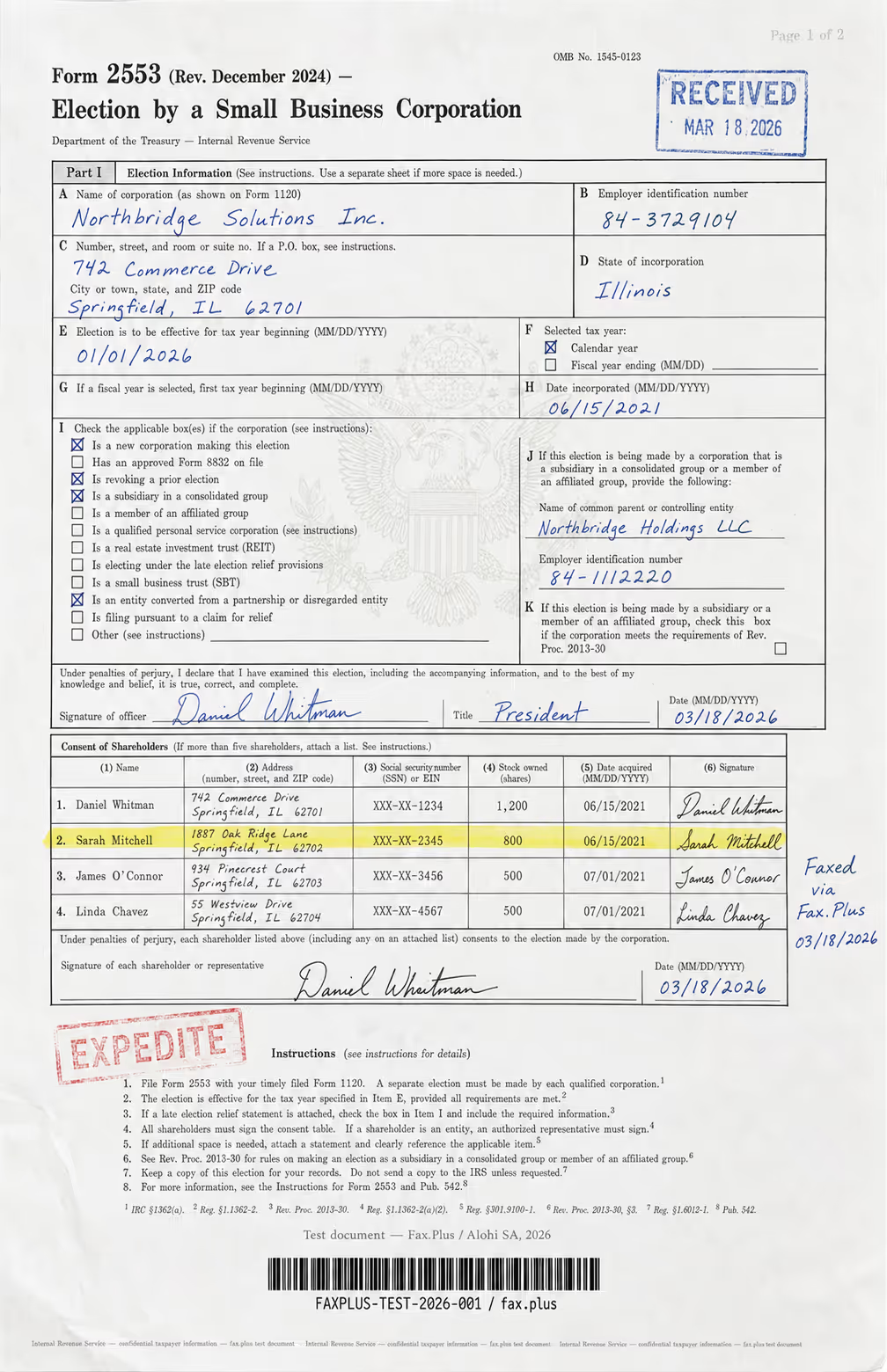
What the test document included:
- Handwritten signatures and a cursive-style officer name
- An official-style RECEIVED stamp with date
- An EXPEDITE rubber stamp with faded ink edges
- A US government eagle seal watermark in the center
- A highlighted shareholder table row
- Mixed font sizes across headers, body text, and fine print
- Dense tabular data across multiple columns
- A microprint line at the bottom for anti-fraud authentication
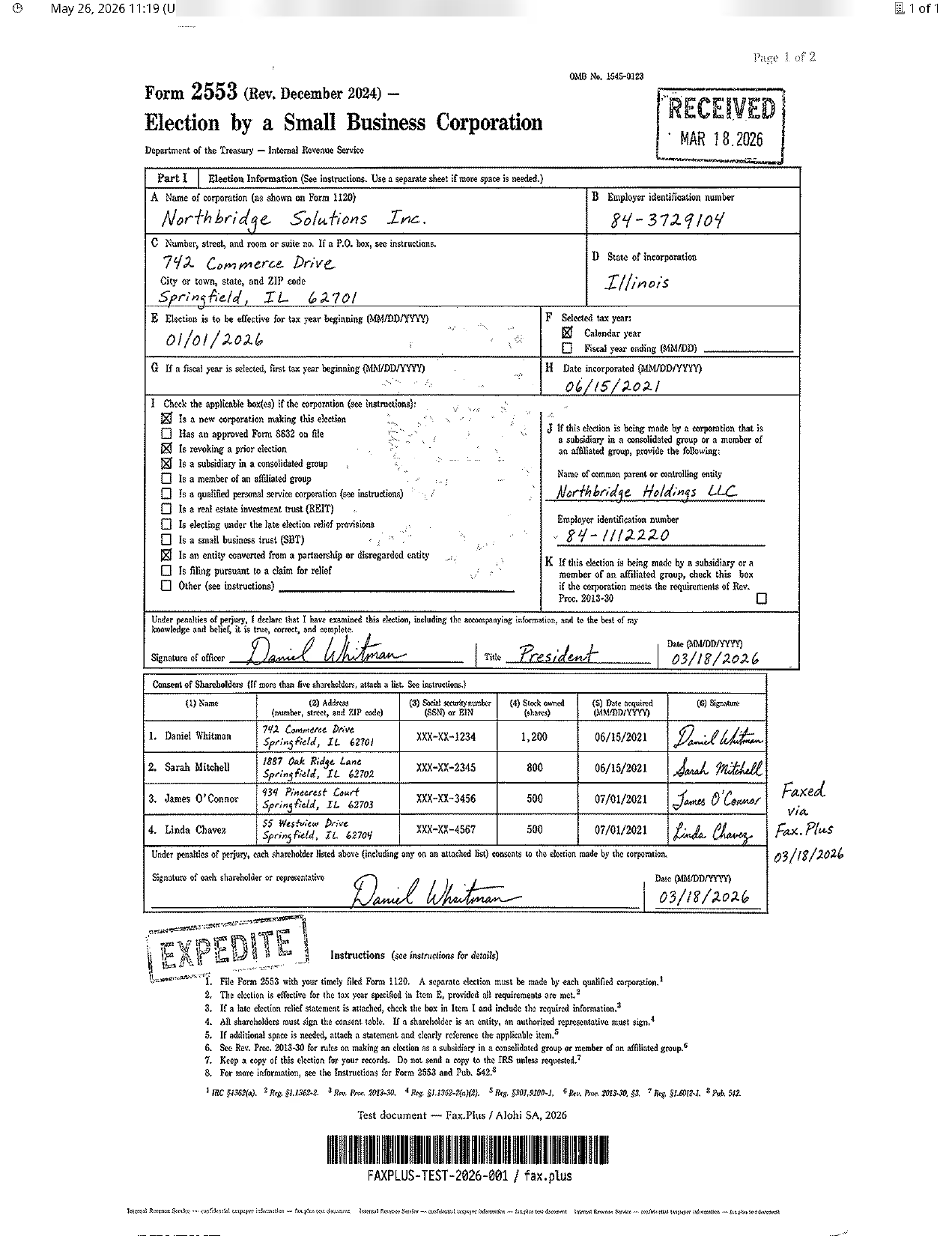
Reference Baseline: Fax.Plus Normal and HD The screenshots below show the same IRS Form 2553 document transmitted via Fax.Plus at Normal and HD quality. We included both as a reference baseline so the quality difference on identical source material is visible rather than described. Fax.Plus is not under review in this section.
eFax Standard
Standard eFax output keeps the main form content readable, including form fields, checkbox states, signatures, and shareholder table entries. However, strong dithering and wave-like artifacts appear across the page. Fine elements such as the faint eagle seal watermark, small instruction text, stamp edges, and microprint are heavily degraded or difficult to distinguish.
Fax.Plus Standard
Mostly white background, but visible dithering and compression artifacts remain. Form fields and table grid lines are readable, though less sharp in finer areas. The faint eagle seal watermark is mostly lost and not clearly distinguishable. Stamps remain legible, but faded-edge ink details are less defined. Handwritten signatures are readable, with some loss of natural line variation.
 Standard
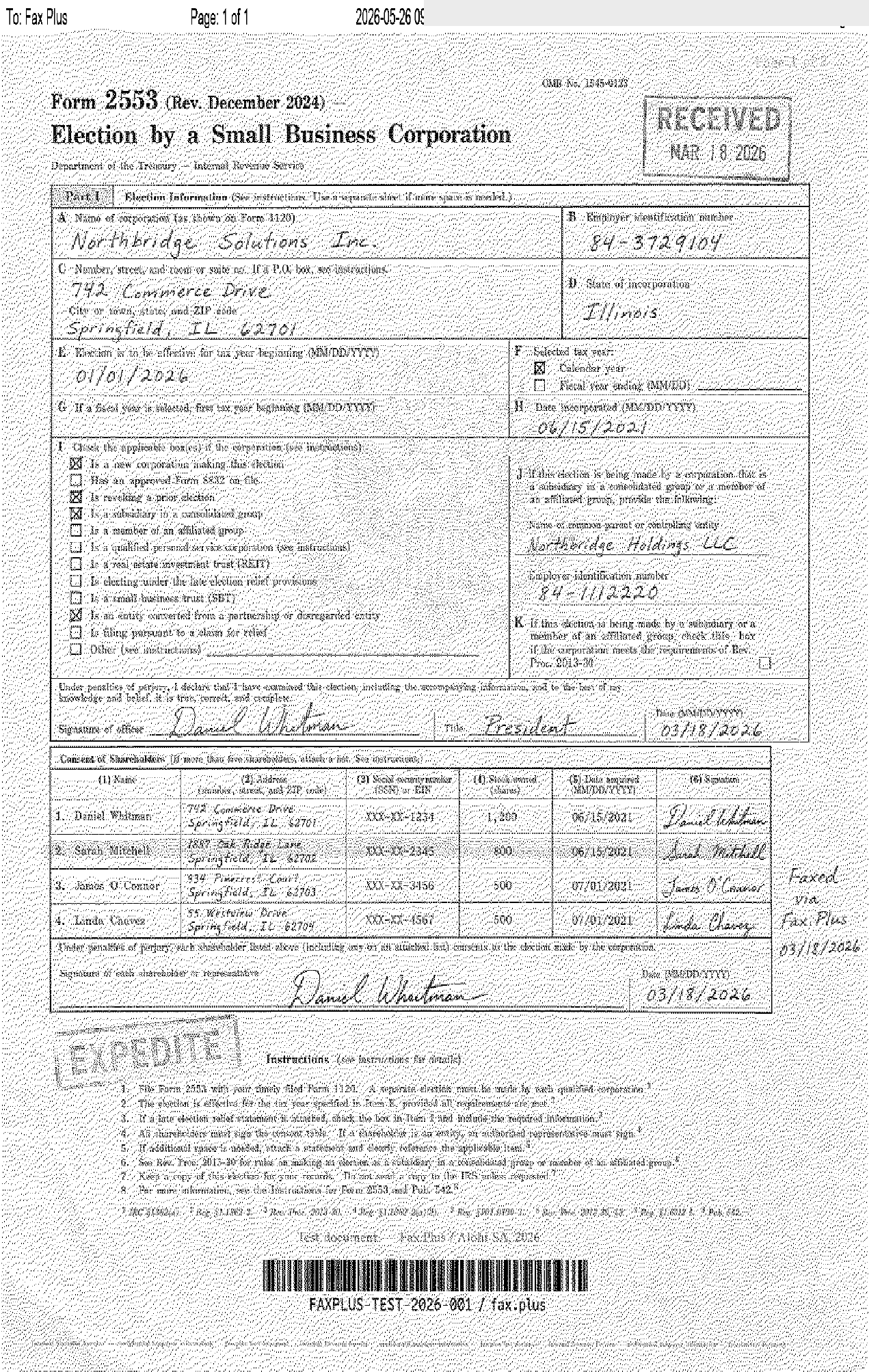
 Standard
eFax Fine
Fine eFax output improves legibility of the IRS form compared with standard quality, with clearer form fields, checkbox states, signatures, and table entries. However, visible background artifacts remain across the page, and subtle details such as the faint eagle seal watermark, small instruction text, stamp edges, and microprint are still not cleanly preserved.
Fax.Plus HD
HD fax quality preserves fine document details with a clean white background, sharper table lines, clearer checkbox states, and more natural handwriting detail. Subtle elements, including stamp ink edges, the faint eagle seal watermark, and microprint, remain noticeably more discernible than in standard fax quality.
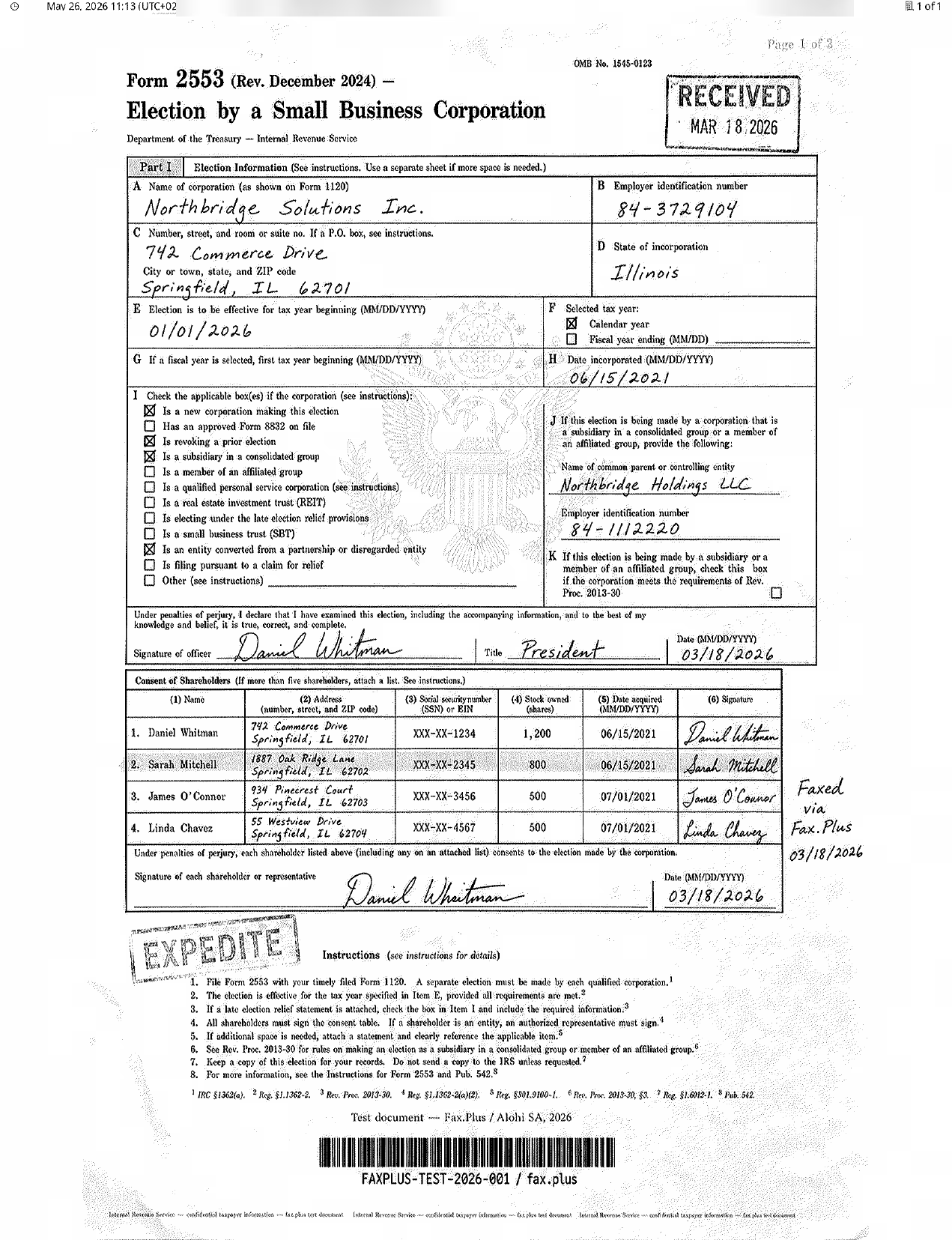 HD
HD
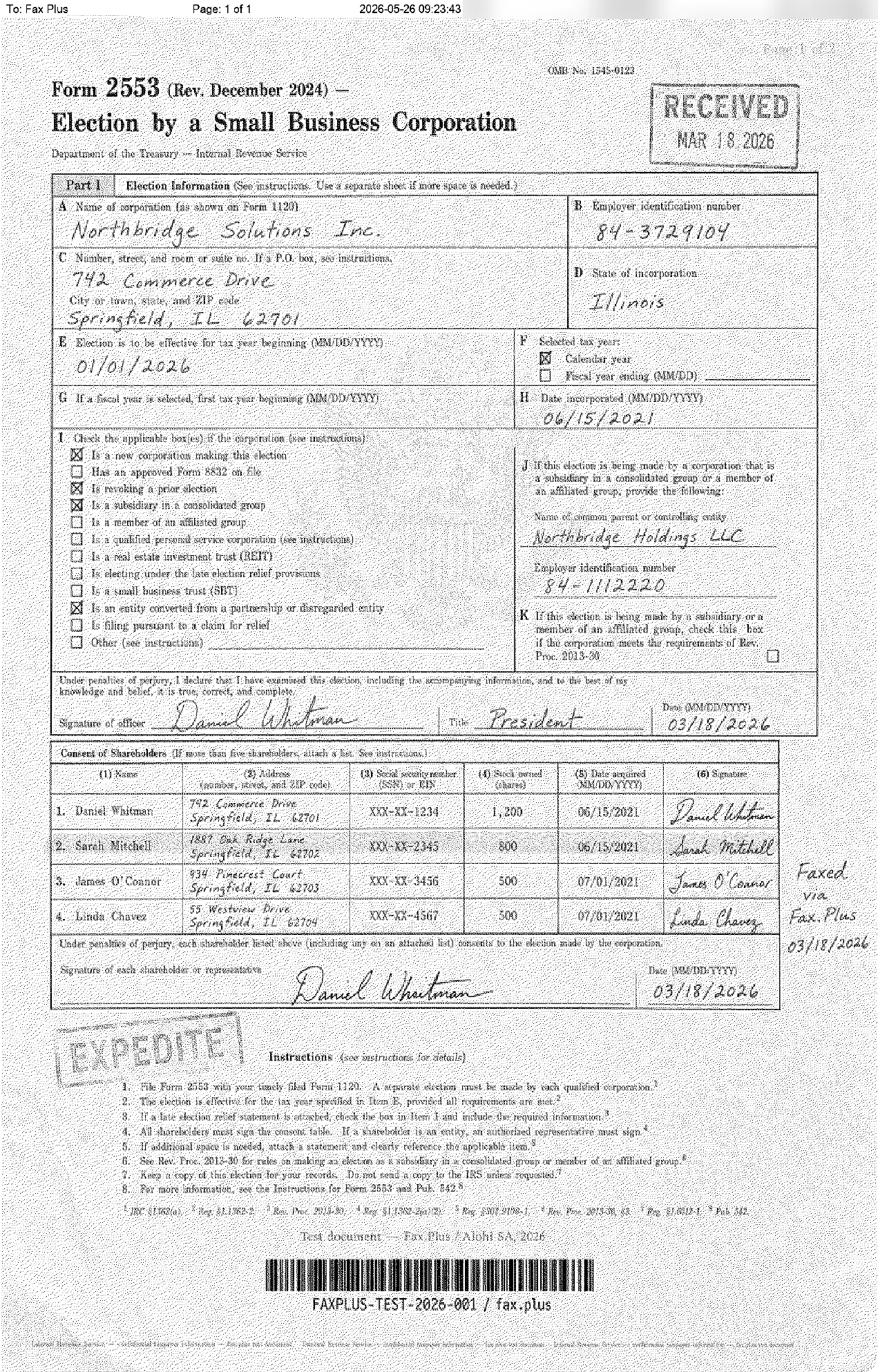 Fine
Fine
Send Speed
eFax Standard completed in 2 minutes, eFax Fine in 4 minutes. Fax.Plus Normal completed in 1 minute, Fax.Plus HD in 3 minutes.
Healthcare Document Test
The second test used a simulated lab results form from a fictional medical center. No real patient data was used. The document was designed as a stress test rather than a literal workflow scenario: in clinical practice, fax workflows rarely include diagnostic imaging, but the embedded EKG strip on red grid paper was included deliberately to push the limits of what each service can render. What is typical is the combination of lab data, flag values, handwritten physician notes, and PHI stamps, all of which appear regularly in real healthcare fax workflows.
The Test Document The image below shows the master document used in this test, transmitted without modification to every service tested. All names, patient identifiers, and clinical data are fictional. No real patient information was used.
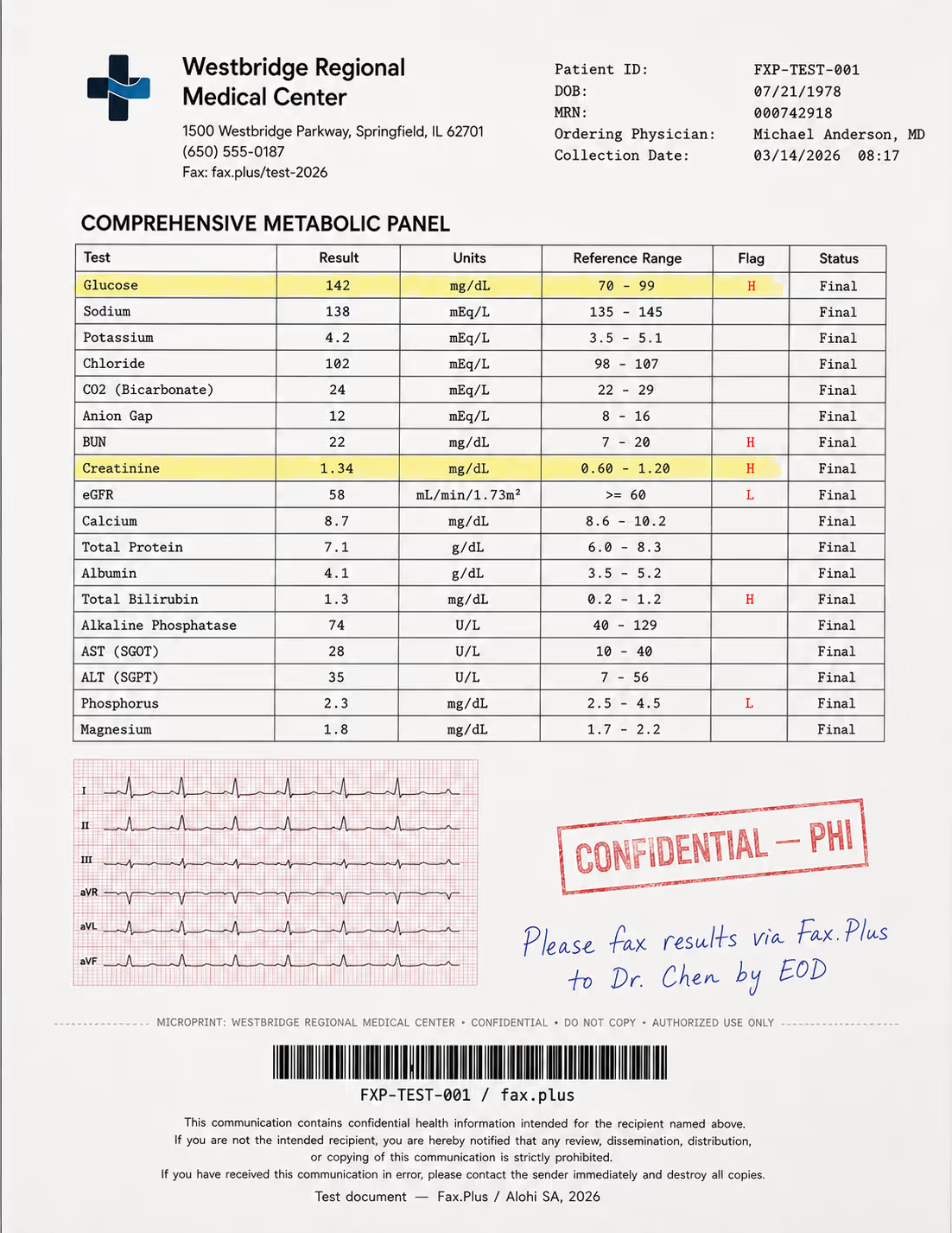
What the test document included:
- A comprehensive metabolic panel with highlighted flag values (H/L indicators)
- A 6-lead EKG strip on red grid paper included as a quality stress test
- A handwritten physician instruction in blue ink
- A CONFIDENTIAL - PHI rubber stamp with faded edges
- Patient header data and a Code-128 barcode
- A HIPAA disclaimer footer in small print
- A microprint line for anti-fraud authentication
Reference Baseline: Fax.Plus Normal and HD The screenshots below show the same healthcare lab results document transmitted via Fax.Plus at Normal and HD quality. We included both as a reference baseline so there is something concrete to compare against. Fax.Plus is not under review in this section.
In a real workflow, a flag value that arrives illegible or a handwritten instruction that cannot be read is not just a quality issue, it is a clinical risk.
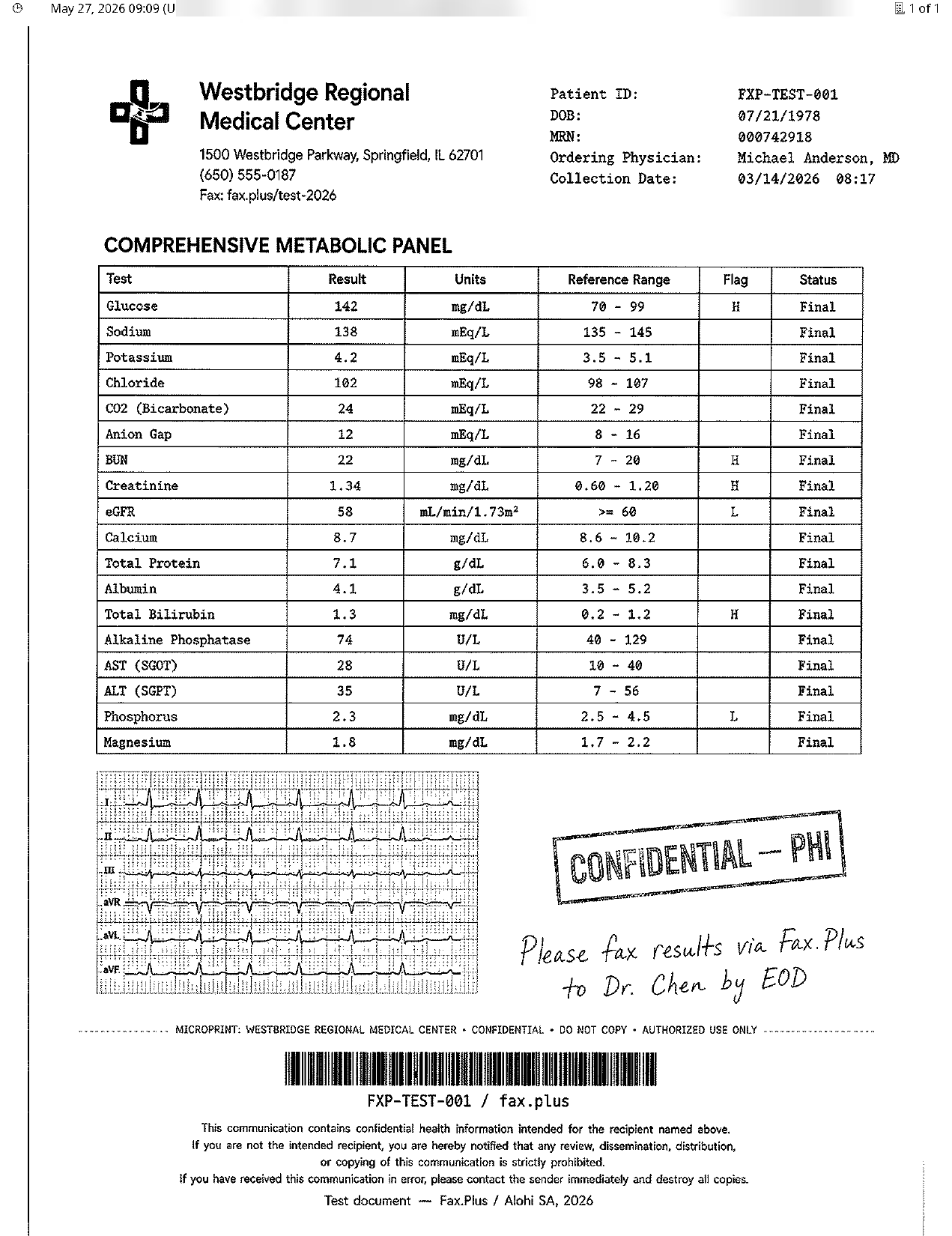
eFax Standard
Standard eFax output keeps the core lab report readable, including table values, flagged results, and header information. However, heavy dithering and wave-like background artifacts are visible across the page. Fine details such as the ECG grid, microprint line, stamp edges, and handwriting variation lose definition
Fax.Plus Standard
Standard fax quality keeps the lab report readable, including table values, flagged results, and header details. However, fine elements show visible degradation: the ECG grid and trace lose precision, stamp edges appear rougher, handwriting line variation is reduced, and the microprint line becomes harder to distinguish.
 Standard
 Standard
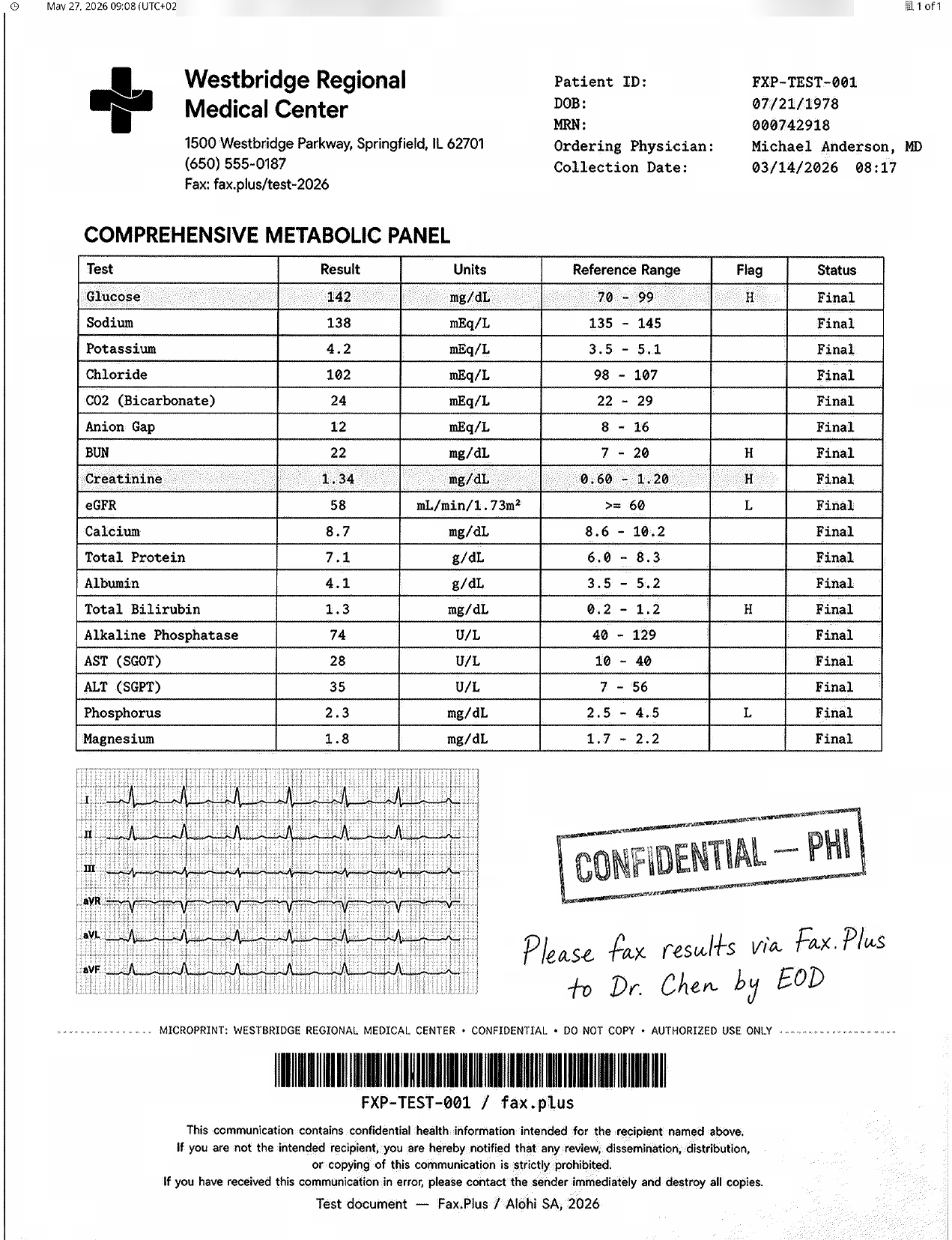
eFax Fine
Fine eFax output improves overall readability and preserves the main lab report structure, including table values, flagged results, ECG waveform, barcode, stamp, and handwritten note. Still, visible dithering and wave-like background artifacts remain throughout the page, reducing clarity in fine details such as the ECG grid, microprint, and subtle handwriting variation.
Fax.Plus HD
HD fax quality preserves the lab report with stronger visual clarity and cleaner detail retention. Table grid lines, small medical text, flagged result values, the ECG grid and waveform, stamp edges, handwriting line variation, barcode detail, and the microprint line remain more clearly defined compared with standard fax quality.
 HD
HD
 Fine
Fine
Send Speed
eFax Standard completed in 1 minute, and eFax Fine completed in 2 minutes. Fax.Plus Normal completed in 1 minute, and Fax.Plus HD completed in 2 minutes. On this document, send times were equivalent across both services at matching quality tiers.
How eFax Fax Quality Compares
eFax Fine produces acceptable output for standard business documents, but the persistent quality gap compared with the Fax.Plus reference output is what keeps the score at 3.5 out of 5.
The most consistent finding across both test types is the grey background cast. Where Fax.Plus Normal maintained a cleaner white page background, eFax output showed visible grey shading and wave-like dithering artifacts on both Standard and Fine settings. This is especially noticeable on documents that combine small text, flagged values, handwritten notes, stamps, barcodes, and embedded grid imagery.
On healthcare documents, the difference is more important because fine-detail preservation can affect practical readability in clinical workflows. In the lab report sample, the ECG grid, microprint line, stamp edges, and handwriting variation all appear less cleanly preserved in the eFax output.
Send speed results were mixed. In the government document test, eFax was slower than the Fax.Plus reference at both quality settings. In the healthcare document test, send times were equivalent between the two services at matching quality tiers.
2. Pricing | Score 3.5/5
eFax is not cheap, and the pricing takes more careful reading than it should.
The main pricing page shows three plans: Personal, Business, and Corporate. Those are the plans new buyers will see and compare.
A separate Plus, Pro, and Protect line also still exists for existing subscribers, with its own login portal at myportal.efax.com. It no longer appears in the main product navigation, but it is accessible via the Login menu in the header. If you signed up under the old plan structure and are wondering where your account went, it is still there.
Note: This review covers the current Personal and Business plans as shown on the main eFax pricing page.
Personal Plan
The entry-level Personal plan is $18.99 per month, with a promotional first month at $4.99. It includes 200 pages per month to the US and Canada, $0.10 per page for overages, 1 user license, 1 fax number, and HIPAA-compliant encryption. No BAA is included.
Business Plan
The Business plan is $39.99 per month, with a promotional first month at $14.99. It adds 500 pages per month to 51 countries, $0.07 per page for overages, 5 user licenses with extra users at $10 per month each, 1 fax number with extra fax lines at $5 per month each, and a signed Business Associate Agreement.
The headline can look simple, but the real monthly cost depends on pages, overages, users, fax numbers, and compliance needs.
The 60-Second Billing Rule
Here is a catch buried in the fine print: eFax bills based on a 60-second rule. Any fax page that takes longer than 60 seconds to transmit is counted as more than one page against your monthly allowance. eFax states this in its terms, and notes that graphic-intensive pages may be charged as multiple pages.
If you send visual documents or deal with unreliable receiver lines, your allowance can disappear much faster than the headline pricing suggests.
| Service | Entry Price | Pages/month | Free Option | Pay-as-you-go |
|---|---|---|---|---|
| eFax Personal | $15.83/mo | 200 (US & Canada) | No | No |
| Fax.Plus | $6.99/mo | 200 | Yes (10 pages, one-time) | No |
| SRFax (Healthcare Lite) | $12.60/mo | 200 | No | No |
| Dropbox Fax | $9.99/mo | 300 | Yes (5 pages, one-time) | $0.99/fax (up to 10 pages) |
| iFax | $12.49/mo | 200 (send only) | No | No |
Entry prices are shown billed annually. eFax Personal is $18.99 billed monthly.
Corporate Plan
Beyond the standard plans, Corporate moves into custom pricing with dedicated account management, full API access, HITRUST certification, and an admin portal. That is a sensible tier for large healthcare organizations, but evaluation is sales-led rather than self-serve, which slows down the buying process.
3. Security & Compliance | Score 4.5/5
Security is one of eFax's strongest arguments.
Enterprise Security Stack
eFax Corporate documents 256-bit AES encryption, TLS 1.2, audit trails, and support for regulations including HIPAA, SOX, GLBA, PCI-DSS, and FERPA. Corporate adds HITRUST certification, dedicated account management, full eFax API access, and an admin management portal.
HIPAA Compliant Encryption vs Signed BAA
This is where buyers need to slow down. The phrase "HIPAA Compliant" does not mean the same thing as having a signed Business Associate Agreement. eFax's pricing page says all plans include HIPAA-compliant encryption, but only the Business plan and above include the signed BAA that healthcare providers need to remain fully compliant.
For a casual user, HIPAA-ready encryption may sound reassuring. For a healthcare provider handling PHI, the BAA is the legal document that matters.
How eFax Security Compares
eFax holds up well on encryption and HIPAA positioning, but the compliance gap becomes visible when you look at the full stack. Providers with a broader compliance stack add ISO 27001 organization-level certification and SOC 2 Type II alongside HIPAA, which covers more ground than eFax at a comparable plan level. On the healthcare side, Fax.Plus Enterprise covers both HIPAA, with a signed BAA, and Canada's PHIPA, and email to fax runs through a TLS-enforced address so the email leg is always encrypted in transit.
4. Usability | Score 4/5
eFax covers all the bases: native Windows desktop app, mobile on iOS and Android, web portal, and email-to-fax. We tested all four. The gaps show up fast.
The Desktop App (eFax Messenger)
eFax Messenger feels like an older Outlook client: dedicated inbox, send queue, fax directly from Word via the print driver. Useful for power users in Microsoft Office all day, but the app has not been seriously rethought in years. Worth flagging before you sign up: there is no native macOS app. Web portal and email-to-fax are your only options on Apple hardware.
The iOS App
The iOS app holds a 4.7/5 on the App Store, and the core workflow earns it: photograph a document, sign on the touchscreen, send. In practice though, new users cannot sign up from within the app and must create an account on the website first. During testing, the compose flow crashed when attaching from the photo library, and enough similar reports exist to rule out an isolated incident.
The Android App
The Android app sits at 4.0/5 across 15,200 reviews, and the compose flow felt noticeably slower than iOS in our testing. One UX issue worth flagging: canceling a subscription from within the app is not where you would expect it, sitting behind the Back and Menu buttons rather than a visible cancel flow, which causes users to miss it and get billed for another month.
The Web Portal
eFax appears to be mid-redesign. A new interface is available with cleaner navigation, a standard inbox layout, and a prominent Compose button. The legacy Outlook-style portal is still live and accessible, which suggests the transition is still in progress. The redesign is visible and the direction is right, but the experience does not yet feel finished. The new and legacy interfaces coexist without a clear transition path, and the UX friction points remain.
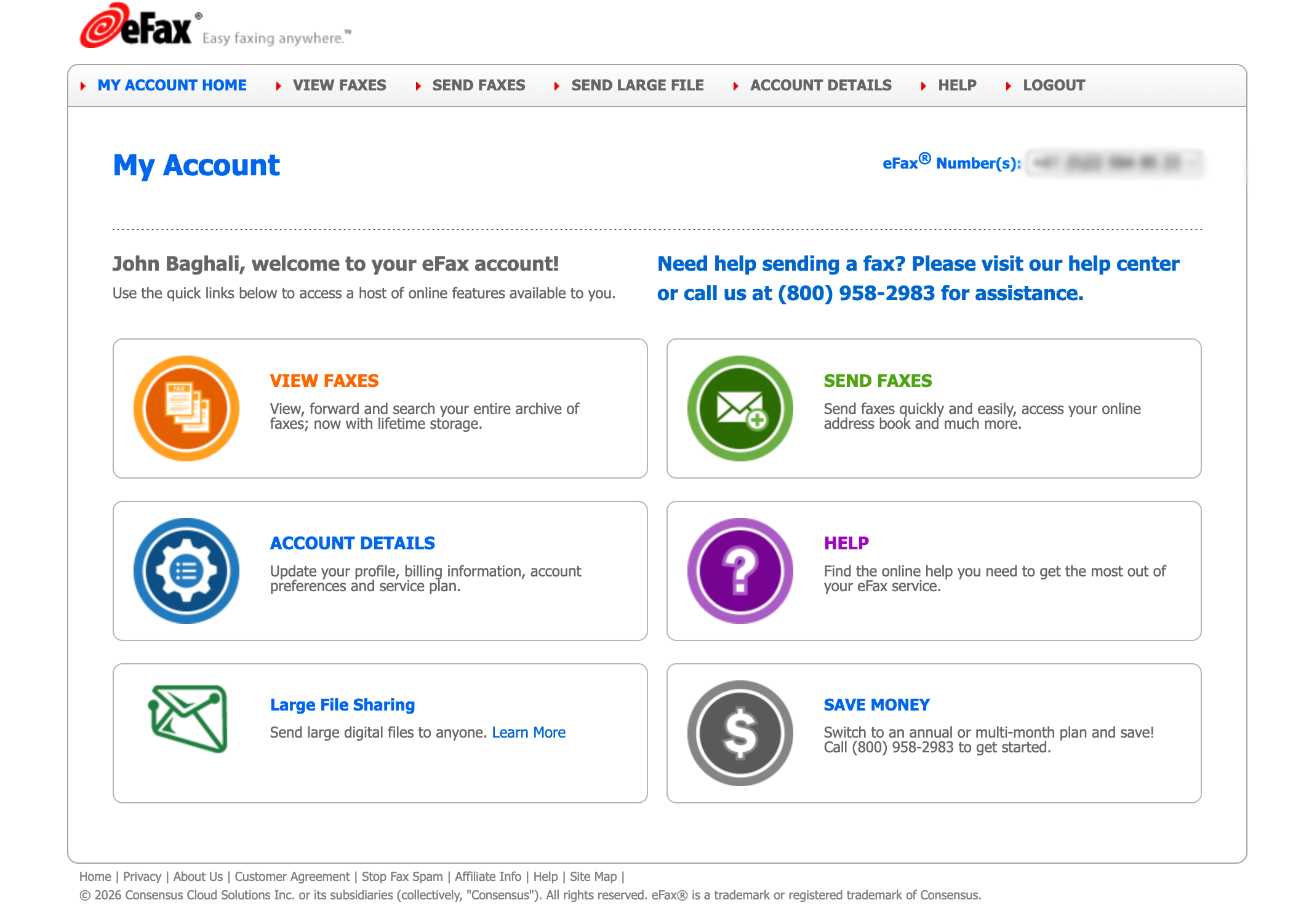
The core functionality holds up. File format support is broad (PDF, Word, Excel, TIFF) and routing incoming faxes to up to five email addresses works exactly as described.
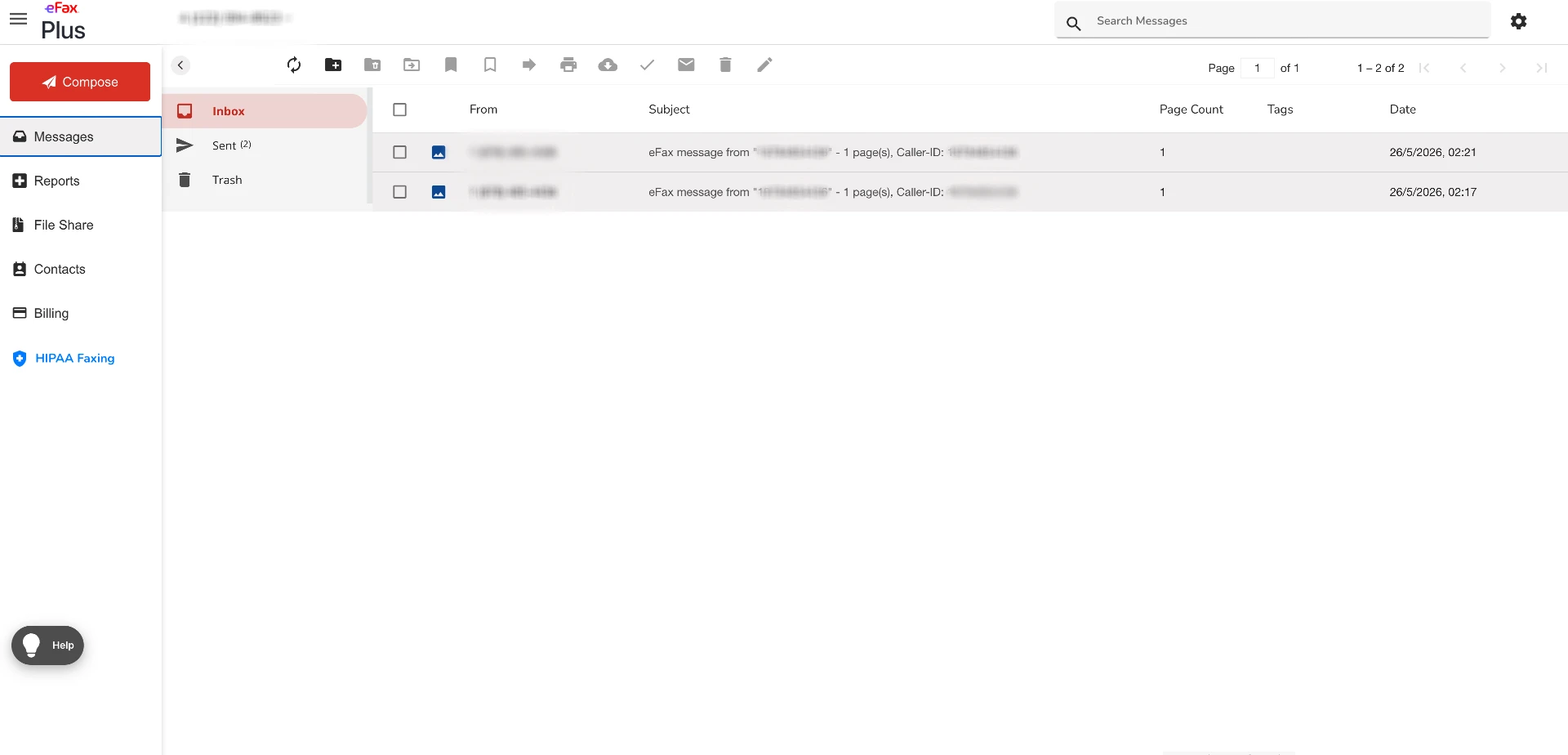
The gaps show up quickly though. There is no persistent send status indicator: a status bar flashes for 2-3 seconds after each action then disappears, manageable for occasional use but friction if you work in the portal continuously. Pasting a fax number into the compose field does not trigger automatic formatting or recognition. Your own assigned fax number has no one-click copy option.
The smoothest workflow remains email-to-fax, which bypasses the portal entirely.
Dropbox Fax has consistently been noted for the clearest and most approachable web interface among online fax services, with a streamlined upload-and-send flow that takes fewer steps. On mobile, Fax.Plus earns strong marks from PCMag, with dedicated iOS and Android apps noted for working extremely well.
5. Customer Service, Cancellation and Account Control | Score 3.5/5
Customer support and account control are the most polarizing parts of the eFax experience, and the part where the gap between the best and worst outcomes is widest.
Support Channels
eFax offers live chat and phone support on all plans, with dedicated account management for Corporate customers. We contacted support twice during our testing: once by phone to ask about plan limits, and once via chat to clarify a billing question.
The phone call picked up within a few minutes and the agent was helpful and knew the product. That lines up with what we see consistently on Trustpilot from 2025 and 2026, where individual agents get genuine praise by name for being patient and professional.
The chat experience was different. The queue moved slowly, and when we got through, the answer to our billing question came back vague enough that we had to follow up again.
That gap between the best and worst support interactions is the recurring theme in public feedback too. When you reach the right person, eFax support is good. When you do not, the experience can drag.
Before You Cancel: Your Fax Number
One thing worth knowing before you even think about canceling: eFax's own legal terms state that fax numbers assigned to your account remain the exclusive property of the company and will not be ported to you. Attempting to transfer a number out without meeting the specific written notice requirements constitutes a violation of the customer agreement, and the terms explicitly provide for liquidated damages in such cases. If your fax number matters to your business, factor that in before committing.
⚠ Important: Once your account closes, you immediately lose access to all stored fax documents and your fax number can be reassigned to another customer straight away. Save everything you need before you start the cancellation process.
How to Cancel eFax
This is where things get complicated. We worked through the process ourselves and mapped out every scenario.
The official cancellation path is: log in, go to Account Details, click the Billing tab, and select Cancel My Account. In straightforward cases this works. The confirmation email is your proof of cancellation, and you should save it immediately.
The exceptions are where users consistently run into problems:
- Outstanding balance: If your account has any balance owing, the online cancellation option is disabled. You must contact support to resolve the balance before cancellation proceeds.
- Multiple fax numbers: Accounts with more than one fax number cannot cancel online and must go through support.
- Annual plan: Annual subscribers need to contact support to cancel rather than using the self-serve option.
- Corporate accounts: A separate phone line applies: 1-888-226-3466.
- App Store or Google Play subscribers: Canceling within the eFax app does not cancel your subscription. Billing is handled by Apple or Google, and cancellation must go through your device's subscription settings.
Pro tip (US users only): Signing up through the App Store is the cleanest route if you want a simple exit. It means you can cancel instantly via your iPhone's subscription settings without navigating the eFax cancellation flow. Note that iTunes signup is only available in the US.
If Self-Serve Cancellation Fails
If the online Cancel My Account option is grayed out or unavailable, it is most likely because your account has an outstanding balance, multiple fax numbers, or an annual plan, all of which disable the self-serve option. In that case, the most reliable fallback is calling 1-800-958-2983, available 24/7. Always ask for a cancellation confirmation number before hanging up.
Refunds
One critical detail: eFax's standard policy is no prorated refunds. You keep access until the end of the paid billing period but will not be reimbursed for unused days.
What Users Report
The complaint pattern across ConsumerAffairs, BBB, and Trustpilot from 2025 and 2026 is consistent enough to take seriously. The most common scenario: a user believes they have canceled, does not receive a confirmation email, and continues to be billed. In documented cases, users made three or more phone calls, received verbal confirmation each time that cancellation would be processed, and were still charged in subsequent months.
What Happens to Your Data When You Close
Two things happen immediately when your account closes. First, you lose access to all stored fax documents. eFax's own help pages confirm there is no grace period and deleted faxes cannot be recovered, so anything you need must be saved before you cancel. Second, your fax number can be reassigned to another customer straight away. eFax's legal terms explicitly state this, which means anyone who has your number on file may reach a completely different person or business from the moment your account closes.
The 24/7 phone support is a real advantage over most competitors. The cancellation friction and number porting prohibition are equally real disadvantages that new buyers should weigh before committing.
6. Data Residency & Retention | Score 3.5/5
Security is not only about encryption. For many organizations, the bigger questions are where fax data lives and how long it is retained.
Retention Settings
eFax publishes retention settings for deleted faxes directly in its Help Center. Personal accounts have a 6-month maximum retention period. Business accounts have a 12-month maximum. Both are adjustable up to the plan limit.
Data Residency
Data residency and retention answer different compliance questions. Residency answers where fax data is stored. Retention answers how long it stays there.
eFax stores data in US-based infrastructure by default. The eFax Corporate enterprise line has a separate EU-facing product with data sovereignty positioning, but that is not available on the standard Plus, Pro, or Protect plans most buyers are evaluating.
How eFax Data Residency Compares
For international teams or regulated industries where data must stay within a specific jurisdiction, the choice of provider matters.
By contrast, Fax.Plus lets Enterprise admins choose from more than 40 data residency locations, including the EU, Canada, Australia, Japan, and Switzerland, and can keep live data and backups in separate places. US customers can keep their fax data in US data centers. Alohi, the company behind Fax.Plus, is headquartered in Geneva with no US parent company, and operates under the Swiss FADP as well as GDPR.
SRFax stores data in the client's own country, US or Canada, but offers no broader regional selection.
7. Enterprise, API & Healthcare Automation | Score 4.5/5
eFax has real enterprise capabilities beyond basic online faxing, especially for large healthcare and regulated organizations.
API Access
eFax publishes a public API overview with REST API details, webhook references, OAuth 2.0 language, and language support for Python, Java, and C#. That gives enterprise buyers a credible starting point.
The friction is the evaluation path. Sandbox access, production API keys, and deeper technical evaluation move into a private developer portal that requires sales contact. For API-first developers in 2026, that slows down proof-of-concept work significantly compared to platforms with public API documentation.
Webhooks are another place where the gap shows. On Fax.Plus, every delivery is signed with HMAC-SHA256, failed deliveries are retried automatically and can be replayed from the dashboard, and each fax number can route to its own endpoint.
The bar for enterprise fax APIs is also rising. A newer expectation in the market is MCP server support, which lets developers integrate fax directly into AI agent workflows and tools like Claude or the OpenAI Agents SDK. eFax has no public positioning in this area.
Healthcare Automation
eFax promotes additional healthcare-focused products including eFax Unite, eFax Clarity, and eFax Conductor. Unless you are evaluating large-scale healthcare interoperability, these are unlikely to be relevant to your buying decision.
For API-first teams, the sales-gated evaluation path is the gap that matters most: sandbox access and production keys both wait on a sales conversation.
Porting a Fax Number from eFax
Whether you can take your fax number with you depends on where the number came from.
- Numbers eFax assigned: eFax's terms say eFax is the customer of record for these numbers and does not have to let them be ported out. Plan for a new number, and tell your contacts before you cancel.
- Numbers you ported into eFax: these can usually move. The new provider's port request has to reach eFax's carrier within 30 days of closing the account, your balance must be paid, and eFax charges a $40 administrative fee per number.
- Timing: start the porting request early, since the 30-day window runs from the day the account closes.
To move an eligible number to Fax.Plus, submit a porting request. The team checks whether the number is portable within one business day, assigns a temporary number while the port completes, and asks for a Letter of Authorization and a recent eFax invoice. Porting a US number requires the Premium plan or higher, and there is no porting fee. The full steps are in how to port a fax number from eFax to Fax.Plus.
Alternatives to eFax
Fax.Plus - Best overall eFax alternative
The strongest alternative to eFax overall. Signing is built into the same suite: any fax in the inbox or sent folder can be forwarded to Sign.Plus, Alohi's own e-signature product, to sign it yourself or request signatures from others under the same account, and the mobile apps let you sign a received fax and send it straight back. eFax's signing, by contrast, places a signature image on your own document. Modern, high-quality cloud fax for individuals, teams, and enterprises. HIPAA and PHIPA ready on Enterprise, with ISO 27001 and SOC 2 Type II across the platform. Plans range from a free tier to enterprise, with a clean experience across web, desktop, and mobile, and for general business and developer use there is a full fax API with OAuth 2.0 and signed webhooks on the Enterprise plan, and a hosted MCP server on paid plans from Basic (not available with Advanced Security Controls).
Best for: Users who want reliable fax quality, modern UX, broad compliance, and developer-ready integrations, from solo users to large teams. Numbers eFax assigned stay with eFax, but a number you brought to eFax from another provider, or hold anywhere else, can be ported to Fax.Plus, free on eligible paid plans, so you can switch without changing the number on your letterhead.
iFax - Best for small healthcare teams on a budget
iFax is a solid option for healthcare teams that mainly care about getting a BAA without moving into enterprise pricing. HIPAA coverage starts on the Plus plan at $24.99/month billed annually, so it may appeal to smaller clinics or healthcare users with a tighter budget. That said, Fax.Plus is still the stronger overall choice for teams that also need a more polished cross-platform experience, broader business workflows, and more advanced developer integrations.
Best for: Healthcare users who prioritize low cost above broader business fax features.
Dropbox Fax - Best for occasional one-off faxing
Good for occasional use. Pay-as-you-go at $0.99 per fax, with 5 free pages to try it. No mobile apps. HIPAA coverage runs through Dropbox Sign rather than the fax service itself.
Best for: Users who only need to send an occasional fax and do not need mobile apps, team workflows, or advanced compliance coverage.
If you are switching from eFax, Fax.Plus is the most complete upgrade: better default fax quality, a full compliance stack, and integrations that scale from a single user to an enterprise team.
FAQs
Is eFax worth it in 2026?

eFax is worth considering for established business and healthcare workflows that need a long-running fax provider with HIPAA-focused plans and enterprise options. It is less compelling for new buyers who prioritize transparent self-serve pricing, modern mobile workflows, and easier developer onboarding.
How much does eFax cost?
The eFax Personal plan is $18.99 per month, with a first-month promotional price of $4.99. It includes 200 pages per month to the US and Canada, 1 user, 1 fax number, and $0.10 per page for overages. No BAA is included. The Business plan is $39.99 per month and includes 500 pages per month to 51 countries, 5 users, 1 fax number, a BAA, and $0.07 per page overage pricing. Extra users and extra fax lines cost more. A 60-second billing rule applies, so image-heavy pages can count as more than one page.
How do you cancel eFax?
Log in, go to Account Details, click the Billing tab, and select Cancel My Account. Save the confirmation email. If you have an outstanding balance, multiple fax numbers, or an annual plan, you need to contact support directly. Corporate accounts call 1-888-226-3466. If the online button does not work, call 1-800-958-2983 (24/7). App Store and Google Play subscribers must cancel through their device's subscription settings. eFax does not issue prorated refunds.
Can I keep my fax number if I leave eFax?
Only if you ported the number in to eFax from another provider. eFax's terms say it is the customer of record for the numbers it assigns and doesn't have to let them be ported out. A number you ported in can usually move, as long as the new provider's port request reaches eFax's carrier within 30 days of closing the account, your balance is paid, and you pay eFax's $40 administrative fee per number. If your number can't move, get a new one and tell your contacts before canceling. Fax.Plus checks whether your number is portable within one business day of a porting request.
Can you access stored faxes after canceling eFax?
No. Once the account is closed, stored fax documents are no longer accessible. Save everything you need before canceling.
Does eFax have an API?
Yes. eFax publishes a public API page with REST API details, webhook references, OAuth 2.0 language, and language support for Python, Java, and C#. Sandbox access and production API keys sit behind a private developer portal that requires sales contact.
Is eFax HIPAA compliant?
eFax markets HIPAA-compliant encryption across all plans, but the signed BAA required for healthcare providers to remain fully compliant is included only on Business and above.
What is the best eFax alternative?
For a more modern online faxing workflow with strong security credentials, Fax.Plus is worth a look. For lighter individual use, iFax is an option. For occasional web-first faxing, Dropbox Fax works well.
Is eFax free?
Not as an ongoing plan. eFax has no free plan in the US, but it offers a 7-day free trial that lets you send up to 200 pages. A credit card is required, and the trial converts to a paid plan unless you cancel. After that, Personal is $18.99 per month, or $15.83 per month billed annually. If you only need to send a few pages without entering card details, Fax.Plus includes 10 free pages with no credit card required.
Which is better, eFax or Fax.Plus?
eFax is the legacy choice: a fax brand with decades of history, a Windows desktop app, and a HITRUST-certified Corporate tier for large healthcare buyers. Fax.Plus is a modern cloud fax platform built for how teams work today. It costs less to start ($6.99 versus $15.83 per month billed annually, both for 200 pages), produced cleaner output in our fax-quality tests, and runs natively on web, desktop, iOS, and Android. For healthcare and other regulated teams, the Enterprise plan covers HIPAA with a signed BAA, and PHIPA and offers more than 40 data residency locations.
For developers and everyday business use, Fax.Plus is also built for automation and AI: a full fax API with signed webhooks (Enterprise plan), AI transcription and data extraction, and a hosted MCP server, available on paid plans from Basic but not with Advanced Security Controls, that lets AI assistants such as Claude and ChatGPT work with your faxes directly.


Featured Articles
See All






Confédération Suisse
Confederazione Svizzera
Confederaziun Svizra
Swiss Confederation
Innosuisse - Swiss Innovation Agency