


Get an International Fax Number
Get an international fax number so customers and partners in another country can send you documents. Receive faxes online on your computer or phone, without a fax machine or dedicated phone line. Choose from available countries and numbers, with eligibility requirements that vary by location.

What is an international fax number?
An international fax number can mean a fax number written with its country code, or a number based in another country. With Fax.Plus, you can choose an available number in a supported country, including one outside the country where you are based, and receive incoming documents online.
Why choose an international fax number?

A number for your contacts
Give customers or partners a fax number in their own country, even when your team works elsewhere. Choose the country and available area code for the people sending documents to you.

Receive without a fax machine
Incoming faxes arrive in your Fax.Plus account. Open them on your computer or phone, without maintaining a fax machine or a dedicated phone line at your own location.

Manage numbers across countries
Use Business or Enterprise to manage multiple fax numbers in one account. Choose country-specific numbers for different teams or projects, subject to local eligibility and available inventory.
Choose a number location that fits your contacts
Choose a fax number based on where your customers or partners send documents from. A number in your own region may suit local contacts; a number in another country may suit contacts based there. Buying a number abroad is not required just to send a fax there.
Number in another country
- Contacts: A country-specific number for customers or partners abroad.
- Costs: The sender’s carrier sets its own charges for fax calls.
- Availability: Eligible plans, documents and number stock vary by country.
Local fax number
- Contacts: A geographic number associated with a city or region.
- Costs: The sender’s carrier sets its own charges for fax calls.
- Availability: Requested area codes depend on inventory and local requirements.
Get an International Fax Number with Fax.Plus in 3 Steps
Choose your country, complete any required verification, and activate a number on an eligible paid plan.
Create your account

Sign up with your email or Google account. Choose the country where you need a fax number and check its available plans and document requirements.
Choose your fax number

If documents are required, submit them for approval. Then choose an available number on an eligible paid plan. Some locations require additional setup through Fax.Plus support.
Start receiving faxes
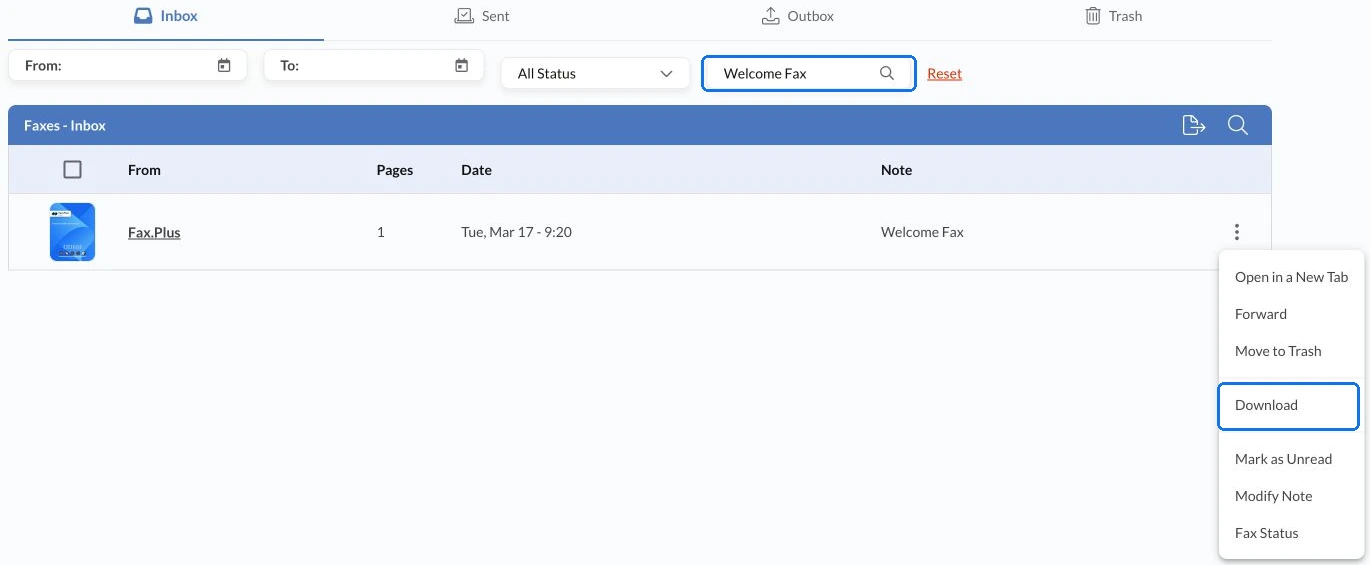
Once your number is active, share it with your contacts. Incoming faxes appear in Faxes > Inbox. Keep your paid plan active and enough pages available for reception.

Keep an existing fax number
Want to bring an existing number to Fax.Plus? Check its porting eligibility and required plan first. Keep your current service active until Fax.Plus confirms the transfer is complete.

Why Get Your International Fax Number with Fax.Plus?
Receive faxes online and manage incoming documents from your account. These features help you work with your number wherever your team is based.

Incoming faxes in one place
Find received documents in Faxes > Inbox and open them when you need them. Your number can receive while your device is offline; an internet connection is needed to access your account.

Access on your devices
Open your Fax.Plus account from a supported web browser or mobile app. Read incoming documents from your computer or phone without keeping a fax machine at each location.

Notifications that fit your work
Configure email and push notifications for incoming faxes. Email delivery and attachment options depend on your account settings and security configuration, so choose the notification setup that suits your team.

Protection for stored documents
Stored fax documents are encrypted with 256-bit AES, using a unique encryption key for each user. HIPAA-compliant faxing requires Enterprise, a signed BAA and Advanced Security Controls enabled.
FAQ
Can I get a fax number in a country I do not live in?

Yes, provided numbers are available and you meet your chosen country’s requirements. Some countries offer numbers to individuals and businesses; others offer them only to businesses.
How much does an international fax number cost?
Receiving faxes requires an eligible paid plan. The minimum plan and any additional number charges depend on the country and your account. Review the price shown for your selected number and billing period before purchase. A free account does not include a receiving number.
Do I need a local address or regulatory documents?
Some countries require identity documents, proof of a local address or business registration. Submit any requested documents and wait for approval before purchasing the number. Check the requirements for your selected country before choosing a plan.
How long does it take to activate the number?
Where regulatory documents are required, review typically takes about 48 to 72 hours, but timing varies by country and the information submitted. Number availability and additional setup can also affect activation. Wait until your number is confirmed active before sharing it.
Can people in other countries fax my number?
Yes. They can send to your internationally reachable number using the full country code and number, without a Fax.Plus account. Their fax provider or telephone carrier determines any calling charges.
Can I manage fax numbers from different countries in one account?
Yes. Business and Enterprise support multiple fax numbers in one account. You can choose numbers from different countries, subject to each country’s eligibility requirements and availability. Included numbers and additional-number charges depend on your plan.
Do I need a foreign number to send a fax abroad?
No. You do not need to buy a number in the recipient’s country just to send a fax there. Outbound availability and sending rates depend on the destination and your account. Choose a foreign receiving number when you need incoming documents addressed to that number.
Explore more ways to use your international fax number
Compare number types, check international number formats, or choose how to receive your documents.
Compare fax types
Check fax formats
Receive documents
Get your international fax number
Create your account, choose an available number in a supported country, and receive faxes online with an eligible paid plan.
Partner with us!


Confédération Suisse
Confederazione Svizzera
Confederaziun Svizra
Swiss Confederation
Innosuisse - Swiss Innovation Agency


