CocoFax Review 2026: Pricing, Safety, and How It Compares
We tested CocoFax: real pricing, the HIPAA claims, security, usability, data retention, and support. Scored across seven categories.


- CocoFax markets itself as a HIPAA compliant fax service, but its own Terms of Service state the opposite: that CocoFax is not a Business Associate and that the service does not follow HIPAA regulations.
- The entry price is the lowest we have reviewed, $4.99 per month for 60 pages on annual billing, but the pricing page promises a 30-day money-back guarantee while the terms allow only a 24-hour cancellation window.
- Every plan advertises Android and iOS mobile apps. The Android app was removed from Google Play in January 2025, and the official iOS app is no longer in the App Store; searching there returns an unrelated lookalike app that also uses the CocoFax name.
- No company name, registered address, founders, or leadership appear anywhere on cocofax.com, including the About, Terms, and Privacy pages.
- Recent user reviews describe unanswered refund requests, charges after cancellation, and no way to remove a saved card; best fit is occasional, non-sensitive sending, and even there with eyes open.
Is CocoFax Worth It in 2026?
CocoFax sells itself on price, and on price alone the pitch works: $4.99 per month on annual billing is the cheapest paid entry point in this entire review series. For someone who sends a handful of routine, non-sensitive pages a month and never needs to talk to support, the low sticker price is real.
The problem is everything around the sticker price. The service's marketing and its legal terms tell two different stories, and when that happens, the terms are what you actually agreed to. The pricing page advertises a 30-day money-back guarantee; the terms grant 24 hours. The plans advertise unlimited storage; the terms allow CocoFax to delete stored data after six months. The healthcare page advertises HIPAA compliance; the terms state the service does not follow HIPAA regulations. We walk through each of these below, with the exact wording.
For anyone faxing patient records, contracts, tax documents, or anything else that matters, the alternatives are simply safer bets: Fax.Plus from $6.99 per month with a named auditor behind its certifications, iFax from $12.49, or eFax from $18.99. Each has trade-offs, covered in their reviews, but each is operated by an identifiable company that stands behind its compliance claims in writing.
About CocoFax
CocoFax is an online fax service that has been operating since at least 2020, when its former Android app first appeared on Google Play, offering web, email-to-fax, and desktop faxing with a free fax number on every paid plan. Its marketing leans heavily on the healthcare and small business audience, with dedicated pages for HIPAA, PHIPA, and a dozen industry verticals.
Who Is Behind CocoFax?
We could not find a company name anywhere on cocofax.com. The About page describes the product but names no entity, no founders, no founding year, and no address. The Terms of Service refer only to "COCOFAX" and place the agreement under the laws of "the state of Geneva, Switzerland," an unusual phrasing, since Geneva is a Swiss canton, not a state. The Privacy Policy names no data controller, which the GDPR it references would normally require. The only contact channel published is a support email address.
CocoFax's public identity trail is also inconsistent. Its own website footer uses "CocoFax Inc.", but the site does not publish a registered address, country of incorporation, company registration number, founders, leadership, or named data controller. CocoFax's LinkedIn company page lists Singapore as its headquarters, while Microsoft Marketplace lists the CocoFax SaaS publisher as Shenzhen Duiyun Technology Co., Ltd. Google Workspace Marketplace lists the developer only as "cocofax" and shows trader status unspecified. ZoomInfo separately lists ownership by CocoFax Technology Co., Ltd., useful context but not a contracting entity published on cocofax.com.
The issue is not that any one location proves bad intent. It is that Singapore, Shenzhen, Swiss data-center language, and a Geneva governing-law clause cannot answer the basic procurement question: which legal entity am I contracting with, where is it registered, and where could I enforce the agreement?
The one operator clue we found sits outside the site: CocoFax's former Android app was published on Google Play under the developer name iGeekSoft before its removal in January 2025.
To be clear about what this means and does not mean: an unnamed operator is not proof of bad intent. But for a service asking healthcare practices and businesses to route confidential documents through it, the inability to answer "who am I contracting with, and in which jurisdiction can I enforce anything" is a real problem, and it is the factual core of why so many people search "is CocoFax legit." Every other service in this review series, whatever its flaws, is run by an identifiable company at a verifiable address.
Watch Out for the Lookalike App
If you search the Apple App Store for CocoFax today, you will find an app called "Cocofax" by a developer named Cacao Mobile, sold at $19.99. It is not connected to the CocoFax service reviewed here, and your CocoFax account will not work in it. CocoFax's own former iOS app is no longer listed. We cover the full mobile situation in the usability section.
What CocoFax Offers
The core product is standard cloud fax: a web portal, email-to-fax and fax-to-email, Windows and Mac desktop apps on the higher tiers, and integrations with Gmail, Google Workspace, Microsoft 365, and Slack. The pricing page states the service is "trusted by over 200,000 individuals and companies worldwide," a figure we could not verify against any independent source.
Review footprints are thin and split. G2 lists 188 reviews with generally positive sentiment, Capterra's profile mixes praise for setup ease with sharply negative billing experiences, and Trustpilot holds just 28 reviews in total, several of them recent and severe. Capterra also discloses that some CocoFax reviews are incentivized, so treat the positive averages as a soft signal.
How We Reviewed CocoFax
We reviewed CocoFax using four evidence layers:
- Hands-on product testing. We created an account and tested CocoFax through the web portal and the email-to-fax workflow. CocoFax no longer offers working mobile apps despite advertising them, so on mobile we tested through the browser. We sent live faxes from each available surface to evaluate the full user experience.
- Fax-quality testing. We tested CocoFax using two fixed, synthetic, real-world-style source documents: one government and legal document and one healthcare lab results form. The same source files were used across testing so we could evaluate output quality consistently. Across the tests, we assessed the practical details that matter in real document workflows, including readability, layout preservation, handwriting, fine print, stamps, signatures, barcodes, dense tables, and mixed font sizes. No real personal, medical, tax, company, or patient data was used in the fax-quality tests.
- Billing and account-control review. We monitored the billing flow from signup onward and mapped the cancellation path directly, including the steps required to manage or cancel the account after registration, and compared the marketed refund policy against the Terms of Service.
- Business-readiness review. We checked CocoFax's public materials for security and compliance claims, including its security overview, HIPAA page, Terms of Service, and Privacy Policy, plus data residency and retention information, API and developer resources, and company background. Pricing, plan limits, and policy wording were verified by live page retrieval in June 2026.
We then scored CocoFax across seven areas: fax quality, pricing, security and compliance, usability, customer service and account control, data residency and retention, and enterprise, API, and healthcare automation.
1. Fax Quality | Score 3/5
CocoFax sends readable faxes, but it does not give users a quality selector. There is no HD, Fine, or higher-resolution mode to choose before sending, so the output below reflects the only quality level CocoFax offers. In our tests, that fixed output handled ordinary text, tables, signatures, stamps, and barcodes well enough for everyday use. The ceiling appeared on faint gray detail, background security patterns, watermark detail, and fine medical traces.
That puts CocoFax in the middle of the quality pack. It is usable for routine documents, but it does not match the fine-detail retention of Fax.Plus HD, and it does not give the user a setting to improve the result when the document needs more detail.
Test Methodology
We tested two document types in both sending directions, Fax.Plus to CocoFax and CocoFax to Fax.Plus, and ran multiple passes. Because CocoFax offers only one fixed quality level, there was no HD, Fine, or resolution toggle to test. We compared CocoFax's single output against the Fax.Plus reference originals and the Fax.Plus Standard and HD outputs on the same source files. The two test documents were a simulated IRS Form 2553 and a simulated healthcare lab results form, the fixed synthetic files used across this series. No real personal, medical, tax, company, or patient data was used.
Government and Legal Document Fax Test
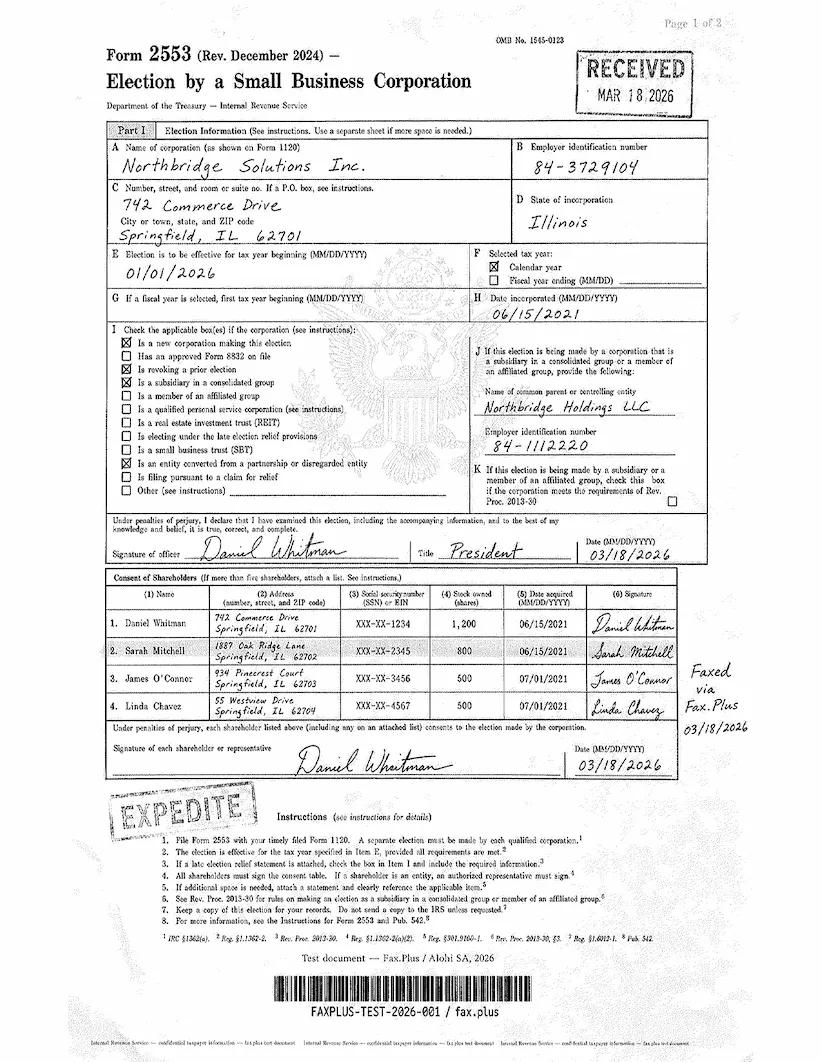
The first test used a simulated IRS Form 2553, a US government tax election form. Documents like this are common in legal, financial, and real estate workflows: signed agreements, tax filings, and multi-party authorization forms where every detail needs to arrive intact.
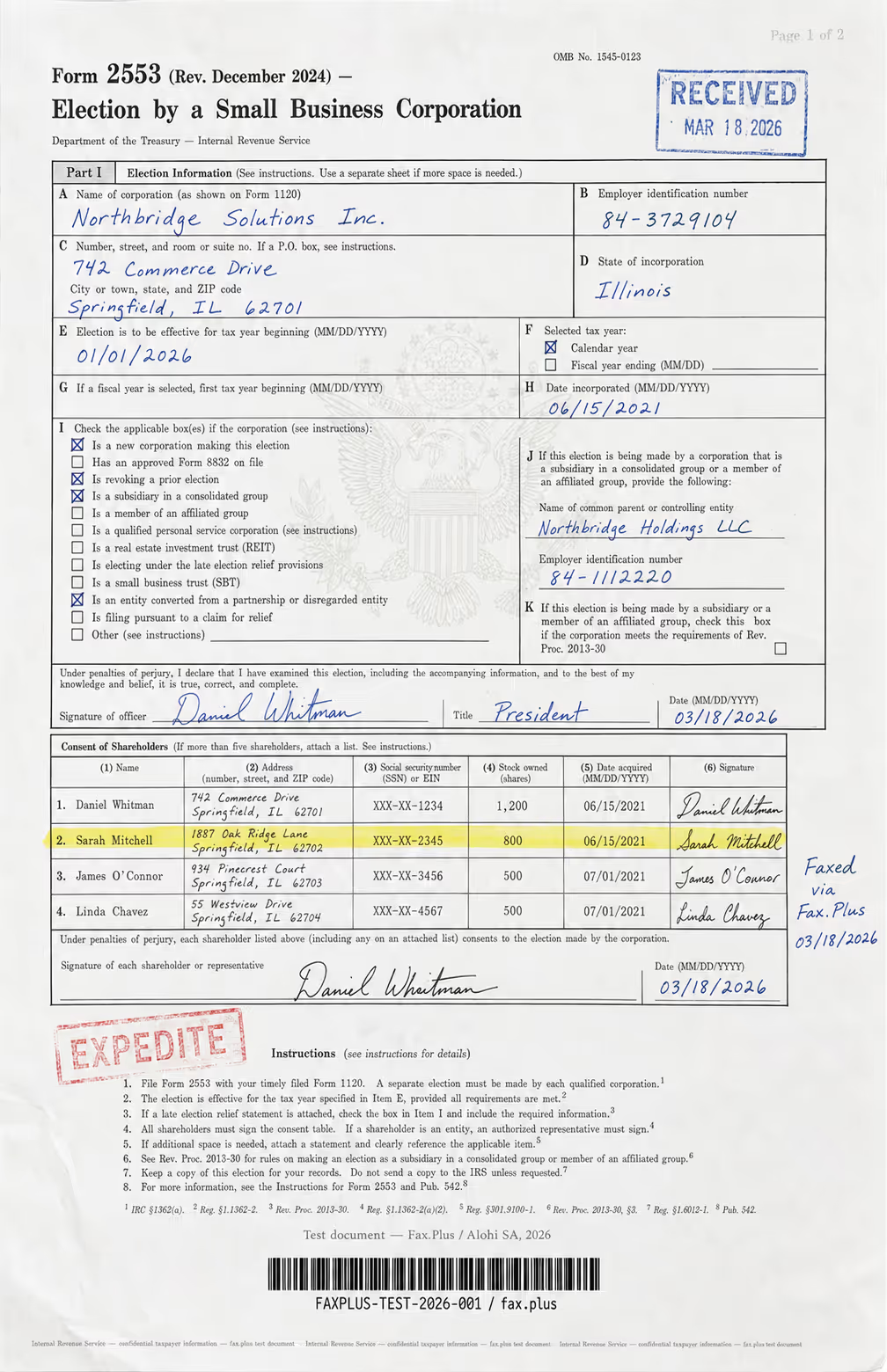
What the test document included:
- Handwritten signatures and a cursive-style officer name
- An official-style RECEIVED stamp with date
- An EXPEDITE rubber stamp with faded ink edges
- A US government eagle seal watermark in the center
- A highlighted shareholder table row
- Mixed font sizes across headers, body text, and fine print
- Dense tabular data across multiple columns
- A microprint line at the bottom for anti-fraud authentication
CocoFax Standard vs Fax.Plus Standard
On the IRS form, CocoFax preserved the practical content. The printed text stayed readable, the main form boxes and shareholder table held their structure, the handwritten signatures and cursive officer name were legible, and both the RECEIVED and EXPEDITE stamps came through clearly enough. The barcode was usable. For an ordinary business or government form, the result is acceptable.
The trade-off is subtle detail. CocoFax renders with a more obvious fax texture than the Fax.Plus reference sends. The faint Treasury eagle watermark behind boxes I and J mostly disappears, the background security pattern is not retained, and the microprint line is softer. The ink survives; the faint gray information underneath it does not.
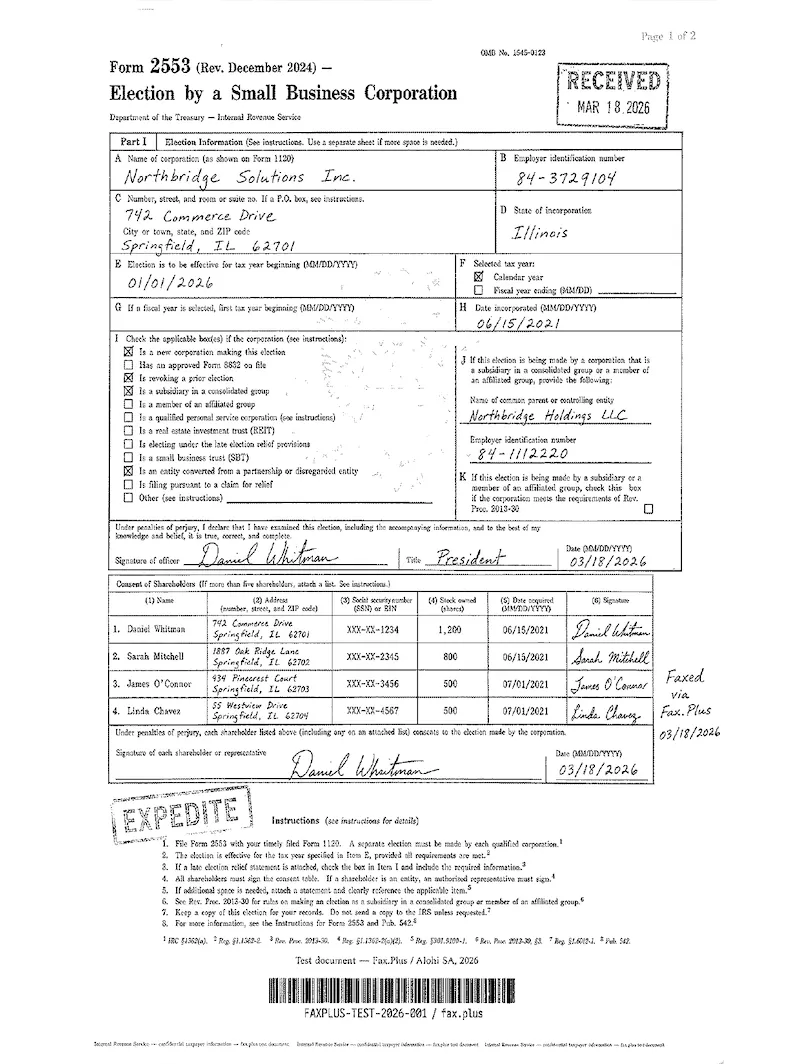 Standard
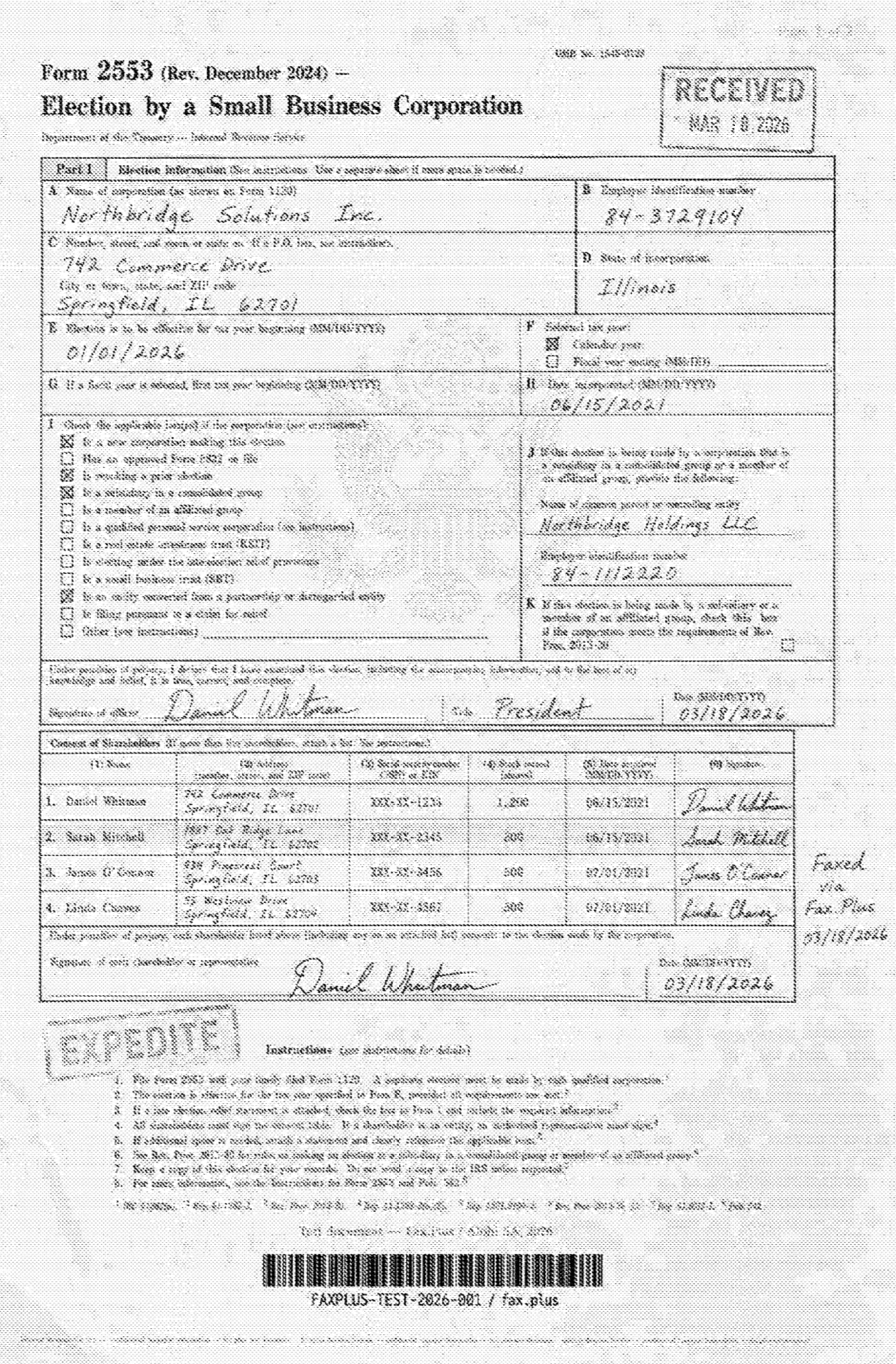
 CocoFax
CocoFax Standard vs Fax.Plus HD
This is where the missing quality selector matters. Fax.Plus HD keeps the Treasury eagle watermark, including the feathers, stars, shield, and more of the page's background security pattern. CocoFax has no higher-quality setting to reach for, so the watermark stays mostly gone. The difference is not ordinary readability. It is fine-detail headroom, and CocoFax does not have it.
 HD
CocoFax
HD
CocoFax
Healthcare Document Test
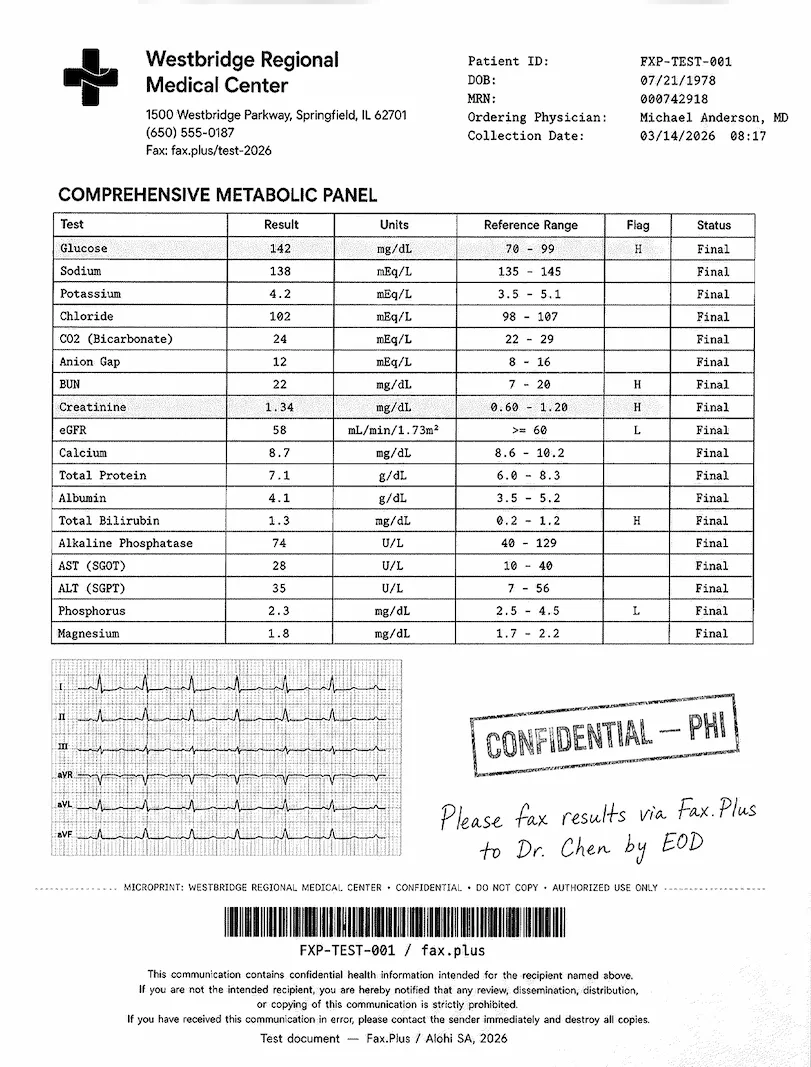
The second test used a simulated lab results form from a fictional medical center. No real patient data was used. The document was designed as a stress test rather than a literal workflow scenario: the embedded EKG strip on red grid paper was included deliberately to push the limits of what each service can render. What is typical is the combination of lab data, flag values, handwritten physician notes, and PHI stamps, all of which appear regularly in real healthcare fax workflows.
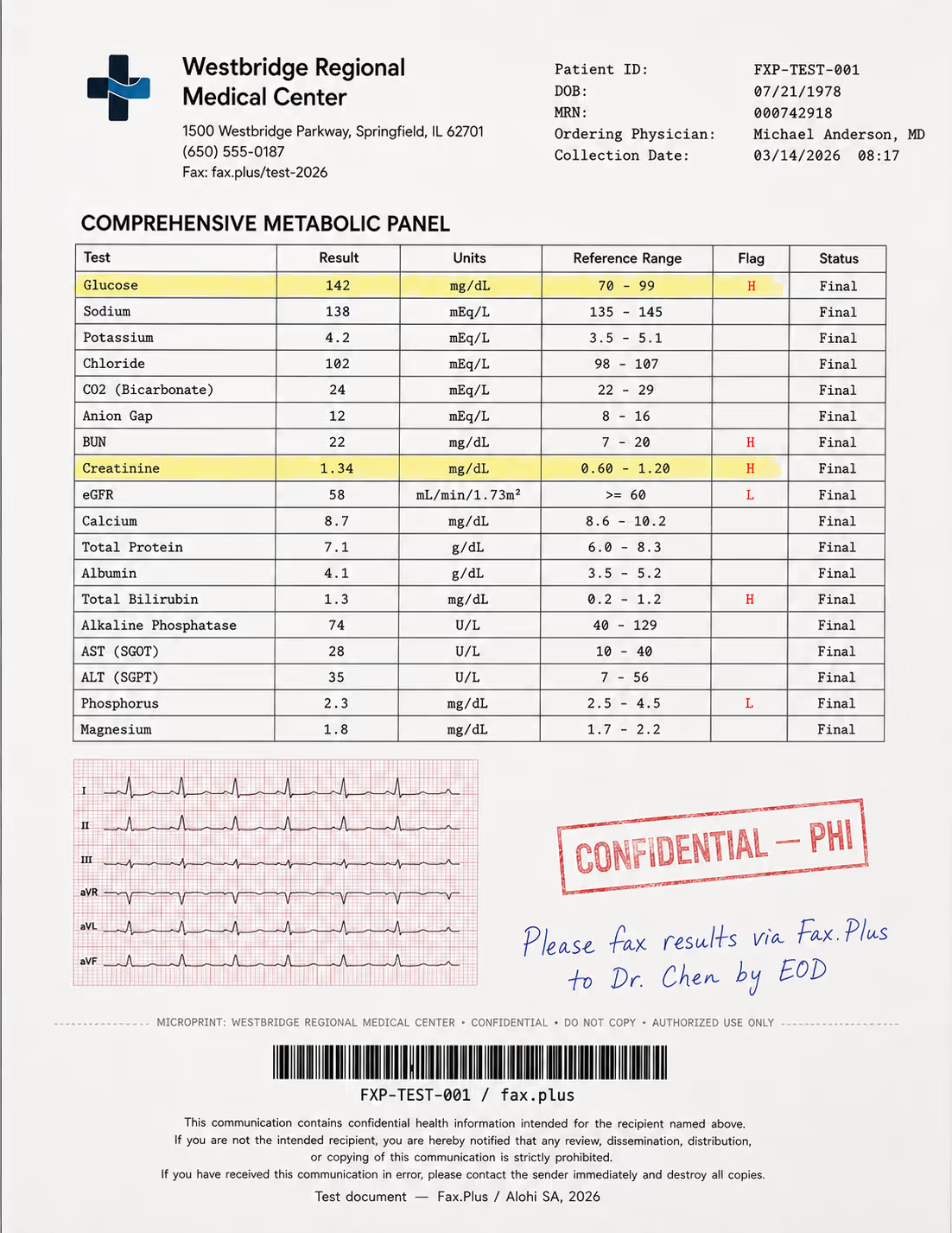
What the test document included:
- A comprehensive metabolic panel with highlighted flag values (H/L indicators)
- A 6-lead EKG strip on red grid paper included as a quality stress test
- A handwritten physician instruction in blue ink
- A CONFIDENTIAL/PHI rubber stamp with faded edges
- Patient header data and a Code-128 barcode
- A HIPAA disclaimer footer in small print
- A microprint line for anti-fraud authentication
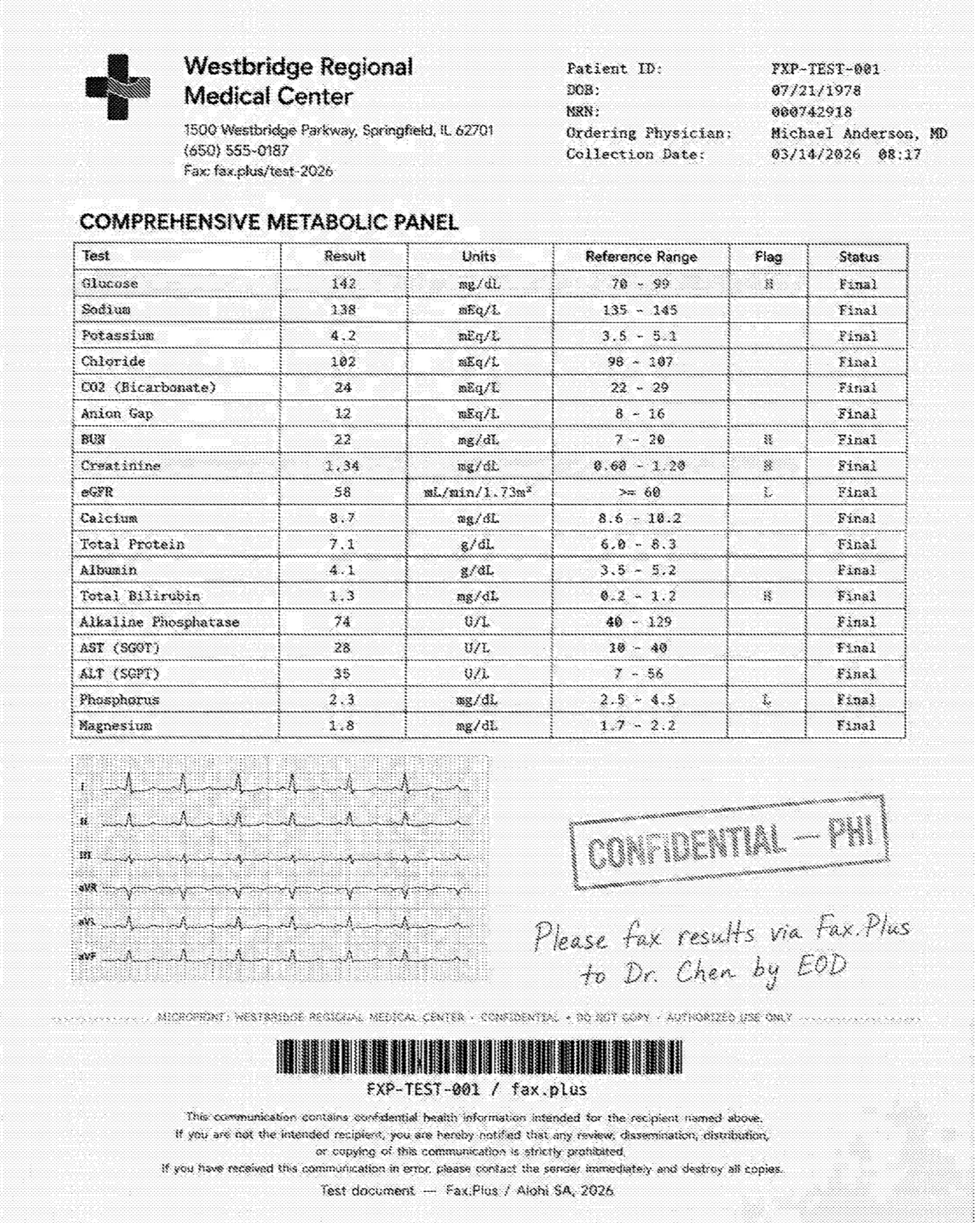
The healthcare form followed the same pattern. CocoFax kept the important text readable: metabolic panel values, H and L markers, patient header details, the physician note, the PHI stamp, the small footer disclaimer, and the barcode all survived. For a routine lab-results fax where the values carry the meaning, CocoFax is usable.
The EKG strip is where the single fixed quality reaches its limit. The grid loses definition, and the waveform comes through thinner and less detailed than the Fax.Plus references. That may be fine for a simple record copy, but it is not ideal for a document where small waveform detail carries meaning.
CocoFax Standard vs Fax.Plus Standard
This is the everyday-tier comparison on the same healthcare form. Fax.Plus Standard keeps the table, flag markers, EKG grid, and trace cleaner. CocoFax keeps the lab values readable but gives up more of the grid and fine waveform definition. For a clinician reading flag values, both are usable. For visual detail in the EKG strip, Fax.Plus Standard holds more.
 Standard
 CocoFax
CocoFax Standard vs Fax.Plus HD
Fax.Plus HD is the stronger reference on the healthcare stress test. It keeps the EKG grid and finer waveform deflections more clearly, and the footer text stays sharper. CocoFax has no HD or Fine mode to close the gap. Its output is readable, but it is not the best fit for healthcare documents where small visual details matter.
 HD
CocoFax
HD
CocoFax
Send Speed
CocoFax completed our sends in about 1 to 2 minutes, which is average for the group. Fax.Plus Standard completed in about 1 minute or less, while Fax.Plus HD took about 2 to 3 minutes, the expected trade-off for a higher-resolution pass. CocoFax sits between those two baselines, but unlike Fax.Plus it does not offer a choice between faster standard sending and slower high-detail sending.
Send time is only one side of speed. On inbound, Fax.Plus also offers real-time fax streaming, which delivers each page of an incoming fax the moment it is decoded instead of holding the whole document until the final page lands, useful when a multi-page record is time-critical. Most cloud fax services deliver the document only after every page has arrived.
CocoFax earns 3/5 for fax quality. It is readable enough for everyday business forms and routine lab-result documents, but the single fixed quality drops too much faint gray and fine-detail information to score higher. The missing HD or Fine mode is the main ceiling: when the document needs more detail, CocoFax gives the user no setting to improve the output.
2. Pricing | Score 3.5/5
On paper, CocoFax is the cheapest paid service in this series. The plans run on a tiered model based on pages, billed monthly, quarterly, or annually, with the annual rate carrying the headline price.
The Plans
- Lite: $9.99 per month, or $4.99 per month billed annually. 60 pages, 1 user, 1 fax number. Overages (the per-page rate once you use up your monthly pages) at $0.20 per page. Email-to-fax, fax-to-email, and the mobile apps the site still advertises.
- Basic: $14.99 per month, or $9.99 per month billed annually. 200 pages. Overages at $0.10 per page.
- Premium: $24.99 per month, or $16.99 per month billed annually. 400 pages. Overages at $0.08 per page. Adds multiple recipients, the Windows and Mac desktop apps, the Google Workspace add-on, Slack, number porting, and SMS notifications. Marked "Most Popular."
- Business: $34.99 per month, or $24.99 per month billed annually. 1,200 pages, 5 team members, an admin panel. Overages at $0.06 per page. Adds enforced two-factor authentication, blacklists, and labels.
- Enterprise: Custom pricing via contact sales. Unlimited team members and API access. Overages at $0.05 per page.
There is also a genuinely free path: 10 pages, send-only, US and Canadian numbers only, no credit card required, no expiry. Receiving requires a paid plan. If you only need an occasional one-off send, that allowance or a separate online free fax service covers it, and our roundup of the best free fax services compares the options.
The Guarantee That Isn't
The pricing page displays a "30-Day Money-back Guarantee" badge: "All of our products come with a 30-day money back guarantee, if it doesn't work for you."
The Terms of Service say something else. Purchases carry a 24-hour cancellation period, the "Opt-out Duration," and it is void if you have used any credit within that window. The terms also state that CocoFax can amend pricing at any time by posting changes on the website, and that you remain bound by your responsibilities under the agreement even after terminating the service.
This is the recurring pattern with CocoFax, and pricing is just the first place it appears: the marketing makes a generous promise, the legal document you actually agree to takes it back. Recent reviewers who tried to collect on the marketing version describe the result, covered in the support section below.
The per-page math is the part the low entry price hides. CocoFax Lite works out to roughly 8.3 cents per included page at the annual rate. Fax.Plus Basic at $6.99 for 200 pages is about 3.5 cents per page, with a service whose refund, storage, and compliance positions read the same in the terms as they do in the marketing. Two dollars per month of savings buys 140 fewer pages and a stack of contradictions.
The rest of the field charges more and delivers more of something specific. iFax at $12.49 gets you working mobile apps, the thing CocoFax sells but no longer ships. eFax at $18.99 buys the best-known brand in the category, with its own cancellation baggage. Dropbox Fax is the better answer for true one-off senders, with a $0.99 pay-as-you-go option that needs no subscription at all. Documo sits at the costly extreme at $25, the highest entry price in the series, and our hands-on testing did not find output quality to match the bill.
The 3.5/5 reflects a genuinely low entry price and a usable free allowance, marked down because the refund guarantee, the storage promise, and the page math do not survive contact with the fine print.
3. Security and Compliance | Score 3/5
CocoFax's security marketing reads like the rest of the category. The legal documents underneath it do not, and this is the section where that gap becomes disqualifying for regulated work.
What CocoFax Claims
The security overview page describes AES-256 encryption for stored faxes, encryption in transit, two-factor authentication (a second confirmation step at login, usually a code on your phone), web application firewalls, and DDoS protection, and states that private data is stored in Swiss data centers. The HIPAA page goes further: CocoFax presents a "HIPAA compliant fax service used by healthcare organizations worldwide," says its data centers follow ISO 27001, references the Cloud Security Alliance, and offers to sign a Business Associate Agreement on request for business users.
What These Certifications Actually Mean
Security certifications are easiest to read as independent inspections. A company can claim anything about its own security; a certification means an outside auditor came in, checked, and signed off. In everyday terms:
- ISO 27001 says the company runs security properly as an organization: who has access to what, how risks are tracked, what happens when something goes wrong.
- SOC 2 Type II says an auditor did not just take a snapshot but watched the controls work over a period of months.
- PCI DSS says card payments are handled safely.
- HIPAA is the US law on patient health information. It has no certification body at all, which is exactly why any vendor can claim HIPAA compliance, and why the contract behind the claim matters so much.
Read CocoFax's page against that standard and three things stand out before we even reach the terms. First, no auditor is named anywhere, for anything, so every item on the list is a claim rather than an inspection result. Second, the ISO 27001 reference is about the data centers CocoFax rents, not CocoFax itself. That is the difference between renting an office in a building with good locks and running a secure company; we flagged the same move when Concord pointed at its AWS data center certificate. Third, the encryption claims do not match each other: the security page says faxes are encrypted with 256-bit AES, while the HIPAA page says fax traffic travels through tunnels encrypted with 128-bit AES. Both are legitimate encryption strengths, and 128-bit is not the scandal here. The scandal is that a service handling confidential documents should know which one it uses, and the Swiss data center claim sits on the same shaky ground, because there is no named company whose infrastructure or registration anyone could check.
What the Terms Actually Say
First, what the BAA actually is: a Business Associate Agreement is the contract HIPAA requires between a healthcare organization and any vendor that touches patient health information. Without a signed, valid BAA, using a fax service for patient documents puts the practice itself out of compliance, which is why this single document decides whether a fax service is usable in healthcare at all.
With that in mind, here is the wording from CocoFax's own Terms of Service:
"COCOFAX is not defined as a health insurer, and it's not a 'Business Associate' as defined by the Health Insurance Portability and Accountability Act and any other related health clauses and amendments under 'HIPAA'. You also acknowledge that our Service does not follow HIPAA regulations."
That second sentence is the one to sit with. By accepting the terms, the user acknowledges that the service does not follow HIPAA regulations, on a service whose marketing site maintains a dedicated HIPAA landing page, a PHIPA page, and a healthcare industry page.
We have seen versions of this pattern before. ComFax's terms establish that it is not a Business Associate by default, and iFax's security page contradicts itself on tier gating. CocoFax is the bluntest version yet: the terms do not merely decline the Business Associate role, they have the customer acknowledge non-compliance outright. A BAA signed by a counterparty whose terms disclaim HIPAA and whose legal identity is unpublished is not a document a compliance officer can rely on.
How CocoFax Security Compares
The transparent end of this market publishes who certifies what, and the rest of the series shows the gradient. eFax keeps its BAA on the Business tier but does sign one. Even Dropbox Fax, which offers no fax BAA at all, is honest about it, and is run by a publicly traded company. Fax.Plus holds ISO 27001 and SOC 2 Type II at the organization level, both certified by EY CertifyPoint, a named, independent auditor, plus PCI DSS, CSA STAR certification, GDPR and CCPA compliance, and HIPAA with a signed BAA on its Enterprise plan. The company behind it, Alohi, is a Swiss company headquartered in Geneva, with the registration, address, and leadership that entails. The contrast writes itself: one service claims Swiss data centers and Geneva law with no company attached; the other is an actual Geneva company you can look up.
The 3/5 is not about missing features. Encryption and 2FA are likely present in some form. It reflects a working security feature set held back by compliance marketing that the service's own contract explicitly revokes, conflicting technical claims, no named auditor, and no named operator.
4. Usability (Hands-On Experience) | Score 3.5/5
Hands-on usability score: 3.5/5. CocoFax's web portal is usable once you are in the right place. The dashboard is clean, the core send flow is simple, and sending an ordinary fax does not require much explanation. The problem is the path around that core flow: mobile apps are still advertised but not available through the official app stores, the Android page pushes an APK download, the upload limit was capped at 2 MB in our test flow, and logged-in navigation can send users back to marketing pages that try to sell an additional fax number.
The Web Portal
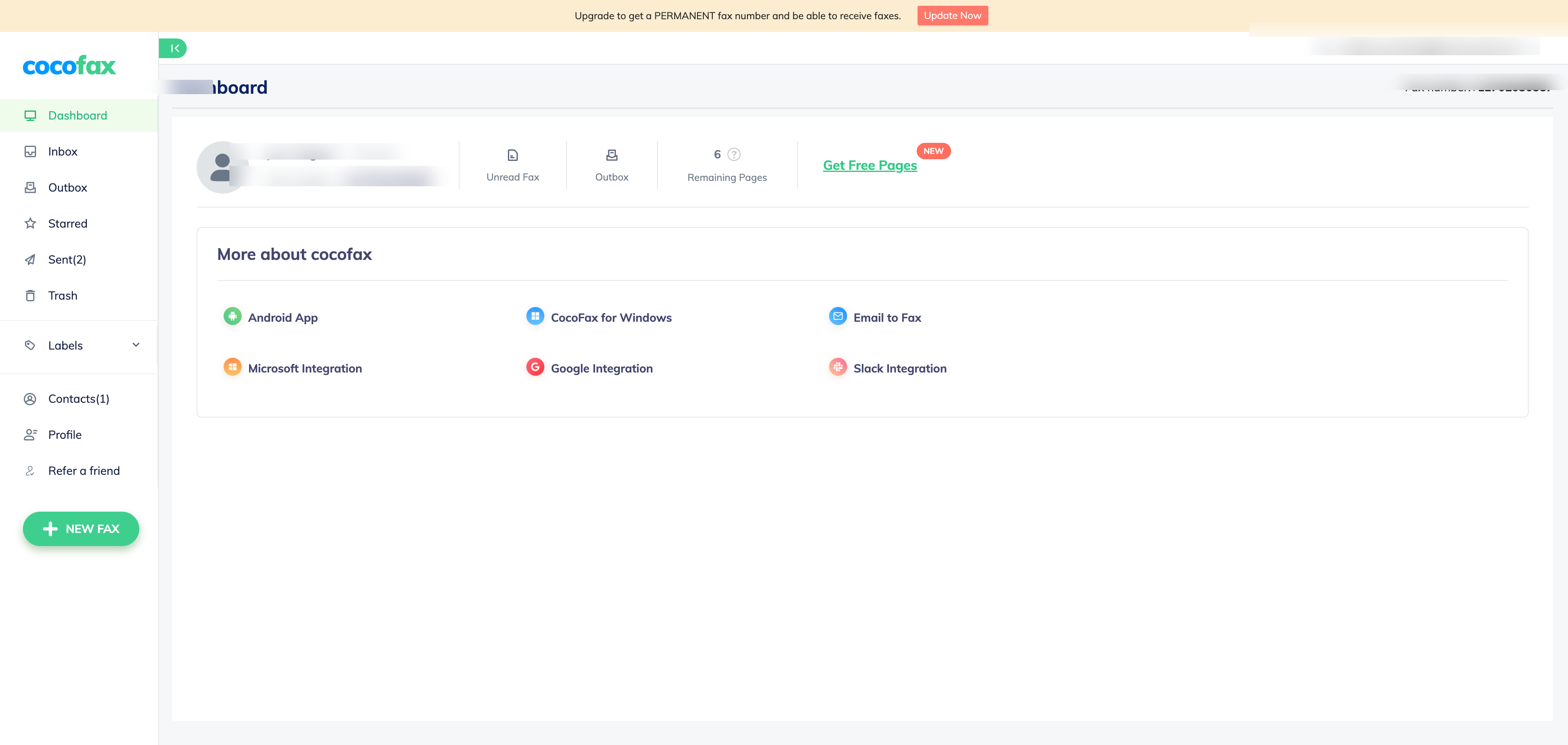
The web dashboard is CocoFax's best surface. Once inside the portal, the left rail gives the expected sections: Dashboard, Inbox, Outbox, Starred, Sent, Trash, Labels, Contacts, Profile, and a New Fax button. The dashboard also shows remaining pages and account shortcuts. This part works and feels close to the standard cloud-fax pattern.
Signup and Verification
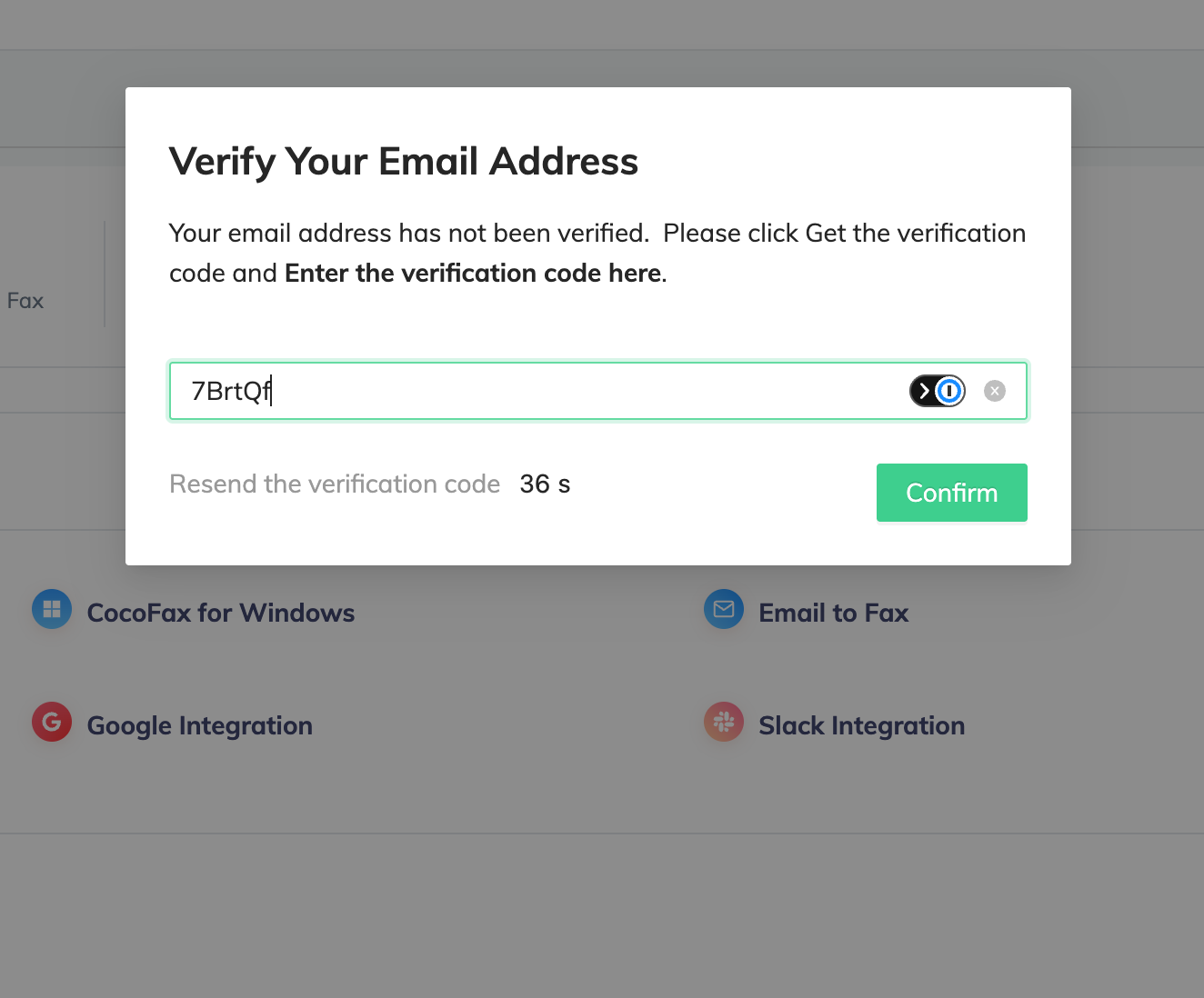
During signup, CocoFax used a short email-verification timer in our test. The modal showed a resend countdown under one minute, giving users very little time to retrieve and enter the code. It is not a dealbreaker, but it adds friction to onboarding.
The awkward part is re-entry. In our test session, leaving the dashboard and typing cocofax.com again kept us logged in, but returned us to the public homepage rather than the fax dashboard. From there, the main Start Faxing buttons pushed toward buying or activating another fax number, even though the account already existed.
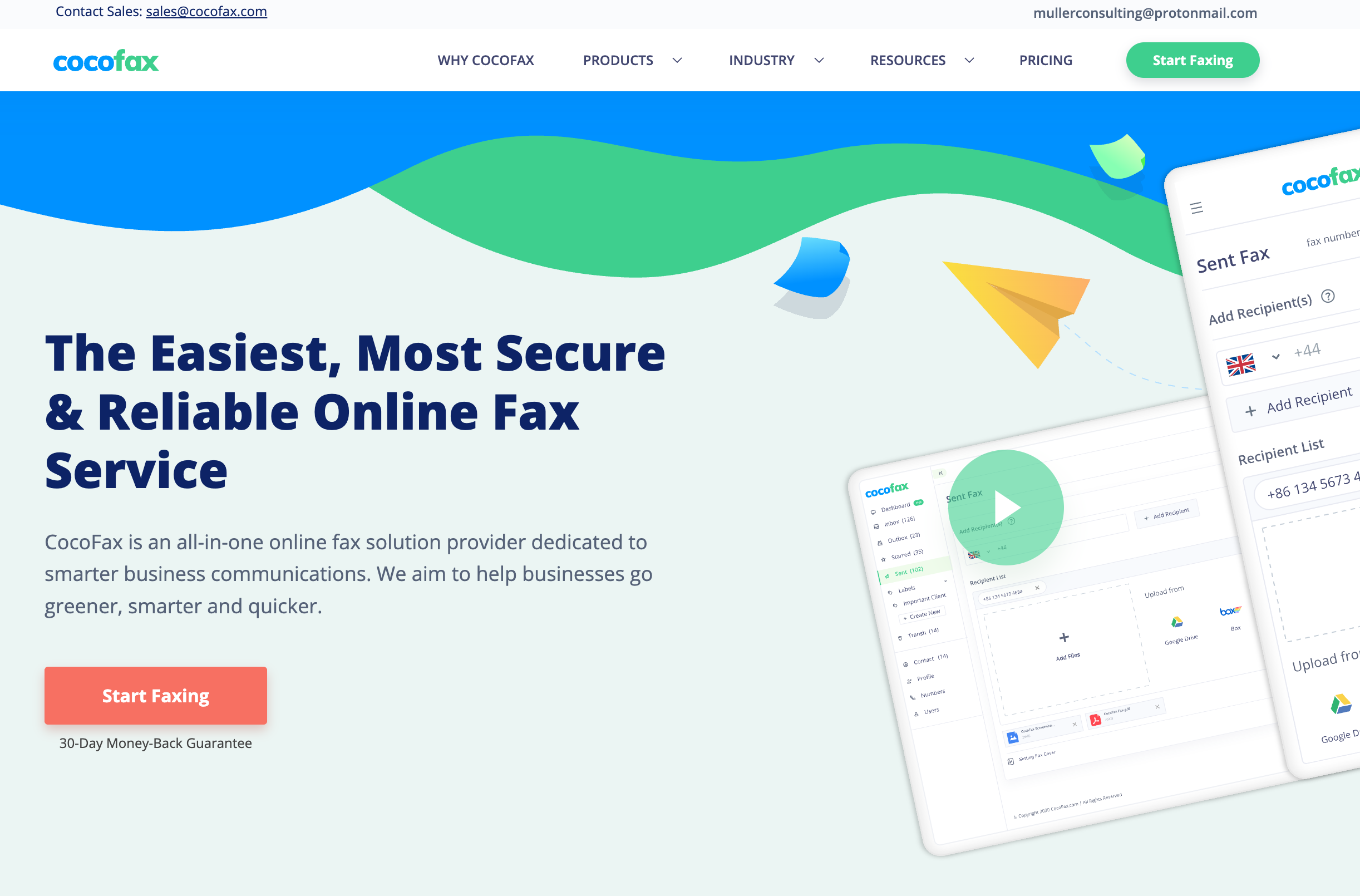
The reliable way back to sending was not the primary CTA, but the account dropdown in the top right: click the email address, then choose Send fax.
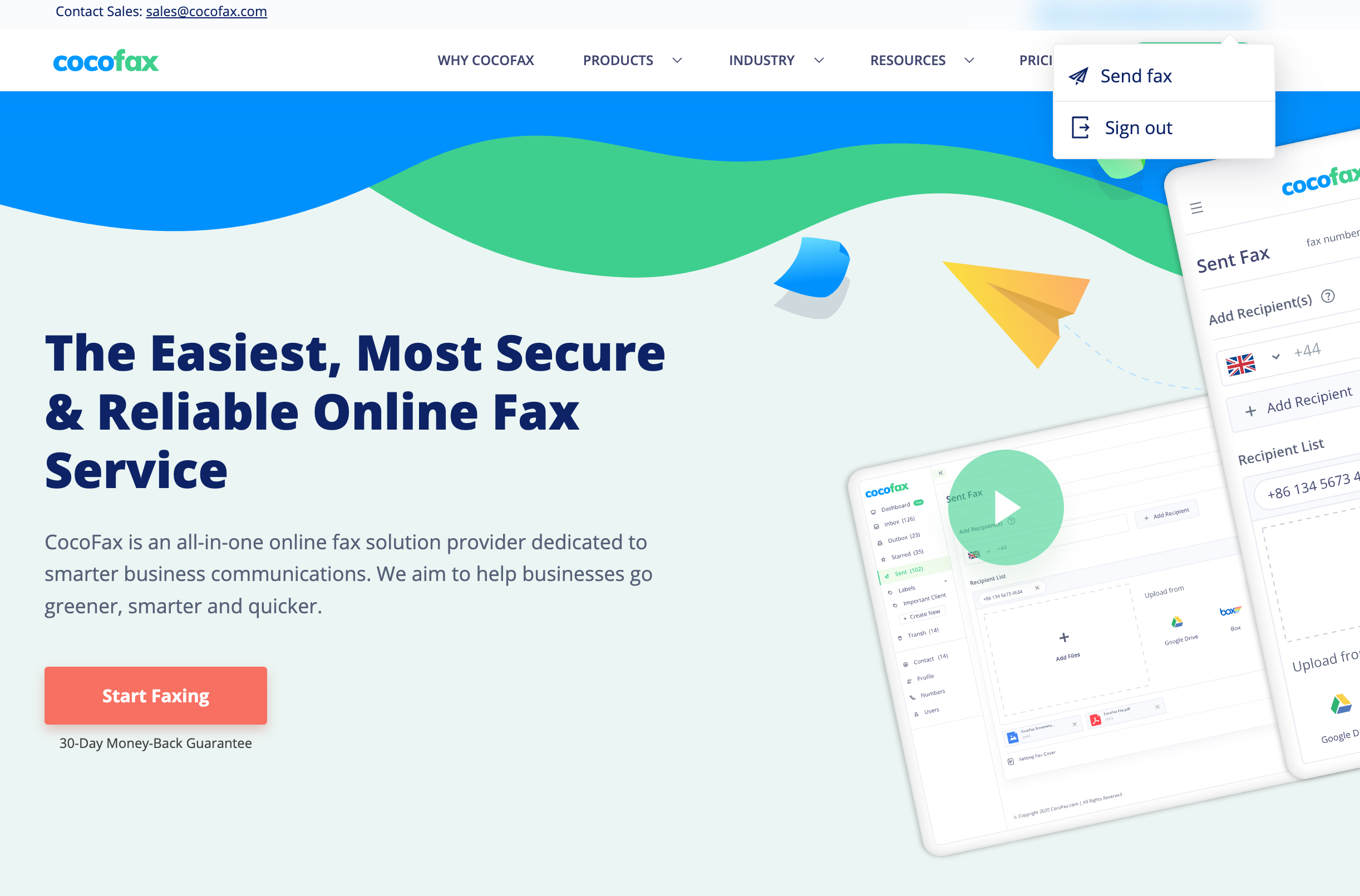
That is a small navigation issue, not a broken product, but it is confusing. A logged-in user clicking a main faxing CTA reasonably expects to return to the send flow, not to be nudged toward adding another number. CocoFax's best workflow is therefore: stay in the dashboard, or use the email dropdown to get back to Send fax.
Mobile: Sold on Every Plan, Available on None
Every CocoFax plan, including the cheapest, lists Android and iOS mobile apps as a feature. As of June 2026, neither exists in a usable app-store form.
The Android path is especially awkward. The Android landing page still says Download CocoFax App for Android and displays a Google Play badge, but the visible download option is a direct Download.apk file. We do not recommend treating a direct APK download as equivalent to an official Google Play app. That is true for CocoFax and for any fax provider: users should know exactly what they are installing, where it came from, and how it will be updated before putting it on a phone that may handle sensitive documents.
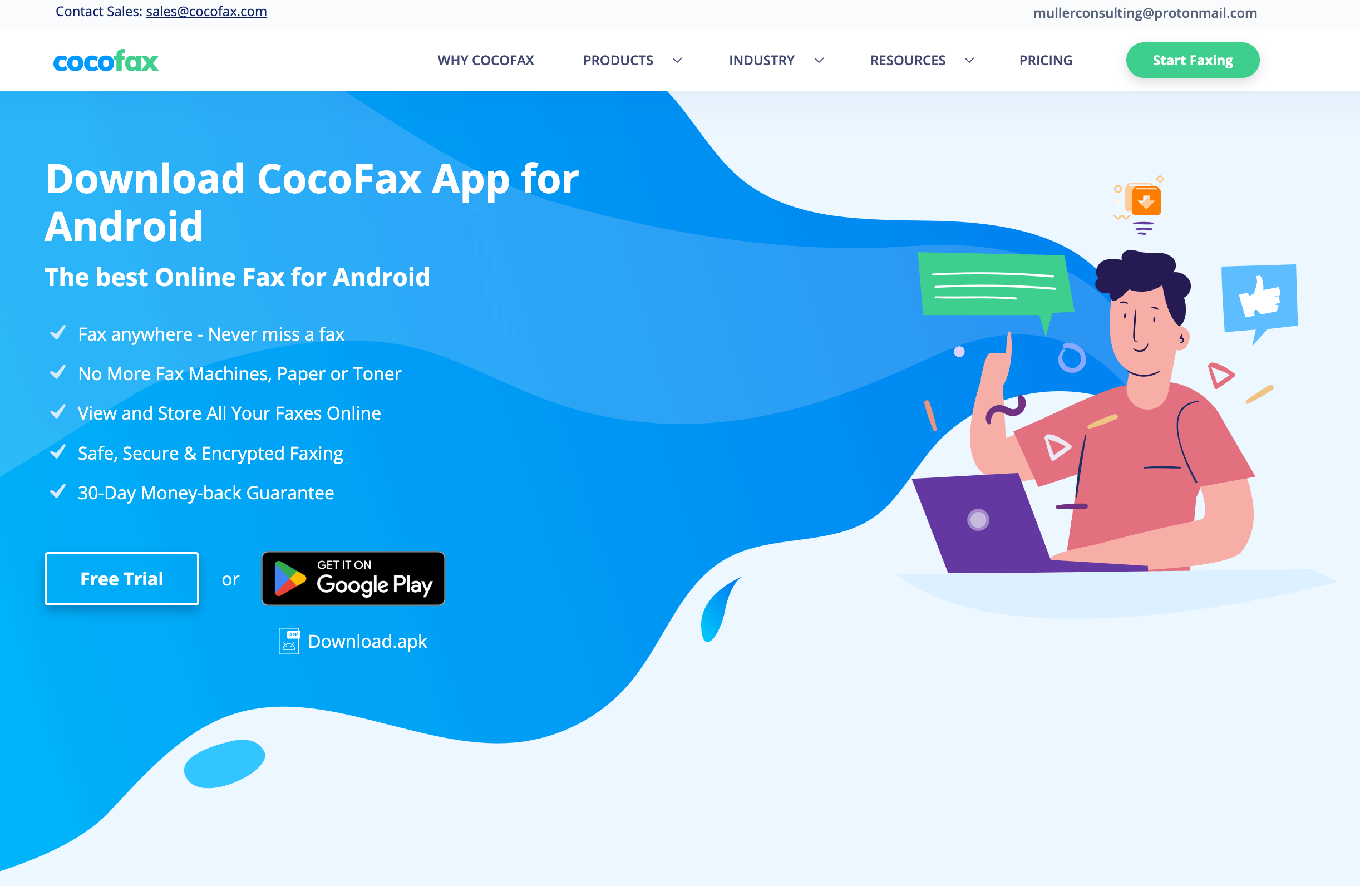
The Android app was removed from Google Play on January 22, 2025. Before removal it carried a 2.08-star rating from 110 reviews and had not been updated since September 2023. The official iOS app is no longer listed in the App Store either. What you find instead when you search is "Cocofax" by Cacao Mobile, a $19.99 unrelated app that happens to use the name, the same lookalike trap we documented with Documo and the mfax.to app, except here the original vanished and left the name to squatters.
File Upload Limit
In our hands-on flow, CocoFax capped uploadable fax files at 2 MB. That is a real usability constraint for scanned PDFs, image-heavy forms, and multi-page packets. Other services in this review set did not surface the same limit in our tests. The limit does not matter for a one-page text PDF, but it becomes a practical issue for the kinds of documents people still fax: tax forms, intake packets, lab results, signed forms, and scanned IDs.
How CocoFax Usability Compares
A clean web portal is table stakes in 2026, and CocoFax clears that bar once the user is inside the dashboard. The picture changes once you put it next to the rest of the field, because each rival actually delivers a surface CocoFax only advertises. iFax comes from mobile-first roots and ships capable apps on both platforms. ComFax sits at the consumer end with a usable mobile app but no admin depth behind it, and fixed output quality. eFax covers web and mobile, and its newer portal looks modern, even if it stops short of polished and leaves small things missing. Dropbox Fax offers no mobile app, but it also does not list one as a paid feature. Even Documo, whose mobile story we criticized, has a working iOS app and never advertised an Android one. And Fax.Plus covers every surface at once: native iOS and Android apps rated 4.8/5 and 4.7/5, desktop apps for macOS and Windows, web, and email-to-fax, with camera capture built in.
5. Customer Service, Cancellation and Account Control | Score 3/5
CocoFax advertises 24/7 human support by email and live chat. The record its own customers leave tells a different story, and it is a consistent one: across Trustpilot, Capterra, and Software Advice, the same failures recur from different people, in different months, on different platforms. That repetition is the point. These are not one disgruntled customer; they are a pattern that anyone can check.
The Pattern, and How to Check It Yourself
The same three failures show up again and again: support that does not respond, charges that continue after cancellation, and no self-serve way to stop them. We are not asking you to take our word for it. Search "CocoFax" on Trustpilot, Capterra, and Software Advice, sort by most recent, and read for yourself. The recurring themes to watch for are charges after a confirmed cancellation, an annual plan that renews and bills despite a cancellation request, saved card or bank details that cannot be removed from the account, and refund requests that go unanswered. A recurring detail worth noting: reviewers report there is no way to remove payment details from the account once saved.
Card cancellation as the exit path is the thread tying it together. When reviewers who have never met, on platforms that do not talk to each other, independently arrive at the same workaround, kill the payment card to make the charges stop, that is no longer a collection of bad days. The cancellation flow is not a flow.
The Refund Reality
Connect this back to the pricing section: the marketed 30-day money-back guarantee is, per the terms, a 24-hour window voided by any usage. The reviewers who report chasing refunds were not being unreasonable; they were collecting on the promise the pricing page makes. The terms ensured there was nothing to collect.
How CocoFax Account Control Compares
This is the weakest account-control record in the series. eFax's call-to-cancel flow is a long-standing annoyance, and Dropbox Fax offers form-only support, but neither pattern includes charges after documented cancellation and an unremovable card. Fax.Plus runs multi-channel support, self-serve cancellation, and supports porting your number both in and out, which also matters here: an exit from CocoFax means either porting the number away or losing it. The 3/5 reflects a working account and cancellation surface held back by a consistent, recent, multi-platform pattern of billing and support failures, not isolated bad days.
6. Data Residency and Retention | Score 3/5
CocoFax's security page states that all private data is stored in Swiss data centers, and the Terms of Service place the agreement under Geneva law. For a privacy-conscious buyer, that sounds like the right answer. The problem is that with CocoFax, neither claim can be anchored to anything.
Storage Location and Jurisdiction Are Two Different Things
This distinction is worth a minute, because CocoFax's marketing blurs it. Storage location is where the files physically sit: which country's data centers hold your faxes. Jurisdiction is which country's law governs the company you contracted with, and whose courts you would go to if something went wrong. A service can store data in Switzerland while being run from anywhere, and a Geneva governing-law clause only means something if there is a Geneva company on the other end of it.
The Singapore listing belongs in this distinction. CocoFax's LinkedIn company page lists Singapore as its headquarters. That is not the same as Swiss data storage, and it is not the same as the Geneva wording in the Terms. In plain English: Singapore describes a company-profile location, Swiss data centers describe where files may sit, and the Geneva wording describes the legal clause CocoFax chose for the Terms.
With CocoFax, both halves fail the check. Swiss data residency is a property of a company's infrastructure contracts, and Swiss jurisdiction is a property of a legal entity registered in Switzerland. CocoFax names no entity, so there is no registration to check in the Swiss commercial registry, no infrastructure provider named, and no party to enforce the Geneva clause against. A jurisdiction claim without a company is a sentence on a webpage.
Retention: Unlimited, Until It Isn't
Retention is governed by the terms, and the terms are explicit: CocoFax may delete stored information once it passes six months from creation. That clause sits directly against the "Secure Unlimited Storage" feature listed on every pricing tier. Unlimited storage that the provider can erase at the six-month mark is a retention policy, and for any business with document retention obligations, it is the wrong one. Export anything you need to keep, continuously.
How CocoFax Data Residency Compares
The verifiable version of the Swiss story exists in this market. Fax.Plus is operated by Alohi, a registered Swiss company in Geneva, under the Swiss FADP, a single national privacy law revised in 2023 to GDPR standards and recognized by the EU as adequate. Crucially, the jurisdiction and the storage location are separate choices: a US customer can keep data in US data centers, exactly as a domestic buyer would expect, while the company itself answers to Swiss law. Account admins on Enterprise choose where data lives across 20+ regions, including US locations alongside Zurich, Geneva, the EU, Canada, Japan, and Australia, and they can set the backup location separately from the live data, so working files can sit in one country while backups sit in another, with self-serve migration between regions later. Retention is under the customer's control rather than capped by a deletion clause. The 3/5 grants that a Swiss storage claim, if true, is a reasonable posture, but a residency promise with no named company, no named provider, and a six-month deletion right underneath it cannot score higher.
7. Enterprise, API and Healthcare Automation | Score 2.5/5
There is not much product here to evaluate, which is itself the finding.
API Access
An API, for the non-developers reading: it is the interface that lets your own software send and track faxes automatically, with no person clicking send, which is how faxing gets wired into an EHR, a CRM, or a billing system. The pricing page lists "CocoFax API" as an Enterprise feature, behind a contact-sales tier with no published pricing. We found no public API documentation, no developer portal, no SDKs, and no mention of webhooks (the automatic notifications that tell your other systems when a fax arrives or completes). Third-party directories repeat that an API exists for enterprises, but a developer evaluating it has nothing to read before a sales call.
The contrast is the documentation, not just the existence of an API. iFax exposes a self-serve API on a lower tier. Documo publishes a well-documented REST API too. And Fax.Plus goes furthest, with two distinct layers a developer can actually read about: a documented REST API with public Node.js and Python SDKs for writing code against faxing, and on top of it an MCP server (covered just below) that exposes faxing as natural-language action tools an AI assistant can call directly. Both are explained on public developer pages rather than gated behind a sales call.
Healthcare
The healthcare pitch collapses under the security section above. CocoFax maintains HIPAA and PHIPA marketing pages and offers a BAA on request, while its terms state the service does not follow HIPAA regulations and that CocoFax is not a Business Associate. A healthcare organization cannot build a compliance position on that foundation, whatever the BAA paperwork says, because the operative service agreement disclaims the obligations the BAA would impose. There is no EHR integration story, no audit-trail documentation aimed at compliance teams, and no named subprocessors.
MCP and AI Workflows
The newer bar for enterprise fax is an MCP server, which lets an AI assistant work faxing directly through natural-language action tools (send a document, check the inbox, track delivery, manage contacts) rather than only through code. Fax.Plus builds this on top of its REST API: the same faxing capabilities the SDKs expose to developers are also available as MCP tools to assistants like Claude or the OpenAI Agents SDK, on its Enterprise plan. CocoFax publishes nothing in either direction, no developer API to read and no MCP layer above it. None of the other services in this series ship an MCP server either.
How CocoFax API Compares
An undocumented API behind a sales gate, a healthcare story contradicted by the service's own contract, and no automation roadmap. That places CocoFax below even the consumer end of the series: Dropbox Fax has no API either, but it does not sell one, and eFax at least documents its developer offering. Teams with programmatic or healthcare requirements should look at iFax for a cheap self-serve API, or Fax.Plus for the API-plus-MCP path with enterprise controls. The 2.5/5 reflects the presence of an Enterprise API claim, but with too little public documentation or healthcare automation substance to evaluate before a sales call.
Alternatives to CocoFax
Fax.Plus - Best overall CocoFax alternative
Modern cloud fax from $6.99 per month with a free tier to test, run by Alohi, a verifiable Swiss company in Geneva with independently audited security (ISO 27001, SOC 2 Type II, PCI DSS, CSA STAR). Native apps on iOS, Android, macOS, and Windows, an API with MCP support, and for healthcare teams, HIPAA with a signed BAA, EHR and EMR integration with Epic, Cerner, athenahealth, and NextGen, and Fax Streaming on the Enterprise plan at $79.99 per month.
Best for: Anyone who liked CocoFax's price range but needs the claims to hold up, from solo users to enterprises.
Dropbox Fax - Best budget alternative
The cheapest path for occasional senders, with pay-as-you-go from under a dollar per fax and a small free tier to try first. There is no mobile app and no signed BAA, so it fits light, desk-based faxing rather than phone-first or healthcare use.
Best for: Occasional senders who want the lowest cost and mostly fax from a computer.
eFax - Best-known brand for occasional business faxing
The most recognized name in faxing, with broad features and apps on both platforms. The entry price is higher at $18.99 and a BAA is gated to its Business tier, but it is an established, identifiable company, which is the bar CocoFax does not clear.
Best for: Buyers who want a known brand and accept its higher pricing.
If you are leaving CocoFax, port your fax number out first (porting means moving your existing number to the new provider, so contacts can keep reaching you at the same number), export your stored faxes immediately given the six-month deletion clause, and if cancellation requests go unanswered, the documented pattern suggests contacting your card issuer rather than waiting.
FAQs
Is CocoFax free?

Partially. CocoFax offers 10 free send-only pages to US and Canadian numbers with no credit card and no time limit. Receiving faxes requires a paid plan. One caution to verify before relying on it: third-party testing has reported that a mandatory cover page on free accounts counts against the 10-page allowance.
Is CocoFax safe?
CocoFax claims AES encryption, two-factor authentication, and Swiss data storage, but none of these claims can be verified because no operating company is named and no auditor is cited for any certification. Its Terms of Service also permit deletion of stored data after six months and limit refunds to 24 hours despite a marketed 30-day guarantee. For routine, non-sensitive documents the risk is mostly financial; for confidential documents, services with verifiable operators and audited certifications are the safer choice.
What is CocoFax?
CocoFax is an online fax service offering web, email-to-fax, and desktop faxing with a free fax number on paid plans, starting at $4.99 per month on annual billing. No company name, address, or leadership is published anywhere on its site, and its formerly available mobile apps have been removed from both app stores.
Is CocoFax legit?
CocoFax is a real, functioning fax service, but legitimacy questions are fair. The operator is unnamed, recent reviewers report charges after cancellation and unanswered refund requests, the marketed mobile apps no longer exist, and the marketed HIPAA compliance is disclaimed in the service's own terms. The pattern is a working product wrapped in claims its legal documents contradict.
Is CocoFax actually free?
Not in the straightforward sense. CocoFax advertises free faxing, but the free pages are a one-time allowance, and the 14-day trial requires a card and can auto-bill. Its own terms also complicate its HIPAA marketing, so avoid using it for sensitive, medical, or business-critical faxing unless you verify the contract first.
How much does CocoFax cost?
CocoFax starts at $4.99 per month billed annually, or $9.99 month to month, for the Lite plan with 60 pages. Basic is $9.99/$14.99 for 200 pages, Premium $16.99/$24.99 for 400, Business $24.99/$34.99 for 1,200 pages and 5 users, and Enterprise is custom. Overage pages cost $0.05 to $0.20. Note that the terms allow a 24-hour refund window only. For comparison, Fax.Plus starts at $6.99 per month for 200 pages with a free plan to test first.
Is CocoFax HIPAA compliant?
No, by its own terms. CocoFax's marketing presents a HIPAA compliant fax service and offers a BAA on request, but its Terms of Service state that CocoFax is not a Business Associate under HIPAA and that the service does not follow HIPAA regulations. Healthcare organizations that fax PHI need a provider whose contract supports compliance, such as a HIPAA-compliant fax service with a signed BAA.
Does CocoFax have a mobile app?
Not anymore, despite every pricing tier advertising Android and iOS apps. The Android app was removed from Google Play in January 2025 after sitting at 2.08 stars, and the official iOS app is no longer in the App Store. An unrelated $19.99 app named "Cocofax" by Cacao Mobile appears in App Store searches; CocoFax accounts do not work in it. For faxing from a phone, the Fax.Plus app on iOS and Android includes camera capture and scan-to-fax.
What is the best CocoFax alternative?
Fax.Plus is the closest like-for-like upgrade: a similar price range from $6.99 per month, a free tier, audited certifications with a named auditor, real mobile and desktop apps, and customer-controlled data residency across 20+ regions, operated by a registered Swiss company. For mobile-first users, iFax ships working apps on both platforms. For a known brand, eFax is the established incumbent, at a higher price and with stricter cancellation terms.




Confédération Suisse
Confederazione Svizzera
Confederaziun Svizra
Swiss Confederation
Innosuisse - Swiss Innovation Agency