12 Best Free Online Fax Services in 2026
We tested every major free fax service against their own live websites and terms of service. Here is which ones are genuinely free, which require a credit card, and where the fine print contradicts the marketing.


- Most "free fax" services fall into one of four categories: a real no-card free account, a per-use web form, a free inbound number, or a paid trial marketed as free. Getting them confused is how people get surprise charges.
- FaxZero and GotFreeFax are the fastest way to send a one-off fax to a US number with no account and no card; neither is suited for sensitive documents.
- Fax.Plus is the strongest free account option: 10 free pages, no credit card, 180+ countries, and independently audited security (ISO 27001 + SOC 2 Type II).
- eFax, MyFax, and iFax all offer real free trials, but each requires a credit card and auto-bills when the trial ends.
- No free fax tier is HIPAA compliant. Real HIPAA requires a signed BAA, which free plans do not include.
The best free fax services are Fax.Plus (10 free pages, no credit card, 180+ countries), FaxZero and GotFreeFax (instant no-account senders for US faxes), and FaxBetter (free inbound toll-free number). The catch: "free fax" means four genuinely different things, and mixing them up is how users end up with an unexpected charge. We signed up for each service, sent test documents, and read the terms of service line by line so you know exactly what you are getting.
What does "free fax" actually mean?
A free fax service lets you send or receive a fax over the internet without buying a subscription, using either a recurring or one-time page allowance. The catch is never hidden in the genuinely free ones: it shows up as a daily cap, a page limit, a branded cover sheet, or a send-only restriction. The deceptive ones hide the catch in the billing terms instead.
It helps to split the market into four buckets, because they solve completely different problems:
- Free fax accounts and starter plans (Fax.Plus, Dropbox Fax, PamFax): you create an account or start a real service relationship with a one-time free allowance, such as 10 pages for Fax.Plus, up to 25 for Dropbox Fax via referrals, or a small starter allowance from PamFax.
- No-account free senders (FaxZero, FaxDrop, GotFreeFax): you use a web form, send a limited fax, and move on. These are best for simple one-off US or Canada faxes, not ongoing fax management.
- Free inbound services (FaxBetter, FaxBurner): these are built mainly around receiving faxes, usually with a free number or inbox-style setup.
- Credit-card "free trials" (eFax, MyFax, iFax): these are marketed as free, but a card is required and billing starts automatically when the trial ends.
One rule cuts across all of them: no free tier is HIPAA compliant. Real HIPAA compliance needs a signed Business Associate Agreement, and free plans don't include one. We come back to why that matters for "free HIPAA fax" claims further down.
How we tested these free fax services
We reviewed each service across four layers: hands-on free-tier testing, fax quality evaluation, pricing and terms verification, and a business-readiness check. Every free-tier and billing claim was checked against the provider's own live website in June 2026, not against third-party review sites.
1. Free-tier and account testing
We created an account on every service that offers one, without providing payment details. Where a free plan supports sending, we sent faxes. Where it supports receiving, we tested inbound delivery. Services that claimed to be "free" but required a card were tested at the signup screen to confirm.
For services where the free tier does not require an account (FaxZero, GotFreeFax), we used the web form directly and evaluated the output we received back.
2. Fax quality testing
Why we use an IRS-style form
For fax quality, we usually use fixed test documents across Faxbench reviews so the comparison stays consistent rather than impressionistic.
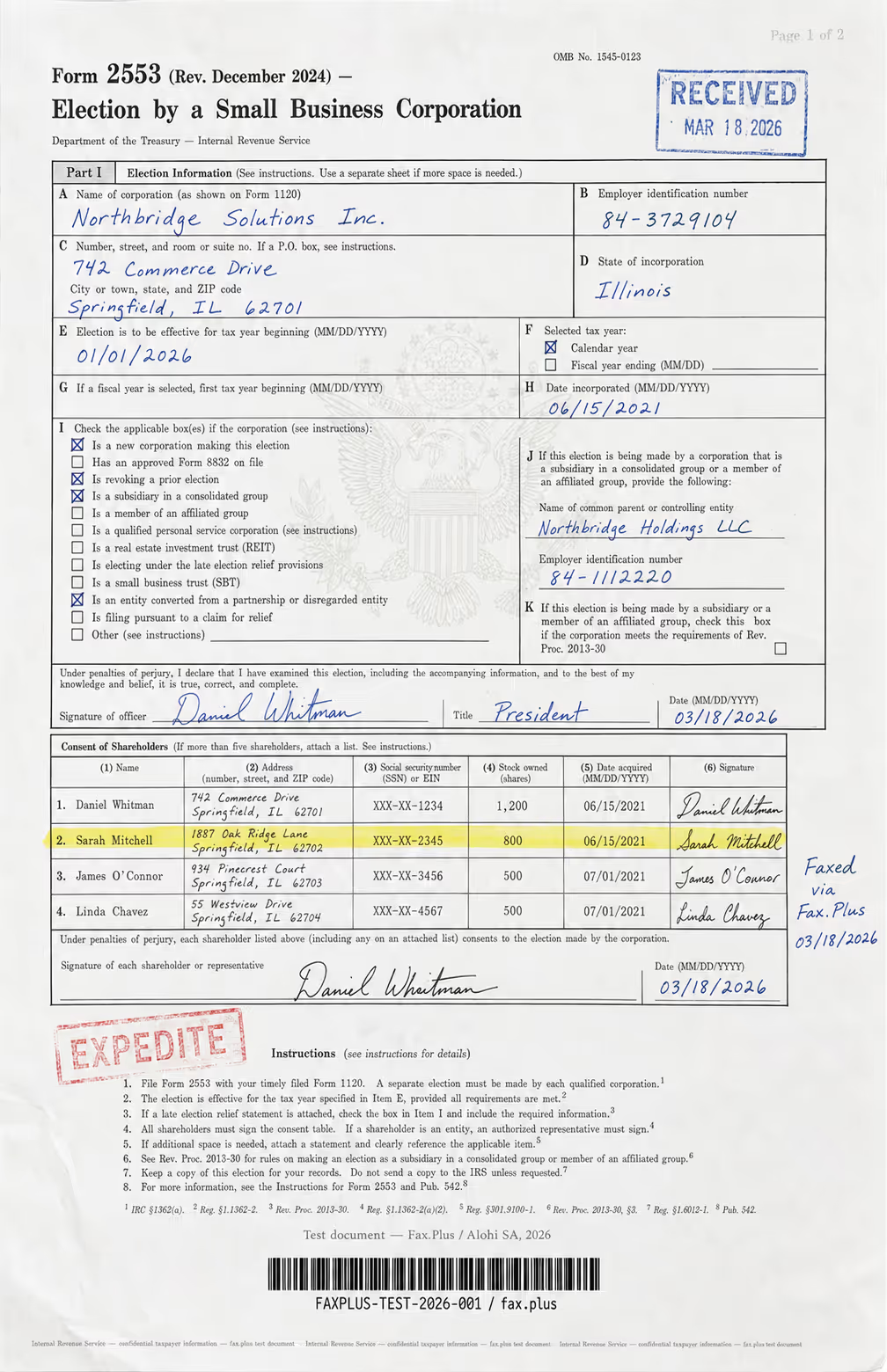
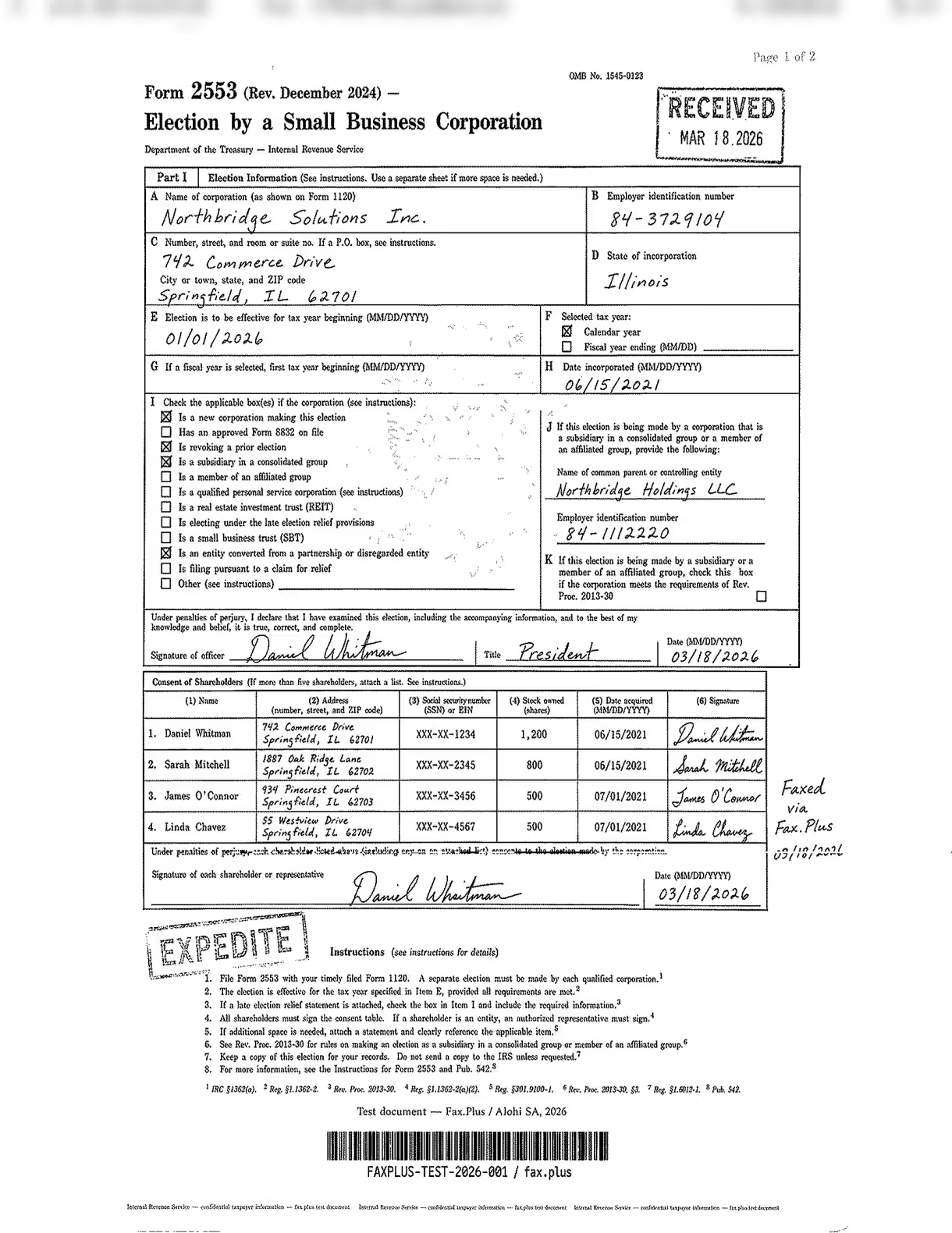
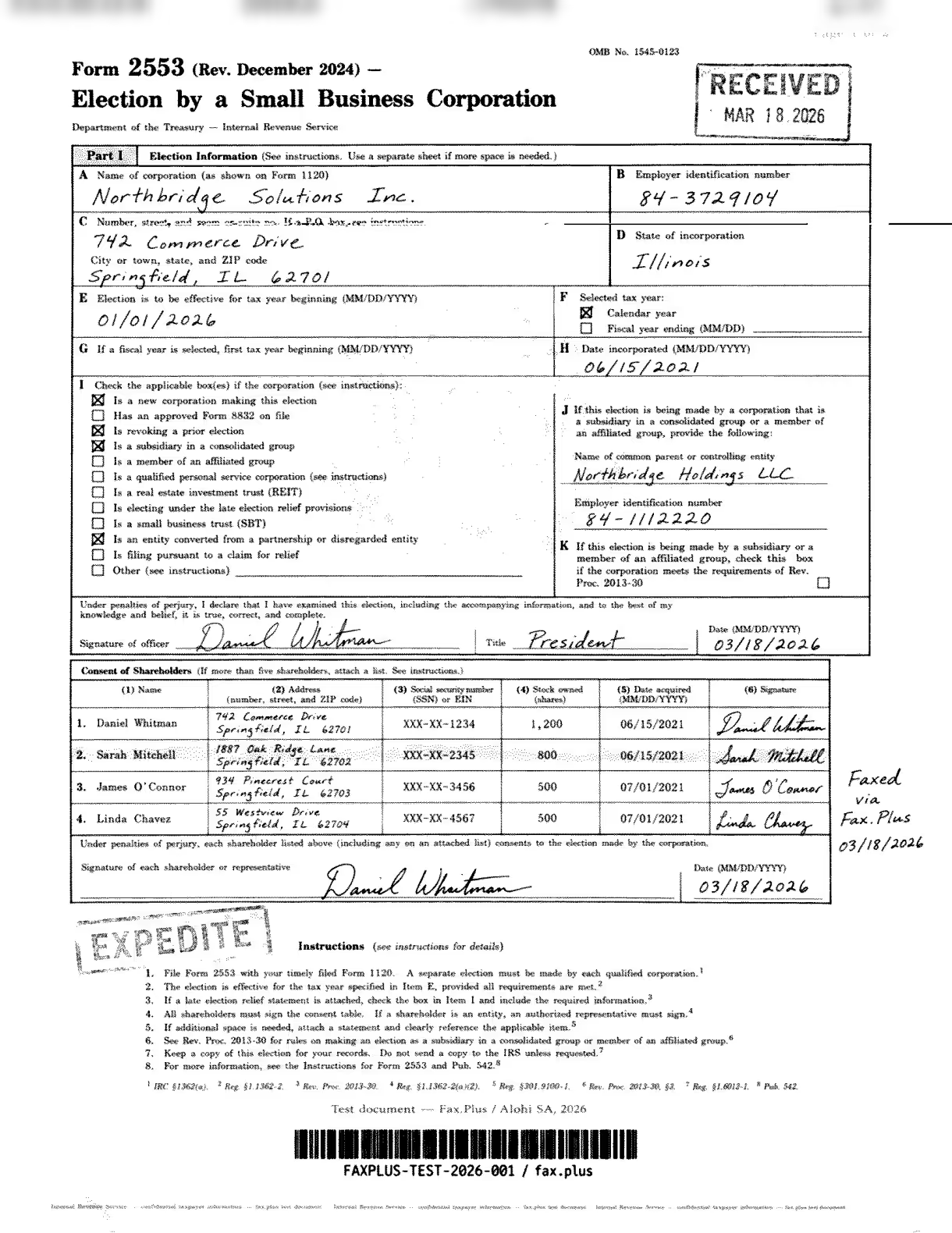
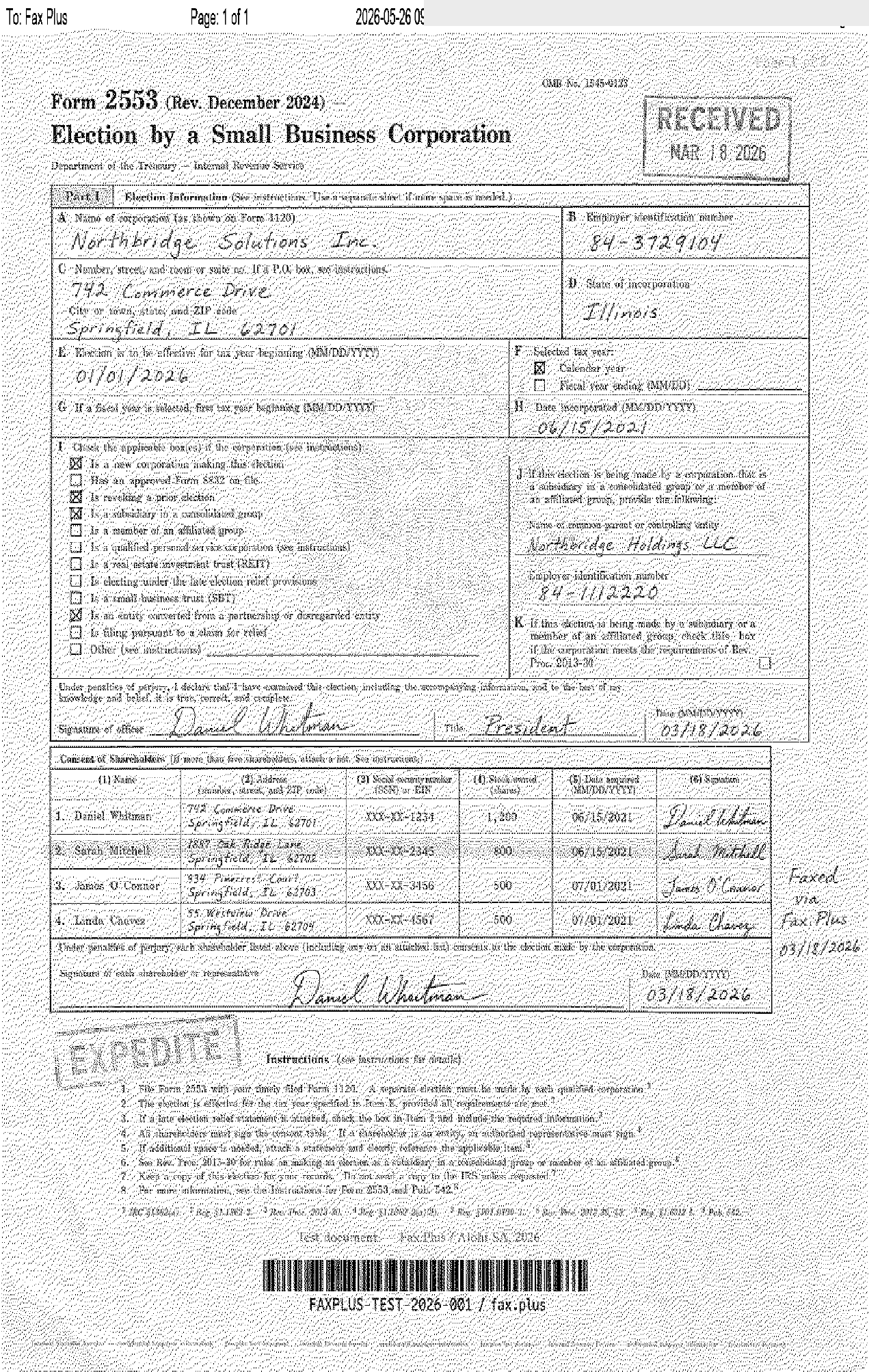
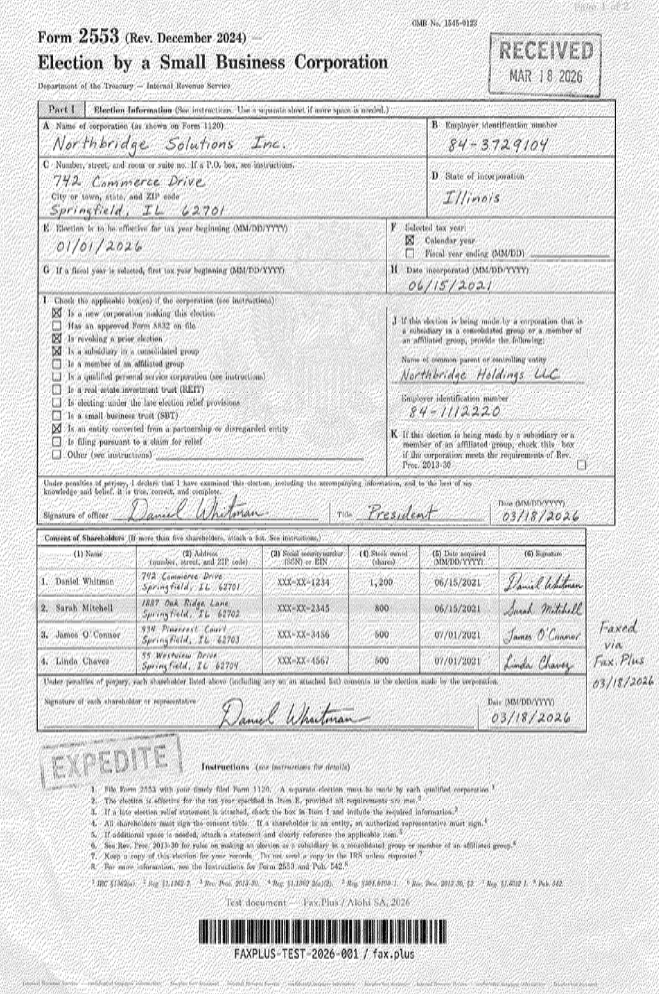
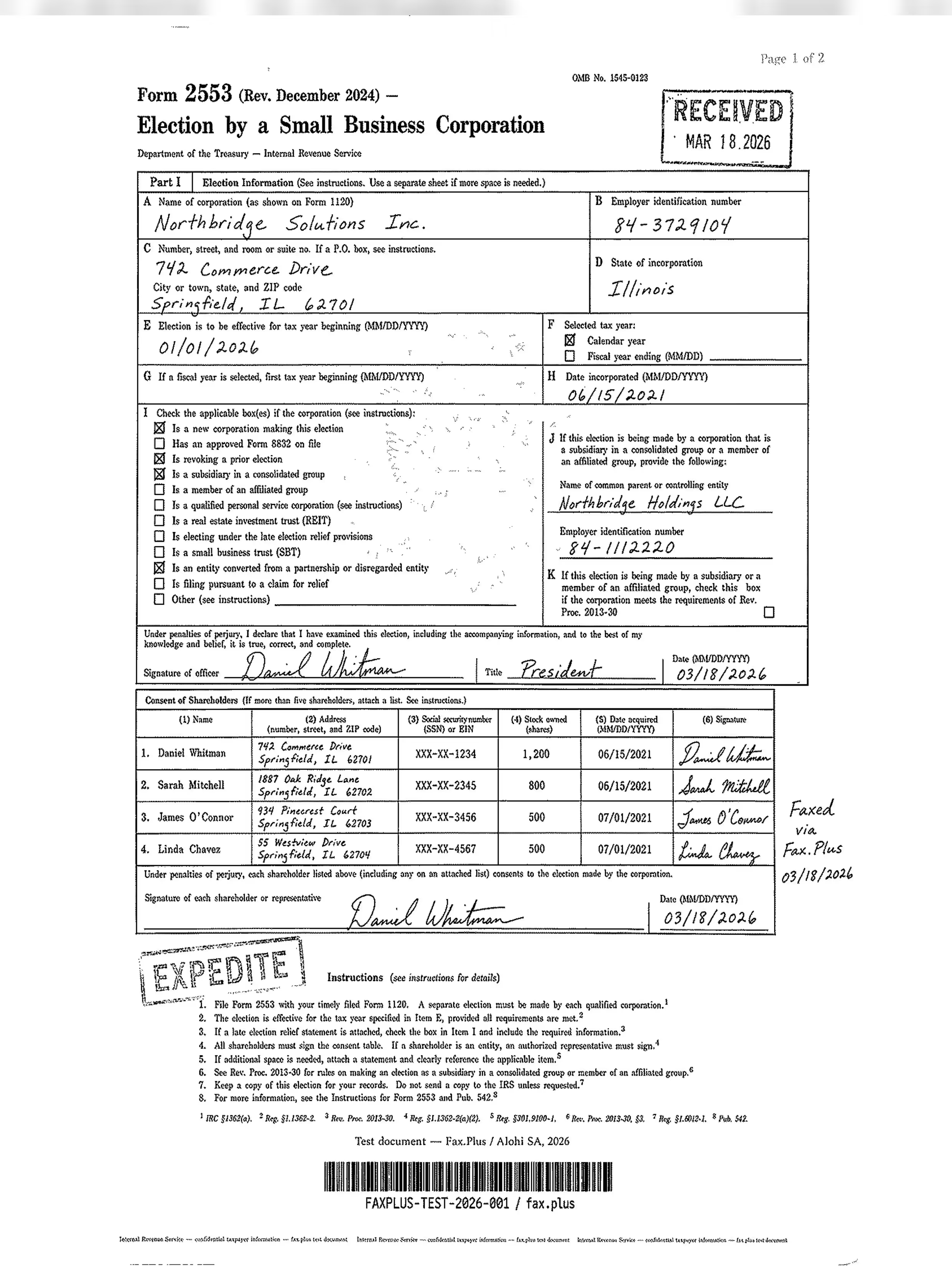
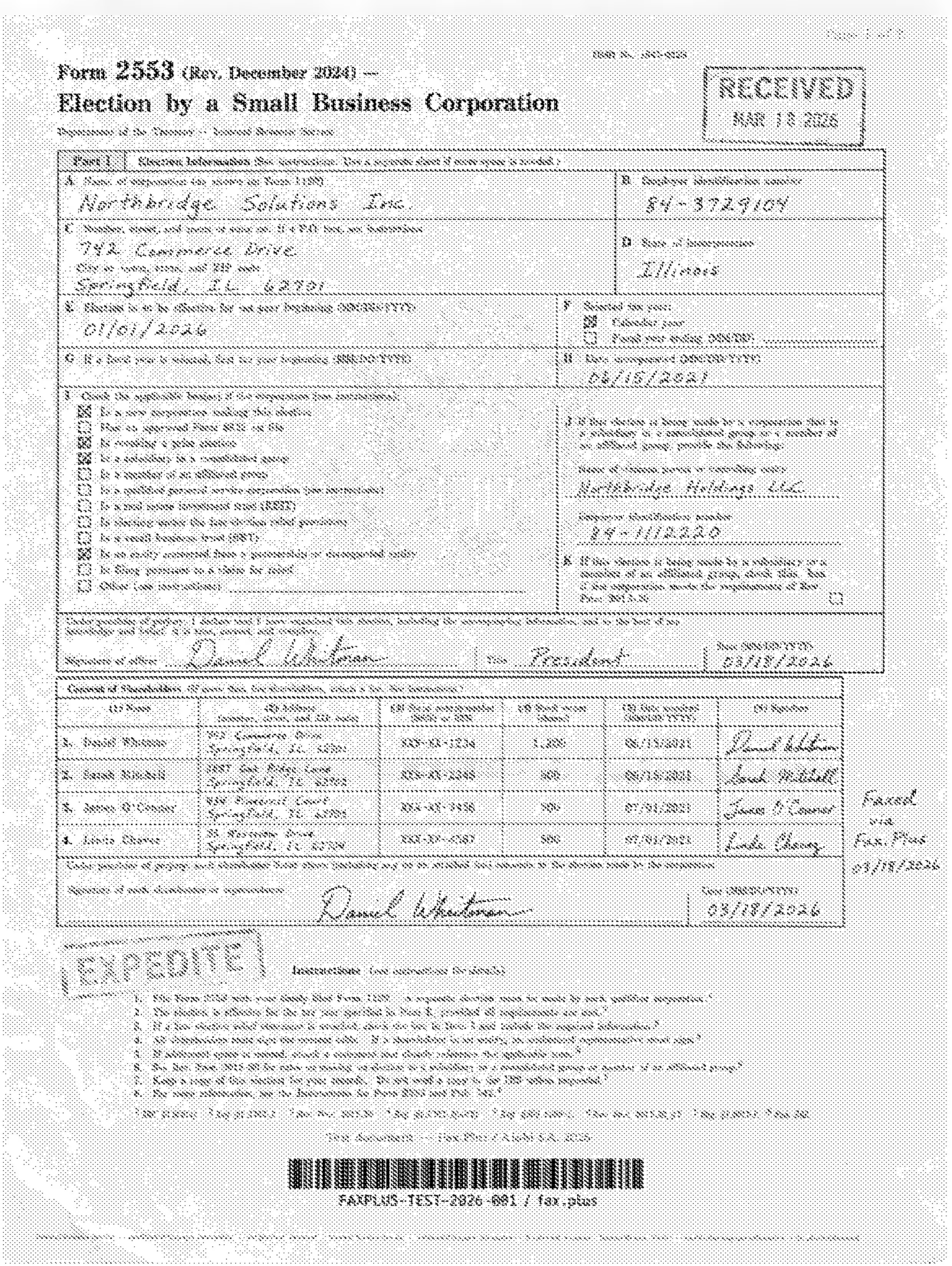
The main test file for this free fax services guide is a simulated IRS Form 2553, a US government tax election form with small-size body text, checkbox grids, fine rules, a center watermark seal, handwritten signatures, and a microprint anti-fraud line at the bottom.
In real life, this type of document stands in for the kinds of paperwork people still fax when clarity matters: tax forms, government forms, contracts, legal paperwork, insurance forms, bank documents, authorization forms, and signed business documents. These files are harder to transmit cleanly than a simple one-page letter because small text, boxes, stamps, signatures, and fine lines can quickly turn blurry, gray, or broken after fax compression.
That makes the IRS-style document a useful stress test for free fax services. If a service can keep this kind of form readable, it is more likely to handle everyday paperwork like a contract, application form, or signed PDF without damaging the important details.
Why we are not using the healthcare test document here
In broader Faxbench reviews, we may also use a simulated healthcare lab results sheet from a fictional medical center. It includes a metabolic panel table, flagged values, a handwritten physician note, a CONFIDENTIAL PHI stamp, a barcode, and small-print compliance language. No real patient data is ever used.
For this free fax services guide, however, we are not using the healthcare document as a test file. Sending healthcare documents through a fax provider should only be done with the right compliance setup in place, including HIPAA protections and a signed Business Associate Agreement where required. Free fax services generally do not include a BAA, so we do not want to imply that they are appropriate for protected health information.
Instead, this comparison focuses on the IRS-style test document as a safer proxy for real-world fax quality. We assess output clarity, background cleanliness, preservation of fine rules and small text, stamp legibility, barcode integrity, and handwriting fidelity.
3. Pricing, terms, and free-tier accuracy
We verified every free-tier claim against each provider's own pricing page and help documentation. We also read the full Terms of Service for services making compliance claims, specifically looking for any gap between marketing language and legal commitments. The CocoFax section is based entirely on CocoFax's own published terms, cross-referenced with Capterra and Trustpilot complaints rather than third-party summaries.
A note on accuracy: free-tier details for online fax services are among the most unreliable information on the web. During research we found multiple third-party review sites describing Fax.Plus's free plan as a monthly-renewing allowance, when the plan is a one-time total of 10 pages. Others listed Dropbox Fax as monthly-renewing, when Dropbox's own help pages confirm the opposite. These errors compound: one site copies another, and a wrong detail from 2022 ends up in a 2026 "updated" guide. We note where we found conflicts.
4. Our reference benchmark: Fax.Plus
Throughout this guide we use Fax.Plus as the reference point for what a well-structured free fax account looks like: 10 free pages (one-time, no card), send-only on free, 180+ countries, independently audited security (ISO 27001 + SOC 2 Type II by EY CertifyPoint), ad-free cover pages, and a self-serve upgrade path starting at $6.99/mo. It represents the most complete free fax account available without a credit card, which makes it a useful baseline to keep in mind as you read the profiles below. Where another service does something better, we note it.
Best free fax accounts with no credit card
These two give you an actual account rather than a throwaway web form, with a one-time page allowance and a transparent way to upgrade later. Neither allowance renews: Fax.Plus gives 10 pages total, Dropbox Fax gives 5 at signup plus up to 20 more via referral actions.
Fax.Plus: the strongest free fax account, no credit card
Fax.Plus is the online fax service from Alohi, a Swiss company based in Geneva. The free fax plan is 10 fax pages with no credit card, send only. It reaches more than 180 countries, the widest coverage on this list by far, and you sign up with email, Google, or Microsoft without entering payment details. The 10 pages are a one-time total that does not renew, so this suits occasional use rather than ongoing volume. Receiving faxes requires a dedicated number, which comes with paid plans.
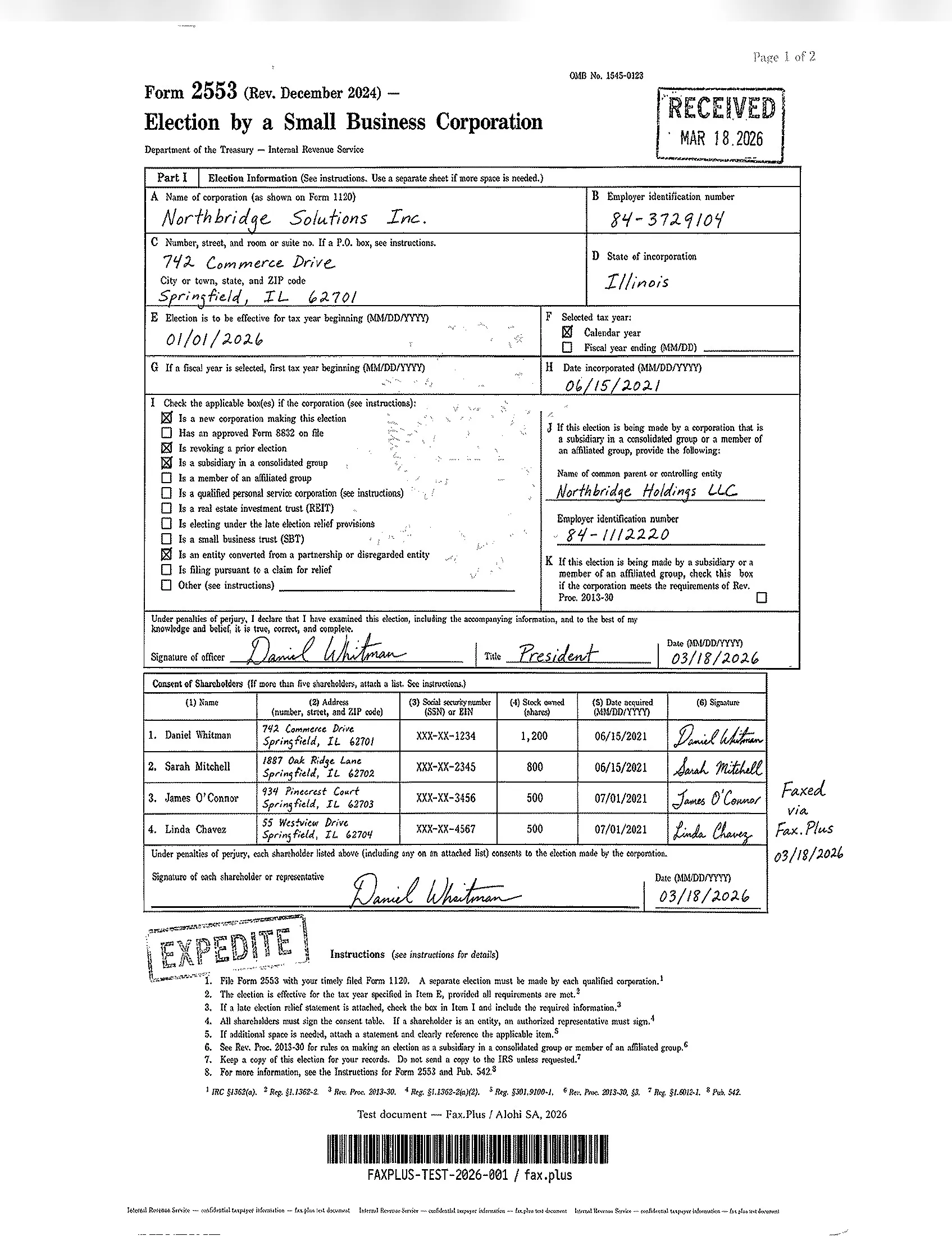
Fax quality is where Fax.Plus separates itself from the free pack. Even at Standard (Normal) quality, output holds a clean white background where most competitors introduce gray shading and dithering, and small checkboxes, fine rules, and signatures survive transmission intact.
The honest limitation is the page count. Ten pages is enough for a few faxes, not for ongoing volume, and once they are used the upgrade path is the point. Paid plans start at $6.99/mo, cancel from settings, no phone call required.
Best for: anyone who wants a real free fax account with broad international reach, clean output, and a transparent upgrade path when the free pages run out.
Dropbox Fax (formerly HelloFax): handy if you live in Dropbox
Dropbox Fax is the rebranded HelloFax, now folded into Dropbox after the HelloSign acquisition. The free allowance is 5 fax pages at signup, with up to 20 more unlocked by completing onboarding and referral actions, 25 pages at most. Unlike Fax.Plus, this is a one-time credit confirmed by Dropbox's own help pages: the pages do not renew each month, and once they are gone you move to pay-as-you-go. For a deeper look, see our full Dropbox Fax review.
Dropbox Fax quality is strong for a free or low-cost service: the background stays clean, text is readable, and stamps and handwriting usually hold up well. However, the one-time nature of the allowance makes this closer to an extended trial than an ongoing free plan.
The main issue is consistency. In our standard-quality tests, intermittent horizontal streaks appeared across the faxed page. On the IRS-style form, one streak crossed the address line, making part of that field harder to read. Without this artifact, Dropbox Fax would be close to the Fax.Plus Normal reference baseline, but the streaks make it less reliable for documents where every field matters.
 Standard
 Standard
Best for: existing Dropbox and Google users who fax once in a while.
PamFax: international reach, tiny free tier
PamFax is a prepaid global service covering 236 countries. The free allowance is small: 3 outbound pages at signup plus a one-month inbound number, no card. After that it is prepaid credits from around $0.11 per page with no monthly fee.
In our PamFax-to-Fax.Plus test, the IRS-style form came through mostly intact and usable, but with clear fax degradation. The page layout, signatures, checkboxes, stamp, and barcode remained visible, while small text, fine rules, and dense form details showed noticeable noise and reduced sharpness. This makes PamFax acceptable for simple one-off documents, but less convincing for forms where small print, barcodes, stamps, or fine table lines need to stay clean.
Standard

 PamFax
Best for: occasional international senders who want prepaid credits, not a plan.
Best free fax services with no account (per-use senders)
When you just need to send one fax right now and never think about it again, these skip the account entirely.
FaxZero: fastest free fax to a US number
FaxZero has run since 2006 and asks for nothing up front, no account and no card. You fill in a web form, attach the file, and send up to 5 faxes a day, 3 pages each plus a cover sheet, to US and Canada numbers. See our full FaxZero review for the complete breakdown.
The branded cover sheet is the real downside for business use. FaxZero's paid tier removes the branding at $3.29 per fax for up to 25 pages, and $3.63 for up to 15 pages internationally (FaxZero pricing, June 2026).
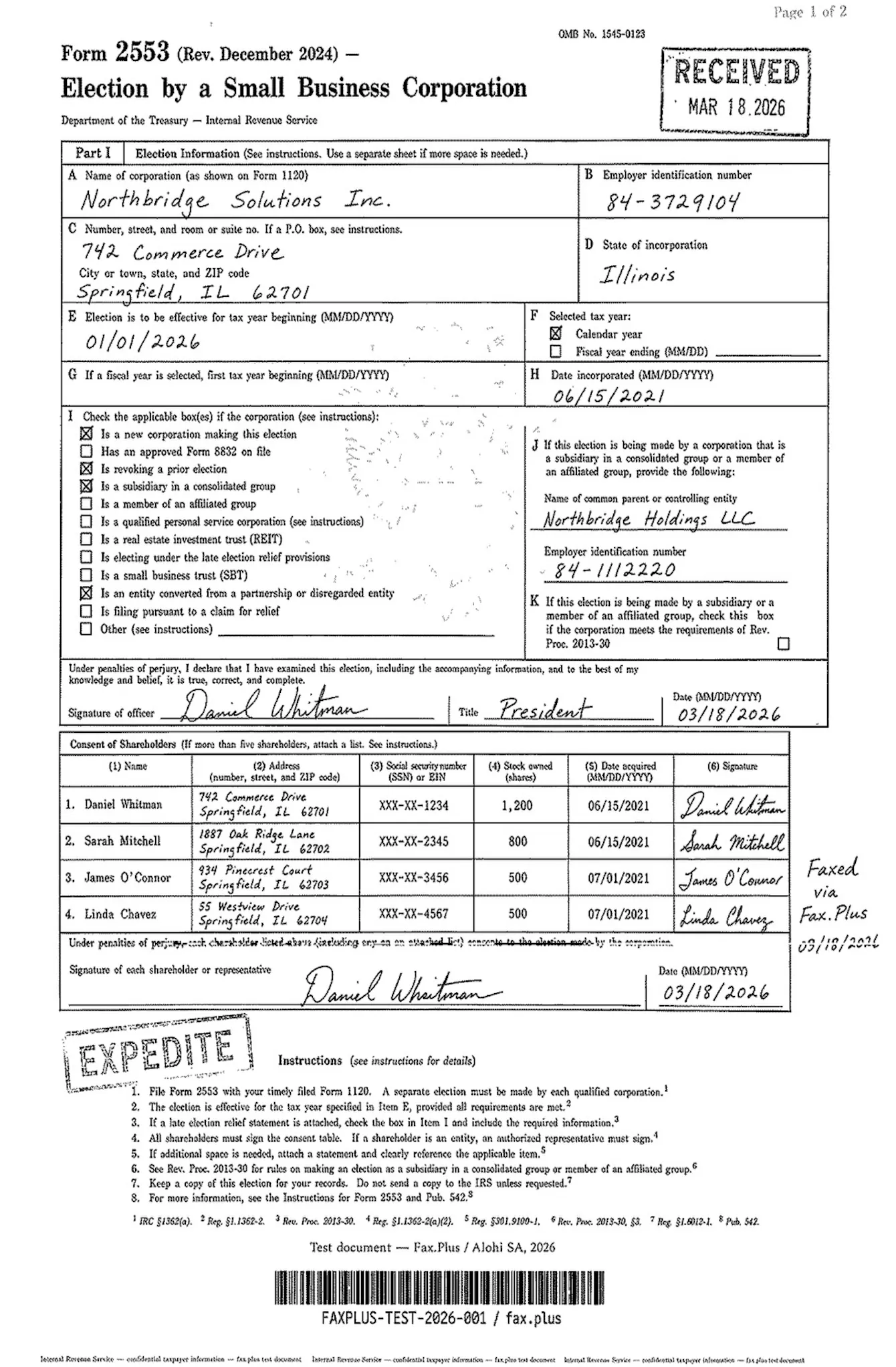 Standard
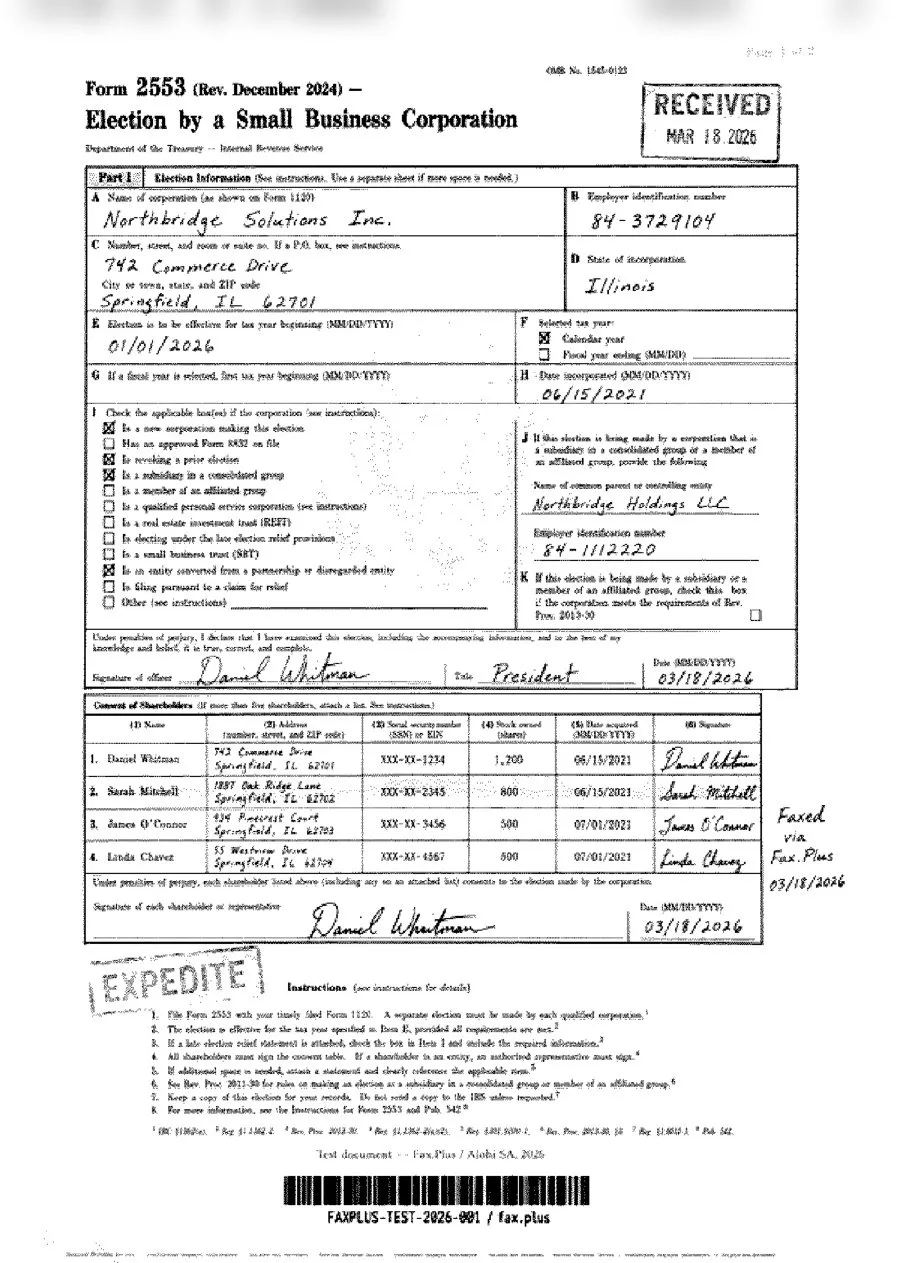
 FaxZero
Best for: a one-time fax to a US office when you would rather not register.
FaxDrop: the most modern free fax form we tested
FaxDrop is a newer browser-based fax sender with a much cleaner, more modern interface than the older free fax tools. The workflow is simple: drag and drop a PDF, JPG, or PNG, enter a US fax number, add your sender details, and send from the browser. It does not require an account or credit card for the free tier, which gives users 2 free faxes per month, capped at 5 pages including the cover page.
In our FaxDrop-to-Fax.Plus test, the IRS-style form came through readable and mostly intact, with the overall layout, signatures, checkboxes, stamp, and barcode preserved. At the same time, the page showed clear fax degradation, including a light gray background, reduced contrast, and weaker sharpness in small text, fine rules, and dense form details. That makes FaxDrop a usable option for simple one-off documents, but not the strongest choice when forms contain small print, barcodes, stamps, or other elements that need to stay especially crisp.
Standard

 FaxDrop
Best for: users who want the most modern no-account free fax experience for a simple US fax.
GotFreeFax: a cleaner free sender, no branding
GotFreeFax covers the same send-only US and Canada ground as FaxZero, with one edge that punches above its weight: no ads or branding on the cover page. The trade is a smaller daily cap.
In our GotFreeFax-to-Fax.Plus test, the output was inconsistent. In one run, the IRS-style form came through, but with visible fax noise, reduced contrast, and weaker readability around small text, fine rules, and dense form details. In another run, the received page was almost blank and effectively unusable, with most of the document content failing to come through. That makes GotFreeFax convenient for very simple, non-sensitive one-off faxes, but not a reliable benchmark for document quality when the original file contains small text, form grids, barcodes, stamps, or other fine details.
Standard

 GotFreefax
Best for: people who want an unbranded free fax for a page or two.
Best free fax services for receiving (inbound)
Most free options send only. These two are built to receive, which is what you want for a number you can hand out.
FaxBetter: a free inbound number, with caveats
FaxBetter gives you something rare on a free plan: a dedicated toll-free fax number and around 50 inbound pages a month. The plan is receive-only; sending needs the paid Premium tier (~$5.95/mo).
Best for: users who only need to receive faxes and will not send anything private.
FaxBurner: free receiving in short bursts
FaxBurner is mobile-first and built around catching a fax fast. The free tier gives you 25 inbound pages a month and 5 outbound pages total, with a temporary inbound number.
Best for: receiving the occasional fax on your phone.
Which "free" fax services actually require a credit card?
All three of these market themselves with some version of "free" or "try for free," and all three require a credit card and start billing automatically when the trial ends. eFax, MyFax, and iFax each offer a genuine free trial, so they belong together, but the details (trial length, page caps, and in eFax's case some self-contradicting numbers) are worth reading closely.
eFax: 7-day free trial, but check the page count it promises
eFax does offer a 7-day free trial, advertised heavily on its free-fax page (verified on efax.com, June 2026). A credit card is required at signup, and the trial auto-converts to a paid plan unless cancelled. After the trial, the Personal plan is $18.99/mo with 200 pages to US and Canada and $0.10 per page over. Note that eFax also runs a separate $4.99-first-month offer on its pricing page, so the same product is marketed through two different "cheap or free" funnels. Our full eFax review goes deeper on quality, pricing, and the cancellation process.
The trial page is also a small case study in why these claims need checking: it states "Send up to 200 pages free for 7 days" in most places, then at the bottom of the same page says "Send up to 170 pages free for 7 days." Two different numbers for the same offer, on one page. It is a minor discrepancy, but it is the kind of thing that should make you read the fine print before signing up.
Cancellation is listed through account settings or customer support, though ConsumerAffairs and G2 carry many complaints about the process being difficult and about charges continuing after attempted cancellations. HIPAA is claimed on all plans; a signed BAA requires the Business tier or higher.
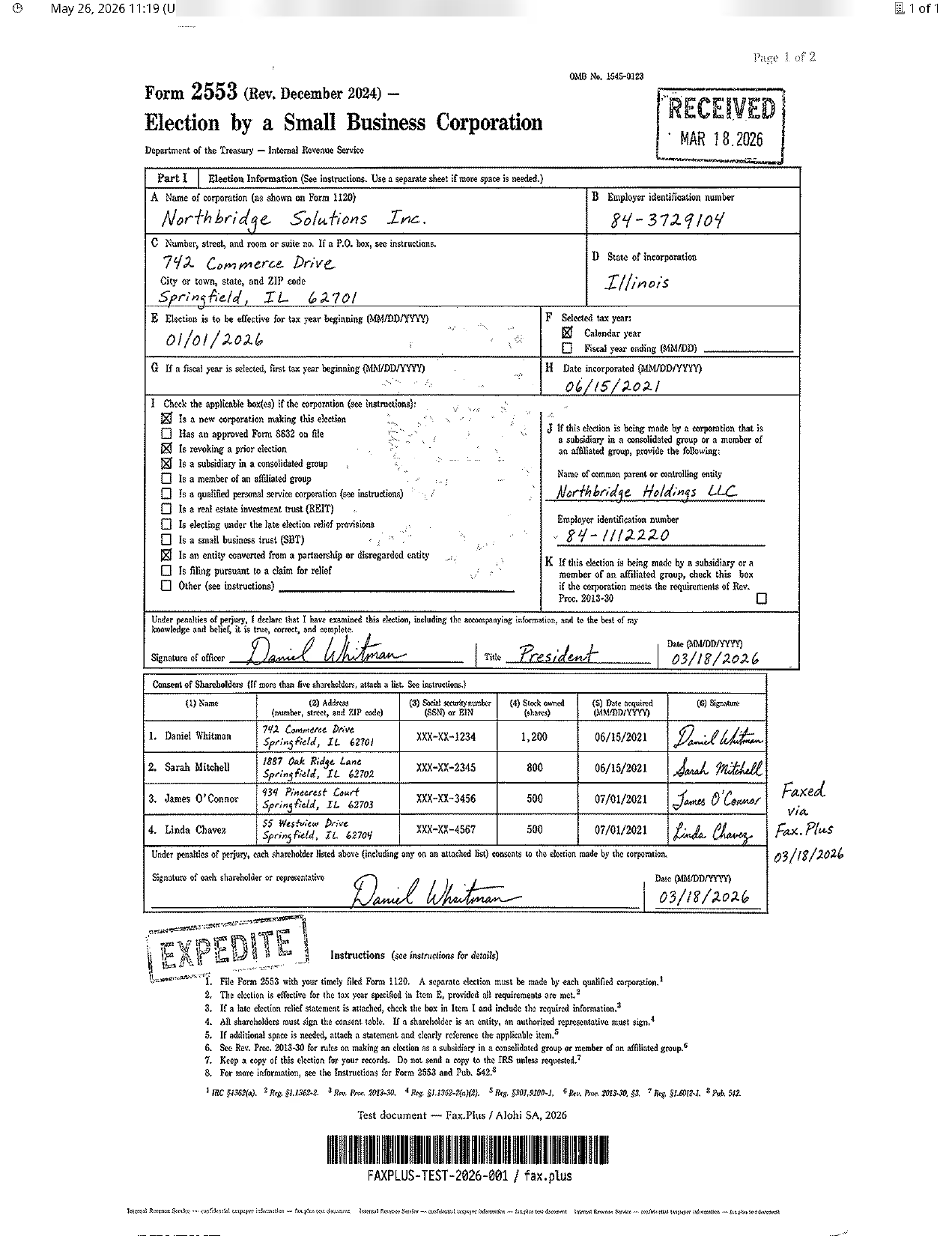 Standard
 Standard
MyFax: 14-day trial (annual) or 3-day trial (monthly), card required
MyFax (Consensus Cloud Solutions, the same parent as eFax) offers a genuine trial, but the length depends on which MyFax page you sign up through, not just the billing cycle: 14 days via the annual pricing page, 3 days via the free-fax funnel, with a 30-day promotion referenced elsewhere (verified on myfax.com, June 2026). A card is required and it auto-converts, so confirm the term at checkout. Home Office is $8.25/mo annual ($12/mo monthly) for 100 send and 100 receive pages; Small Business is $20.83/mo annual ($25/mo monthly) for 300 each way. Cancellation is self-serve through account settings, or via chat and email.
Standard
 Standard
iFax: 7-day trial, credit card required, confirmed from their own FAQ
iFax offers a 7-day free trial on its Pro plan. From iFax's own trial page: "We will request your credit card details to unlock the premium features. But do not worry; we won't charge you for the first seven days." The trial includes up to 100 pages, send and receive, and HIPAA compliance. After 7 days it auto-bills to the plan selected at signup. We cover the send-only Basic plan and the auto top-up billing in our full iFax review.
Paid plans: Basic at $12.49/mo (annual, send only, no receive, no HIPAA), Plus at $24.99/mo (send and receive, HIPAA), Pro at $33.33/mo (annual, 1,000 pages, full features). A BAA is included for Plus and Pro subscribers. No overage fees on any plan. Cancellation is self-serve: Settings > Plan & Account in your iFax account.
 Standard
 Standard
None of these services is a scam. The pattern to watch for is the gap between a "free" headline and a flow that requires a card and bills automatically when the period ends. If you sign up for MyFax or iFax, set a calendar alert well before the trial closes.
CocoFax belongs in this caution bucket too, but for a different reason. It advertises free faxing and HIPAA compliance, yet the free pages are a one-time allowance, receiving is not free, the 14-day trial requires a card, and its terms say CocoFax is not a HIPAA Business Associate unless a separate agreement is signed.
There are also billing and cancellation red flags. CocoFax routes cancellations through email support, and public reviews mention billing after cancellation attempts. That does not make every CocoFax use case invalid, but it is enough reason not to recommend it for sensitive, medical, or business-critical faxing.
Can a free fax service be HIPAA compliant?
No. This is the part that trips people up, so it is worth stating plainly. HIPAA compliance is not a feature you toggle on; it is a legal relationship. Sending Protected Health Information through a vendor without a signed Business Associate Agreement is itself a violation, even when the connection is encrypted. Free tiers almost never include a BAA, because the agreement creates real liability, so vendors reserve it for paid or enterprise plans.
"HIPAA compliant" is also often self-asserted. CocoFax claims it, then disclaims it in the terms. A more credible signal is independent auditing. A genuine HIPAA-compliant fax setup pairs a signed BAA with third-party audits like SOC 2 Type II, not a badge on a landing page. If you handle PHI, budget for a paid plan that puts the BAA in writing, and read the contract before trusting any "free HIPAA" claim.
Which free fax service should you choose?
It depends on the job.
One quick fax to a US or Canada number, no account: FaxZero for the highest free daily allowance, GotFreeFax for unbranded output, or FaxDrop for the cleanest modern browser workflow. Keep sensitive documents off all three.
A real free fax account with broad international coverage and no card: Fax.Plus. It is the only option here with 180+ country reach, ad-free output, and independently audited security, all without entering payment details. The free allowance is 10 pages one-time, so the value is the account itself plus a transparent upgrade path: paid plans start at $6.99/mo, you cancel from settings, and HIPAA with a signed BAA is available on the enterprise fax tier when you genuinely need it. For teams building automation, Fax.Plus also offers a dedicated MCP server that connects fax actions like sending, receiving, and tracking delivery to AI agent workflows.
Receiving only, for free: FaxBetter (free toll-free number) or FaxBurner (free inbound pages), with the security caveats above.
Healthcare, legal, or finance with sensitive data: none of the free tiers. Choose a paid plan with a signed BAA and independent audits, and treat any "free HIPAA" claim as a reason to read the contract.
The pattern across this whole category is a trade between "actually free" and "actually trustworthy." Most services make you pick one. Fax.Plus lands at the top of this guide because its free tier is honest about its limits and its paid tiers are honest about their billing, which is rarer here than it should be.
FAQs
Is CocoFax actually free?

Not in the straightforward sense. CocoFax advertises free faxing, but the free pages are a one-time allowance, and the 14-day trial requires a card and can auto-bill. Its own terms also complicate its HIPAA marketing, so avoid using it for sensitive, medical, or business-critical faxing unless you verify the contract first.
Where can I fax for free near me?
Public libraries, some shipping stores, and certain banks occasionally allow free or low-cost faxing, but availability is inconsistent. An online free fax service is usually faster and works from home.
Is any free fax service HIPAA compliant?
No. HIPAA compliance requires a signed Business Associate Agreement, which free tiers do not include. If you handle protected health information, choose a paid plan that provides a signed BAA in writing, such as a HIPAA-compliant fax service.
Is there a truly free fax app?
Several apps offer a free allowance, including the Fax.Plus app and FaxBurner, but most "free" fax apps are trials that require a card after a few pages. Check whether a credit card is requested before you commit.
Can I send a fax for free without a credit card?
Yes. FaxZero, GotFreeFax, Fax.Plus, Dropbox Fax, and FaxBurner all offer free allowances with no card required. eFax, MyFax, iFax, and CocoFax's trial each require a card at signup.
How can I send a fax for free from my phone or computer?
Use a per-use web sender like FaxZero or GotFreeFax from any browser, or a free account with iOS and Android apps like Fax.Plus, which also connects to Google Drive, Dropbox, and OneDrive on the free tier. None of these require a fax machine or a landline.
How can you tell if a free fax service is really free?
A genuinely free fax service explains its limits clearly, does not ask for payment details, and does not turn into a paid trial by default. Watch for services where the free offer only covers receiving, has very short limits, or depends on paid upgrades for the features most users expect.
What is the best free fax service?
For a quick send to a US number with no account, FaxZero and GotFreeFax are the fastest options. For a real free fax account with broader country coverage and no credit card, Fax.Plus is the strongest pick, with a transparent upgrade path once its 10 free pages are used.
How do I send a fax from Gmail or Outlook for free?
Email-to-fax lets you email a document to a fax address and have it converted automatically, but it is almost always a paid feature: on Fax.Plus it starts with the Basic plan ($6.99/mo), not the free tier. To fax at no cost, use a web-form sender like FaxZero or GotFreeFax, or the Fax.Plus web and mobile apps on the free plan.
Are there other free ways to send or receive a fax online?
Yes, but every genuinely free option has a catch. GotFreeFax offers a small daily free allowance for US and Canada numbers, FaxDrop offers a limited monthly US-only allowance, Fax.Plus gives 10 free pages as a one-time account credit, and Dropbox Fax starts with a small free page credit. Free receiving is much rarer because it requires a dedicated fax number.


Featured Articles
See All





Confédération Suisse
Confederazione Svizzera
Confederaziun Svizra
Swiss Confederation
Innosuisse - Swiss Innovation Agency