


RingCentral Fax Review 2026: Pricing, HIPAA & How It Compares
We took a close look at RingCentral's faxing, hands-on: the Fax 3000 plan, the RingEX bundle, HIPAA and BAA coverage, the certification stack, the apps, and the contract terms, then scored it across six categories.


- RingCentral is a phone-system giant that also faxes, and the faxing holds up: mature apps, large page allowances, and a broad audited certification stack (ISO 27001, SOC 2, HITRUST, BSI C5, all on a public trust portal).
- Faxing is sold two ways: Fax 3000, a fax-only plan at $22.99 per user per month with 3,000 pages, or bundled into RingEX Advanced at $25 per user per month with unlimited faxing under a reasonable-use policy.
- The catch is the contract: multi-year terms that renew automatically, early termination fees, and a cancellation path that runs through a phone call. Read the terms before signing.
- The fax-only plan has no API, no admin controls, and per-seat pricing, so light faxers and small practices pay business-phone prices for capacity and machinery they will never use.
- Best fit: teams already on RingCentral's phone system, or genuinely high-volume faxers. For everyone else, dedicated services like Fax.Plus do the same job from $6.99 per month with no telecom contract attached.
Is RingCentral Fax Worth It in 2026?
RingCentral is not a fax company. It is a $2 billion public UCaaS vendor (unified communications as a service, meaning phone, video, messaging, and SMS in one platform) that happens to include faxing, and every strength and weakness in this review flows from that fact.
The strengths are real. The compliance file is the deepest we have reviewed, the platform's apps are mature, faxing rides on the same number as calls and texts on the RingEX plans, and 3,000 included pages at $22.99 works out to under a cent per page, the lowest per-page rate in this series, if you actually send that volume.
The weaknesses flow from the same source. A solo practitioner faxing 100 pages a month pays the same $22.99 and gets no API, because RingCentral marks integrations and APIs as not available on the fax-only plan. And the commercial machinery around the product is built for enterprise telecom contracts: multi-year terms, auto-renewal, early termination fees, and a cancellation path that runs through a retention call. That suits committed business buyers, but it asks more of a small practice than the simpler month-to-month services in this series do.
For light and medium faxing, dedicated services are simpler and cheaper: Fax.Plus from $6.99 per month or iFax from $12.49, with Documo a pricier certification-heavy option at $25. RingCentral makes sense when faxing is one channel inside a phone system you wanted anyway.
About RingCentral Fax
RingCentral, founded in 1999 and headquartered in Belmont, California, is one of the largest cloud communications companies in the world, publicly traded on the NYSE as RNG. Faxing has been part of its platform since the early days, and for years the company sold standalone "RingCentral Fax" plans that competed directly with the dedicated services in this series.
What Happened to the Standalone RingCentral Fax?
The structure changed. For years RingCentral sold simple standalone fax plans; today the offer is split into two tracks: Fax 3000, a fax-only plan, and faxing bundled into the RingEX phone-system plans. Search results still surface the old "RingCentral Fax and eFax solutions" naming and older reviews quoting plan structures that no longer match what is sold now. Anyone arriving from an old review or bookmark should price against the current two-track structure, which we lay out in the pricing section below.
No, RingCentral Is Not eFax
One small thing worth knowing, because it trips people up: RingCentral often uses "eFax" as a generic word for electronic faxing in its own materials, including a few spots on its plan table and a blog explainer titled "eFax: An in-depth guide." eFax is also the brand name of a separate, competing fax service owned by Consensus Cloud Solutions, with no corporate relationship to RingCentral. So if you are comparing "RingCentral fax vs eFax," they are two unrelated companies, despite RingCentral's casual use of the word.
What RingCentral Fax Offers
The faxing itself is full-featured: send and receive from the web dashboard, the desktop and mobile apps, or email (recipient number followed by @rcfax.com), attach up to 50 MB across common file types, schedule sends, fax to 50 recipients at once or more via broadcasting, block spam faxes, and print to fax directly from Microsoft Office by selecting RingCentral Internet Fax as the printer. Cover page templates are included, and faxes travel over TLS-encrypted connections into a password-protected account.
How We Reviewed RingCentral Fax
We reviewed RingCentral's faxing using three evidence layers:
- Hands-on product testing. We created an account and tested faxing through the web dashboard, the email-to-fax workflow, the desktop app's FaxOut function, and the mobile app. We sent live faxes from each surface to evaluate the full user experience.
- Billing and account-control review. We monitored the signup and trial flow, mapped the cancellation path, and reviewed RingCentral's published terms of service alongside the dated complaint record on contract renewals and termination.
- Business-readiness review. We checked RingCentral's public materials for security and compliance claims, including its trust center and downloadable certifications, HIPAA and BAA documentation, API and developer resources, and the current plan structure. Pricing, plan limits, and certification listings were verified by live page retrieval in June 2026.
We then scored RingCentral's faxing across six areas: pricing, security and compliance, usability, customer service and account control, data residency and retention, and enterprise, API, and healthcare automation.
1. Pricing | Score 4/5
RingCentral's fax pricing only makes sense once you see what it is: telecom pricing applied to faxing.
The Plans
- Fax 3000: $22.99 per user per month billed annually, or $27.99 month to month. A fax-only package with 3,000 pages per user per month, overages (the per-page rate once you use up your monthly pages) at 4.9 cents, fax numbers available in 105+ countries, the mobile app, cloud storage integrations, device compatibility, and cover page templates. What it does not include, per RingCentral's own plan table: admin fax controls, the API and integrations (listed there as "eFax integrations and APIs"), and the ability to share one number across voice, SMS, and fax. Those are RingEX-only.
- RingCentral Advanced (RingEX): $25 per user per month billed annually, or $35 month to month. Unlimited internet fax (subject to reasonable use, with a 200-page or 50 MB ceiling on any single fax) bundled with the full phone system: calling, 50 SMS per user, 1,000 toll-free minutes, unlimited audio conferencing, team messaging, video meetings for 100 participants, 300+ app integrations, call recording, and analytics.
- RingEX Core, the $20 per user entry phone plan, does not include internet fax, so the bundled path starts at Advanced.
- Add-ons: additional fax numbers at $4.99 per month each (shared numbers managed by a single administrator), and 1-800 or vanity numbers for a $30 one-time fee.
Both paths can be bought online without talking to sales: Fax 3000 has a self-serve signup with a 7-day free trial that converts to a paid subscription unless canceled, and RingEX offers a 14-day trial for new subscribers.
Volume Math, Both Directions
The per-page arithmetic is the most extreme in this series, in both directions. A team that genuinely pushes 3,000 pages per user pays under 0.8 cents per included page, the cheapest rate we have reviewed, and the unlimited faxing on Advanced removes the page question entirely, within reasonable use.
Now run it the other way. A solo practitioner sending 100 pages a month pays the same $22.99, which is an effective 23 cents per page, with no cheaper tier to drop to. There is no light plan, no pay-as-you-go, and no free tier; for occasional sends, a separate online free fax service covers it at zero. RingCentral priced faxing for the customers it actually wants, which are businesses, in volume, on contract.
And the contract is part of the price. The headline rates assume annual billing, the complaint record below shows multi-year terms that renew automatically, and leaving early triggers termination fees. The sticker price is honest; the total cost of ownership depends on reading section C of a telecom contract.
| Service | Entry Price | Pages/month | Free Option | HIPAA + BAA |
|---|---|---|---|---|
| RingCentral Fax 3000 | $22.99/user/mo (annual) | 3,000 | No | Supported, BAA available |
| Fax.Plus Basic | $6.99/mo | 200 | Yes (10 pages, one-time) | From Enterprise |
| SRFax Healthcare Lite | $12.60/mo | 200 | No | BAA on healthcare plans |
| iFax Basic | $12.49/mo | 200 | No | BAA from Plus |
| eFax Personal | $18.99/mo | 200 | No | BAA on Business+ |
| Documo Solo | $25/mo (annual only) | 300 | No | BAA on all plans, on request |
Against the field, RingCentral is playing a different game. Every dedicated service above sells a few hundred pages to a small operation; RingCentral sells thousands of pages, or unlimited under a reasonable-use policy, per seat. eFax at $18.99 for 200 pages looks absurd next to Fax 3000's 3,000, and Documo's $300 annual entry buys a tenth of the capacity. But SRFax's healthcare tiers serve high volume without a phone-system contract attached, iFax covers light mobile use at half the price, and Fax.Plus scales from a $6.99 starter to an Enterprise plan at $79.99 per month with unlimited users, which beats per-seat pricing the moment a team grows.
The 4/5 reflects category-best volume economics, honest list prices, and a genuinely strong fit for the buyer it targets: a team that faxes at volume inside a phone system it wants anyway gets the lowest per-page rate in the series. The missing point is for everyone outside that profile, with no light-use tier and a contract structure that can turn the list price into the smallest number on the invoice.
2. Security and Compliance | Score 5/5
This is the category where being a $2 billion public telecom vendor pays off for the buyer, and RingCentral earns the full score on paper that anyone can download.
The Stack
What the Certifications Cover
Security certifications are easiest to read as independent inspections: a company can claim anything about its own security, while a certification means an outside auditor came in, checked, and signed off. RingCentral's public trust center lists, with downloadable documents:
- ISO 27001, the core standard saying the company runs security properly as an organization, extended with ISO 27017 (cloud-specific controls) and ISO 27018 (protecting personal data in public clouds).
- ISO 22301, business continuity, meaning audited plans for keeping the service running through disruptions.
- SOC 2 with additional FINRA and HIPAA criteria mapped in, and a public SOC 3 summary; SOC 2 means an auditor watched the controls operate over months, not just on inspection day.
- HITRUST, the healthcare-industry framework that maps HIPAA, ISO, and NIST controls into one certifiable standard, scoped to the RingCentral Office and Engage products.
- BSI C5, the German government's cloud security catalog, and the UK's Cyber Essentials Plus for its UK and EU offering.
Among the dedicated fax providers in this series, Documo and Fax.Plus are the two that publish audited certification stacks more or less in the same league, the latter with ISO 27001 and SOC 2 Type II certified by a named independent auditor plus CSA STAR and PCI DSS adherence (detailed in the comparison below).
The Scope Catch
The honest caveat is scope, and it matters here: the trust center lists each certification against specific products. ISO 27001/27017/27018, ISO 22301, SOC 2, and SOC 3 are scoped to RingEX (and RingCX); HITRUST is scoped to the older "RingCentral Office" and Engage products; PCI attaches to RingCX. None is listed against the standalone Fax 3000 plan by name. A buyer who needs a specific attestation to cover their fax usage should confirm with RingCentral which plan inherits which certificate, rather than assuming the fax-only tier carries the full stack.
Healthcare agreement scope
RingCentral makes a BAA available to paying covered-entity customers and identifies RingCentral Fax in its HIPAA documentation. Confirm that the executed agreement covers the fax service you purchase and its configuration.
How RingCentral Security Compares
Line up the whole series and a clear gradient shows up. RingCentral, Documo, and Fax.Plus sit at the certification-heavy end, Documo with HITRUST plus ISO 27001, SOC 2 Type II, and PCI DSS on a public trust center. eFax runs a HITRUST-certified platform. SRFax signs an easy BAA but publishes no certifications at all. Fax.Plus holds ISO 27001 and SOC 2 Type II at the organization level, both certified by EY CertifyPoint, a named independent auditor, plus CSA STAR, PCI DSS adherence, GDPR and CCPA compliance, Swiss FADP jurisdiction, and HIPAA with a signed BAA on its Enterprise plan. RingCentral's stack is broader; Fax.Plus pairs its audited stack with customer-controlled data residency, covered below, which RingCentral's fax offering does not expose.
The 5/5 reflects audited breadth at the top of the category, awarded to the platform as a whole; a Fax 3000 buyer should still confirm the scope point above before relying on a specific certificate. The trade-offs live in the contract and the data residency sections, not in the security controls.
3. Usability (Hands-On Experience) | Score 4/5
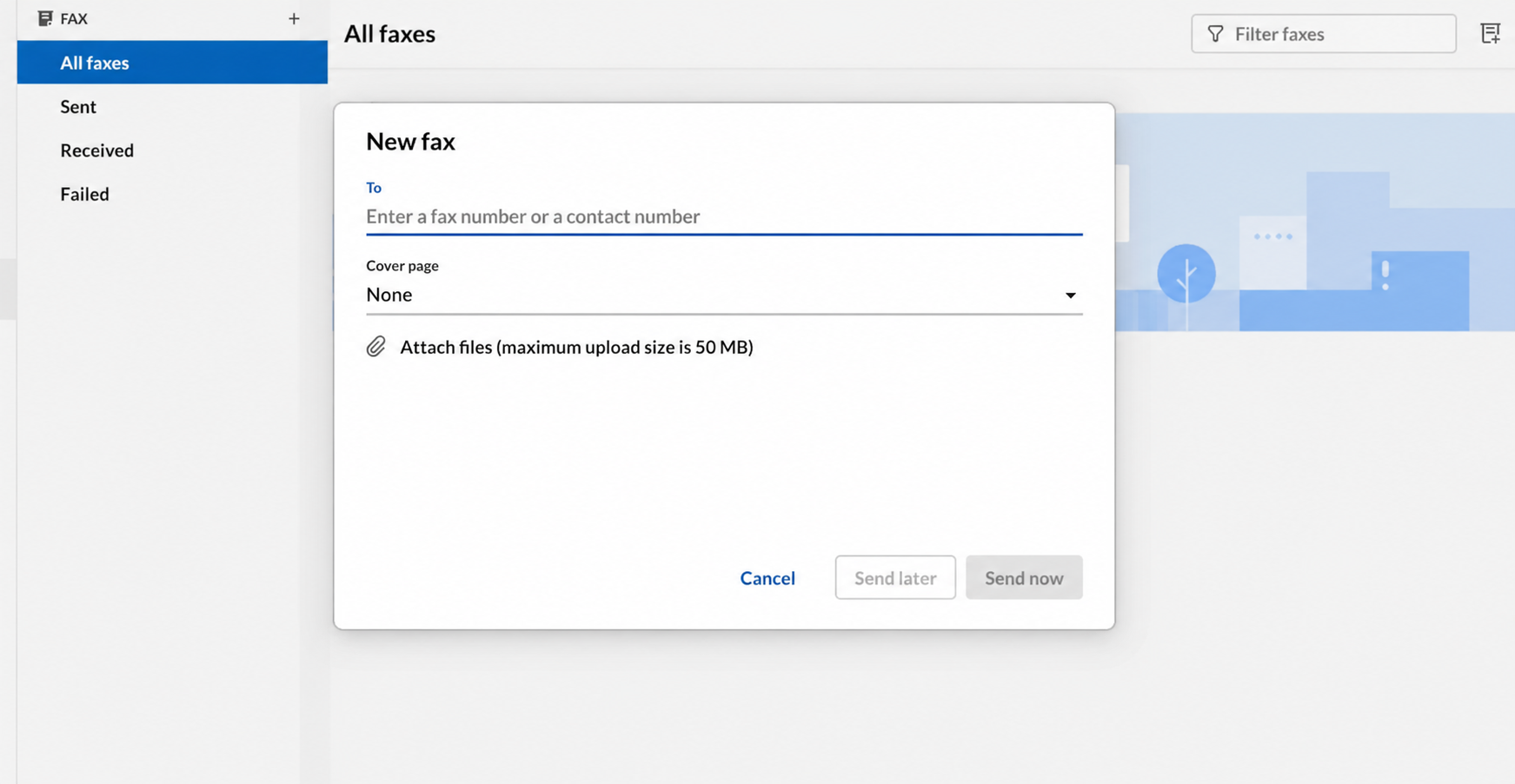
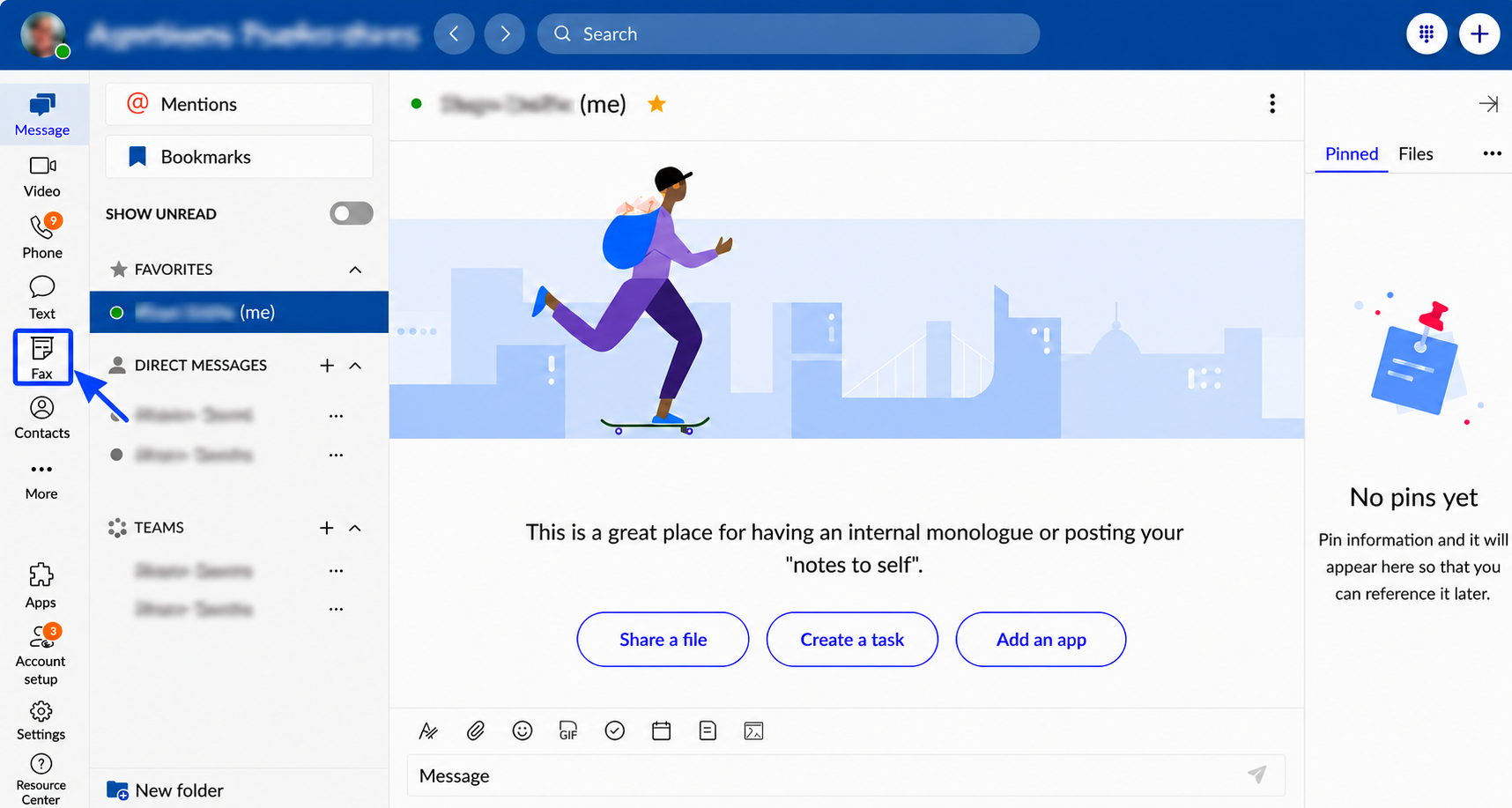
On the web and desktop app, fax lives as its own icon in the same left rail as Message, Video, Phone, Text, and Contacts, RingCentral's full unified communications app rather than a fax-only tool. Clicking it opens a dedicated Fax panel with All Faxes, Sent, Received, and Failed views. Starting a new fax opens a clean modal: a To field, a Cover Page dropdown defaulting to None, an attach-files control capped at 50 MB combined (RingCentral's own current developer docs confirm 50 MB, not the 20 MB figure that shows up in some older community posts), and Send Now or Send Later buttons. Signup is self-serve: you pick a plan on the fax page, create an account, and start a free trial that rolls into a paid subscription unless you cancel, so watch the trial end date.
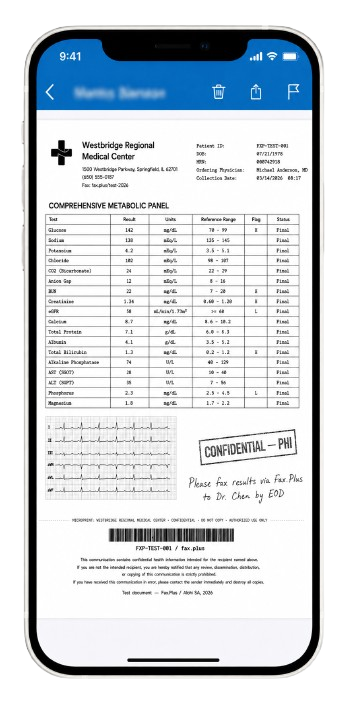
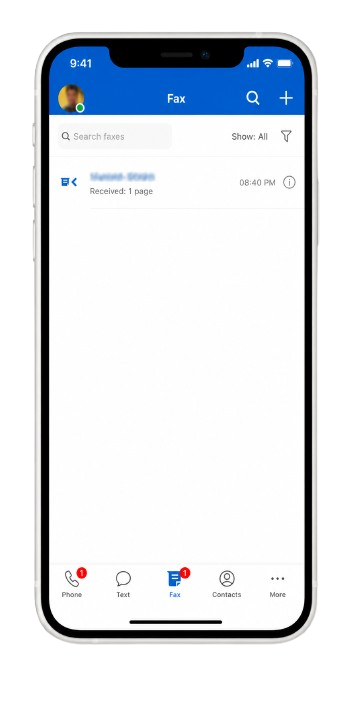
The mobile app mirrors this well. The Fax tab sits in the bottom bar alongside Phone, Text, Contacts, and More, with unread badges, and the fax list shows sender, direction (sent or received), page count, and timestamp at a glance, laid out the way a text inbox would be. Opening a received fax renders the actual document inline, with delete, share, and flag controls up top and a page counter, so reading a fax on a phone feels closer to reading a PDF than to squinting at a scan.
How Faxing Works in RingCentral
Here is how it actually works, in plain terms.
Sending a Fax
There are four ways to send:
- From the web dashboard: click the fax icon, enter the number, pick a cover page, attach up to 50 MB, send now or schedule.
- By email: send to the recipient's fax number followed by @rcfax.com; the subject line becomes the cover page text.
- From the desktop app: the FaxOut icon opens the same compose flow with contacts and cover pages.
- From Microsoft Office: File, Print, choose RingCentral Internet Fax as the printer.
Receiving a Fax
Incoming faxes land in the app and email, with alerts by SMS or on-screen, and multiple faxes can arrive simultaneously, so there is no busy signal even while a line is in use.
The UCaaS Trade-Off
The apps themselves are mature, polished, and maintained, which immediately puts RingCentral ahead of half this series.
Fax as a Side Icon
The friction is that fax is one icon inside a platform built for calls, meetings, and messaging. Users have to find faxing inside a phone system, admins manage it inside a telecom console, and the publicly tracked feature requests (separating fax from user profiles, assigning fax numbers to groups) show real teams bumping into the bundle's edges.
How RingCentral Usability Compares
Surface for surface, RingCentral covers more than anyone in the series except Fax.Plus: web, desktop, mobile, email, and the Office print path. iFax is simpler for phone-first users, SRFax and Dropbox Fax are simpler for desk-bound ones, and Documo's web portal takes some getting used to. Fax.Plus matches the full surface coverage with native iOS and Android apps rated 4.7/5 and 4.5/5, desktop apps, web, and email-to-fax, in a product where fax is the headline rather than a side icon. Because the web app and Chrome extension are fully browser-based, it also runs properly on a Chromebook, which matters if you are faxing from a Chrome OS tablet or a school or work-managed device where nothing else installs. The 4/5 reflects genuinely good, maintained software with a discoverability tax: capable apps, in which faxing is the feature you have to go find.
4. Customer Service, Cancellation and Account Control | Score 3/5
Read this section before signing anything, because RingCentral's telecom roots show up most clearly in how it handles contracts and cancellation.
What the Contract Says
The contract mechanics here come straight from RingCentral's published Online Terms of Service, and they explain why account control is such a recurring sore point. Recurring services run on an Initial Term set by your order, then renew automatically for successive periods of the same length unless you give written notice at least 30 days before expiration. So a two-year initial term rolls into another two years if you miss a one-month window. If you terminate early for any reason other than RingCentral's own material breach, the terms have you pay the sums remaining for the rest of the current term, and a pro-rata refund of prepaid, unused fees is available only when RingCentral is the one in material breach. That is the structure: multi-year terms, automatic renewal with a narrow opt-out window, and full-remaining-term liability on early exit.
The Pattern, and How to Check It Yourself
We are not going to characterize individual complaints for you. The more useful thing is to look for yourself, because the volume and consistency are the point. Search "RingCentral cancellation" or "RingCentral contract" on the review and complaint sites you trust, sort by most recent, and read what comes up. The recurring themes to watch for line up with the contract above: auto-renewal charges that hit without a clear heads-up, demands to pay out the remainder of a multi-year term to leave, early termination fees, refunds that are slow to arrive after a cancellation or number port-out, and a cancellation path that runs through a retention call rather than a button. These are the same threads, from different customers, in different years. We are not asserting any single account; we are pointing you to where the pattern is visible so you can judge it.
How RingCentral Account Control Compares
RingCentral sits at the stricter end of this series on contracts, but it is a defensible kind of strict. eFax's notorious call-to-cancel flow governs a month-to-month service; RingCentral's multi-year terms can hold a balance over the exit, which is heavier, but the terms are public and consistent, so what people run into traces back to a contract they signed rather than a bait-and-switch. At the friendly end, SRFax refunds remaining full months within 35 days, Documo cancels in the portal with no contract above its Solo tier, and Fax.Plus runs self-serve cancellation with multi-channel support and number porting both in and out. The 3/5 reflects mature, well-staffed support and transparent terms, marked down for a contract structure (multi-year terms, automatic renewal, full-remaining-term liability on early exit) that suits committed business buyers but can catch a small practice off guard, plus a cancellation path built around a retention call rather than a button.
5. Data Residency and Retention | Score 4/5
RingCentral runs a genuinely global infrastructure footprint, including audited Equinix data centers, with regional offerings for the UK and EU that carry their own certifications (Cyber Essentials Plus, BSI C5). If you are a typical US fax customer, though, the practical answer is simple: your data lives in RingCentral's US infrastructure, under US jurisdiction, wrapped in the company's full security stack.
For a fax buyer, the limitation is direct control over storage location. RingCentral's regional infrastructure is not presented as a self-serve fax storage-region selector. Teams evaluating a specific location requirement need to confirm the applicable setup rather than choose a fax archive region in their account settings.
Retention also needs planning. RingCentral's published message-store policy lists a 30-day limit for sent faxes. For non-HIPAA accounts, the inbox has a 200-message limit shared by faxes and voice messages; HIPAA-enabled accounts also have a 30-day inbox limit. Teams that need a longer fax archive should arrange exports before those limits apply.
Documo focuses on US hosting with Canadian residency options for eligible workflows. SRFax documents Canadian storage for Canadian clients and US storage for US clients, alongside its delete-on-delivery option. Those are North American approaches, rather than the broader regional choice available from Fax.Plus. The 4/5 credits RingCentral's audited global infrastructure and regional compliance programs, with the missing point for the lack of a documented self-serve fax storage-region choice.
A Swiss-Based RingCentral Fax Alternative for European Teams
For European teams that want a Swiss provider and direct control over where their fax documents are stored, Fax.Plus is a stronger fit. It is provided by Geneva-based Alohi, with fax files stored in Zurich and Geneva by default.
Fax.Plus Enterprise lets account admins choose from more than 40 storage locations, including Germany, France, and other EU countries. Stored sent and received faxes and their backups can use separately selected regions, combining a Swiss provider with documented regional storage controls. Your team gets that choice in a dedicated fax service, without buying a broader phone-system bundle.
6. Enterprise, API and Healthcare Automation | Score 5/5
This is a genuine enterprise-grade offering, and it is one of the few in this series where the developer and automation story is actually built out, not just promised on a sales page.
API Access
RingCentral operates an actual developer platform: a documented REST API covering fax send, status, and retrieval alongside voice, SMS, and messaging, with SDKs in major languages, a developer portal, sandbox accounts, and an app gallery of hundreds of prebuilt integrations. For a developer, this is the most complete programmatic environment in the series. The gate is explicit on RingCentral's own plan-comparison table: "eFax integrations and APIs" is marked Not available on Fax 3000 and included only on RingEX. The fax-only plan is the API-less plan, so automating faxes means buying the phone system.
Healthcare
The healthcare positioning leans on the certification stack (HITRUST in particular, the framework large health systems demand from vendors) plus the BAA, and the ecosystem adds what dedicated fax vendors lack: the app gallery includes healthcare-specific tools like Phelix AI, which triages incoming faxes on RingCentral lines and syncs them with EMRs. A question that comes up often from practices is whether it works with Practice Fusion: we found no official RingCentral fax connector for it, and Practice Fusion's documented fax partner is Updox; pairings run through email-to-fax, the API, or third-party tools, and should be confirmed with the EHR vendor.
Fax.Plus takes a more direct route to the same buyer. It connects with EHR systems, so incoming faxes go straight into the practice's EHR. Fax Streaming delivers each page of an incoming fax the moment it is decoded, rather than waiting for the whole document to finish transmitting, and it comes included on the Enterprise plan with no separate line item. RingCentral does not offer this: its webhook fires only once a fax is fully received, the same batch model used across the industry. For a health system comparing the two, the question is whether faxing into the EHR runs through an add-on layered onto a phone system, or natively inside a product built around fax that already speaks to the record systems it needs to reach and gets you the first page well before a batch-delivery webhook would even fire.
MCP and AI Workflows
A newer dimension for enterprise fax is the MCP server, which lets an AI assistant work faxing through natural-language action tools (send a document, check the inbox, track delivery, manage contacts) rather than only through code. RingCentral and Fax.Plus approach the developer side from two strong angles: RingCentral brings a deep, mature API platform spanning fax, voice, SMS, and messaging with a large integration ecosystem, while Fax.Plus pairs its REST API and public SDKs (Enterprise plan) with an MCP server for agent-driven workflows on paid plans from Basic (not available with Advanced Security Controls). RingCentral now also ships LLM plugins and MCP connectors, but they bring calls, texts, and team chat into assistants like ChatGPT and Claude; fax is not part of that layer. Both are credible enterprise automation paths; which one fits depends on whether you want faxing inside a broad communications platform or a fax-focused API-plus-MCP stack.
How RingCentral API Compares
As a developer environment, RingCentral's mature REST API, SDKs, sandbox, and large app gallery put it at the top of this series, ahead of Documo's thorough but narrower API and SRFax's password-authenticated HTTPS POST interface. The one structural quirk is that the API lives on the RingEX plans rather than the fax-only Fax 3000 tier, so programmatic faxing means being on the phone-system plan, and even at the top of RingCentral's own range, fax stays a bundled feature of a per-seat license rather than a capacity a fax-heavy buyer can purchase on its own terms. Alongside it, Fax.Plus is the other strong enterprise option here, with a REST API and public SDKs on the Enterprise plan, an MCP server for AI-agent workflows on paid plans from Basic (not available with Advanced Security Controls), and Fax-to-EHR and Fax Streaming on its Enterprise plan, without a phone-system purchase attached. The 5/5 reflects a complete developer and automation platform built and documented with care; buyers choosing between RingCentral and Fax.Plus are picking between two capable approaches rather than ranking a clear winner.
Alternatives to RingCentral Fax
Fax.Plus: Best overall RingCentral Fax alternative
Modern cloud fax from $6.99 per month with a free tier to test, scaling to an Enterprise plan at $79.99 per month with unlimited users. Signing is built into the same suite: any fax in the inbox or sent folder can be forwarded to Sign.Plus, Alohi's own e-signature product, to sign it yourself or request signatures from others under the same account, and the mobile apps let you sign a received fax and send it straight back. Everything RingCentral ties to the phone system is available here on its own: audited certifications (ISO 27001 and SOC 2 Type II certified by EY CertifyPoint, plus CSA STAR and PCI DSS adherence), native apps on every platform, customer-controlled data residency across more than 40 locations. For general business and developer use, the Enterprise plan includes an API with public SDKs and signed webhooks, and paid plans from Basic, except accounts with Advanced Security Controls, include a hosted MCP server. For healthcare teams, Enterprise covers HIPAA with a signed BAA, and PHIPA, plus Fax-to-EHR, which routes incoming faxes straight into the EHR, and Fax Streaming, all included rather than sold separately.
Best for: Buyers who want serious audited certifications and automation without the phone-system bundle, the per-seat pricing, or the multi-year contract.
SRFax: Cheapest path to a healthcare BAA
A dedicated fax service with healthcare-oriented plans and a BAA at small-practice prices, on month-to-month terms with prorated refunds. It skips a mobile app and published certifications, and the interface shows its age.
Best for: Small practices leaving RingCentral's bundle that want a BAA without enterprise-level pricing and don't need mobile apps or audited certifications.
Documo: Certification-heavy, with an annual-only entry plan
A dedicated fax product with certifications (HITRUST, ISO 27001, SOC 2 Type II, PCI DSS), HIPAA and a BAA on its plans, and document automation on the upper tiers. The $25 Solo entry plan is sold on annual billing only, a $300 up-front commitment; the higher tiers are available month to month. There is no Android app.
Best for: Healthcare procurement teams moving off a UCaaS bundle for a dedicated, certification-heavy fax product.
FAQs
What is RingCentral Fax?

RingCentral Fax is the online faxing capability of RingCentral, a major cloud communications platform. As of 2026 it is sold two ways: Fax 3000, a fax-only plan at $22.99 per user per month with 3,000 pages, and as a bundled feature of RingEX phone-system plans, where the Advanced plan at $25 per user per month includes unlimited internet fax under a reasonable-use policy. Sending works from the web, desktop and mobile apps, email (number@rcfax.com), and Microsoft Office's print dialog.
Does RingCentral have a fax API?
Yes, and it is one of the most complete developer platforms in this category: a documented REST API covering fax alongside voice and messaging, SDKs, a sandbox, and an app gallery. The one catch is plan placement: RingCentral's plan table marks "eFax integrations and APIs" as not available on the Fax 3000 plan, so programmatic faxing requires a RingEX subscription. If your priority is wiring fax into AI-agent workflows specifically, Fax.Plus is the other strong option here, pairing its REST API (Enterprise plan) with a hosted MCP server on paid plans from Basic (not available with Advanced Security Controls). RingCentral's own MCP connectors cover calls, texts, and team chat rather than fax.
How much does RingCentral fax cost?
The fax-only path is Fax 3000 at $22.99 per user per month billed annually ($27.99 monthly) with 3,000 pages and 4.9-cent overages. The bundled path is RingEX Advanced at $25 per user per month billed annually ($35 monthly) with unlimited internet fax (under a reasonable-use policy) plus the full phone system. Additional fax numbers cost $4.99 per month, and 1-800 or vanity numbers carry a $30 one-time fee. There is no free tier; for occasional faxing, Fax.Plus starts at $6.99 per month with a free plan to test first.
Is RingCentral fax HIPAA compliant?
RingCentral identifies Fax within its BAA offering for eligible customers. Confirm an executed agreement covering the purchased fax service and its healthcare configuration before handling PHI. See our RingCentral HIPAA compliance guide for the service, agreement and workflow checks.
Is RingCentral fax the same as eFax?
No. eFax is a separate fax service owned by Consensus Cloud Solutions, with no corporate relationship to RingCentral. The mix-up comes from RingCentral occasionally using "eFax" as a generic word for electronic faxing in its own materials. They are different companies with different products.
How do I send a fax with RingCentral?
Four ways: from the web dashboard via the fax icon (enter the number, attach up to 50 MB, send or schedule); by email, addressed to the recipient's fax number followed by @rcfax.com, with the subject line becoming the cover page; from the desktop app's FaxOut function; or from Microsoft Office by printing to RingCentral Internet Fax. Group sends reach up to 50 recipients at once, with broadcasting available beyond that.
What happened to the standalone RingCentral Fax plans?
The old standalone RingCentral Fax plans, sometimes surfaced in search as "RingCentral Fax and eFax solutions," have been restructured rather than sold as a separate product. The current offer is the Fax 3000 plan for fax-only buyers and the RingEX bundles for everyone else. Reviews and prices you find for the old plans may no longer match what RingCentral sells today, so confirm against the current plan table.
What is the best RingCentral Fax alternative?
For most teams, Fax.Plus: dedicated faxing from $6.99 per month to an unlimited-user Enterprise plan at $79.99, with audited certifications, apps on every platform, customer-controlled data residency, and an API plus MCP support, all without a telecom contract. SRFax suits high-volume healthcare with cancel-anytime terms, and Documo suits certification-driven procurement. If you want faxing inside a full phone system, RingCentral remains the strongest UCaaS option; just read the contract term and renewal clauses before signing.
Can I port my fax number from RingCentral to Fax.Plus?
Yes, if RingCentral releases the number. Submit a porting request and Fax.Plus checks whether your number is portable within one business day. If it is, you move to a paid plan (Premium or higher for US numbers), get a temporary number while the port completes, and provide a Letter of Authorization and a recent RingCentral invoice. There is no porting fee. Step-by-step instructions are in the help center.


Featured Articles
See All



Confédération Suisse
Confederazione Svizzera
Confederaziun Svizra
Swiss Confederation
Innosuisse - Swiss Innovation Agency


