


The 5 Best Fax Apps for iPhone in 2026 (Tested and Compared)
Your iPhone has a camera, a screen, and an internet connection, which is everything a fax machine needs except the dial tone. The right app supplies the rest. The problem is that the App Store is crowded with fax apps, and a lot of them hide a weekly charge behind a friendly "free" button, or send a fax so noisy the recipient cannot read it. We have used these apps the way you would: scanning a document on the couch, signing it, and sending it before an office even opens. Below are the five we trust most in 2026, what each one is genuinely good at, and where it falls short.


- Fax.Plus is the best overall iPhone fax app: the strongest scanner, HD quality mode, full compliance stack, and the widest feature set from $6.99/mo.
- iFax is the best budget pick for compliance: a BAA without paying enterprise prices, available from $24.99/mo.
- ComFax is for high-volume mobile faxers who want unlimited pages on every plan, starting at $29.99/mo.
- Genius Fax suits occasional faxers who want pay-as-you-go credits that never expire, no subscription required.
- FaxBurner is the fastest way to receive the occasional free fax, with 25 pages/month free and no credit card needed.
Quick comparison
How we picked these apps
A good iPhone fax app has to do four things well. It has to send a clean fax, because a smeared signature or an unreadable lab value defeats the point. It has to be honest about price, since the most common complaint in App Store reviews is a surprise charge. It has to be easy, ideally a scan-and-send in under five minutes. And for anything sensitive, it has to be secure, which for medical documents means real HIPAA coverage and a signed agreement, not just a reassuring word on the homepage.
We weighed those four criteria across all five apps, leaned on hands-on testing for fax quality, and picked one clear winner plus four apps that each suit a specific kind of user. There is no single "best" for everyone, so each pick below comes with a plain answer to "best for whom."
1. Fax.Plus: best overall fax app for iPhone
Fax.Plus is the app we recommend to almost everyone, and the one we measure the others against. PCMag listed it among the best online fax services, calling out the mobile app specifically. It turns your iPhone into a full fax machine: scan a paper page with the camera, attach a PDF or a Word file, sign it with your finger, and send, with a push notification when it lands. The interface is clean enough that you never wonder what to tap next, and it has a dark mode, which sounds minor until you are faxing something at midnight.
Pros
- Best camera scanner in the group, with automatic edge detection and HD fax quality mode
- Full feature set: sign, schedule, Email to Fax (HIPAA-compliant), auto-retry, multi-recipient, 22 languages
- Organization-level ISO 27001 and SOC 2 Type II, signed BAA on Enterprise
- Free to start, no credit card, plans from $6.99/mo
Cons
- Free tier is 10 pages lifetime, send-only, non-renewing
- No free receive tier: a dedicated fax number for incoming faxes requires a paid plan
- HIPAA BAA only on Enterprise
The camera and scanning
The camera scanner is the part you feel most on a phone, and it is the best in this group. Its document detection finds the edges of a page automatically, crops cleanly, and the brightness and contrast controls are good enough that a photographed page comes through looking scanned rather than snapped. You can reorder pages before sending, so the top file becomes page one, and pull in files from iCloud, the Files app, Google Drive, or Dropbox if the document is already on your phone.
What is built in
The app does more than send and receive. You can sign a received fax and send it back without printing anything, add a cover sheet, and fax to several recipients at once. Email to Fax lets you send a fax straight from your inbox by putting the number in the subject line, which is handy when the document is already an email attachment. You can schedule a fax to go out later, set automatic retries so a failed fax resends on its own, and route delivery confirmations to up to five email addresses. Received faxes are stored in an encrypted archive you can search, and the app runs in 22 languages.
Fax quality
Fax quality is one of the strongest reasons to pick Fax.Plus. It sends in two modes, Standard for everyday documents and HD for anything with small print, fine lines, or stamps that need to arrive intact, which most consumer apps do not offer at all. We put it through the same hands-on tests as every service we cover, and you can see the side-by-side results on our online fax reviews hub.
Healthcare and integrations
If you fax patient records, this is where Fax.Plus separates from a basic phone app. It connects with EHR systems, so incoming faxes go straight into the practice's EHR, so faxes flow into the system a clinic already runs on rather than living in a separate inbox. On Enterprise, the signed BAA covers HIPAA, and a PHIPA agreement covers Canadian practices. It also supports Fax Streaming, which delivers each page the moment it is decoded instead of holding the whole fax until the last page arrives, so a long incoming fax becomes readable in real time. For a busy clinical workflow, that combination of Fax-to-EHR and real-time delivery is the kind of thing a basic consumer app simply does not do.
Security
Security is where it pulls clearly ahead of the consumer apps. Every fax uses 256-bit AES encryption, and Fax.Plus is built on organization-level ISO 27001 and SOC 2 Type II, with a signed BAA available for healthcare faxing rather than a vague "HIPAA-aligned" claim. For anyone sending patient or financial records, that is the difference between a marketing promise and a document an auditor will accept.
Pricing
Pricing is refreshingly readable. You can try it free with 10 pages to send, no credit card and no trial countdown, though those 10 pages are a one-time allowance for the life of the account rather than a monthly reset, and the free tier is send-only. When you need more, the plans are:
- Basic: $6.99 per month, 200 pages
- Premium: $13.99 per month, 500 pages
- Business: $27.99 per month, 1,000 pages
- Enterprise: $79.99 per month, HIPAA BAA, API, data residency
You can cancel in-app, which sounds obvious until you read how the other apps handle it. And if you need more than faxing, Fax.Plus is part of the Alohi suite alongside Sign.Plus for e-signatures and Scan.Plus for scanning, so the same account can cover the full document workflow without switching platforms.
Best for: almost anyone, from a one-off personal fax to enterprise and healthcare teams that need real compliance and room to grow. Start with the free fax app for iPhone, or see the full how to fax from iPhone guide for every method.
2. iFax: best budget pick for compliance
iFax is the pick for people whose documents are the sensitive kind: contracts, financial paperwork, anything where you want strong encryption and a clear paper trail. It markets itself heavily on security, and that reputation is earned on its paid plans with military-grade encryption, delivery tracking, and compliance features built for regulated industries.
Pros
- Fast send speed and live delivery tracking
- BAA available from Plus plan ($24.99/mo)
- Electronic signing and cloud imports built in
- Higher resolution mode produces acceptable output for most business documents
Cons
- Standard fax quality below market average
- Basic plan is send-focused with no BAA and no receive number
- No free tier; App Store signup often costs more than the website
The app and scanning
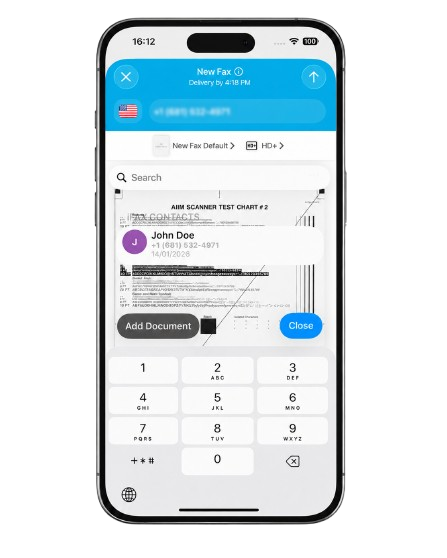
The app is capable and quick. You scan a page with the camera, pull files from cloud storage, enter the number, and send, with live status as the fax moves from sending to delivered. Send speed is genuinely fast, which is one of its real strengths. The interface is busier than Fax.Plus, with more packed onto each screen, but nothing you cannot learn in a few minutes.
What is built in
iFax covers the core mobile faxing job and adds the security-minded extras its audience cares about: encrypted transmission, delivery tracking, cloud imports, and electronic signing so you can sign and return a fax without printing. Audit logs and user activity tracking sit on the higher tiers, which matter more for regulated industries than for individual users.
Fax quality
In our hands-on testing, the default Standard quality came in below the market standard, with a heavy grey background, dithering, and fine-detail loss on dense documents. The higher resolution mode was a meaningful step up: cleaner background, reduced noise, and sharper lines, making it acceptable for most business documents, though it still does not quite match Fax.Plus at the same tier. If fax quality matters for your workflow, send on the higher setting and check the results on an important page before relying on it. The full side-by-side is in our iFax review.
Pricing and the catch
Plans start at $12.49 per month (billed annually) for the Basic tier with 200 pages, moving to $24.99 for Plus (500 pages) and $33.33 for Pro (1,000 pages). There is no free tier, though a trial is available on Pro.
The BAA (Business Associate Agreement) is the part worth paying attention to. A BAA is the legal contract that makes a fax provider responsible for protecting patient health information under HIPAA. Without a signed BAA, a healthcare practice sending patient records through a fax app is technically out of compliance, no matter how good the encryption is. On iFax, the BAA becomes available from the Plus plan at $24.99 per month, which is a realistic entry point for smaller clinics or individual practitioners who need HIPAA coverage.
The catch is that the Basic tier at $12.49 is send-focused and does not include a BAA, so the attractive headline price does not cover the compliance need. Always confirm which plan includes the signed agreement before subscribing. Users also report higher charges when signing up through the App Store than on the website, so it pays to compare the two checkouts.
Best for: professionals handling sensitive documents who need compliance coverage without a large monthly commitment.
3. ComFax: best for unlimited pages on mobile
ComFax (sold on the App Store as Municorn Fax) is a phone-first fax app with a large following: it is one of the most-rated fax apps on the store, with a 4.8 average across more than 377,000 ratings. Every plan comes with unlimited send and receive pages and a free local fax number included, which is the real differentiator here. If you fax heavily from a phone and want to stop counting pages, that is a genuinely useful offer.
Pros
- Unlimited pages on every plan, free local fax number included
- Fast guided send flow, built-in scanner, in-app signing and live chat support
- 4.8 App Store average across 377,000+ ratings
Cons
- Single fixed fax quality, no HD mode
- Subscription-only from $29.99/mo, no pay-per-fax, no refund after first send
- Fragmented ecosystem: the web version runs under a separate brand, no unified admin experience across platforms
The app and scanning
This is a product built mobile-first by a team that clearly understands the phone faxing job. The send flow is fast and guided, a scan-to-fax takes well under five minutes, and the built-in scanner, cloud imports from Google Drive, Dropbox, and iCloud, and in-app signing are all where you expect them. Delivery tracking tells you when a fax lands. In day-to-day use it is hard to fault.

What is built in
You get the full mobile toolkit: scan, sign, import from the cloud, send to 90-plus countries, a free local fax number, and unlimited pages on every plan. In-app support, including live chat, is genuinely good, which not every app here offers.
Pricing
ComFax is subscription-only, sold through the App Store with no pay-per-fax option. The plans are:
- Weekly: $9.99 per week
- Monthly: $29.99 per month
- Annual: $249.99 per year ($20.83 per month)
All three include the same thing: unlimited pages, a free local fax number, and international faxing to 90-plus countries. The monthly rate is higher than most competitors here, Fax.Plus starts at $6.99 per month for 200 pages, so the value case only holds if you actually send enough to make unlimited worthwhile. There is no free tier, only a single demo fax before the paywall appears, and refunds are not granted once you have sent a fax.
Where it falls short
The main limitation is a fragmented ecosystem. The mobile app and the web version run under separate brand names with no unified admin experience, so there is no central place to manage users, view logs, or configure settings across devices. There is no public API and no Windows app, which means it does not scale into a business setup the way a proper multi-platform account does. It also transmits at a single fixed quality with no HD or Fine mode, so fine detail on dense documents does not survive as cleanly as on services that offer quality control. Data sits on US-only servers with no residency choice. None of that matters for a quick personal fax, but it adds up fast for anyone managing faxing for a team. We dig into all of it in our ComFax review.
Best for: high-volume mobile faxers who want unlimited pages without counting, and do not need admin controls or desktop access.
4. Genius Fax: best for occasional faxing
Genius Fax is the one to pick if you fax a few times a year and resent paying a monthly subscription for the privilege. Built by The Grizzly Labs, the team behind the popular Genius Scan app, it carries one of the highest ratings in the category, a 4.9 average across more than 44,000 App Store ratings, and it runs on a pay-as-you-go model instead of a recurring plan.
Pros
- Pay-as-you-go credits that never expire, no monthly subscription
- 4.9 App Store rating, excellent perspective correction in the scanner
- No usage data tracking
Cons
- Limited page editing and basic cover page options
- Fax output below the cleaner services on detailed documents
- No HIPAA path, no BAA
The app and scanning
Genius Fax is clean, simple, and quick to learn, and the scanning pedigree shows. Its perspective correction turns a wrinkled, hand-held camera shot into a flat, readable page, which is the part casual users struggle with most. The whole experience is built around getting one fax out the door without fuss.
How pricing works
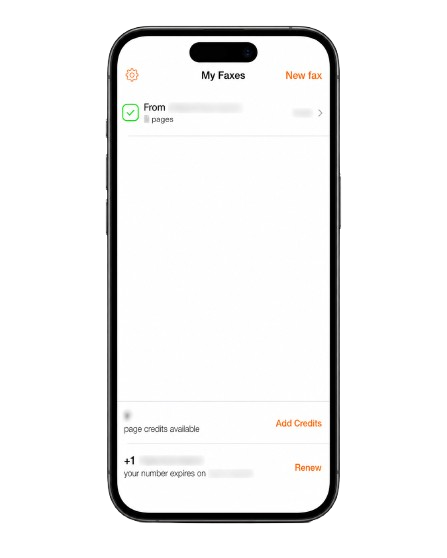
This is the real draw. Instead of a subscription, you buy credits that never expire. A single fax credit costs $0.99, and bundles bring that down: 10 credits cost $6.99 and 50 credits $19.99, about 40 cents each, with the App Store listing prices as low as $0.39 per credit on the largest pack. A dedicated fax number for receiving is a separate subscription, from $3.49 per month. For someone who faxes occasionally, that means no plan to remember and no monthly charge for a service you barely use. A nice privacy touch: the app does not track your usage data.
Where it falls short
The trade-off for that simplicity is a thinner feature set. Files can come in from Dropbox, Google Drive, or Box, but page editing is limited, the cover page options are basic, and rearranging pages on a longer fax is awkward. Fax output is also a notch below the cleaner services on detailed documents, and there is no HIPAA path or BAA, so it is not the tool for patient records.
Best for: light users who fax a few times a year and want to pay per page rather than commit to a subscription.
5. FaxBurner: best for receiving the occasional fax
FaxBurner has been around for a decade, has a 4.9 App Store rating across roughly 42,000 reviews, and a one-minute, no-card signup that is genuinely the fastest here. Its real value is on the receiving side: the free plan gives you a number that can pull in faxes without a subscription, which is unusual and useful.
Pros
- 25 receive pages per month free, permanently, no credit card
- Fastest signup in the group, one minute, no card required
- Email-to-fax and fax-to-email built in
Cons
- Free sending capped at 5 pages for the life of the account, not monthly
- US and Canada only, no international sending
- Weakest fax output in our testing, no HIPAA
The app and how it works
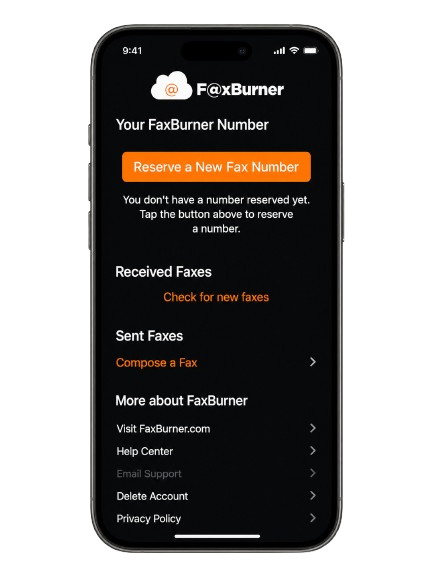
FaxBurner is built mobile-first and easy to pick up. You can scan or attach a document, add a quick cover note, and send, and it has email-to-fax and fax-to-email built in, so you can also send from your inbox or receive a fax as a PDF in your email. It works on iPhone and iPad. The interface feels dated next to the slicker apps, but it is not hard to use.
The free tier, read carefully
This is where you have to pay attention. On the free plan you can receive up to 25 pages per month, which is the genuinely useful free feature, but your free number is temporary and expires after 24 hours unless you upgrade. Free sending is capped at five pages for the entire life of the account, not per month, so treat free sending as a one-time trial rather than an ongoing option. Paid plans are $14.95 per month for 500 pages (Professional) or $24.95 per month for 2,000 pages (Premier), both with a permanent toll-free fax number and no annual lock-in.
Where it falls short
Sending is limited to the US and Canada, there is no HIPAA compliance, and the company states plainly that the app is not for health information. Fax output was the weakest in our testing, noisy and low-contrast, so it suits casual documents rather than forms where every detail has to land. The full picture is in our FaxBurner review.
Best for: people who mainly need to receive the occasional fax for free, or want the quickest possible way to try sending one.
Our verdict
If you want one app that does everything well, Fax.Plus is the pick, and it is the one we measure the rest against: the best scanner, a selectable HD quality mode, a real compliance stack with a signed BAA, Fax-to-EHR and Fax Streaming for healthcare, and pricing that starts free and scales without surprises.
The others each win a narrower lane. iFax suits users who need a BAA without jumping to enterprise pricing, as long as you check the fax output on important documents. ComFax is a capable phone-only app with unlimited pages on every plan, held back by single-quality output, subscription-only pricing from $29.99 per month, and a lack of admin depth once you need more than one user. Genius Fax is the pay-as-you-go choice for the few-times-a-year faxer. FaxBurner is the one to keep on your phone for receiving the occasional free fax. For a wider view across desktop and web services too, our online fax reviews hub has the hands-on tests behind every pick, including the established names like eFax.
FAQs
Can I fax from my iPhone for free?

Yes, within limits. Most apps offer some free allowance: Fax.Plus gives 10 send pages one time with no credit card, and FaxBurner lets you receive up to 25 pages a month free. Truly unlimited free faxing does not exist, so check whether the free pages are one-time or monthly before you rely on them.
What does an iPhone fax app cost?
It ranges from free allowances to subscriptions. Paid plans on the better services start around $6.99 to $15 per month, while pay-as-you-go apps like Genius Fax charge $0.99 per credit, less in bundles with no monthly fee. Match the model to how often you fax. You can compare plans on the Fax.Plus pricing page.
Do I need an app to fax from my iPhone?
Not always. The app is the easiest route, but you can also fax without installing anything by using Email to Fax or the web app in Safari, both of which Fax.Plus supports.
Does the iPhone have a built-in fax app?
No. iOS has no native fax feature or modem, so you need a third-party app such as Fax.Plus to send and receive faxes from your iPhone.
Which iPhone fax app is best for healthcare?
For patient records you need real HIPAA compliance and a signed BAA, not just "HIPAA-aligned" encryption. Fax.Plus offers a signed BAA along with HIPAA-compliant fax, Fax-to-EHR, and Fax Streaming for real-time delivery, which makes it the strongest fit for clinical workflows.


Featured Articles
See All




Confédération Suisse
Confederazione Svizzera
Confederaziun Svizra
Swiss Confederation
Innosuisse - Swiss Innovation Agency


