


FaxBurner Review 2026: Is the Free Fax App Safe, Really Free, and Worth It?
We tested FaxBurner's real fax output quality and reviewed its pricing, security and HIPAA posture, usability, and the full Terms of Service.


- FaxBurner is an iOS-only, free-first mobile fax app from Networx Online, sold on a real no-card free tier, a one-minute signup, and one of the highest App Store ratings in the category.
- The free plan sends only five pages for the life of the account, not per month, and sending is limited to the US and Canada.
- No plan is HIPAA compliant, and the company states plainly that the app is not meant for health information.
- The Terms of Service put all fax-advertising compliance on the user, keep refunds at the company's discretion, and grant broad rights to use and assign data about you.
- Best fit is occasional, non-sensitive domestic faxing where basic delivery matters more than clean output; regulated, high-volume, or automated faxing needs a business platform.
Is FaxBurner Worth It in 2026?
If you want to send or receive the occasional fax from your phone without buying hardware or signing a contract, FaxBurner is one of the easier tools to pick up. The free account needs no credit card, signup takes under a minute, and the iPhone app rating (4.9 stars across more than 41,000 reviews) is unusual for a utility app. The app flow is simple, but our test output was visibly weak, so this is best for casual faxes where basic delivery matters more than clean document quality.
The picture changes once you read past the homepage. The free plan lets you send only five pages over the life of the account rather than per month, there is no HIPAA compliance, and sending is limited to the US and Canada. The Terms of Service, updated January 2025, push every fax-advertising obligation onto you, keep refunds discretionary even after cancellation, and have you authorize the company to use and assign information about you and your usage. None of it is hidden, but you have to go looking for it.
About FaxBurner
FaxBurner is made by Networx Online, Inc., a software and communications company founded in 2010 and based in Ladera Ranch, California. The product launched the same year with the goal of turning a phone or inbox into a fax machine, and the company says it has served more than 1.9 million users and carried over 10 million faxes since then.
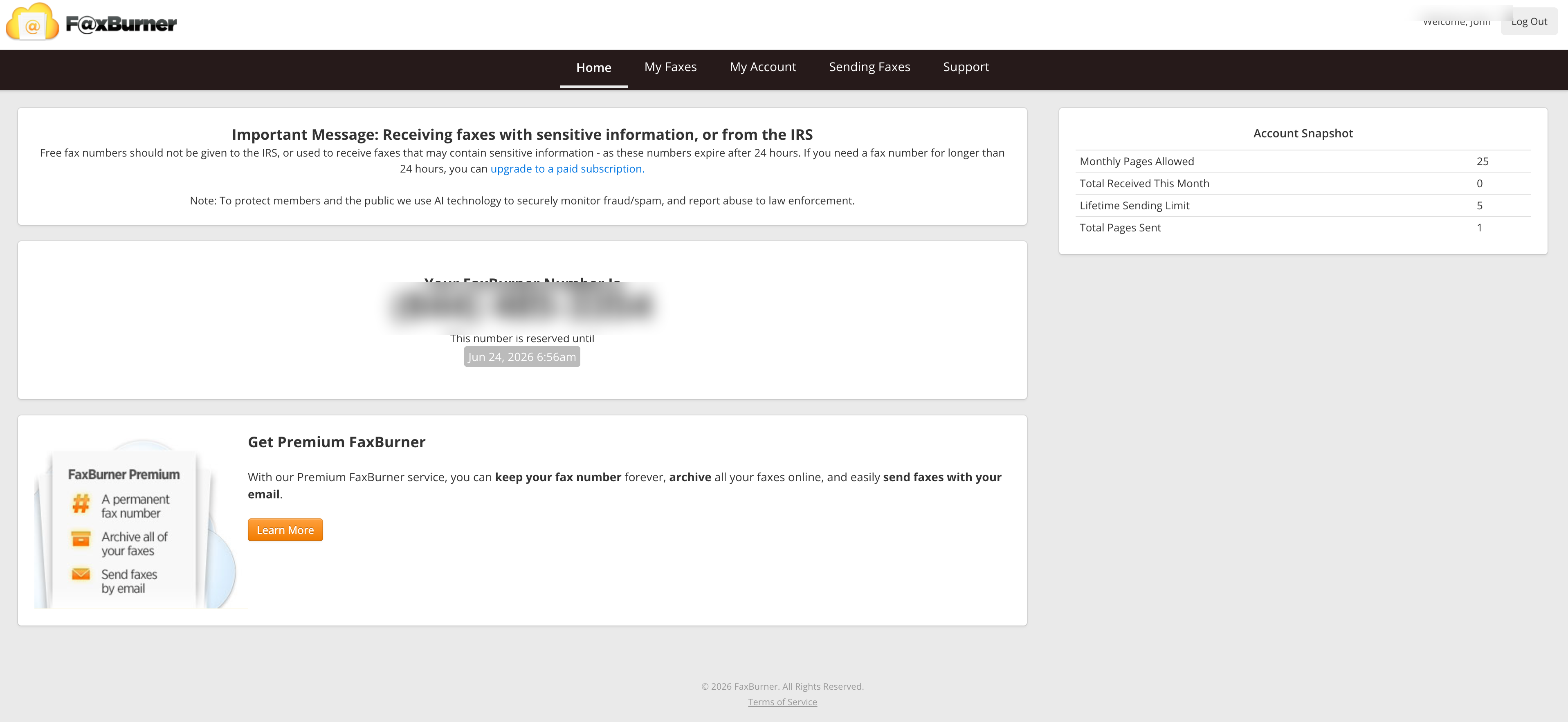
The service is built around mobile. The iPhone and iPad app is the flagship. The browser dashboard is mainly for account, number, and fax management; for sending outside the app, the practical path is email-to-fax.
There is a second, less visible side to the business. The Terms of Service are written heavily around fax advertising and broadcast campaigns, with references to the FTC Telemarketing Sales Rule, the FCC's Junk Fax Prevention Act, Do-Not-Call lists, and fax solicitor registration. That tells you FaxBurner is also used for outbound fax marketing, and that the company has built its legal terms to keep itself clear of how customers use the service. We come back to this below, because it shapes who should and should not rely on the product.
The product surface is narrow: iPhone and iPad apps, a web dashboard for account and number management, email-to-fax, and fax-to-email. There is no full browser-based send flow, no desktop app, no published developer API, and no enterprise interoperability stack. Who is it for? Individuals and light users who need the occasional fax and want to avoid a contract. People who fax regularly, handle patient or financial records, run fax campaigns, or need automation will run into the limits quickly.
How We Reviewed FaxBurner
We reviewed FaxBurner using four evidence layers:
- Product review across its surfaces. We worked through signup, the free 24-hour number, the send-and-receive flow, email-to-fax, fax-to-email, the iPhone and iPad app experience, and the web account dashboard, checked against FaxBurner's own help center and the public user record.
- Fax-quality testing. We test FaxBurner using a fixed, synthetic, real-world-style source document: a government and legal document. The same source file is used across testing so we can evaluate output quality consistently. Across the test, we assess the practical details that matter in real document workflows, including readability, layout preservation, handwriting, fine print, stamps, signatures, barcodes, dense tables, and mixed font sizes. No real personal, medical, tax, company, or patient data is used in the fax-quality test.
- Billing and account-control review. We read the FAQ, the privacy policy, and the full Terms of Service, and mapped the cancellation and refund path against the public complaint record.
- Business-readiness review. We checked FaxBurner's public materials for security and compliance claims, data residency and retention information, API and developer resources, healthcare readiness, and enterprise automation support.
We then scored FaxBurner across four areas (fax quality, pricing, security and compliance, and usability) and assessed customer service, data residency, and enterprise readiness narratively, because FaxBurner is a free-first consumer app rather than a business platform.
1. Fax Quality | Score 2/5
Fax quality is the part of a fax service that most reviews skip and most users only notice when it fails: a signature that arrives as a smudge, a stamp that turns to a gray block, a table that loses its columns. We tested FaxBurner with the same simulated IRS Form 2553 used across this series. The fax was delivered, but the received output was weak: noisy, low-contrast, and visibly degraded in the areas where official forms need detail.
Test Methodology
We include Fax.Plus Standard and Fax.Plus HD only as reference baselines. This is not a like-for-like settings comparison inside FaxBurner, because FaxBurner does not offer separate Standard or HD resolution modes. The point is to show where FaxBurner's single output lands against a normal fax-resolution send and against a higher-resolution reference on the same source file. The test document is a simulated IRS Form 2553, the fixed synthetic file used across this series. No real personal, tax, or company data is used.
We dropped the healthcare lab document used elsewhere in the series from this review on purpose. FaxBurner has no HIPAA path and states it is not for health information, so a clinical stress test would not reflect how anyone is meant to use the product. The government and legal form is the realistic test for FaxBurner's actual audience.
Government and Legal Document Fax Test
The test uses a simulated IRS Form 2553, a US government tax election form. Documents like this are common in legal, financial, and real estate workflows: signed agreements, tax filings, and multi-party authorization forms where every detail needs to arrive intact. All names, numbers, and signatures in the file are fictional. FaxBurner returned the file as a two-page PDF: a branded cover page followed by the test form.
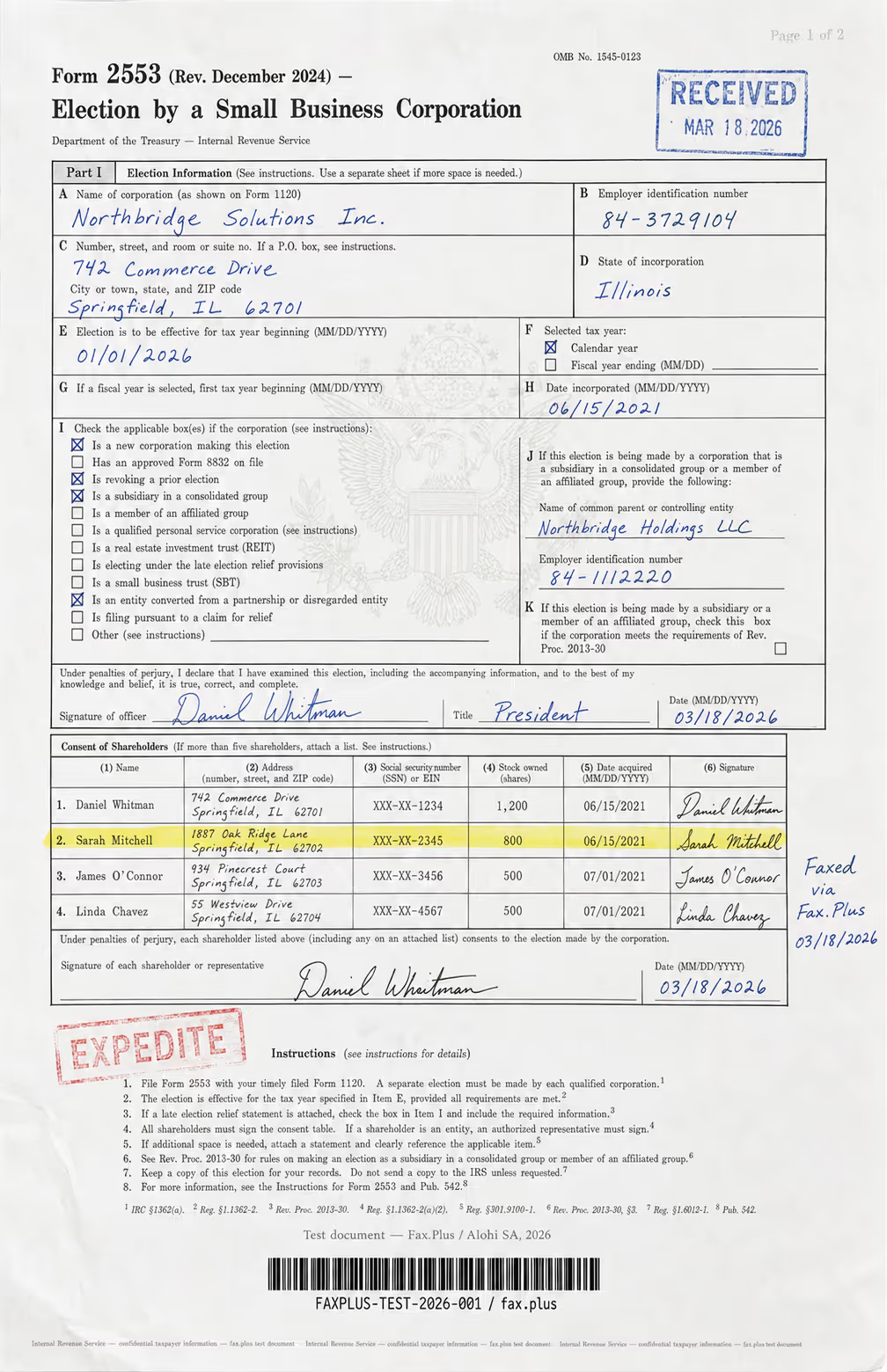
What the test document included:
- Handwritten signatures and a cursive-style officer name
- An official-style RECEIVED stamp with date
- An EXPEDITE rubber stamp with faded ink edges
- A US government eagle seal watermark in the center
- A highlighted shareholder table row
- Mixed font sizes across headers, body text, and fine print
- Dense tabular data across multiple columns
- A microprint line at the bottom for anti-fraud authentication
Fax.Plus Standard Resolution vs FaxBurner
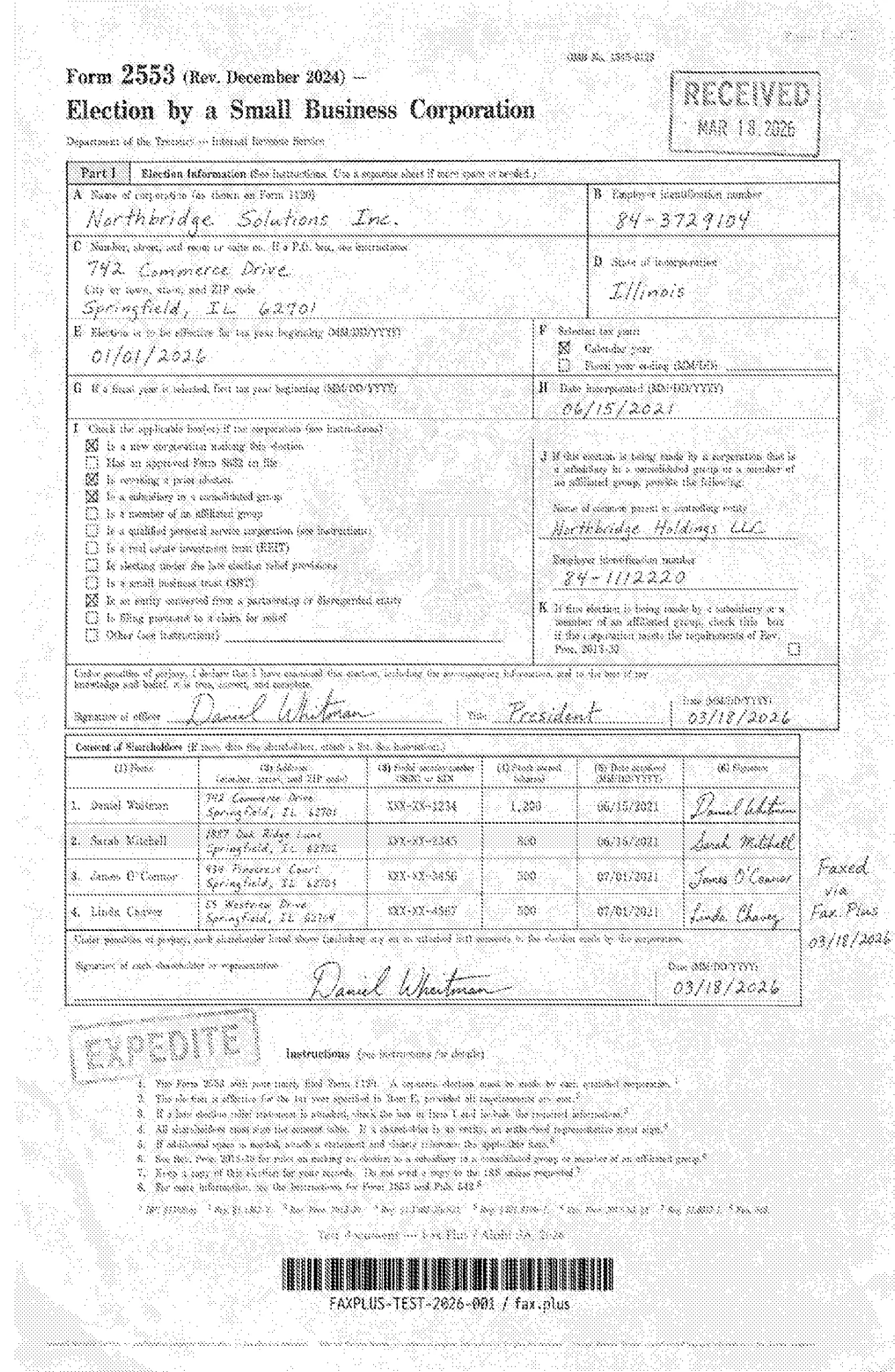
Fax.Plus Standard is the practical baseline: a normal-resolution fax of the same IRS form. FaxBurner delivered the page, but the output was noticeably weaker. The FaxBurner version picked up heavy speckling and a gray cast across the page, with softer table lines and lower contrast in handwritten fields. Large text, the main shareholder table, and signatures remained broadly readable, but smaller labels, fine print, and background details degraded quickly. Compared with Fax.Plus Standard, FaxBurner looked rougher, noisier, and less controlled.
 Standard

Fax.Plus HD Resolution vs FaxBurner
Fax.Plus HD is included only as a ceiling reference, not because FaxBurner offers an equivalent mode. The comparison shows what extra resolution preserves on the same source document. Against the HD reference, the FaxBurner gap is clear: small text, linework, barcode detail, the watermark, and faint stamp edges are much less clean. The RECEIVED and EXPEDITE stamps are still visible in the FaxBurner output, but weaker. The microprint and subtle background details are mostly lost. This is where FaxBurner's lack of a higher-resolution option becomes most obvious.
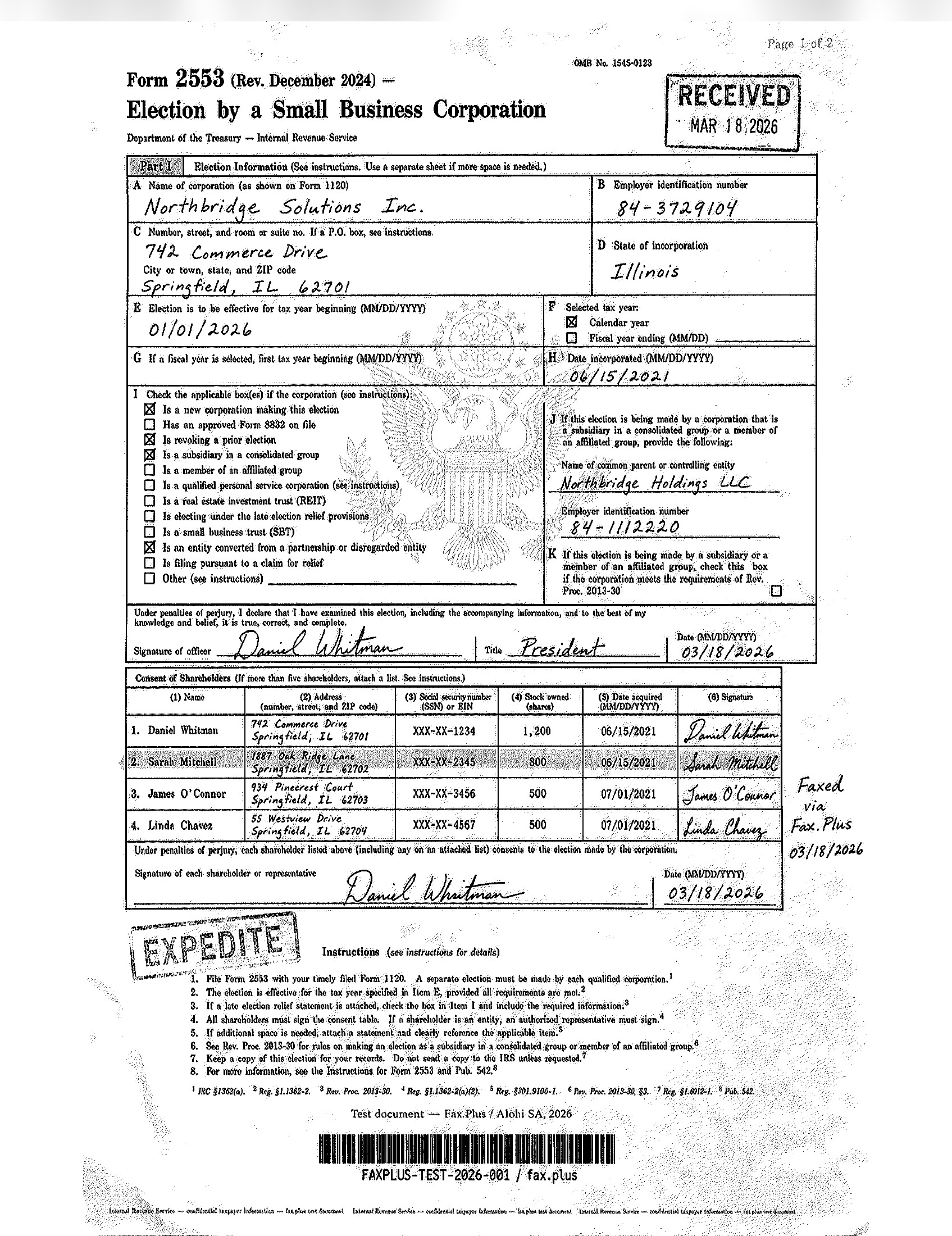 HD
HD
Send Speed
Send speed was acceptable for a light-use fax app. In our test set, Fax.Plus Standard usually completed in about a minute or less, while Fax.Plus HD took about 2 to 3 minutes because it preserves more detail. FaxBurner averaged around 2 minutes. That is not slow, but the trade-off is quality: FaxBurner's output was faster than the HD reference range but noticeably weaker in detail preservation. The received PDF also included a FaxBurner-branded cover page before the test document, so recipients should expect the cover page to count as part of the delivered fax.
How FaxBurner Fax Quality Compares
FaxBurner works, but fax quality is not a strength. The received form was usable for broad reading, but noisy, low-contrast, and visibly weaker than both Fax.Plus Standard and Fax.Plus HD. It is fine for a casual, low-risk personal fax where the recipient only needs the main fields. It is not a good fit for forms with dense tables, small print, stamps, signatures, barcodes, or official markings that need to arrive cleanly. The 2/5 score reflects completed delivery, but weak output quality.
2. Pricing | Score 3.5/5
Pricing is where FaxBurner wins its fans, and the headline numbers are good. The catches live in the free tier and in the contract behind the plans.
The Plan Lineup
- Free: $0, no credit card. A disposable fax number that stays active for 24 hours, receive up to 25 pages per month, and send up to five pages total.
- Professional: $14.95 per month for 500 pages (sending and receiving combined), plus a permanent toll-free fax number.
- Premier: $24.95 per month for 2,000 pages, with the same permanent number.
Both paid plans are billed month to month, and the 2,000-page Premier allowance is more generous than the entry plans of several larger competitors. Toll-free here means an 800-style number the recipient can reach without a long-distance charge. On raw per-page cost the paid plans are cheap, around 3 cents a page on Professional and closer to 1 cent on Premier.
The Free Tier
The free plan is the headline feature, but read the send limit carefully. The five pages are a lifetime allowance, not a monthly reset, so once you have sent five pages over the entire life of the account, free sending is done. Receiving resets monthly at 25 pages, and the number itself expires after 24 hours unless you upgrade. Treat the free tier as a trial for sending rather than an ongoing option.
The Terms Behind the Price
The contract is less friendly than the prices, which is why this is not a higher score. According to the Terms of Service, fees are non-refundable even if you cancel, and any refund is at the company's sole discretion and requires you to make a case for it. Annual and signup fees are never refundable. Subscriptions auto-renew until you cancel, and cancellation has to be done on the website, not in the app. A usage clause lets the company add a surcharge or change your pricing if your usage goes beyond "reasonable and ordinary" patterns, which sits oddly on top of a plan that advertises a fixed page count. Advertised prices exclude taxes.
How FaxBurner Pricing Compares
FaxBurner sits in the same free-first, light-use category as Fax.Plus, Dropbox Fax, and FaxZero. The table compares the free and paid sides of each.
A few things stand out. FaxBurner and Fax.Plus both cap free sending for the life of the account, but Fax.Plus gives 10 one-time send pages while FaxBurner gives five. FaxBurner is also the only paid plan here limited to US and Canada sending. Its per-page cost on Premier is the lowest in the group, so for someone faxing heavily within North America it can still be good value. Fax.Plus has the cheapest entry plan with double the pages, sending to 180-plus countries, stronger fax quality in our test, and the only HIPAA path with a signed BAA. FaxZero is the pick for a true one-off, and Dropbox Fax suits pay-as-you-go senders. The 3.5/5 reflects genuinely cheap, contract-free pricing held back by discretionary-only refunds, the surcharge clause, and the five-page free-send cap. For a broader look at free and low-cost faxing options, our roundup of the best free online fax services lines up the realistic choices.
3. Security and Compliance | Score 2/5
Is FaxBurner HIPAA Compliant?
This is where a business user has to slow down. FaxBurner's FAQ states the service is not HIPAA compliant and is not intended for personal health information. HIPAA is the US health-privacy law, and a Business Associate Agreement (BAA) is the contract that makes a vendor legally responsible for protecting that data. Without a signed BAA, using a fax service for patient documents puts the practice itself out of compliance. FaxBurner offers neither.
Security Evidence and Encryption
The privacy policy describes security as "industry-standard good practices" without naming any independent certification. There is no SOC 2 (an audit of how a company controls customer data), no ISO 27001 (an international information-security standard), and no healthcare assurance such as HITRUST. The Terms add that while the service uses industry-standard encryption, your uploads and transmissions may be intercepted, and that risk is yours.
How It Handles Your Data
The bigger theme is data. The Terms of Service have you authorize the company to use and assign information about your use of the site and the content you provide or create. The privacy policy describes building a profile of each user through cookies and web beacons, using it for retargeting, and granting affiliates or the partner who referred you access to a customer's contact details for sales follow-up. The company does say plainly that it does not sell personal data, and it honors California CCPA rights (the state's consumer-privacy law), but the overall posture is built for a consumer marketing business rather than for confidential document handling.
Who Carries the Compliance Burden
One more piece sits here because of how FaxBurner is used. The Terms place the entire burden of fax advertising law, the TCPA (the federal rule restricting unsolicited marketing faxes and calls), the Junk Fax Prevention Act, and Do-Not-Call rules, on the customer, stating plainly that the company is not your compliance officer. If you ever use FaxBurner to send anything resembling a broadcast or marketing fax, that liability is yours alone. The 2/5 reflects basic encryption and an honest privacy policy, set against the absence of certifications, the lack of HIPAA, the broad data rights, and the compliance burden pushed onto the user. For anyone who actually needs a HIPAA-compliant fax option, FaxBurner rules itself out by its own admission.
4. Usability | Score 3/5
Signup and Sending
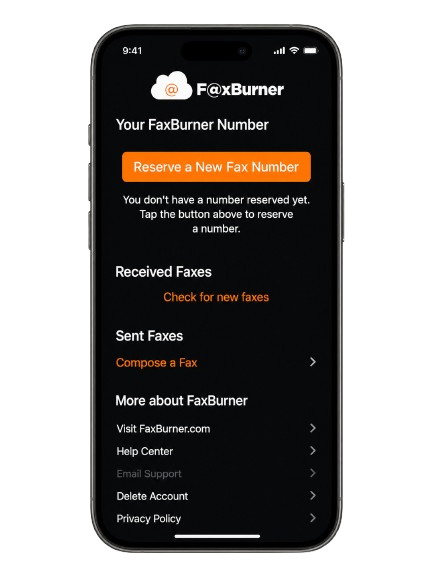
Ease of use is still one of FaxBurner's better points. Signup takes under a minute and needs no payment details. Reserving a number is simple, and the iPhone app makes composing a fax straightforward: add the destination, write an optional cover note, attach pages, and send. The problem is not basic usability; it is how narrow the product is once you need anything beyond a simple send.
Email-to-Fax and Fax-to-Email
Email-to-fax adds useful cross-device flexibility. You send a message to send@faxburner.com from your account email, put the destination fax number in the subject line, and attach a PDF. The body becomes an optional cover note and counts as one page. Fax-to-email also works from any device, because received faxes can be handled through email once your number is active. That said, the web dashboard is not a full web fax workspace. In our test, it worked mainly for account and number management, usage limits, and received/sent fax visibility. For sending outside the iOS app, email-to-fax is the practical path.
Where the App Shows Its Age
FaxBurner is easy to use because there is not much to use. The interface feels dated, the controls are sparse, and there are few advanced options.
The marketing site
The experience is clearly built iPhone-first. The web dashboard feels secondary and does not offer a full browser-based send flow. The public marketing site is also rough in places: leftover placeholder text on the homepage, a privacy page whose title still reads as a staging draft, and a mismatched office ZIP code between pages. None of that stops a simple fax, but it undercuts the polish the product otherwise earns.
The app, in the public record
The app itself is understandable and easy enough for a one-off send, but visually basic. There is no high-resolution send option, no full web sending workflow, no team management, no API, and no deeper admin layer. FaxBurner's help center also documents a recurring paid-upgrade sync issue where the app can keep treating an upgraded account as free until the user logs out, fully closes the app, and signs back in. The 3/5 score reflects a product that is easy for occasional mobile faxing, but limited and old-fashioned for anything more serious.

What FaxBurner Leaves Out, and the Terms Worth Reading First
A full business review usually scores customer service, data residency, and enterprise readiness as separate categories. With FaxBurner there is little to score in those columns, so here is the honest version in one place, along with the contract terms that matter more than the feature list.
Support and account control
Support runs through email and two published phone numbers, plus a Zendesk help center, which is more than many free tools offer. Account control is weaker. The free number expires after 24 hours, number recovery is reserved for paid accounts, and downgrading or canceling can revert your number to temporary and drop you to free-tier limits. Cancellation is web-only, it cannot be done in the app, and it runs through a short exit survey. Billing is split: subscribe through the App Store and Apple bills you, subscribe on the website and FaxBurner bills you directly, and the two paths are handled separately, which is a known source of confusion in app store reviews along with reports of disabled paid accounts and refund friction.
The terms worth reading
The Terms of Service, updated January 2025, run user-unfriendly in a few specific ways. There is no service level agreement and no uptime guarantee, and the company is not required to give notice of downtime at any account level. Total liability is capped at one month of fees, which for a free user is zero. Refunds are discretionary, as covered in Pricing. And the compliance language puts all fax-advertising and Do-Not-Call obligations on you. To its credit, the Terms include no forced arbitration and no class-action waiver, and disputes are handled under California law.
Data residency
FaxBurner is a US operation and its data stays in the US. The privacy policy states the service is for the United States and Canada only and is not available to users in the European Union or United Kingdom. Data residency means where your files are physically stored and under which laws. FaxBurner offers no choice of region and no documented retention controls. For a US individual this is a non-issue. For an organization with European obligations, it is a hard stop.
Enterprise, API, and healthcare
There is no fax API, so FaxBurner cannot connect to an electronic health record system, a CRM, or any internal workflow. An API, an application programming interface, is the bridge that lets other software send and track faxes automatically, and FaxBurner publishes none. There are also no SDKs or webhooks (the developer kits and the automatic notifications that let faxing talk to your other systems), no single sign-on (SSO, the one-login standard companies use across their apps), no admin console, and no MCP path. MCP, the Model Context Protocol, is the newer interface that lets an AI assistant send and track faxes directly, and FaxBurner has none of it. In healthcare, the absence of HIPAA and a BAA closes the door on regulated medical use. Teams that need any of this can see what a published MCP server for fax workflows alongside a self-serve fax API looks like; FaxBurner offers neither layer.
Alternatives to FaxBurner
Fax.Plus: Best overall FaxBurner alternative
Fax.Plus is the closest step up for anyone who likes FaxBurner's simple send flow but wants cleaner fax quality first, and a product that can scale after that. The free plan is still a limited, one-time allowance, but it gives 10 send pages instead of FaxBurner's five. More importantly, Fax.Plus produced much cleaner results in the fax-quality test. It also adds what FaxBurner lacks for business use: broader international sending, a published API, a hosted MCP server for AI-agent faxing, and a documented compliance stack with HIPAA and a signed BAA on the Enterprise plan.
Best for: Users who want a simple fax product like FaxBurner, but with better fax quality first, then broader sending coverage, stronger compliance options, an API, and a more scalable setup.
FaxZero: Best for true one-off faxing
Free, no-account faxing: a handful of free faxes a day with a branded cover page, or a flat fee for larger sends. No inbound number, no storage, and no subscription to manage. It is send-only and not for sensitive documents, with the trade-offs we cover in our FaxZero review.
Best for: The genuinely occasional faxer who does not need an account, a number, or a subscription.
Dropbox Fax: Best for pay-as-you-go web faxing
The HelloFax successor suits people who want a tidy web experience and pay-as-you-go sending, especially inside the Dropbox ecosystem, as covered in our Dropbox Fax review.
Best for: Light web-based senders who want no app and no monthly commitment.
FAQs
Is FaxBurner really free?

Yes, within a strict limit. The free account needs no credit card and gives you a fax number that lasts 24 hours, lets you receive up to 25 pages a month, and lets you send five pages total over the life of the account. To keep a permanent number and send more, you move to a paid plan at $14.95 or $24.95 per month.
Is FaxBurner HIPAA compliant?
No. FaxBurner states in its FAQ that it is not HIPAA compliant and is not intended for personal health information, and it does not offer a BAA. Healthcare faxing needs a service that is HIPAA compliant and will sign that agreement.
Is FaxBurner worth it in 2026?
For occasional, non-sensitive domestic faxing from a phone, yes: the free tier, the high app rating, and the one-minute signup have genuine appeal. For anyone needing clean fax output, HIPAA coverage, dependable refund and uptime terms, an API, or faxing beyond the US and Canada, the record points elsewhere. The overall score is 2.6/5, based on the unweighted average of fax quality, pricing, security and compliance, and usability.
Is FaxBurner safe to use?
For non-sensitive personal faxes, yes. It uses industry-standard encryption, but its own Terms say transmissions can be intercepted and that the risk is yours, and it holds broad rights to use and assign data about you. It has no security certifications and is not HIPAA compliant, so it is not the right place for confidential records. For anything sensitive, choose a provider that publishes its security stack, such as Fax.Plus.
Does FaxBurner have an API?
No. There is no public fax API, SDK, or MCP support, so it cannot be connected to an EHR, CRM, or other software workflow. Teams that need self-serve programmatic or AI-agent faxing should compare a published fax API and MCP server.
How do you cancel FaxBurner?
Cancellation is done on the FaxBurner website, not in the app: log in, open your account billing settings, complete the short exit survey, and confirm. It is effective immediately. Keep your own confirmation, since billing-after-cancellation and disabled paid accounts both appear in the public review record.
Can I get a refund from FaxBurner?
Refunds are at the company's discretion. The Terms state that fees are non-refundable even if you cancel, that annual and signup fees are never refundable, and that any refund requires you to make a case for it. If you want flexibility, choose the monthly option and cancel before the next renewal.
Can I send a fax internationally with FaxBurner?
The FAQ says sending is limited to the United States and Canada, though you can receive from anywhere to a US number. The homepage suggests international sending is possible with a country code, which conflicts with the FAQ, so confirm current limits before relying on it.


Featured Articles
See All



Confédération Suisse
Confederazione Svizzera
Confederaziun Svizra
Swiss Confederation
Innosuisse - Swiss Innovation Agency




