


Resolve missing or unreadable information on faxed DME orders. Request precise corrections and connect returned versions to the approved review process.


- Review the received order against the requirements applicable to the item and payer.
- Describe the precise missing or unreadable information when requesting a correction.
- Keep the corrected order connected to its earlier version and supporting documents.
- Let authorized staff determine documentation readiness and the next permitted step.
- Track the fax result separately from order review, coverage and payment decisions.
A DME order arrives by fax, but a signature is unreadable or a requested order detail is missing. The next administrative task is to obtain the correct document and connect it to the order already being reviewed.
A focused correction request is more useful than asking for the whole packet again. It identifies the document, explains what needs attention and gives the sending office a clear return route. Clinical decisions and coverage review remain with the responsible professionals.
Use the applicable order requirements
Start with the item, payer and current documentation instructions. For Medicare DMEPOS, CMS’s general documentation requirements describe standard written orders and distinguish items requiring an order before delivery. Item-specific requirements must also be checked.
Do not turn a generic fax checklist into permission to supply equipment or bill a claim. Have the qualified reviewer establish which order elements and supporting documents apply, then use that approved list for administrative review.
Check what is actually present. A missing page, a faint signature and an absent order element are different issues. Read the complete received document before recording an item as missing.
Request the exact correction needed
Refer to the existing order through the organization’s approved identifiers and contact the verified sending office. State the document date or version and the specific field or page that needs attention.
For example, “Please return a readable copy of the signed order dated [date]” requests a different action from asking the practitioner to complete an unsigned order. Use the wording approved for your process and let the authorized practitioner make any clinical or order correction.
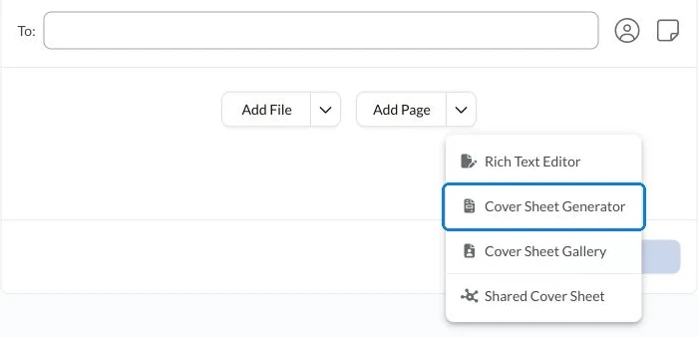
Put instructions intended for the sending office in the transmitted document or cover sheet. Follow the Fax.Plus cover-sheet instructions and avoid repeating unnecessary patient details in routing text.
Reconcile the returned document
When a corrected order arrives, match it to the intended patient and order through the approved records process. Check its source, date, page count and the issue the office was asked to resolve.
If supporting records arrive through another approved channel, reconcile them to the same order record before repeating the request.
Keep the earlier copy identifiable while making clear which version is under review. If the correction introduces a different item or conflicting information, send it to the responsible reviewer rather than treating every returned page as closure.
Record remaining administrative questions specifically: a requested page is still absent, the replacement remains unreadable or a reviewer needs clarification. This keeps follow-up connected to the actual document issue.
Keep transport and review separate
Fax.Plus supports the sending and receiving stages. Use an appropriate healthcare fax setup for DME order exchanges before handling patient information. HIPAA workflows require Enterprise, Advanced Security Controls and a signed BAA.
Check the outgoing correction request’s transmission result, then track the returned order and review outcome separately. A successful fax is a transport result, not confirmation that an order meets every applicable requirement.
Close the administrative follow-up when the responsible team has reviewed the returned document and recorded the next action. Preserve the relevant source and corrected versions through the organization’s records process, so another authorized colleague can understand what was requested and what came back.
For equipment paperwork that forms part of a hospital transfer, coordinate the order record with the discharge-packet document handoff.
FAQs
How should staff describe an unreadable signature on a faxed DME order?

Identify the order and the affected page, then request a readable copy through the approved process. Distinguish an unreadable signature from an unsigned order and leave any required correction to the authorized practitioner.
What should happen when a corrected order arrives?
Match it to the existing order, check whether it resolves the requested issue and make the version under review clear. Refer conflicting or changed order details to the responsible reviewer.
Which checklist should staff use for DME order review?
Use the checklist approved for the specific item, payer and current requirements. Administrative staff can identify missing or unreadable information against it; the responsible team determines documentation readiness and subsequent action.




Confédération Suisse
Confederazione Svizzera
Confederaziun Svizra
Swiss Confederation
Innosuisse - Swiss Innovation Agency




