FaxZero Review 2026: Is It Safe, Really Free, and Right for You?
We tested FaxZero's free and paid send flows. Here is what we found on safety, the real cost, compliance, and whether it is the right fit for you in 2026.


- FaxZero is genuinely free. No account, no credit card, up to five faxes a day to any US or Canada number.
- Output quality is better than the price suggests. In our tests it kept a clean white background on complex documents, where some paid services left a grey cast.
- It is send only. FaxZero cannot receive faxes, and there is no mobile or desktop app, only a mobile-friendly website.
- It has no HIPAA compliance, no BAA, and no security certifications, so it is not the place for medical, legal, or financial documents.
- The "is FaxZero a scam" worry comes from third-party ads sitting next to the send flow, not from FaxZero itself. The free send really is free.
- Right fit for the occasional one-off domestic fax. If you fax regularly or need to receive, you have outgrown it, and FaxZero will tell you the same thing.
FaxZero has quietly run since 2006 as a one-person project, and it does one thing honestly: it lets you send a short fax to a US or Canada number for free, with no signup. It is not trying to be an enterprise platform, and it does not pretend to be.
Is FaxZero Worth It in 2026?
FaxZero is worth using if you send a fax once every few weeks, you are sending within the US or Canada, and the document is not something that needs confidentiality or a delivery record. For returning an insurance form or sending a signed government form without paying for a subscription, it does the job in under a minute.
It is the wrong tool for almost everyone else. If you need to receive faxes, work from your phone with a real app, handle protected health information, or connect faxing to any other system, FaxZero has no answer for you. None of that is a knock on what it is. It is just a clear line around what it was built for.
About FaxZero
FaxZero is owned and run by Savetz Publishing, Inc., a one-person internet publishing company operated by Kevin Savetz out of West Linn, Oregon. This is not a funded SaaS startup. It is a side project that has run for nearly two decades alongside Savetz's other web tools, things like printable forms and templates. The service pays for itself through advertising on the site and in the notification emails.
That backstory matters, because it explains both the charm and the ceiling. A one-person operation can keep a free fax tool alive for twenty years and answer support emails personally. It cannot ship a mobile app, a receive feature, or a compliance program. Knowing which of those you need is the whole decision.
FaxZero launched in 2006 and has sent more than 28.7 million faxes over its lifetime, with a live counter on its homepage that read 28,797,520 in June 2026. It covers US and Canada destinations for free and international destinations for a per-fax fee. There is no enterprise product, no healthcare tier, and no API.
How We Reviewed FaxZero
FaxZero has no app and no account, so we ran our checks entirely through the web flow, using both the free send and the paid send. We watched the full path from form submission through the confirmation email, and read through the FAQ, Terms, and Privacy Policy to map what happens to your data and what the service does and does not promise.
For output quality we sent our two standard test documents through FaxZero: a government tax form and a healthcare lab report, both built to stress every part of a page that a real fax has to carry. All names, numbers, and clinical values in them are fictional. We then compared the result against the same files sent on Fax.Plus, used here only as a quality reference rather than as a service under review.
1. Fax Quality
This was the surprise of the review. For a free tool that sends over a basic connection, FaxZero held up better than expected on documents that usually trip fax services up. The clearest finding: it kept a clean white background on both test pages, where some paid services we have tested left a grey cast across the whole page.
We include Fax.Plus at Normal and HD as the reference baseline. FaxZero has no high-resolution mode, so its single output sits closest to a Normal send, and the HD reference is there only to show the ceiling on identical source material.
Government and legal document test
The first test used a simulated IRS Form 2553, a US tax election form. Documents like this run through legal, financial, and real estate workflows, where signed agreements, filings, and multi-party authorizations all need every detail to arrive intact.
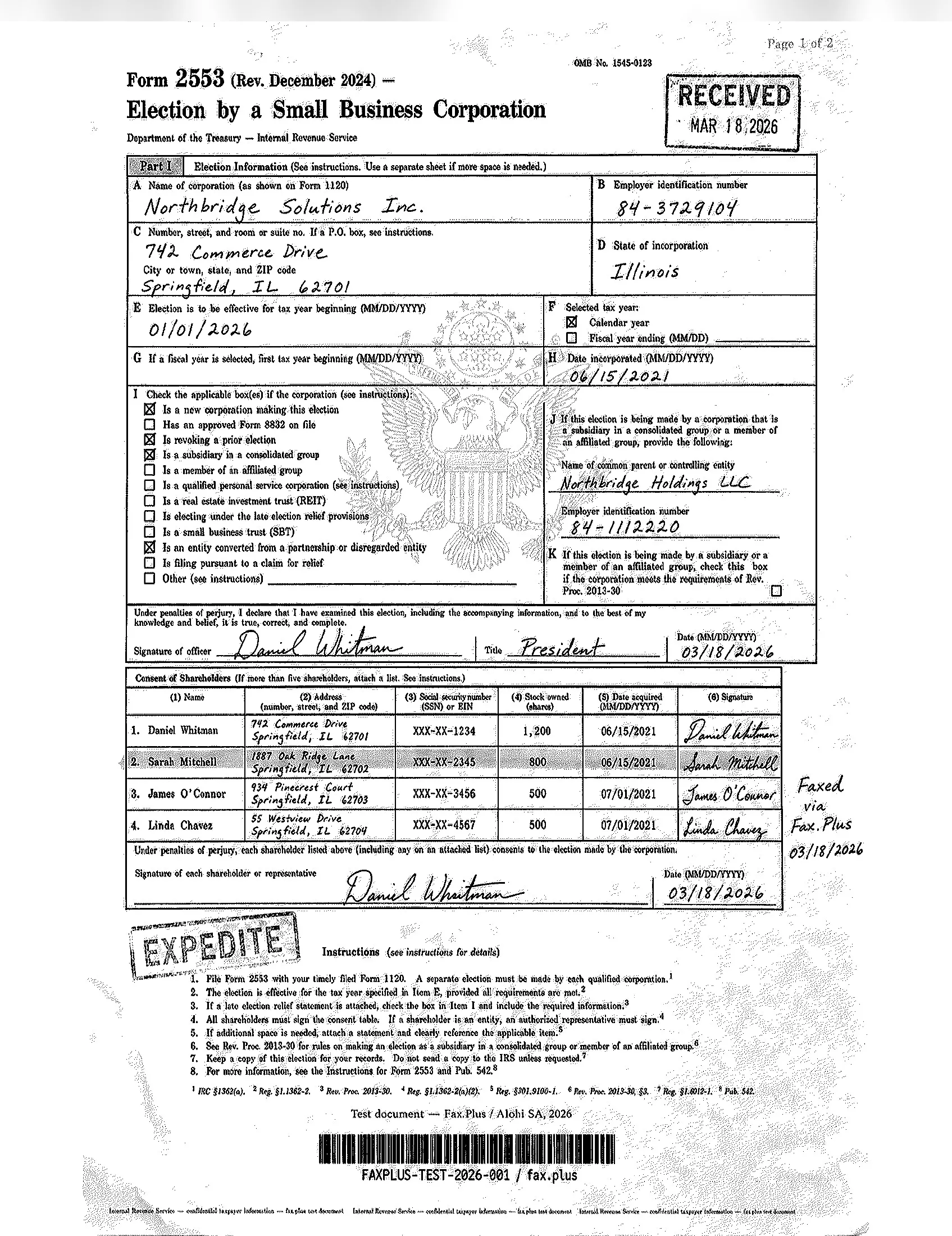
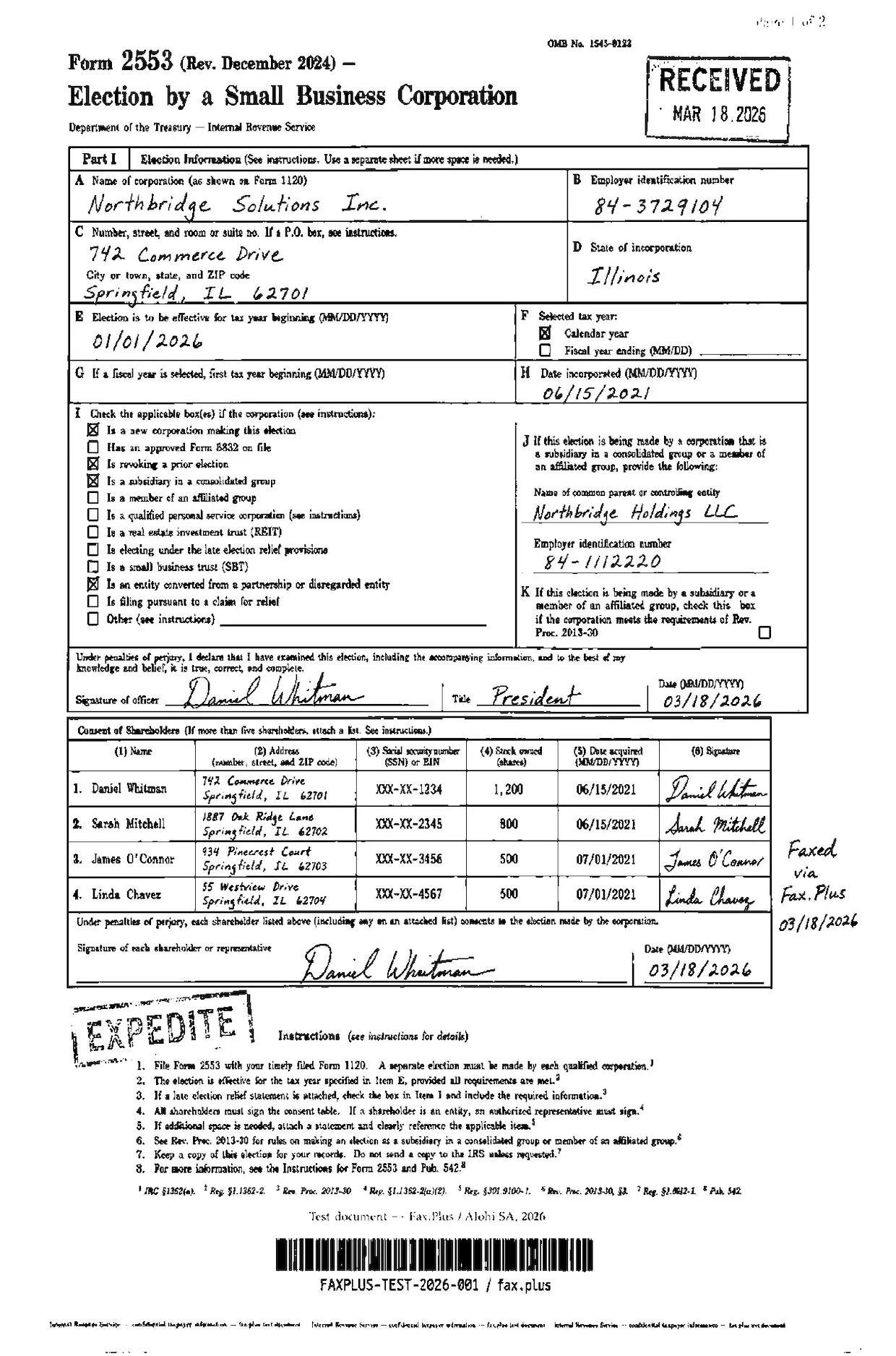
The master file included handwritten signatures and a cursive officer name, an official RECEIVED stamp with a date, an EXPEDITE rubber stamp with faded ink edges, a government eagle seal watermark, a highlighted shareholder table row, mixed font sizes, dense multi-column tables, and an anti-fraud microprint line along the bottom.
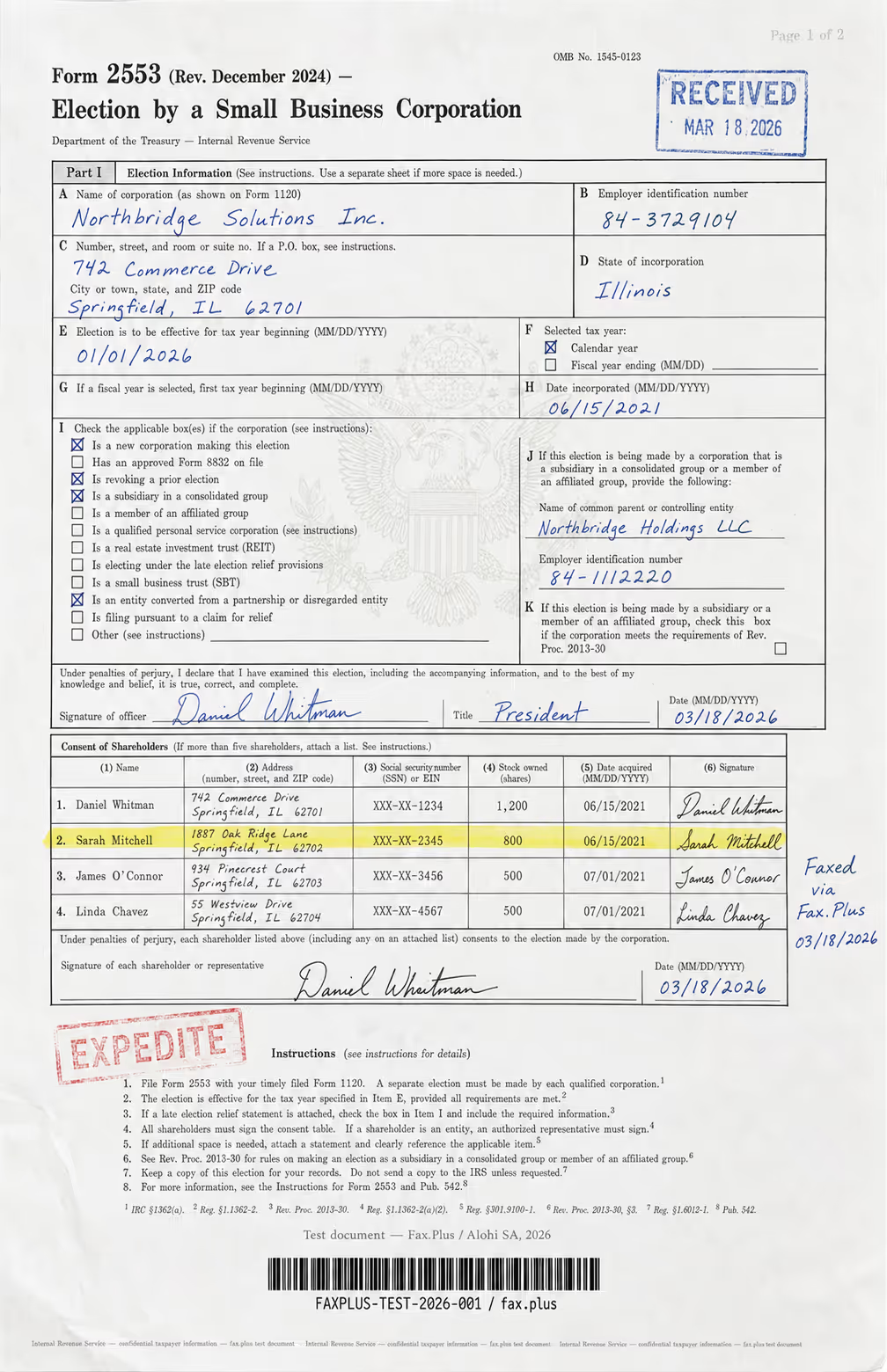
FaxZero fax quality reference, compared with Fax.Plus Standard
On FaxZero, the page came back on a clean white background with the shareholder table, signatures, and both stamps readable. The EXPEDITE stamp softened at its edges and the smallest footnote references at the very bottom degraded, which is normal at fax resolution, but the body of the form held up well.
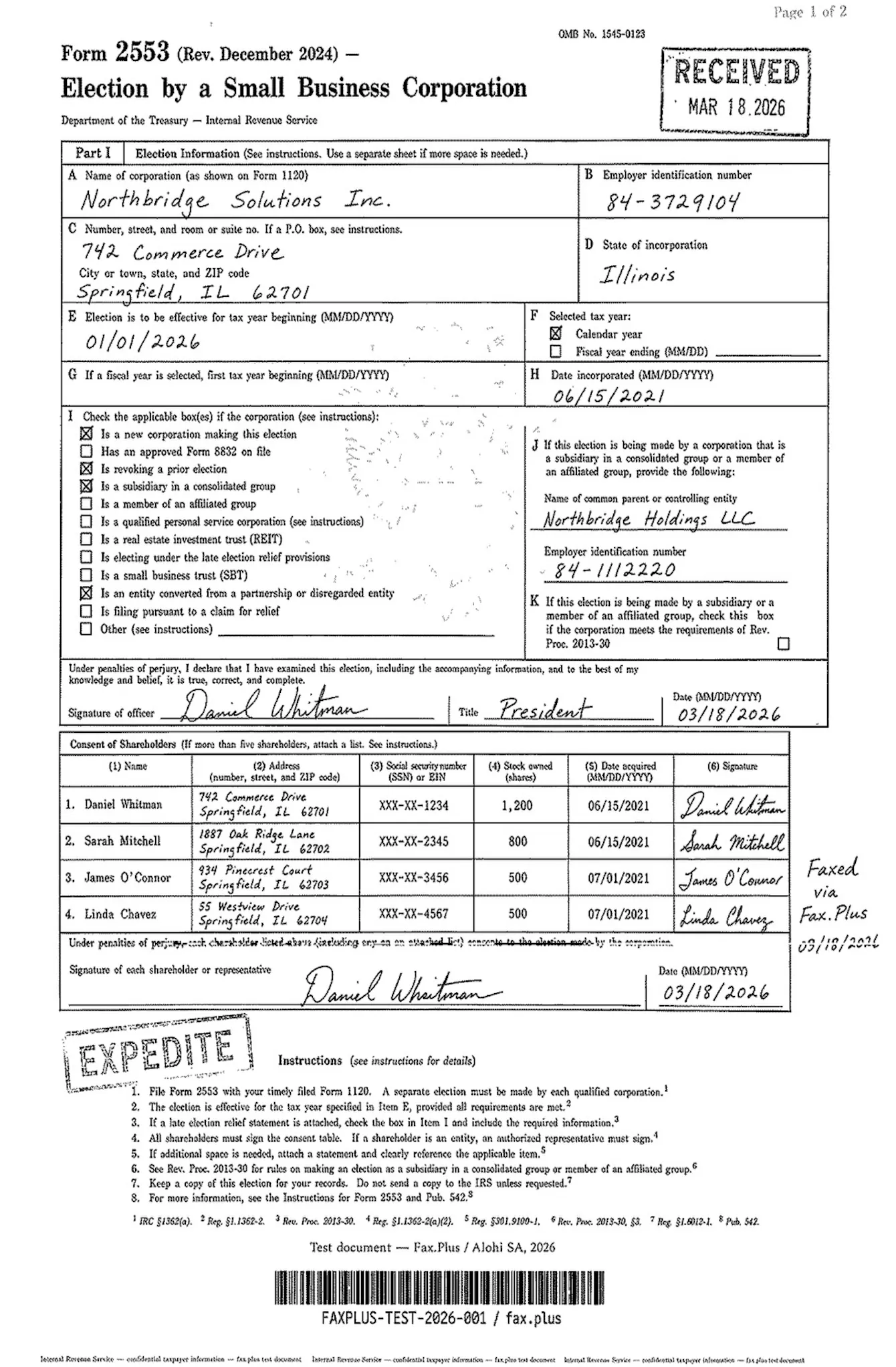 Standard
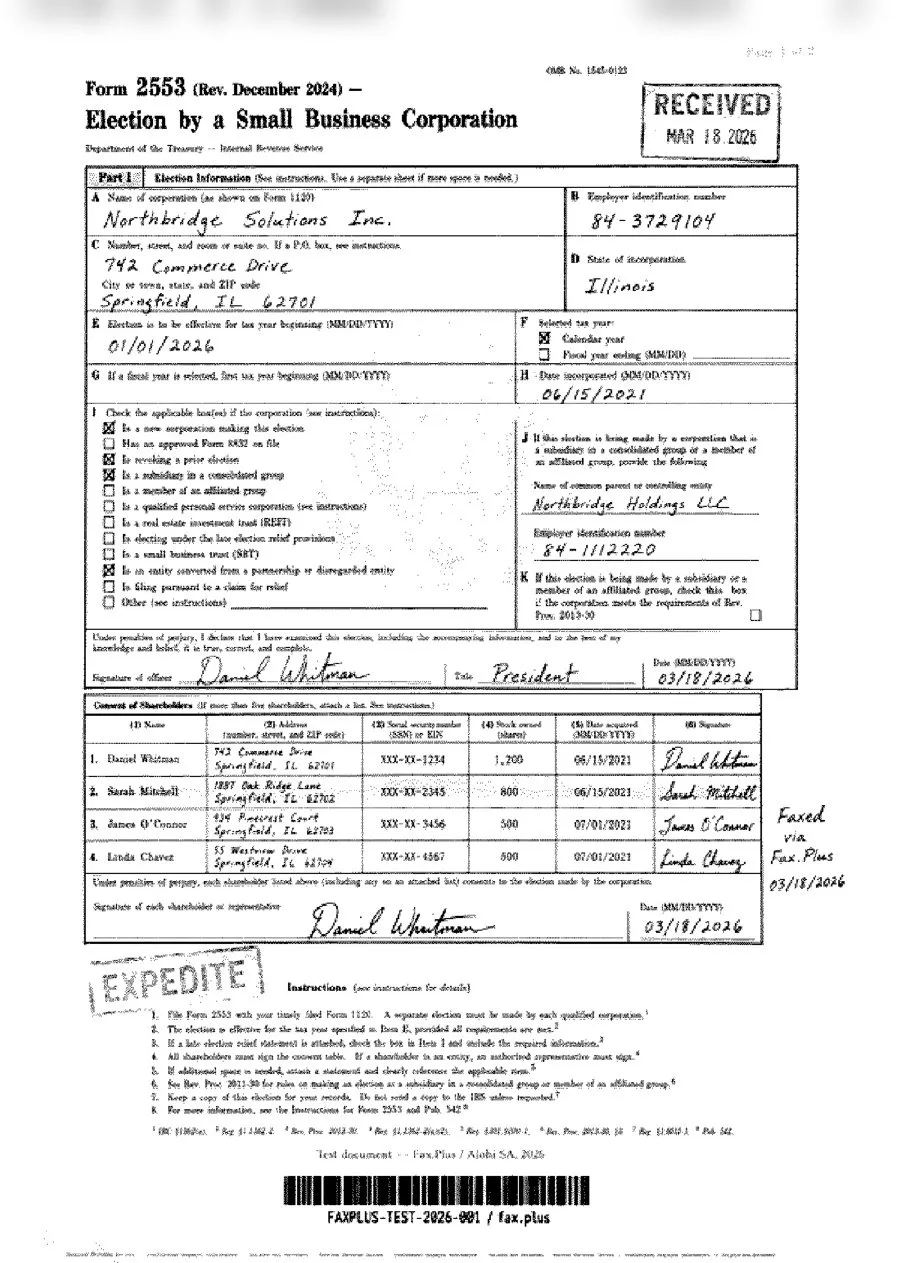
 FaxZero
FaxZero fax quality reference, compared with Fax.Plus HD
FaxZero does not offer separate Standard or HD fax quality modes, which is expected for a free, send-only fax service. Still, it is useful to compare its output against Fax.Plus HD to see how far a free web-based fax tool can go, and where a higher-resolution fax option starts to preserve more detail in dense forms, handwriting, stamps, and small text.
 HD
HD
 FaxZero
Healthcare document test
The second test used a simulated lab results form from a fictional medical center. It was built as a stress test rather than a literal workflow: in practice a fax rarely carries diagnostic imaging, but we added a six-lead EKG strip on red grid paper deliberately, to push what each service can render. The realistic part is the mix of lab data, flag values, a handwritten physician note, and a PHI stamp, all of which show up in real healthcare fax traffic.
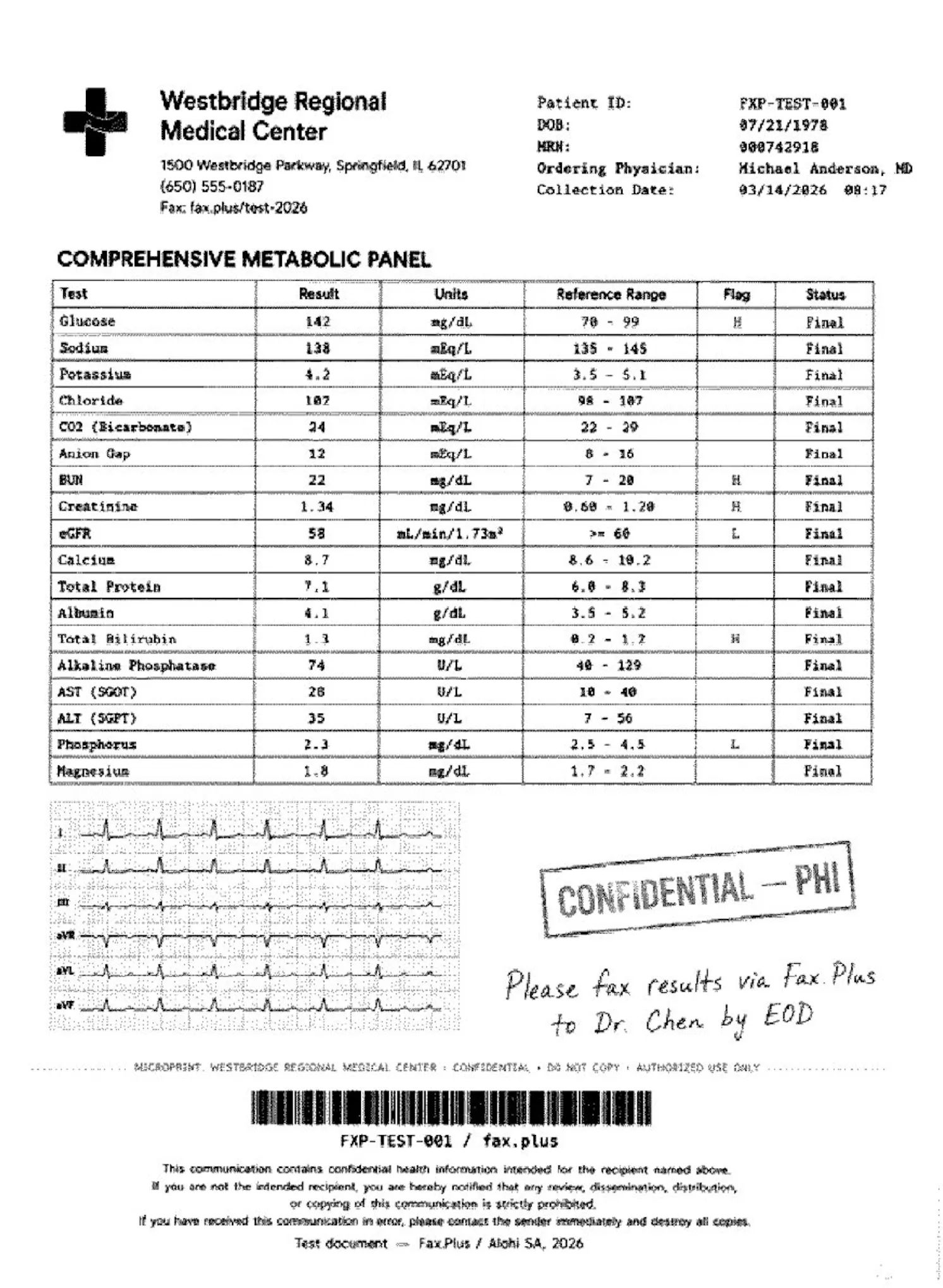
The master file included a comprehensive metabolic panel with highlighted flag values, the EKG strip on red grid paper, a handwritten physician instruction in blue ink, a CONFIDENTIAL PHI rubber stamp with faded edges, patient header data, a Code 128 barcode, a small-print HIPAA footer, and an anti-fraud microprint line.
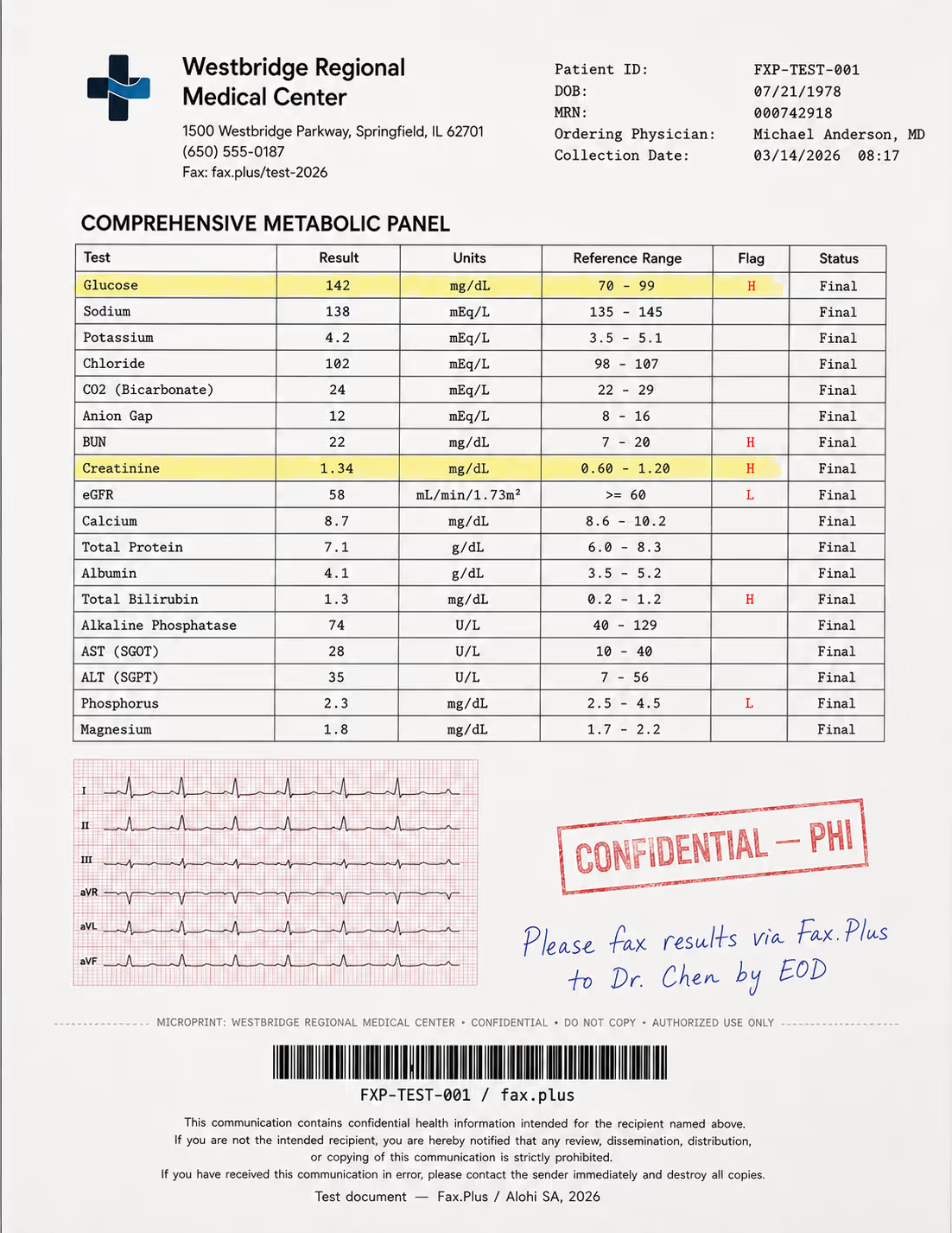
FaxZero fax quality reference, compared with Fax.Plus Standard
On FaxZero, the metabolic panel arrived fully legible, including the H and L flag markers, on a white background. The handwritten note and the PHI stamp stayed readable, and the barcode rendered cleanly. The red EKG grid dropped to grey lines, as expected when color goes through a monochrome fax, and the trace itself remained visible. In a real workflow, a flag value that arrives illegible or a handwritten instruction that cannot be read is not just a quality issue, it is a clinical risk, so the legibility here matters more than it looks.
 Standard
 FaxZero
FaxZero fax quality reference, compared with Fax.Plus HD
FaxZero does not offer separate Standard or HD fax quality modes, which is expected for a free, send-only fax service. Still, it is useful to compare its output against Fax.Plus HD to see how far a free web-based fax tool can go, and where a higher-resolution fax option starts to preserve more detail in dense forms, handwriting, stamps, and small text.
 HD
FaxZero
HD
FaxZero
What we saw
The takeaway is a genuine point in FaxZero's favor. On both documents its output stayed on a clean white background, which is not something we can say of every paid service. In our testing the iFax app and eFax both produced a grey, slightly washed background on the same kind of source, where FaxZero did not. For a free, no-account tool, that is a better result than the price would suggest. The limits are the ones you would expect at standard fax resolution: the very finest microprint and a few faded stamp edges lose definition, and there is no high-resolution mode to fall back on.
2. Pricing
FaxZero's free tier is not a trial and not a hook. You get up to five faxes per day to any US or Canada number, including Puerto Rico, with up to three pages plus a cover sheet. The cover page does not count toward your page total, and there is no credit card required.
Two things come with that free tier. The cover page carries FaxZero branding, and you have to click a confirmation link in an email before the fax transmits. FaxZero’s FAQ notes that the confirmation email can land in spam, so check there if your fax has not gone through.
If you need more, the paid option is a flat per-fax charge through PayPal: 3.29 USD per fax for up to 25 pages, with no branding, priority delivery, and no email confirmation step. International faxes run 3.63 USD for most countries for up to 15 pages. There is no monthly plan and nothing to auto-renew, which is part of why FaxZero feels clean for one-off use.
But FaxZero is not the only free fax option. Fax.Plus also offers a free fax option with 10 total pages, no credit card required, and support for sending from both computer and phone. The difference is the model. FaxZero is better if you want the fastest no-account domestic send. Fax.Plus is better if you want free faxing inside a real account, with mobile access, delivery confirmation, secure archive, and a path to receiving faxes later.
For one or two very short US or Canada faxes, FaxZero is hard to beat. For anything more regular, the math and workflow change quickly. At FaxZero’s paid rate, one 25-page fax costs 3.29 USD, or roughly 13 cents per page. Fax.Plus starts with 10 total free pages, then its Basic annual plan starts at 6.99 USD per month for 200 pages, with one fax number, mobile app access, unlimited fax storage, and 0.10 USD per extra page.
3. Security and Compliance
Is FaxZero safe and legit?
FaxZero is a real service, and the free send is genuinely free. The "scam" worry that shows up in some reviews is a real thing people have run into, but it is worth understanding what actually causes it.
FaxZero is ad-supported, and some of those ads are for other paid fax services that appear near the send form or in the confirmation email. A few users have clicked through, signed up for a different company by mistake, and then seen a charge they did not expect. That is third-party advertising friction, not FaxZero charging you. The free send does not require payment, and FaxZero processes its own paid faxes through PayPal. If you only want the free send, ignore the surrounding ads and use the clearly marked send button.
On security, FaxZero does the minimum and is upfront about it. Data is sent over HTTPS with SSL or TLS in transit. There are no certifications, no SOC 2, no ISO 27001, and no security audit mentioned anywhere on the site. For a free tool used to fax a permission slip, that is fine. For anything sensitive, it is not enough.
One detail to know before you send anything you care about. FaxZero's own FAQ states that it stores data about your faxes, including the sender email and destination number, indefinitely, while the fax content itself is deleted within three days. So the document goes away quickly, but the record that you faxed a particular number, tied to your email, stays with no expiry. Data is stored in the US, with no EU option, and the site runs Google Analytics and third-party ad trackers. The Terms, last updated in November 2016, provide the service "as is" and cap total liability at 25 USD, and they reserve the right to change prices at any time without notice.
Is FaxZero HIPAA compliant?
No. FaxZero is not HIPAA compliant, does not offer a Business Associate Agreement, and cannot be made compliant by any setting or paid upgrade. Its own positioning makes no healthcare claim at all.
If you handle protected health information, or anything covered by HIPAA, GLBA, SOX, or FERPA, FaxZero is a non-starter. This is not a close call or a tier you can buy your way into. For regulated work you want a HIPAA-compliant fax service that will sign a BAA and back it with real certifications. FaxZero is simply not built for that, and to its credit, it never says it is.
4. Usability
FaxZero turns a web form into a fax. There is nothing to install and no account to create, which is the whole point. A send takes about a minute, with one extra step on the free tier that trips people up.
The hands-on flow
When we used it, the whole service lived on one page: a single form split into a green sender panel and a blue recipient panel, with a file upload below labeled for PDF and Word, though the FAQ accepts a wider set including images, spreadsheets, and text files up to a 25 MB combined limit. There is no learning curve to speak of, and the plainness is the point.
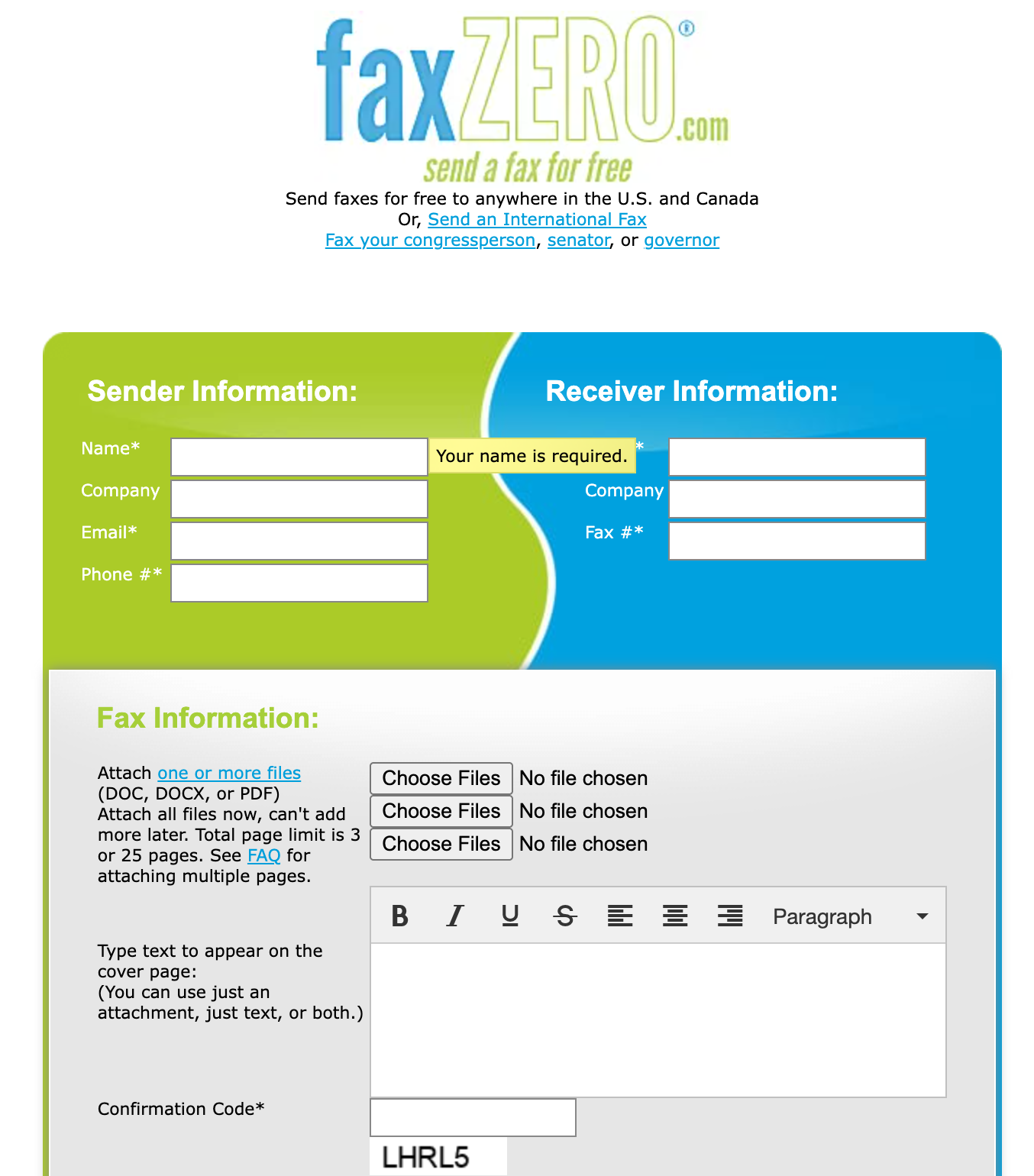
The one difference worth understanding is the free versus paid send. The free fax covers up to 3 pages plus a cover sheet, 5 a day, and carries the FaxZero logo, but it does not transmit until you click a confirmation link FaxZero emails you, and that email often lands in spam. The paid Almost Free Fax, 3.29 USD through PayPal, drops both the branding and the confirmation step so the fax goes straight out, and raises the limit to 25 pages with priority delivery. Either way FaxZero only sends, there is no stored history, and the status link is shown only once, so save it if you need a record.
Can FaxZero receive faxes or run on an app?
No on both, and these are the two limits that send most people looking elsewhere.
FaxZero is send only. There is no inbound number and no way to receive a fax on any tier. If someone needs to fax you back, FaxZero cannot help. A regular fax line, where you both send and receive online faxes, is a different category of product.
There is also no app. No iOS, no Android, no desktop client. The site is mobile-friendly and works fine in a phone browser, which covers a quick send, but you do not get a real fax from iPhone experience, no saved history, and no inbox. Once the status link from a send is gone, there is no record on FaxZero's side that you can pull up.
5. Customer Service, Data Residency, and Enterprise: What FaxZero Leaves Out on Purpose
A full review usually scores a service on enterprise readiness, API access, and healthcare support. With FaxZero there is nothing to fill in those columns, and that is the honest answer rather than a gap we are smoothing over. There is no API, no enterprise tier, no admin console, and no healthcare program. A one-person operation was never going to build them, and FaxZero has never claimed otherwise.
The same root explains two more categories. Customer service is one person answering email when he can, which is charming for a free tool and thin if you need a support line with set hours. Data residency is US only, with no EU option and no choice of where your record sits. None of this counts as a failing on FaxZero's terms. It is a free send tool that knows exactly what it is, and that self-awareness is rarer than any feature.
If you do need those columns filled, that is the line where a different product starts. An enterprise fax platform with a real API, signed agreements, and a choice of data residency locations is a different category of tool, and for teams wiring fax into AI workflows there is now an MCP server for it. FaxZero will be the first to point you there, and so will we.
When FaxZero Is the Right Tool, and When You Have Outgrown It
Here is the clean version. Use FaxZero when the fax is occasional, domestic, not sensitive, and you do not need a copy. Send it, confirm the email, done, for free. That is a genuinely good answer, and it is rare to find a free tool that does exactly what it says for twenty years.
You have outgrown FaxZero the moment any of these is true: you need to receive faxes, you want an app and a history, you fax often enough that per-fax pricing stings, or you are sending anything that needs HIPAA or a delivery record. At that point you are no longer FaxZero's user, and FaxZero knows it.
We will say this plainly, because FaxZero said it first. On its own FAQ, FaxZero tells regular faxers to get a real account and points them to "our friends at FaxPlus." We are not too proud to return the favor. If all you need is to fire off the odd form to a US number, go use FaxZero, it is free and it works. When you outgrow it, which the people at FaxZero will be the first to tell you happens, that is when Fax.Plus is waiting, with sending and receiving, real apps, HIPAA on the higher tiers, and an MCP server for teams wiring fax into AI workflows.
Best Alternatives to FaxZero
FaxZero has two kinds of alternatives: other free send-only tools for one-off documents, and fuller fax platforms for people who have outgrown free web forms. The free options below are useful only for occasional, non-sensitive faxes. If you need receiving, history, apps, compliance, admin controls, or reliable business workflows, Fax.Plus is the stronger step up.
Fax.Plus - best overall FaxZero alternative
Fax.Plus is the best choice once FaxZero starts to feel too limited. It supports sending and receiving, works across web, desktop, iOS, and Android, and scales from a free online fax option to enterprise fax workflows with admin controls, compliance, API access, and data residency options.
It is also a stronger fit when fax quality matters. In our testing, Fax.Plus Normal produced cleaner standard-quality output than many competitors, while Fax.Plus HD preserved more detail in dense forms, handwriting, stamps, tables, and barcodes. Best for users who want a modern fax platform that can grow from occasional personal faxing to business, healthcare, developer, or enterprise use.
GotFreeFax - best for no-signup free US and Canada faxes
GotFreeFax belongs in the same free-send bucket as FaxZero. It gives a smaller allowance, 2 free faxes a day with up to 3 pages, but it also works without signup or a card for US and Canada numbers.
That makes it a useful fallback if you want another genuinely free sender, but it is not a bigger step up. It is still send-only, still capped, and still not the right place for sensitive documents, fax history, receiving, apps, or compliance.
FaxDrop - best for quick free US-only faxes
FaxDrop is useful when you want a quick free fax to a US number and FaxZero is not the right fit. It allows 2 free faxes per month, up to 5 pages including the cover page, with no card required.
The trade-off is scope. FaxDrop is US-only, send-only, and limited to rare one-off use. It is not a replacement for fax receiving, a dedicated fax number, team features, enterprise controls, or a long-term fax inbox.
Dropbox Fax - best for pay-as-you-go sending
Dropbox Fax is a good fit for occasional senders who want simple pay-as-you-go pricing. After the free starter pages, Dropbox Fax charges 0.99 USD for faxes up to 10 pages, then 0.20 USD for each additional page, which makes it cheaper than FaxZero’s paid send option for short documents.
It can also receive faxes, but only on paid plans. Best for users who want occasional paid sending without FaxZero branding. It is not the strongest overall option if you need mobile apps, consistent fax-quality controls, a clearer healthcare path, enterprise administration, or a broader business fax platform.
FAQs
Is FaxZero safe?

FaxZero sends data over HTTPS and the free send is genuinely free, so it is real and usable for non-sensitive documents. The catch is that it keeps sender and recipient details on file indefinitely, runs third-party ad trackers, and has no security certifications, so it is not a good choice for confidential files.
Is FaxZero really free?
Yes. You can send up to five faxes a day to US and Canada numbers, up to three pages plus a cover sheet, with no account and no card. Free faxes include FaxZero branding and a confirmation-email step.
Can FaxZero receive faxes?
No. FaxZero is send only on every tier. To receive faxes, you need a service with an inbound fax number.
Is FaxZero HIPAA compliant?
No. FaxZero offers no HIPAA compliance and no BAA, and it cannot be configured to be compliant. Healthcare and other regulated documents need a HIPAA-compliant service that will sign a BAA.
Is FaxZero legit, or is it a scam?
FaxZero is legitimate. The scam impression usually comes from third-party ads near the send flow that can lead users to sign up for another fax service by mistake. FaxZero's own free send does not require payment.
What is the best FaxZero alternative?
For a service that both sends and receives with modern apps and strong security, Fax.Plus is the natural step up. If you just want another no-signup free sender, GotFreeFax is the closest US-and-Canada alternative and FaxDrop is useful for rare US-only sends. For cheap pay-as-you-go, Dropbox Fax works well.
How can you tell if a free fax service is really free?
A genuinely free fax service explains its limits clearly, does not ask for payment details, and does not turn into a paid trial by default. Watch for services where the free offer only covers receiving, has very short limits, or depends on paid upgrades for the features most users expect.


Featured Articles
See All





Confédération Suisse
Confederazione Svizzera
Confederaziun Svizra
Swiss Confederation
Innosuisse - Swiss Innovation Agency