


mFax Review 2026: Features, Pricing, and Real-World Performance
We tested mFax by Octagon Lab: pricing, HIPAA and BAA coverage, security claims, usability, data residency, API access, support, and hands-on fax quality. mFax is a small, mobile-first fax app with a BAA on Business plans, held back by one fixed send quality, weak file-send output, no published SOC 2 report, and a UAE-based operator.


- mFax (by Octagon Lab) is a mobile-first fax service with web and desktop access, dedicated fax numbers, and team seats, sold on a clean pay-for-what-you-use model.
- On paper, mFax lists a signed BAA on Business plans, AES-256 at rest, TLS 1.2+ in transit, and audit logging, plus a stated promise not to train AI on your documents. It publishes no SOC 2 report or ISO 27001 certification, so regulated buyers should still review the details closely.
- Every Business plan includes a REST API with signed webhooks, but no SDKs or hosted MCP server.
- The operator, Octagon Lab, is organized under the laws of the United Arab Emirates with a Hong Kong office. Patient data is stored US-only under the BAA, but the company's home jurisdiction is a consideration for buyers who care where their vendor sits.
- mFax is a small vendor: its apps rate 4.7 on both the App Store and Google Play, from a few thousand ratings and a five-figure install base.
- On fax quality, mFax sends at one fixed resolution with no Standard or HD option, and it was at its best on a phone scan and noticeably worse on an existing file.
Is mFax Worth It in 2026?
If you want app-first faxing with a BAA available on Business plans and no long contract, mFax is one small-provider option, mainly for teams that value mobile sending over deep admin controls. Business plans start at $11 per month for 200 pages on a single seat ($9 billed annually), every Business plan includes a signed Business Associate Agreement (the contract that lets a healthcare organization send patient data through a vendor), and you can cancel anytime. The apps cover iOS, Android, web, and desktop, with a built-in mobile scanner, a file converter, and in-app signing.
The picture is more nuanced once you look at who is behind it, how loudly it markets, and how its faxes actually land. Octagon Lab, the company that operates mFax, is organized under UAE law and lists a Hong Kong office, which matters to some regulated and government buyers even though patient data is stored in the United States. The compliance claims are good but not independently verifiable: mFax publishes no SOC 2 report and holds no ISO 27001. The scale is modest too: the live app stores show a five-figure install base and a few thousand ratings. And on output quality, a single fixed resolution that degrades on file sends is a real limit for the regulated documents this product is sold for. mFax is a small, less proven fax app with a BAA on Business plans, and it is easy to confuse with two other products called mFax.
About mFax
mFax is operated by Octagon Lab, a mobile-application developer that, per its own privacy policy, is organized under the laws of the United Arab Emirates, with a registered address in Dubai Silicon Oasis and a Hong Kong office. The Business Associate Agreement is signed with Octagon Lab itself. The product is mobile-first by design: native iOS and Android apps backed by web and desktop access, a dedicated fax number per organization, and team seats. Faxing rides over the apps, the website, or email, with an optional in-app scanner, a document converter, and digital signing.
Three Products Called mFax (Read This Before You Compare)
The name collides three ways, and mixing them up will give you the wrong pricing, the wrong compliance answer, or both.
- mFax by Octagon Lab (mfax.to) is the product in this review: a mobile-first app with Business plans and a developer API. On the Apple App Store the same company lists it as "Fax from iPhone - Send Docs" under the seller OCTAGON LAB - FZCO, which is why a search for "mFax" on iOS can be confusing.
- mFax by Documo is a different company entirely. Documo was branded "mFax" in the past and still surfaces under that name on review sites, with its own pricing. If a comparison quotes mFax plans like $25, $100, and $300 a month, it is describing Documo, not Octagon Lab. We cover that product in our Documo review.
- "mFax: Send & Receive Fax" is a separate iOS app published under a different developer account that points to mfaxfree.com. Its feature claims (for example, sending to 90-plus countries) should not be assumed to describe the mfax.to product.
Confirm you are reading about the Octagon Lab mFax at mfax.to before you rely on any pricing, compliance, or feature claim you find elsewhere.
A Note on Scale
Earlier versions of mFax's site reported its size in numbers that did not agree with each other, from "2,815+ enterprise customers" and "281K+ faxes per day" to "5 million users" and a "31+ years in business" line. The redesigned site, checked in September 2026, drops those figures and leads with its app-store ratings instead, which is the more honest signal.
The live app stores put the real scale in perspective. The Octagon Lab Android app (mFAX - Fax from Phone) shows more than 10,000 installs at 4.7 stars from about 1,100 reviews, and the company's iOS app (Fax from iPhone - Send Docs, by OCTAGON LAB - FZCO) sits at 4.7 stars from about 6,000 ratings. That is a long way from the millions of users the older pages claimed.
How We Reviewed mFax
We reviewed mFax using four evidence layers:
- Hands-on product use. We used the iOS and Android apps and the web app, sending our test documents and working through the compose, send, history, and settings screens.
- Fax-quality testing. We tested mFax using two fixed, synthetic, real-world-style source documents: one government and legal document and one healthcare lab results form. The same source files were used across testing so we could evaluate output quality consistently. Across the tests, we assessed the practical details that matter in real document workflows, including readability, layout preservation, handwriting, fine print, stamps, signatures, barcodes, dense tables, and mixed font sizes. No real personal, medical, tax, company, or patient data was used in the fax-quality tests.
- Billing and account-control review. We read mFax's published pricing, terms, and privacy policy, and mapped the cancellation path and retention rules.
- Business-readiness review. We checked mFax's public materials and developer documentation for security and compliance claims, data residency and retention, API and AI-agent resources, healthcare readiness, and corporate ownership.
We then scored mFax across seven areas: fax quality, pricing, security and compliance, usability, customer service and account control, data residency and retention, and enterprise, API, and healthcare automation.
1. Fax Quality | Score 3/5
mFax sends every page at one fixed quality. There is no Standard, Fine, or HD selector anywhere in the send flow on web, iOS, or Android, so the output you get on the first send is the only output available. Across our passes that fixed quality was the weakest in this series, and it got worse, not better, when we sent a clean digital file instead of a phone photo.
Test Methodology
We tested two document types through both input paths mFax offers: a page captured in the app with the phone camera, and an existing file sent from the device or the web app. The two test documents are a simulated IRS Form 2553 and a simulated healthcare lab results form, the fixed synthetic files used across this series. We compared each output against the Fax.Plus reference originals and against Fax.Plus Standard and Fax.Plus HD on the same source files. No real personal, medical, tax, company, or patient data was used.
Because mFax leads with its in-app scanner, we separated the two input paths on purpose. They are not the same workflow, and they did not return the same quality. In the published review, each comparison is shown as a draggable slider that wipes between mFax and Fax.Plus on the same page, so you can judge the difference directly rather than from a description.
The Input Path Was the Biggest Quality Variable
The result runs opposite to what most fax services do. A page scanned with the phone camera came through cleaner than the same document sent as a clean PDF. Sending an existing file, the path you use for a contract already saved on your phone or a lab report exported from a system, produced the most degraded output we have seen in this series: a heavy gray speckle across the whole page, a mottled background, and softened lines, closer to a third-generation photocopy than a digital send. The phone-scan path was more legible, but it sat at the bottom of average, with visible grain and no way to push it higher, because there is no quality setting to raise. The capture step itself is quick: the scanner grabs and cleans up the page fast, which is the part of this workflow mFax handles well.
The practical reading: mFax is at its best when you point the camera at a piece of paper, and at its worst on the file you already have on your device, which is the wrong way around for regulated work. Contracts, signed agreements, and exported medical records almost always start as a file, not a paper page you scan in the moment.
Government and Legal Document Fax Test
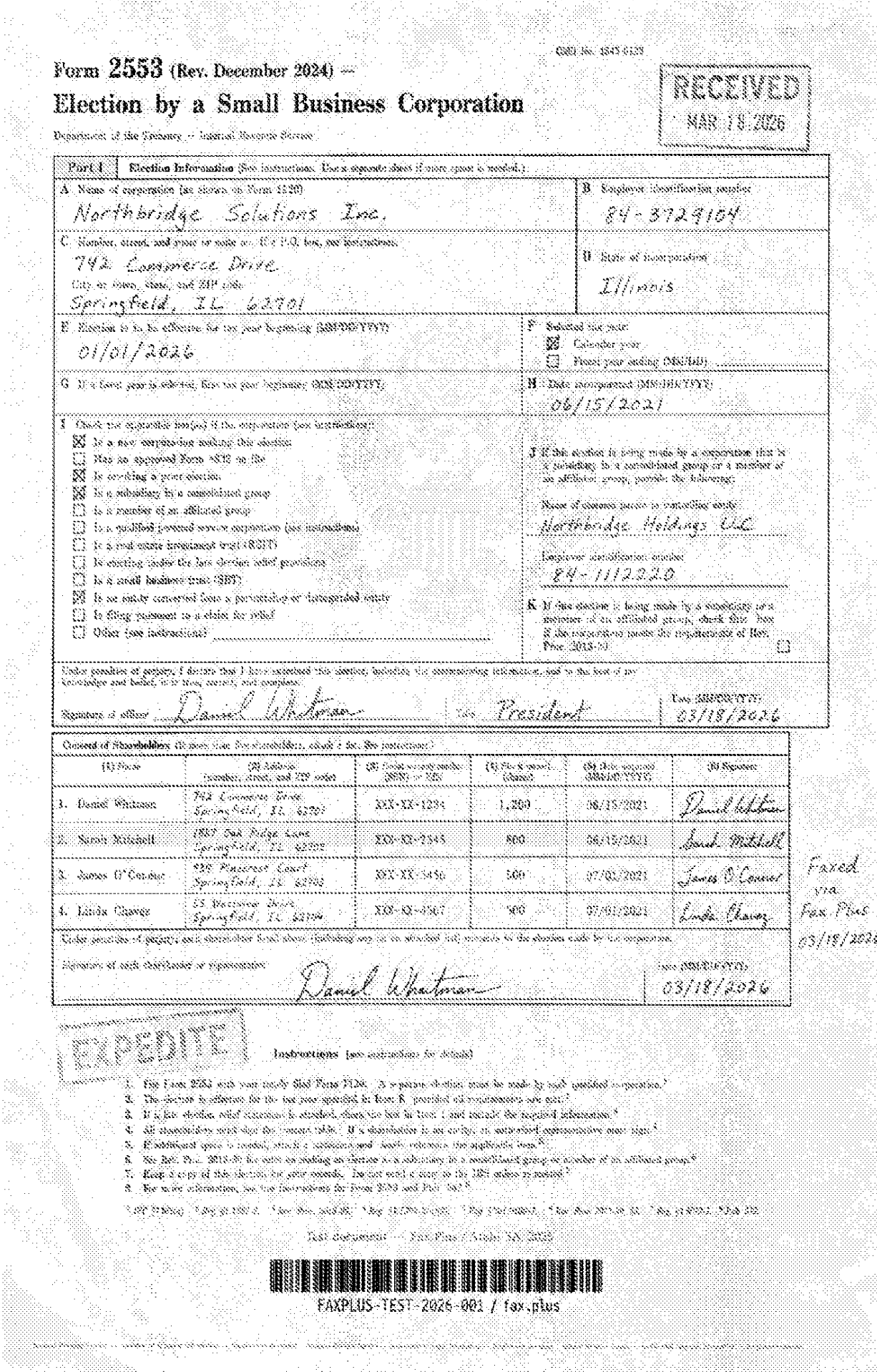
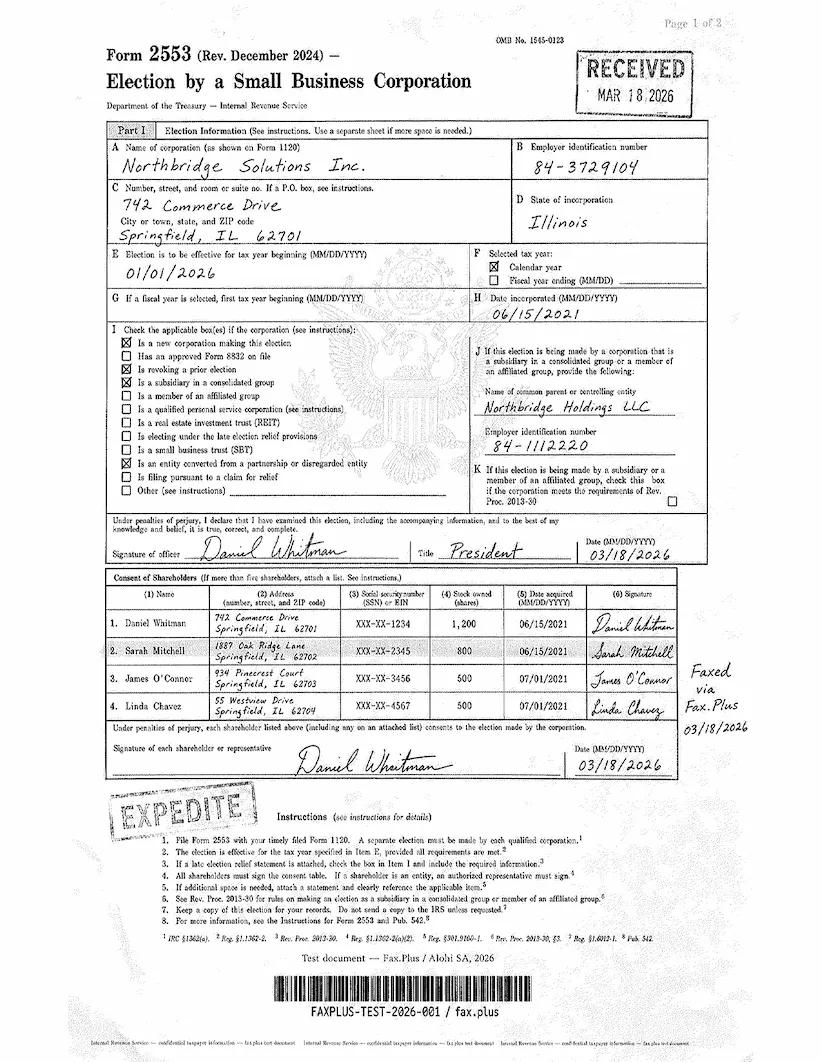
The first test uses a simulated IRS Form 2553, a US government tax election form. Documents like this are common in legal, financial, and real estate workflows: signed agreements, tax filings, and multi-party authorization forms where every detail needs to arrive intact.
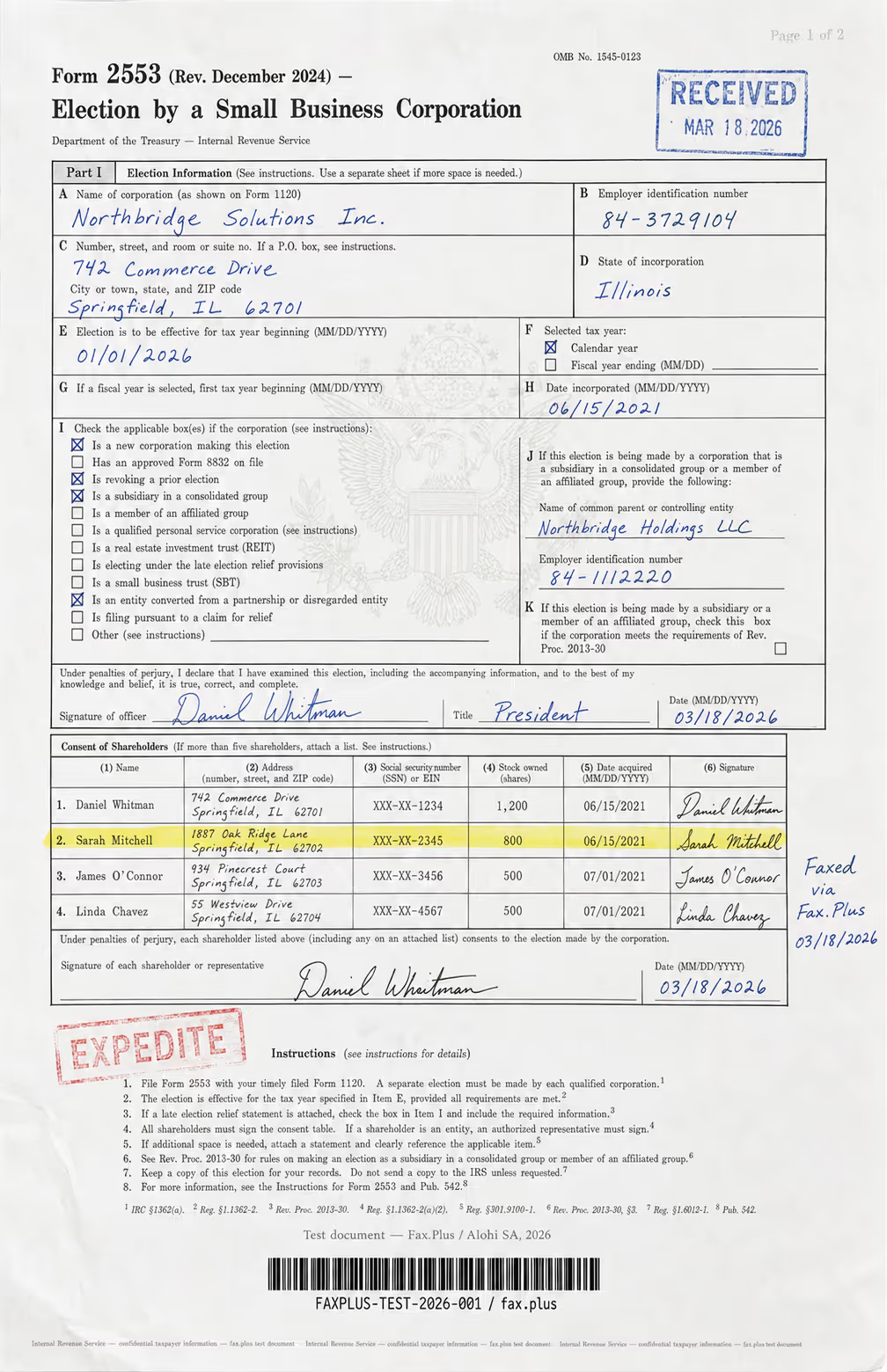
What the test document includes:
- Handwritten signatures and a cursive-style officer name
- An official-style RECEIVED stamp with date
- An EXPEDITE rubber stamp with faded ink edges
- A US government eagle seal watermark in the center
- A highlighted shareholder table row
- Mixed font sizes across headers, body text, and fine print
- Dense tabular data across multiple columns
- A microprint line at the bottom for anti-fraud authentication
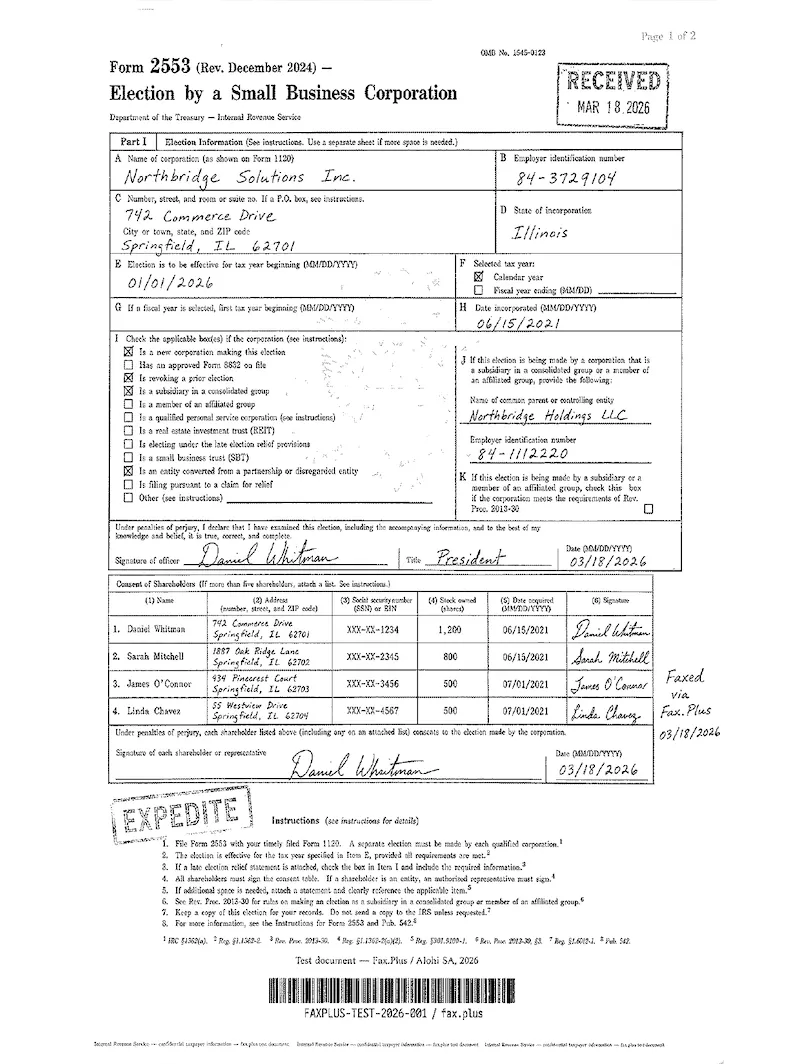
mFax Phone-Scan Result
The form stayed readable, but not especially crisp. Key elements such as the signatures, RECEIVED and EXPEDITE stamps, and shareholder table all survived clearly enough to read without effort. Finer details were weaker: the eagle watermark and microprint line were still there, but softened by the grain across the page. It is acceptable quality for an internal copy, but for a filing or customer-facing document, I would want a cleaner result. Next to Fax.Plus Standard, mFax is close, but it looks a little rougher, with more grain and slightly lower contrast.
 Standard
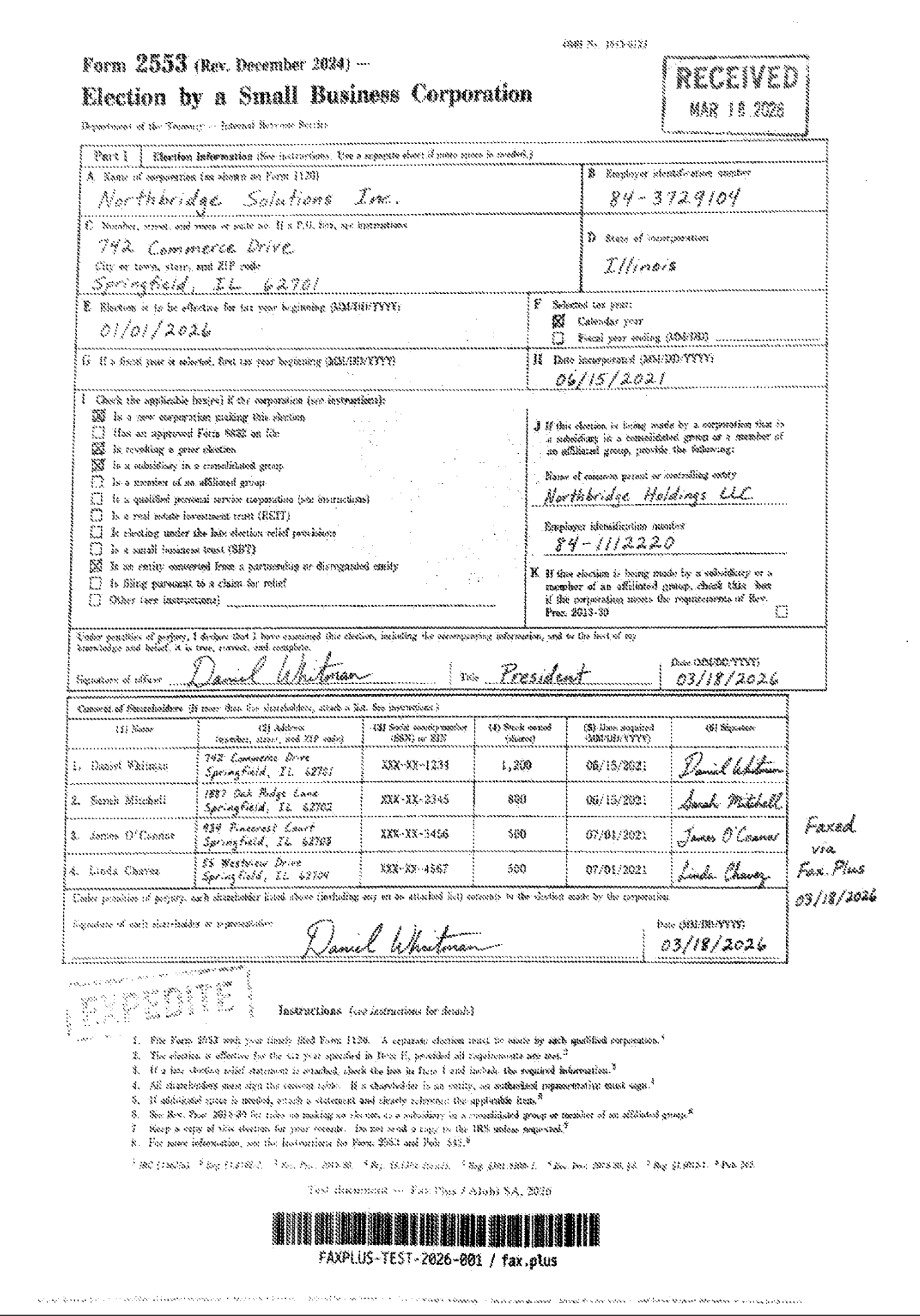

mFax File-Send Result
Noticeably worse. The same form sent as a file arrived with a dirty, speckled texture across the entire page, faint form rules, and softened text. The signatures and stamps were still readable, but the page looked degraded in a way the scanned version did not. For a tax election form or a signed agreement, where the reviewer on the far end has to trust that nothing was altered or dropped, that background noise is a real problem. Against Fax.Plus Standard, the gap is obvious: the same base tier that mFax's scan nearly matched, its file-send falls clearly below.
Standard
Compared with Fax.Plus HD
Fax.Plus also has a higher gear mFax does not. At HD, Fax.Plus came through close to the original, with crisp body text, sharp signatures, an intact dense table, and the anti-fraud microprint footer still readable. That is the fidelity a single-quality service cannot reach, and it is the level you would want for a filing where the fine print has to survive. Even mFax's cleanest output, the phone scan, sits a clear step below it.
 HD
HD
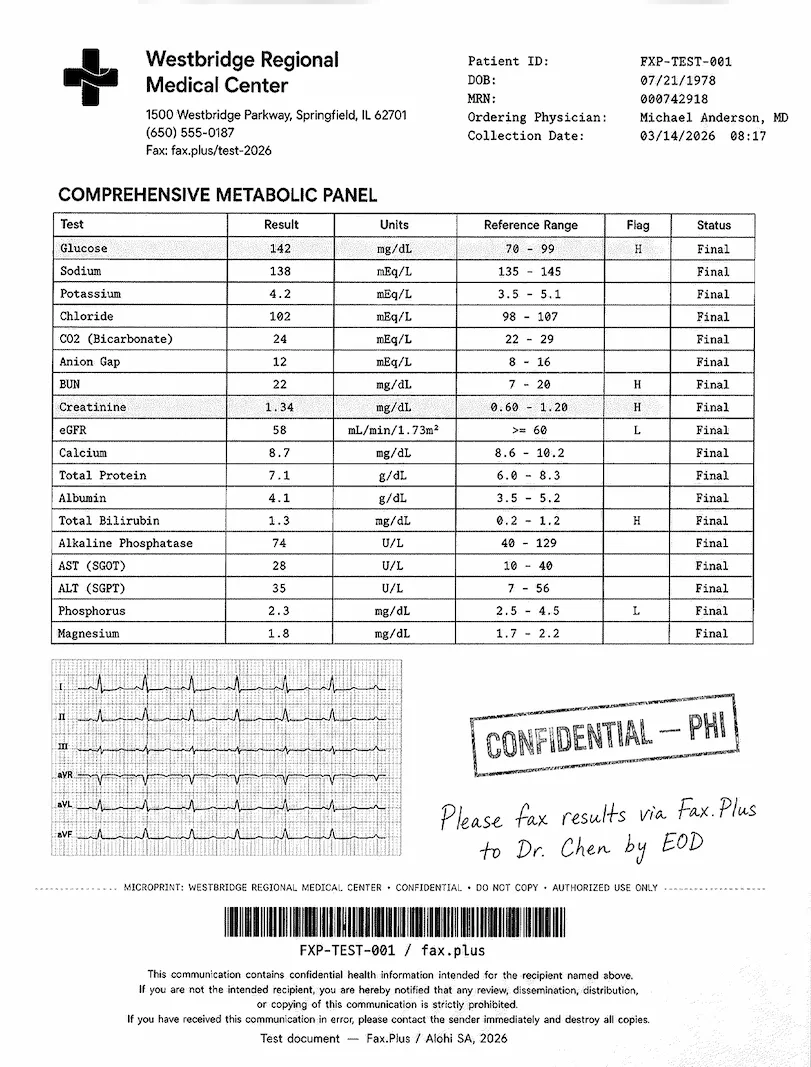
Healthcare Document Test
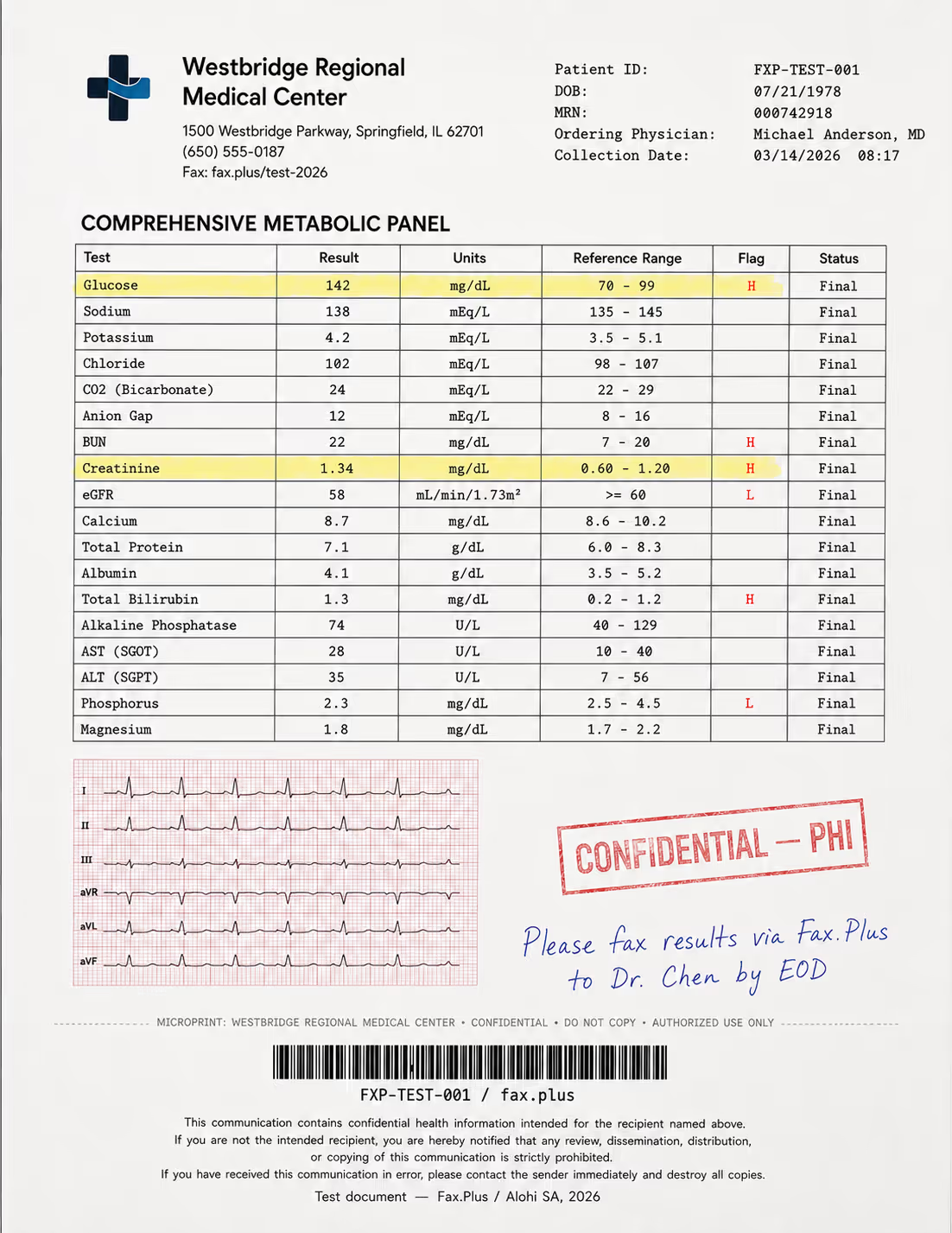
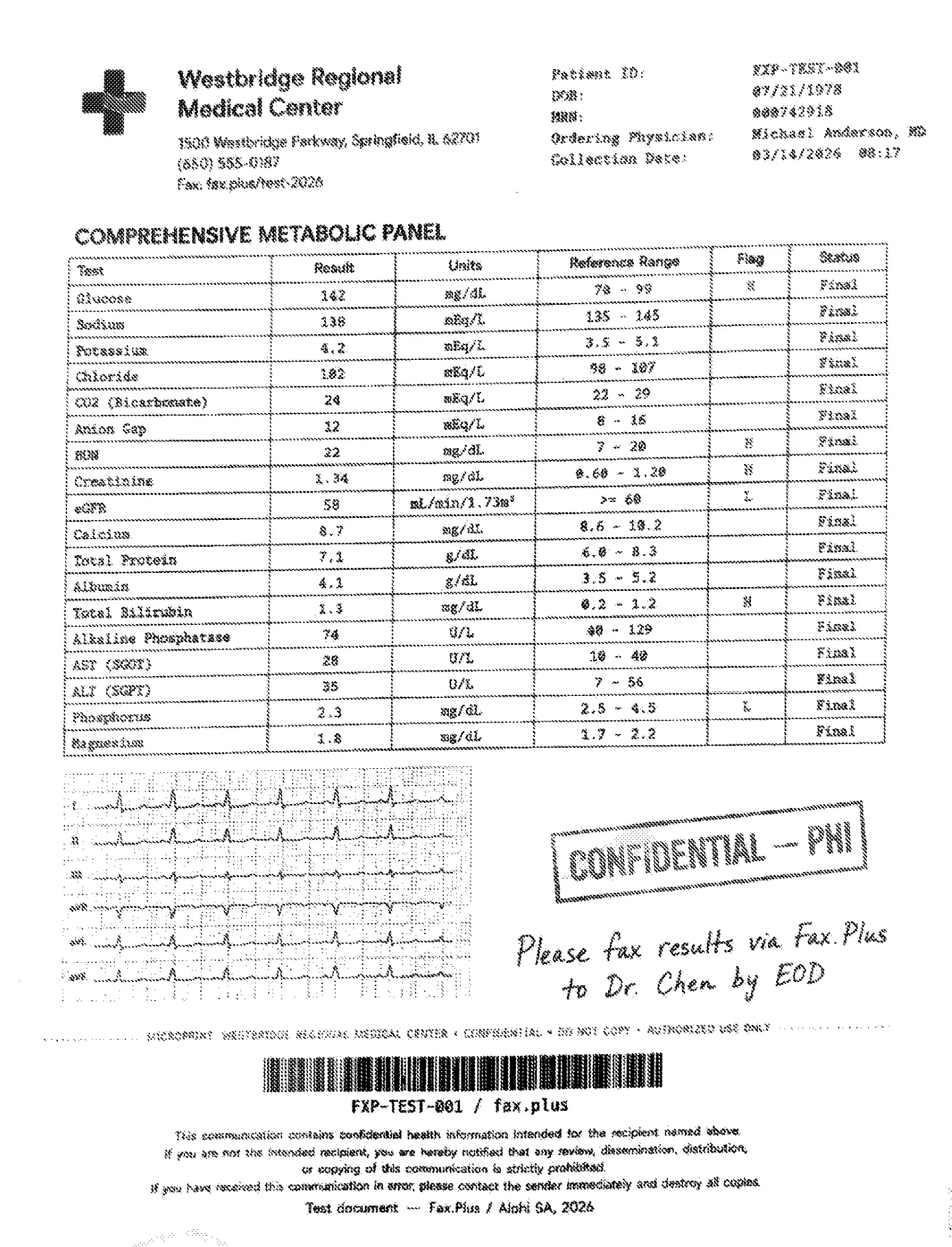
The second test uses a simulated lab results form from a fictional medical center. No real patient data is used. The combination that is typical here is lab data, flag values, handwritten physician notes, and stamps marking protected health information (PHI), the patient data HIPAA protects, all of which appear regularly in real healthcare fax workflows. Because mFax does support HIPAA faxing with a BAA on Business plans, this test reflects both output quality and a workflow a clinic could actually use.
What the test document includes:
- A comprehensive metabolic panel with highlighted flag values (H/L indicators)
- A 6-lead EKG strip on red grid paper included as a quality stress test
- A handwritten physician instruction in blue ink
- A CONFIDENTIAL/PHI rubber stamp with faded edges
- Patient header data and a Code-128 barcode
- A HIPAA disclaimer footer in small print
- A microprint line for anti-fraud authentication
mFax Phone-Scan Result
Usable. The metabolic panel and its H/L flag values were readable, the EKG trace held its shape, the CONFIDENTIAL/PHI stamp and the blue-ink physician note came through, and the small-print HIPAA footer was legible if soft. Bottom of average, but a clinic could work with it. Next to Fax.Plus Standard on the same form, mFax's scan is close on the panel values but softer on the EKG grid and the smallest print.
 Standard
mFax File-Send Result
The same form sent as a file picked up heavy speckle and mottling. The panel values stayed readable, but the EKG grid and trace lost contrast against the noisy background, and the small-print footer and the microprint line were harder to make out. On a document where a misread flag value or an illegible physician note carries clinical consequences, the file path is the weaker one, which is exactly backward, because an exported lab PDF is the kind of file a clinic actually sends. Against Fax.Plus Standard, the noise is plain.
Standard

Compared with Fax.Plus HD
At HD, Fax.Plus held the panel, the EKG grid and trace, and the small-print HIPAA footer cleanly, the fidelity that matters most when a flag value or a physician note has to be read without doubt. mFax offers no equivalent step up, so even its cleanest output stays below Fax.Plus's top tier on exactly the details a clinic cannot afford to lose.
 HD
HD
No Resolution Control
One structural limit shaped both tests. mFax exposes no quality or resolution option in the send flow on any platform. There is no Standard, Fine, or HD choice, no fallback to a higher-fidelity mode when a send comes through poorly, and no per-document override. If a file-send page arrives speckled and soft, there is nothing in the app to raise it. Fax.Plus, by contrast, lets you pick the quality level per send (Standard and HD), so a detail-heavy contract or lab page can be sent at higher fidelity when it matters.
This limit reads differently given how mFax positions itself. The company markets toward business teams across healthcare, finance, and government, and selectable send quality is close to table stakes at that tier. A single fixed resolution, with no way to lift a poor send, is a real constraint for the regulated, detail-heavy documents enterprise buyers fax most.
Send Speed
mFax came in around a minute for the standard document and about a minute and a half for the graphics-heavy one. That is competitive, and it roughly matches Fax.Plus at Standard quality. The difference shows up at HD: Fax.Plus HD took two to three minutes in this test, the time cost of the higher fidelity. So mFax is not slow, it simply has no higher-fidelity mode to spend that extra time on. Fax.Plus lets you trade a couple of minutes for an HD-clean contract or lab page, while mFax sends fast at one fixed quality and stops there.
Fax Streaming
One delivery-speed difference is worth calling out separately from raw send time. Fax.Plus offers Fax Streaming, available on request, where each page is handed over the moment it is decoded rather than holding the whole transmission until the last page lands, so on a long document the first pages are readable while the rest are still arriving. mFax publishes no fax-streaming capability, and the model most services use is to hold the fax until it completes, so the recipient sees nothing until every page has decoded.
How mFax Fax Quality Compares
mFax lands at the low end of this series on fax quality. A single non-adjustable quality level that reaches only the bottom of average at its best, and degrades on the file-send path that matters most, puts it below the field. For the full picture across the comparison set, our hands-on fax-quality findings live in the Documo, eFax, iFax, Dropbox Fax, and ComFax reviews, where the same two source documents were run the same way. The reference point throughout is Fax.Plus, which offers selectable Standard and HD quality, with page-by-page Fax Streaming available on request.
The 3/5 reflects output that stayed legible but never rose above the bottom of average on its strongest path, the phone scan, and degraded further on the file-send path that regulated buyers depend on most, with no resolution control anywhere in the app to recover it. The phone-scan path is acceptable for everyday sends and the capture is quick, which keeps it at a middling score rather than a failing one, but a single fixed quality that the Fax.Plus Standard and HD references both clear comfortably is what holds it to the middle of the scale.
2. Pricing | Score 3.5/5
mFax sells faxing the modern way: pick seats and pages, pay monthly or save on annual, and cancel whenever. The value story is that HIPAA is included rather than sold as an upsell.
The Plan Lineup
Business pricing is a configurator rather than named tiers: you pick seats and monthly pages, from 1 seat and 200 pages up to 35 seats and 5,000 pages. Typical combinations billed monthly:
- 1 seat and 200 pages: $11 per month ($9 billed annually).
- 3 seats and 500 pages: $29 per month.
- 5 seats and 1,000 pages: $55 per month.
- Extra seats add about $3 each.
Annual billing saves about 20 percent, and there is a usage-based developer rate of roughly $0.04 per page for API sending. On the consumer side, the web app runs a free week and then $7.99 per month, while recent Google Play reviews describe the mobile app's low-cost trial rolling into weekly charges. Every Business plan includes web, mobile, and desktop access, API access, a dedicated fax number, and HIPAA compliance.
One thing worth clarifying with mFax before you buy: the plans are sold by monthly page count, and the developer API returns a "quota_exceeded" error when the monthly page quota is exhausted. mFax does not publish an overage rate, so what happens when you pass your page count, an overage charge or a hard stop, is a fair question to confirm in writing.
The page math is mid-pack rather than category-leading. One seat with 200 pages at $11 is about $0.055 per page, and five seats with 1,000 pages at $55 lands in the same range. That is more than Fax.Plus Basic at $6.99 for 200 pages, and the seat-based model means cost climbs as you add users. What you are paying for is HIPAA on every Business plan and the apps, not the lowest per-page rate.
| Service | Entry Price | Pages/month | Free Option | BAA Included |
|---|---|---|---|---|
| mFax Business (1 seat) | $9/mo (1 seat, billed annually) | 200 | No (Free week on the consumer web app) | Yes (Business plans) |
| Fax.Plus Basic | $6.99/mo | 200 | Yes (10 pages, one-time) | No (BAA on Enterprise) |
| eFax Personal | $15.83/mo | 200 (US & Canada) | No | No (BAA on Business tier) |
| iFax Basic | $12.49/mo | 200 | No (trial only) | No (BAA from Plus, $24.99) |
| Documo Solo | $25/mo (annual only) | 300 | No (14-day trial, no card) | Yes (BAA on every plan) |
Entry prices are shown billed annually. Billed monthly, mFax is $11 and eFax Personal is $18.99.
On entry price, mFax is not the cheapest option. Fax.Plus Basic includes the same 200 monthly pages for less, with 10 free pages to test first. mFax’s 3.5/5 pricing score reflects a reasonable mix of Business-plan BAA availability, cancel-anytime billing, and short configurable retention. It does not score higher because the per-page cost is mid-pack, pricing increases as teams add seats, and the lowest-cost consumer options are separate from the Business plans that include the compliance features.
3. Security and Compliance | Score 4/5
Security and compliance is not an enterprise-grade win for mFax. The product publishes useful controls for a small operator, including BAA availability, encryption, audit logging, and PHI handling rules, while leaving open questions around public verification, certification depth, and corporate jurisdiction.
Is mFax HIPAA Compliant?
Short answer: yes, on Business plans, with a signed BAA. Two terms first. HIPAA is the US law on patient health information, and a Business Associate Agreement (BAA) is the contract HIPAA requires between a healthcare organization and any vendor that touches that information. Without a signed BAA, using a fax service for patient documents puts the practice itself out of compliance.
mFax includes a signed BAA on every Business plan, which is a real advantage over services that gate it behind a top tier or a sales call. Its privacy policy is specific about how PHI is handled: PHI is processed only for Business-plan customers under a written BAA, it is stored and processed only within the United States, it is not used for marketing or to train AI models, and breach notification follows the HIPAA 60-day rule. PHI must not be sent through the free tools, free trials, or personal plans. For a clinic that wants HIPAA faxing from a phone, that is a usable, documented path, and it does not strip out the email or app workflow the way some bundled HIPAA configurations do.
One wording point is worth confirming, though. The site describes mFax as "HIPAA-compliant by default," while the Terms (Section 7.2) say PHI may be transmitted only after you have "requested and entered into a written BAA" that the company has "countersigned," and that "until a BAA is fully executed, you must not upload, send, receive, or store any PHI." So is it compliant by default, or compliant once you have requested a BAA and mFax has signed it back? If you are buying for a clinic, the practical question to ask is how quickly a BAA is countersigned after you subscribe, and whether your account is blocked from carrying PHI until then.
Healthcare buyers comparing options can also look at Fax.Plus Enterprise, which pairs HIPAA with a signed BAA, and PHIPA, with unlimited users and an organization-level certification stack, Documo, which includes a BAA on every plan, and iFax, which includes a free BAA from its Plus plan.
The Evidence Gap
mFax lists these technical controls: AES-256 encryption at rest, TLS 1.2 or higher in transit, role-based access controls, audit logging of document access, and HMAC-SHA256 signed webhooks. Payments run through Stripe, a PCI-DSS compliant processor. The gaps are in what is independently verifiable. mFax publishes no SOC 2 report, no public trust page, and no ISO 27001 certification, so its controls cannot be independently reviewed before you commit. Earlier versions of its site stated SOC 2 Type II; the current site and privacy policy no longer do.
What These Certifications Mean in Plain Language
- SOC 2 (Type II): an outside auditor checks, over a period of months, that a company actually follows the security controls it claims. mFax does not publish one.
- ISO 27001: an international standard for running an information-security program, certified by an external body at the organization level. mFax does not hold it.
- PCI DSS: the payment-card industry's security rules for handling card data. mFax meets this only indirectly, through Stripe handling payments; the fax service itself is not a card processor.
Where the Company Sits
There is also a jurisdiction question that has nothing to do with encryption. Storage location is where your documents physically live, and corporate jurisdiction is whose laws govern the company holding them. mFax keeps PHI in the United States, which is the storage-location answer healthcare buyers usually want. But the operator, Octagon Lab, is organized under UAE law with a Hong Kong office, which is the corporate-jurisdiction answer, and for some government, defense, and regulated buyers the home jurisdiction of the vendor is part of the decision regardless of where the bytes sit. It is a factor to weigh, not a disqualifier.
A Few Things Worth Confirming Before You Sign Up
A few points in the Terms are worth asking about rather than assuming.
On reliability, the Terms (Section 10.3) say: "We make no service-level or uptime commitment except as expressly set out in a signed enterprise agreement," and Section 10.1 disclaims any guarantee that the Service will be uninterrupted or error-free. On a standard Business plan there is no contractual uptime commitment, so get one in writing if uptime matters to you.
On encryption, the privacy policy describes TLS 1.2+ in transit and AES-256 at rest, and the Terms note the company accesses content "as necessary to provide the Service," including for AI-assisted features like OCR and document conversion. That is transport-and-storage encryption with provider access, not a zero-knowledge setup, which is normal for fax but worth knowing.
On who you are actually contracting with, the Terms name Octagon Lab, organized under UAE law with a Dubai address, as both the operator and the BAA counterparty, while the governing law (Section 13.1) is the State of Delaware with arbitration administered by the American Arbitration Association. A UAE company under a Delaware contract is unusual enough to review with counsel. For a regulated or government buyer, those are reasonable questions to resolve up front.
By contrast, Fax.Plus publishes its stack openly: ISO 27001 at the organization level and SOC 2 Type II, both certified by EY CertifyPoint, under a Swiss company headquartered in Geneva with no US parent company, with AES-256 at rest and TLS in transit. The 4/5 reflects a BAA on every Business plan and clear PHI handling, held back from a higher mark by no published SOC 2 report, no ISO 27001, no contractual uptime commitment on standard plans, and a corporate jurisdiction some buyers will want to weigh.
4. Usability | Score 3.5/5
mFax is built mobile-first, and for a quick send it is easy: a short learning curve and a few taps from open to sent. Where it thins out is business use. The features that turn a fax app into a workflow, saved recipients, labeling, scheduling, and findable records, are mostly absent, and that gap is what holds the score back.
The App-First Workflow
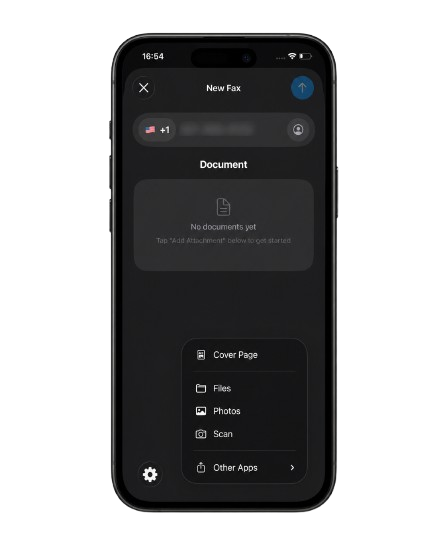
The core experience is the iOS and Android apps, backed by web and desktop. Composing a fax is straightforward: enter a recipient, attach a document, send. The attachment menu is broad for a small app, with Files, Photos, an in-app Scan, a Cover Page option, and a handoff to other apps, so you can fax from almost any source on the device. As covered in the fax-quality section, the in-app scanner is the path that produces mFax's cleanest output, which fits the photo-to-fax workflow that defines mobile faxing.
Where It Falls Short for Business Use
The gaps show up the moment you use mFax the way a business actually does, sending to the same handful of recipients, and needing to find a record later.
No Saved Recipients and No Labeling
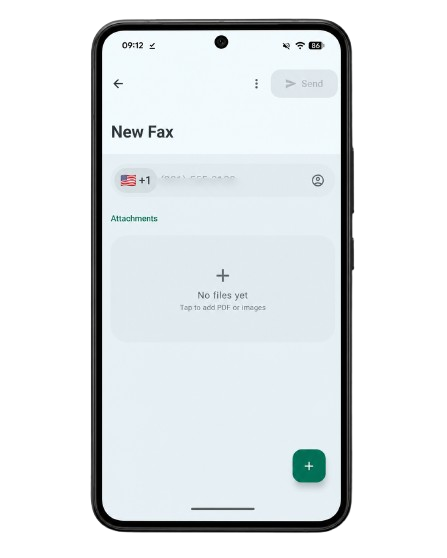
The recipient field takes a phone number. In our testing there was no in-app way to save, name, or reuse a frequent recipient, so the same numbers get entered by hand each time, even when an account clearly sends to the same two or three destinations repeatedly. The fax record itself carries only the number and the country, with no place for an internal label like "Dr. Chen's office," so a list of past faxes reads as a column of phone numbers with no human-readable context.

Records Are Hard to Identify Later
Archived faxes are renamed to a system identifier (for example, fax-50c5a401-c14d-4a3f-ac23-b88c25109d2f.pdf), so the original filename is lost and the document cannot be recognized by name. Combined with the number-only records, that makes finding a specific past fax harder than it should be. The list groups entries by relative day (Today, Yesterday) with no date-range filter, so locating a fax from a specific week means scrolling.
No Scheduled Send, and a No-Warning Resend
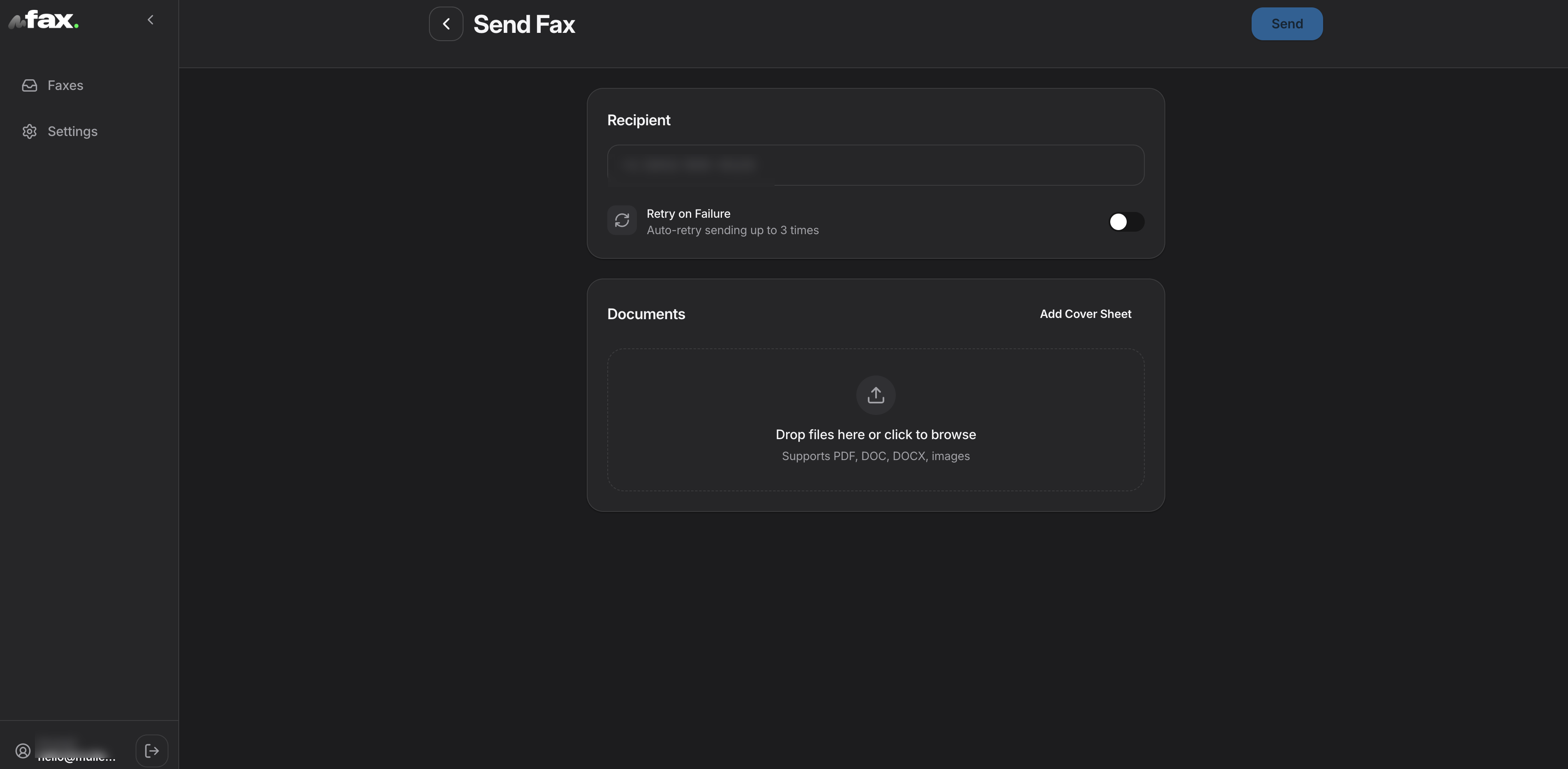
There is no option to schedule a fax for a later time, which a business sender often expects (overnight, or first thing in the morning). Resending is the opposite problem: in our testing, resend started uploading a new fax with the previous document immediately, with no confirmation step and no chance to change the recipient or the file first.
A Sparse Settings Screen
Settings covers the account, the fax number, a business upsell, the legal pages, and account deletion. It does not surface notification preferences (for example, an email confirmation on a successful send), a saved cover or header template, or an in-app link to the API that the Business plans include. The account's own fax number lives here too, rather than on the compose or fax-detail screens, so you cannot see or copy it at the moment you might want to quote it to a recipient.
App-Store Reputation
mFax's site now leads with its store ratings, and the live listings back them up. On Google Play, the Octagon Lab app (mFAX - Fax from Phone) holds 4.7 stars from about 1,100 reviews with more than 10,000 installs, last updated September 24, 2026. On the Apple App Store, the same company's app is listed under a different name (Fax from iPhone - Send Docs, seller OCTAGON LAB - FZCO, linking to mfax.to) at 4.7 stars from about 6,000 ratings. Both come from a five-figure install base. The "FZCO" in the Apple seller name is a UAE free-zone company designation, consistent with the corporate jurisdiction noted earlier in this review.
The recent Play Store review themes are worth a buyer's attention: trouble registering an account, faxes that did not go through or could not be confirmed, and complaints that a low-cost trial rolled into weekly charges that were hard to stop. The store identity also feeds the confusion the About section flags, since the iOS app is not even named "mFax," and a separate "mFax: Send & Receive Fax" app tied to mfaxfree.com is a different product again.
How mFax Usability Compares
The picture is a mobile-first client that is easy to learn and thin on business workflow. The market context is the one we applied across this series: Dropbox Fax ships no mobile app, Documo has no Android app, eFax draws a lower mark on its slower portal, iFax has apps on both platforms, and ComFax has mobile apps but lacks admin depth. Fax.Plus covers every surface at once, with native apps on iOS and Android, desktop apps, web, and email-to-fax, plus saved contacts, list search, and the admin depth a team needs.
mFax lands at 3.5/5. The score reflects an app that is easy and pleasant for a quick send, held back by the missing pieces a business depends on: no saved recipients, no recipient labeling, weak record-keeping with system-renamed files and no date-range filter, no scheduled send, a resend with no confirmation, and a thin settings layer. The store ratings are 4.7 on both Android and iOS, though recent reviews flag registration friction and billing complaints, and our own testing found blurry, speckled output on file sends.
5. Customer Service, Cancellation and Account Control | Score 3.5/5
mFax's account model is simple: no long contract and self-serve deletion.
Cancellation and Contracts
There is no long-term contract. Plans are cancel-anytime, billing is monthly or annual by choice, and document retention is short by default (30 days for fax documents) and configurable, so you are not locked into a multi-year commitment or fighting an auto-renewal to leave. That alone separates mFax from the evergreen-contract pattern documented at some larger providers. Account and data deletion is self-serve from the app settings or by request to the privacy team.
Support Channels
Support runs through the website support page and email, with dedicated addresses for privacy, legal and BAA requests, and a data protection officer. As a smaller operator, the depth and speed of support are not something we can verify against a large public record, and recent app-store reviews flag friction in account registration and fax confirmation, which is a fair caution to keep in mind for a vendor of this size.
How mFax Account Control Compares
A cancel-anytime model with short, configurable retention and self-serve deletion is the posture buyers want, and it avoids the contract traps that drag down some larger competitors. For contrast, Documo earned a 5/5 here with multi-channel support and a clean billing-menu cancellation, and Fax.Plus matches that no-maze posture. The 3.5/5 reflects a simple account model paired with an unverified support record and the small size of the operator.
6. Data Residency and Retention | Score 3.5/5
mFax is more transparent on retention and residency than most of the small-vendor field, with one limit for buyers who need to choose a region.
Retention
Retention rules are short and clearly stated. Fax documents are stored for 30 days by default or as configured in your account, and you can delete documents at any time or set them to auto-delete after delivery. Account information is kept for roughly 90 days after deletion, usage logs for about 90 days, and transaction records for seven years for tax and accounting. For a regulated workflow, the ability to auto-delete documents after delivery is a useful control.
Data Residency
Data residency means where, geographically, your documents physically live, which decides whose laws protect them. mFax stores and processes PHI only within the United States under the BAA, which is the answer US healthcare buyers want. For non-PHI data, Octagon Lab transfers and processes information internationally across its providers, relying on EU Standard Contractual Clauses and data-transfer frameworks, with no user-selectable region. So PHI is fixed to the US, but ordinary account and document data can move across jurisdictions, and there is no region picker.
How mFax Data Residency Compares
The transparent end of the market lets you choose a region. Fax.Plus lets account admins select from more than 40 data residency locations, including several US locations alongside the EU, Canada, Australia, Japan, and Switzerland, with live data and backups storable separately. mFax does not offer region selection, but it states its retention periods and pins PHI to the US in writing. The 3.5/5 reflects clear, short retention and documented US-only PHI handling, balanced against the lack of region selection and the international movement of non-PHI data under a UAE-based operator.
7. Enterprise, API and Healthcare Automation | Score 3/5
mFax offers a documented REST API, signed webhooks, and a Claude Skill for AI-assisted fax workflows, while still falling short of a fuller developer platform with SDKs, sandbox access, number provisioning, or a hosted MCP server.
API Access
Every mFax Business plan includes a REST API at no extra fee, billed by usage at roughly $0.04 per page. The send flow is a single call: POST a PDF to the faxes endpoint with the recipient in E.164 format (the international phone-number format, like +15417543010), and you get back a fax object with a status you can poll or track. Inbound faxes arrive on your Business virtual number, and you subscribe to signed webhooks (automatic notifications to your systems when a fax is delivered, fails, or arrives), verified with an HMAC-SHA256 signature. Document access is logged. The documented limits are honest: mFax states there are no official SDKs, no sandbox, and no numbers-provisioning API, so you call the REST endpoints directly.
MCP and AI Workflows
mFax also publishes a Claude Skill, which gives an AI assistant instructions for calling the mFax REST API to send and track faxes. That is useful, but it is worth being precise about what it means. A Skill is not a hosted AI tool layer or a managed MCP server. It still depends on direct API access, customer-managed credentials, and the same REST endpoints a developer would call manually.
mFax’s Skill is a practical automation shortcut, not a full developer platform: there are no official SDKs, no sandbox, no number-provisioning API, and no hosted MCP server underneath it.
That distinction is where Fax.Plus still leads. Fax.Plus was the first dedicated fax provider to ship a hosted MCP server (mcp.fax.plus), available on paid plans from Basic, alongside a documented REST API with public Node.js and Python SDKs, giving an AI assistant native send, receive, track, contact, and webhook tools to call directly. mFax brings an AI-agent path to the table, which most competitors do not, but it does so with a Skill over REST rather than a hosted server plus SDKs. For a team comparing how far each provider has actually built toward agent-driven faxing, that is the line to draw.
Healthcare Automation
mFax’s healthcare automation story is mostly the BAA plus API access. That gives technical teams a way to send and track faxes programmatically, but it does not amount to a prebuilt healthcare workflow. There are no documented EHR integrations, no published healthcare connectors, no official SDKs, and no clear sandbox for testing clinical fax flows before production. By comparison, Fax.Plus Enterprise connects with EHR systems, so incoming faxes go straight into the EHR.
The fax-quality findings also matter here. Automation is only as useful as the documents it reliably delivers, and mFax’s weaker file-send output is a real concern for healthcare workflows where lab values, physician notes, stamps, barcodes, and small-print disclaimers need to arrive cleanly. A BAA and API help with compliance and integration, but they do not solve the risk of sending detail-heavy medical documents at one fixed quality level.
The 3/5 reflects useful automation building blocks rather than a complete healthcare platform: REST API access, signed webhooks, Business-plan BAA availability, and a Claude Skill for AI-assisted workflows. What holds it back is the combination of inconsistent fax output, no selectable HD mode, no SDKs, no hosted MCP support, no number provisioning, no EHR integrations, and no prebuilt healthcare connectors.
Alternatives to mFax
Fax.Plus: Best overall mFax alternative
Modern cloud fax from $6.99 per month billed annually, with 10 free pages to test and no annual lock-in. Signing is built into the same suite: any fax in the inbox or sent folder can be forwarded to Sign.Plus, Alohi's own e-signature product, to sign it yourself or request signatures from others under the same account, and the mobile apps let you sign a received fax and send it straight back. An organization-level compliance stack with a named auditor (ISO 27001 and SOC 2 Type II certified by EY CertifyPoint), HIPAA with a signed BAA, and PHIPA, on the Enterprise plan with unlimited users, and more than 40 data residency locations. It ships native apps on iOS, Android, macOS, and Windows, and for general business and developer use, the first hosted MCP server for fax on paid plans from Basic, alongside a documented API with signed webhooks and SDKs. It answers mFax's open questions with an openly audited certification stack, a Swiss corporate base in Geneva with no US parent company, and selectable HD output, while matching the mobile-first experience.
Best for: Buyers who want mFax’s modern, app-first faxing, but with stronger HIPAA-ready enterprise controls, an openly verifiable compliance stack, clear corporate jurisdiction, and consistent high-fidelity output.
Documo: Best for teams comparing compliance-focused fax vendors
A different company from the mFax in this review, despite the shared former name. HIPAA is included on every plan with a BAA available on all of them, plus HITRUST certification. The trade-off is price, with a $25 per month Solo plan sold on annual billing only, and no Android app.
Best for: US healthcare teams that want a compliance-focused vendor and will pay above market rate for it.
iFax: Best for users comparing mobile HIPAA fax apps
Apps on iOS and Android, a BAA from its Plus plan, and a HIPAA Seal of Compliance. The catch is aggressive upselling, with key features locked behind the higher tier.
Best for: Mobile-first healthcare users who want a BAA without a sales call and can live with the upsell pressure.
FAQs
Is mFax legit and safe?

mFax is a real, operating service with a current privacy policy, a signed BAA on Business plans, AES-256 at rest, and TLS 1.2+ in transit. Two cautions: it publishes no SOC 2 report and holds no ISO 27001, and the operator is based in the UAE with a Hong Kong office, which some regulated buyers will want to weigh. It is also a small vendor, with a few thousand app-store ratings and 10,000-plus Android installs. For non-regulated faxing it is a functioning service; for a fully and openly audited stack, compare a provider like Fax.Plus.
Where is mFax based?
Per its own privacy policy, mFax is operated by Octagon Lab, a company organized under the laws of the United Arab Emirates, with a registered address in Dubai Silicon Oasis and a Hong Kong office. Patient data under a BAA is stored only in the United States, while non-PHI data may be processed internationally.
Does mFax have an API?
Yes. Every Business plan includes a REST API at no extra fee, billed by usage, with signed webhooks (HMAC-SHA256) and audit logging. mFax also publishes a Claude Skill so an AI assistant can send and track faxes. There are no official SDKs and no hosted MCP server; the AI-agent path is a Skill over the REST API. Teams that want a hosted MCP server with public SDKs can compare what that looks like.
How much does mFax cost?
Business pricing is built from seats and pages: $11 per month for 1 seat and 200 pages ($9 billed annually), $29 for 3 seats and 500 pages, and $55 for 5 seats and 1,000 pages, with about 20 percent off on annual billing. API sending is usage-based at roughly $0.04 per page, and the consumer web app runs a free week, then $7.99 per month. For a lower entry price with 10 free pages to test, Fax.Plus starts at $6.99 per month (billed annually) for 200 pages.
Is mFax HIPAA compliant?
Yes, on Business plans, with a signed Business Associate Agreement included. mFax stores and processes patient data only in the United States under the BAA and does not use it to train AI. PHI must not be sent through free tools, free trials, or personal plans. Healthcare buyers comparing options can also look at Fax.Plus Enterprise (HIPAA with a signed BAA, and PHIPA), Documo, or iFax.
Is mFax worth it in 2026?
For a price-sensitive buyer who wants app-first faxing with a BAA on Business plans and no long contract, mFax is one small-vendor option, and its API and Claude Skill give developers a basic path in. For anyone who needs an openly audited certification stack, ISO 27001, region selection, selectable HD output, or a vendor outside the UAE with clear corporate jurisdiction, the open questions point elsewhere. Overall, mFax lands at 3.5/5, with fax quality, pricing, residency, and its small size as the soft spots. For most teams we would choose Fax.Plus.
Is mFax's fax quality good?
It is acceptable, not class-leading. mFax sends at a single fixed quality with no Standard or HD option. In our testing it was at its best on a page scanned with the phone camera and noticeably worse on an existing file sent from the device or web, where the output came out blurry, with a heavy speckle across the page. For documents where fine print, stamps, or lab values have to survive, a service with selectable HD quality such as Fax.Plus holds detail more reliably.
What is mFax and who makes it?
mFax is a mobile-first online fax service made by Octagon Lab, available on iOS, Android, web, and desktop, with dedicated fax numbers and team seats. Octagon Lab is organized under the laws of the United Arab Emirates with a Hong Kong office. Note that this mFax is not the same as Documo, which used to be branded mFax, or the separate iOS "mFax" app linked to mfaxfree.com.


Featured Articles
See All






Confédération Suisse
Confederazione Svizzera
Confederaziun Svizra
Swiss Confederation
Innosuisse - Swiss Innovation Agency


