SRFax Review 2026: HIPAA, Pricing, and How It Compares
We tested SRFax: real pricing, HIPAA and BAA coverage, security claims, usability, data retention, and support. Scored across seven categories.


- SRFax is quietly part of the eFax family. Its Terms of Service name the operator as a division of Consensus Cloud Solutions Canada ULC, the parent of eFax, MyFax, SFax, and MetroFax, and parts of srfax.com are served from efax.com, yet the marketing pages never mention the connection.
- The cancellation and refund terms are the friendliest we have reviewed: cancel at any time, with pro-rated refunds for remaining full months, processed within 35 days.
- HIPAA plans include an easy BAA at every healthcare tier, but SRFax publishes no security certifications at all, names no auditor, and still claims to be the only fax service that will sign a BAA, which is false and runs on a page updated as recently as July 2025.
- There is no SRFax mobile app, despite third-party directories claiming one exists; faxing runs through the web portal, email, a Windows print driver, and a Mac client.
- SRFax accounts and fax numbers are available in the United States and Canada only, with international sending offered at additional per-page rates. Best fit is North American healthcare practices that want low per-page HIPAA faxing and humane billing, and can live without a modern app.
Is SRFax Worth It in 2026?
SRFax is the rare service in this series where the fine print is friendlier than the marketing. The terms let you cancel at any time, promise pro-rated refunds for the full months you have not used, and commit to paying them out within 35 days. After reviewing services whose guarantees evaporate in the legal text, finding one that works the other way around is genuinely refreshing.
The product around those terms is solid but visibly aging. The platform runs on web, email, and a Windows print driver, with no mobile app and a security page that has not been touched since 2020. One thing genuinely impressed us, though: fax quality. SRFax outputs at its platform's higher Fine resolution, and in testing the detail held level with Fax.Plus HD, sharper than a standard send, with only the gray Consensus background keeping it from a top mark. The compliance story is a signed BAA and self-described safeguards rather than audited certifications, which is workable for a small practice and a problem for enterprise procurement. And the company behind it is not the independent Canadian outfit the website suggests: since 2020, SRFax has belonged to the same parent as eFax, a fact the marketing pages leave out entirely.
For a solo practitioner or small clinic in the US or Canada faxing a steady monthly volume, SRFax is a reasonable, fairly priced choice. Teams that need audited certifications, mobile apps, international sending, or modern automation will find stronger options: Fax.Plus with a named auditor, apps on every platform, and HIPAA with a signed BAA on its Enterprise plan, or Documo for a certification-heavy compliance file at a premium price.
About SRFax
SRFax launched in 2004 in Nanaimo, British Columbia, as an independent Canadian internet fax provider, and built its name on exactly two things: HIPAA-friendly faxing for small healthcare practices and unusually decent customer treatment. Both are still the core of the product today.
The eFax Connection
What changed is who owns it. In February 2020, J2 Global, the then-parent of eFax, acquired SRFax's cloud services assets. When J2 spun off its fax business in 2021, SRFax landed in the new public company, Consensus Cloud Solutions (NASDAQ: CCSI), alongside eFax, MyFax, SFax, and MetroFax.
You will not learn this from srfax.com's marketing pages, which still read like an independent Canadian company. The disclosure sits in the legal text: the Terms of Service name the operator as SRFax, a division of Consensus Cloud Solutions Canada ULC, at the same Nanaimo address. The technical fingerprints agree: image assets on SRFax's own landing pages load from the eFax domain (efax.com).
Does the ownership matter? For day-to-day faxing, not much; the service has kept its own platform, plans, and support culture. It matters for context. When you compare SRFax against eFax, you are comparing two brands of one company, and the contrast is striking: the same parent runs the most complained-about cancellation flow in this series under one brand and the friendliest one under another. Buyers should also know that the long-term roadmap, billing infrastructure, and corporate policies sit with a Los Angeles-listed parent, not a Nanaimo startup.
What SRFax Offers
The core product is classic email and web faxing: a portal, email-to-fax and fax-to-email with up to 50 scheduled recipients, unlimited online storage (or none at all, if you switch on immediate deletion), a Windows print driver, a Mac client, and a documented fax API. Plans split into Standard and Healthcare lines, with the healthcare tiers carrying the HIPAA positioning and the BAA. Accounts and fax numbers are offered in the United States and Canada only; sending to international destinations works, at published per-page international rates.
How We Reviewed SRFax
We reviewed SRFax using four evidence layers:
- Hands-on product testing. We created an account and tested SRFax through the web portal, the email-to-fax workflow, and the Windows print driver. SRFax offers no mobile app, so on mobile we tested through the browser. We sent live faxes from each available surface to evaluate the full user experience.
- Fax-quality testing. We tested SRFax using two fixed, synthetic, real-world-style source documents: one government and legal document and one healthcare lab results form. The same source files were used across testing so we could evaluate output quality consistently. Across the tests, we assessed the practical details that matter in real document workflows, including readability, layout preservation, handwriting, fine print, stamps, signatures, barcodes, dense tables, and mixed font sizes. No real personal, medical, tax, company, or patient data was used in the fax-quality tests.
- Billing and account-control review. We monitored the billing flow from signup onward and mapped the cancellation path directly, comparing the marketed cancellation promise against the Terms of Service.
- Business-readiness review. We checked SRFax's public materials for security and compliance claims, including its HIPAA, PHIPA, and security overview pages and Terms of Service, plus data retention options, API and developer resources, and corporate ownership. Pricing, plan limits, policy wording, and the Consensus ownership disclosure were verified by live page retrieval in June 2026.
We then scored SRFax across seven areas: fax quality, pricing, security and compliance, usability, customer service and account control, data residency and retention, and enterprise, API, and healthcare automation.
1. ファックスの品質 | 評価: 4/5
SRFax sends very good faxes, and this was the surprise of the test. SRFax runs on the Consensus platform, the same engine behind eFax and MyFax, and its output sits at that platform's Fine resolution, the higher of the two quality modes the siblings expose. On pure detail it is one of the strongest outputs we have seen in this series: sharper than Fax.Plus Standard, and level with Fax.Plus HD on fine print, signatures, and stamp edges. The one thing holding it back is the gray background that the Consensus platform stamps on every page. Strip that away and the legibility is excellent.
Here is the catch worth knowing before you sign up. SRFax gives you no quality setting at all. There is no Standard or Fine toggle, no resolution dropdown, nothing. You get one fixed output level. The pleasant surprise is that the one level you get is the high one.
テスト方法論
We tested two document types in both directions (Fax.Plus to SRFax and SRFax to Fax.Plus) and ran multiple passes. Since SRFax has no quality selector to compare against itself, we lined its single output up against Fax.Plus Standard and Fax.Plus HD on the same files, plus the MyFax Fine results from our earlier test so we could place SRFax on the same scale as its platform siblings. The two source files were a simulated IRS Form 2553 and a simulated healthcare lab results form, the fixed synthetic documents we use across this whole series. No real personal, medical, tax, or patient data was used.
Government and Legal Document Test
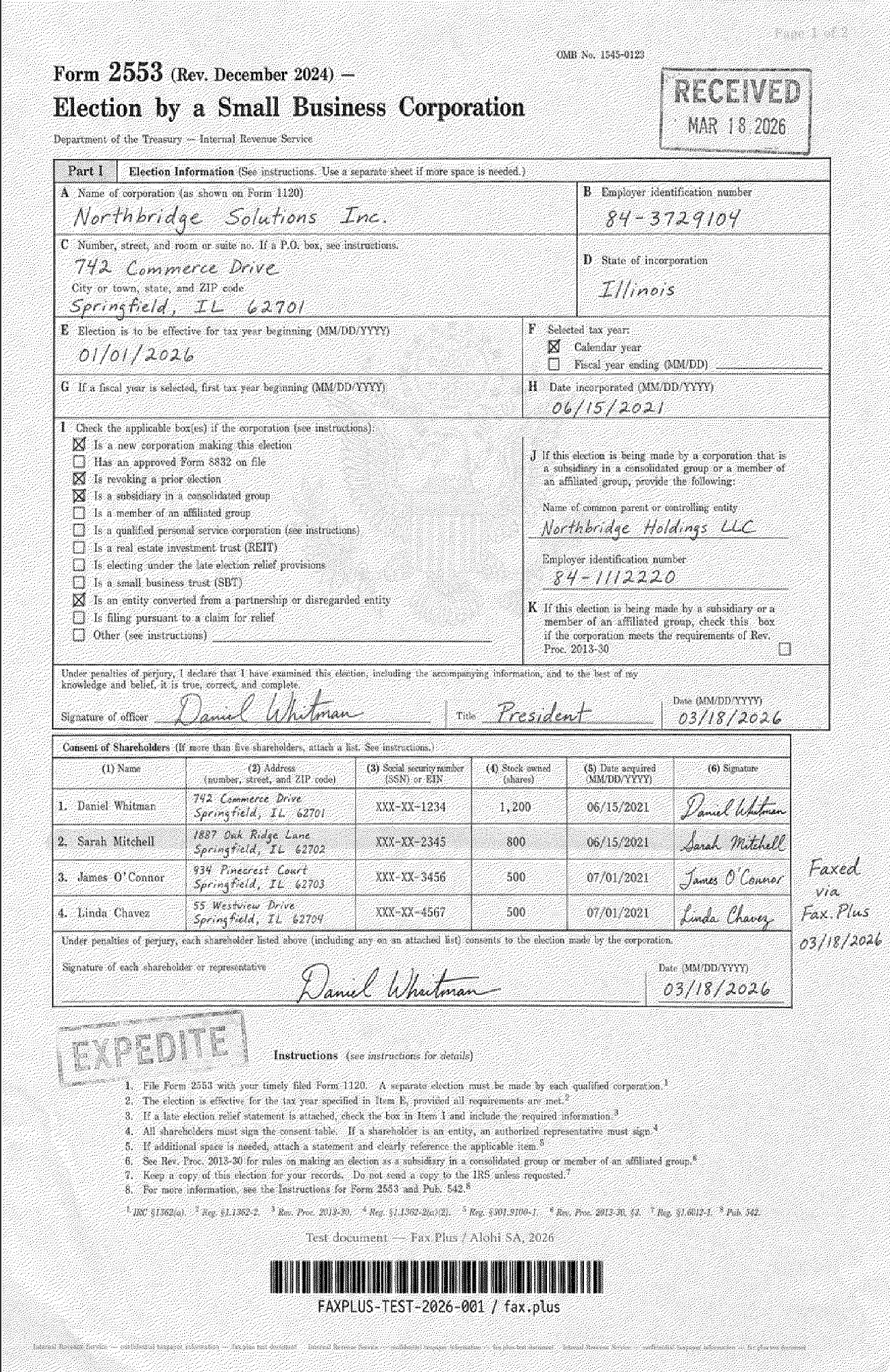
The first test used a simulated IRS Form 2553, a US government tax election form. Documents like this show up constantly in legal, financial, and real estate work: signed agreements, tax filings, and multi-party authorization forms where one smudged digit can cost you.
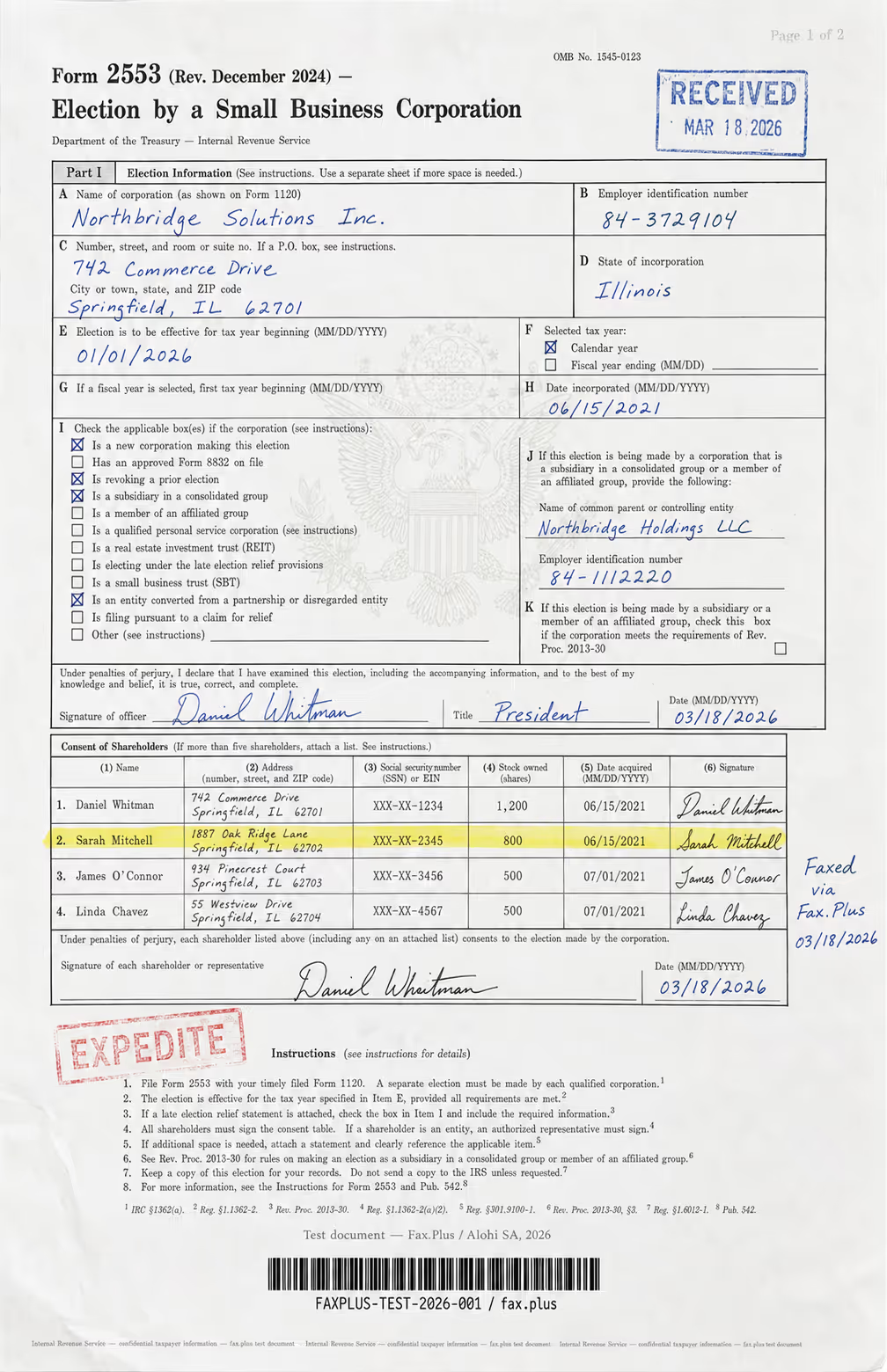
テスト文書の内容:
- Handwritten signatures and a cursive officer name
- An official-style RECEIVED stamp with a date
- インクの縁が色褪せたEXPEDITEのゴム印
- 中央に米国政府の鷲の紋章の透かし
- 株主名簿の行がハイライト表示されています
- 見出し、本文、細字でフォントサイズが混在している
- 複数の列にわたる高密度の表形式データ
- A microprint line at the bottom, the tiny anti-fraud text you find on official forms
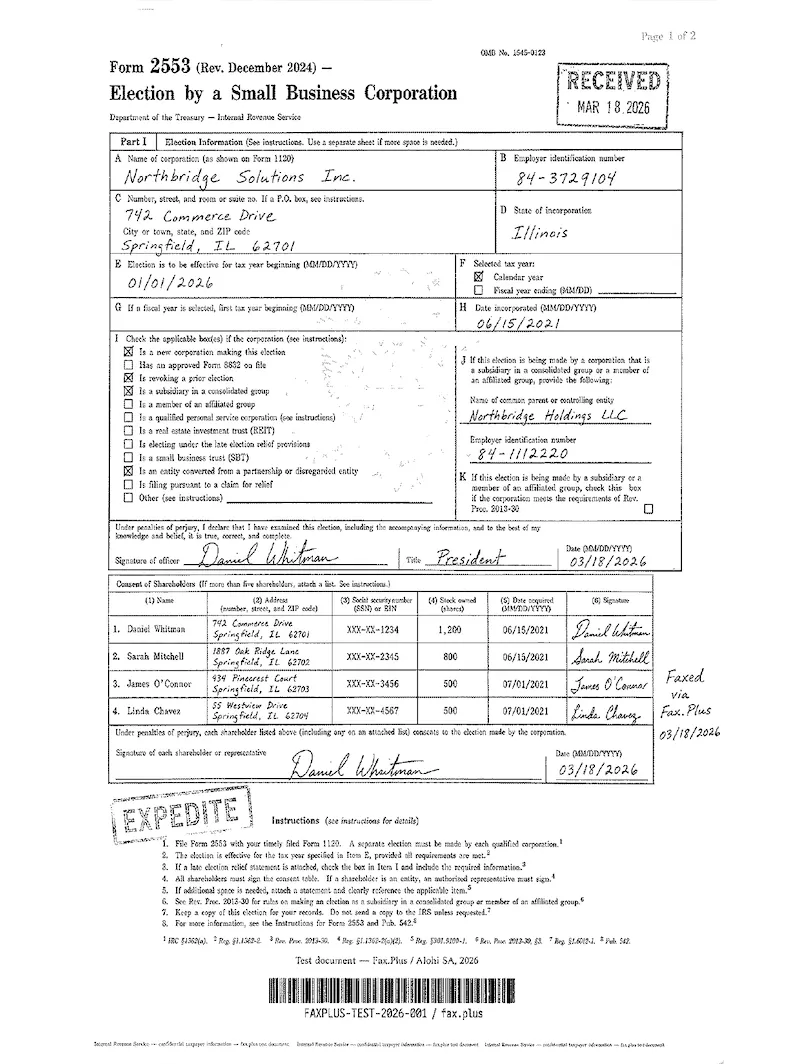
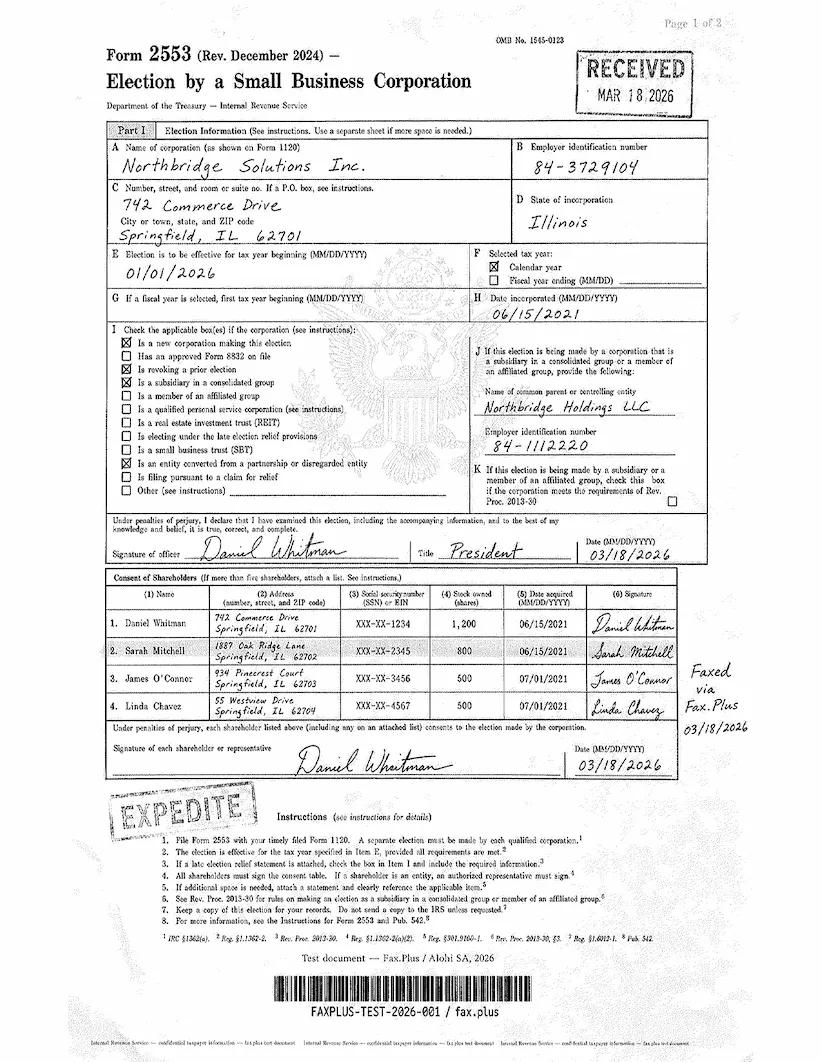
The form arrived clean on the first pass. The handwritten signatures and the cursive officer name stayed readable, the RECEIVED and EXPEDITE stamps survived, and the dense shareholder table kept its columns. SRFax carries the Consensus fingerprint here, a gray texture laid across the whole page. This is called dithering, a pattern of tiny dots fax engines use to approximate shading, and it leaves the page looking off-white instead of clean white. Detail aside from that background was strong, the Treasury eagle watermark held, and the microprint line came through. The two comparisons below place SRFax against Fax.Plus on the same form. SRFax has no resolution control, so these are not a settings test inside SRFax; they show where its single fixed output lands against a normal-resolution send and a higher-resolution reference.
SRFax vs Fax.Plus Standard Resolution
Fax.Plus Standard is the normal-resolution baseline, and on this form SRFax edges ahead of it on detail. Both keep the shareholder table columns clean, the signatures readable, and the RECEIVED and EXPEDITE stamps intact, but SRFax holds the microprint line and the faint eagle watermark a touch more crisply than a standard send does. The one place Standard wins is the background: Fax.Plus Standard is clean white, while SRFax carries the gray Consensus texture. So the trade on the IRS form is detail versus cleanliness, and on a document that gets photocopied or re-faxed down the line, the clean white original holds up better through each generation even when its first-pass detail is slightly softer.
 標準
標準
SRFax vs Fax.Plus HD Resolution
Fax.Plus HD is the top reference. On this form, SRFax keeps up on detail: the microprint line, the smallest body text, the dense table rules, and the faint stamp and watermark edges that usually separate HD from a standard send all survive on SRFax at close to HD level. The single consistent difference is again the background. HD renders the form on clean white; SRFax lays the gray dithering over it. Take the background out of the picture and the two are genuinely close on legibility, which is rare to say against Fax.Plus HD. The practical read on the IRS form: SRFax gives you HD-class detail with a gray cast you cannot remove, HD gives you the same detail on a clean page, in 2 to 3 minutes against SRFax's 1 to 2.
 HD
HD
医療文書テスト
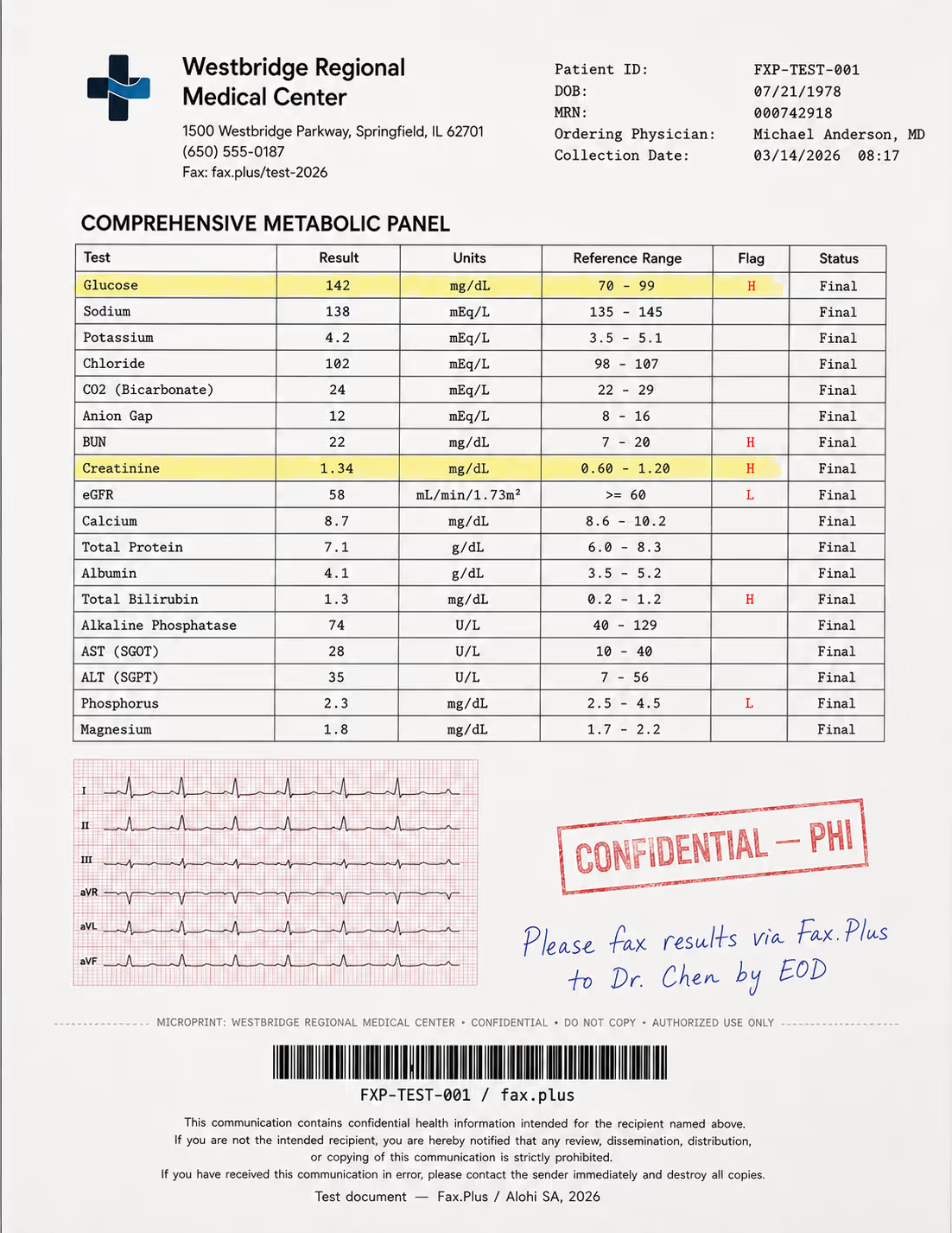
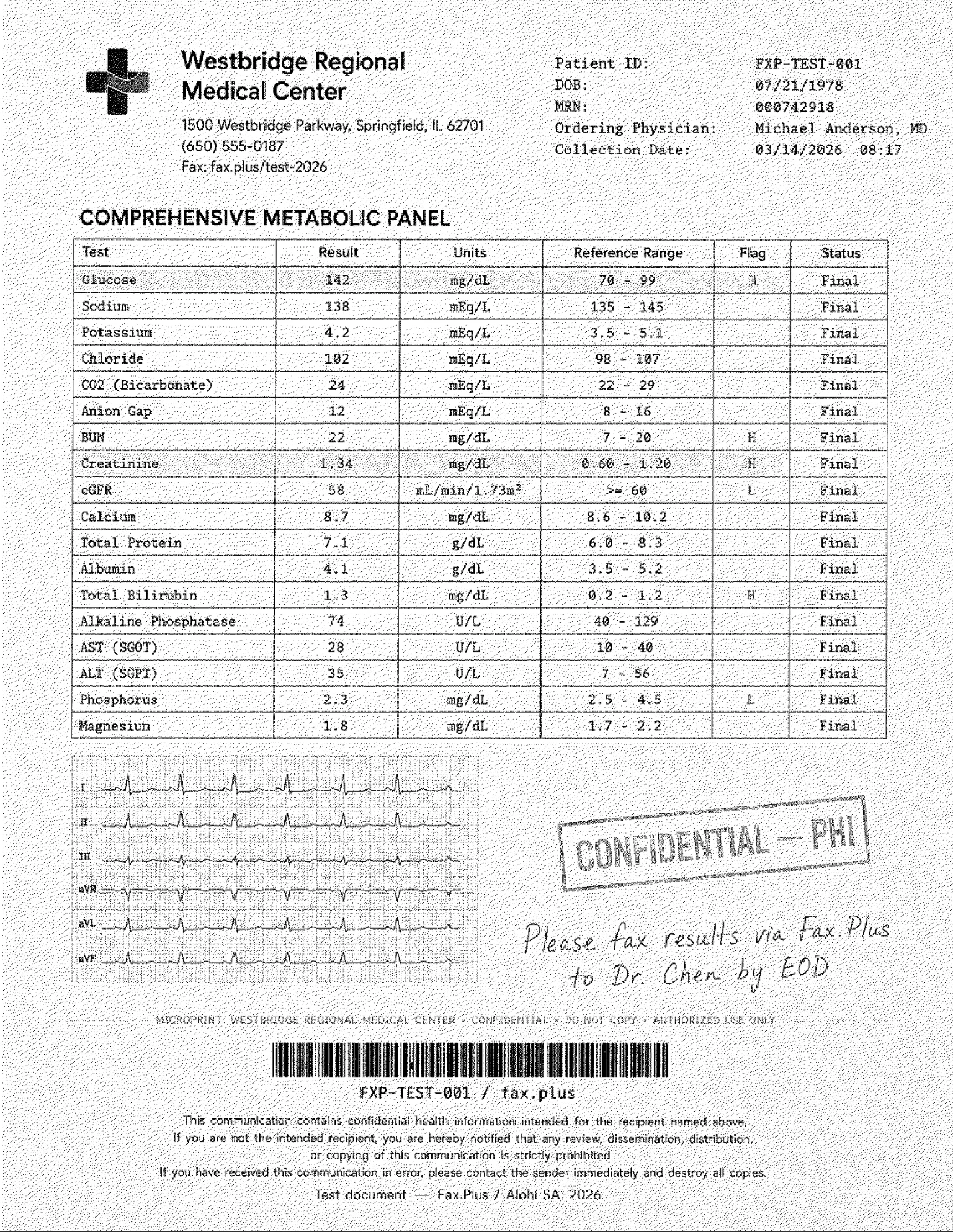
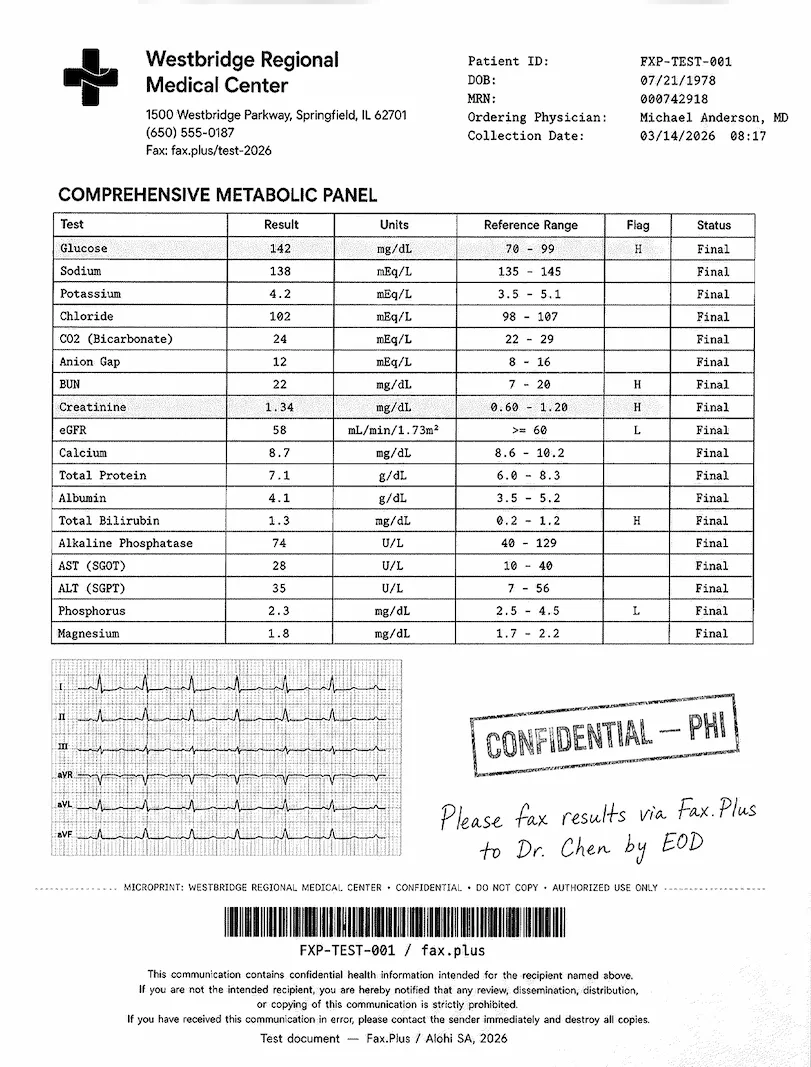
The second test used a simulated lab results form from a fictional medical center. No real patient data was used. The EKG strip printed on red grid paper is in there as a deliberate stress test, the hardest thing you can ask a black-and-white fax to carry. The rest of the page is ordinary healthcare traffic: lab values, flag markers, a handwritten physician note, and a stamp marking protected health information, which is patient data the law treats as confidential.
テスト文書の内容:
- A comprehensive metabolic panel with highlighted flag values (the H and L markers next to out-of-range results)
- A 6-lead EKG strip on red grid paper, the quality stress test
- 青インクで手書きされた医師の指示書
- 縁が色褪せた「機密/PHI」のゴム印
- 患者ヘッダーデータとCode-128バーコード
- HIPAA免責事項の小さな文字のフッター
- A microprint anti-fraud line
The result tracked the government test, which is what you expect when one engine renders both pages. The lab values, the H and L flag markers, the handwritten note, the PHI stamp, and the small HIPAA footer all came through sharp. The EKG trace stayed clear and the fine grid behind it held up well. The red color of the grid did not survive, which is expected: fax sends in black and white only, so any color drops to gray no matter which service you use. The gray Consensus background sits behind all of it, the one persistent knock on an otherwise clean result.
One workflow note that matters for clinics, and is not about pixels. SRFax delivers a received fax as a single file once the whole transmission lands, so a long referral packet or a multi-page lab result arrives all at once, at the end. Fax.Plus offers Fax Streaming on its healthcare tier, which releases each page the moment it is decoded rather than holding the document until the last page arrives, so staff can start reading page one of a referral while the rest is still coming in. For a busy practice handling time-sensitive results, that page-by-page delivery shortens the wait on long inbound faxes. SRFax has no equivalent. The same gap shows up in inbound routing: SRFax notifies an authorized email address (and can PGP-encrypt that notification), while Fax.Plus adds HIPAA-compliant email-to-fax with a signed BAA on Enterprise, so the email path itself is covered by the compliance agreement rather than sitting beside it.
SRFax vs Fax.Plus Standard Resolution
On the lab form, SRFax again reads a step sharper than Fax.Plus Standard. The metabolic panel values and the H and L flags are clean on both, but SRFax resolves the small HIPAA footer text and the barcode lines slightly better than a standard send. Standard's advantage is the clean white background, which matters more on a clinical document that may be scanned into an EHR, where a gray cast can muddy a later re-scan. Detail to SRFax, cleanliness to Standard.
 標準
標準
SRFax vs Fax.Plus HD Resolution
Against HD on the lab form, the story holds: SRFax matches it on the detail that counts. The flag markers, the handwritten physician note, the PHI stamp edges, the barcode, and the EKG grid all survive on SRFax at close to HD sharpness. HD pulls slightly ahead on the very finest EKG deflections and renders the whole thing on clean white, where SRFax keeps the gray ground. For a lab result that has to stay legible through a clinic's own re-scanning and archiving, HD's clean page is the safer original; for a one-time read, SRFax's output is effectively as detailed.
 HD
SRFax
HD
SRFax
送信速度
Send speed was solid, and notable given the detail SRFax preserves. It completed single-page sends in about 1 to 2 minutes across both tests. Fax.Plus Standard usually finishes in about a minute, and Fax.Plus HD takes roughly 2 to 3 minutes because it preserves more detail. SRFax lands in between: it delivers close to HD-level detail in standard-send time, without the 2-to-3-minute HD wait. That is a real efficiency, and one of the few places where the fixed-output approach works in the user's favor.
送信時間は速度の一側面にすぎません。受信時には、 Fax.Plus また、リアルタイムのファックスストリーミング機能も提供しており、受信したファックスの各ページをデコードされた瞬間に配信するため、最終ページが届くまで文書全体を保留する必要がありません。これは、複数ページの記録を時間的に厳密な要件で処理する必要がある場合に便利です。ほとんどのクラウドファックスサービスは、すべてのページが到着してから初めて文書を配信します。
How SRFax Fax Quality Compares
The short version: SRFax gives you one output level, you cannot change it, and it is a high one. It runs at the Consensus Fine resolution (the same higher mode eFax and MyFax expose), which on detail puts it above Fax.Plus Standard and level with Fax.Plus HD on fine print, signatures, stamps, and watermarks. The only thing standing between SRFax and a top mark is the gray dithering baked into every Consensus page; on a clean white background this output would be among the best in the series. Read against the MyFax and eFax Standard defaults, with their heavier gray wash, SRFax is clearly the better-looking sibling.
The 4/5 reflects output that matches Fax.Plus HD on detail and beats Fax.Plus Standard, delivered in standard-send time. It loses a point for two things you cannot change: the gray background the Consensus platform applies to every page, and the absence of any quality control at all, no toggle to adjust, no clean-white option, just the one fixed output. Excellent as that output is, a service that locks you into a single look with a permanent gray cast is one config decision short of perfect.
2. Pricing | Score: 4/5
SRFax prices like what it is: a volume-oriented service for steady faxers, split into Standard plans for general business and Healthcare plans that carry the HIPAA positioning.
計画
On the standard side, the entry point is Basic Plus 200 at $11.45 per month for 200 pages, with overages (the per-page rate once you use up your monthly pages) at $0.10 and OCR (turning received faxes into searchable text) available as a $1 per month add-on. Annual billing brings roughly 15% off across the lineup.
The healthcare line is the one most buyers come for, and the tiers scale by combined sent-and-received pages:
- Healthcare Lite: $12.60 per month, or $10.70 per month billed annually. 200 pages. Overages at $0.05 per page.
- Healthcare Basic: $16.05 per month, or $13.65 annually. 500 pages. Overages at $0.05.
- Healthcare Basic Plus: $22.95 per month, or $19.50 annually. 800 pages. Overages at $0.05.
- Healthcare Standard: $41.35 per month, or $35.15 annually. 1,500 pages. Overages at $0.05.
- Healthcare Standard Plus: $68.95 per month, or $58.60 annually. 2,500 pages. Overages at $0.05.
- Healthcare Professional: $137.90 per month, or $117.20 annually. 5,000 pages. Overages at $0.05.
- Healthcare Professional Plus: $275.75 per month, or $234.35 annually. 10,000 pages. Overages at $0.045.
- Healthcare Professional Premium: $551.55 per month, or $468.80 annually. 20,000 pages. Overages at $0.04.
Every healthcare tier includes additional fax numbers at $4.95 each, multiple user accounts, unlimited authorized email addresses, and consolidated billing. Larger volumes go through sales. There is no free tier and no trial: the former free-trial landing page now redirects straight to the plan list, and the signup flow mentions none. For occasional one-off sends, a separate online free fax service is the cheaper path. Porting an existing number in carries a $25 one-time fee, and international destinations are billed at published per-page international rates on top of plan pages.
The per-page math is the strongest argument here. The healthcare line opens at $12.60 per month for 200 pages (Healthcare Lite), and the value improves as volume climbs: Healthcare Basic Plus works out to roughly 2.9 cents per included page, and the $0.04 to $0.05 overage rates are the lowest in this series. For a clinic pushing high steady volume, that adds up fast.
One small irritation sits in the flow: OCR as a paid add-on feels stingy at this price level.
Against the field, SRFax sits in a sensible middle. It undercuts its own sibling eFax by a wide margin at the entry level, beats Documo's $300 annual-only commitment for a healthcare starter, and lands close to iFax while including a BAA path iFax gates higher. Fax.Plus Basic at $6.99 for the same 200 pages is cheaper for general use, and for healthcare teams the Fax.Plus Enterprise plan pairs HIPAA and a signed BAA with unlimited users at $79.99 per month, which beats SRFax's per-seat-free model only once a team's volume pushes past the mid healthcare tiers. For pure high-volume page economics, SRFax is hard to argue with.
The 4/5 reflects transparent pricing, the lowest overage rates in the series, and honest billing, held back a notch by the missing free tier, the paid OCR add-on, the $25 port fee, and a price level that has crept up since the Consensus acquisition.
3. Security and Compliance | Score: 3/5
SRFax's compliance story was written for a different era of this market, and it shows, both in what it promises and in what it never got around to adding.
What SRFax Claims
The HIPAA page describes the safeguards you would expect: SSL-encrypted sessions, application-level separation between customer accounts, restricted employee access, firewalled and monitored infrastructure, redundant storage with nightly off-site backups, and 2048-bit SSL certificates. Two genuinely good options sit on top: customers can upload a PGP public key (PGP is end-to-end email encryption, meaning the fax notification is locked before it leaves SRFax and only your email software can open it), and a "No Storage" setting deletes fax data the moment it is delivered.
A BAA is available, and this is worth saying plainly because it decides healthcare usability: a Business Associate Agreement is the contract HIPAA requires between a healthcare organization and any vendor that touches patient health information. Without one, faxing patient documents puts the practice itself out of compliance. SRFax signs BAAs across its healthcare plans on request: the healthcare pricing page carries a "Request a BAA" link that routes to the contact form rather than offering a downloadable template or a self-serve signing flow, so the agreement is arranged by email or phone. Small-practice reviewers consistently describe that process as quick. One structural note worth flagging: SRFax's General Terms of Service, the master customer agreement, make no mention of HIPAA or the BAA at all, so the BAA stands as a separate document obtained on request rather than anything referenced in the contract you accept at signup, and that master agreement caps SRFax's total liability at the amount you actually paid for the service, a low ceiling measured against the potential cost of a PHI exposure.
What Is Missing
Now read the same pages the way a compliance officer would. Security certifications are independent inspections: a company can claim anything about its own security, while a certification means an outside auditor came in, checked, and signed off. SRFax publishes none. No SOC 2, no ISO 27001, no HITRUST, no PCI DSS, no named auditor, anywhere on the site. Everything on the security pages is self-attested.
Because these acronyms come up across every review in this series, here is what each one actually tells a buyer, in plain terms:
The Certifications, in Plain Language
- SOC 2 Type II: an auditor did not just take a snapshot but watched the company's security controls work over a period of months, then reported on whether they held up.
- ISO 27001: an international standard saying the company runs security properly as an organization, who can access what, how risks are tracked, what happens when something goes wrong.
- HITRUST: a healthcare-focused certification that bundles HIPAA, ISO 27001, and other rules into one standard an outside assessor can certify against. It is the credential large hospital systems most often ask their vendors to prove.
- PCI DSS: the standard that says card payments are handled safely.
SRFax carries none of these on its own pages. That does not make the service unsafe, but it does mean a buyer has only SRFax's own word to go on, with no outside party having checked it.
Then there is the page itself. The first line of SRFax's HIPAA page reads: "SRFax is the only HIPAA-compliant fax for healthcare that will sign a Business Associate Agreement." That claim is false. Its own sibling brand eFax signs BAAs, as do Documo, Fax.Plus, and others in this series. The HIPAA page metadata shows it was last modified in December 2020, which would explain the claim as a fossil from the independent-SRFax era, except that it is not confined to that page. The same "only online fax service for healthcare that will sign a Business Associate Agreement" wording also sits on the main Security and Privacy page, which was last modified in July 2025, and in that page's meta description, the text Google shows in search results. So this is not simply a stale page nobody revisited; the false superlative is live on a recently maintained page and actively served to searchers. The HIPAA page also hedges the legal core, stating SRFax "may be defined as" a Business Associate rather than stating that it is one. None of this means the BAA is invalid. It means the public compliance messaging is both inaccurate and inconsistently maintained, and that is itself a signal.
There is an irony here too. SRFax's parent, Consensus, operates HITRUST-certified infrastructure for its eFax Corporate product. Whatever certifications exist at the corporate level, SRFax's own pages claim none of them, so a buyer evaluating SRFax on its public materials gets the weakest documented compliance posture of any healthcare-focused service in this series.
One bright spot for Canadian buyers sits alongside the HIPAA material: SRFax maintains a dedicated PHIPA compliance page. PHIPA is Ontario's Personal Health Information Protection Act, the provincial equivalent of HIPAA for handling patient health information. On it, SRFax commits to storing all data in Vancouver, British Columbia, and keeping it within Canadian borders, a residency promise most US-focused rivals never make. The honest caveat is the same one that applies to the rest of the file: this is self-declared compliance, not an audited certification, and the page carries the same 2020 timestamp. For a Canadian practice it is a real and relevant commitment; it is just a stated policy rather than a certified one.
How SRFax Security Compares
The gradient across the field is clear. Documo publishes a trust center listing HITRUST, ISO 27001, SOC 2 Type II, and PCI DSS. eFax runs a HITRUST-certified platform. Fax.Plus holds ISO 27001 and SOC 2 Type II at the organization level, both certified by EY CertifyPoint, a named independent auditor, plus PCI DSS, CSA STAR, GDPR and CCPA compliance, and HIPAA with a signed BAA on its Enterprise plan. Even iFax, whose tier-gated security page we criticized, at least names the frameworks. SRFax offers a real BAA, real safeguards, and two privacy features (PGP notifications and instant delete-on-delivery No Storage) that few rivals match as simple account toggles, wrapped in documentation that has not kept pace.
The 3/5 reflects exactly that split: a genuinely usable HIPAA path for small practices, marked down for the absence of any audited certification, a false flagship claim, and security pages frozen in 2020.
4. Usability | Score: 3/5
SRFax is easy to use and visibly dated, in about equal measure. Both are true at once, and for most people the first one matters more day to day. You can learn the whole product in an afternoon. You will also notice, every time you log in, that nobody has redesigned it in years.
The Interface
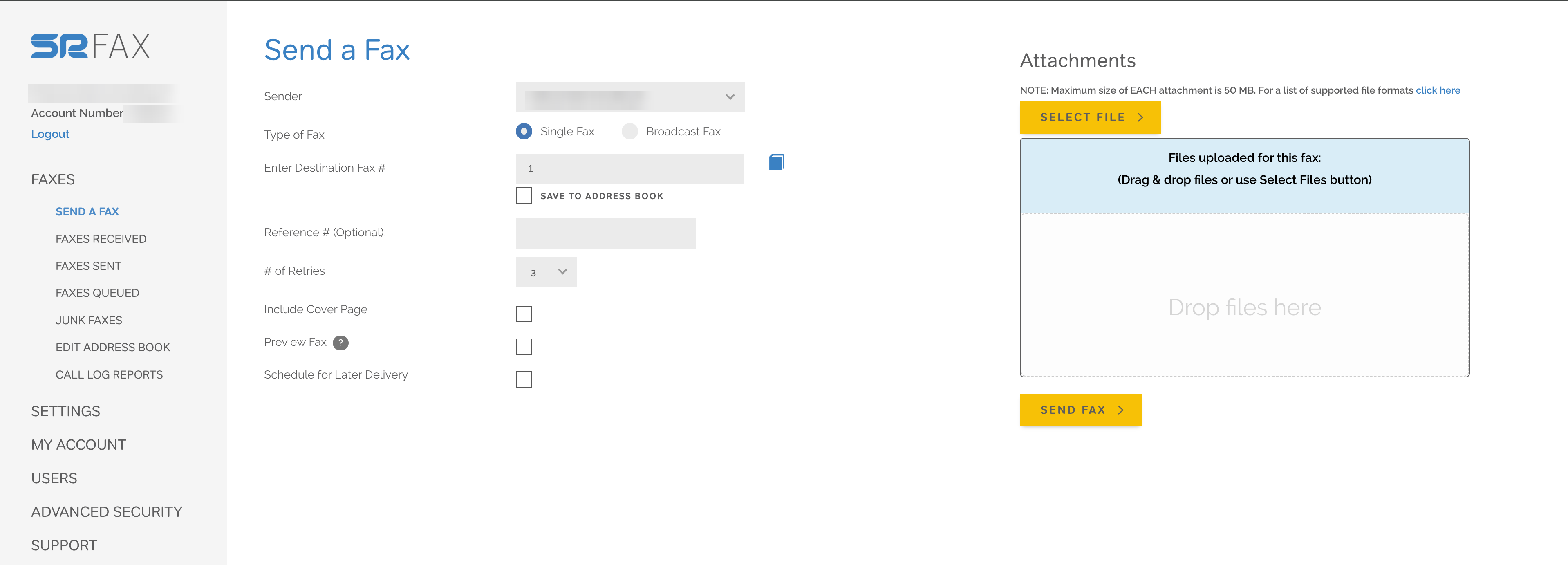
The web portal uses one consistent look on every screen: blue table headers in all caps, yellow buttons everywhere, and a left-side menu covering Faxes, Settings, My Account, Users, Advanced Security, and Support. The layout is logical and everything is one or two clicks away. The Send a Fax screen keeps the form on the left (sender, fax type, destination, retries, cover page, scheduling) and the file upload panel on the right, so the workflow reads clearly the first time you see it.
The style is pure Consensus family. That same blue-header, yellow-button, gray-background look runs across eFax and MyFax too, and it reads like enterprise software from the early 2010s. It is not broken or confusing, just clearly in maintenance mode. No real refresh has landed in years, the checkboxes use the plain browser default with no styling, and the footer still shows what looks like the old Twitter bird. None of this stops a fax from sending. It just tells you where the company spends its effort, which is on the fax engine, not the screen around it.
Faxの送信
The send flow is clean and quick. Enter the destination, upload your file by dragging it in or browsing, set an optional schedule for up to 50 recipients at once, and hit Send. SRFax also installs a print driver on Windows, which lets you fax straight from any program's Print menu without opening a browser, and a Mac client that handles local archiving. Email-to-fax works from any address you authorize in settings, which is how most desk-based offices fax without a machine in the room. Reviewers across Capterra and TechRadar consistently describe the experience as easy to set up and unexciting to use, which for a fax tool is mostly a compliment.
Nothing here needs a support ticket to figure out. The learning curve is genuinely flat.
No Mobile App, and Directories That Say Otherwise
This is where it shows its age. There is no SRFax app for iPhone or Android, so the phone experience is the website loaded in a mobile browser, and it was not built for a small screen. The left menu stays put instead of folding into a hamburger menu, so it eats horizontal space the content needs. Table-heavy screens like Faxes Received spill off the right edge, and the Actions column, the one with download and delete, is the first thing to disappear, so basic tasks mean scrolling sideways to find the buttons. On the Send a Fax screen the form and upload panel stay side by side instead of stacking, which squeezes the destination number field down to roughly 130 pixels wide.
The missing app is not an oversight but a long-settled decision. In SRFax's own support forum, customers requested iPhone and Android apps years ago, staff replied that an app was planned, it never shipped, and the company eventually apologized and recommended a third-party scanning app plus email-to-fax as the workaround. Meanwhile SRFax's own FAQ markets the browser experience with "When you think Fax Mobile, think SRFax," and third-party software directories actively get it wrong: SourceForge, for one, states SRFax "has a mobile app for iPhone and iPad." It does not. This is the same directory-misinformation pattern we documented with Documo's nonexistent Android app, and it matters for the same reason: people pick fax services off these listings.
To be fair, none of this breaks on mobile. You can send and receive from a phone in a pinch. But it is not adapted for one, and for something like a clinic where someone checks an incoming fax between rooms, that gap is felt more than it would be at a desk.
How SRFax Usability Compares
For browser-and-email teams, SRFax is perfectly serviceable, and the print driver covers the office workflow that Dropbox Fax handles with less depth. The moment phones enter the picture, the field pulls ahead: iFax ships capable apps on both platforms, ComFax is mobile-first by design, Documo at least has an iOS app, and even eFax covers both stores with mixed-review apps. Fax.Plus covers every surface at once: native iOS and Android apps rated 4.8/5 and 4.7/5, desktop apps for macOS and Windows, web, and email-to-fax, with camera capture built in. The 3/5 reflects dependable desktop workflows and a generous scheduling feature, held back by the missing mobile story and a platform that is visibly running on maintenance mode.
5. Customer Service, Cancellation and Account Control | Score: 5/5
This is SRFax's best category, and the most interesting one, because of who owns it.
The Terms Actually Favor the Customer
Start with the contract, since this series has taught us that is where promises go to die. SRFax's terms say the opposite of what we have come to expect: either party may terminate at any time, refunds are pro-rated for any remaining full months based on the cancellation date, and refunds are processed within 35 days. The marketing promise of "no-hassle cancellation, no questions asked" is the rare one that the legal text actually backs up. After documenting CocoFax's 24-hour window dressed as a 30-day guarantee, reading a refund clause this clean was almost disorienting.
Support Reputation
The support record matches. Across Capterra and SRFax's own review stream, users praise fast phone and email responses, smooth onboarding, painless BAA issuance, and in several cases name individual support staff, which almost never happens in this category. The pattern holds across years of reviews, from solo therapists to pharmacies. We found no recent cluster of billing or support complaints of the kind that dominate several rivals' recent reviews.
The eFax Contrast
Here is the part worth sitting with. The same parent company, Consensus Cloud Solutions, operates both this series' friendliest cancellation experience (SRFax) and its most notorious one (eFax, with its long-documented call-to-cancel flow and retention tactics). Two brands, one owner, opposite philosophies. Whatever the corporate reasoning, the practical takeaway for buyers is that SRFax has so far kept its pre-acquisition service culture intact, and that culture, not the ownership, is what you experience day to day.
How SRFax Account Control Compares
Documo earns its support reputation too, but locks its cheapest plan into annual-only billing; SRFax does not. Dropbox Fax runs form-only support. Fax.Plus matches the no-maze posture with multi-channel support and supports porting your number both in and out (porting means moving your existing fax number from one provider to another, so you keep the number when you switch). SRFax supports porting in for a $25 fee and porting out per standard carrier process. The 5/5 reflects contractual refund terms no other service in this series matches, backed by a years-long, consistent support record.
6. Data Residency and Retention | Score: 3/5
SRFax's privacy posture has one genuinely distinctive feature and a lot of unanswered questions around it.
The distinctive feature is the No Storage option. Retention is usually a policy you read; here it is a switch you flip. With it enabled, SRFax deletes fax data the moment it is delivered or retrieved, so there is simply nothing stored to breach, subpoena, or leak later. For practices whose policy is "PHI lives in the EHR, nowhere else," that is a cleaner answer than any retention schedule. Other services do offer retention controls (Fax.Plus, for one, lets Enterprise admins set a document-retention period after which faxes are permanently purged), but SRFax's instant delete-on-delivery is the most aggressive setting of its kind in this series. With the option off, storage is unlimited.
There is more geographic disclosure here than first appears, and it is a genuine point in SRFax's favor for Canadian healthcare. SRFax's PHIPA page (PHIPA is Ontario's health privacy law, the provincial counterpart to HIPAA) states plainly that all data is stored in its facilities in Vancouver, British Columbia, and that at no point during transmission does data leave Canadian borders. For a Canadian practice with data-residency obligations, that is a clear, useful commitment, and one the US-centric rivals in this series do not make. The PHIPA page itself is self-declared compliance rather than an audited certification, and it carries the same 2020 timestamp as the rest of the compliance material, so treat the Vancouver commitment as a stated policy rather than a certified guarantee.
Two caveats follow from the same disclosure. First, that Canadian residency cuts both ways: a US healthcare provider using SRFax is storing US patient data in Canada, a cross-border arrangement that some US compliance reviews will want to account for. Second, there is no region choice anywhere. You take Canadian storage and BC jurisdiction as they come, with a US public company (Consensus) as the ultimate parent, and accounts are offered in the US and Canada only.
How SRFax Data Residency Compares
Documo is narrower but clearer: US and Canada, named all-US subprocessors. The transparent end of the market is customer-controlled: Fax.Plus account admins choose where data lives across 20+ regions, including US, Canadian, EU, Swiss, Japanese, and Australian locations, with separate locations for live data and backups and self-serve migration later, under Switzerland's FADP, a single national privacy law revised in 2023 to GDPR standards. The 3/5 credits the No Storage option as a real, unusually aggressive retention control, the disclosed Canadian storage and residency commitment for Canadian healthcare, and the Canadian jurisdiction as a fair posture, marked down for the absence of any region choice, the cross-border implication for US customers, and the stale, self-declared (not certified) nature of the disclosure.
7. Enterprise, API and Healthcare Automation | Score: 3/5
SRFax has a real developer story, which is more than several rivals can say, but it is a story from 2015 that has not gained a chapter since.
APIアクセス
SRFax publishes a documented Internet Fax API (the interface that lets your own software send and track faxes automatically, with no person clicking send) with developer pages explaining authentication and integration, and unlike Documo's $150-per-month gate or CocoFax's contact-sales mystery, the API is presented as part of the standard offering rather than an enterprise upsell. The mechanics show its age, though: it works over HTTPS POST web services returning JSON or XML, authenticates with your account number and your account login password rather than API keys or OAuth (the modern standard where applications get their own revocable credentials), and the official helper code is a downloadable PHP class. It covers the essentials: queueing faxes, checking delivery status, retrieving inbound faxes, and usage reports.
医療
A common question from practices is whether SRFax works with their EHR, and Practice Fusion comes up most often. The verified picture, as of June 2026: documented, official integrations exist with IntakeQ/PracticeQ (a published integration guide with an SRFax connector in its settings) and Juvonno, with Juno EMR and DentalRx named in directory listings. Practice Fusion is not one of them: there is no official SRFax integration, and Practice Fusion's own fax partner is Updox, per Practice Fusion's documentation. Adding to the confusion, a different Consensus sibling brand, Sfax, does list Practice Fusion among its EHR integrations, and the near-identical names (SRFax vs. Sfax) are easy to mix up. Practices pairing SRFax with Practice Fusion do so manually, via email-to-fax or the API, not through a packaged connector. The honest framing is that SRFax is a common fax layer for small-practice setups via its API and email workflows rather than a vendor of packaged, supported EHR connectors; confirm your specific integration with the EHR vendor before committing.
Fax.Plus takes the more direct route here. Native integrations connect straight into Epic, Cerner, athenahealth, NextGen, and Kipu EMR, rather than leaving a practice to stitch things together with email-to-fax or API glue. Fax Streaming, which delivers each page the moment it is decoded rather than waiting for the whole document, comes included on the Enterprise plan with no separate line item. For a practice that has outgrown ad hoc integration work, that is the gap between a fax layer bolted onto other tools and a service that treats reaching the EHR as a first-class feature.
MCPとAIワークフロー
The newer bar for enterprise fax is an MCP server, which lets an AI assistant work faxing through natural-language action tools (send, check the inbox, track delivery, manage contacts) rather than only through code. The fuller picture is two layers: a documented REST API with SDKs for developers writing code, and an MCP server on top that exposes the same faxing operations as tools an assistant like Claude or the OpenAI Agents SDK can call. SRFax publishes neither, and neither does its parent for the SRFax brand. Fax.Plus ships both layers, on its Enterprise plan; eFax, iFax, and Dropbox Fax publish neither.
How SRFax API Compares
A self-serve, documented API at small-business pricing beats Documo's tier gate and embarrasses CocoFax's undocumented one, and for a small clinic wiring fax into an intake tool, SRFax is genuinely workable. What is missing is everything from the last decade: no published SDKs, no certification file for enterprise procurement, no document-AI layer like Documo's, and no MCP path. Teams comparing programmatic options will weigh SRFax's accessible API against iFax's similarly cheap one and the two-layer Fax.Plus developer offering, a REST API with public SDKs plus an MCP server that exposes faxing as AI-agent action tools, on its enterprise plan. The 3/5 reflects a real, reachable API frozen in time.
Alternatives to SRFax
Fax.Plus - Best overall SRFax alternative
Modern cloud fax from $6.99 per month with a free tier to test. Everything SRFax's platform is missing is here: audited certifications (ISO 27001 and SOC 2 Type II certified by EY CertifyPoint, plus PCI DSS and CSA STAR), native apps on iOS, Android, macOS, and Windows, sending to 180+ countries out of the box, customer-controlled data residency across 20+ regions, and an API with public SDKs and MCP support. For healthcare teams, the Enterprise plan pairs HIPAA and a signed BAA with unlimited users at $79.99 per month, EHR integrations (Epic, Cerner, athenahealth, NextGen), and Fax Streaming for routing incoming faxes straight into existing systems.Best for: Teams that like SRFax's honesty but need a current platform: mobile apps, certifications, international sending, and automation.
Documo - Best for certification-driven healthcare procurement
The compliance file SRFax never built: HITRUST, ISO 27001, SOC 2 Type II, and PCI DSS on a public trust center, HIPAA included on every plan with a BAA available on all of them. The trade-off is the price: a $300 annual-only entry commitment, and no Android app.
Best for: US healthcare organizations whose procurement process demands audited certifications.
eFax - The sibling brand, for those who want the big name
Same parent company, opposite personality: the most recognized brand in faxing, broader features and mobile apps, at a higher $18.99 entry with a BAA gated to its Business tier and a long-documented difficult cancellation flow. If you are choosing between the two Consensus brands, SRFax treats you better on the way out; eFax gives you more product while you stay.
Best for: Buyers who specifically want the incumbent brand and accept its terms.
よくある質問
What is SRFax?

SRFax is a cloud fax service founded in 2004 in Nanaimo, British Columbia, focused on HIPAA-oriented faxing for healthcare practices in the United States and Canada. It offers web and email faxing, a Windows print driver, a Mac client, and a documented fax API, with Standard plans from $11.45 per month and Healthcare plans from $12.60 per month.
How much does SRFax cost?
SRFax Standard plans start at $11.45 per month for 200 pages (Basic Plus). Healthcare plans run from $12.60 per month for 200 pages (Healthcare Lite) up to $551.55 for 20,000 pages, with about 15% off on annual billing, overages from $0.04 to $0.05 per page, additional numbers at $4.95, OCR as a $1 monthly add-on, and a $25 number porting fee. There is no free tier. For comparison, Fax.Plus starts at $6.99 per month for 200 pages with a free plan to test first.
Is SRFax HIPAA compliant?
SRFax markets HIPAA compliance on its healthcare plans and signs a Business Associate Agreement, which users report is quick to obtain. However, SRFax publishes no audited security certifications (no SOC 2, ISO 27001, or HITRUST) and no auditor name, and its HIPAA page has not been updated since December 2020, including a false claim of being the only HIPAA fax service that signs a BAA. Practices that need a certification-backed HIPAA-compliant fax file should compare providers with audited stacks.
Does SRFax have a mobile app?
No. SRFax has no iOS or Android app; mobile faxing runs through the phone's browser. Some third-party directories incorrectly state that an iPhone app exists. SRFax's platforms are the web portal, email-to-fax, a Windows print driver, and a Mac client. For faxing from a phone, the Fax.Plus app on iOS and Android includes camera capture and scan-to-fax.
What is the best SRFax alternative?
Fax.Plus is the strongest overall alternative: a modern platform with audited certifications, mobile and desktop apps, international sending, customer-controlled data residency, and an API with MCP support, from $6.99 per month with HIPAA and a signed BAA on the Enterprise plan. Documo suits certification-driven healthcare procurement, and eFax, SRFax's sibling brand, offers the biggest name with more product surface but harsher account terms.
Is SRFax good for high-volume faxing?
For steady high volume in the US and Canada, SRFax's page economics are among the best in the category: under 3 cents per included page on Healthcare Basic Plus and overages from $0.04. The constraints are that accounts and numbers are limited to the US and Canada (international sending costs extra per page), the absence of audited certifications for enterprise procurement, and a platform without modern automation. High-volume healthcare teams should also compare Fax.Plus Enterprise at $79.99 per month with unlimited users and real-time page-by-page delivery via Fax Streaming (most cloud fax services hold an incoming fax until the last page arrives, then deliver the whole document at once; Fax Streaming releases each page the moment it is decoded, so staff can start reading a long referral the second page one lands).
Who owns SRFax? Is SRFax part of eFax?
Yes. Since 2020, SRFax has been owned by the parent company of eFax. J2 Global acquired SRFax's cloud services assets in February 2020, and after the 2021 spinoff, SRFax became part of Consensus Cloud Solutions (NASDAQ: CCSI), which also operates eFax, MyFax, SFax, and MetroFax. SRFax's Terms of Service name the operator as a division of Consensus Cloud Solutions Canada ULC. The SRFax marketing site does not mention the eFax connection.


Featured Articles
See All



Confédération Suisse
Confederazione Svizzera
Confederaziun Svizra
Swiss Confederation
Innosuisse - Swiss Innovation Agency