Dropbox Fax(旧HelloFax)2026年版レビュー:機能、価格、実使用性能
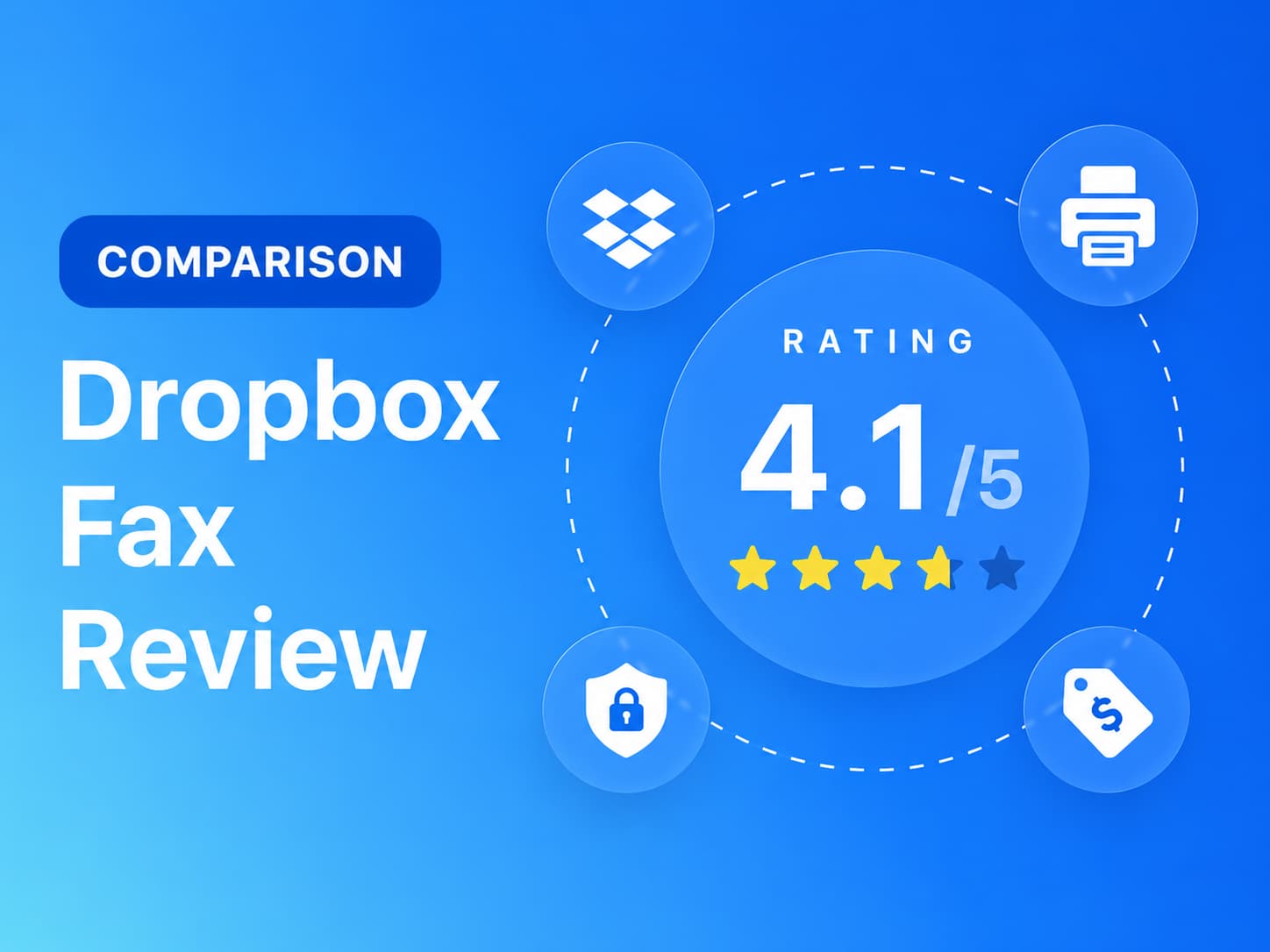
Dropbox Fax(旧HelloFax)の実際の料金、ファックス品質、HIPAA(医療情報保護法)上の問題点、解約条件などを検証しました。7つのカテゴリーで評価を行いました。


- Dropbox Faxは、デスクトップから簡単にファックスを送信できる、安価なウェブ専用ファックスサービスです。
- テスト出力は判読可能でしたが、筋状のノイズが重要な内容を遮ってしまうことがありました。
- ウェブポータルはシンプルだが、モバイルアプリやアドレス帳がないという制約がある。
- 価格設定は魅力的だが、更新、払い戻し、年間請求については見直しが必要だ。
- たまにしか利用しないユーザーに最適です。規制の厳しい環境やモバイル端末を多用するチームは、他の選択肢も検討すべきです。
2026年において、Dropbox Faxは利用する価値があるのか?
月に数回、デスクからファックスを送信する程度であれば、Dropbox Faxは最も安価な方法の一つです。無料プランではクレジットカード不要で5ページまで送信でき、従量課金制では10ページまで1回あたり0.99ドル、月額9.99ドルのホームオフィスプランでは月300ページまで送信でき、1ページあたり約3.3セントとなります。ウェブ上での操作は簡単で、内蔵の編集・署名ツールを使えば、プリンターを使わずに「このフォームに署名してファックスで送り返す」といった一般的なワークフローをスムーズに行えます。
たまに送信する以上のニーズが生じた瞬間、状況は一変します。iOS または Android アプリは全く存在しないため、モバイル ファックスはブラウザ タブまたはメール to ファックスでしか送信できません。Dropbox Fax プランには HIPAA 準拠やBusiness 提携契約により、販売された状態では医療ワークフローへの適用は認められていません。また、何か問題が発生した場合、会社に連絡する唯一の方法はウェブフォームのみで、どのプランでも電話やチャットは利用できません。
Dropbox Faxについて
Dropbox Faxは、Dropbox, Inc.(NASDAQ: DBX)が所有しています。この製品は、Y Combinatorのスタートアップ企業であるHelloFaxとして2011年に誕生し、2019年2月に親会社であるHelloSignが2億3000万ドルの現金でDropboxに買収されたことで、Dropbox傘下に入りました。HelloSignは2022年にDropbox Signとなり、HelloFaxは2024年にDropbox Faxにブランド名を変更しました。
リブランディングはまだ明らかに不完全です。アプリケーションはapp.hellofax.comにあり、表紙にはHelloFaxのブランドロゴが表示され、メールからファックスへの送信は依然として@hellofax.comのアドレスを経由しています。両方の名前が混同して使われているのを見かけるかもしれませんが、それはHelloFaxとDropbox Faxが同じ製品だからです。
製品の表面積は意図的に限定されています。ウェブアプリ、有料プランでのメールtoファックス機能、Dropbox、Google Drive、Box、OneDrive、Microsoft Wordとの連携機能、そしてDropbox Sign開発者プラットフォーム内に販売制限付きのファックスAPIが用意されています。ファックス番号は米国、英国、カナダで利用可能で、モバイルアプリやデスクトップアプリはありません。
Dropbox Faxのレビュー方法
私たちはDropbox Faxを4つの証拠層を用いて検証しました。
- 製品の実践的なテストを実施しました。アカウントを作成し、Dropbox Faxが提供する2つのインターフェース(WebポータルとメールtoFax)を使用してテストを行いました。Dropbox Faxはデスクトップアプリやモバイルアプリを提供していないため、インストールやテストを行うアプリはありませんでした。ブラウザベースとメールベースのワークフローにおけるユーザーエクスペリエンスを評価するため、両方のインターフェースから実際にFaxを送信しました。
- ファックス品質テスト。Dropbox Faxのテストには、政府機関や法律文書、医療機関の検査結果フォームという、実際の文書を模した2つの固定ソース文書を使用しました。出力品質を一貫して評価できるよう、テスト全体を通して同じソースファイルを使用しました。テストでは、読みやすさ、レイアウトの保持、手書き文字、細かい文字、スタンプ、署名、バーコード、密集した表、フォントサイズの混在など、実際の文書ワークフローで重要な実用的な詳細を評価しました。ファックス品質テストでは、実際の個人情報、医療データ、税務データ、企業データ、患者データは一切使用していません。
- 請求およびアカウント管理の見直し。登録から無料トライアル期間までの請求フローを監視し、登録後のアカウント管理やキャンセルに必要な手順を含め、キャンセル経路を直接マッピングしました。
- Business準備状況レビュー。Dropbox Fax の公開資料でセキュリティとコンプライアンスの主張、データの所在と保持情報、API と開発者リソース、ヘルスケア準備状況の詳細などを確認しました。 enterprise 自動化サポート。
次に、Dropbox Fax を、ファックス品質、価格設定、セキュリティとコンプライアンス、使いやすさ、カスタマー サービスとアカウント コントロール、データの所在と保持、 enterprise API、およびヘルスケアの自動化。
1ファックス品質 | スコア4.5 / 5
Dropbox Faxは、以前のテストでeFaxやiFaxよりも優れた基本ファックス品質を実現しています。背景は白く、テキストや表の値は鮮明に表示され、デフォルト設定でも十分な出力品質が得られます。ただし、繰り返し発生する不具合が、より高い評価を阻んでいます。
テスト方法論
送信方向の両方で 2 種類の文書をテストしました ( Fax.Plus Dropbox Fax へ、Dropbox Fax へFax.Plus )、そしてアーティファクトパターンを確認するために複数回実行しました。各ドキュメントについて、スライダーはDropbox Fax StandardとFax.Plus 通常およびHDの基準値。オプションの「高解像度カラー版ファックスを送信する」チェックボックスも試しましたが、高画質のファックスではなく、元のファイルへのダウンロードリンクが送信されました。
政府および法律文書のファックステスト
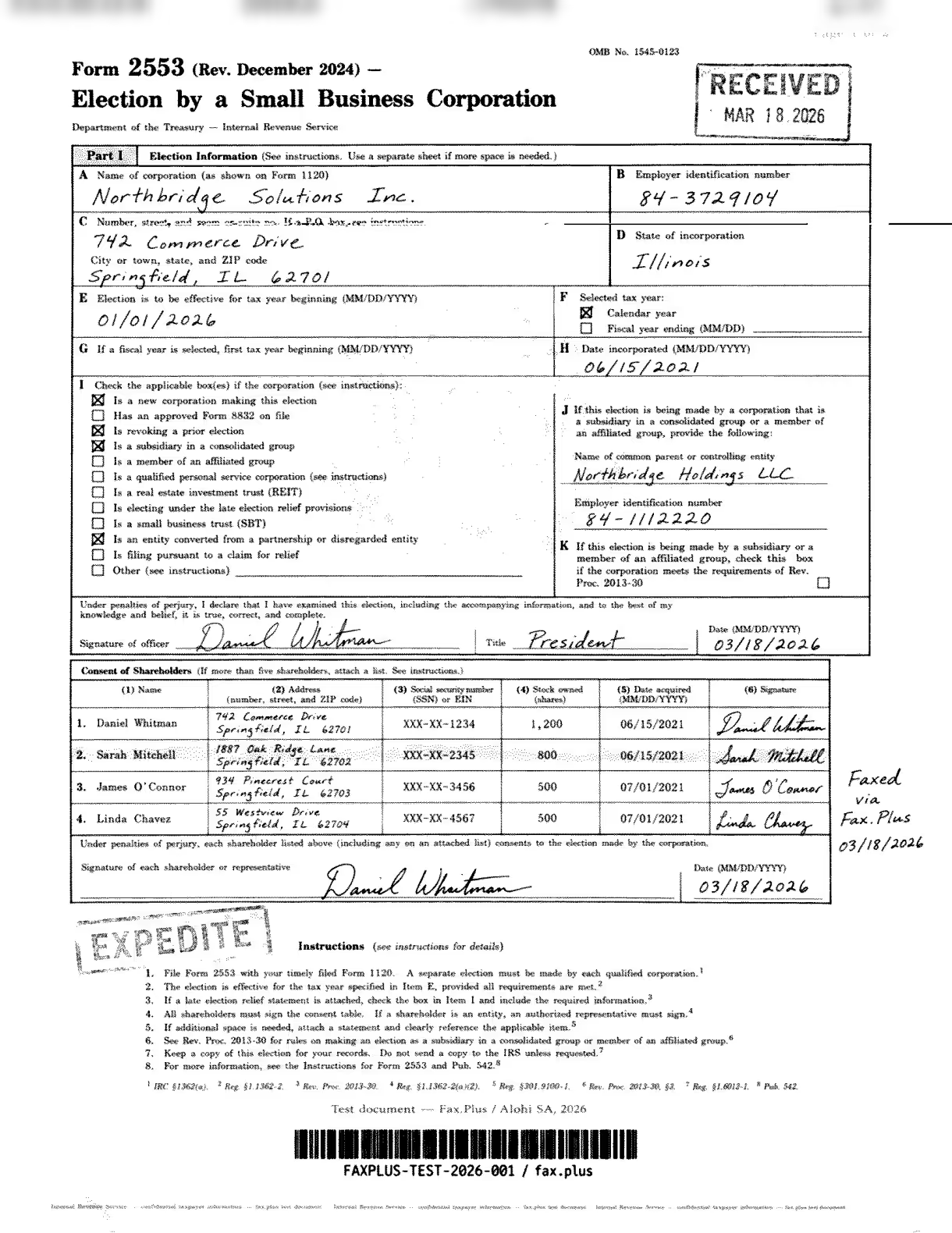
最初のテストでは、米国政府の納税申告書であるIRSフォーム2553を模擬したものを使用しました。このような文書は、法律、金融、不動産などの業務フローでよく見られます。例えば、署名済みの契約書、納税申告書、複数当事者間の承認書など、あらゆる詳細が漏れなく届く必要がある場合です。
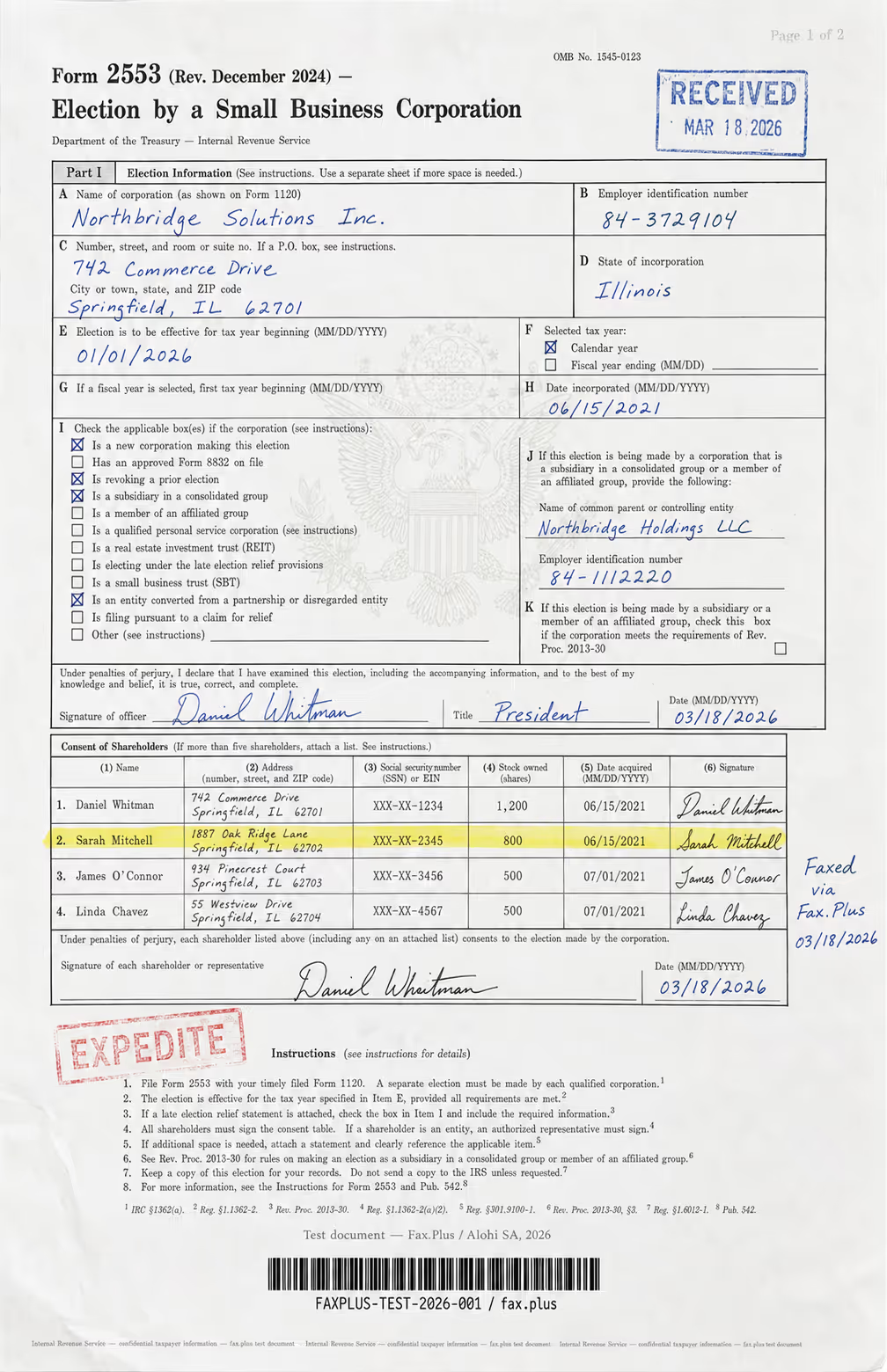
テスト文書の内容:
- 手書きの署名と筆記体で書かれた役員の名前
- 日付入りの公式スタイルの受領印
- インクの縁が色褪せたEXPEDITEのゴム印
- 中央に米国政府の鷲の紋章の透かし
- 株主名簿の行がハイライト表示されています
- 見出し、本文、細字でフォントサイズが混在している
- 複数の列にわたる高密度の表形式データ
- 不正防止認証のための底部マイクロプリントライン
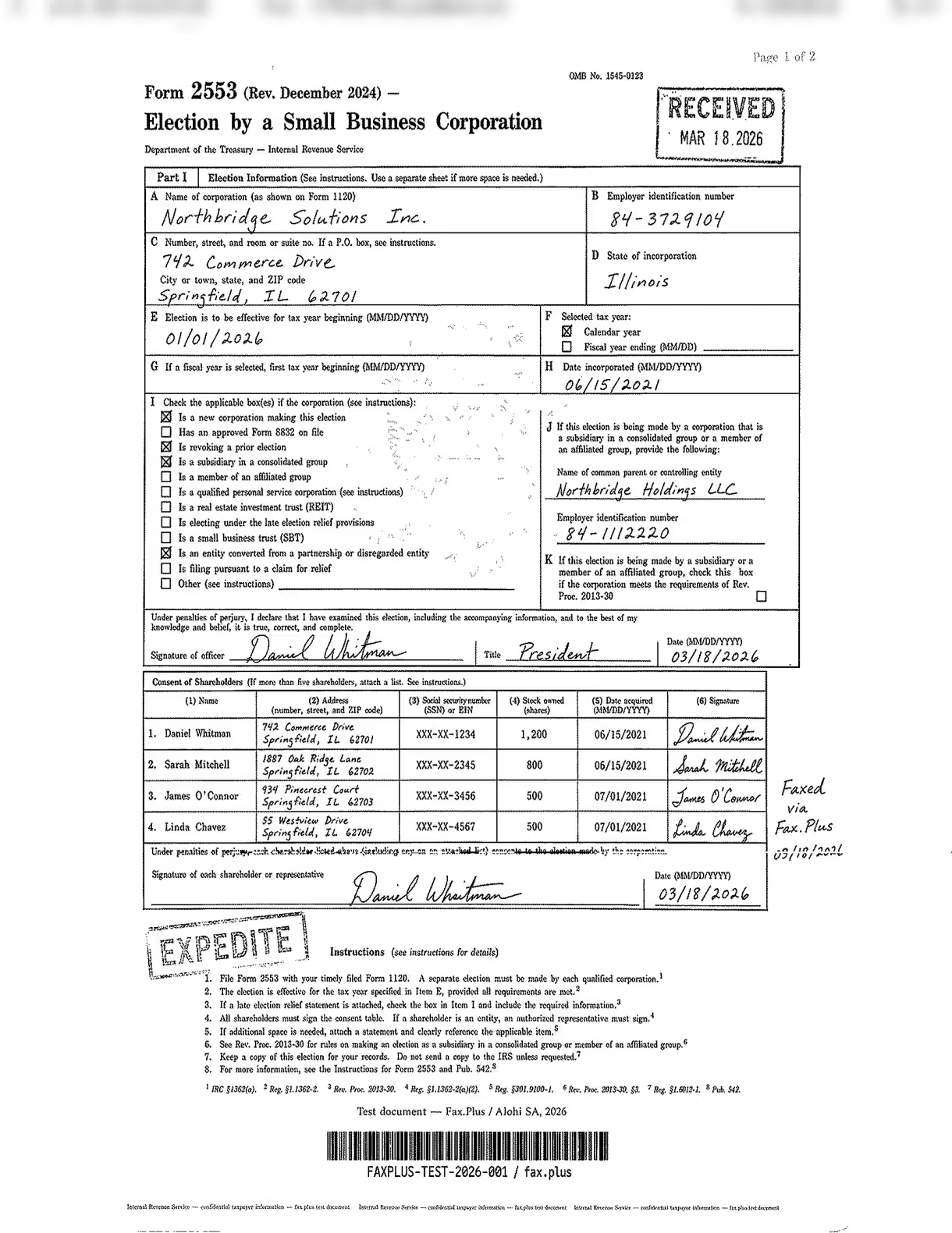
Dropbox Fax Standard
項目Cの住所欄(番地、通り名、部屋番号またはスイート番号)に横方向の線が走っており、その欄のラベルが劣化し、右端まで達しています。それ以外はすべて良好です。受領印と速達印は鮮明で、同意表の株主4名の署名もすべて判読可能、記入済みの住所は押印ラベルのすぐ下にきれいに読み取れ、下部のマイクロプリントの線も確認できます。全体的にきれいなページに、線が1本だけあります。
Fax.Plus 標準
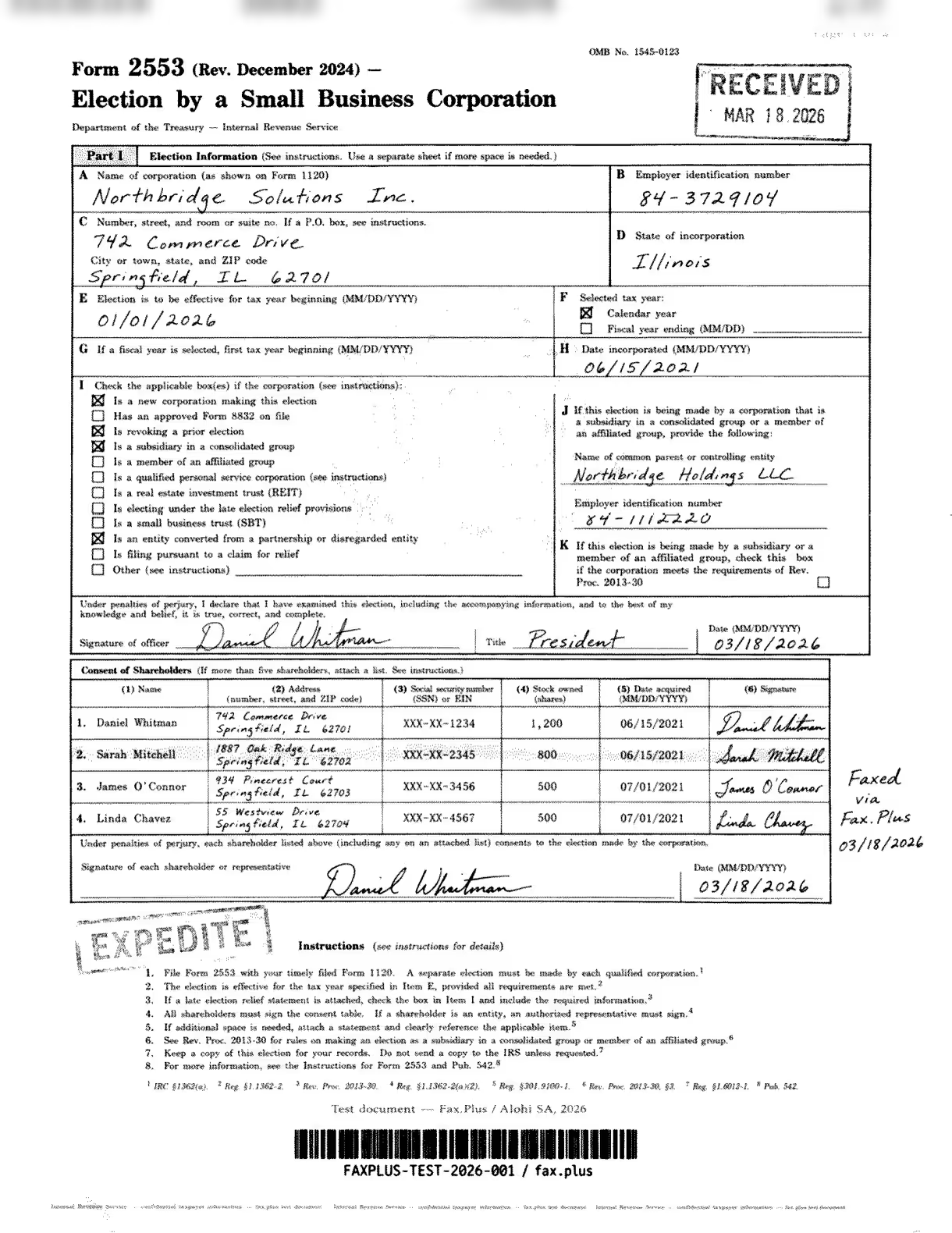
清潔な白い背景、鮮明な表、読みやすい文字、筋なし。鷲の紋章の透かしは薄い。これが標準品質のファックスの基準となる。
 標準
標準
 標準
標準
Fax.Plus HD(参考)
真の高解像度ファックス:第1部全体に鷲の印章の透かしがはっきりと見え、切手の輪郭も鮮明で、手書き文字もくっきりとしており、株主名簿も鮮明です。これはDropbox Faxにはない、まさに最高レベルの高解像度ファックスです。
標準
 高解像度
高解像度
送信速度
Fax.Plus 通常は約1分で完了します。 Fax.Plus HD送信は約3分で完了しました。Dropbox Faxの標準送信は、テスト実行全体で1~2分で完了しました。
医療文書テスト
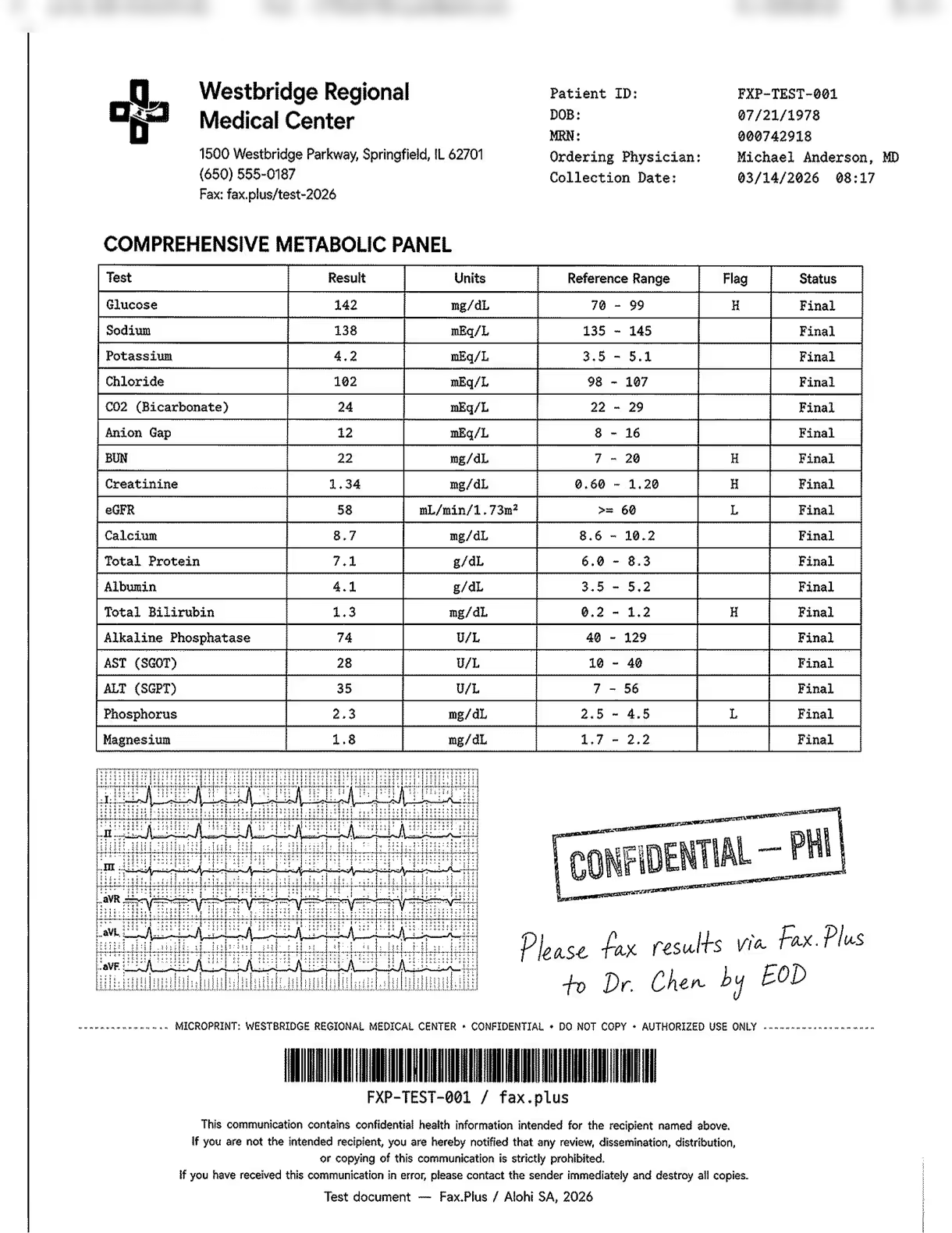
2回目のテストでは、架空の医療センターのシミュレーションされた検査結果フォームを使用しました。実際の患者データは一切使用していません。この文書は、実際のワークフローシナリオというよりは、ストレステストとして設計されました。臨床現場では、ファックスのワークフローに診断画像が含まれることは稀ですが、赤い方眼紙に埋め込まれた心電図波形は、各サービスが提供できる限界を試すために意図的に含めました。典型的なのは、検査データ、フラグ値、医師の手書きメモ、PHIスタンプの組み合わせであり、これらはすべて実際の医療ファックスワークフローで頻繁に見られます。
下の画像は、このテストで使用されたマスター文書を示しています。この文書は、テスト対象となったすべてのサービスに修正されることなく送信されました。すべての名前、患者識別情報、および臨床データは架空のものです。実際の患者情報は一切使用されていません。
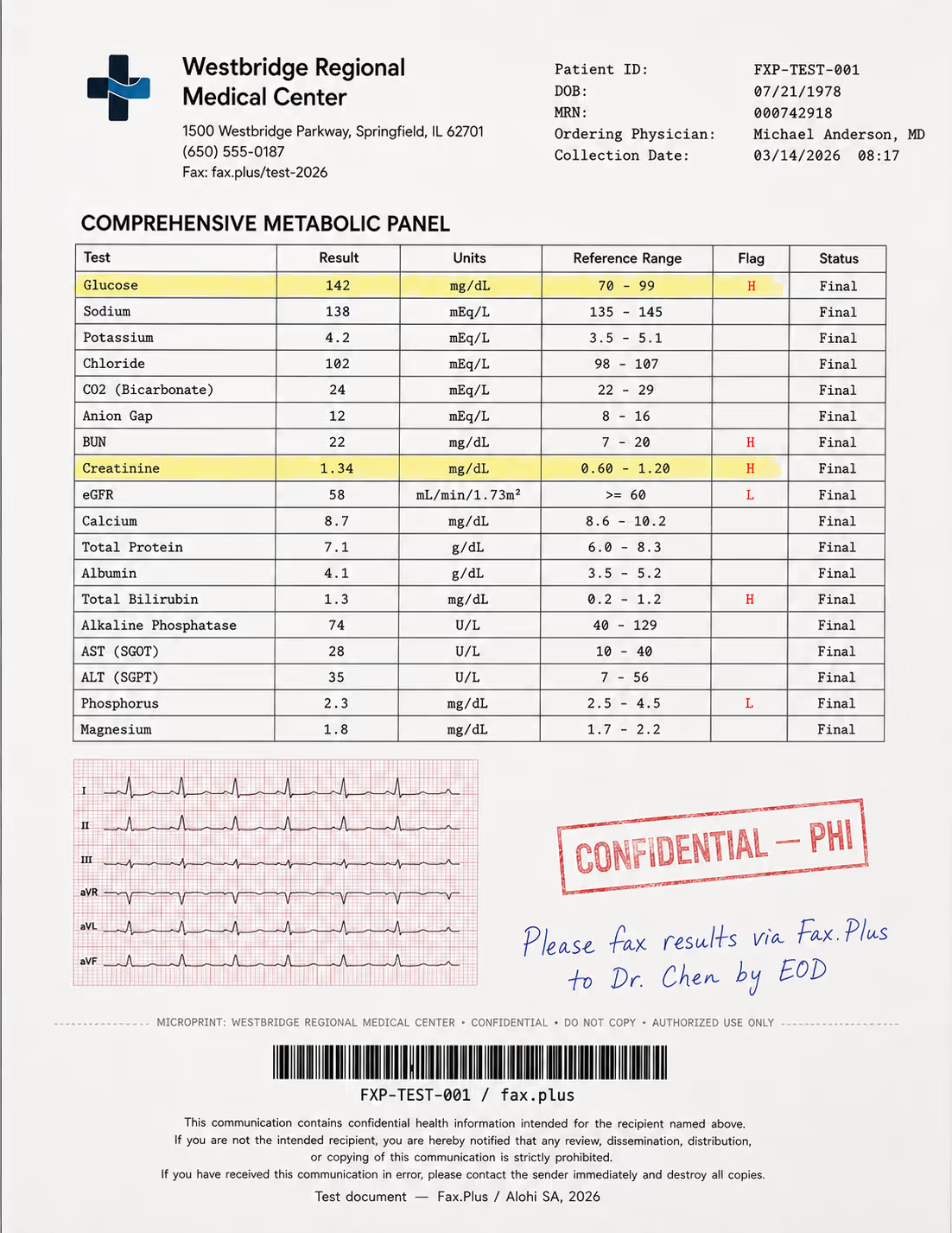
テスト文書の内容:
- 強調表示されたフラグ値(H/L指標)を含む包括的な代謝パネル
- 品質ストレス検査として、赤い方眼紙に6誘導心電図の記録用紙が付属しています。
- 青インクで手書きされた医師の指示書
- 縁が色褪せた「機密/PHI」のゴム印
- 患者ヘッダーデータとCode-128バーコード
- HIPAA免責事項の小さな文字のフッター
- 不正防止認証用のマイクロプリントライン
実際のワークフローにおいて、判読不能なフラグ値や判読できない手書きの指示は、単なる品質問題ではなく、臨床上のリスクとなる。
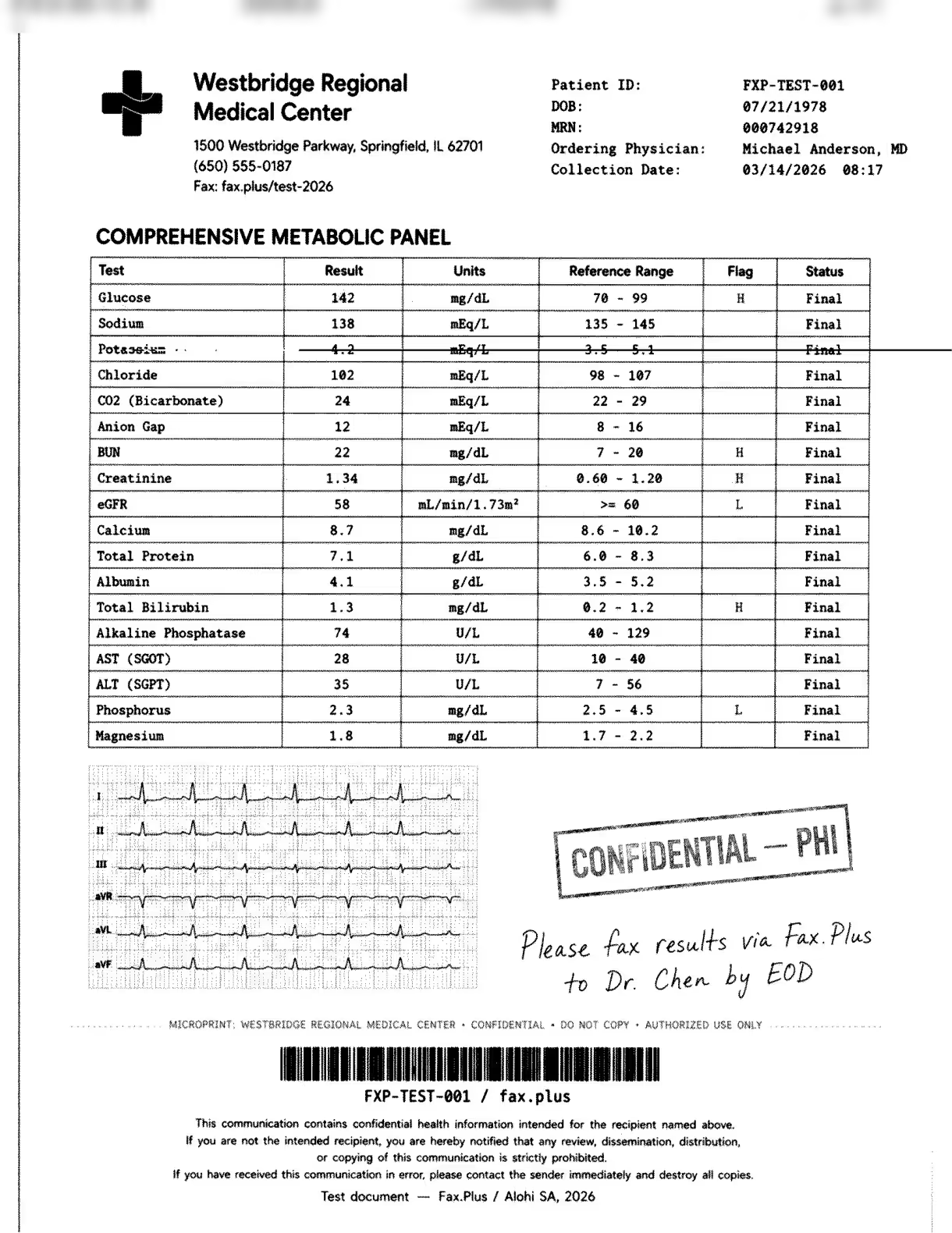
Dropbox Fax Standard
筋状の線は、代謝パネルのカリウムの行を横切っています。その行の結果値(4.2 mEq/L)、基準範囲(3.5~5.1)、およびステータスは、線で消されて判読不能になっています。その上のグルコース(Hと表示)と下のすべての行は判読可能で、心電図波形は赤いグリッドの背景の下で良好な状態を保っており、手書きの医師のメモは鮮明で、CONFIDENTIAL/PHIのスタンプもきれいに残っています。筋状の線の外側の出力は正常です。筋状の線の内側では、患者データの行が消えています。
Fax.Plus 標準
出力は鮮明で、カリウムを含む代謝パネルのすべての行が判読可能、HおよびLフラグの値もすべて読み取れ、心電図も部分的に保持されている。標準品質のファックス送信の基準となる。
 標準
標準
 標準
標準
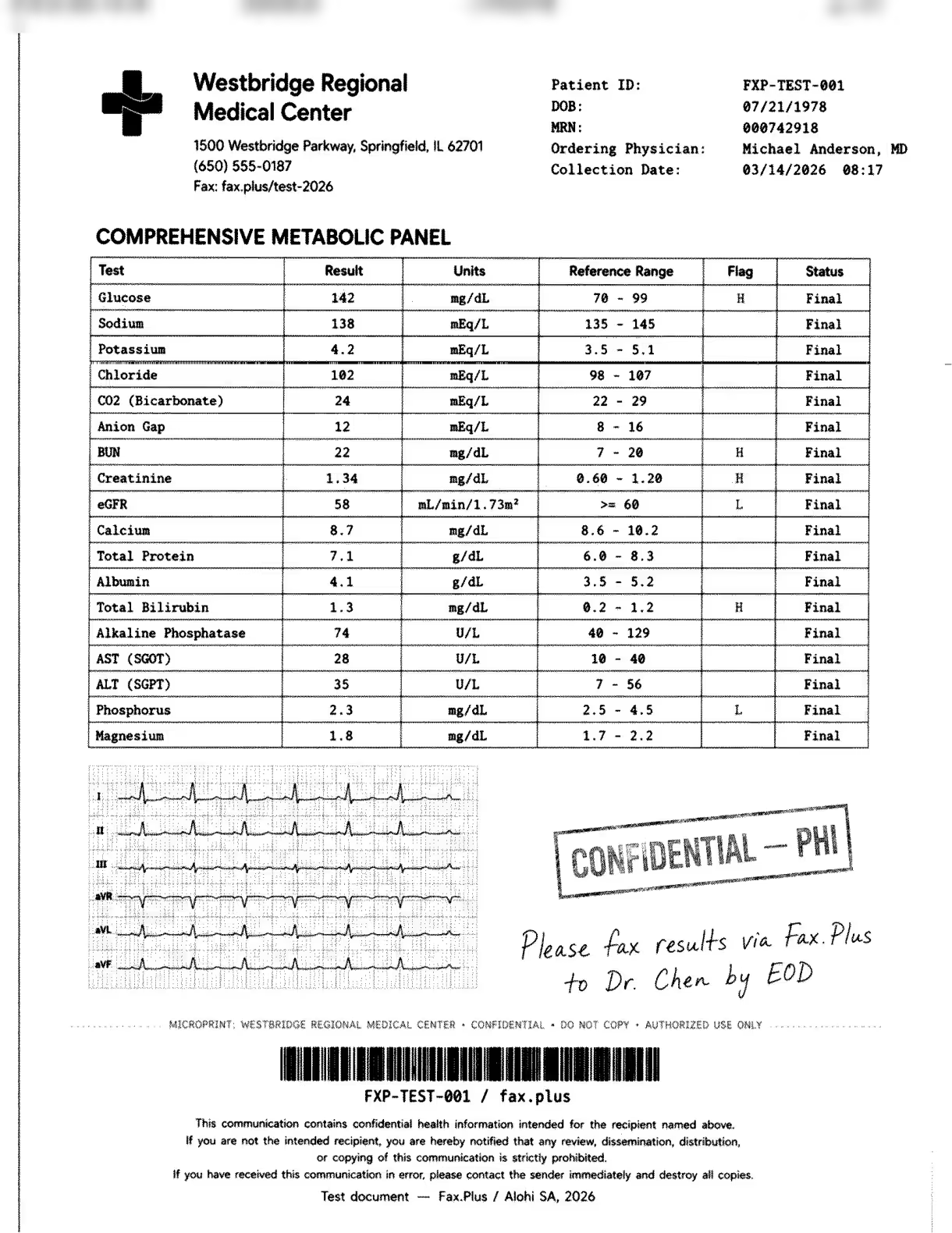
Fax.Plus HD(参考)
真の高解像度ファックス:パネルの各行が鮮明で、国旗もくっきり、心電図波形やバーコードもより鮮明、手書き文字もくっきり。Dropbox Faxでは提供されていない高解像度ファックスサービスです。
 HD
HD
 高解像度
高解像度
送信速度
Fax.Plus 通常は約1分で完了します。 Fax.Plus HD送信は約3分で完了しました。Dropbox Faxの標準送信は、テスト実行全体で1~2分で完了しました。
ストリーク・アーティファクト
この筋状のノイズは予測不可能で、余白ではなく実際のコンテンツに発生し、通常の送信でも頻繁に発生するため、単発的な現象ではなく、記録されたパターンとなっています。医療文書ではカリウムの行が消え、結果値、基準範囲、ステータスがすべて失われました。IRSフォームでは、項目Cの住所行が消えました。どちらの文書の受信者も、このコンテンツを復元する方法はありません。このノイズは断続的に発生し、常に発生するわけではありません。高解像度カラー版のチェックボックスをオンにした送信では、ファックスページはきれいに送信されました。これは、このノイズが品質設定に関連するものではなく、送信時の不具合であることを示唆しています。送信者がこのノイズを防ぐための制御手段はありません。
ストリークがなければ、Dropbox Fax Standard の出力は次のようになります。 Fax.Plus 通常レベル:白い背景、読みやすい表、きれいな切手、読みやすい筆跡。この項目の評価が4.5/5に留まるのは、まさにこの線状の線が原因です。
「高解像度カラー版」機能
高解像度カラー版はダウンロードリンクを送信しますが、より優れたファックスではありません
送信フローの「高解像度カラー版ファックスを送信する」チェックボックスをオンにしても、ファックスの送信品質は向上しません。受信者には標準のファックスに加え、URLとアクセスコードが記載されたHelloFaxの表紙が届きます。URLにアクセスコードを入力すると、アップロードされた元のファイルがダウンロードされます。結果として、送信者がダウンロードリンクをメールで送信するのと実質的に同じになります。ファックス回線は単にURLを配信するための手段であり、受信者がダウンロードするファイルは元のソース文書であって、ファックスそのものではありません。このダウンロードは送信された画像ではなくソース画像であるため、品質比較の対象から除外しました。
表紙にはwww.hellofax.com/HighResと印刷されますが、ページは読み込まれません。
表紙に印刷されているURLはwww.hellofax.com/HighResです。www.hellofax.comドメインはapp.hellofax.comに自動的にリダイレクトされますが、リダイレクトは/HighResパスまで引き継がれないため、印刷されたURLはエラーを返します。有効なアドレスはapp.hellofax.com/HighResですが、これは文書化されておらず、受信者が目にする場所には印刷されていません。印刷された指示に従うと、受信者はエラーに遭遇します。表紙のテンプレートは、HelloFaxが2024年にDropbox Faxになって以来更新されていません。
不一致に気づき、URLを修正して72時間以内に対応できるデジタル受信者にとっては、ダウンロードは非常に便利です。しかし、物理的なファックス機を使用する受信者、あるいは印刷された指示通りに操作する受信者にとっては、うまく機能しません。そうなると、文書をメールの添付ファイルとして送信する方がはるかに簡単だったでしょう。
Dropboxのファックス品質の比較
Dropbox Fax Standardは、それぞれのデフォルト設定において、eFaxとiFaxの両方よりも上位に位置づけられます。eFax Standardの出力は、どちらの文書タイプでも画質がやや粗く、細かいディテールが失われていました。iFax Standardでは、ページ全体に濃いグレーの背景のぼやけと波状のディザリングが見られました。Dropbox Faxには、これらの問題は一切ありません。
ストリークがそれを区別するFax.Plus 通常であれば一致するはずのものです。 Fax.Plus 送信時にファックスごとの品質切り替え機能(受信者フィールドと同じ画面に「標準」または「HD」が表示される)を備えており、HD出力はファイルダウンロードによる回避策ではなく、高解像度のファックス送信です。出力の一貫性が重要な文書量の多いワークフローにおいては、これが適切な比較対象となります。4.5/5という評価は、ほとんどの競合製品よりも優れた出力性能を示していますが、本番ワークフローで求められる一貫性の基準には達していません。
2価格 | スコア5 / 5
Dropbox Faxは、私たちがレビューした中で最も安価で信頼できるサブスクリプション型ファックスサービスです。ただし、契約前に更新条件をよく読んでおく必要があります。
料金プランはシンプルです。無料プランでは、ファックス送信専用で合計5ページ(1回限りの上限で、毎月ではありません)まで利用でき、紹介を通じてさらに最大20ページまで追加できます。それ以降は従量課金制となり、10ページまでは1ページあたり0.99ドル、それ以降は1ページあたり0.20ドルとなります。こちらも月額料金はかかりません。
自宅オフィス:月額9.99ドル
月間300ページまで、送信者最大5名まで、市外局番を選択できる受信ファックス番号、メールからファックスへの変換機能、受信機能付き。初月は2.50ドルの割引料金。有料プランの超過料金は、送受信1ページあたり0.05ドルで、同カテゴリーの中でも最低水準です。
プロフェッショナル:月額19.99ドル、スモールBusiness月額39.99ドル
プロフェッショナル版には500ページと10人の送信者が含まれます。スモール版Business 1,000ページと20人の送信者が含まれます。また、既存のFAX番号の移行に対応しているのは、この2つのプランのみです。Dropboxのヘルプドキュメントによると、1回線あたり60ドルの料金がかかり、移行できるのは米国とカナダの番号のみとなっています。
公開されている料金ページには表示されていないプランがもう一つあります。アプリ内では、2,000ページ以上、送信者40名まで利用できる「Ultimate」プランが月額69.99ドルで表示されますが、これはアカウントを作成して初めて確認できました。さらに上位の法人向けプランについては、営業担当者に問い合わせる必要があります。
年間請求は料金ページのトグルから選択できます。料金は、ホームオフィスが年間93.74ドル(月額7.81ドル)、プロフェッショナルが年間187.49ドル(月額15.62ドル)、スモールオフィスが年間187.49ドル(月額15.62ドル)です。 Business 年間374.99ドル(月額31.25ドル)で、いずれも月額料金より約22%安く、月払いの場合と比べて約2ヶ月半節約できます。Ultimateプランは年間671.90ドルで、約20%お得です。
有料プランはすべて、初月料金が通常料金の25%割引となります。料金ページには、初期費用、解約手数料、契約期間は一切不要と記載されています。
更新条件はまず読んでおくべき事項です
Dropbox Fax を規定する Dropbox Sign の利用規約には、主要な課金メカニズムが明記されています。第 8.4 項には、大文字で次のように記載されています。「お客様が Dropbox に解約を通知しない限り、試用期間終了時または更新時に自動的に料金が請求されます。」第 9.2 項では、契約期間終了の 30 日前までに通知がない限り、各契約期間は自動的に更新されます。
年間契約条項には特に注意が必要です。第8.6項では、解約は現在の契約期間の終了時に有効になると規定されています。年間契約の場合、これは翌年を意味します。返金不可の方針と相まって、ここでは年間契約は文字通り1年間の契約となります。
Dropbox Faxの料金体系を比較してみましょう
Dropbox Faxは1ページあたり0.033ドルで、1ページあたりのコストでこの表のすべてのサービスを上回っています。 Fax.Plus Basic 1ページあたり0.035ドルで、真の従量課金制を採用している唯一のサブスクリプションサービスです。 Fax.Plus Basic 最低価格は月額6.99ドルです。次の上位プランで何が購入できるかを機能別に確認するには、 Fax.Plus 料金ページにはすべての制限が公開されており、これは非公開のDropbox法人向けプランにはない透明性のレベルです。5/5の評価は、このカテゴリーで本当に優れた価値(ページあたりのコストが最も低く、従量課金オプションが唯一で、超過料金も最も低い)を反映していますが、5つ星には届きませんでした。 Fax.Plus 絶対的なエントリー価格を低く設定し、返金不可の方針を採用することで、クリーンな最高評価を得るためには対処が必要となる請求リスクを追加している。
3. セキュリティとコンプライアンス | スコア 4.5/5
Dropbox Faxは、動作基盤であるDropbox Signから強力なコンプライアンス基盤を受け継いでいます。問題は認証情報ではなく、ファックス製品自体に公開されたBAA(ビジネス契約書)や独自の暗号化仕様がないことです。
コンプライアンススタック
Dropbox Signは、ISO/IEC 27001、ISO/IEC 27018:2019、SOC 2 Type 2、SOC 3、HIPAA、HITECH、PCI DSS、CCPA、GDPRといった幅広い認証に加え、EU-US DPFやeIDASなどのデータ転送フレームワークにも対応しています。
暗号化に関して、トラストセンターはデータが保存時と転送時の両方で暗号化されていることを確認していますが、ファックス製品のAESビット長やTLSバージョンについては一切言及していません。一方、 Fax.Plus 、完全な認証情報、保存時のAES-256暗号化、転送時のTLS 1.3を直接公開しています。
Dropbox Fax は HIPAA に準拠していますか?
簡潔に言うと、Dropbox Fax プランは HIPAA 準拠として販売されておらず、 Business 提携契約(BAA)。
HIPAAはDropbox Signのトラストセンターにバッジとして表示されますが、これは電子署名製品であるDropbox Signのものであり、FAXのものではありません。FAX側で唯一それらしいのは、ラベルのない「HIPAAおよびSOC 2」という項目が価格なしで記載されている、販売担当者向けの連絡先欄だけです。
利用規約では、この点がより明確になっています。第4.2条(xii)項では、別途BAAに署名していない限り、保護対象医療情報(PHI)の取り扱いに本サービスを利用することを禁じています。セルフサービス型のファックスプランにはBAAが含まれていないため、これらのプランを通じてPHIをファックス送信することは、サポートがないだけでなく、利用規約にも違反します。フッターのバッジを信頼する医療チームは、プランで提供されていないサービスに申し込むことになります。
HIPAA準拠とBAAの比較
人々はこの2つを混同しがちです。HIPAA準拠とは、医療提供者が医療情報を保護するための安全対策を講じていることを意味します。BAAは、実際にPHI(保護対象医療情報)をプロバイダー経由で送信することを許可する契約です。どちらも必要です。署名済みのBAAがなければ、たとえ完全に認証されたサービスであっても、PHIを合法的に処理することはできません。
HIPAAに基づく価格透明性
Dropbox Fax の問題は、プラットフォームに HIPAA 管理機能があるかどうかではなく、セルフサービス プランに BAA オプションが掲載されていないことです。購入者は、価格ページからどのティアで HIPAA ファックス ワークフローが承認されているか、またその費用がいくらかを知ることができません。唯一の方法は、価格が公表されていない営業担当者に問い合わせることです。一方、 eFax は、少なくとも $39.99 のプランに BAA を掲載しています。 Business プラン。
Dropbox Faxのセキュリティはどのように比較されるのか
プラットフォームレベルのスタックは実在し、それが4.5/5という評価の理由です。トラストセンターの認証(ISO/IEC 27001、SOC 2 Type 2、HIPAA、HITECH、PCI DSS)はDropbox Sign全体に付与されており、Dropbox Faxもその傘下で動作しています。
この点が評価を決定的に下げているのは、ファックスに関する情報開示の欠如である。ファックス送信用の暗号化規格が公開されておらず、セルフサービス型のBAA(ビジネス契約書)も存在しない。これらは、規制対象顧客向けのファックスサービスにとって当然の要件である。レビュー担当者は、プラットフォームの信頼性は高いと評価するものの、プランのレベルで壁にぶつかるだろう。
より明確なベンチマークはFax.Plusで、組織レベルでのコンプライアンススタックを公開し、特定のBAAティアと明示されたAES-256暗号化と組み合わせることで、医療機関の購入者は営業担当者に連絡する前に、実際に何が得られるのかを正確に把握できます。
4. 使いやすさ(実体験)|スコア 4.5/5
ウェブの流れは実にシンプルだ。そして、それこそが唯一の流れなのだ。
ウェブポータル
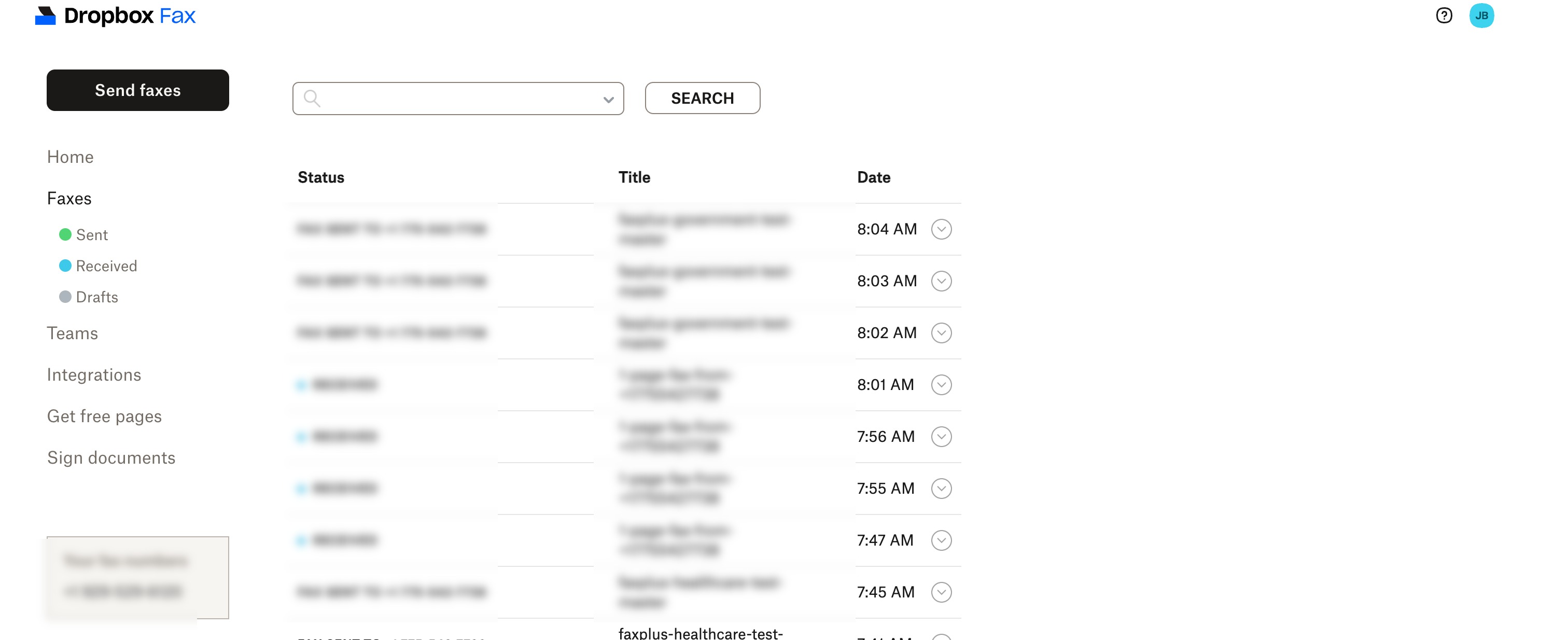
ポータルは、左側のナビゲーション(ホーム、送信済み、受信済み、下書きビューを備えたファックス、チーム、連携機能、文書への署名)を中心に構築されており、目立つ場所に「ファックス送信」ボタンがあります。送信は、文書の選択、確認、送信という2ステップのウィザードで行われます。内蔵のエディターを使用すると、プリンターに触れることなく、送信前にフォームに入力して署名できます。
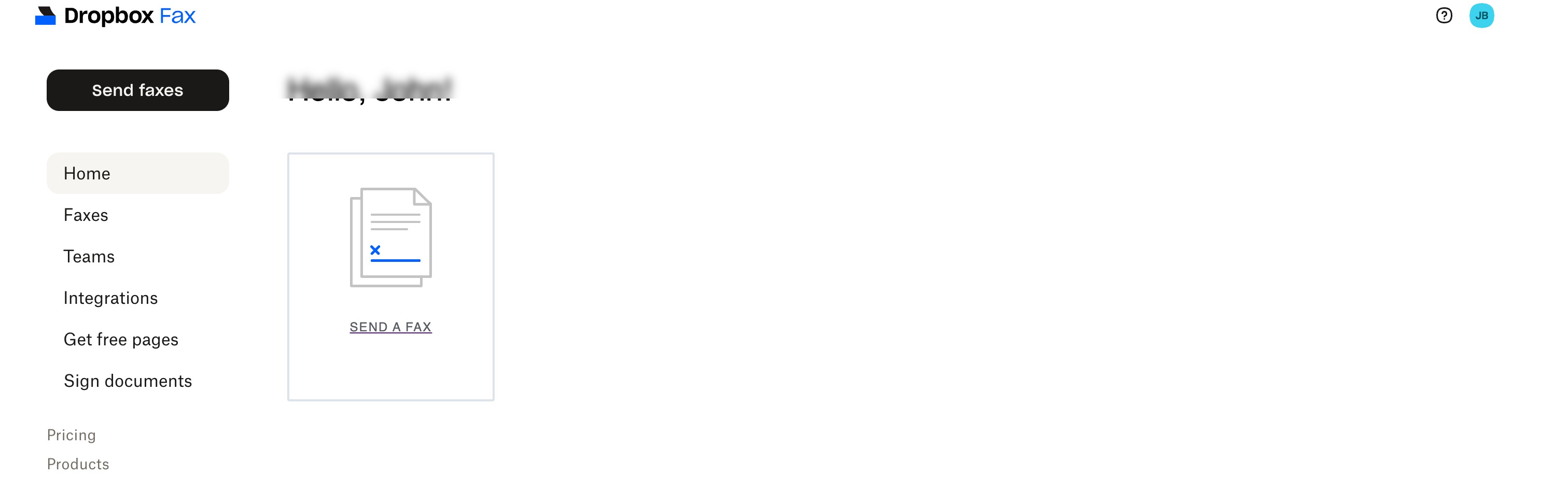
Dropbox、Google Drive、Box、OneDriveといったクラウドサービスからのファイル受け取りは問題なく動作し、アップロード機能は本製品の最も優れた部分と言える。ただし、ドキュメントのアップロードは、競合サービスで同じファイルを扱う場合と比べて、時折著しく時間がかかることがある。送信済みリストにはすべての送信内容が明確に表示されるが、失敗時の説明は不十分だ。詳細がほとんどない疑問符アイコンが表示されるだけで、再試行するかファイルを変更するかはユーザー自身が判断するしかない。
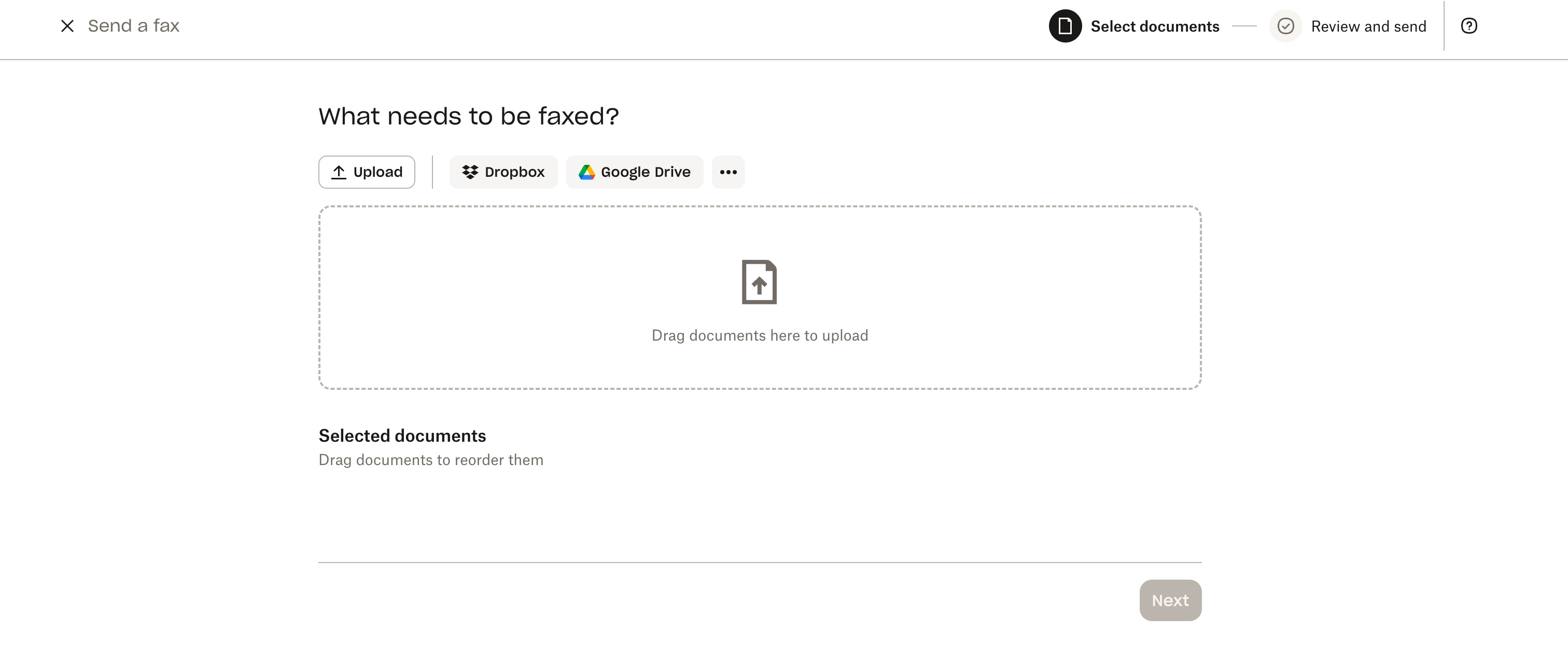
アドレス帳もありません。宛先欄には毎回手動でFAX番号を入力する必要があり、オートコンプリート機能を使うにはGoogleアカウントを接続するしかありません。しかも、接続したとしてもアプリ内で連絡先を表示、編集、管理することはできません。リピート利用を目的としたFAX送信アプリとしては、これは奇妙な欠点と言えるでしょう。
このポータルサイトは、明らかに旧式の製品である。app.hellofax.comにログインすると、リブランディングから2年経ってもHelloFaxのロゴが入った表紙が表示され、インターフェースは執拗にアップグレードを促す。最近のTrustpilotのレビューでは、無料プランにアクセスする際に、ほとんどあらゆる場面でアップグレードを促されるという苦情が繰り返し寄せられている。
モバイル:アプリはありません
Dropbox FaxにはiOSアプリもAndroidアプリもありません。Dropboxのヘルプセンターでもそのことが確認されており、モバイルファックスはブラウザのタブ経由、または@hellofax.comのアドレスに添付ファイルをメールで送信することで利用できるため、アプリは不要だと説明されています。ただし、メールでの送信には有料プランが必要です。
通知の受信、送信状況の確認、電話番号の管理はすべて、同じブラウザの回避策を介して行われます。
Dropbox Faxの使いやすさの比較
デスクベースの時折の送信に関しては、Dropbox Fax のウェブのシンプルさは同カテゴリーのどの製品にも引けを取りません。しかし、2026 年の市場の期待にはネイティブ モバイル アプリが含まれます。eFax、iFax、RingCentral、 Fax.Plus すべてiOSとAndroidアプリを出荷しており、 Fax.Plus App Storeでの評価は4.8/5、Google Playでは4.7/5。アプリは不要だとヘルプセンターで謳っているサービスが、その欠点を強みにしている。4.5/5という評価は、ウェブ上での使い勝手の良さと優れた統合性を反映しているが、モバイルアプリの欠如、2024年のリブランディング以前の古いインターフェース、リピーター向けのアドレス帳がないことがマイナス要因となっている。
5.カスタマーサービス、キャンセル、アカウント管理|評価 3/5
Dropbox Faxは、今回レビューしたサービスの中で解約手続きが最も簡単である一方、何か問題が発生した場合に連絡を取るのが最も難しい会社である。
サポートチャネル
サポートはウェブフォームのみです。どのプランにも電話番号やライブチャットはなく、料金ページのFAQにはいくつかの質問への回答が掲載された後、フォームへのリンクが示されています。テスト中にサポートリクエストを送信したところ、Trustpilotで長年報告されているパターンと一致しました。つまり、回答は会社のスケジュールに従ってメールで届き、2019年から2025年までのレビューでは、待ち時間が数日からまったくないまで様々であると一貫して報告されています。
公平に言えば、製品が正常に動作しているときは、ユーザーがサポートを必要とすることはほとんどなく、賞賛レビューでも会社に問い合わせたという記述はほとんど見られない。苦情は請求に関する問題を抱えたユーザーに集中しており、まさにこうした時にサポートが受けられないことが最も大きな問題となるのだ。
キャンセルする前に:ファックス番号とデータ
キャンセルする前に、2つの点に注意してください。プロフェッショナルプランとスモールプランでは、番号ポータビリティはセルフサービスです。 Business プラン:Teamsを開き、「番号の移行」をクリックし、番号を入力して資格を確認し、メールの指示に従ってください。料金は1回線あたり60ドルで、米国とカナダの番号のみが対象です。番号の移行は別問題です。Dropboxのヘルプセンターや利用規約には、番号移行の手順は一切記載されていません。
利用規約に明記されているとおり、第9.5項では、Dropboxは契約終了から30日経過後であればいつでもお客様のデータを削除する権利を有します。
**重要:** アカウントが閉鎖されると、Dropbox は 30 日経過後いつでも保存済みのファックスを削除する可能性があり、ファックス番号の移行手続きに関する情報は提供されていません。解約する前に、必要なものをすべてダウンロードし、番号移行を開始してください。
Dropbox Faxをキャンセルする方法
正式な手続きは完全にセルフサービスです。ログイン後、右上隅のイニシャルにカーソルを合わせ、「設定」を選択し、「請求」タブをクリックしてから「プランのキャンセル」をクリックしてください。アカウントは請求期間の終了まで有効で、その後無料プランにダウングレードされます。電話連絡も、解約勧誘も一切ありません。
例外事項:年間プランは当該年度末まで有効です。割引価格の最初の1ヶ月は、キャンセルされない限り、最初の請求期間終了時に自動的に通常の月額料金に切り替わります。払い戻しは行われません。
ユーザーからの報告
Trustpilot で 2020 年~ 2025 年にかけて繰り返し見られるパターンは、契約期間終了後も継続する請求です。試用期間が 1 年間の課金に切り替わったり、アカウントが閉鎖された後も月額料金が継続されたり、年間支払いに加えて月額料金が発生したりしています。最近のレビューでは、送信されたと報告されたファックスが受信者に届かなかったという、配信の信頼性に関する別のスレッドも現れています。Dropbox Fax の Trustpilot スコアは 22 件のレビューで 2.0/5 ですが、G2 では 2020 年~ 2023 年のレビューが中心でベンダーが招待したレビュアーも含まれている 57 件のレビューで 4.5/5 となっています。どちらの数値も実際の数値であり、その差は依頼されたフィードバックと依頼されていないフィードバックの違いです。
Dropboxのファックスアカウント管理機能の比較
セルフサービスキャンセルフローは、一部の旧来のFAXベンダーが今でも採用している電話キャンセルの迷路を凌駕しており、その点は評価に値する。しかし、その周辺体制(フォームのみのサポート、返金なし、文書化されていないポートアウト、30日間のデータ削除期間)は、これまでレビューしてきた中で最も制限の厳しい部類に入る。この価格帯のほとんどの競合他社は、少なくとも1つのライブチャネルを用意しており、公開されている制限など、ティアごとの透明性のあるポリシーを提供している。 Fax.Plus 価格ページには、購入者が契約前に知っておくべき内容が明記されています。3/5という評価は、すべてのプランでウェブフォームのみのサポートしかなく、エスカレーションパスがないこと、Trustpilotの評価が2.0/5で、請求と連絡の取りにくさが指摘されていること、そして請求条件によって顧客が事後的にほとんど救済措置を受けられないことを反映しています。
6.データの所在地と保持|スコア 3.5/5
DropboxはGDPRに基づくデータ転送メカニズムを適切に文書化し、サブプロセッサーリストを公開している。これは競合他社の中には見られないほどの充実ぶりだ。トラストセンターでは、インフラストラクチャプロバイダーとしてAmazon Web Servicesが明記されており、プライバシーポリシーだけでは得られない透明性を示している。しかし、存在する地域別データ保存場所管理機能は、プラットフォームの電子署名機能に関するものであり、FAX機能に関するものではない。また、FAXデータ専用のホスティング地域は公開されていない。
保持
すべてのプランで安全なクラウドストレージが謳われており、プライバシーポリシーでは、その目的を達成するために必要な期間、個人情報を保持するとされています。プランごとの保持期間の上限は公表されておらず、ユーザーが利用できる保持期間の管理機能もありません。アカウント解約後は、第9.5項の30日間削除条項が適用されます。
データ所在地
Dropbox Signプラットフォームは、EUオプションを含む地域別データ保存場所を提供しており、保存されたドキュメントは選択したAWSリージョン(例えば、パリにバックアップがあるフランクフルト)に保存されます。ただし、この制御はSignの電子署名ドキュメントに関するものであり、ファックス製品に関するものではありません。この設定はSign管理コンソールの「ドキュメントとテンプレート」にあり、すべてのプランのデフォルトリージョンは米国で、アクセス制限があります。 Premium 階層構造。送受信ファックスについては、同等の地域選択オプションは公開されておらず、デフォルトでは米国に保存されるようです。
GDPRに関する書類手続きは概ね整っており、標準契約条項(SCC)やEU・米国間、英国間、スイス間のデータプライバシーフレームワークもすべて揃っている。しかし、欧州の顧客や業界特有のローカライゼーション規則を持つ企業にとって、ファックスデータには適用できないプラットフォームレベルのEUオプションは、依然として部分的な解決策に過ぎない。
Dropbox Faxのデータ所在地の比較
市場の透明性の最終形態は、20以上の地域にわたるユーザーが選択可能なデータ所在地のように見える。 Fax.Plus 提供するEnterprise ティア。SRFaxも同様に、カナダのホスティングに名前を付けています。Dropbox FaxはAWSを冠するプラットフォームを継承しており、署名文書のEU居住地も提供していますが、ファックスデータ自体のリージョン選択は公開していません。
3.5/5という評価は、AWSの名称を明記し、GDPRに基づくデータ転送を文書化していることは、完全に沈黙しているよりはましだが、ファックスデータに関してリージョンやユーザー制御に関する情報が公開されていないため、ローカライゼーション要件を持つ規制対象の購入者は、ここでの評価を完了できないことを反映している。
7 。 Enterprise APIとヘルスケアオートメーション | スコア3 / 5
Dropbox Faxには、正式なドキュメント付きのAPIが存在する。問題は、その周辺環境にある。
APIアクセス
Fax APIはDropbox Signの開発者向けドキュメント内にあり、送信、受信、一覧表示、ダウンロード、削除の5つのエンドポイントが公開されています。ドキュメントにはv1からv3への移行ガイドが含まれており、APIが廃止されたのではなく、維持されていることを示しています。
アクセスするには、サポートに連絡してFax APIプランにアップグレードする必要がありますが、これはこのカテゴリでは一般的なことです。しかし、このAPIの特徴は、公開ドキュメントに欠けている点です。具体的には、APIの価格情報、Fax専用のWebhookドキュメント、OAuth実装ガイドが公開ページに掲載されていません。そのため、APIを評価する開発者は、問い合わせる前にコストや統合範囲を判断することができません。
MCPとAIワークフロー
2026年6月現在、Dropbox Faxはファックス自動化専用のMCPサーバーを公開していないため、利用可能なFax API以外に、AIエージェントのワークフローが製品にアクセスする明確な公開ルートがありません。AI支援によるドキュメントワークフローを検討している開発チームにとって、これは重要な問題です。なぜなら、MCPはエージェントが外部ツールと連携するための標準化された方法を提供するからです。
この種のワークフローを評価するチームは、Dropbox FaxのAPI専用の公開パスと、AIエージェントワークフロー用の公開MCPサーバーを比較することができます。特に、Claude、OpenAI Agents SDK、またはその他のMCP互換環境などのツールを試している場合は、この比較が役立ちます。
医療自動化
医療業界に特化した製品ラインも、電子カルテとの連携機能も、そして前述の通り、基盤となるファックス事業提携契約(BAA)も存在しない。
Dropbox Fax APIの比較
文書化された5つのエンドポイントAPIにより、Dropbox Faxは消費者向けサービスよりも優位に立っていますが、Webhookドキュメントの不足、API価格の非公開、OAuthドキュメントの欠如は、評価時に重要なギャップを残しています。プログラムによるファックス送信を検討しているチームは、専用のFax APIページでより詳細な公開APIドキュメントの内容を比較できます。また、エージェントベースのワークフローを検討しているチームは、公開されているMCPサーバーを確認することもできます。特に医療自動化に関しては、この製品は候補には入りません。3/5という評価は、カテゴリの中間点を獲得するメンテナンスされたAPIを反映していますが、ドキュメントの不足、ファックスワークフロー用の公開MCPパスの欠如、医療専用の製品ラインの欠如によって評価が下がっています。
Dropbox Faxの代替案
Fax.Plus - Dropbox Faxの総合的に見て最高の代替サービス
Dropbox Fax の総合的な代替として最も強力なサービス。個人、チーム、企業向けのモダンで高品質なクラウド ファックス。HIPAA 準拠、ISO 27001、SOC 2 Type II 認証取得済み。OAuth 2.0 および MCP サーバーサポートを含む高度なファックス API を備え、Web、デスクトップ、モバイルでクリーンなエクスペリエンスを提供。プランは無料ティアから始まり、 enterprise 。
最適なユーザー:信頼性の高いファックス品質、最新のユーザーエクスペリエンス、幅広いコンプライアンス、開発者向けの統合機能を求めるユーザー(個人ユーザーから大規模チームまで)。
SRFax - 米国およびカナダの小規模医療チームに最適
カナダを拠点とするクラウドファックスサービス。HIPAAおよびPHIPAに準拠し、医療保険プランにBAA(事業提携契約)が含まれ、料金体系は透明性が高く、REST APIも利用可能です。メールからファックスへの変換に特化しており、最新のモバイルアプリは提供していません。サービス提供地域は米国とカナダのみです。
最適なユーザー: HIPAA/PHIPAのサポートと予測可能な価格設定を必要とする米国およびカナダの医療チーム。特に、日々の業務フローにおいてメールからファックスへの変換で十分な場合に最適です。
FaxZero - 真の単発ファックス送信に最適
アカウント不要の無料ファックス:1日最大5回まで、各3ページ(ブランドロゴ入りの表紙付き)のファックスが無料。または、最大25ページまで1回あたり3.29ドル。着信番号、ストレージ、管理するサブスクリプションは一切不要です。
最適なユーザー:アカウントを作成したり、サブスクリプションを管理したり、受信ファックスを受け取ったりすることなく、手軽にファックスを送信したい、たまにしかファックスを使わないユーザー。
よくある質問
Dropbox Faxの料金はいくらですか?

無料:合計5ページまで(送信のみ)。従量課金:10ページまではファックス1枚あたり0.99ドル、それ以降は1ページあたり0.20ドル。ホームオフィス:月額9.99ドル(300ページ)。プロフェッショナル:月額19.99ドル(500ページ)。小規模Business月額39.99ドルで1,000ページまで。アプリ内課金のUltimateプランでは、月額69.99ドルで2,000ページ以上まで利用できます。有料プランの超過料金は1ページあたり0.05ドルです。
Dropbox Fax は HIPAA に準拠していますか?
Dropbox Faxのセルフサービスプランには、HIPAA準拠を明記しているものやBAAが含まれているものはありません。利用規約では、別途署名済みのHIPAAなしにDropbox Signサービスを使用してPHIを保存、送信、またはその他の方法で処理することを禁止しています。 Business 提携契約とは、公共のセルフサービスファックスプランではPHIファックス送信が許可されていないことを意味します。医療チームは、SRFax(月額12.60ドルから)、eFaxなど、ファックスBAAティアが公開されているサービスを検討する必要があります。 Business 月額39.99ドル、またはFax.Plus Enterprise 。
2026年において、Dropbox Faxは利用する価値があるだろうか?
デスクワークでたまに送信する程度であれば、確かにファックスはおすすめです。無料の5ページ、従量課金制、そして300ページまで使える月額9.99ドルのプランは、ファックスとしては破格の安さです。しかし、HIPAA(医療情報保護法)への対応、モバイルアプリ、サポート体制、返金などが必要な場合は、当社のレビューでは4.1/5という評価にとどまり、より優れた選択肢が存在します。
Dropbox Faxにはモバイルアプリがありますか?
いいえ。iOS版やAndroid版のアプリはありません。Dropboxのヘルプセンターでも確認済みです。モバイルファックスを利用するには、ブラウザでapp.hellofax.comにアクセスするか、@hellofax.comのアドレスに文書をメールで送信する必要があります。後者の場合、有料プランへの加入が必要です。
HelloFaxはDropbox Faxと同じですか?
はい。HelloFaxは2011年にサービスを開始し、2019年にHelloSignが2億3000万ドルでDropboxに買収された際にDropboxに統合され、2024年にDropbox Faxにブランド名が変更されました。アプリは現在もapp.hellofax.comで利用でき、表紙にはHelloFaxのブランド名が表示されています。
Dropbox Faxの最適な代替サービスは何ですか?
重要なのは、どのギャップかによって異なる。 Fax.Plus 最新のアプリと公開されたコンプライアンススタックについてはSRFax、低コストの医療BAAカバレッジについてはSRFax、無料の単発送信についてはFaxZeroが適しています。
Dropbox Faxを解約した場合でも、現在のFAX番号は維持できますか?
プロフェッショナルプランとスモールプランでは、番号移行はセルフサービスです。 Business 手順:Teamsを開き、「番号の移行」をクリックし、番号を入力して移行資格を確認し、画面の指示に従ってください。1回線あたり60ドルの手数料がかかり、移行できるのは米国とカナダの番号のみです。他国への番号移行は別問題です。Dropboxのヘルプセンターや利用規約には、他国への番号移行に関する説明は一切ありません。番号移行は、解約後ではなく、解約前に計画してください。
Dropbox Faxの「高解像度カラー版ファックスを送信する」機能は何をするものですか?
高画質のファックスは送信されません。チェックボックスをオンにすると、受信者は標準のファックスに加えて、URLとアクセスコードが記載されたHelloFaxのカバーページを受け取ります。そのURLにコードを入力すると、72時間以内にアップロードされた元のファイルをダウンロードできます。ファックスページ自体は標準品質です。また、バグがあります。カバーページにはwww.hellofax.com/HighResと印刷されますが、これは機能しません。www.hellofax.comドメインはapp.hellofax.comに自動的にリダイレクトされますが、そのリダイレクトは/HighResパスまで引き継がれません。機能するアドレスはapp.hellofax.com/HighResですが、受信者が確認できる場所には印刷されません。物理的なファックス機を使用している受信者、または印刷された指示に従っている受信者にとっては、この機能は機能しません。


Featured Articles
See All



Confédération Suisse
Confederazione Svizzera
Confederaziun Svizra
Swiss Confederation
Innosuisse - Swiss Innovation Agency