HumbleFax Review 2026: Features, Pricing, and Real-World Performance
We reviewed HumbleFax: the $10 unlimited promise, the fine print that limits it, the missing HIPAA path, and a surprisingly capable API. Scored across seven categories.


- HumbleFax is a single-plan, $10-per-month unlimited fax service from Web Ventures LLC, sold on simplicity and a price that undercuts the whole category.
- The headline is real: unlimited pages, no overage fees, a dedicated local number, and up to 10 users, all for one flat fee.
- The fine print is where the story turns. The customer agreement reserves the right to move heavy senders off the unlimited plan, and a documented pattern of forced upgrades and account suspensions follows from it.
- No HumbleFax plan is marketed as HIPAA compliant, there is no healthcare or BAA page, and the terms mention a BAA only in passing with no way to obtain one.
- Best fit is the individual or small business that faxes regularly within the United States or Canada, values a predictable flat price, and does not handle protected health information.
Is HumbleFax Worth It in 2026?
If you fax often and hate metered billing, HumbleFax is built for exactly that frustration. One plan, $10 per month, unlimited pages in and out, a dedicated local fax number, and no per-page overage charges anywhere. You send from the web dashboard, from your phone browser, or by emailing your document to {number}@humblefax.com, and a REST API and Zapier connector come included at no extra cost. The customer satisfaction signal is genuinely strong: thousands of reviewers praise the simplicity, the reliability, and above all the price.
The picture gets more complicated once you read the customer agreement. The $10 unlimited plan is described in the terms as the option for individual, non-commercial use, and the agreement separately lists tiered and metered account types that the marketing site never shows you. Tie that to a fair usage clause that flags "unusual calling patterns," and you get the most consistent complaint on the public record: heavy senders moved off the $10 plan onto a $25 one, or suspended outright, with the company citing usage the homepage told them was unlimited. There is no HIPAA path to speak of, no published security certification, and faxing is limited to the United States and Canada. None of that erases the value. It just means the flat price comes with conditions the homepage does not spell out.
About HumbleFax
HumbleFax is operated by Web Ventures LLC, a company based at 50 East Ridgewood Avenue in Ridgewood, New Jersey, which is also the governing jurisdiction for the customer agreement. Unlike most of the category, HumbleFax is not part of a larger fax conglomerate. It is an independent, narrowly focused product built around a single idea: charge one flat price for unlimited faxing and keep everything else simple. The company has been operating under the current customer agreement since 2019, and its own marketing leans into a David-versus-Goliath framing, pointing out that several of the larger fax brands are owned by the same parent and arguing that the resulting lack of competition is why the rest of the category meters pages and charges overage fees.
The product surface matches that philosophy. There is a web dashboard at app.humblefax.com, email-to-fax, and a mobile-optimized web app you reach through your phone browser. There is no desktop application and no native iOS or Android app, a point worth weighing if you expect to fax primarily from a phone. Fax numbers are local United States and Canada numbers, chosen during signup from any area code you like, and the service does not support international faxing in either direction.
What sets HumbleFax apart from the other budget-minded names in the category is its developer surface. A real REST API, a Zapier connector, and webhook support all ship as part of the standard $10 plan, where most competitors gate programmable faxing behind a sales conversation or a higher tier. For a service that markets itself on humility and simplicity, that is a genuinely uncommon inclusion, and it is the single feature that lifts HumbleFax above pure consumer-grade faxing.
How We Reviewed HumbleFax
We reviewed HumbleFax using four evidence layers:
- Hands-on product testing. We reviewed signup, the web dashboard, email-to-fax, the resolution settings, and the cancellation path.
- Fax-quality testing. We tested HumbleFax using two fixed, synthetic, real-world-style source documents: one government and legal document and one healthcare lab results form. The same source files were used across testing so we could evaluate output quality consistently. Across the tests, we assessed the practical details that matter in real document workflows, including readability, layout preservation, handwriting, fine print, stamps, signatures, barcodes, dense tables, and mixed font sizes. No real personal, medical, tax, company, or patient data was used in the fax-quality tests.
- Billing and account-control review. We monitored signup through the first billing cycle, read the full customer agreement, and mapped the cancellation path against the public complaint record.
- Business-readiness review. We checked HumbleFax's public materials and developer documentation for security and compliance claims, data residency and retention information, API and developer resources, healthcare-readiness details, and enterprise automation support.
We then scored HumbleFax across seven areas: fax quality, pricing, security and compliance, usability, customer service and account control, data residency and retention, and enterprise, API, and healthcare automation.
1ファックス品質 | スコア4 / 5
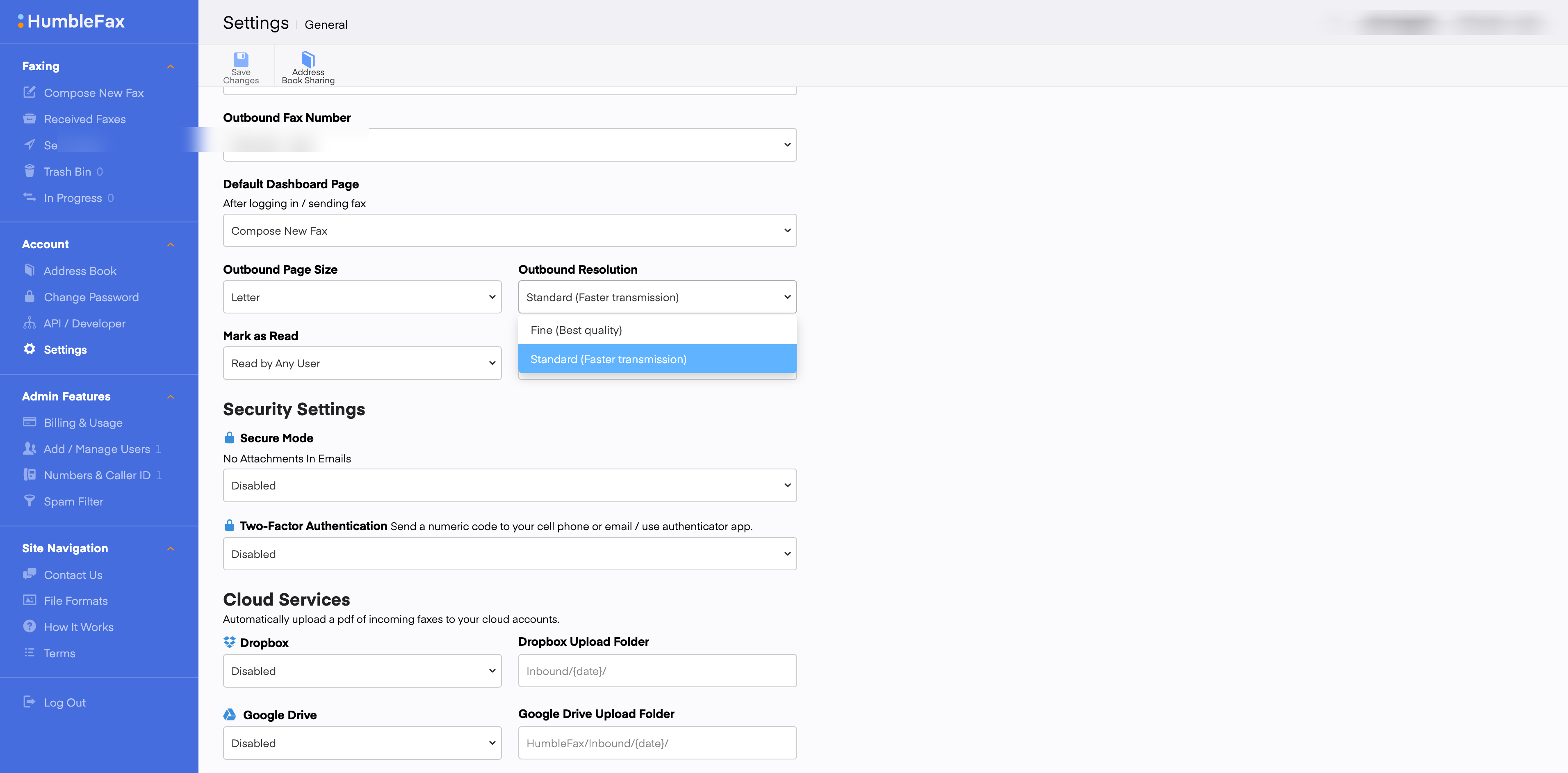
The headline finding from the hands-on test is that HumbleFax was the surprise performer in this review. Output on both tiers comes through on clean white paper with no grey background wash, which puts it well ahead of the MyFax and eFax renders, on a par with Dropbox Fax, and clearly above iFax on output cleanliness. The resolution setting lives in the dashboard settings panel rather than the send form, and the default is Fine. Standard is available for faster transmission and requires a deliberate settings change, so most users will fax on Fine unless they go looking for speed.
テスト方法論
We tested two document types in both sending directions (Fax.Plus to HumbleFax and HumbleFax to Fax.Plus) and ran multiple passes. Because HumbleFax gives two quality options, we ran both Standard and Fine and compared them against the Fax.Plus Standard and HD output on the same source files. The two test documents were a simulated IRS Form 2553 and a simulated healthcare lab results form, the fixed synthetic files used across this series. No real personal, medical, tax, company, or patient data was used.
政府および法律文書のファックステスト
最初のテストでは、米国政府の納税申告書であるIRSフォーム2553を模擬したものを使用しました。このような文書は、法律、金融、不動産などの業務フローでよく見られます。例えば、署名済みの契約書、納税申告書、複数当事者間の承認書など、あらゆる詳細が漏れなく届く必要がある場合です。
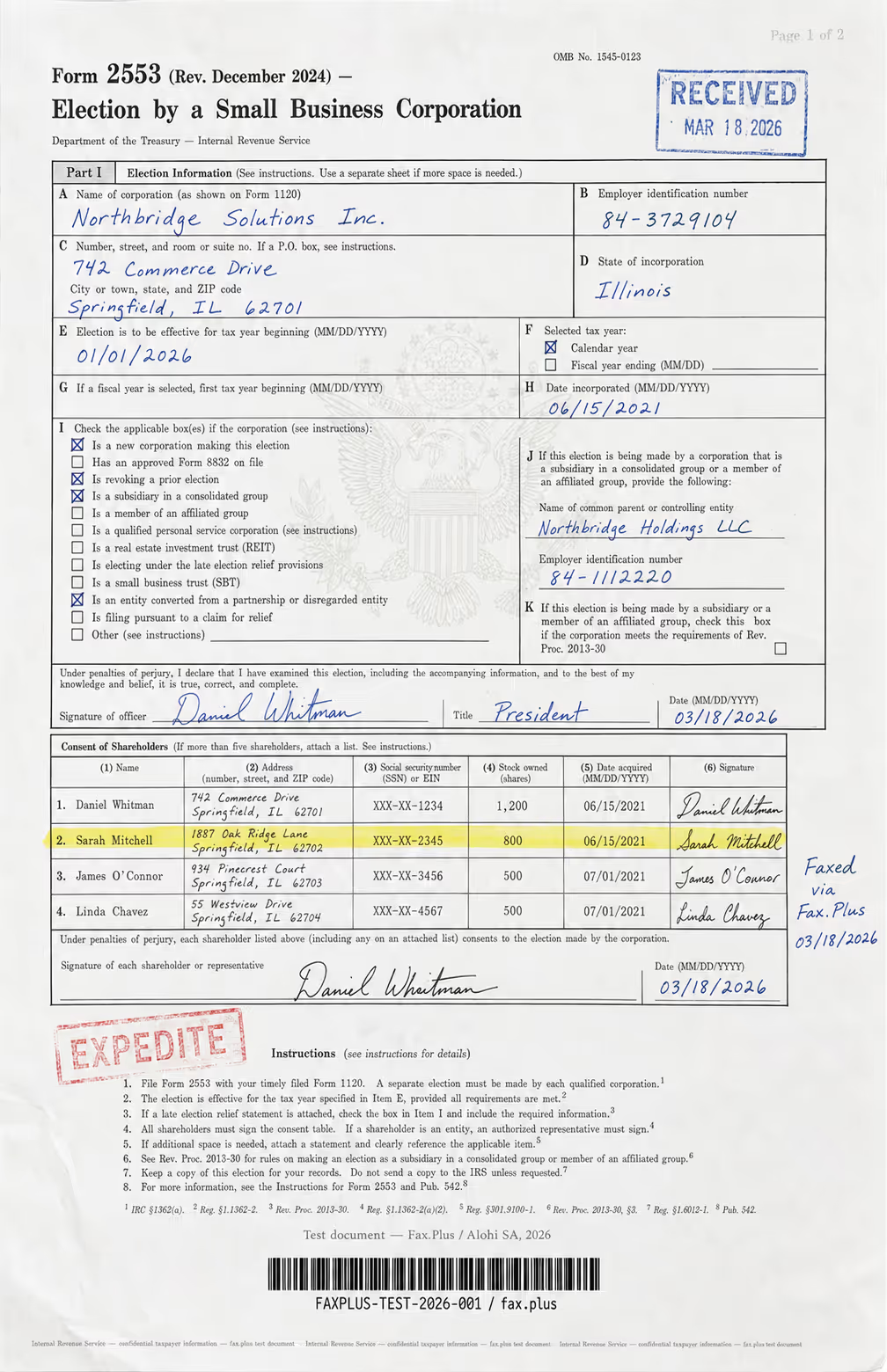
テスト文書の内容:
- 手書きの署名と筆記体で書かれた役員の名前
- 日付入りの公式スタイルの受領印
- インクの縁が色褪せたEXPEDITEのゴム印
- 中央に米国政府の鷲の紋章の透かし
- 株主名簿の行がハイライト表示されています
- 見出し、本文、細字でフォントサイズが混在している
- 複数の列にわたる高密度の表形式データ
- 不正防止認証のための底部マイクロプリントライン
HumbleFax Standard vs Fax.Plus Standard
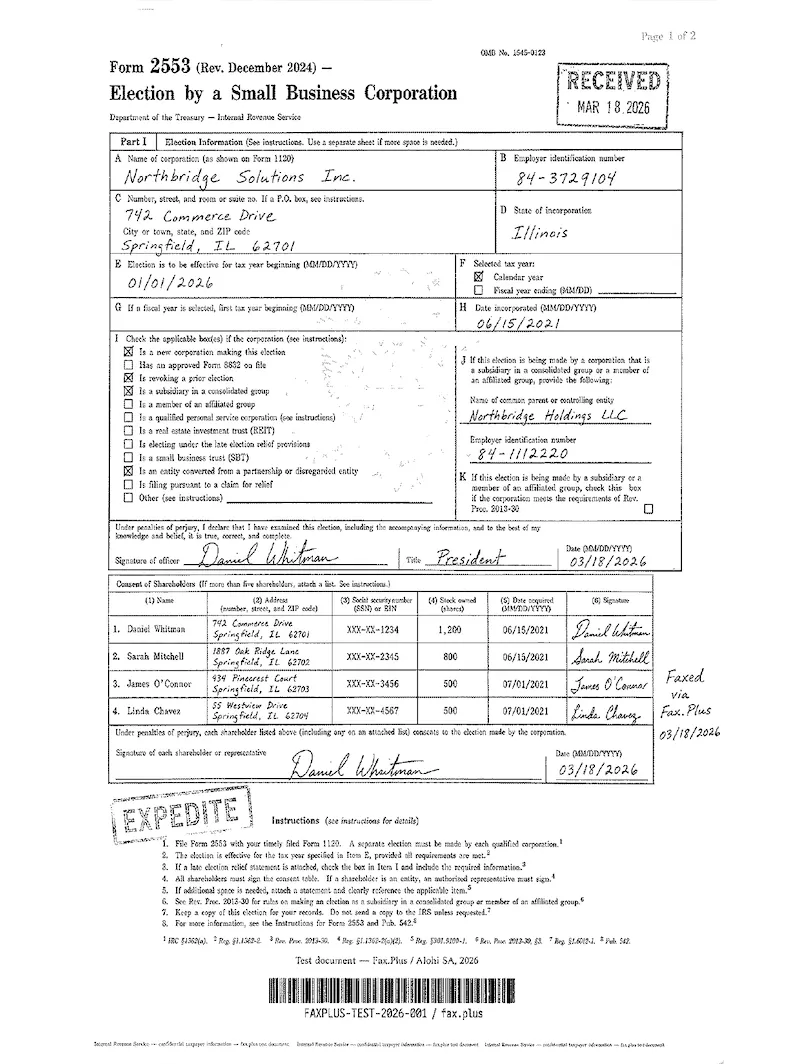
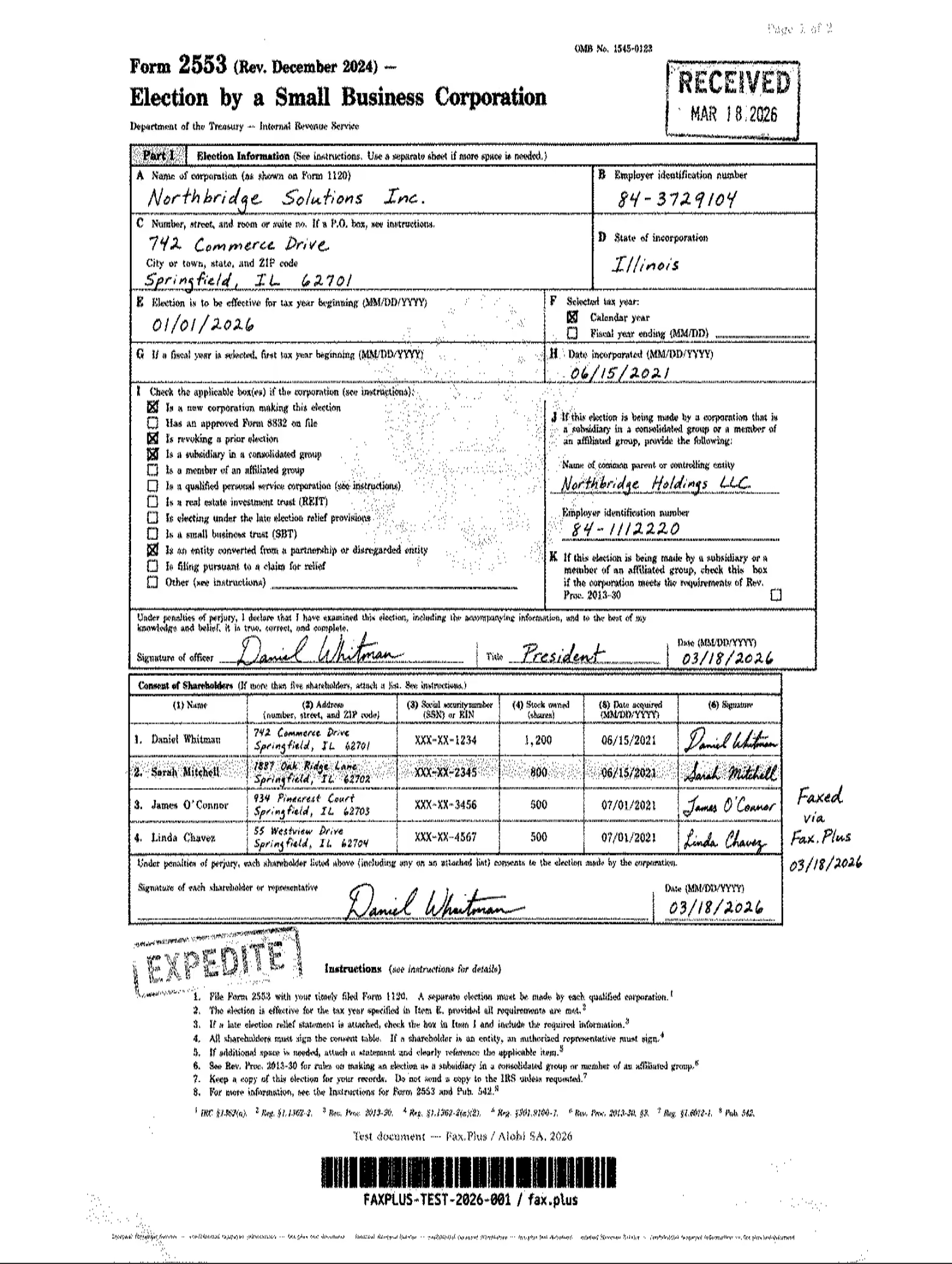
The Standard output arrived on clean white paper without the grey dithered background that often appears in lower-quality fax outputs. The printed text, the RECEIVED and EXPEDITE stamps, the handwritten signatures, and the shareholder table all came through legible. The eagle watermark behind boxes I and J does not survive Standard transmission on either service: this is a fax-resolution limit at this tier, not a HumbleFax-specific weakness. The microprint line at the foot of the form dissolves to a soft smear, as expected at fax resolution.
Standard fax quality comparison. On the IRS form, both services render on clean white paper at this tier. HumbleFax Standard and Fax.Plus Standard are closely matched: text, stamps, signatures, and the shareholder table come through legible on both. The eagle watermark does not survive on either at Standard transmission, which is the expected result at this resolution tier.
 標準
標準

HumbleFax Fine vs Fax.Plus HD
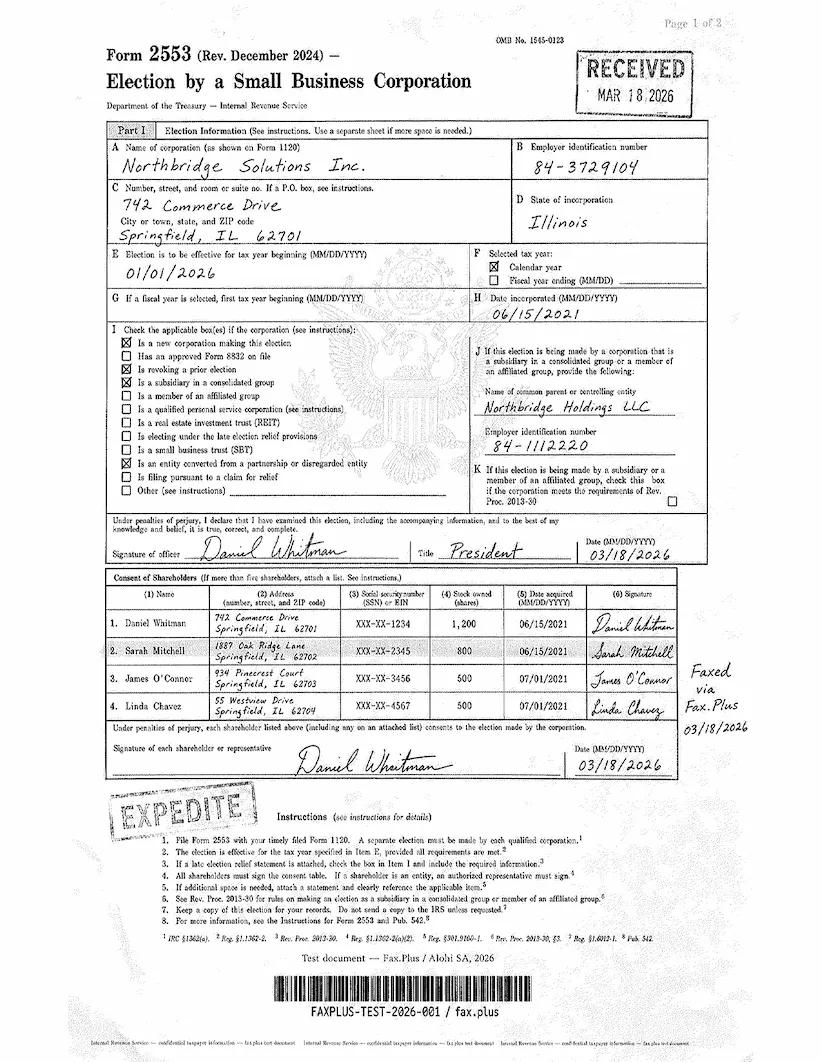
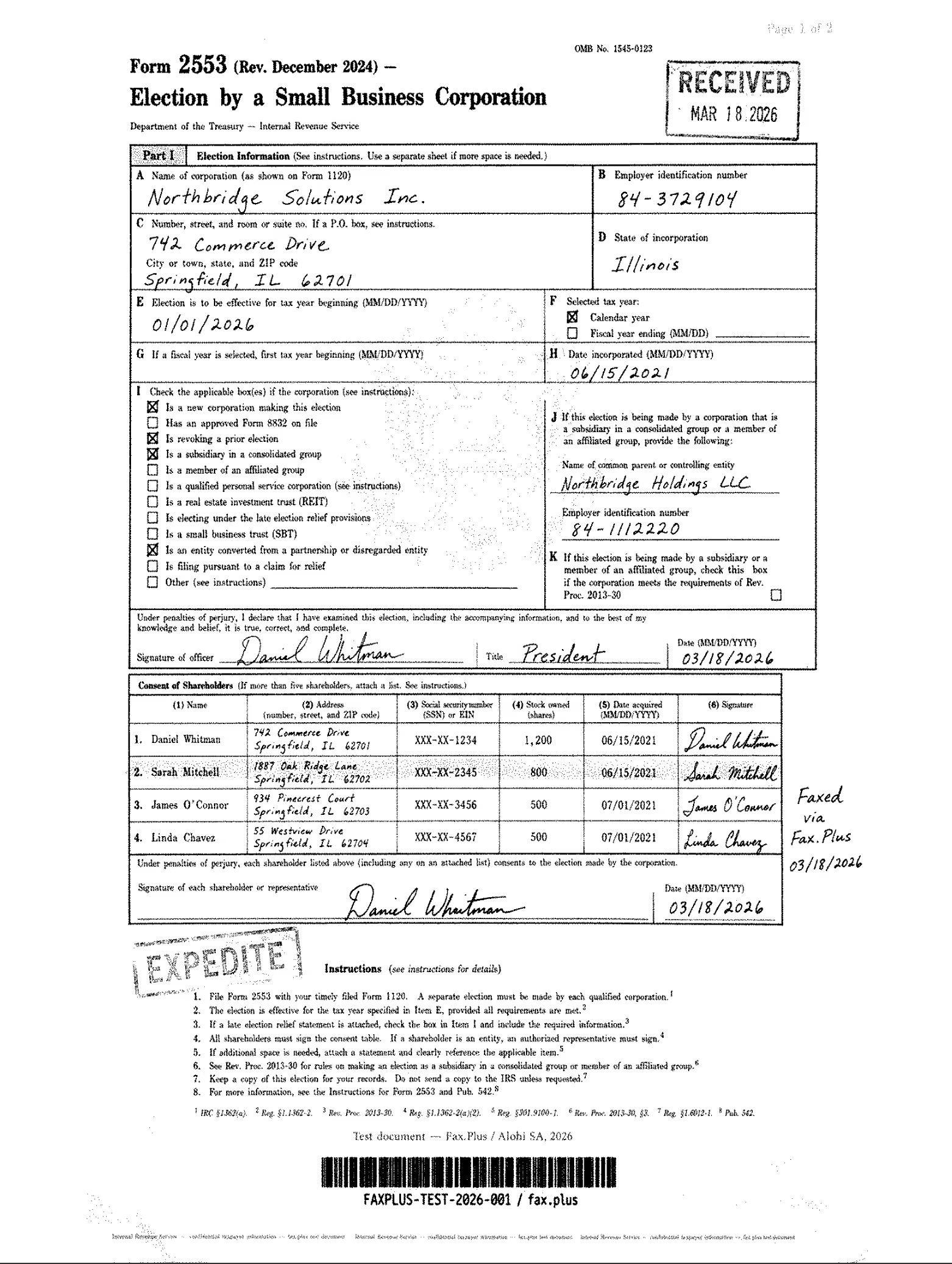
Fine sharpens the output across the board. Text and fine print are crisper, the stamps hold their edges more cleanly, and the shareholder table grid tightens up. The microprint line remains a smear. The output at this tier reads clean.
HD fax quality comparison. This is where the tiers part company. Fax.Plus HD holds the Treasury eagle watermark in full, the feathers, stars, and shield clearly visible in the center of the form. HumbleFax Fine produces a clean, sharp output but the watermark does not come through at that level of detail. The ink and form content survive equally well on both; the watermark headroom is what Fax.Plus HD has and HumbleFax Fine does not fully reach.
 HD
HD
医療文書テスト
The second test used a simulated lab results form from a fictional medical center. No real patient data was used. To be clear up front: HumbleFax has no marketed HIPAA path and no BAA mechanism, so this document type is not one a healthcare organization should be sending through this service. We ran the test anyway out of curiosity, to see how the output holds up on a clinically demanding document. The results below are a quality observation only, not an endorsement of HumbleFax for healthcare workflows. With that said, the output quality is worth noting: on this document HumbleFax rendered cleaner pages than several services that actively position themselves for healthcare, which is a useful reminder that marketing posture and actual print fidelity are two different things.
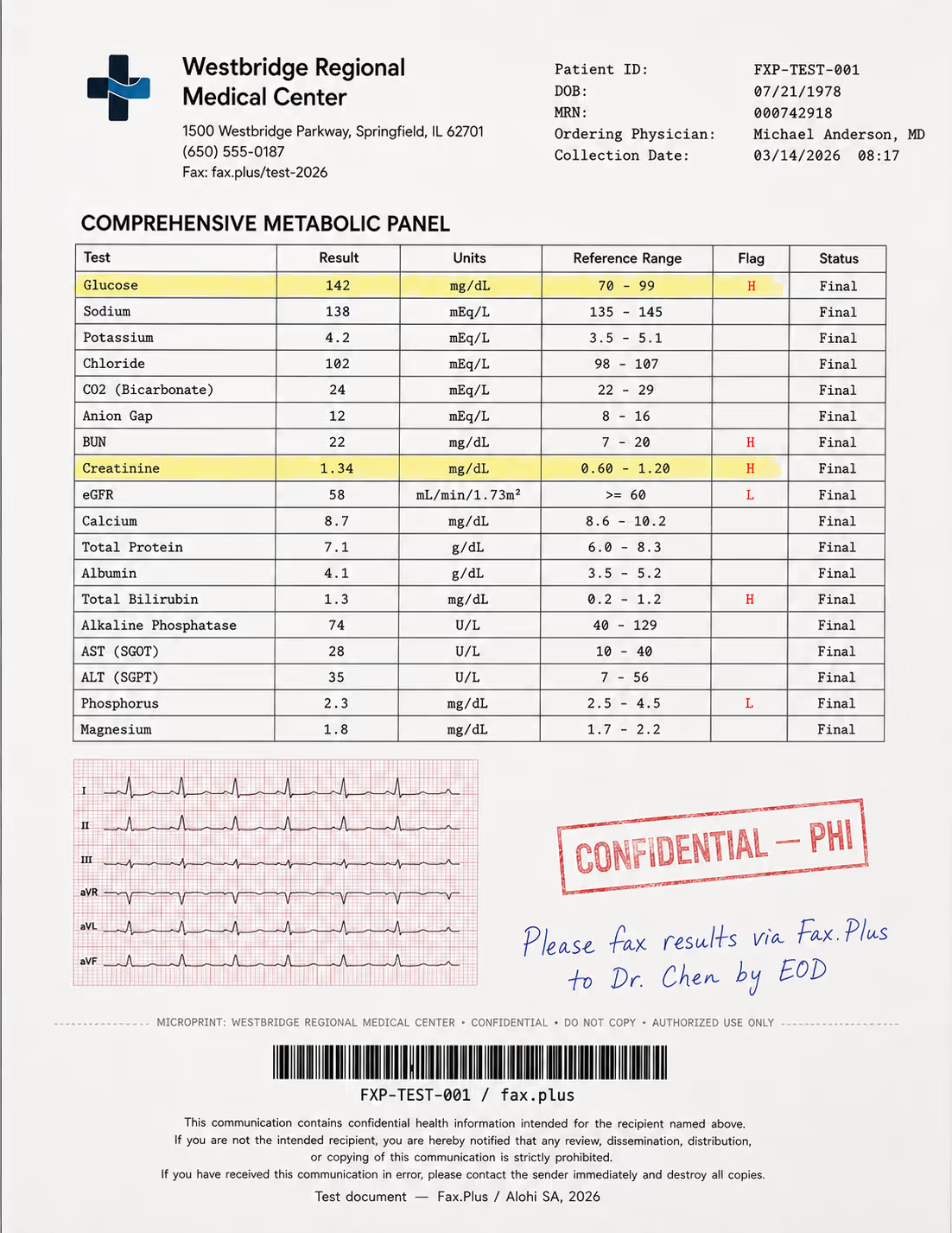
テスト文書の内容:
- 強調表示されたフラグ値(H/L指標)を含む包括的な代謝パネル
- 品質ストレス検査として、赤い方眼紙に6誘導心電図の記録用紙が付属しています。
- 青インクで手書きされた医師の指示書
- 縁が色褪せた「機密/PHI」のゴム印
- 患者ヘッダーデータとCode-128バーコード
- HIPAA免責事項の小さな文字のフッター
- 不正防止認証用のマイクロプリントライン
HumbleFax Standard vs Fax.Plus Standard
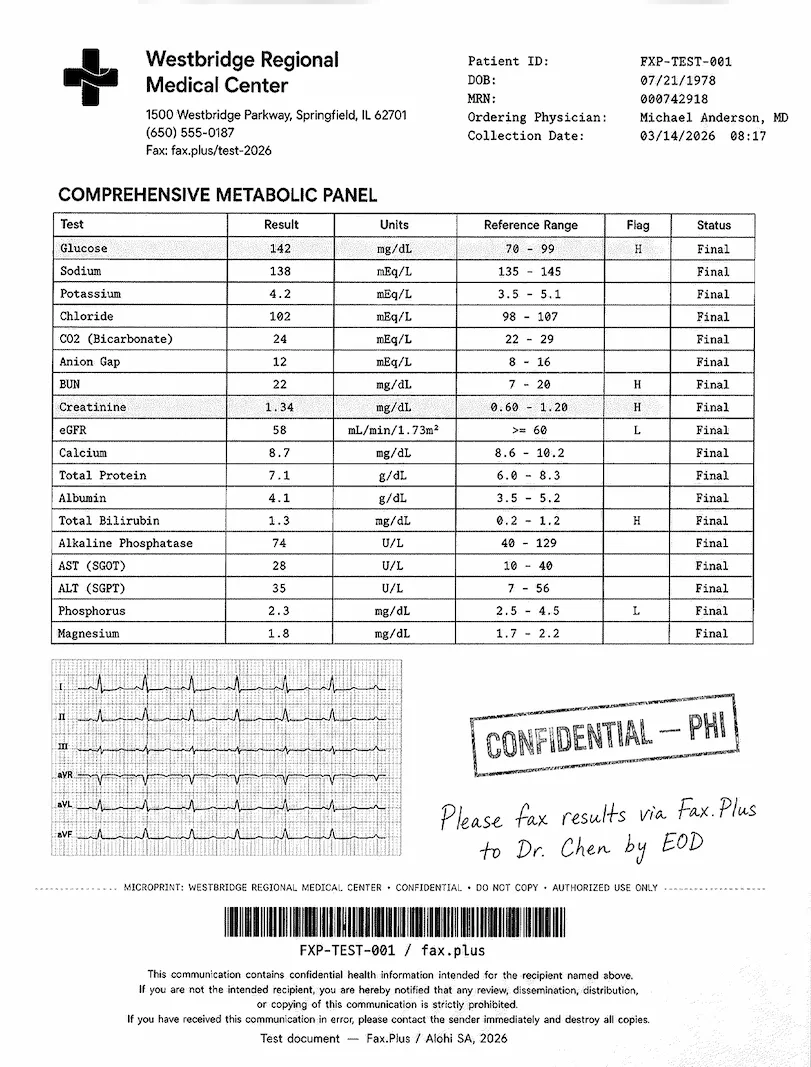
Again, clean white paper throughout with no grey wash. The metabolic panel values, the H and L flag markers, the handwritten physician note, the CONFIDENTIAL-PHI stamp, the barcode, and the small-print HIPAA footer all came through readable, which is what matters in a real lab result workflow. The EKG strip is the stress test, and Standard holds the trace clearly while the fine red grid behind it softens and partially drops out. For a clinician reading flag values, this is fine; for a document where the waveform carries the clinical meaning, Fine is the better call.
Standard fax quality comparison. On the lab form both services render on clean white paper. Fax.Plus Standard holds the EKG grid behind the trace clearly, with flag markers, panel values, PHI stamp, and footer all sharp. HumbleFax Standard reads the same panel values and flag markers cleanly, but the fine red EKG grid partially drops out behind the trace. For reading lab values both are usable; for the EKG waveform detail, Fax.Plus Standard has the edge at this tier.
 標準
標準

HumbleFax Fine vs Fax.Plus HD
Fine brings the EKG section into clearer focus. The trace sharpens, more of the red grid lines survive, and the finer waveform deflections are more distinguishable. The rest of the form, the panel table, stamps, physician note, and footer, also tightens up. The overall output is close to a clean clinical photocopy.
HD fax quality comparison. Fax.Plus HD holds the EKG grid and the finer waveform deflections fully, with the footer disclaimer and microprint staying sharp. HumbleFax Fine brings the trace into clearer focus and more grid lines survive than on Standard, but the finest grid detail does not hold as completely as on Fax.Plus HD. For lab values and clinical flag markers both are fully sufficient; for the waveform itself, Fax.Plus HD is the stronger output.
 HD
HD
 HumbleFax
送信速度
In our testing, HumbleFax Standard completed in about 1 to 2 minutes per page and Fine in about 2 to 3 minutes, against Fax.Plus baselines of 1 minute on Standard and 2 to 3 minutes on HD. The speed gap between Standard and Fine is real and worth knowing: on a multi-page send, Fine costs roughly double the transmission time. Because the plan is unlimited with no overage fees, slow transmission costs you time but never money, which is a meaningfully different bargain from the per-minute billing used elsewhere in the category. HumbleFax documents this trade-off directly in its settings panel, labeling the options "Fine (Best quality)" and "Standard (Faster transmission)."
Send time is only one side of speed. On inbound, Fax.Plus also offers real-time fax streaming on its Enterprise tier, which delivers each page of an incoming fax the moment it is decoded rather than holding the whole document until transmission completes. Most cloud fax services, including HumbleFax, deliver the document only after every page has arrived.
The hands-on result is better than the desk-research suggested. Clean white paper on both tiers, legible output across the board, and a Fine setting that genuinely sharpens the render for demanding documents. The score is 4/5: the clean background and solid performance on everyday documents earn it, with the main caveat being that Fine requires a settings-panel visit rather than being the out-of-the-box default. The gap to Fax.Plus HD shows on the densest detail: the eagle watermark does not survive on either service at Standard transmission, but Fax.Plus HD recovers it fully, and the finest EKG waveform deflections hold more completely on HD than on HumbleFax Fine.
2価格 | スコア4.5 / 5
This is HumbleFax's strongest card, and it deserves the high score. One plan, $10 per month, unlimited pages sent and received, a dedicated local number included, up to 10 users, and no per-page overage fees anywhere. For anyone who faxes regularly, that is the best raw value in the category, full stop. The half-point we hold back is not about the price you see. It is about the account types the marketing does not show you.
The Plan
- Unlimited: $10 per month for unlimited pages, sent and received, with one dedicated local fax number and up to 10 users.
There are no monthly page allowances to track, no overage rates, and no setup fees. A credit card is required at signup, and the service accepts Visa, Mastercard, Amex, Discover, and PayPal. There is no separate annual plan promoted on the signup flow and no free trial; you are on the $10 monthly plan from day one.
For a regular faxer, the math is decisive. A user who sends 300 pages a month pays the same $10 as one who sends three, while metered competitors would bill the heavy user many times more. That is the genuine appeal, and the large, positive review base is mostly built on it: people leaving $58 landline fax lines and per-page services for a flat $10 and being delighted.
The Free Trial and Refunds
There is no free trial. You enter a card and the $10 plan begins immediately, billing monthly until you cancel. The refund posture is strict and worth knowing before you sign up: the customer agreement states that all charges are non-refundable, and that if you cancel mid-month you are not refunded for the remaining days of that month. Your account stays active until the next scheduled payment would have been due, then closes. The only refund pathway in the agreement is a narrow prorated one for annual accounts that get canceled by the company for exceeding limits.
The Fine Print on "Unlimited"
Here is where the pricing score loses half a point, and it is worth explaining precisely because the gap is between the marketing and the contract.
The homepage sells one thing: unlimited faxing, "no gimmicks, no hidden fees, no overage charges." The customer agreement describes something more layered. It states that the company offers several account types, including basic unlimited accounts for individual, non-commercial use, plus tiered accounts for customers with regular volume and a metered option based on usage. None of those alternative account types appears anywhere on the marketing site. The agreement also carries a fair usage clause that lists "unusual calling patterns inconsistent with normal, individual use" as grounds for action, and reserves the right to suspend an account and require an upgrade.
Put those together and you get the single most consistent theme in HumbleFax's public complaint record. Heavy senders report receiving an email telling them their unlimited $10 plan is being moved to a $25 plan, with a short window to add payment or lose the account, even though the homepage advertised the volume as unlimited. In documented cases, accounts were suspended mid-send, the user's IP was blocked, and no refund was issued. This is not a hidden per-page fee, and it does not affect the typical individual user, who will never trip the threshold. But for a business evaluating HumbleFax on the strength of the word "unlimited," the contract sets a different expectation than the homepage, and that gap is the reason this lands at 4.5 rather than 5.
On raw value for a high-volume faxer, nothing in this table beats a flat $10 for unlimited pages. Fax.Plus Basic is cheaper at $6.99 but caps you at 200 pages, which is the better deal for light users and the worse one for heavy senders, exactly the trade HumbleFax is built around. The 4.5/5 reflects a category-leading price for the regular faxer, with the half-point reserved for the distance between the "unlimited, no gimmicks" marketing and the account-type and fair-usage language in the contract.
3. Security and Compliance | Score 2.5/5
HumbleFax markets a short list of security features, and they are real, but they sit at the floor of what the category offers rather than the ceiling. On the question that matters most for regulated buyers, the answer is that there is no marketed HIPAA path at all.
HumbleFaxはHIPAAに準拠していますか?
Short answer: treat it as no. Two terms first, because they decide everything here. HIPAA is the US law on patient health information, and a Business Associate Agreement (BAA) is the contract HIPAA requires between a healthcare organization and any vendor that touches that information. Without a signed BAA, using a fax service for patient documents puts the practice itself out of compliance. This single document decides whether a fax service is usable in healthcare at all.
HumbleFax does not market itself as HIPAA compliant. There is no HIPAA page, no healthcare page, and no published BAA anywhere on the marketing site, the FAQ, or the signup flow. The only reference to HIPAA in the entire customer agreement is a single defensive clause: unless a HIPAA BAA document is signed, the user agrees not to impose any independent obligations on the company when storing protected health information through the service. That sentence acknowledges that a BAA could exist, but the terms describe no way to request or sign one, and the company publishes no healthcare positioning to suggest it does. Independent compliance reviews across the category reach the same conclusion: HumbleFax does not explicitly claim HIPAA compliance and offers no clear mechanism to obtain a BAA, so it cannot be relied on for PHI.
A healthcare practice faxing patient information through HumbleFax is therefore operating without the contract HIPAA requires, on a service that does not claim to provide it. Healthcare buyers need a service with a published BAA path: Fax.Plus Enterprise pairs HIPAA and a signed BAA with unlimited users, eFax Business offers one at a higher per-user cost, and Documo includes a BAA on every plan, signed on request.
What HumbleFax Does Publish
To its credit, HumbleFax does name specific security features rather than hiding behind vague assurances. The marketing materials list end-to-end encryption, two-factor login, a spam blocker, and custom caller ID, and the terms describe encrypted storage of files on the company's infrastructure. Those are genuine and useful. The problem is that they are the baseline every credible online fax service offers, not a differentiator, and they are not backed by the independent audits that turn a security claim into a verifiable one.
What is missing is the evidence layer. No encryption standard is published (the AES bit length or TLS version that tells you how data is actually protected), no SOC 2 report, and no ISO 27001 certification appears anywhere for the product. These certifications matter because a company can claim anything about its own security; a certification means an outside auditor came in, checked, and signed off. By contrast, Fax.Plus publishes its compliance stack directly: ISO 27001 at the organization level and SOC 2 Type II, both certified by EY CertifyPoint, AES-256 encryption at rest, and TLS in transit, paired with a named BAA tier. That is the disclosure standard a regulated buyer needs to see before contacting sales.
The 2.5/5 reflects a service that names real, baseline security features and encrypts stored files, but publishes no independent audit, no encryption specifics, and no working HIPAA path. It is a half-step above the services that publish nothing at all, and several steps below what a regulated buyer requires.
4. 使いやすさ | スコア 4/5
HumbleFax is built around a single promise on usability: get out of the way. The hands-on experience largely delivers on it. The web dashboard is clean and modern, the signup is genuinely a one-minute affair, and the core actions, composing a fax, dragging in attachments, browsing your history, behave the way you expect on the first try. The large, positive review base is not an accident here; the most repeated word in HumbleFax feedback is "easy," and the product earns it.
メールからファックスへの変換:コアワークフロー
HumbleFax's strongest design decision, shared with the best of the category, is making email a first-class way to fax. Address a message to {number}@humblefax.com, let the subject and body become your cover sheet, attach your documents, and send. You get a confirmation email back. For users who live in Outlook or Gmail, this takes the dashboard out of daily use entirely, and it is a clean implementation of email-to-fax, the workflow most of this category was built on.
The Web Dashboard
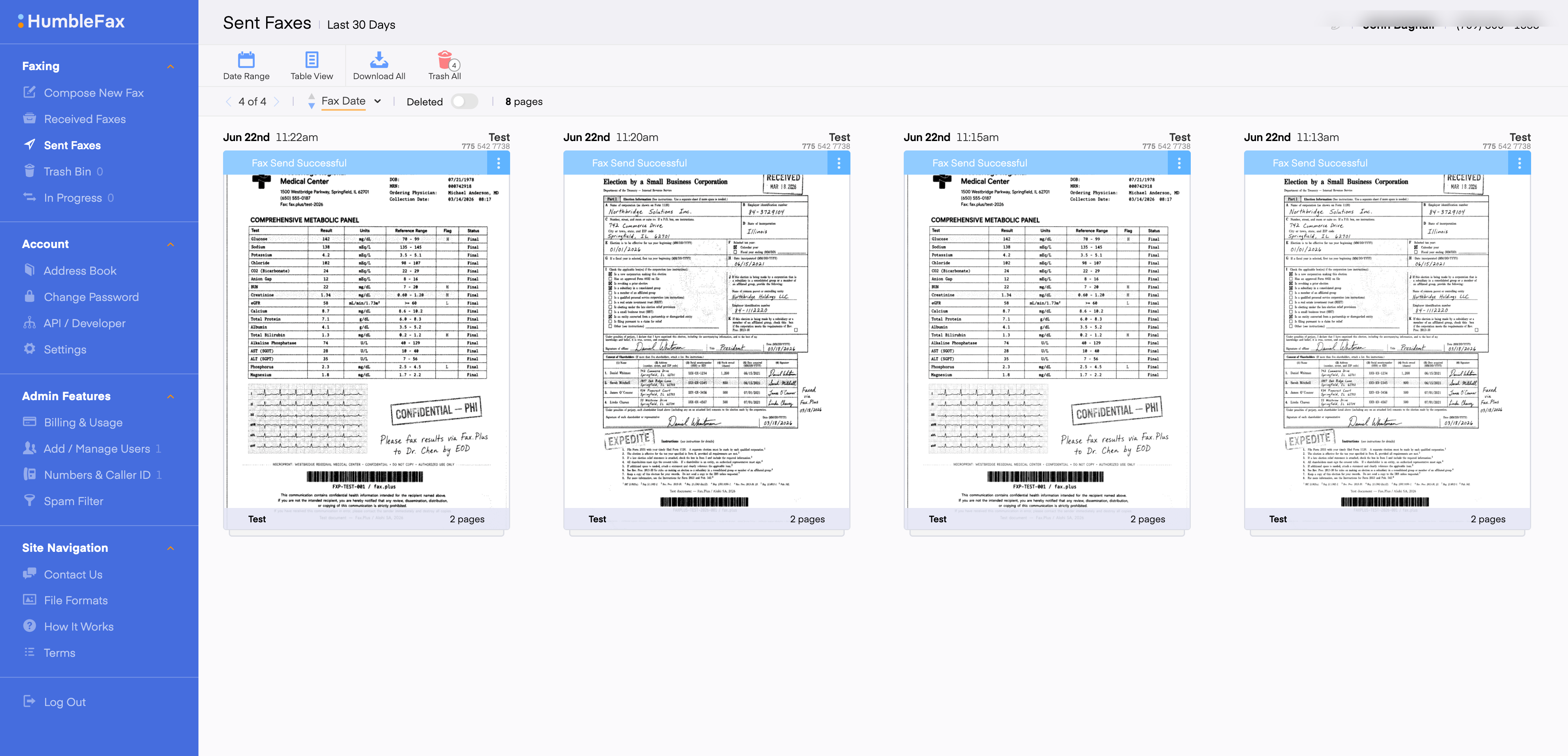
The dashboard at app.humblefax.com is the center of the product, and it holds up well. You compose a new fax, drag and drop attachments or pull them from Google Drive or Dropbox, send to one or more recipients, and search your full sent-and-received history. Contact lists and an address book handle repeat recipients and broadcast sends. Custom caller ID, scheduled faxes, and a spam blocker round out the feature set, and all of it is included rather than tiered. For a $10 product, the dashboard is more capable than the price suggests.
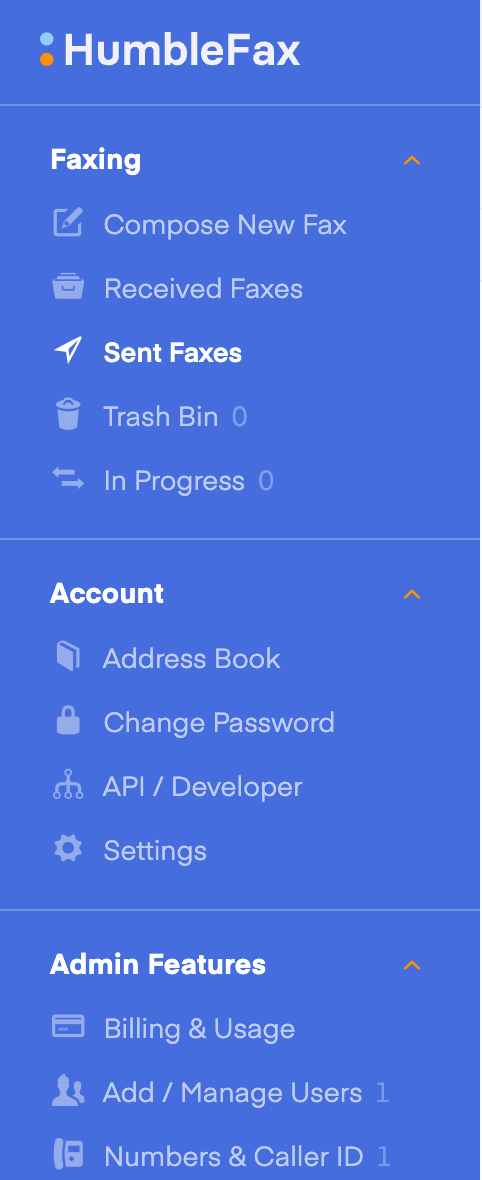
Two small friction points are worth flagging. First, the default landing page after login is Sent Faxes, which makes sense as a history view but is a step removed from the action most users want to take. The start page is adjustable in Settings to Compose New Fax, which is where most desk users will want it, but it requires a deliberate settings visit to get there. Second, the active navigation item in the sidebar uses white text against the blue background, while inactive items render in a lighter, greyed-out blue. The visual weight difference is subtle enough that the active state can be hard to distinguish at a glance, particularly on the icon side of the sidebar. Neither is a workflow blocker, but both are the kind of thing a user notices in the first week.
携帯
This is where the simplicity philosophy costs something. HumbleFax has no native iOS or Android app. The mobile experience is the web app loaded in your phone browser, which is responsive and supports faxing a photo straight from your camera, but it is not a dedicated application with the polish, offline handling, and native scanning that mobile-first users expect. HumbleFax frames this as a deliberate choice to avoid extra software, and for occasional mobile use it is fine. For anyone who intends to fax primarily from a phone, the absence of a real app is a genuine limitation, and it is the main thing keeping usability at 4 rather than higher.
How HumbleFax Usability Compares
The picture is a clean, fast web experience with a strong email-to-fax flow, let down only at the edges by the lack of a native mobile app. The market context is the one we applied across this series: Dropbox Fax ships no mobile app at all yet still scores well on its desk-based simplicity, Documo has no Android app, eFax draws a lower usability mark on its slower portal and mixed apps, iFax ships strong apps on both platforms, and ComFax ships a clean, functional mobile app but lacks the depth and platform coverage of the category leaders. Fax.Plus covers every surface at once, with native apps on iOS and Android, desktop apps, web, and email-to-fax. HumbleFax lands at 4/5: an excellent web and email experience that does what it promises, held back from a higher mark only by the browser-only mobile path. For a desk-based user, it is one of the most pleasant products in the category to actually use.
5.カスタマーサービス、キャンセル、アカウント管理|評価 4/5
HumbleFax's support reputation is, by the numbers, a strength. The recurring note in its reviews is that the support team responds quickly and helpfully through chat and email. The concerns in this section are not about whether support answers; they are about what the customer agreement lets the company do to your account and your number.
サポートチャネル
Support runs through an online contact form and a callback request, with the company advertising availability around the clock. The terms direct account notices to customercare@humblefax.com and to the company's Ridgewood, New Jersey mailing address. There is no prominently published direct support phone line on the contact page; the callback request is the path to a phone conversation. For a service this size, the channel mix is lean but, by most user accounts, responsive, and the consistent praise for quick replies is a real point in its favor.
キャンセルする前に:ファックス番号
HumbleFax's customer agreement contains the same number-control architecture we documented at eFax and MyFax, and it deserves explaining precisely, because the legal terms are doing a lot of quiet work here.
顧客契約書に実際に書かれていること
Customer of record means the entity the phone carrier officially recognizes as the number's owner. HumbleFax's terms establish that the company, not you, is the customer of record for all numbers provided with the service, and that what you get is revocable permission to use the number. Porting, moving a number from one provider to another, is the mechanism that would normally let you take it with you. The agreement permits porting out only in connection with terminating your account, and only if you give written notice no later than 30 days before termination, your new carrier files a porting request in the same window, and your account is paid in full. If you attempt to move a number outside those conditions, the agreement authorizes charging you $500 in liquidated damages, a pre-agreed penalty written into the contract. On termination for any reason, the terms allow the company to reassign your number to another customer.
What This Means in Practice
The good news, and it is genuine, is that HumbleFax makes porting a number in easy and free, and many reviewers describe smoothly moving a long-held number off an expensive landline onto the $10 plan. The caution is on the way out. Once a number lives on HumbleFax, the customer-of-record status sits with the company, and getting it back out requires hitting the 30-day notice window precisely. If your fax number matters to your business, resolve any port-out before you cancel, not after, and consider whether a provider that supports porting your number both in and out is the safer long-term home for a number you cannot afford to lose.
How to Cancel HumbleFax
Cancellation is self-serve and refreshingly direct: log in to your dashboard, open the Billing and Usage section, and click "Cancel Billing Plan." Your account stays active until the next payment date would have arrived, then closes, and after that you lose access to the number and to every fax sent or received on the account. Save your own proof of cancellation, and export anything you need to keep first, because the terms make clear that access ends at termination with no archive afterward. Two things temper an otherwise clean exit: you are not refunded for the remainder of the month, and a missed payment moves you to suspended status, with termination following five days later, which means a lapsed card can cost you your number faster than you might expect.
ユーザーからの報告
If you research HumbleFax before buying, the pattern is unusually positive for this category. The directories and review sites skew strongly favorable, clustered on simplicity, reliability, and price, and the company maintains a large body of high-rated feedback. The negative signal is narrower and specific: the heavy-sender upgrade-or-suspend experience documented in the pricing section, the occasional complaint of slow transmission on large files, and a handful of billing disputes where charges continued and resolution required escalation. What matters is the shape of it. The typical individual user reports a genuinely good experience; the friction concentrates around high-volume use and the exit, which is exactly what the contract language predicts.
How HumbleFax Account Control Compares
A clean self-serve cancel button and a well-reviewed support team are the core of this score. The support reputation is genuinely a strength: the recurring note across user feedback is quick, helpful replies through chat and email, and the cancel path is a single button in the billing menu with no retention maze. The concerns sit around account control rather than service: the non-refundable posture, the five-day suspension-to-termination window on a missed payment, and a number-ownership regime with a $500 port-out penalty. For contrast, Documo earned a 5/5 here with multi-channel support and a clean billing-menu cancellation, and Fax.Plus matches that no-maze posture while supporting number porting both in and out. The 4/5 reflects responsive support and an easy cancel path, held just short of the top by the account-control risk for anyone whose number or billing continuity is critical.
6.データの所在地と保持|評価 2/5
Security is not only about encryption and certificates. For many organizations, the bigger questions are where fax data is stored and how long it is retained, and on both, HumbleFax publishes very little.
保持
Every account includes storage of sent and received faxes, viewable in the dashboard for the full life of the account. The catch is at the end: the terms state plainly that on termination you lose access to all faxes sent or received with the account, with no grace period and no export window described. The agreement also reserves the company's right to change its storage practices, including how many faxes and how many days are retained, with notice. The practical takeaway is the same one we give across this series: export everything you need before you cancel, because access ends when the account does.
データ所在地
Data residency means where, geographically, your documents physically live, which decides which country's laws protect them and whether you can satisfy localization rules. HumbleFax publishes no hosting region, no infrastructure provider, and no data-residency option. The service mentions redundant data centers in its marketing but does not say where they are, and because faxing is limited to the United States and Canada, US-based infrastructure is the operative assumption. There is no EU residency option and no regional selection of any kind.
How HumbleFax Data Residency Compares
The transparent end of the market looks like user-selectable data residency across many regions. Fax.Plus lets account admins select from more than 20 regions, including several US locations alongside the EU, Canada, Australia, Japan, and Switzerland, with live data and backups storable in separate regions and self-serve migration later. Even Dropbox Fax names AWS and documents its GDPR transfer mechanisms, and Documo publishes its subprocessor list and US-and-Canada footprint. HumbleFax publishes none of the above. The 2/5 reflects near-zero disclosure on questions that regulated and international buyers cannot skip, lifted just off the floor by clear retention language and the simplicity of a US-and-Canada-only footprint.
7 。 Enterprise APIとヘルスケアオートメーション | スコア3.5 / 5
This is usually where budget fax services bottom out, because the product stops at send and receive. HumbleFax does not, and the API is the reason. For $10 a month, it is one of the few services in the category that hands a developer something real to build on.
APIアクセス
HumbleFax ships a genuine REST API, documented publicly, and included in the standard $10 plan rather than gated behind a sales call or a higher tier. That alone is unusual: most of the category treats programmable faxing as an enterprise upsell, while HumbleFax gives every user the same developer surface. The API is properly built. It returns JSON, authenticates with access and secret keys you generate from the dashboard, and exposes a clean workflow: create a temporary fax, upload one or more attachments, and send, or skip the steps and fire a single quick-send call. Webhooks are first-class, with delivery notifications for both inbound and sent faxes and up to 10 endpoints per user, so an external system can react the moment a fax lands or completes rather than polling for status. An official Zapier connector extends all of that to thousands of other apps with no code at all, which means even a non-developer can wire HumbleFax into a document workflow.
There are limits, and they are the honest kind. Authentication is HTTP Basic rather than OAuth, which is quick to start with but less granular than a larger integration may want, and there is a 5-requests-per-second rate cap. Neither is a dealbreaker for the automation most small teams actually build. For the money, this is a capable, well-documented API with real webhook support, and it is the single feature that lifts HumbleFax clearly above consumer-only faxing.
Where It Stops: MCP, Healthcare, and Streaming
The ceiling is the enterprise layer above the API, and HumbleFax does not reach for it, which is fair enough for a product built for individuals and small businesses. There is no MCP server, the interface that lets an AI agent like Claude or the OpenAI Agents SDK call faxing directly as a natural-language action, so the REST API is something you build against rather than something an agent drives on its own. There is also no healthcare automation: no EHR integrations, no marketed BAA, and batch transmission rather than the page-by-page delivery that time-critical clinical workflows benefit from. Fax.Plus is where those layers live, pairing the REST API with public SDKs and an MCP server for agent workflows, plus real-time fax streaming on its Enterprise tier. None of that is what HumbleFax is trying to be.
The 3.5/5 is well above the budget norm, and the API earns it: a real, included REST layer with webhooks and Zapier, marked down only for the enterprise and healthcare layers it never set out to offer.
Alternatives to HumbleFax
Fax.Plus - Best overall HumbleFax alternative
Modern cloud fax from $6.99 per month, with a free tier to test before paying anything. Where HumbleFax keeps everything on one flat plan, Fax.Plus scales with you: an organization-level compliance stack with a named auditor (ISO 27001 and SOC 2 certified by EY CertifyPoint), HIPAA and a signed BAA on the Enterprise plan with unlimited users, data residency across 20+ regions, number porting in and out, native apps on iOS, Android, macOS, and Windows, and an API paired with MCP support for AI-agent workflows. International faxing is supported, where HumbleFax stops at the US and Canada.
Best for: Users who want the compliance, mobile apps, international reach, and exit flexibility that a flat-price personal service does not provide.
MyFax - Best known legacy email-to-fax name
A long-established email-to-fax brand from the eFax family, sold on a similar keep-it-simple sensibility. Where HumbleFax bets everything on one flat unlimited plan, MyFax meters pages across three tiers starting at $12 a month for 100 pages, with overage charges and time-based page counting in the fine print. It ships native iOS and Android apps, which HumbleFax lacks, but its customer agreement carries the same customer-of-record and restricted port-out terms.
Best for: Buyers who want a known email-to-fax brand with native mobile apps and do not mind metered pages instead of a flat unlimited rate.
FaxZero - Best for true one-off faxing
If your faxing is genuinely occasional, even $10 a month is more than you need. FaxZero offers free, no-account faxing of a few pages a day with a branded cover page, or a flat fee for larger sends, with no subscription to manage and therefore no cancellation to fight.
Best for: The genuinely occasional faxer who does not want any subscription at all.
よくある質問
Is HumbleFax legit and safe?

HumbleFax is a legitimate service operated by Web Ventures LLC, based in Ridgewood, New Jersey, with a large and consistently positive customer review base, so the business itself is real and well established. Safe is the more careful question: HumbleFax markets end-to-end encryption, two-factor login, and encrypted storage, but publishes no encryption standard, SOC 2 report, or ISO 27001 certification, and offers no working HIPAA path. For general, non-regulated faxing within the US and Canada it is a functioning, well-liked service; for anything sensitive or healthcare-related, choose a provider that publishes its security stack and offers a BAA, such as Fax.Plus.
Is HumbleFax HIPAA compliant?
Treat it as no. HumbleFax does not market itself as HIPAA compliant, publishes no healthcare or BAA page, and references a BAA only once in its terms with no mechanism to obtain one. Independent compliance reviews across the category reach the same conclusion. Healthcare teams handling protected health information should choose a service with a published BAA path, such as Fax.Plus Enterprise, eFax Business, or Documo, which includes a BAA on every plan.
How do you cancel HumbleFax?
Log in to your dashboard, open the Billing and Usage section, and click "Cancel Billing Plan." Your account stays active until the next scheduled payment would have been due, then closes, and you lose access to your number and all stored faxes. Keep your own proof of cancellation and export anything you need first, since there is no archive access after termination and no refund for the unused part of the month.
Does HumbleFax have an API?
Yes, and it is one of its standout features, especially at the price. HumbleFax ships a documented REST API included in the $10 plan, where most competitors charge extra or gate it behind sales. It returns JSON, authenticates with dashboard-generated access keys, supports webhooks for inbound and sent-fax notifications with up to 10 endpoints per user, and comes with an official Zapier connector for no-code automation. The main limits are HTTP Basic Authentication rather than OAuth and a 5-requests-per-second cap. What it does not have is an MCP server for AI-agent workflows. Teams that need an agent-ready layer on top of a fax API can compare a published fax API and MCP server.
How much does HumbleFax cost?
HumbleFax costs $10 per month for unlimited faxing, sent and received, with one dedicated local fax number, up to 10 users, and no per-page overage fees. There is no free trial; a credit card is required at signup and the plan begins immediately. All charges are non-refundable, including the remaining days of the month if you cancel mid-cycle. For a lower-cost path for lighter use, Fax.Plus starts at $6.99 per month for 200 pages with a free plan to test first.
Is HumbleFax really unlimited?
For a typical individual user, yes. The complication is in the contract. The $10 plan is described in the terms as being for individual, non-commercial use, the agreement reserves separate tiered and metered account types that the marketing site does not show, and a fair usage clause flags "unusual calling patterns." Heavy senders have reported being moved from the $10 plan to a $25 plan, or suspended, despite the homepage advertising unlimited volume. Most users will never trip this, but a high-volume business should know the limit exists before relying on the word "unlimited."
Is HumbleFax worth it in 2026?
For an individual or small business that faxes regularly within the US or Canada, values a flat, predictable price, and does not handle protected health information, HumbleFax is one of the best values in the category: unlimited pages, a clean web experience, and a real API, all for $10. For anyone needing HIPAA coverage, international faxing, native mobile apps, published security evidence, or guaranteed unlimited volume regardless of usage, the documented record points elsewhere. Overall, HumbleFax lands at 3.5/5: an excellent flat-price service for the regular North American faxer, with surprisingly clean fax output on both resolution tiers, held back by compliance gaps, the fine print on "unlimited," and the absence of a native app.
Does HumbleFax have a free trial?
No. There is no free trial. A credit card is required at signup and the $10 monthly plan starts immediately, billing until you cancel. Because charges are non-refundable, including the remaining days of the month at cancellation, treat the first $10 as committed once you sign up.
Can HumbleFax send international faxes?
No. HumbleFax supports United States and Canada fax numbers only, for both sending and receiving. There is no international faxing in either direction. If you need to fax outside North America, choose a provider with international coverage such as Fax.Plus.
Can I keep my fax number if I leave HumbleFax?
Treat this as conditional. HumbleFax makes porting a number in free and easy, but on the way out its customer agreement designates the company as the customer of record, permits porting out only with 30 days' written notice before termination and a paid-up account, and authorizes $500 in liquidated damages for non-compliant transfers. On termination the number can be reassigned to another customer. Complete any port-out before you cancel, confirm it with the receiving carrier first, and compare providers that support porting your number both in and out.


Featured Articles
See All



Confédération Suisse
Confederazione Svizzera
Confederaziun Svizra
Swiss Confederation
Innosuisse - Swiss Innovation Agency