


Follow a fax from its receiving number to the intended EHR destination. Use practical demonstration checks to compare routing, review and filing responsibilities.


- A fax number identifies where a transmission is sent; evaluate separately how the document reaches an EHR work queue or chart.
- Define the destination you need: department inbox, review queue, patient record or another approved location.
- Ask for a demonstration using your EHR version and representative synthetic documents.
- Check who confirms a proposed match, handles exceptions and verifies that filing succeeded.
- Confirm current availability, account requirements and support responsibilities before planning deployment.
Your team wants incoming faxes to reach the place staff already work. A receiving number is part of that plan. The buying decision becomes clearer when you follow the document beyond the number: where does it appear, who reviews it, and what confirms that the handoff is complete?
That is the useful distinction between fax routing and an EHR-connected workflow. Each can serve a purpose. Choose the result your team needs, then ask to see how it is achieved.
Separate the receiving number from the document destination
An EHR-related fax arrangement can describe different stages of a process:
- Reception: a fax is received on the designated number and becomes available to authorized staff.
- Routing: the document is directed to a department, inbox or application destination under defined rules.
- EHR workflow: the document is presented in an agreed EHR location, with the review and filing steps your organization requires.
In Fax.Plus, the Owner on Business, and Owners or Admins on Enterprise, can assign a number to receiving members. This sets which team members receive its incoming faxes.
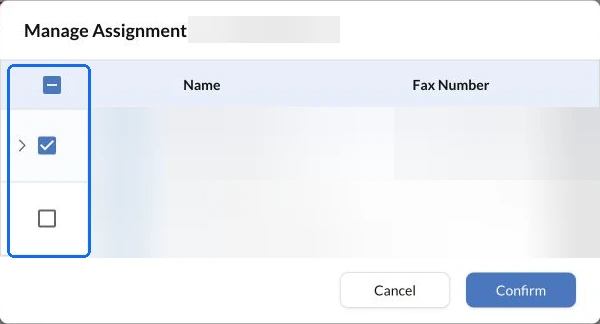
Ask which stages the proposed setup includes. A number associated with a department helps identify the intended route; it does not, on its own, establish the patient or record where a document belongs.
If someone uses the term “proxy number,” ask what it means in that proposal. Does the number forward a transmission, change the receiving destination or support a connection to another system? The term alone does not specify the workflow.
Describe where staff should find the fax
Turn “fax into our EHR” into an observable requirement. For example: an authorized reviewer can open the received document from the agreed queue, check the proposed record match and complete the filing step.
Specify whether the destination is a department queue, a patient's chart or a particular document area. Agree what identifies the original fax and how staff return to it if a question arises.
Also identify the confirmation you need. A fax transmission confirmation concerns transmission. For your EHR workflow, ask what shows that the document reached the intended destination and completed the required review or filing step.
Ask for a demonstration that follows one document
Use an approved synthetic document and a test environment agreed with the provider and your EHR team. Watch the complete proposed handoff rather than only the arrival notification.
Ask separately about inbound document placement and outbound sending. A demonstration of one direction does not establish that the other is included.
Start with the normal route
Confirm the receiving number, the staff role opening the fax and the destination where the document appears. Ask the demonstrator to identify any step completed manually or by a separate application.
Check a document that needs review
Use an example with incomplete identifiers or an uncertain match. Ask where it waits, who can review it and how the next action is recorded. Follow your organization's patient-identification rules rather than assuming a name alone establishes the correct chart.
Confirm the final state
After the authorized review, reopen the destination and check the document. Can another permitted staff member find it and understand its status? Agree what happens if the connection is interrupted before filing finishes.
Confirm the implementation and support boundaries
Before scheduling deployment, document the supported EHR product and version, account prerequisites, permissions and any local setup. Establish who maintains the connection and who investigates a document that reached the fax service but has not appeared in the expected EHR location.
For Fax.Plus, review the EHR and EMR integration information with the team. Confirm the available option for your environment before selecting a deployment date.
If your route involves a custom connection, a healthcare fax automation plan covers the processing stages and implementation responsibilities. Keep this evaluation focused on the destination and the evidence your staff need before accepting the handoff.
FAQs
What should an EHR fax demonstration prove?

It should show where a representative document appears, who reviews it and how the final filing state is checked. Use the EHR version and staff roles relevant to your proposed setup.
How should we evaluate a fax number described as a proxy?
Ask which destination the number reaches and which steps happen after reception. Confirm whether staff retrieve the document manually or a configured connection presents it in an agreed workflow.
What should happen when the correct patient record is uncertain?
Keep the document in an authorized review process until staff resolve the match under your organization's rules. Confirm that exception route during the demonstration.




スイス連邦(フランス語)
スイス連邦(イタリア語)
スイス連邦(ロマンシュ語)
スイス連邦(英語)
Innosuisse - スイスイノベーション庁




