


Choose fax around an agent’s document sources and devices or a brokerage’s reception and record-handling needs, with a practical service demonstration.


- Identify the document exchanges where the recipient accepts or requests fax before choosing a service.
- Test the route from the actual document source: a saved file, approved storage location or paper page captured on a phone.
- An agent who only sends occasionally has different requirements from a brokerage that receives replies on a continuing number.
- Evaluate brokerage account control, authorized staff access and the approved destination for retained document copies.
- Compare the complete sending and receiving setup, then demonstrate it without using client documents.
For a real estate agent, the fax purchase decision may start with a document already open on a phone or stored on a computer. For a brokerage, it may start with making reception available to the office while agents work elsewhere. Those are different tasks, and the best starting point is to identify the one you need to support.
Follow the document from its source to the recipient. Choose the service after checking how that specific route works, rather than assuming that a mobile app or a shared office number solves every part of it.
Identify where fax belongs in your document exchange
Confirm which counterparties accept or request documents by fax and whether your office needs to receive their replies the same way. Use the recipient's current instructions for the particular submission.
If you need only an occasional outgoing fax, evaluate the sending process and its cost. If counterparties will send documents back, include a receiving number, its ongoing subscription and a way for authorized staff to monitor it. Fax.Plus reception requires a paid plan with a receiving number and available allowance.
This distinction helps avoid buying a sending-only solution for an office that needs continuing reception, or selecting a team deployment before an independent agent has identified that need.
Try the document-source route you will actually use
Ask to see how a saved document becomes an outgoing fax on your preferred device. Check that you can choose the intended file, review every page and put attachments in the right order before sending.
A PDF received electronically and a paper page captured on a phone begin in different places. If paper documents are part of your work, assess the phone-camera route for preparing a fax as well as ordinary file upload. Use a synthetic sample to check legibility and page completeness.
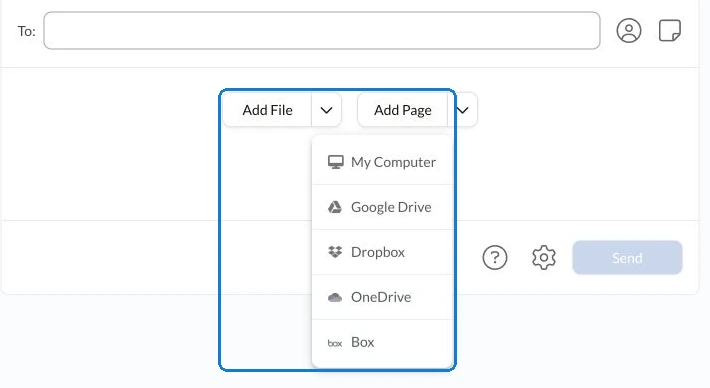
In Fax.Plus, the web sending screen offers Add File for preparing the document packet. The mobile app also supports camera scanning. Demonstrate the route you need rather than treating the availability of an app as proof that all file sources and office procedures are covered.
Decide what belongs to the agent and what belongs to the brokerage
If the office needs to retain the receiving number and correspondence, establish who controls the account and who provides authorized cover. Check the proposed team plan against those responsibilities instead of relying on one person's login as the office arrangement.
If the office already publishes a fax number, include transfer eligibility, account ownership and a transition plan in the evaluation.
Fax.Plus offers team accounts on Business and Enterprise. Ask to see the relevant staff-access setup, including who manages users and who can retrieve documents for the approved brokerage file.
For files that move between authorized colleagues, review the access and record checks for title and escrow fax handoffs.
For retained copies, review the available document download methods for brokerage records. Check where the file goes afterward under your office's process. A download option does not establish a connection to real estate or transaction-management software.
Compare the complete route and cost
Use the same assumptions with each provider: occasional or recurring sending, reception, staff access, numbers and expected page usage. Ask about account terms and extra charges that apply to that configuration. The Fax.Plus sending and receiving plan details provide the current starting point for evaluating its options.
Then demonstrate a complete synthetic task on the device you expect to use: choose or capture the document, review the pages, select an approved test destination and locate the transmission result. If receiving is required, test that separately with the intended authorized user.
A successful transmission is a fax result, not a completed real estate transaction. Evaluate the service around the document exchange it supports, while recipient review and the broader transaction continue through their own processes.
Review Fax.Plus for agent and brokerage document exchange against that demonstrated route. The useful choice makes the required fax task workable on your devices and fits the office's reception and record-handling needs.
FAQs
What should an agent test when comparing mobile fax options?

Start with the document source you use: a saved file or paper captured with the camera. Check page review, attachment order and where you find the transmission result.
When should a brokerage include a receiving number in its evaluation?
Include one when counterparties need to send documents back by fax. Compare ongoing reception, allowance and authorized staff access alongside outgoing sending.
What should a brokerage include in a fax-service quote request?
Specify sending and receiving needs, expected page usage, numbers and authorized staff. Ask for the cost of that complete configuration, including applicable extra charges.




スイス連邦(フランス語)
スイス連邦(イタリア語)
スイス連邦(ロマンシュ語)
スイス連邦(英語)
Innosuisse - スイスイノベーション庁




