


Connect a received prior-authorization fax to the right signer, then check the completed document and outgoing packet before tracking the payer response.


- When a prior-authorization form needs a signature, keep it connected to the request and its current document version.
- Fax.Plus lets you forward a received fax to Sign.Plus, the separate Alohi product for electronic signing.
- Confirm the authorized signer, accepted signature method and required account setup before handling patient information.
- Check the completed signed document before sending the required packet by fax.
- Track signature completion, fax transmission and the payer's response as separate stages.
A prior-authorization packet arrives by fax, and one form needs a signature before your team can return it. The useful next step is to move that document into signing while keeping its request reference and version clear. After signing, staff need to know which file belongs in the outgoing fax and what remains outstanding.
Fax.Plus and Sign.Plus can support that handoff. Fax.Plus handles the fax; Sign.Plus handles the electronic signing process. Your team connects those stages through the request record and the recipient's submission requirements.
Check the form before requesting a signature
First, confirm that you have the current form, the relevant request reference and the pages needed for the signature step. Identify who is authorized to sign and which information they must review.
Check that electronic signing is accepted for the specific document and submission route. Prior-authorization requirements vary by payer, request and form, so use the recipient's current instructions. This workflow applies where fax submission and the chosen signature method are appropriate.
If the recipient requires verifiable signature evidence, confirm how it must be supplied. Keep the completed signed source file and any required signing evidence alongside the fax copy.
For HIPAA workflows involving patient information, both Fax.Plus and Sign.Plus require Enterprise, Advanced Security Controls and a signed Business Associate Agreement. Confirm the setup for healthcare signing with Sign.Plus alongside your fax account before moving the document into signing.
Review the fax account setup for prior-authorization packets alongside the separate signing configuration.
Move the received fax into the signing step
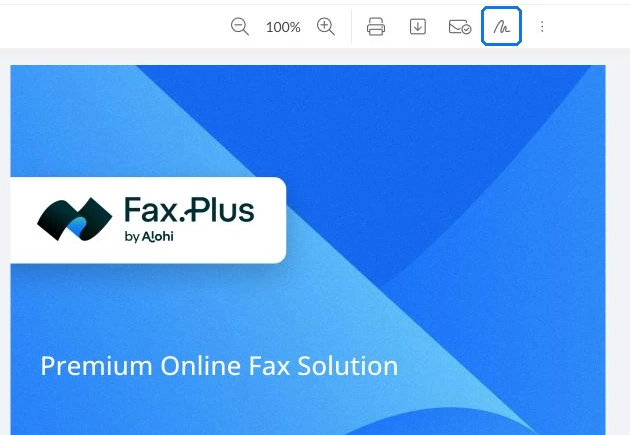
Use the signing action on the received fax to continue in Sign.Plus. There, choose Sign Myself or Request Signature according to who needs to complete it.
Use the request reference in your approved tracking process so colleagues can connect the signing task to the original fax. Before sending a signature request, check the recipient and the fields they need to complete.
The Fax.Plus signing instructions document the Forward to Sign.Plus route and signing steps. For this healthcare handoff, the key is that the right person receives the correct document version for review and signature.
Bring the completed document back into the packet
After signing is complete, open Documents > Completed in Sign.Plus and use More > Download to retrieve the signed document. Review that file before preparing the outgoing fax, rather than using the unsigned copy saved earlier.
Check that the document belongs to the same request, includes the expected signature and contains all pages required for this submission. Reconcile any remaining attachments against the recipient's instructions. Your team decides when the packet is ready to send; completing a signing task alone does not make that decision.
Back in Fax.Plus, use Add File to attach the downloaded signed document to the outgoing fax along with the other required pages. Verify the intended recipient number and use the reference the recipient requests. This is a staff-managed handoff between signing and faxing, not an automatic submission rule.
Track the fax and the response separately
Keep the outgoing fax confirmation connected to the request under your organization's records process. That gives staff a transmission result to check when following up.
The next status is the recipient's response: acknowledgment, a request for more information or a determination. Record it against the same request reference so staff can distinguish a submitted packet from an outstanding response.
If a correction or another signature is requested, identify which document needs changing and preserve the relationship to the earlier submission. Send the updated packet through the recipient's accepted route, with its version clear to the team.
The practical result is a traceable sequence: received fax, signing task, completed document, outgoing fax and recipient response. Each stage has a clear purpose without treating a signature or a successful transmission as payer approval.
If the team is also connecting fax receipt and review to another system, continue with planning the connected healthcare fax workflow.
FAQs
What should staff check before forwarding a prior-authorization fax for signature?

Confirm the document version, authorized signer and request reference. Check that the recipient accepts the selected signature method for that form and submission route.
Which file should go into the outgoing fax after signing?
Use the completed signed document, then review it with the other required pages before sending. Keep it connected to the same request reference rather than reusing the unsigned copy.
How should we track a signed packet that has been faxed?
Record signature completion and the fax transmission result separately from the payer's response. Follow up using the recipient's process when acknowledgment or additional information is needed.




Confédération Suisse
Confederazione Svizzera
Confederaziun Svizra
Schweizerische Eidgenossenschaft
Innosuisse – Schweizerische Agentur für Innovationsförderung




