


A practical purchasing checklist for approved PO versions, supporting documents, repeat faxes and supplier acknowledgments when fax is the agreed channel.


- Agree on fax as the ordering channel for the supplier concerned.
- Send the approved PO version with its relevant drawings, specifications or addenda.
- Make it clear whether a fax is a new order, an amendment or a repeat copy.
- Check the transmission result separately from the supplier’s acknowledgment.
- Connect the acknowledgment and any agreed changes to the purchasing record.
Your purchasing system may support electronic data interchange, while a particular supplier needs an order by fax. You can keep that supplier in your purchasing process by sending a readable PO document and agreeing how the supplier should respond.
The useful boundary is straightforward: fax carries the order document; your purchasing process controls its version and approval. The following checks are a suggested procedure for a supplier relationship where fax is an agreed channel.
Start with the supplier’s ordering instructions
Confirm the correct ordering contact and fax number, the documents they need and the return channel for an acknowledgment. Establish how they want amended orders or replacement copies identified.
Use the approved PO as your source. If it comes from an ERP or purchasing application, export the appropriate document through that system’s authorized process. Teams evaluating a custom connection can review fax integration options for ERP systems separately; this document workflow does not depend on a native EDI connection.
If your team is building the document connection, plan its production fax integration before extending it to additional suppliers.
Make the order version visible
Check that the supplier can identify the PO number, issue date and revision where applicable. Include the approved delivery location and contact information needed for this order.
Where a drawing, specification or addendum forms part of the approved packet, check that its identifier and revision match the PO. Review the complete document set before sending, including page order, readability and any references to attachments.
Where a drawing depends on fine detail or color, confirm that fax is suitable for the supplier’s use. Supply the original through its approved file channel when required.
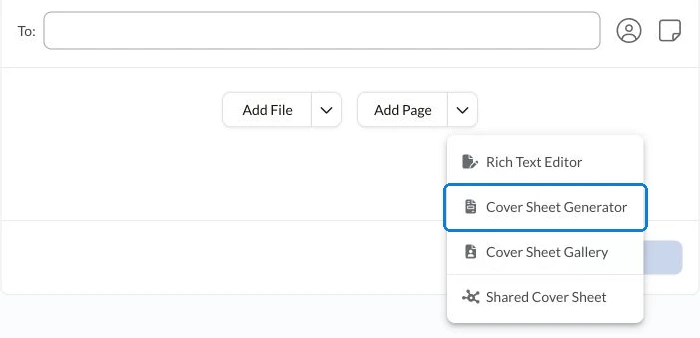
Put supplier-facing instructions on the document or cover sheet. A clear subject can identify the PO and revision; the message can explain what response you need. Follow the current instructions for adding a fax cover sheet in Fax.Plus.
Distinguish a repeat copy from an amendment
Before sending again, establish what has changed. Use wording consistent with your purchasing procedure and the supplier’s instructions:
- Same order, same version: identify the document as a repeat copy of the existing PO, rather than an additional order.
- Approved amendment: identify the new revision and explain which earlier version it replaces or changes.
- Additional supporting document: identify the existing PO and state which attachment you are supplying.
For example, “Repeat copy of PO [reference], revision [version]. Please confirm receipt against the existing order” communicates a different purpose from an amended PO. Apply these labels as part of your purchasing procedure. Have the responsible buyer approve changes before sending them.
Check transmission, then review the acknowledgment
After sending, check the fax result and keep the relevant fax confirmation record with your purchasing documentation. Successful transmission and supplier acknowledgment answer different questions. The fax result concerns delivery of the fax; the supplier’s reply tells you what they have understood or proposed.
When the acknowledgment arrives, compare its order reference and version with the PO sent. Review the quantities, prices and dates relevant to your process. Refer differences to the authorized buyer before updating the purchasing record or confirming an arrangement.
When the order progresses to shipment, keep shipping-document handoff exceptions separate from purchase-order approval.
If a reply is outstanding, check the transmission record and the agreed response process before choosing the next action. Record whether you are following up, supplying a missing attachment or issuing an approved amendment.
For teams exploring assistant-supported sending and confirmation review, the separate purchase order fax workflow with AI covers that approach. Keep the same approved-source and version checks whichever sending method you choose.
FAQs
What should identify a faxed PO amendment?

Use the PO reference and approved revision, and explain which earlier version or details it changes. Include the relevant updated attachments and follow the supplier’s agreed amendment process.
How should a repeat PO fax be labeled?
Identify it as a repeat copy of the existing order, with the same PO reference and version. Use wording agreed with the supplier so the purpose of the repeat transmission is clear.
What should a buyer compare in the supplier’s acknowledgment?
Check the PO reference and version, then the quantities, prices and dates relevant to the order. Refer differences for authorized review before changing the purchasing record or confirming the proposed arrangement.




Confédération Suisse
Confederazione Svizzera
Confederaziun Svizra
Konfederacja Szwajcarska
Innosuisse – Szwajcarska Agencja Innowacji




