



Scope a fax API integration before production with decisions on authorization, document preparation, result handling and a controlled launch test.


- Start with one application workflow and define what a completed fax task means.
- Confirm Enterprise API access, expected usage and the testing arrangement before sending test faxes.
- Choose authentication around the account and permissions your application needs.
- Treat request acceptance, fax transmission and the recipient’s business response as separate events.
- Agree how your application records results and who handles exceptions before launch.
Adding fax to an application starts with a practical question: what should the application do when a document needs to reach a fax number, or when a fax arrives? A useful production plan answers that question before choosing endpoints.
This checklist helps developers turn a fax workflow into a scoped integration brief. Use it alongside the current documentation, then build and validate the smallest complete workflow first.
Define the application’s fax job
Choose an initial workflow with a clear starting point and result. An outbound workflow might begin with an approved document in your application. An inbound workflow might begin when a complete received fax becomes available for retrieval.
Write down the source document, sending or receiving number, application record and next action. Give the application its own business reference, so staff can connect the fax activity to the correct task without relying on a filename alone.
A supplier purchase-order fax workflow illustrates why the application needs a business reference and a separate acknowledgment step.
Define completion carefully. Successful fax transmission is a transport result. A recipient reviewing a document or accepting a request is a separate business step. Your application’s labels should preserve that distinction.
Confirm the account and authentication model
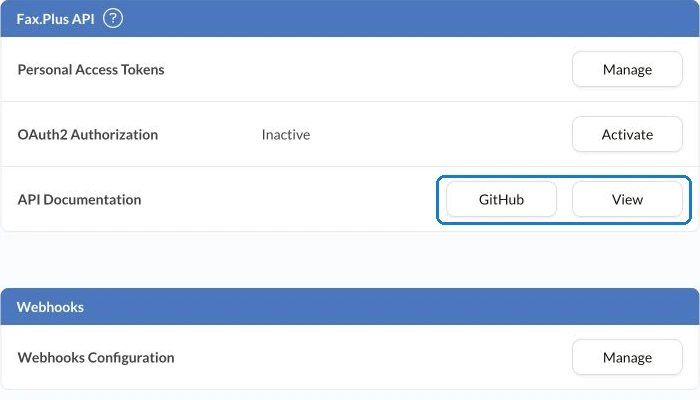
Review Fax.Plus API access and integration options against the workflow you have scoped. API access requires Enterprise, and normal fax charges apply. Confirm expected sending and receiving usage, the required numbers and your testing arrangement with the team before running trials.
The authentication documentation covers Personal Access Tokens and OAuth 2.0 Authorization Code authentication. Choose the approach that fits how the application connects to an account and obtains authorization. Match scopes and underlying account permissions to the intended work. Keep credential handling within your application’s approved security process.
Map the document through submission
For outbound faxing, decide which application component prepares the final document, checks its page order and supplies the destination number. Use the API Quickstart for the implementation sequence: uploading a new document returns a path that can be used in the send request.
Keep that submission connected to the application’s business reference and the tracking identifiers returned by the API. An accepted send request creates an Outbox entry; it is not a delivery result. Show an appropriate in-progress state until a transmission result is available.
For incoming faxes, specify where the retrieved document should go and how the application identifies the associated record. Include a review step when the destination cannot be established confidently.
Decide how results reach the application
Plan the result-handling path as part of the integration. The webhook documentation explains the available events and delivery mechanisms. An outbound fax_sent event can represent success or failure, so the application must interpret the reported status.
Agree which application states and staff notifications follow each outcome. For example, a successful transmission can close the sending task while a separate task remains open for the recipient’s response. Use wording that matches your actual business process.
Include a controlled interruption in the test plan. Confirm how your application reconciles the fax record and resumes work before initiating another send.
Keep detailed event verification, recovery and status-checking behavior in the implementation specification. The planning decision is which system maintains the task state and who investigates an unresolved result.
Set a useful launch test
Choose controlled documents and agreed test destinations. Walk through document preparation, submission, result handling and retrieval where relevant. Check current documentation for applicable file and sending conditions, and discuss expected traffic patterns before deployment.
Record acceptance criteria that someone can verify: the correct document reaches the agreed destination, the result is connected to the application record, and the designated operator can resolve an unsuccessful attempt. Launch with a tested workflow and a named operational owner, then expand the integration as additional use cases are validated.
FAQs
What should developers include in a fax integration brief?

Include the workflow trigger, document source, fax numbers, application record, authorization model, expected usage and completion criteria. Specify who handles exceptions and which business steps follow the transmission result.
How should an application describe an accepted fax request?
Use a state that indicates submission or processing. Update it when the transmission result becomes available, and track any required recipient response as a separate business step.
What makes a first production test useful?
Use controlled documents and agreed destinations to verify the complete workflow. Confirm that staff can connect each result to the application record and follow the agreed procedure for an unsuccessful attempt.




Confédération Suisse
Confederazione Svizzera
Confederaziun Svizra
Confédération suisse
Innosuisse - Agence suisse pour l'encouragement de l'innovation




