


Keep merchant-services fax correspondence connected to the right entity and request, with clear packet checks, staff context and transmission records.


- Confirm the receiving team, merchant entity, accepted fax destination and any supplied request reference before preparing the packet.
- Put recipient-facing reference information in the cover sheet or document, not an internal fax note.
- Check the requested items, document versions and page order before sending or passing the packet to another operator.
- Use Shared Notes on received faxes for context among authorized colleagues; the team manages the handoff convention.
- Keep the transmission result separate from acknowledgment or the recipient's business review.
When a merchant-services team exchanges supporting documents by fax, the packet needs to remain connected to the request that prompted it. A later attachment, a corrected page or a colleague taking over should not require everyone to reconstruct what was sent and what is still needed.
Where the recipient provides or agrees a reference, keep that identifier consistent across the documents and the team's approved record. Fax.Plus supports receiving, reviewing and transmitting the fax; staff check packet completeness and decide the next action.
Agree how the recipient will identify the packet
Confirm which team requested the documents and whether fax is its accepted route for that submission. Verify the destination through the agreed contact process. Use the existing request reference when provided, and ask how the recipient wants related documents identified.
If staff handle correspondence for several merchant entities, check which entity the request concerns. An assigned receiving number can help organize the destination, but staff still verify the correspondence before taking action. Keep the original received fax as the source document.
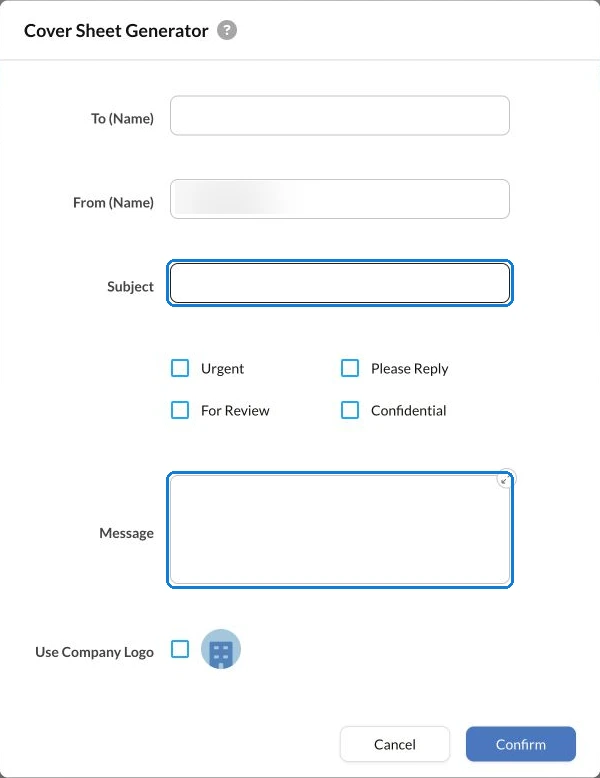
Use that reference on a cover sheet for the document packet or in the document itself, following the recipient's instructions. Include the appropriate reply contact and page information where required. Avoid adding financial details that are unnecessary for identifying the request.
Internal notes and recipient-facing documents serve different purposes. A personal note in Fax.Plus is not sent with the fax. Any information the recipient needs to connect the packet with its request must be in the transmitted material.
Check the packet against the specific request
Adapt these checks to your organization's procedure and the recipient's current document request. Identify the items requested, the version of each document and any outstanding question that needs the receiving team's clarification.
Before sending, check that:
- The reference matches the request and intended recipient.
- The requested pages are present, readable and in the required order.
- A corrected or replacement document is distinguishable from its earlier version.
- Any item still outstanding has an agreed next action.
This is an administrative packet check. The receiving organization applies its own review and acceptance requirements; sending the listed pages does not establish a business decision.
Make a colleague's handoff usable
Illustrative handoff: a supporting page arrives after the initial packet, and another authorized operator takes over before the response is sent. The colleague needs to know which request it belongs to, whether it supplements or replaces a page, and what remains to be checked.
On Business and Enterprise, authorized colleagues using the web app can add context to received faxes. Shared Notes for the receiving team can record that context for colleagues authorized to access the fax. Use the approved reference and a short next action rather than copying the document's financial contents into the note.
The team maintains the handoff convention. Shared Notes provide editable context; they do not lock the task or assign responsibility automatically. Agree who checks the packet and who confirms the transfer when another operator takes over.
Send the checked version and retain the result
Prepare the outgoing fax from the reviewed packet. Confirm the destination again and ensure that the cover sheet or document carries any reference or identifying information the recipient requires. The sender should know which version is being submitted before starting transmission.
After the fax completes, check its result and retain the relevant fax transmission report under your records process. Verify the destination in the fax record, then connect the result with the packet reference in the approved request record.
If the transmission is unsuccessful or its state is unclear, review the current record before deciding on another send. If the recipient requests a correction, identify the changed item and keep its relationship to the earlier submission clear.
Close the document request through the agreed process
Where acknowledgment is required, confirm that the receiving team can locate the packet using its reference. Record any outstanding item or follow-up through the recipient's process. Transmission success and business review remain separate stages.
Evaluate Fax.Plus for merchant-services document exchange around that sequence: an identifiable packet, authorized staff context, a checked transmission result and a clear next action.
FAQs
Where should the merchant-services request reference appear?

Put the recipient's required reference in the transmitted cover sheet or document. An internal personal note is not sent with the fax.
How should staff handle a page that arrives after the first packet?
Match it to the request, check whether it supplements or replaces an earlier page, and record what remains to be done. Follow the recipient's instructions for submitting the update.
What should a second operator check before sending the packet?
Confirm the reference, intended recipient, requested items and document versions. Check the current fax record before sending again if an earlier transmission may already be underway or complete.




Confédération Suisse
Confederazione Svizzera
Confederaziun Svizra
Konfederacja Szwajcarska
Innosuisse – Szwajcarska Agencja Innowacji




