


Compare a school-office or district fax setup by numbers, staff access, total cost and deployment requirements, with practical demonstration checks.


- Compare services against the same school-office or district setup: numbers, staff access and expected usage.
- Decide which numbers belong to individual schools or departments and who needs each one's incoming faxes.
- Include additional numbers, shared reception, busy-period usage and required administration in the price comparison.
- Ask providers to demonstrate the receiving, sending and staff-access tasks your school actually needs.
- Review district requirements for account ownership, access, retention and data handling before procurement.
Choosing a fax service for a school office starts with the work staff need to do: receive documents, send them to accepted destinations and find the relevant record when a question arises. A district buying for several schools adds another requirement: a setup its IT team can manage across locations and staff changes.
The useful comparison is the same deployment priced and demonstrated by each provider. Start there, rather than comparing a personal sending subscription with a district account that includes different numbers, permissions and administration.
Define the office or district you are buying for
Write down the number of schools, departments and staff who will use fax. Distinguish people who need to receive documents from those who only send, and identify who manages the account.
An office with one receiving number and a district with separate numbers for several schools need different evaluations. That is a deployment choice, not a reason to assume every district needs the same plan.
List the routes staff need: a browser inbox, approved email notifications or sending from supported office software. Ask providers to demonstrate those specific routes. Include the complete path staff will use to receive, review and retrieve a fax in that demonstration.
Compare numbers and staff access together
Decide which public fax number serves each school or department. If retaining an existing number matters, confirm its eligibility, transition arrangements and responsibility for the transfer; the fax number porting information is the starting point for assessing that option with Fax.Plus.
Then map who needs access to each receiving number. Consider office cover, district administration and the person responsible for removing access when roles change. Separate access to school documents from permission to administer the account.
Fax.Plus supports assigning numbers to team members, including shared assignments on Business and Enterprise. Review its team roles and access permissions against your proposed staff map rather than assuming every administrator needs the same document access.
If district policy requires single sign-on, confirm compatibility with its identity provider. Fax.Plus supports SAML 2.0 SSO on Enterprise, with configuration managed by Owners or Admins.
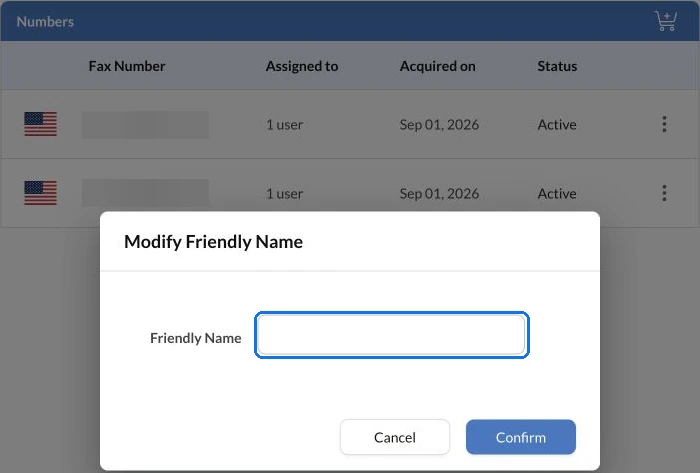
Friendly Names can label numbers by school or purpose so staff recognize them more easily. A recognizable label and the access settings serve different purposes: evaluate both in the demonstration.
Price the configuration you expect to use
Give each provider the same usage assumptions. Include ordinary receiving and sending, additional numbers and any periods when demand changes, such as enrollment or term transitions.
Ask for the complete price of the required setup:
- Numbers and users: what is included, and what requires another charge or plan?
- Page usage: how are sending, reception and overages counted?
- Shared reception: does delivery to several staff members affect usage?
- Administration: are required identity, retention or reporting controls included?
For Fax.Plus, each assigned user's copy of an incoming fax counts against the plan's pages or Alohi credits. Include the intended assignments in the estimate. Check the current Fax.Plus plan options for the features and allowances you need; use the complete quote for your chosen configuration when comparing providers.
Check privacy and records requirements during selection
Have the responsible district team review the proposed service's terms, access controls, storage and retention options against its requirements. Ask how staff retrieve records and what happens to access and retained documents when an employee leaves or the service changes.
Product security features can support that review, but the school determines its authorized document-handling process. Document how the proposed configuration meets the requirements that apply to the school and the documents it handles.
Demonstrate a school-office workflow before committing
Use approved synthetic documents, not student records, to test the proposed setup. Receive a fax on the intended number, open it as an authorized office user and send a document to an approved test destination. Check that staff can find the resulting record and that the administrative role behaves as expected.
Record the result of those checks alongside the quote. The preferred service should fit the required tasks, access model and total cost. Review Fax.Plus for school and district teams against that same set of criteria.
FAQs
Should one school office and an entire district compare the same fax plan?

Compare the required setup first. A district may need several numbers and administrative controls, while one office may have fewer users and destinations; price each configuration with its actual requirements.
What should be included in a school fax cost estimate?
Include numbers, users, sending and receiving volume, overages and required administration. Ask how shared reception changes usage, and compare providers using the same assumptions.
How can a school test staff access without using student records?
Use synthetic documents and approved test destinations. Check the intended office user's reception and retrieval tasks, then verify the separate administrative role without adding real student information.




Confédération Suisse
Confederazione Svizzera
Confederaziun Svizra
Zwitserse Bondsstaat
Innosuisse - Zwitsers Innovatieagentschap




