Choose a number structure, assign reception and backup responsibilities, estimate shared-number usage and test fax workflows across your offices.


- A central account can support local receiving numbers, one number for central intake or a hybrid arrangement.
- On Fax.Plus Business and Enterprise, each member assigned to a receiving number gets a copy that counts toward usage.
- Two incoming pages shared with three assigned members use six pages when transmission duration does not increase the billable count.
- Shared Sent visibility requires activation through Support; Outbox remains visible only to the sender.
- A pilot should reconcile reception, backup cover, sending identity, peak demand and actual usage before rollout.
A fax sent to your main number may need to reach a central intake team, one local office or a colleague covering several branches. A multi-location fax setup works best when those responsibilities are clear before you assign access.
Start with three decisions: which numbers stay local, who receives each number's faxes and how those assignments affect usage. On Fax.Plus Business and Enterprise, several members can share a receiving number. Each assigned member receives a copy, and each copy counts toward the account's usage. For example, a two-page incoming fax shared with three assigned members uses six pages, assuming the transmission's time-based calculation does not increase the billable count.
This guide walks through a rollout across offices, from choosing a number structure to testing it with the people who will use it. For a broader provider evaluation, see our enterprise cloud fax evaluation guide.
1. Choose one shared number, local numbers or a hybrid
The right structure follows where work is handled. An organization can use one account while keeping separate receiving numbers for offices or departments.
One shared number for central intake
Use a common number when a central team handles incoming documents for every location. Assign it to the people responsible for that intake, including approved cover. This gives external senders one destination, while your team decides which office handles the next step.
A shared number alone does not sort documents by branch or assign a task to a colleague. Give senders a clear location or department reference to include, and agree how the intake team passes work onward.
A receiving number for each office
Keep local numbers when senders already know them or when each office handles its own documents. Assign each number to the relevant staff and add cross-office cover where needed. This can preserve familiar destinations while moving administration into one account.
A hybrid for local work and shared services
Use local receiving numbers alongside a central number for a shared function such as billing. A regional backup member may need access to several local numbers; that does not mean every member needs every number.
Example: a three-office business keeps its local fax numbers and adds one central billing number. Local staff receive their office's documents, billing staff receive billing faxes and a designated colleague provides absence cover. This is an illustrative operating model, not an automatic routing feature.
2. Make a number-and-access map
Create one record per receiving number. Include the office or function it serves, the existing provider, the people who receive its faxes, the person responsible for responding and the approved backup. Add the expected incoming volume and the busiest sending period.
Keep access and responsibility separate in that record. Three members may receive the same fax, but your process still needs to identify who acts on it. Decide how colleagues record that a document has been picked up and how an unresolved fax reaches the backup.
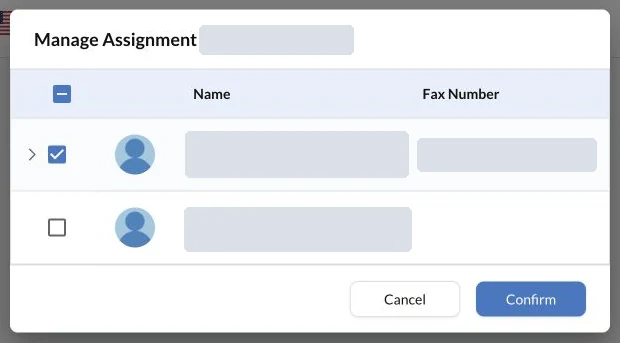
For Fax.Plus, configure the agreed recipients using the shared-number assignment instructions. The Owner manages number assignments on Business; Owners and Admins can manage them on Enterprise. Use individual member accounts so access follows each person's role.
If your deployment is a pharmacy network, our pharmacy network access and sending-capacity guide covers that sector's branch-level planning.
Here is a hypothetical number map using role labels instead of real names or fax numbers. The usage estimates assume transmission duration does not increase the billable page count.
3. Set permissions for reception, supervision and sent faxes
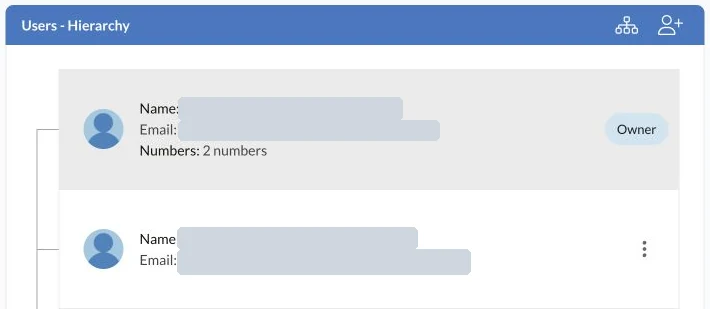
Receiving a shared number's faxes and supervising another member's activity are different arrangements. Assigning a receiving number gives each assigned member an incoming copy. The account's hierarchy separately determines access to subordinate members' Inbox and Sent faxes.
Admin status does not automatically reveal every member's fax content. On Enterprise, an Admin can also be a Manager when members sit below them in the hierarchy. Configure the management structure around the supervision your organization actually needs, rather than using an Admin role as a shortcut to document visibility.
For colleagues who need to see outgoing activity on the same number, Fax.Plus can enable Shared Sent box on request through Support. With that feature enabled, successful and failed sent faxes are visible to members assigned to the number. Queued faxes in Outbox remain visible only to the sender. Shared Sent visibility does not add page charges.
Test these views with a local member, a backup and a supervisor. Include the moment before a fax finishes sending, so staff know where to look while it is still queued. Use the same access map when a member changes office or leaves the organization.
4. Budget for the people assigned to each receiving number
Estimate incoming usage number by number. A shared monthly allowance and the number of members receiving a fax are separate parts of the calculation. Record receiving-number assignments separately from hierarchy permissions when estimating incoming copies.
The two numbers in the example map produce 800 pages of incoming usage in total: 600 for the local office and 200 for central billing. If the local office needed only two assigned members, its same 200 incoming document pages would produce 400 pages of usage. These examples assume each fax's transmission duration does not produce a higher billable count.
Use the assignments needed to do the work, including appropriate absence cover. A backup who remains assigned receives an incoming copy even while the primary colleague is available. Include those copies in your estimate. The aim is a deliberate access decision with a realistic budget. Blanket assignments across every office can increase both document exposure and incoming consumption.
Then add outgoing activity, additional-number costs and any extra-page charges on your plan. Fax.Plus calculates billable pages using the higher of the actual pages transmitted or the number of started 60-second transmission intervals. Sending to some destinations can also apply a multiplier. The current fax page calculation explains those rules.
A member's Monthly Send Quota controls their sending allowance; it is not a separate reserve for incoming copies. Compare the total estimate with the current team plans and usage allowances before choosing your rollout configuration.
5. Test peak demand as well as monthly volume
A monthly usage estimate tells you how much faxing to budget for. It does not tell you how many transmissions can run at once or how long a batch will take to finish.
Record when offices are likely to send at the same time, which sending numbers they use and how long documents typically take to transmit. Confirm the applicable concurrent sending and receiving limits for your chosen plan and number configuration. More members or a larger monthly allowance should not be treated as a capacity increase.
Run a representative busy-period test using approved destinations. Observe queue behavior and completed or failed delivery statuses, and agree who follows up on exceptions. Recipient availability and transmission conditions also affect completion, so use observed results to plan staffing and follow-up rather than promising a fixed delivery time.
6. Pilot one office before moving the rest
Start with a small group that includes a local recipient, their backup and whoever supervises the work. Use synthetic documents and approved test destinations. Work through this sequence:
Record the results beside the number map. Expand when the intended staff can receive and act on documents, outgoing identity is correct and usage matches the configuration you agreed.
If you are bringing existing numbers, check eligibility to transfer your office fax numbers and plan the migration around the confirmed transfer. Keep the current service active until the port completes. Test sending and receiving again after the transfer.
For workflows involving protected health information, prepare Enterprise with Advanced Security Controls enabled and a signed BAA before using patient documents. Apply the same access and document-handling policy across the participating offices.
Bring your number map, expected usage and pilot requirements when discussing a Fax.Plus deployment across your offices. These give the team a concrete configuration to size, rather than just a location count.
FAQs
Should every office have its own receiving number?

Keep local numbers where offices handle their own documents or senders already rely on them. A central or hybrid setup can work better when one team handles a shared function across locations.
What should we record when opening another location?
Add its receiving number, assigned members, responsible reviewer, backup and expected usage to the number map. Repeat the reception, sending-identity and handoff tests before adding live traffic.
How should we plan fax cover between offices?
Identify the backup and give them the access needed for the agreed work. Include their incoming copies in the usage estimate and test the handoff before the primary member is absent.


精选文章
查看全部





Confédération Suisse
Confederazione Svizzera
Confederaziun Svizra
瑞士联邦
Innosuisse - 瑞士创新署