


Keep faxed credentialing documents connected to the correct application. Check versions, effective dates, transmitted copies and administrative receipt.


- Follow the receiving organization’s current credentialing submission instructions.
- Identify the provider, application and requested document through approved references.
- Check effective dates and versions before sending a replacement document.
- Keep the exact submitted file connected to its fax transmission record.
- Confirm administrative receipt separately from credentialing review or approval.
A credentialing team requests a current supporting document, and the practice sends a replacement by fax. The administrative question is whether the right version reached the right application record, with a clear indication of what it replaces.
Document receipt is one stage in credentialing. A fax result supports transmission tracking; the receiving organization determines whether a document satisfies its request and how the application proceeds.
Begin with the current submission route
Read the requesting organization’s instructions for the specific document. A portal may handle the application while another accepted channel is used for a particular supporting item. Do not assume a fax number used for billing, claims or referrals is also a credentialing destination.
As one payer-specific example, AmeriHealth Caritas PA CHC’s credentialing instructions distinguish provider-data steps and submitting a current W-9 through the stated channels. Use the actual recipient’s current instructions rather than applying that example to every organization.
Identify the provider and application using the requested reference. If the recipient supplies a personalized cover page, include it as directed. Establish who can confirm that the document was added to the intended record.
Check the version before attaching it
Compare the requested item with the file selected for sending. Check the document’s title, issue date, effective period and expiration date where those details apply.
If a document has been renewed or corrected, make the replacement’s purpose explicit. For example, “Updated [document type] for application [reference], replacing the copy dated [date]” identifies an administrative change without suggesting that the credentialing decision has been made.
Preserve the submitted version in the approved application record. A filename alone may not explain which document was faxed if the underlying file is replaced later. Keep the relevant version and the transmission record connected through your organization’s records process.
Prepare a readable submission
Check every page, including signature sections and the dates the recipient needs. Include only the documents requested for this submission and confirm any required attachment order.
In Fax.Plus, attach the reviewed file to the outgoing fax and verify the current destination before sending. The computer-to-fax sending steps explain the attachment workflow. Apply the recipient’s document and signature requirements before preparing the final copy.
Evaluate Fax.Plus for healthcare administrative document exchange against the receiving organization’s document and account requirements.
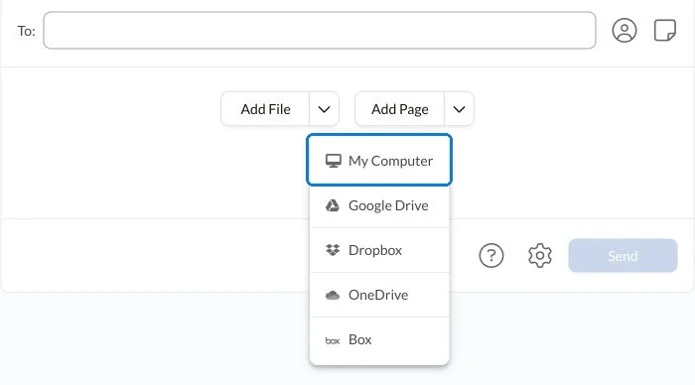
After sending, review the result and retain the appropriate fax confirmation report. Follow the organization’s handling requirements for personal and professional information throughout the exchange.
Confirm receipt against the outstanding request
When the receiving process calls for acknowledgment, ask whether the document can be located against the application and whether the requested version is present. Record the response and any further administrative action.
If a replacement is requested, identify the precise issue before sending again. An unreadable page, an expired document and a request for a different document need different responses.
Keep “sent,” “received for review” and the recipient’s credentialing outcome distinct. This gives colleagues an accurate view of outstanding documents while leaving verification and credentialing decisions with the responsible organization.
FAQs
What should identify a replacement credentialing document?

Include the requested provider or application reference, document type and relevant version or effective dates. Explain which earlier copy is being replaced and follow the recipient’s submission instructions.
What should staff retain after faxing a credentialing document?
Keep the exact submitted version and its relevant transmission record connected to the application through the approved records process. Record the recipient’s acknowledgment and any further request separately.
What should a credentialing receipt check confirm?
Confirm that the receiving team can locate the requested document against the correct application and identify its version. Receipt for review should remain separate from verification and the credentialing outcome.




Confédération Suisse
Confederazione Svizzera
Confederaziun Svizra
Confederação Suíça
Innosuisse - Agência Suíça de Inovação




