


The 5 Best Fax Apps for Android in 2026 (Tested and Compared)
Android has no built in fax feature, so if you need to send a fax from your phone, the app you pick is the whole game. And picking one is trickier than it looks: most fax apps started life on iPhone and got ported to Android afterward, and it shows. Some lose their built in scanner along the way, some carry a completely different price on Google Play than on the App Store, and a few have Play Store ratings that tell a different story than their iOS reviews. None of that is obvious until you actually install the Android version and use it. We did exactly that. Below are the five Android fax apps we trust most in 2026, what changes (or breaks) when you move from iPhone to Android specifically, and where each one genuinely earns its spot.


- Fax.Plus is the best overall Android fax app: the strongest scanner, full feature parity with iOS, a complete compliance stack, and the widest feature set from $6.99/mo.
- iFax is the budget pick for compliance: a signed BAA from $24.99/mo, well below most rivals, just set up the subscription deliberately to keep billing clean.
- ComFax (Municorn) is best for high volume mobile faxers who want unlimited send and receive pages and a free number on every plan.
- WiseFax suits occasional faxers who want pay-as-you-go pricing with no subscription, though its Android footprint is small.
- Tiny Fax is the cheapest way to send unlimited faxes without renting a dedicated number, built by a Chinese developer with no documented HIPAA process.
Quick comparison
A good Android fax app has to do four things well. It has to send a clean fax, because a smeared signature or an unreadable lab value defeats the point. It has to be honest about price, since billing surprises are the single most common complaint we found across Play Store reviews for this category. It has to be easy, ideally a scan and send in under five minutes. And for anything sensitive, it has to be secure, which for medical documents means real HIPAA coverage and a signed agreement, not just a reassuring word on the app description.
One pattern is worth knowing before you install anything: for several of these apps, the Android Play Store rating sits a little lower than the iOS one, usually because of subscription and cancellation confusion rather than the faxing itself. It is an easy thing to sidestep once you know to subscribe deliberately and manage billing through Google Play, and we flag exactly where it applies for each app below so none of it catches you out.
Here is how the five stack up, with one clear overall winner and four apps that each cover a narrower need well. None of them is the right choice for everyone, so each section ends with a straight answer to who it actually fits.
How we tested
Every service in this guide has been through the same hands on process we use for all our reviews: we send two standardized test documents, a filled IRS form and a healthcare lab report, through each service and compare what arrives on the other end for sharpness, contrast, and fine detail. The full side by side results, output scans included, live in each app's individual review linked throughout this article. What this guide adds on top is the Android specific layer: we installed each app from Google Play, checked its real Play Store rating and recent reviews, verified its Android pricing against what the company advertises, and noted where the Android experience differs from the iPhone one.
1. Fax.Plus: best overall fax app for Android
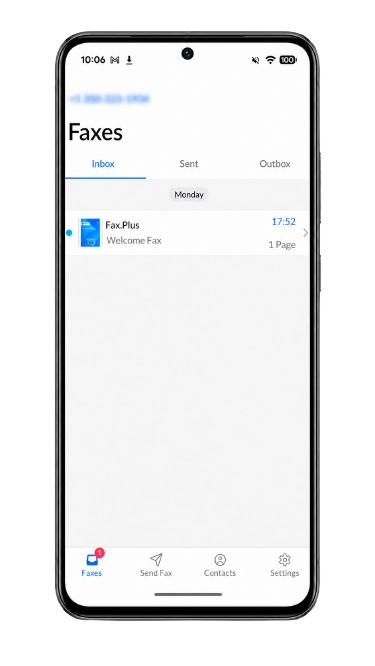
Fax.Plus is the Android fax app we recommend to almost everyone, and the one we measure the others against. It turns your Android phone into a full fax machine: scan a paper page with the camera, attach a PDF or Word file from Google Drive, sign it with your finger, and send it, with a push notification when the fax is delivered.
It is also one of the few apps here that runs properly on a Chromebook, which matters if you fax from a Chrome OS tablet rather than a phone. At 4.6 stars across 30.4K Android reviews, it holds the highest rating of any full-featured fax app on Google Play. Alohi also replies to recent Play Store reviews individually, not with a copy-paste template, which is a useful signal that the Android build is actively maintained rather than left to drift.
The app and scanning
The camera scanner is the part you feel most on a phone, and it is the best in this group. Point it at a page and it finds the edges automatically, applies perspective correction so a slightly angled shot still comes out square, and cleans up the contrast so a photographed page reads as scanned rather than snapped. You can pull files straight from Google Drive or Dropbox, reorder pages before sending, and add notes to archived faxes to keep a long history organized.
What is built in
The app does more than send and receive. You can sign a received fax and send it back without printing anything, add a cover sheet, and fax to several recipients at once. Email to Fax lets you send a fax straight from your inbox by putting the number in the subject line, which is handy when the document is already an email attachment. You can schedule a fax to go out later, set automatic retries so a failed fax resends on its own, and route delivery confirmations to up to five email addresses. Received faxes are stored in an encrypted archive you can search, and the app runs in 22 languages.
Healthcare and integrations
If you fax patient records, this is where Fax.Plus separates from a basic phone app. It connects to the major EHR and EMR systems, including Epic, Cerner, athenahealth, NextGen, and Kipu EMR, so faxes can flow into the systems a clinic already runs on rather than living in a separate inbox. It also supports Fax Streaming, which delivers each page the moment it is decoded instead of holding the whole fax until the last page arrives, so a long incoming fax becomes readable in real time. For a busy clinical workflow, that combination of EHR integration and real time delivery is the kind of thing a basic consumer app simply does not do.
Fax quality
Fax quality is one of the strongest reasons to pick Fax.Plus. It sends in two modes, Standard for everyday documents and HD for anything with small print, fine lines, or stamps that need to arrive intact, which most consumer apps do not offer at all. We put it through the same hands on tests as every service we cover, and you can see the side by side results on our online fax reviews hub.
Cennik
Pricing is refreshingly readable. You can try it free with 10 pages to send, no credit card and no trial countdown, though those 10 pages are a one time allowance for the life of the account rather than a monthly reset, and the free tier is send only. When you need more, the plans are:
- Basic: $6.99 per month, 200 pages
- Premium: $13.99 per month, 500 pages
- Business: $27.99 per month, 1,000 pages
- Enterprise: $79.99 per month, HIPAA BAA, API, data residency
You can cancel in app at any time, with no support ticket needed.
If you need more than faxing, Fax.Plus is part of the Alohi suite alongside Sign.Plus for e-signatures and Scan.Plus for scanning, so the same account can cover the full document workflow without switching platforms.
Best for: nearly every kind of Android user, from someone sending one fax a year to an enterprise team that needs org level compliance, EHR integration, and an admin console across dozens of users. See the full how to fax from Android guide for every method, or check the pricing page to find the right tier.
2. iFax: best for compliance on a budget
iFax earns its place for people whose documents are the sensitive kind: contracts, financial paperwork, patient records, anything where you want strong encryption, a clear paper trail, and a signed BAA without enterprise pricing. It is a genuinely capable security focused fax app, fast to send, with HIPAA coverage available well below what most rivals charge, and that is why it makes this list.
One thing to go in with your eyes open about, because it is specific to Android: the Play Store build (published under the developer name Crowded Road) sits at 3.3 stars versus 4.7 on iOS, and most of the lower reviews are about billing rather than faxing. The pattern is trial-to-paid confusion, people who meant to start a trial and found themselves on an annual plan. It is the reason we rank iFax second rather than first, and we cover how to avoid it below.
The app and scanning
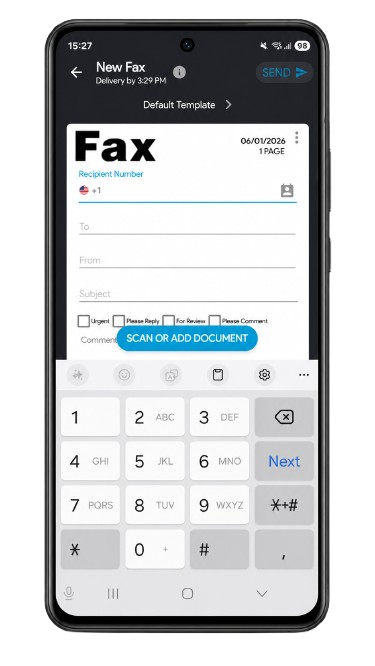
The app is capable and quick. You scan a page with the camera, pull files from cloud storage, enter the number, and send, with live status as the fax moves from sending to delivered. Send speed is genuinely fast, one of its real strengths, and the higher resolution mode produces clean output for business documents. The interface is busier than Fax.Plus, with more packed onto each screen, but nothing you cannot learn in a few minutes.
What is built in
iFax covers the core mobile faxing job and adds the security minded extras its audience cares about: encrypted transmission, delivery tracking, cloud imports, and electronic signing so you can sign and return a fax without printing. Audit logs and user activity tracking sit on the higher tiers, which matter more for regulated industries than for individual users.
Fax quality
In our hands on testing, the default Standard quality came in below the market standard, with a heavy gray background, dithering, and fine detail loss on dense documents. The higher resolution mode was a meaningful step up, with a cleaner background and sharper lines, making it acceptable for most business documents, though it still does not quite match Fax.Plus at the same tier. The full side by side is in our iFax review.
Pricing and the BAA
Plans start at $12.49 per month, billed annually, for the Basic tier with 200 pages, moving to $24.99 for Plus (500 pages) and $33.33 for Pro (1,000 pages). There is no free tier, though a trial is available on Pro.
The BAA, the legal contract that makes a fax provider responsible for protecting patient health information under HIPAA, is the part worth paying attention to. Without a signed BAA, a healthcare practice sending patient records through a fax app is technically out of compliance no matter how good the encryption is. On iFax the BAA is available from the Plus plan at $24.99 per month, a realistic entry point for smaller clinics or individual practitioners, and a real point in its favor compared to providers that gate HIPAA behind a much pricier tier.
The one catch to plan around: the Basic tier at $12.49 is send focused and does not include a BAA, so the headline price is not the compliance price. Confirm which plan includes the signed agreement, start your subscription deliberately rather than through a trial pop up, and you sidestep the billing surprises that drive most of the negative Android reviews.
Best for: professionals handling sensitive documents who need compliance coverage without a large monthly commitment.
3. ComFax (Municorn): best for unlimited pages on mobile
ComFax, sold on Google Play as Fax App by Municorn, is a phone-first fax app with a large following. It carries 4.5 stars across 67.9K reviews and currently ranks among the top-grossing Business apps on Google Play, which tells you the subscription engine is working hard.
It is published by Municorn Limited, a Cyprus-based developer whose other apps, including an eSIM tool and a second phone number app, sit at noticeably lower ratings, so the fax app is clearly their strongest product rather than a side project. Every plan comes with unlimited send and receive pages and a free local fax number, which is the real differentiator here.
The Android pricing is also worth checking carefully before you subscribe. The prices shown in Google Play differ from the pricing advertised on ComFax's website and iOS-facing pages: on Android, the current options are $14.99 per week, $35 per month, or $100 per year, and the plans auto-renew unless canceled through Google Play.
The app and scanning
This is a product built mobile first by a team that clearly understands the phone faxing job. The send flow is fast and guided, a scan to fax takes well under five minutes, and the built in scanner, cloud imports, and in app signing are all where you expect them. The in app live chat is the genuine standout, the only app in this group where we could reach a human without leaving the app.
What is built in
You get the full mobile toolkit: scan, sign, import from the cloud, send to 90+ countries, a free local fax number, and unlimited pages on every plan. In app support, including live chat, is genuinely good, which not every app in this category offers.
Cennik
The Android pricing is also worth checking carefully before you subscribe. ComFax does not show Android prices on its website, so Android users only see the actual subscription price at Google Play checkout. In our Android checkout, the weekly plan was shown at $14.99 per week, higher than the $9.99 weekly iOS price advertised on ComFax's own site, and the plan auto-renews unless canceled through Google Play.
For comparison, ComFax's own website lists these iOS prices:
- Weekly: $9.99 per week
- Monthly: $29.99 per month
- Annual: $249.99 per year ($4.81 per week)
That difference matters because the website price can make ComFax look cheaper than what an Android user actually sees before subscribing. Android users should check the Google Play checkout price carefully instead of relying only on the pricing shown on the website.
All paid tiers include the same core offer: unlimited pages, a free local fax number, and international faxing to 90+ countries. There is no free tier beyond a single demo fax, and refunds are not granted once you have sent a fax.
Where it falls short
The main limitation is a fragmented ecosystem and a real gap in admin depth rather than polish. There is no admin console, no team management, no public API, and no Windows app, which means it does not scale into a business setup the way a proper multi platform account does. It also transmits at a single fixed quality with no HD or Fine mode, so fine detail on dense documents does not survive as cleanly as on services that offer quality control. None of that matters for a quick personal fax, but it adds up fast for anyone managing faxing for a team. We dig into all of it in our ComFax review.
Best for: high volume mobile faxers who want unlimited pages without counting, and who do not need admin controls or desktop access.
4. WiseFax: best no subscription, pay as you go option
WiseFax is built for people who fax rarely and do not want a recurring plan for the privilege. It runs on fax tokens instead of a subscription: one token costs $1.00, and most domestic and EU destinations need one token per page. There is no monthly charge unless you specifically want a dedicated number to receive faxes, which makes it the cleanest pay per use option in this list, with the widest country coverage of the five.
On Android it is published by Vanaia LLC, the same developer behind the well rated ScanWritr scanning app. One genuinely Android friendly touch is the sign in flow, which lets you authenticate with an existing Google, Facebook, or Microsoft account instead of creating yet another login, so you can send a one off fax without setting up an account from scratch.
The app and scanning
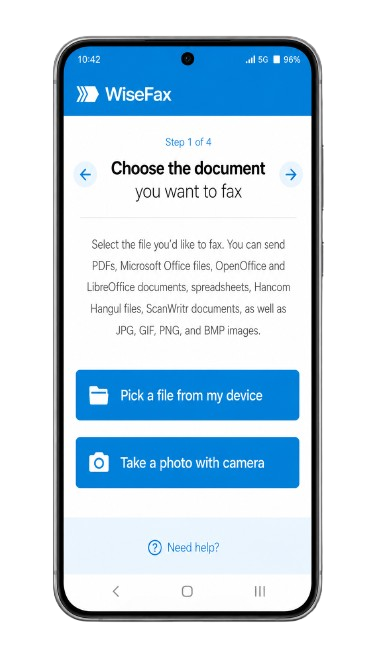
You upload a document from your device or cloud storage, or take a picture, and WiseFax automatically detects the edges of the page and cleans up shading and contrast. You select the country and enter the recipient's number, purchase tokens if you need them, and send. Every fax gets an email confirmation regardless of outcome, which is a small but real reassurance compared to apps that leave you guessing.
What is built in
Sending works without an account verification step, which is unusual: no account setup is required to send a one off fax. WiseFax supports a wide range of file types, including PDF, Microsoft Office, Apple's iWork formats, OpenOffice, and common image formats, and you can fax a picture taken directly on your phone. For people who want their own number, a subscription unlocks receiving.
Cennik
Sending is pay as you go: one fax token costs $1.00, and most faxes to domestic numbers and most EU countries use one token per page. Taxes are included in the token price. If you want your own fax number to receive faxes, a subscription is $8.00 per month or $4.25 per week, and that subscription includes up to 300 received pages per month (or 50 per week) plus an additional 10 send tokens per month (or 5 per week) on top. There are no setup or cancellation fees, and you can cancel the number subscription at any time.
Where it falls short
There is less collective experience to lean on here than with the bigger apps on this list, so treat it as a niche pick rather than a mainstream default. The thing to understand going in is simply how pay as you go math works: every page is a $1 token, so a 34 page fax costs $34, and that adds up faster than a flat monthly plan if you fax a lot. It is the right model for the occasional one or two page fax and the wrong one for volume. Also note the paid number's "300 pages per month" applies to receiving, not sending. There is no HIPAA compliance path, so this is not the choice for medical or legal documents that need a signed BAA.
Best for: people who fax only occasionally, want to pay per page with no subscription commitment, and need to reach a wide range of countries.
5. Tiny Fax: best for unlimited sending without renting a number
Tiny Fax separates sending and receiving into two entirely independent subscriptions, which sounds like a drawback until you realize it is also the app's real advantage. If you only need to send faxes and never need your own number to receive them, the unlimited send plan alone is cheaper than ComFax's all in one unlimited plan, because you are not paying for a number you do not need.
On Android it is one of the more established listings here, 4.6 stars across 23.7K reviews and 500K+ downloads, built by the same developer behind the popular Tiny Scanner app. That shared lineage shows: unlike Genius Fax, which farms scanning out to a separate companion app, Tiny Fax has a competent scanner built straight in, so the whole scan and send job stays in one place.
The app and scanning
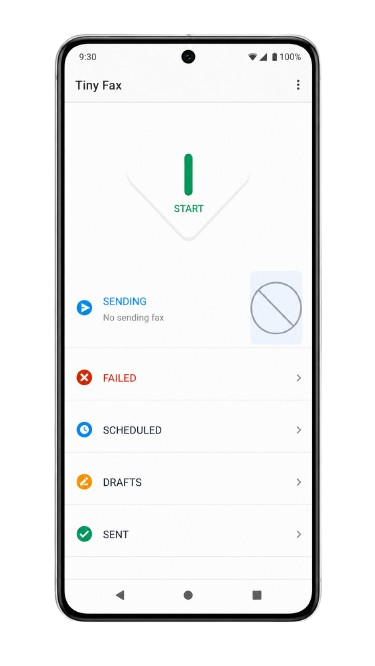
Tiny Fax supports both sending and receiving, turning your phone into a fax machine for documents, photos, and other files. The interface is straightforward, and the app includes a genuinely useful organizational layer most competitors skip: you can archive faxes by status, set reminders, and schedule a fax to send automatically at a future time.
What is built in
You can fax documents straight from Mail and other apps, from Dropbox, Google Drive, Box, and OneDrive, or from photos taken on the camera. The app supports PDF, TXT, HTML, PNG, and JPG files, can send multiple files in one fax, and covers a list of international destinations. Scheduled sending and reminders are the standout features here, and a searchable, status filtered fax archive is something several competitors in this list lack entirely.
Cennik
This is the part that needs the most attention. Tiny Fax splits sending and receiving into two completely separate subscriptions:
- Unlimited sending: $4.99 per week, $14.99 per month, or $39.99 per year
- Dedicated fax number, for receiving: $9.99 per week, $24.99 per month, or $79.99 per year
If you only send, the $14.99 monthly plan covers unlimited sending without paying anything extra for a number, which makes it cheaper for send only use than ComFax's bundled unlimited plan at $29.99 per month. If you also need to receive, the two subscriptions stack, and the combined cost runs higher than most single subscription competitors.
Where it falls short
Confirm the HIPAA fit before you rely on it: the app advertises compliance, but there is no publicly documented BAA process, so check directly if patient records are involved. The "first fax free" offer is also smaller than it sounds in practice, since a single fax with a cover page can use up the two page allowance in one go. Treat it as a quick trial rather than a real free tier, and the app is straightforward from there.
Best for: people who mainly need to send, not receive, and want the cheapest possible unlimited sending plan without paying for a number they will not use.
Other Android fax apps worth a mention
These three names did not make the top five for this guide, but they come up often enough in searches and reviews that they deserve a straight answer rather than silence.
Genius Fax
Genius Fax is one of our favorite picks in our best fax apps for iPhone guide, where it pairs a sharp built in scanner with simple pay per page pricing and no subscription. The Android version tells a different story. It ships as a companion app to its own scanner, Genius Scan, so scanning and faxing live in two separate apps rather than one, which turns a five minute job into a longer back and forth, and a few reviewers report crashes on older or lower memory phones during the handoff between the two apps. The pricing itself is still reasonable, with per page credits and an inexpensive number subscription, so if you already use Genius Scan for document scanning, it is worth a look. For most Android users starting from scratch, the apps on our main list get the same job done in one app instead of two.
eFax and MyFax
eFax and MyFax both have working Android apps, and both come up constantly in "best fax app" searches because of brand recognition. What is worth knowing before you pick one over the other is that they run on the same Consensus Cloud Solutions infrastructure, the same backend, the same core app, with different branding and pricing layered on top. eFax leans on the more established name and a broader enterprise feature set, while MyFax is positioned as the lighter, cheaper entry point into the same system. Treat the choice between them as a pricing and branding decision rather than a product decision, and check our full eFax review and MyFax review for the hands on details and current Android ratings before subscribing to either.
Our verdict
If you want one app that does everything well, Fax.Plus is the pick, and it is the one we measure the rest against: the best scanner, a selectable HD quality mode, a real compliance stack with a signed BAA, EHR integration and Fax Streaming for healthcare, and pricing that starts free and scales without surprises.
The others each win a narrower lane. iFax suits users who need a BAA without jumping to enterprise pricing, as long as they choose the plan deliberately, avoid accidental trial upgrades, and read the cancellation terms first. ComFax is a capable phone only app with unlimited pages on every plan, held back by single quality output and a lack of admin depth once you need more than one user. WiseFax is the pay as you go choice for the few times a year faxer who wants the widest country coverage. Tiny Fax is the cheapest way to send without renting a number, as long as you are comfortable with its data residency and skip its receiving plan unless you actually need it.
If none of the five quite fits, Genius Fax, eFax, and MyFax above are worth a look too, with the caveats that come with each.
FAQ
Does Android have a built in fax app?

No. Android has no native fax feature or modem, so you need a third party app such as Fax.Plus to send and receive faxes from your phone.
Do I need an app to fax from Android?
Not always. The app is the easiest route, but you can also fax without installing anything using Email to Fax, which Fax.Plus supports alongside its app.
Can I fax from my Android phone for free?
Yes, within limits. Fax.Plus gives 10 send pages one time with no credit card, and WiseFax requires no subscription to send, though every page still costs a token. Truly unlimited free faxing does not exist, so check whether the free allowance is one time or monthly before relying on it.
Which Android fax app is best for healthcare?
For patient records you need real HIPAA compliance and a signed BAA, not just "HIPAA aligned" language on an app description. Fax.Plus offers a signed BAA along with HIPAA compliant fax, EHR and EMR integration, and Fax Streaming for real time delivery, which makes it the strongest fit for clinical workflows.


Featured Articles
See All



Confédération Suisse
Confederazione Svizzera
Confederaziun Svizra
Swiss Confederation
Innosuisse - Swiss Innovation Agency




