


Send EMS documentation to the agreed fax destination, check the transmission result and confirm document availability when the recipient process requires it.


- Confirm which EMS document the recipient needs, its accepted fax destination and any submission window it specifies.
- Use the request or transport reference approved by your organization to connect the fax with the intended record.
- Check the completed transmission result in Fax.Plus, then retain its confirmation report when required.
- Confirm document availability through the recipient's agreed process when that additional step is needed.
- Treat fax transmission, recipient acknowledgment and clinical handover as distinct stages.
After a transport, an EMS team may need to send documentation to a receiving facility or administrative office. A clear fax handoff connects the requested document with its destination and gives staff a transmission result they can check later.
The useful question is specific: what does this recipient need to complete the document handoff? Sometimes the process calls for a fax transmission record; sometimes staff also need confirmation that the document is available to the intended team. Agree that expectation before sending.
Confirm the document and destination together
Identify the document requested and the recipient responsible for receiving it. Verify the fax number through the organization's accepted contact route, especially when a facility uses different destinations for different administrative purposes.
Record any submission window or follow-up requirement the recipient gives you. Use the current instructions for that handoff rather than applying a general EMS deadline to every document or facility.
Prepare the pages in the required order and check that they are complete and readable. Include the reference the recipient needs to connect them with the intended record, following your organization's patient-information and cover-sheet policy.
For example, an administrative office may request a document under a particular reference and ask staff to confirm its availability afterward. That is a process to verify with the recipient, not a universal requirement.
Send through the approved healthcare account
Use the verified destination number and review the packet before sending it in Fax.Plus. For HIPAA workflows involving patient information, confirm Enterprise, Advanced Security Controls and a signed BAA as part of the healthcare setup for EMS document faxing.
Keep this administrative document workflow separate from your established clinical handover and urgent communication procedures. A fax status records a document transmission; it does not describe the clinical information exchanged between care teams.
Check the completed transmission result
Once the fax has finished, open the relevant record in Sent and check its result. The sent-fax status instructions explain where to find it.
Success confirms the fax transmission. It does not establish that a particular staff member has opened the document or linked it to the intended record.
When your process requires retained evidence, open the fax's downloadable transmission report. Verify the destination in the fax record, then check the transmission date and time, page count and result in the report. Keep the report connected to the relevant reference under your records process.
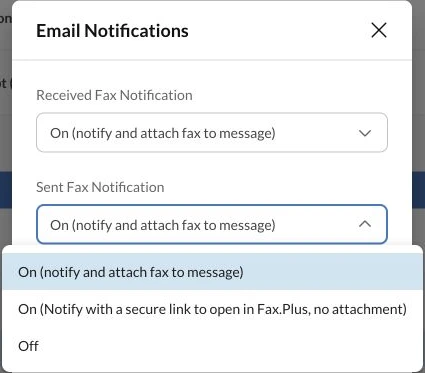
If your team also uses email alerts, review the available sent-fax notification options as part of its approved document-handling setup. Use the fax record when checking the completed result.
If the result is unsuccessful or unclear, check the current transmission record before deciding whether another send is needed. Resolve destination or document issues through the approved process and avoid treating a queued or pending item as completed.
Close the recipient's document handoff
Where the agreed process calls for acknowledgment, contact the recipient through its accepted route. Confirm that the requested document is available to the appropriate team, using the minimum reference information needed.
Record recipient acknowledgment separately from transmission status. If the recipient needs a clearer page or a different attachment, identify the correction and connect the updated submission to the original reference.
This gives staff a usable sequence: the intended document, a verified destination, a checked transmission result and any required acknowledgment. Review how Fax.Plus fits EMS documentation workflows alongside the receiving organizations' requirements.
FAQs
How should EMS staff determine a document's fax submission window?

Use the receiving organization’s current instructions for the specific document, alongside your service’s applicable procedures. Record the agreed window with the destination and reference.
Which transmission details should EMS staff keep with the document reference?
Keep the verified destination from the fax record, plus the transmission date and time, page count and result. Retain the confirmation report when your records process requires it.
When should staff confirm document receipt separately?
Do so when the recipient's agreed process requires confirmation that the document is available to its team. Record that acknowledgment separately from the fax transmission result.




Confédération Suisse
Confederazione Svizzera
Confederaziun Svizra
Swiss Confederation
Innosuisse - Agenzia svizzera per la promozione dell'innovazione




