Recensione di Dropbox Fax 2026 (precedentemente HelloFax): funzionalità, prezzi e prestazioni nel mondo reale.
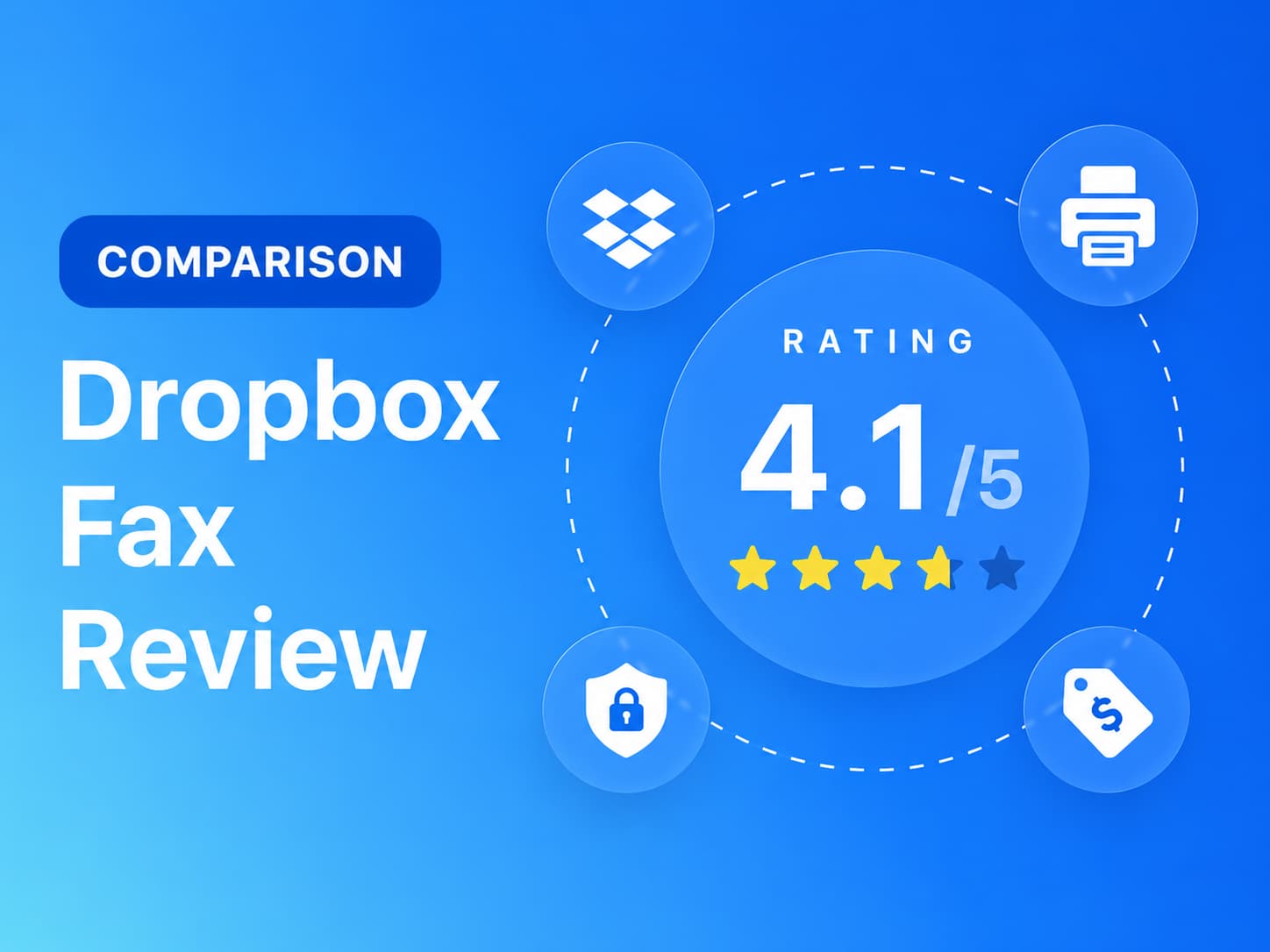
Abbiamo testato Dropbox Fax (precedentemente HelloFax): prezzi reali, qualità del fax, conformità alle normative HIPAA e condizioni di cancellazione. Il punteggio è stato assegnato in sette categorie.


- Dropbox Fax è un servizio di fax economico, disponibile solo via web, ideale per l'invio di fax semplici da computer.
- L'output del test era leggibile, ma le striature potevano oscurare il contenuto principale.
- Il portale web è semplice, ma limitato dall'assenza di app per dispositivi mobili e di una rubrica.
- I prezzi sono competitivi, ma le politiche di rinnovo, rimborso e fatturazione annuale necessitano di una revisione.
- Ideale per utenti occasionali; i team che operano in contesti regolamentati o che utilizzano intensamente dispositivi mobili dovrebbero valutare alternative.
Vale la pena utilizzare Dropbox Fax nel 2026?
Se invii solo pochi fax al mese dalla tua scrivania, Dropbox Fax è una delle soluzioni più economiche. Il piano gratuito include 5 pagine senza bisogno di carta di credito, l'invio a consumo costa 0,99 dollari a fax fino a un massimo di 10 pagine, mentre il piano Home Office da 9,99 dollari include 300 pagine al mese, ovvero circa 3,3 centesimi a pagina. L'interfaccia web è semplice e gli strumenti integrati per la modifica e la firma gestiscono il classico flusso di lavoro "firma questo modulo e invialo via fax" senza bisogno di una stampante.
La situazione cambia nel momento in cui le tue esigenze superano l'invio occasionale. Non esiste alcuna app per iOS o Android, quindi l'invio di fax da dispositivo mobile significa utilizzare una scheda del browser o inviare un'email via fax. Nessun piano Dropbox Fax elenca la conformità HIPAA o un Business Accordo di affiliazione, che lo esclude dai flussi di lavoro sanitari così come venduto. E quando qualcosa va storto, l'unico modo per contattare l'azienda è un modulo web: niente telefono, niente chat, con nessun piano tariffario.
Informazioni su Dropbox Fax
Dropbox Fax è di proprietà di Dropbox, Inc. (NASDAQ: DBX). Il prodotto è nato nel 2011 come HelloFax, una startup di Y Combinator, ed è entrato a far parte di Dropbox con l'acquisizione, avvenuta nel febbraio 2019, della sua società madre HelloSign per 230 milioni di dollari in contanti. HelloSign è diventata Dropbox Sign nel 2022 e HelloFax è stato rinominato Dropbox Fax nel 2024.
Il rebranding è ancora visibilmente incompleto. L'applicazione si trova all'indirizzo app.hellofax.com, le pagine di copertina riportano il marchio HelloFax e il servizio di invio fax via email utilizza ancora indirizzi @hellofax.com. Se vedete entrambi i nomi usati in modo intercambiabile, ecco il motivo: HelloFax e Dropbox Fax sono lo stesso prodotto.
Il prodotto ha una struttura volutamente limitata. Offre un'applicazione web, la funzione di invio fax via email per i piani a pagamento, integrazioni con Dropbox, Google Drive, Box, OneDrive e Microsoft Word, e un'API per fax accessibile solo agli addetti alle vendite all'interno della piattaforma per sviluppatori Dropbox Sign. I numeri di fax sono disponibili negli Stati Uniti, nel Regno Unito e in Canada, e non sono previste app per dispositivi mobili o desktop.
Come abbiamo recensito Dropbox Fax
Abbiamo analizzato Dropbox Fax utilizzando quattro livelli di evidenza:
- Test pratico del prodotto. Abbiamo creato un account e testato Dropbox Fax attraverso le due interfacce offerte dal servizio: il portale web e l'invio di fax via email. Poiché Dropbox Fax non offre app per desktop o dispositivi mobili, non è stato necessario installare o testare alcuna applicazione. Abbiamo inviato fax reali da entrambe le interfacce per valutare l'esperienza utente nei flussi di lavoro basati su browser e su email.
- Test di qualità del fax. Abbiamo testato Dropbox Fax utilizzando due documenti sorgente fissi, sintetici e realistici: un documento governativo e legale e un modulo di referti di laboratorio sanitario. Gli stessi file sorgente sono stati utilizzati per tutti i test, in modo da poter valutare la qualità dell'output in modo coerente. Nei test, abbiamo valutato i dettagli pratici rilevanti nei flussi di lavoro documentali reali, tra cui leggibilità, conservazione del layout, scrittura a mano, caratteri piccoli, timbri, firme, codici a barre, tabelle dense e dimensioni dei caratteri miste. Nessun dato personale, medico, fiscale, aziendale o relativo ai pazienti è stato utilizzato nei test di qualità del fax.
- Revisione della fatturazione e del controllo dell'account. Abbiamo monitorato il flusso di fatturazione dall'iscrizione al periodo di prova gratuito e mappato direttamente il percorso di cancellazione, inclusi i passaggi necessari per gestire o cancellare l'account dopo la registrazione.
- Revisione della preparazione Business . Abbiamo controllato i materiali pubblici di Dropbox Fax per le dichiarazioni di sicurezza e conformità, le informazioni sulla residenza e la conservazione dei dati, le API e le risorse per sviluppatori, i dettagli sulla preparazione al settore sanitario e enterprise supporto all'automazione.
Abbiamo quindi valutato Dropbox Fax in sette aree: qualità del fax, prezzi, sicurezza e conformità, usabilità, servizio clienti e controllo dell'account, residenza e conservazione dei dati e enterprise , API e automazione del settore sanitario.
1 Qualità del fax | Punteggio 4.5 / 5
Nei nostri test precedenti, Dropbox Fax ha offerto una qualità di base dei fax superiore sia a eFax che a iFax. Lo sfondo è bianco, il testo e i valori delle tabelle vengono visualizzati correttamente e l'output è utilizzabile al livello predefinito. Un artefatto ricorrente gli impedisce di ottenere un punteggio più alto.
Metodologia di test
Abbiamo testato due tipi di documenti in entrambe le direzioni di invio ( Fax.Plus a Dropbox Fax e Dropbox Fax a Fax.Plus ), e ha eseguito più passaggi per confermare il modello dell'artefatto. Per ogni documento, il cursore si sposta tra Dropbox Fax Standard e il Fax.Plus Linee guida di riferimento normali e HD. Abbiamo anche provato la casella di controllo opzionale "Invia versione a colori ad alta risoluzione del fax", ma fornisce un link per scaricare il file originale anziché un fax di qualità superiore.
Test via fax di documenti governativi e legali
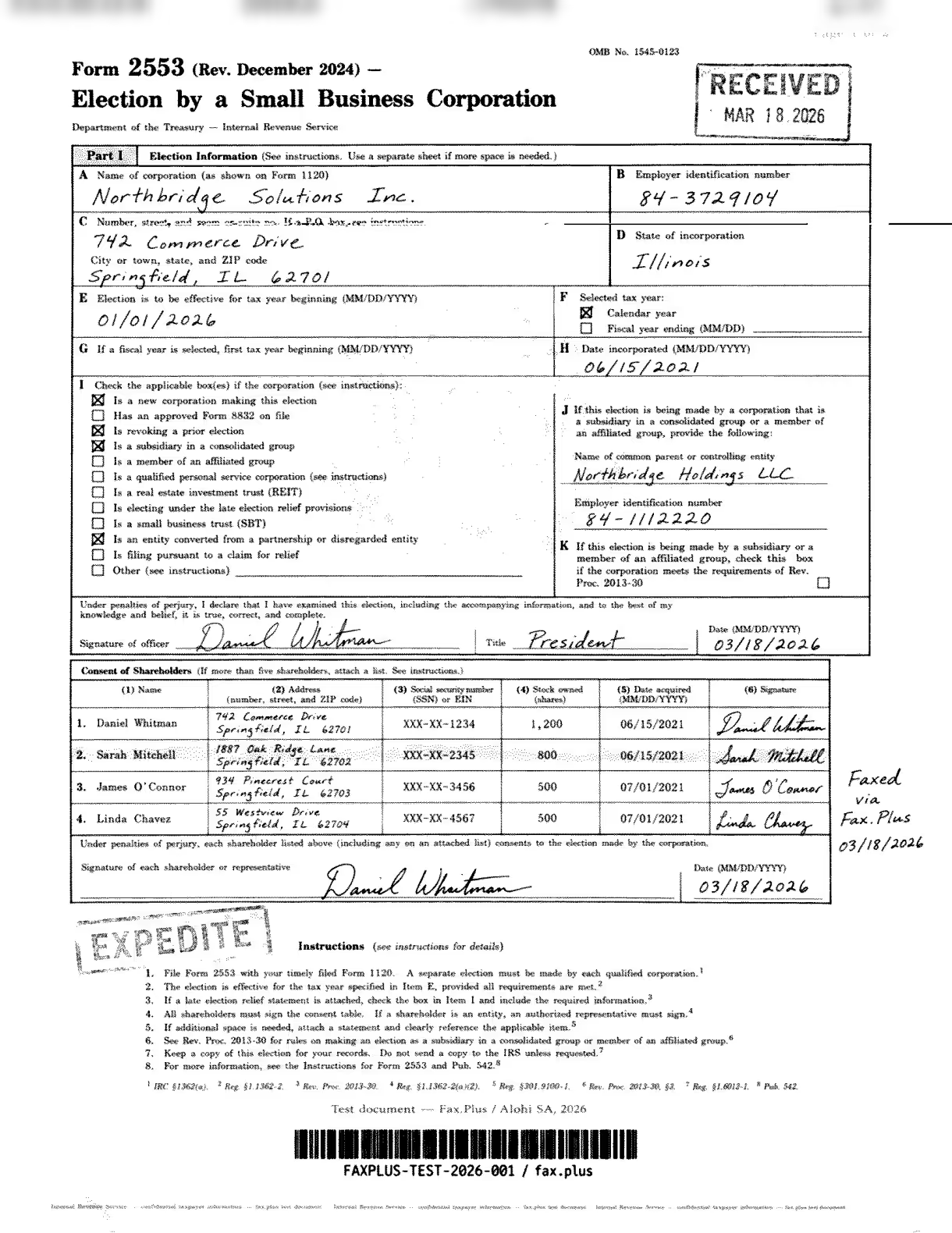
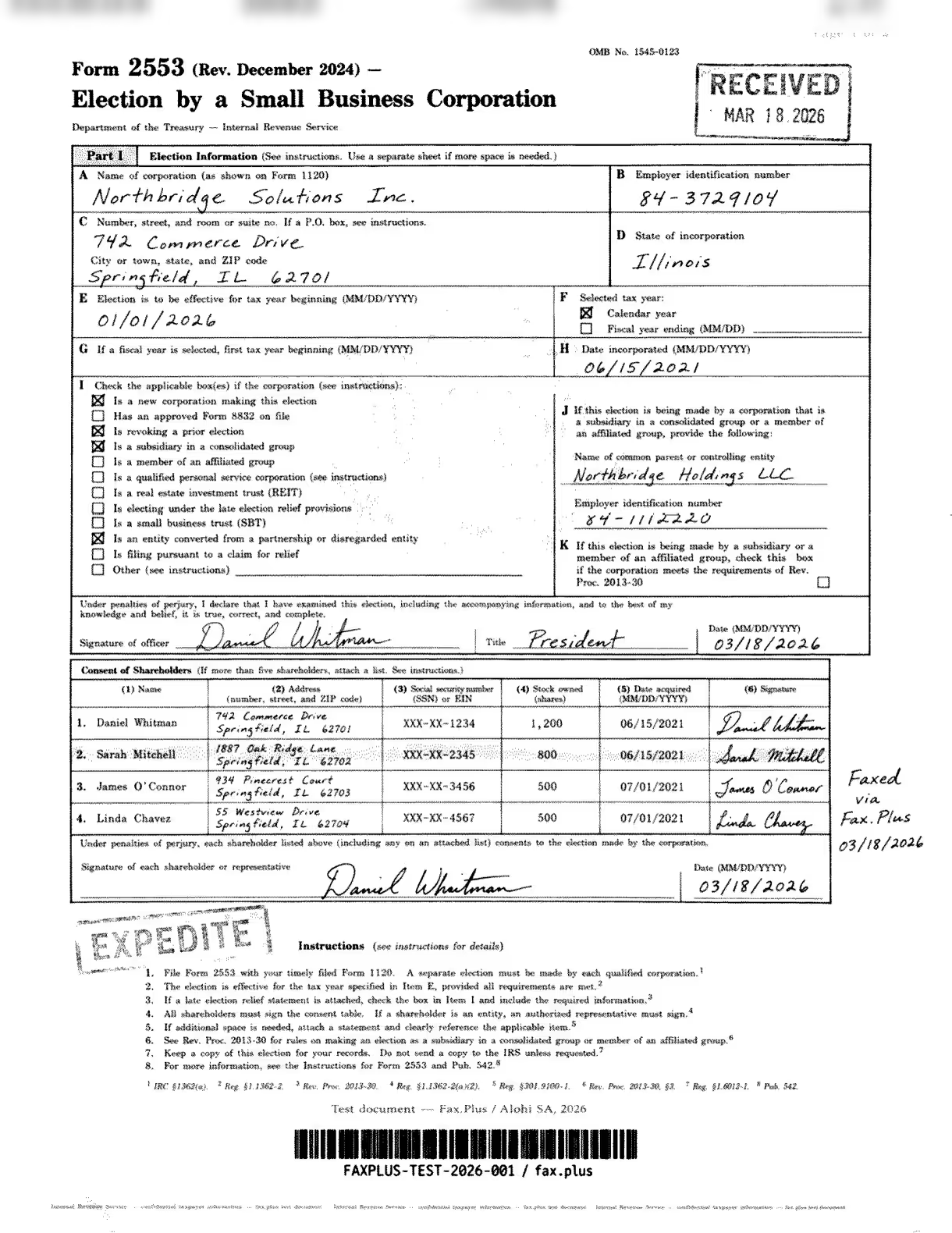
Il primo test ha utilizzato una simulazione del modulo IRS 2553 , un modulo di opzione fiscale del governo statunitense. Documenti come questo sono comuni nei flussi di lavoro legali, finanziari e immobiliari: accordi firmati, dichiarazioni dei redditi e moduli di autorizzazione multiparte in cui ogni dettaglio deve arrivare integro.
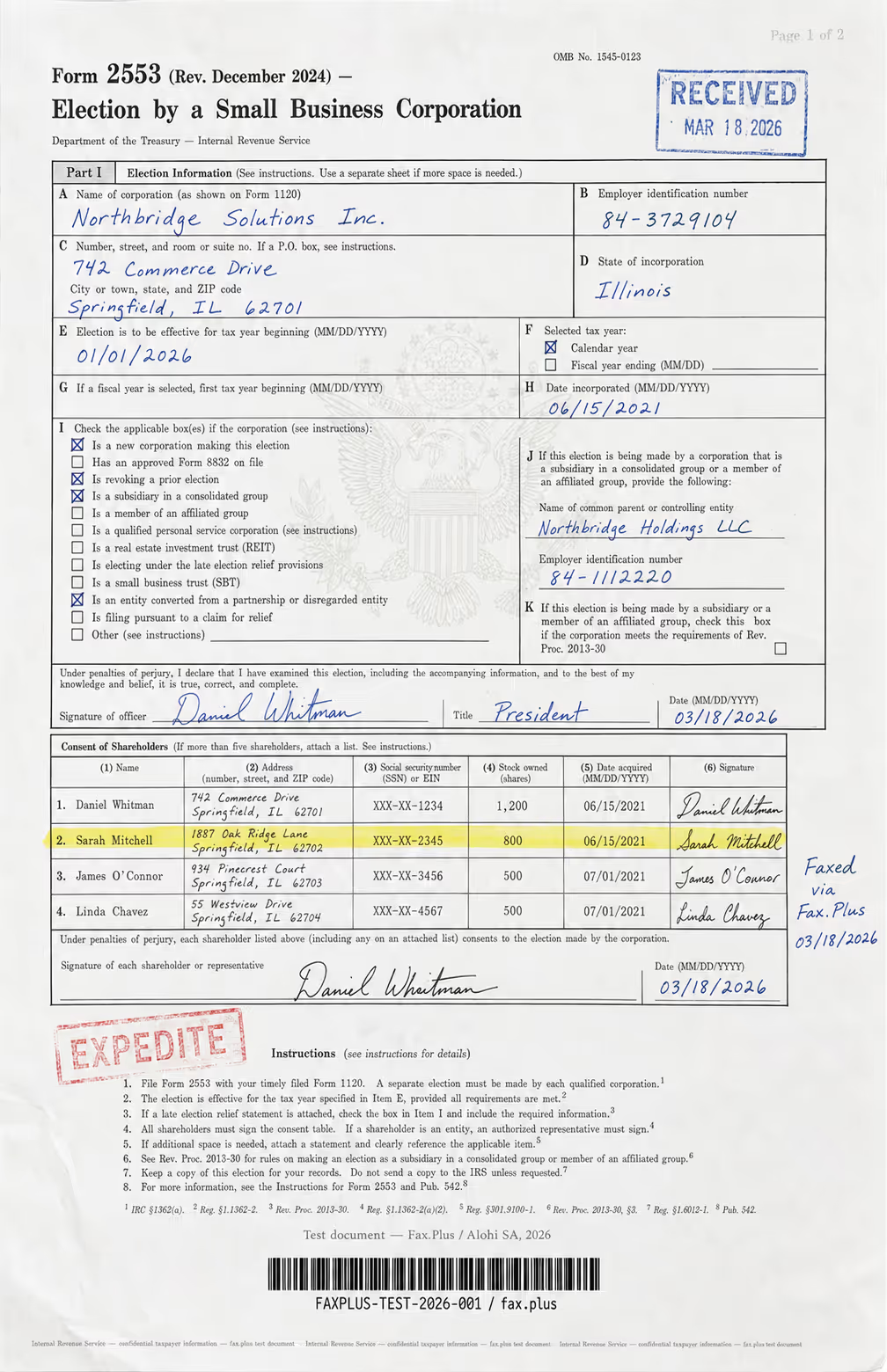
Cosa conteneva il documento di prova:
- Firme autografe e nome dell'ufficiale scritto in corsivo
- Un timbro RICEVUTO in stile ufficiale con data
- Un timbro in gomma EXPRESSITE con bordi di inchiostro sbiaditi
- Al centro è presente una filigrana con il sigillo dell'aquila del governo degli Stati Uniti.
- Una riga evidenziata della tabella degli azionisti
- Utilizzo di caratteri di dimensioni diverse per intestazioni, corpo del testo e caratteri piccoli.
- Dati tabellari densi distribuiti su più colonne
- Una linea in microstampa nella parte inferiore per l'autenticazione antifrode.
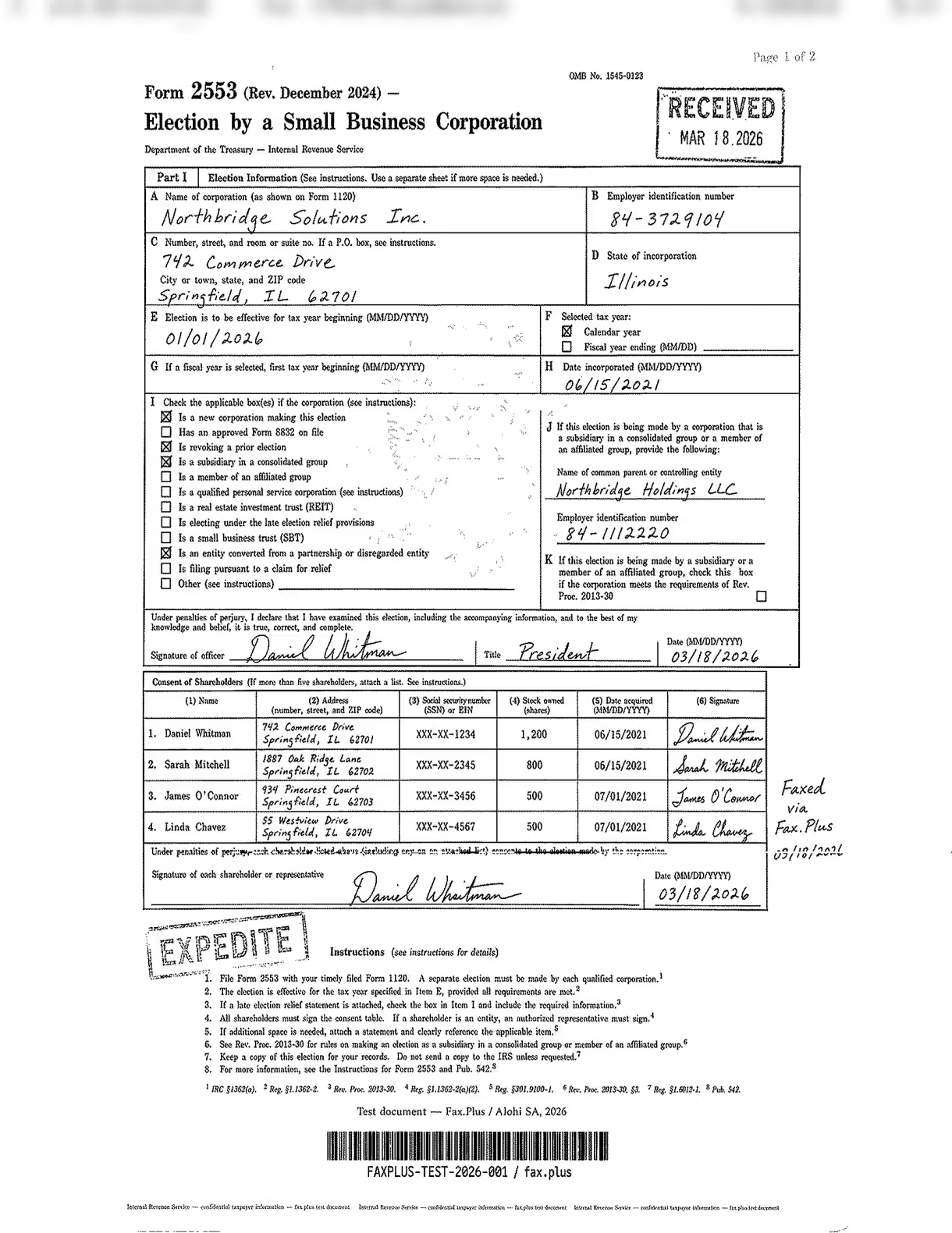
Dropbox Fax Standard
Una striscia orizzontale attraversa la riga dell'indirizzo del punto C (Numero civico, via e numero di stanza o suite), deteriorando l'etichetta del campo e invadendo il margine destro. Tutto il resto è intatto: i timbri RICEVUTO e SPEDITO sono nitidi, tutte e quattro le firme degli azionisti nella tabella di consenso sono leggibili, l'indirizzo inserito è chiaramente leggibile appena sotto l'etichetta barrata e la linea in microstampa in basso è riconoscibile. Una sola striscia su una pagina altrimenti pulita.
Fax.Plus Standard
Sfondo bianco pulito, tabelle nitide, scrittura leggibile, nessuna sbavatura. La filigrana con il sigillo dell'aquila è sbiadita. Questo è il modello di riferimento per la qualità standard dei fax.
 Standard
 Standard
Fax.Plus HD (riferimento)
Un fax ad alta risoluzione autentico: la filigrana con il sigillo dell'aquila è perfettamente visibile nella Parte I, i timbri mantengono i dettagli dei bordi, la scrittura a mano è nitida e la tabella degli azionisti è ben definita. Questo è il livello di fax ad alta risoluzione che Dropbox Fax non offre.
Standard
 Alta risoluzione
Velocità di invio
Fax.Plus Normalmente, il processo si completa in circa 1 minuto. Fax.Plus Il trasferimento in HD è stato completato in circa 3 minuti. La trasmissione standard di Dropbox Fax è stata completata in 1-2 minuti durante i nostri test.
Test del documento sanitario
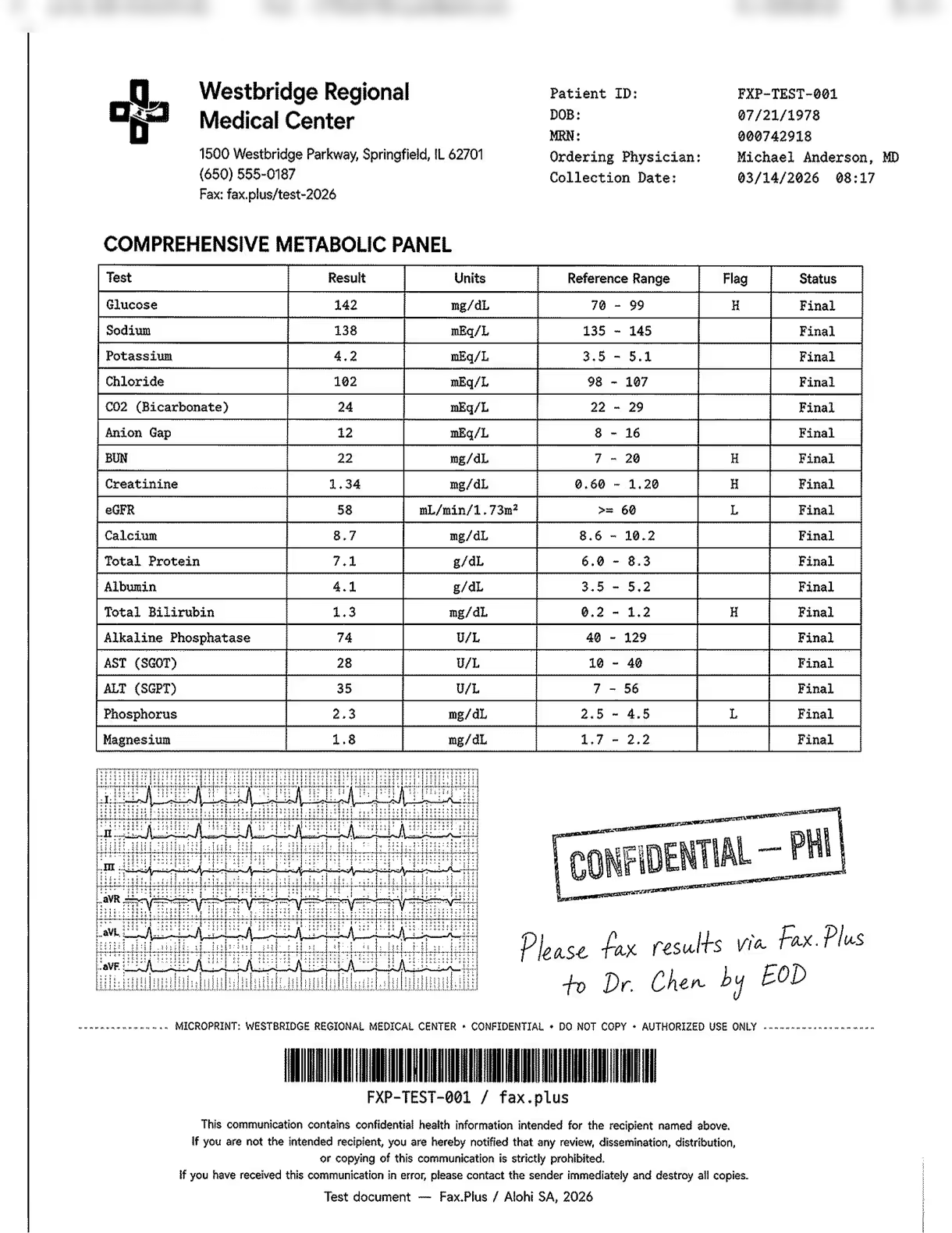
Il secondo test ha utilizzato un modulo simulato di referti di laboratorio di un centro medico fittizio. Non sono stati utilizzati dati reali di pazienti. Il documento è stato concepito come un test di stress piuttosto che come uno scenario di flusso di lavoro reale: nella pratica clinica, i flussi di lavoro via fax raramente includono immagini diagnostiche, ma la striscia ECG incorporata su carta a quadretti rossi è stata inclusa deliberatamente per spingere al limite le capacità di ciascun servizio. Ciò che è tipico è la combinazione di dati di laboratorio, valori di flag, note scritte a mano dal medico e timbri PHI, tutti elementi che compaiono regolarmente nei flussi di lavoro via fax in ambito sanitario.
L'immagine sottostante mostra il documento principale utilizzato in questo test, trasmesso senza modifiche a tutti i servizi testati. Tutti i nomi, gli identificativi dei pazienti e i dati clinici sono fittizi. Non sono state utilizzate informazioni reali di pazienti.
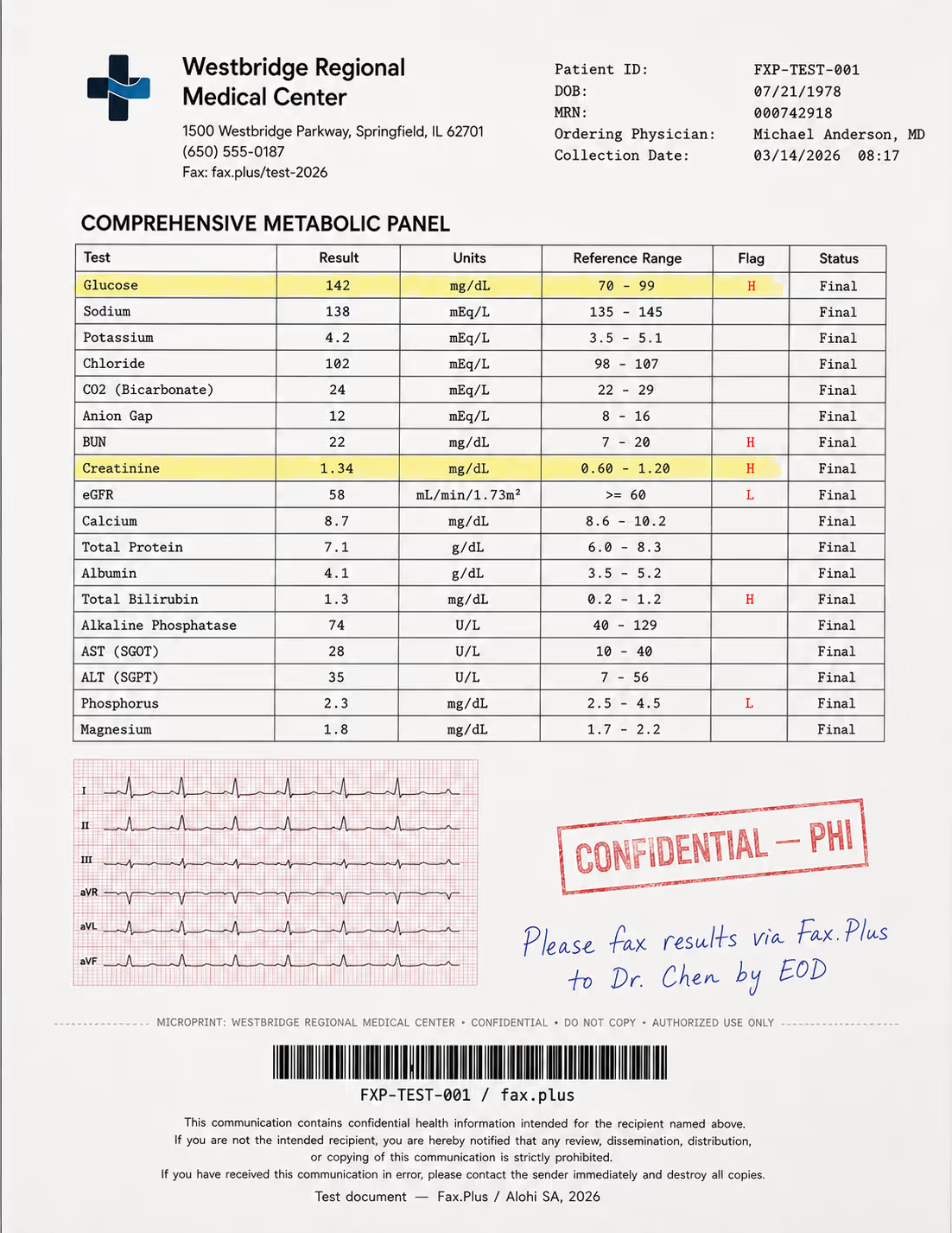
Cosa conteneva il documento di prova:
- Un pannello metabolico completo con valori di riferimento evidenziati (indicatori H/L)
- Una striscia ECG a 6 derivazioni su carta a griglia rossa inclusa come test di qualità sotto sforzo
- Istruzioni mediche scritte a mano con inchiostro blu
- Timbro in gomma RISERVATO/PHI con bordi sbiaditi
- Dati di intestazione del paziente e un codice a barre Code-128
- Una clausola di esclusione di responsabilità HIPAA a piè di pagina, scritta in caratteri piccoli.
- Una linea di microstampa per l'autenticazione antifrode
In un flusso di lavoro reale, un valore di flag che arriva illeggibile o un'istruzione scritta a mano che non si riesce a leggere non è solo un problema di qualità, ma rappresenta un rischio clinico.
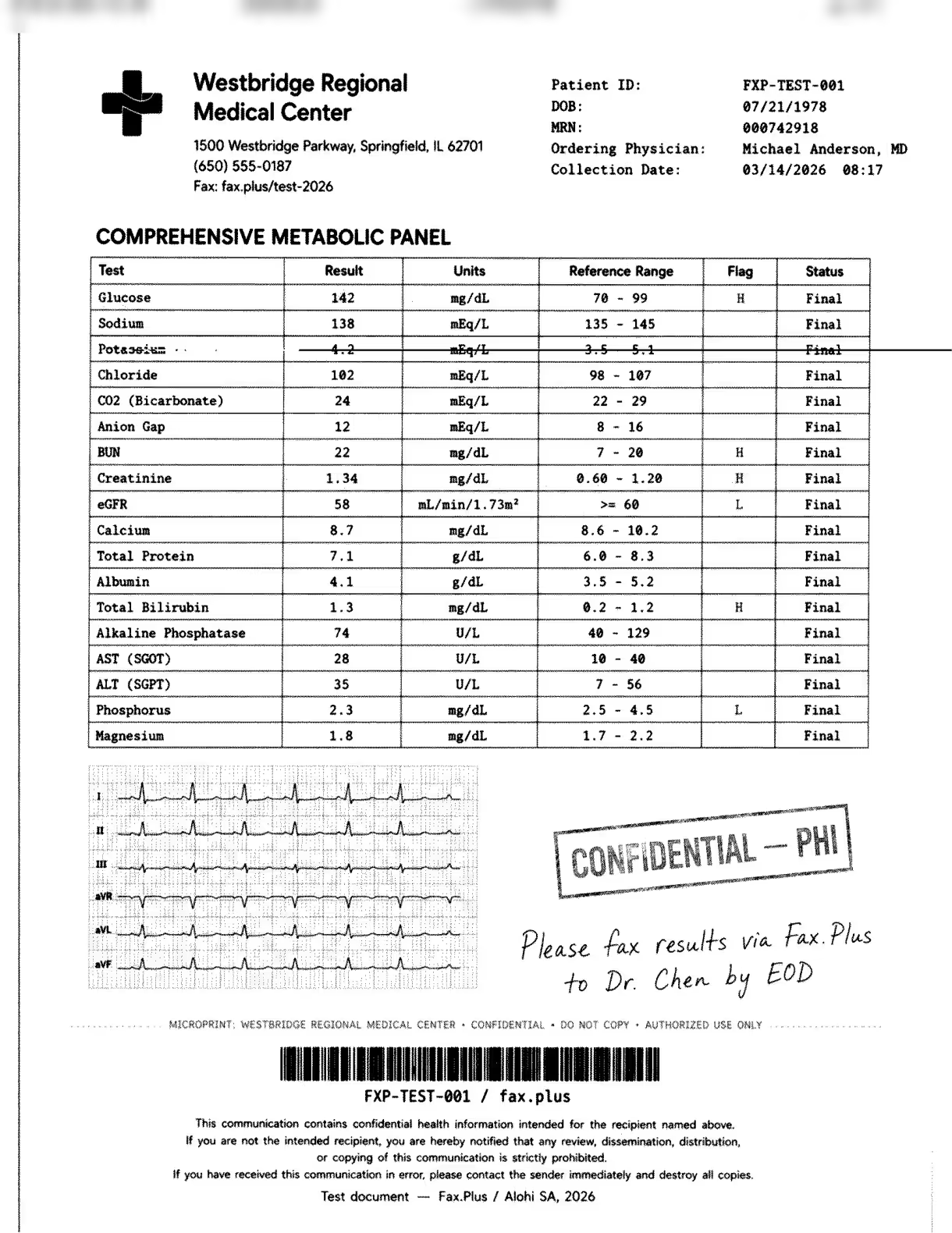
Dropbox Fax Standard
La striscia taglia direttamente la riga del potassio nel pannello metabolico. Il valore del risultato (4,2 mEq/L), l'intervallo di riferimento (da 3,5 a 5,1) e lo stato su quella riga sono barrati e illeggibili. Il glucosio sopra (contrassegnato con una H) e tutte le righe sottostanti rimangono leggibili, la traccia ECG sopravvive allo sfondo a griglia rossa in condizioni accettabili, la nota manoscritta del medico è chiara e il timbro RISERVATO/PHI è stato impresso correttamente. Al di fuori della striscia, il risultato è completo. Al suo interno, una riga di dati del paziente è scomparsa.
Fax.Plus Standard
Output pulito, ogni riga del pannello metabolico è leggibile, incluso il potassio, tutti i valori dei flag H e L sono leggibili, l'ECG è parzialmente conservato. Il punto di riferimento per l'invio di fax di qualità standard.
 Standard
 Standard
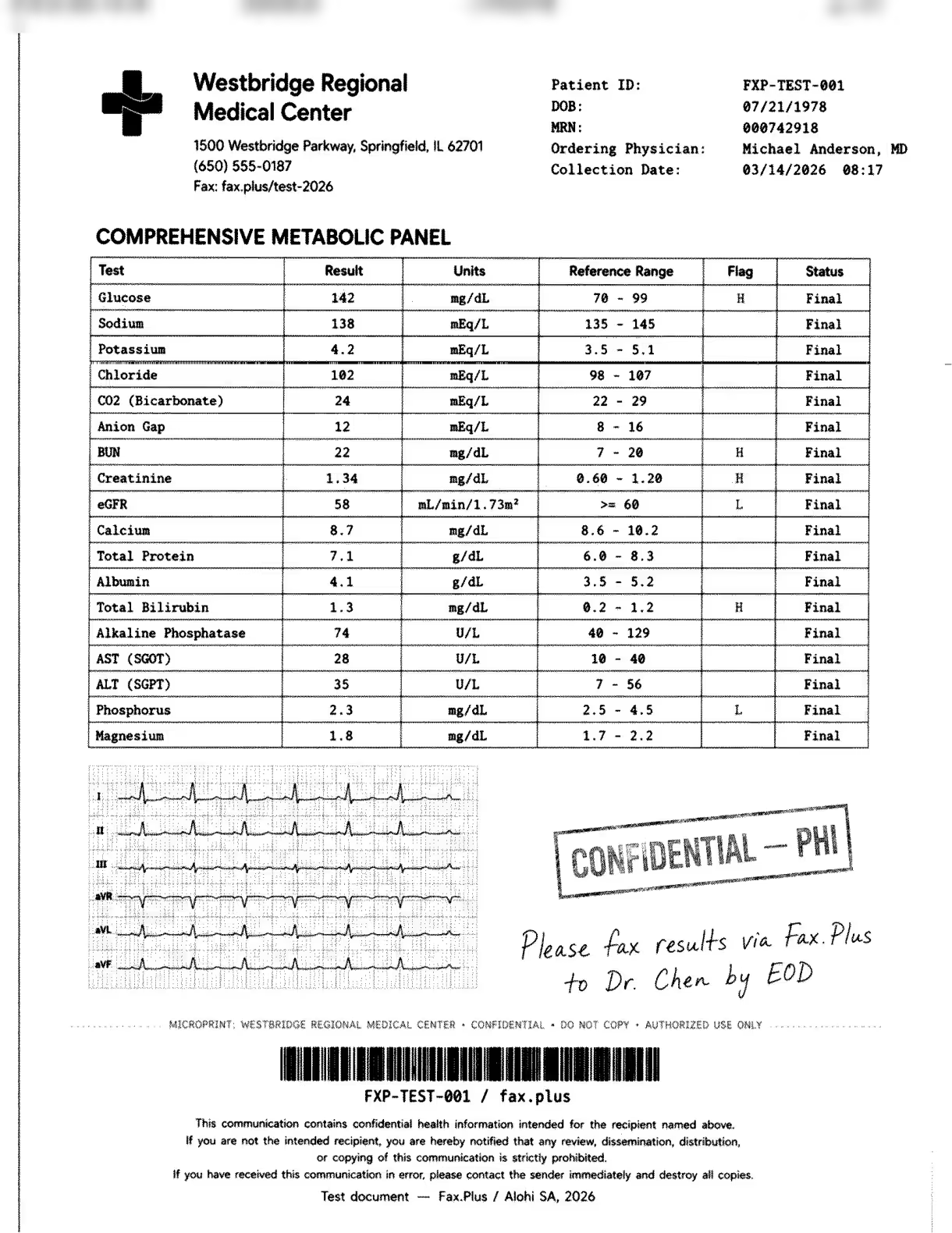
Fax.Plus HD (riferimento)
Un fax ad alta risoluzione autentico: ogni riga del pannello nitida, le bandierine definite, la traccia ECG e il codice a barre più puliti, la scrittura a mano nitida. Un servizio di fax ad alta risoluzione che Dropbox Fax non offre.
 HD
HD
 Alta risoluzione
Velocità di invio
Fax.Plus Normalmente, il processo si completa in circa 1 minuto. Fax.Plus Il trasferimento in HD è stato completato in circa 3 minuti. La trasmissione standard di Dropbox Fax è stata completata in 1-2 minuti durante i nostri test.
L'artefatto della striscia
La riga danneggiata non è prevedibile, taglia il contenuto effettivo anziché i margini, ed è apparsa in un numero sufficiente di invii standard da poter essere considerata un problema documentato piuttosto che un episodio isolato. Nel documento sanitario ha eliminato la riga relativa al potassio: valore del risultato, intervallo di riferimento e stato sono spariti. Nel modulo dell'Agenzia delle Entrate ha colpito la riga dell'indirizzo del punto C. Il destinatario di entrambi i documenti non ha modo di recuperare il contenuto danneggiato. Il problema è intermittente, non costante: in un invio in cui avevamo selezionato la casella di controllo per la versione a colori ad alta risoluzione, la pagina del fax è arrivata senza problemi, il che conferma che la riga danneggiata è un errore di trasmissione piuttosto che un problema legato a un'impostazione di qualità. Non esiste alcun meccanismo di controllo che il mittente possa utilizzare per evitarlo.
Senza la serie, l'output di Dropbox Fax Standard si attesterebbe a Fax.Plus Livello normale: sfondo bianco, tabelle leggibili, timbri nitidi, scrittura leggibile. È proprio questa serie di successi che impedisce a questa sezione di ottenere un punteggio di 4,5/5.
La funzione "Versione a colori ad alta risoluzione"
La versione a colori ad alta risoluzione invia un link per il download, non un fax migliore.
La casella di controllo "Invia versione a colori ad alta risoluzione del fax" nel flusso di invio non migliora la qualità della trasmissione del fax. Il destinatario riceve il fax standard, più una pagina di copertina di HelloFax contenente un URL e un codice di accesso. Inserendo tale codice nell'URL, viene scaricato il file originale caricato. Il risultato è funzionalmente identico all'invio di un link per il download tramite e-mail. La linea fax funge solo da mezzo di trasmissione per l'URL e il file scaricato dal destinatario è il documento sorgente originale, non un fax. Abbiamo escluso questo download dal confronto di qualità perché si tratta dell'immagine sorgente, non di una trasmissione.
La pagina di copertina stampa www.hellofax.com/HighRes, che non si carica
L'URL stampato sulla pagina di copertina è www.hellofax.com/HighRes. Il dominio www.hellofax.com reindirizza automaticamente ad app.hellofax.com, ma il reindirizzamento non viene eseguito sul percorso /HighRes, quindi l'URL stampato restituisce un errore. L'indirizzo corretto è direttamente app.hellofax.com/HighRes, non documentato e non stampato in alcun punto visibile al destinatario. Un destinatario che segue le istruzioni stampate incontrerà un errore. Il modello della pagina di copertina non è stato aggiornato da quando HelloFax è diventato Dropbox Fax nel 2024.
Per un destinatario digitale che nota l'errore, corregge l'URL e interviene entro 72 ore, il download è effettivamente utile. Per un destinatario che utilizza un fax tradizionale, o per chiunque segua le istruzioni stampate, non funziona. E a quel punto, inviare il documento come allegato e-mail sarebbe stato più semplice.
Come si confronta la qualità dei fax di Dropbox?
Dropbox Fax Standard si posiziona al di sopra sia di eFax che di iFax nelle rispettive fasce di prezzo predefinite. L'output di eFax Standard risultava più morbido, con una maggiore perdita di dettagli fini in entrambi i tipi di documento. iFax Standard presentava un forte sfondo grigio e un effetto di dithering ondulatorio su tutta la pagina. Dropbox Fax non presenta nessuno di questi problemi.
La striscia è ciò che lo separa da Fax.Plus Normale, cosa che altrimenti corrisponderebbe. Fax.Plus Offre un'autentica opzione di selezione della qualità per ogni fax al momento dell'invio (Normale o HD nella stessa schermata del campo del destinatario) e l'output HD è una trasmissione fax ad alta risoluzione, non una soluzione alternativa per il download di un file. Per i flussi di lavoro con un elevato numero di documenti, dove la coerenza dell'output è fondamentale, questo è il confronto pertinente. Il punteggio di 4,5/5 riflette un output migliore rispetto alla maggior parte dei concorrenti diretti, ma non raggiunge lo standard di coerenza richiesto da un flusso di lavoro di produzione.
2 Prezzi | Punteggio 5 / 5
Dropbox Fax è il servizio di fax in abbonamento più economico e affidabile che abbiamo recensito, a patto di leggere attentamente i termini di rinnovo prima di abbonarsi.
Il sistema è semplice. Il piano gratuito include un totale di 5 pagine fax (un limite una tantum, non mensile), solo per l'invio, con la possibilità di ottenere fino a 20 pagine aggiuntive tramite il programma di referral. Successivamente, il costo è a consumo: 0,99 dollari per fax fino a un massimo di 10 pagine, più 0,20 dollari per ogni pagina successiva, senza abbonamento.
Ufficio domestico: 9,99 dollari al mese
300 pagine al mese, fino a 5 mittenti, un numero di fax in entrata con prefisso a scelta, servizio di invio fax via email e ricezione fax. Il primo mese è scontato a $2,50. Il costo per pagina in eccesso, per ogni piano a pagamento, è di $0,05 per pagina inviata o ricevuta, una delle tariffe più basse della categoria.
Professionale: $19,99/mese e Piccolo Business : 39,99 dollari al mese
Il pacchetto Professional include 500 pagine e 10 mittenti; il pacchetto Small Business Include 1.000 pagine e 20 mittenti. Questi due piani sono anche gli unici che supportano la portabilità di un numero di fax esistente. La documentazione di supporto di Dropbox conferma un costo di 60 dollari per linea e limita la portabilità ai soli numeri statunitensi e canadesi.
Esiste un ulteriore livello di piani tariffari non presente nella pagina pubblica. All'interno dell'app, è disponibile un piano Ultimate a 69,99 dollari al mese per oltre 2.000 pagine e 40 mittenti, che abbiamo scoperto solo dopo aver creato un account. Per accedere a piani aziendali più ampi, è necessario contattare il reparto vendite.
La fatturazione annuale è disponibile tramite l'interruttore nella pagina dei prezzi. Le tariffe sono: Home Office $93,74/anno ($7,81/mese), Professional $187,49/anno ($15,62/mese) e Small Business 374,99 dollari all'anno (31,25 dollari al mese), circa il 22% in meno rispetto alla tariffa mensile, con un risparmio equivalente a quasi due mesi e mezzo di abbonamento rispetto al pagamento mensile. L'abbonamento Ultimate costa 671,90 dollari all'anno, circa il 20% in meno.
Ogni piano a pagamento prevede uno sconto del 25% sul prezzo normale per il primo mese. La pagina dei prezzi specifica che non ci sono costi di attivazione, né penali di cancellazione, né vincoli contrattuali.
Le condizioni di rinnovo che vale la pena leggere prima
I Termini di servizio di Dropbox Sign, che regolano Dropbox Fax, formalizzano per iscritto i principali meccanismi di fatturazione. La Sezione 8.4 afferma, in maiuscolo: gli addebiti automatici si applicano al termine del periodo di prova o al rinnovo, a meno che il cliente non comunichi a Dropbox la disdetta. La Sezione 9.2 rinnova automaticamente ogni periodo di abbonamento, a meno che non venga dato preavviso di almeno 30 giorni prima della scadenza.
La clausola relativa all'abbonamento annuale merita particolare attenzione. La sezione 8.6 specifica che la cancellazione ha effetto al termine del periodo in corso. Nel caso di un abbonamento annuale, ciò significa l'anno successivo. In combinazione con la politica di non rimborso, un impegno annuale in questo caso è effettivamente vincolante per tutto l'anno.
Come si confrontano i prezzi di Dropbox Fax
A $0,033 per pagina, Dropbox Fax supera ogni servizio in questa tabella in termini di costo grezzo per pagina, incluso Fax.Plus Basic al costo di 0,035 dollari a pagina, ed è l'unico servizio in abbonamento qui presente con un vero e proprio modello di pagamento a consumo. Fax.Plus Basic ha il prezzo di ingresso più basso a $6,99/mese. Per una visione dettagliata di ciò che offre il livello successivo, Fax.Plus La pagina dei prezzi pubblica ogni limite, che è il livello di trasparenza che manca al livello aziendale non pubblicato di Dropbox. Il 5/5 riflette un valore davvero forte nella categoria (il costo per pagina più basso, l'unica opzione di pagamento a consumo e la tariffa di superamento più bassa), trattenuto da un 5 da Fax.Plus abbassando il prezzo di ingresso assoluto e con la politica di non rimborso aggiungendo un rischio di fatturazione che un punteggio massimo pulito richiederebbe di affrontare.
3. Sicurezza e conformità | Punteggio 4,5/5
Dropbox Fax eredita un solido sistema di conformità da Dropbox Sign, la piattaforma su cui si basa. Il problema non sono le credenziali, ma il fatto che il prodotto fax in sé non abbia un accordo BAA pubblicato né specifiche di crittografia proprie.
La pila di conformità
Dropbox Sign vanta un ampio portfolio di certificazioni: ISO/IEC 27001, ISO/IEC 27018:2019, SOC 2 Tipo 2, SOC 3, HIPAA, HITECH, PCI DSS, CCPA e GDPR, oltre a framework per il trasferimento dei dati come EU-US DPF ed eIDAS.
Per quanto riguarda la crittografia, il Trust Center conferma che i dati sono crittografati sia a riposo che in transito, ma non specifica mai la lunghezza in bit di AES o la versione di TLS per il prodotto fax. Fax.Plus , al contrario, pubblica direttamente l'intero set di certificazioni, la crittografia AES-256 a riposo e TLS 1.3 in transito.
Dropbox Fax è conforme all'HIPAA?
Risposta breve: nessun piano Dropbox Fax è venduto come conforme a HIPAA e nessuno include un Business Accordo di affiliazione (BAA).
La conformità HIPAA compare come badge nel Centro di sicurezza di Dropbox Sign, ma appartiene a Dropbox Sign, il prodotto per la firma elettronica, non al servizio fax. L'unico indizio relativo al servizio fax è una colonna senza etichetta nei contatti di vendita che elenca "HIPAA e SOC 2" senza indicare il prezzo.
I Termini rendono la cosa più vincolante. La Sezione 4.2(xii) vieta l'utilizzo dei Servizi per gestire Informazioni Sanitarie Protette a meno che non si sia firmato separatamente un BAA. Poiché nessun piano di fax self-service ne include uno, l'invio di PHI tramite fax attraverso questi piani non solo non è supportato, ma viola anche i Termini di Servizio. Un team sanitario che si affidasse al badge a piè di pagina si iscriverebbe a qualcosa che i piani non offrono.
Conformità HIPAA vs. BAA
Spesso si confondono questi due concetti. La conformità HIPAA significa che un fornitore di servizi sanitari dispone delle misure di sicurezza necessarie per proteggere le informazioni sanitarie. Un BAA (Business Associate Agreement) è il contratto che effettivamente autorizza l'invio di informazioni sanitarie protette (PHI) tramite tale fornitore. Sono necessari entrambi. Senza un BAA firmato, anche un servizio completamente certificato non può legalmente trattare le PHI.
Trasparenza dei prezzi ai sensi dell'HIPAA
Con Dropbox Fax, il problema non è se la piattaforma abbia controlli HIPAA, ma che nessun piano self-service pubblichi un'opzione BAA. Gli acquirenti non possono capire dalla pagina dei prezzi quale livello, se presente, autorizzi i flussi di lavoro fax HIPAA o quanto costi. L'unica via è contattare il reparto vendite senza un prezzo pubblicato. eFax , al contrario, elenca almeno un BAA nel suo piano da $39,99 Business piano.
Come si confronta la sicurezza di Dropbox Fax?
La piattaforma è solida e questo è ciò che le vale il punteggio di 4,5/5. Le certificazioni del Trust Center (ISO/IEC 27001, SOC 2 Type 2, HIPAA, HITECH, PCI DSS) appartengono a Dropbox Sign nel suo complesso, e Dropbox Fax opera sotto la sua egida.
A peggiorare ulteriormente la situazione è la mancanza di informazioni specifiche sul fax: non è stato pubblicato alcuno standard di crittografia per le trasmissioni fax e non è disponibile un BAA (Business Associate Agreement) self-service. Entrambi sono requisiti fondamentali per i servizi fax rivolti ad acquirenti regolamentati. Un recensore troverà le credenziali della piattaforma solide, ma incontrerà comunque delle lacune a livello di piano tariffario.
Il benchmark più affidabile è Fax.Plus , che pubblica il suo stack di conformità a livello di organizzazione e lo associa a un livello BAA specifico e a una crittografia AES-256 dichiarata, in modo che un acquirente del settore sanitario possa vedere esattamente cosa otterrà prima di contattare il reparto vendite.
4. Usabilità (esperienza pratica) | Punteggio 4,5/5
Il flusso web è davvero semplice. Ed è anche l'unico flusso esistente.
Il portale web
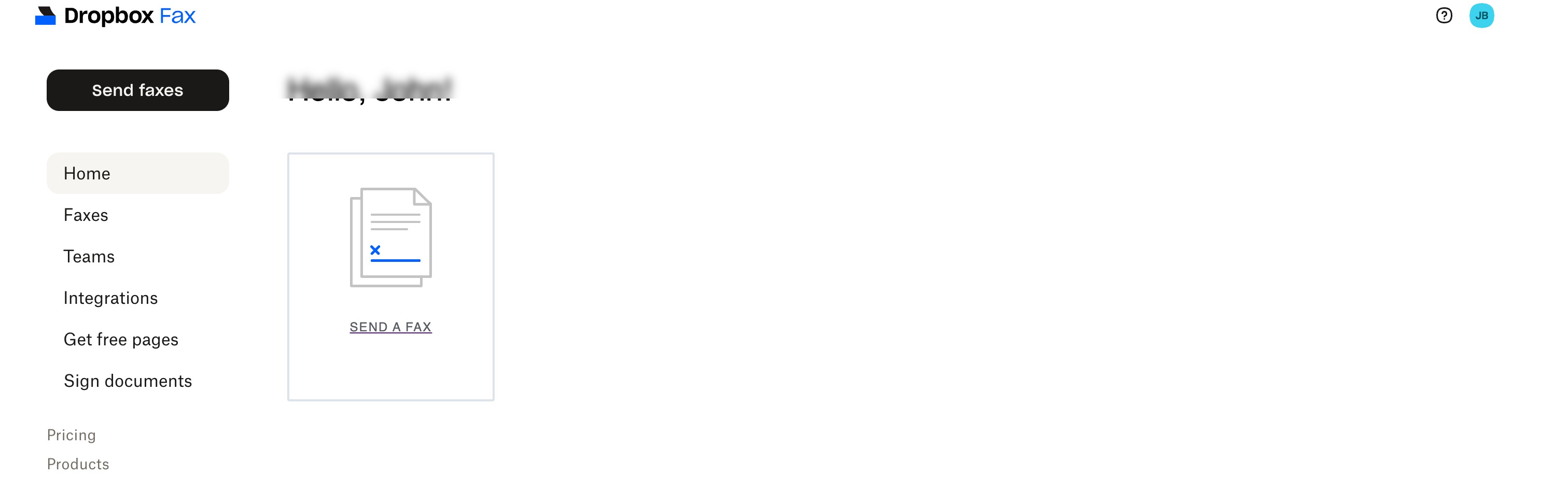
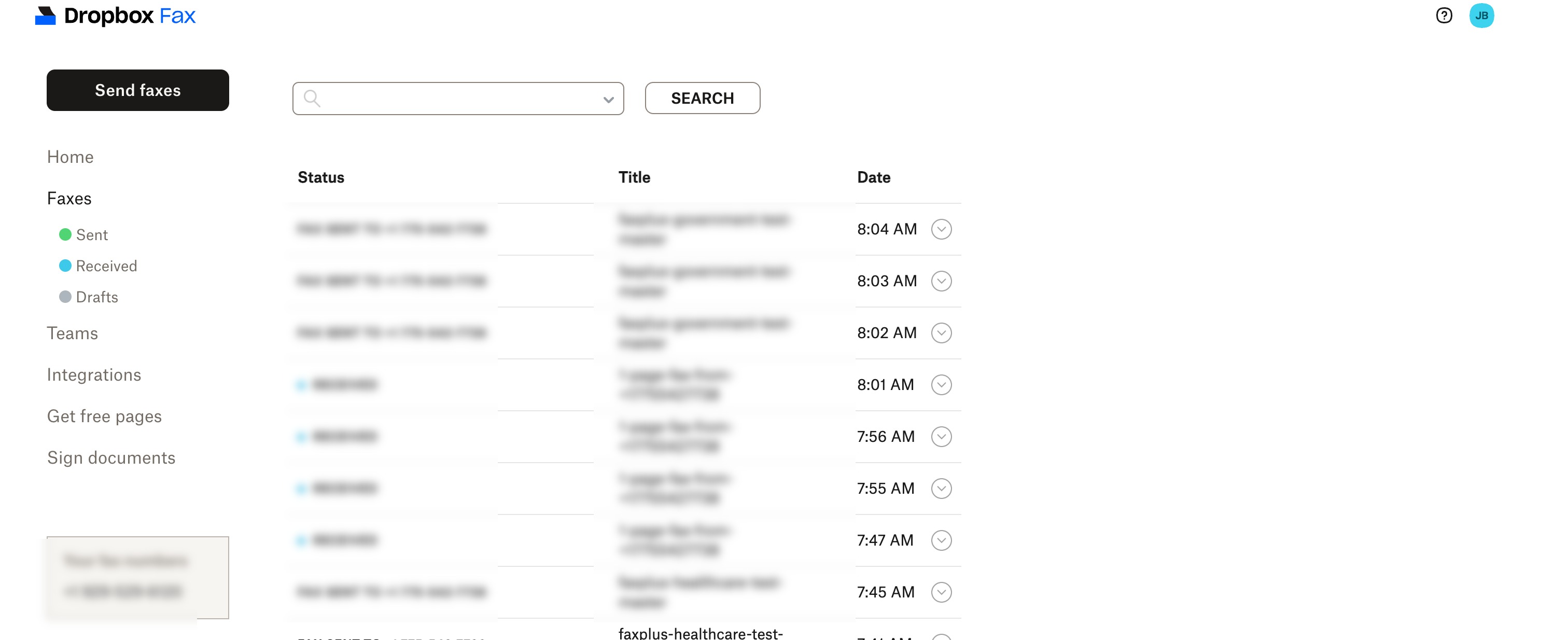
Il portale è strutturato attorno a un menu di navigazione a sinistra (Home, Fax con visualizzazioni Inviati, Ricevuti e Bozze, Team, Integrazioni, Firma documenti) con un pulsante ben visibile "Invia fax". L'invio avviene tramite una procedura guidata in due fasi: seleziona il documento, rivedilo e invia. L'editor integrato consente di compilare e firmare un modulo prima dell'invio, senza dover utilizzare una stampante.
Cloud Il prelievo dei file ha funzionato correttamente da Dropbox, Google Drive, Box e OneDrive, rendendo la fase di caricamento il punto di forza del prodotto, sebbene occasionalmente il caricamento dei documenti si sia bloccato per un tempo sensibilmente più lungo rispetto agli stessi file caricati su servizi concorrenti. L'elenco "Inviati" etichetta chiaramente ogni trasmissione, anche se la spiegazione di un errore è piuttosto scarna: un'icona con un punto interrogativo e pochi dettagli, che lascia all'utente il compito di decidere se riprovare o sostituire il file.
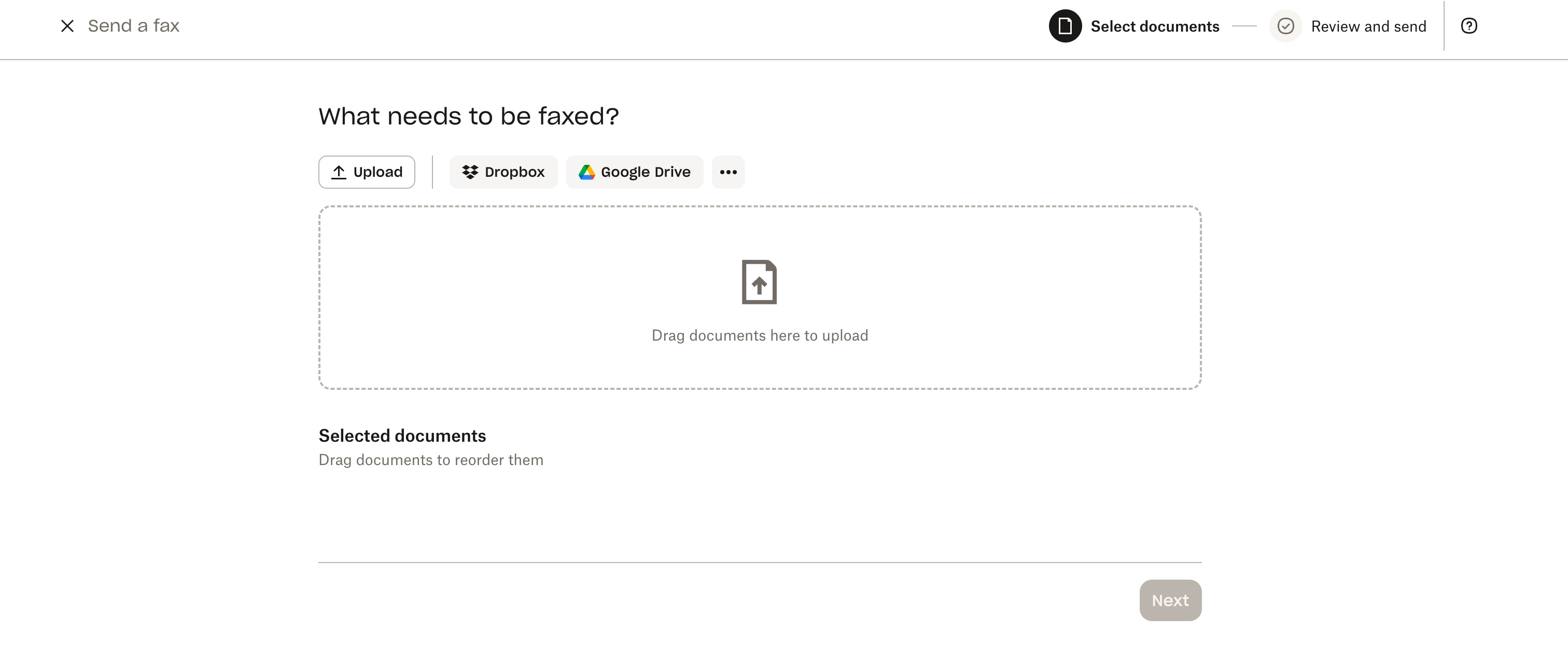
Inoltre, manca una rubrica. Il campo del destinatario richiede l'inserimento manuale del numero di fax ogni volta; l'unico modo per ottenere il completamento automatico è collegare un account Google, e anche in questo caso non è possibile visualizzare, modificare o gestire i contatti all'interno dell'app. Per un prodotto pensato per l'invio ripetuto di fax aziendali, si tratta di una lacuna piuttosto strana.
Il portale è chiaramente un prodotto obsoleto. Accedendo ad app.hellofax.com, due anni dopo il rebranding, la pagina di copertina mostra ancora il logo di HelloFax e l'interfaccia propone continuamente l'aggiornamento al piano a pagamento. Le recenti recensioni su Trustpilot lamentano costantemente la difficoltà di accedere al piano gratuito, con continue richieste di upgrade.
Mobile: Non esiste un'app
Dropbox Fax non ha un'app per iOS né per Android. Lo conferma anche il centro assistenza di Dropbox, affermando che non è necessaria un'app perché l'invio di fax da dispositivi mobili funziona tramite una scheda del browser o inviando un allegato via email a un indirizzo @hellofax.com. L'invio tramite email richiede un piano a pagamento.
Ricevere notifiche, controllare lo stato di invio e gestire il proprio numero di telefono: tutte queste operazioni avvengono tramite la stessa soluzione alternativa basata sul browser.
Come si confronta l'usabilità di Dropbox Fax?
Per l'invio occasionale da scrivania, la semplicità web di Dropbox Fax regge il confronto con qualsiasi altra soluzione della categoria. Ma le aspettative del mercato per il 2026 includono app mobili native: eFax, iFax, RingCentral e Fax.Plus tutte le spedizioni sono disponibili app iOS e Android, con Fax.Plus Con una valutazione di 4,8/5 sull'App Store e 4,7/5 su Google Play, un servizio il cui centro assistenza sostiene che non sia necessaria un'app sta facendo di una lacuna un punto di forza. Il punteggio di 4,5/5 riflette un'esperienza web effettivamente pulita e ben integrata, penalizzata dall'assenza di app per dispositivi mobili, da un'interfaccia obsoleta precedente al rebranding del 2024 e dalla mancanza di una rubrica per i mittenti ricorrenti.
5. Servizio clienti, cancellazione e gestione dell'account | Punteggio 3/5
Tra i servizi che abbiamo recensito, Dropbox Fax offre la procedura di cancellazione più semplice, ma è anche l'azienda più difficile da contattare in caso di problemi.
Canali di supporto
L'assistenza clienti è disponibile tramite un modulo web. Non è previsto un numero di telefono né una chat in tempo reale per nessun piano tariffario, e la pagina delle FAQ sui prezzi risponde solo a poche domande prima di indirizzare l'utente al modulo. Durante la fase di test, abbiamo inviato una richiesta di assistenza e l'esperienza ha confermato il modello consolidato su Trustpilot: le risposte arrivano via email secondo le tempistiche aziendali e le recensioni dal 2019 al 2025 descrivono costantemente tempi di attesa che vanno da giorni a tempi di attesa nulli.
A dire il vero, quando il prodotto funziona, gli utenti raramente hanno bisogno di assistenza e le recensioni positive quasi mai menzionano di aver contattato l'azienda. Le lamentele si concentrano tra gli utenti con problemi di fatturazione, proprio quando l'irraggiungibilità dell'assistenza clienti è più problematica.
Prima di annullare: il tuo numero di fax e i tuoi dati
Prima di annullare, è opportuno segnalare due cose. Il trasferimento dei dati è self-service per i piani Professional e Small. Business Per i piani tariffari: vai su Teams, clicca su Porta numeri, inserisci il tuo numero per verificare l'idoneità e segui le istruzioni via email. Il costo è di 60 dollari per linea, solo per numeri statunitensi e canadesi. La portabilità del numero è un'altra questione: non esiste alcuna procedura di portabilità documentata nel centro assistenza o nei termini di servizio di Dropbox.
Come chiaramente indicato nei Termini e Condizioni, la sezione 9.5 concede a Dropbox il diritto di eliminare i tuoi dati in qualsiasi momento dopo 30 giorni dalla cessazione del servizio.
**Importante:** Una volta chiuso l'account, Dropbox potrebbe eliminare i fax archiviati in qualsiasi momento dopo 30 giorni e non è documentata alcuna procedura di portabilità del numero di fax. Scarica tutto il necessario e avvia l'eventuale migrazione del numero prima di annullare l'abbonamento.
Come annullare un fax di Dropbox
La procedura ufficiale è completamente autonoma: accedi, posiziona il cursore sulle tue iniziali nell'angolo in alto a destra, seleziona Impostazioni, fai clic sulla scheda Fatturazione, quindi fai clic su Annulla piano. L'account verrà quindi gestito fino alla fine del ciclo di fatturazione e passerà automaticamente al piano gratuito. Nessuna chiamata, nessun script di fidelizzazione.
Le eccezioni: gli abbonamenti annuali hanno validità fino alla fine dell'anno in corso; il primo mese scontato si converte automaticamente nella tariffa mensile intera al termine del primo periodo di fatturazione, salvo disdetta; non sono previsti rimborsi.
Cosa segnalano gli utenti
Il modello ricorrente su Trustpilot dal 2020 al 2025 è la fatturazione che continua anche dopo la chiusura del rapporto: un periodo di prova che si trasforma in un addebito annuale, addebiti mensili che continuano anche dopo la chiusura dell'account e un pagamento annuale affiancato da canoni mensili. Un altro problema, relativo all'affidabilità della consegna, emerge nelle recensioni più recenti, con fax segnalati come inviati ma mai ricevuti dai destinatari. Il punteggio di Dropbox Fax su Trustpilot è di 2,0/5 su 22 recensioni, contro un 4,5/5 su G2 basato su 57 recensioni, prevalentemente relative al periodo 2020-2023 e che includono recensori invitati dal fornitore. Entrambi i punteggi sono reali; la differenza tra di essi è data dalla distinzione tra feedback sollecitati e non sollecitati.
Confronto tra Dropbox Fax Account Control e altre soluzioni
Il flusso di annullamento self-service è migliore dei labirinti di chiamate per annullare che alcuni fornitori di fax tradizionali utilizzano ancora, e questo è un merito da riconoscere. Ma l'atteggiamento circostante (supporto solo tramite moduli, zero rimborsi, portabilità non documentata, finestra di 30 giorni per la cancellazione dei dati) è tra i più restrittivi che abbiamo esaminato. La maggior parte dei concorrenti in questa fascia di prezzo ha almeno un canale live e politiche trasparenti per livello come i limiti pubblicati su Fax.Plus La pagina dei prezzi mostra ciò che gli acquirenti possono ragionevolmente aspettarsi di sapere prima di abbonarsi. Il punteggio di 3/5 riflette un supporto disponibile solo tramite modulo web per ogni piano, senza possibilità di escalation, un punteggio Trustpilot di 2.0/5 incentrato sulla fatturazione e sull'irraggiungibilità, e termini di fatturazione che lasciano ai clienti poche possibilità di ricorso a posteriori.
6. Residenza e conservazione dei dati | Punteggio 3,5/5
Dropbox documenta correttamente i suoi meccanismi di trasferimento GDPR e pubblica un elenco dei sub-responsabili del trattamento, cosa che alcuni concorrenti non riescono a fare. Il Trust Center indica Amazon Web Services come fornitore dell'infrastruttura, il che offre maggiore trasparenza rispetto alla sola informativa sulla privacy. Tuttavia, il controllo della residenza regionale, laddove presente, riguarda la firma elettronica della piattaforma e non il fax, e non viene pubblicata alcuna regione di hosting specifica per i dati relativi ai fax.
Ritenzione
Ogni piano di mercato è sicuro cloud L'archiviazione e l'informativa sulla privacy conservano le informazioni personali per il periodo necessario al raggiungimento delle finalità previste, senza limiti di conservazione pubblicati per ciascun piano e senza controlli di conservazione visibili all'utente. Dopo la chiusura dell'account, si applica la clausola di cancellazione di 30 giorni di cui alla sezione 9.5.
Residenza dei dati
La piattaforma Dropbox Sign offre la residenza regionale dei dati, inclusa un'opzione UE, con i documenti a riposo archiviati nella regione AWS selezionata, ad esempio Francoforte con un backup a Parigi. Tuttavia, questo controllo è documentato per i documenti con firma elettronica di Sign, non per il prodotto fax. L'impostazione si trova nella console di amministrazione di Sign in Documenti e modelli, la regione predefinita per tutti i piani è gli Stati Uniti ed è accessibile solo Premium livelli. Non viene pubblicata alcuna opzione di regione equivalente per i fax inviati o ricevuti, che sembrano essere archiviati di default negli Stati Uniti.
Per il resto, la documentazione relativa al GDPR è in regola: sono presenti le clausole contrattuali standard (SCC) e i quadri normativi UE-USA, Regno Unito e Svizzera in materia di protezione dei dati. Tuttavia, per un acquirente con clienti europei o soggetto a normative di localizzazione settoriali, un'opzione UE a livello di piattaforma che non può essere applicata specificamente ai dati dei fax rappresenta ancora solo una soluzione parziale.
Come si confronta la residenza dei dati di Dropbox Fax
La parte trasparente del mercato sembra essere la residenza dei dati selezionabile dall'utente in oltre 20 regioni, che Fax.Plus offre sulla sua Enterprise tier; SRFax dà un nome simile al suo hosting canadese. Dropbox Fax eredita una piattaforma che si chiama AWS e offre persino la residenza UE per i documenti firmati, ma non pubblica alcuna opzione di regione per i dati fax stessi.
Il punteggio di 3,5/5 riflette il fatto che nominare AWS e documentare i trasferimenti GDPR sia un passo avanti rispetto al silenzio assoluto, ma l'assenza di qualsiasi informazione specifica sulla regione o sul controllo degli utenti per i dati fax significa che gli acquirenti soggetti a normative con requisiti di localizzazione non possono completare la loro valutazione in questo caso.
7 . Enterprise , API e automazione sanitaria | Punteggio 3 / 5
Dropbox Fax ha un'API reale e documentata. Le lacune risiedono in ciò che la circonda.
Accesso API
L'API Fax è inclusa nella documentazione per sviluppatori di Dropbox Sign e documenta pubblicamente cinque endpoint: inviare un fax, riceverne uno, elencarli, scaricare documenti ed eliminarli. La documentazione contiene una guida alla migrazione dalla versione 1 alla versione 3, il che indica che l'API è ancora supportata e non abbandonata.
L'accesso richiede di contattare l'assistenza per passare al piano Fax API, una pratica comune in questa categoria. Ciò che distingue questo servizio è la mancanza di documentazione pubblica: non sono disponibili informazioni sui prezzi delle API, né documentazione specifica sui webhook per i fax, né una guida all'implementazione di OAuth sulle pagine pubbliche. Uno sviluppatore che valuta le API non può determinare i costi o l'ambito di integrazione prima di contattare l'assistenza.
MCP e flussi di lavoro di intelligenza artificiale
A partire da giugno 2026, Dropbox Fax non pubblica un server MCP dedicato per l'automazione dei fax, pertanto i flussi di lavoro basati su agenti AI non hanno un percorso pubblico chiaro per integrarsi nel prodotto, al di là dell'API Fax disponibile. Per i team di sviluppatori che esplorano flussi di lavoro documentali assistiti dall'IA, questo è un problema, poiché MCP offre agli agenti un modo standardizzato per interagire con strumenti esterni.
I team che valutano questo tipo di flusso di lavoro possono confrontare il percorso pubblico di Dropbox Fax, accessibile solo tramite API, con un server MCP pubblicato per flussi di lavoro basati su agenti AI, soprattutto se stanno sperimentando strumenti come Claude, l'SDK OpenAI Agents o altri ambienti compatibili con MCP.
Automazione sanitaria
Non ce n'è: nessuna linea di prodotti specifica per il settore sanitario, nessuna integrazione con le cartelle cliniche elettroniche e, come già accennato, nessun accordo BAA per il fax su cui basarsi.
Come si confronta l'API di Dropbox Fax
Un'API documentata con cinque endpoint pone Dropbox Fax in vantaggio rispetto ai servizi destinati esclusivamente ai consumatori, ma la mancanza di documentazione sui webhook, i prezzi dell'API non pubblicati e l'assenza di documentazione OAuth lasciano delle lacune che risultano rilevanti in fase di valutazione. I team interessati all'invio programmatico di fax possono confrontare la documentazione API pubblica più completa con quella presente su una pagina dedicata all'API Fax, mentre i team che esplorano flussi di lavoro basati su agenti possono anche esaminare un server MCP pubblicato. Per l'automazione specifica del settore sanitario, questo prodotto non è in lizza. Il punteggio di 3/5 riflette un'API ben mantenuta che si posiziona a metà classifica nella categoria, penalizzata da lacune nella documentazione, assenza di un percorso MCP pubblico per i flussi di lavoro fax e mancanza di una linea di prodotti specifica per il settore sanitario.
Alternative a Dropbox Fax
Fax.Plus - La migliore alternativa a Dropbox Fax in assoluto
La migliore alternativa a Dropbox Fax in assoluto. Moderna e di alta qualità. cloud Fax per privati, team e aziende. Conforme a HIPAA, ISO 27001, SOC 2 Tipo II, con un'API fax avanzata che include OAuth 2.0 e supporto server MCP, oltre a un'esperienza pulita su web, desktop e dispositivi mobili. I piani vanno da un livello gratuito a enterprise .
Ideale per: Utenti che desiderano una qualità fax affidabile, un'esperienza utente moderna, un'ampia conformità e integrazioni pronte per gli sviluppatori, dai singoli utenti ai grandi team.
SRFax - Ideale per i piccoli team sanitari di Stati Uniti e Canada
con sede in Canada cloud Servizio fax conforme a HIPAA e PHIPA, BAA incluso nei piani sanitari, prezzi trasparenti e API REST. Focalizzato sulla comunicazione via email e fax, senza app mobile moderna. Disponibile solo per Stati Uniti e Canada.
Ideale per: team sanitari statunitensi e canadesi che necessitano di supporto HIPAA/PHIPA e di prezzi prevedibili, soprattutto se la comunicazione via email a fax è sufficiente per il loro flusso di lavoro quotidiano.
FaxZero - Ideale per l'invio di fax una tantum.
Invio fax gratuito senza necessità di abbonamento: fino a cinque fax gratuiti al giorno di tre pagine ciascuno con frontespizio personalizzato, oppure 3,29 $ a fax per un massimo di 25 pagine. Nessun numero di ricezione, nessun costo di archiviazione, nessun abbonamento da gestire.
Ideale per: utenti occasionali che necessitano di inviare un fax rapidamente senza creare un account, gestire un abbonamento o ricevere fax in entrata.
Domande frequenti
Quanto costa Dropbox Fax?

Gratuito: 5 pagine in totale, solo invio. A consumo: $0,99 per fax fino a 10 pagine, poi $0,20 per pagina. Ufficio domestico: $9,99/mese per 300 pagine. Professionale: $19,99/mese per 500. Piccolo Business : 39,99 $/mese per 1.000 pagine. Il piano Ultimate, acquistabile tramite l'app, offre 69,99 $/mese per oltre 2.000 pagine. Il costo per pagina in eccesso rispetto al piano a pagamento è di 0,05 $.
Dropbox Fax è conforme all'HIPAA?
Nessun piano Dropbox Fax self-service elenca la conformità HIPAA o include un BAA. I Termini di servizio vietano ai clienti di utilizzare i servizi Dropbox Sign per archiviare, trasmettere o altrimenti elaborare PHI senza un accordo HIPAA firmato separatamente. Business Accordo di affiliazione, il che significa che l'invio di fax PHI non è autorizzato tramite i piani di fax self-service pubblici. I team sanitari dovrebbero prendere in considerazione i servizi con livelli BAA di fax pubblicati, come SRFax a partire da $ 12,60/mese, eFax Business a 39,99 dollari al mese, oppure Fax.Plus Enterprise .
Vale la pena utilizzare Dropbox Fax nel 2026?
Per l'invio occasionale da scrivania, sì: le 5 pagine gratuite, l'opzione a consumo e il piano da 9,99 dollari con 300 pagine sono tra le più economiche per il servizio fax. Per chi ha bisogno di conformità HIPAA, un'app per dispositivi mobili, un'assistenza clienti raggiungibile o rimborsi, il servizio ha ottenuto un punteggio di 4,1/5 nella nostra recensione e esistono opzioni migliori.
Dropbox Fax ha un'app per dispositivi mobili?
No. Non esiste un'app per iOS o Android; il centro assistenza di Dropbox lo conferma. L'invio di fax da dispositivo mobile avviene tramite il browser all'indirizzo app.hellofax.com oppure inviando documenti via email a un indirizzo @hellofax.com, operazione che richiede un piano a pagamento.
HelloFax è lo stesso di Dropbox Fax?
Sì. HelloFax è stato lanciato nel 2011, è entrato a far parte di Dropbox tramite l'acquisizione di HelloSign per 230 milioni di dollari nel 2019 ed è stato rinominato Dropbox Fax nel 2024. L'app è ancora disponibile all'indirizzo app.hellofax.com e le pagine di copertina riportano ancora il marchio HelloFax.
Qual è la migliore alternativa a Dropbox Fax?
Dipende dal divario che conta: Fax.Plus Per le applicazioni moderne e una suite di conformità pubblicata, SRFax per una copertura BAA sanitaria a basso costo, FaxZero per l'invio una tantum gratuito.
Posso mantenere il mio numero di fax se disdico il servizio Dropbox Fax?
Il trasferimento in entrata è self-service su Professional e Small Business Procedura: vai su Teams, clicca su Porta numeri, inserisci il tuo numero per verificare l'idoneità e segui le istruzioni. È previsto un costo di 60 dollari per linea e la portabilità è limitata ai numeri statunitensi e canadesi. La portabilità in uscita è un'altra questione: non esiste alcuna procedura di portabilità in uscita documentata nel centro assistenza o nei termini di servizio di Dropbox. Pianifica qualsiasi migrazione del numero prima di annullare l'abbonamento, non dopo.
A cosa serve la funzione "Invia una versione a colori ad alta risoluzione del fax" di Dropbox Fax?
Non invia un fax di qualità superiore. Quando si seleziona la casella di controllo, il destinatario riceve il fax standard, più una pagina di copertina HelloFax con un URL e un codice di accesso. Inserendo il codice a quell'URL, può scaricare il file originale caricato entro 72 ore. La pagina del fax in sé è di qualità standard. C'è anche un bug: la pagina di copertina stampa www.hellofax.com/HighRes, che non funziona. Il dominio www.hellofax.com reindirizza automaticamente ad app.hellofax.com, ma questo reindirizzamento non viene eseguito sul percorso /HighRes. L'indirizzo funzionante è app.hellofax.com/HighRes, ma non viene stampato da nessuna parte visibile al destinatario. Per un destinatario che utilizza un fax tradizionale o per chiunque segua le istruzioni stampate, la funzione non funziona.


Featured Articles
See All



Confédération Suisse
Confederazione Svizzera
Confederaziun Svizra
Swiss Confederation
Innosuisse - Agenzia svizzera per l'innovazione