



Plan pharmacy fax numbers, shared staff access and concurrent outbound capacity around branch responsibilities and busy-period demand.


- Map each pharmacy fax number to its intended branch, department or central team.
- Assign incoming-fax access to the people who need it, including approved cross-branch cover.
- Plan user access and outbound sending capacity separately: more users do not establish a higher concurrency limit.
- Current Fax.Plus documentation lists up to 60 concurrent outbound faxes per number on Enterprise; additional sends queue until capacity is available.
- Test receiving, sender identity and peak-period sending before expanding the setup across locations.
A pharmacy network can have several branches, a central administrative team and colleagues covering more than one location. Fax numbers need to support that arrangement: incoming documents should reach the intended staff, and outgoing traffic should use the appropriate sending identity and capacity.
The useful starting point is a number-and-access map. Decide what each number represents, who needs its incoming faxes and how much sending activity may overlap. Those decisions give the network a practical structure to configure and test.
Map numbers to the work they serve
Start with the destinations external senders already use. Decide whether a number serves one branch, a specialist team or a central function. Document which team receives traffic on it and how colleagues recognize its purpose.
For example, a branch may keep its own receiving number while a central administrative team monitors a separate number. This is an illustrative setup, not a required design or an automatic routing feature.
Choose the structure around the people doing the work. A shared number gives several authorized colleagues access to incoming faxes; separate numbers can help distinguish destinations. Neither choice determines who completes a particular task or whether a document is appropriate for fax submission.
Give each team the access it needs
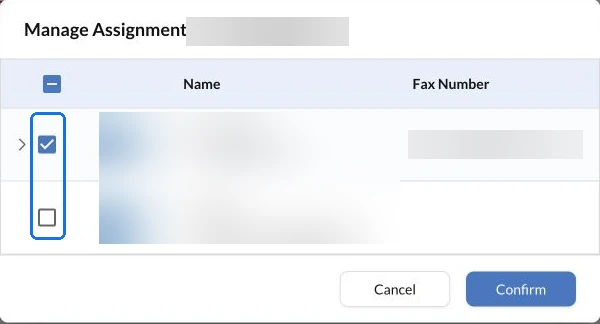
Fax.Plus supports assigning a number to multiple team members on Business and Enterprise. The Owner on Business, and Owners or Admins on Enterprise, can manage that assignment in the Numbers section. Use the shared-number assignment instructions when configuring the agreed access map.
Include staff who need to receive the number's faxes and approved cover for absences. Check cross-branch access deliberately rather than assigning every location's number to everyone.
Include shared reception in usage planning: each assigned user's incoming copy counts against the plan's pages or Alohi credits. Confirm how the chosen assignments affect your expected volume before extending them across the network.
Size concurrent sending for the busy period
Concurrent sending means active outbound transmissions at the same time. It differs from the number of users, the monthly page allowance and the number of documents waiting to send.
Fax.Plus currently documents up to 60 concurrent outbound faxes per number on Enterprise, with additional faxes queued until active transmissions finish. Review the current outbound concurrency limits for the account you are evaluating.
Estimate overlapping sends during the network's busy periods, not just its monthly total. Several staff using one number may share that number's available sending capacity. Confirm the account's configuration with the team before relying on a particular distribution across numbers.
The recipient's availability and transmission conditions also affect completion. Capacity planning helps size the sending workflow; it is not a delivery-time guarantee.
Check branch identity and healthcare configuration
Before rollout, verify which sending number appears for staff working across locations. Confirm that return-contact details identify the appropriate branch or central team, and test that recipients can direct their response to the intended destination.
For HIPAA workflows involving patient information, confirm Enterprise, Advanced Security Controls and a signed BAA. Review the account safeguards for pharmacy fax workflows alongside your organization's permissions and document-handling process. Use fax only where the specific document and recipient requirements permit it.
Test one location before extending the map
Use approved synthetic documents and test destinations to check three things: the right staff can receive the fax, the intended sender identity is used, and the sending queue behaves as expected under representative demand.
If the network also needs an application connection, use the guide to scoping a custom fax integration before production.
Validate the configuration, then repeat the setup deliberately. Record any differences between branches and review access when staff responsibilities change. Discuss the resulting number map and capacity needs when evaluating Fax.Plus for a multi-location team.
FAQs
How can a pharmacy network give several staff access to one receiving number?

The Owner on Business, and Owners or Admins on Enterprise, can assign a number to multiple members. For HIPAA workflows, use Enterprise with the required security configuration and signed BAA.
Does adding more users increase concurrent sending capacity?
User access and sending capacity are separate settings to evaluate. Confirm the plan's per-number outbound concurrency limit rather than assuming it increases with team size.
What should a pharmacy network test before adding more branches?
Check reception by the intended staff, the outgoing sender identity and queue behavior under representative demand. Use synthetic documents and approved test destinations rather than patient information.




Confédération Suisse
Confederazione Svizzera
Confederaziun Svizra
İsviçre Konfederasyonu
Innosuisse - İsviçre İnovasyon Ajansı




